Azure-devops-docs: How to enforce the use of a specific template?
I'm slightly confused by the description on this page. I understand how a template can sanitize its parameters. But: how can I ensure that the azure-pipelines.yml actually uses that template and users cannot add arbitrary commands to the azure-pipelines.yml file in a pull request?
Document Details
⚠ Do not edit this section. It is required for docs.microsoft.com ➟ GitHub issue linking.
- ID: f721e2df-f7e4-8db7-08cc-eab779477c99
- Version Independent ID: 95014030-e9eb-6425-2990-8f9fa2452e7e
- Content: Security through templates - Azure Pipelines
- Content Source: docs/pipelines/security/templates.md
- Product: devops
- Technology: devops-cicd
- GitHub Login: @thomps23
- Microsoft Alias: jukullam
 imphil
All 6 comments
Ha. I had the same question in my mind while reading this.
Let's say my template.yml file has a deployment job to production requiring an environment with approvals. In azure-pipelines.yml file I can reference template.yml using extends, but there doesn't seem to be anything stopping someone else just removing the extends and putting in their own steps or using their own malicious template.yml file in extends without environment approvals.
 xenalite
on 11 Feb 2020
xenalite
on 11 Feb 2020
Interesting, my thoughts exactly. Extending xenalite example - lets assume the aure-pipelines.yml that is meant to deploy to production, uses a service connection to prod. By leveraging template extension in azure-pipelines.yml we could force to run from specific branch (lets say prod). But since the pipeline is tied to repo not a branch, what would stop anyone from running that pipeline from another branch where the template was not mentioned at all in aure-pipelines.yml and hence the branch was not enforced? In consequence someone could deploy to prod from a dev branch. Are we missing out on something here?
 tlisiecki
on 20 Feb 2020
tlisiecki
on 20 Feb 2020
Ah, it seems that the documentation was quicker than the deployment of new features.
Now you can enforce the use of a specific template for a given runner if you go to
- Go to Project Settings -> Agent Pools
- Choose the agent
- Click on the three "..." on the top-right
- Choose "Approvals and Checks"
- Choose "Required Template"
- Choose the repository and the template name you're extending off.
There might be more ways of doing it, but this seems to work now. Can this information be added to the docs?
Edit: Unfortunately, even though the interface is there, it doesn't seem to work; whatever I enter as requirements, the job is always auto-cancelled with no further information whatsoever. I've opened #7476 to learn more about how this feature is supposed to be used. (Before I open an issue that it doesn't work :smile:)
imphil
on 3 Mar 2020
I've got it to work when the root pipeline extends from a template, and this example itself accepts other templates as parameters (it's a design pattern we're wanting to enforce for higher security):
Master template
parameters:
- name: templates
  type: object
  default: []

stages:
- ${{ each template in parameters.templates }}:
  - ${{ each pair in template }}:
      ${{ if eq(pair.key, 'template') }}:
        ${{ template }}
Root pipeline with extends
trigger:
  - *

resources:
  repositories:
    - repository: template_reference
      type: git
      name: name_of_template_repo
      ref: "refs/heads/master"

extends:
  template: templates/master.yml@template_reference
  parameters:
    templates:
    - template: ../path/in/template/repo/to_file.yml
      parameters:
        my_param_1: "my value 1"
        my_param_2: "my value 2"
Check is shown on the pipeline
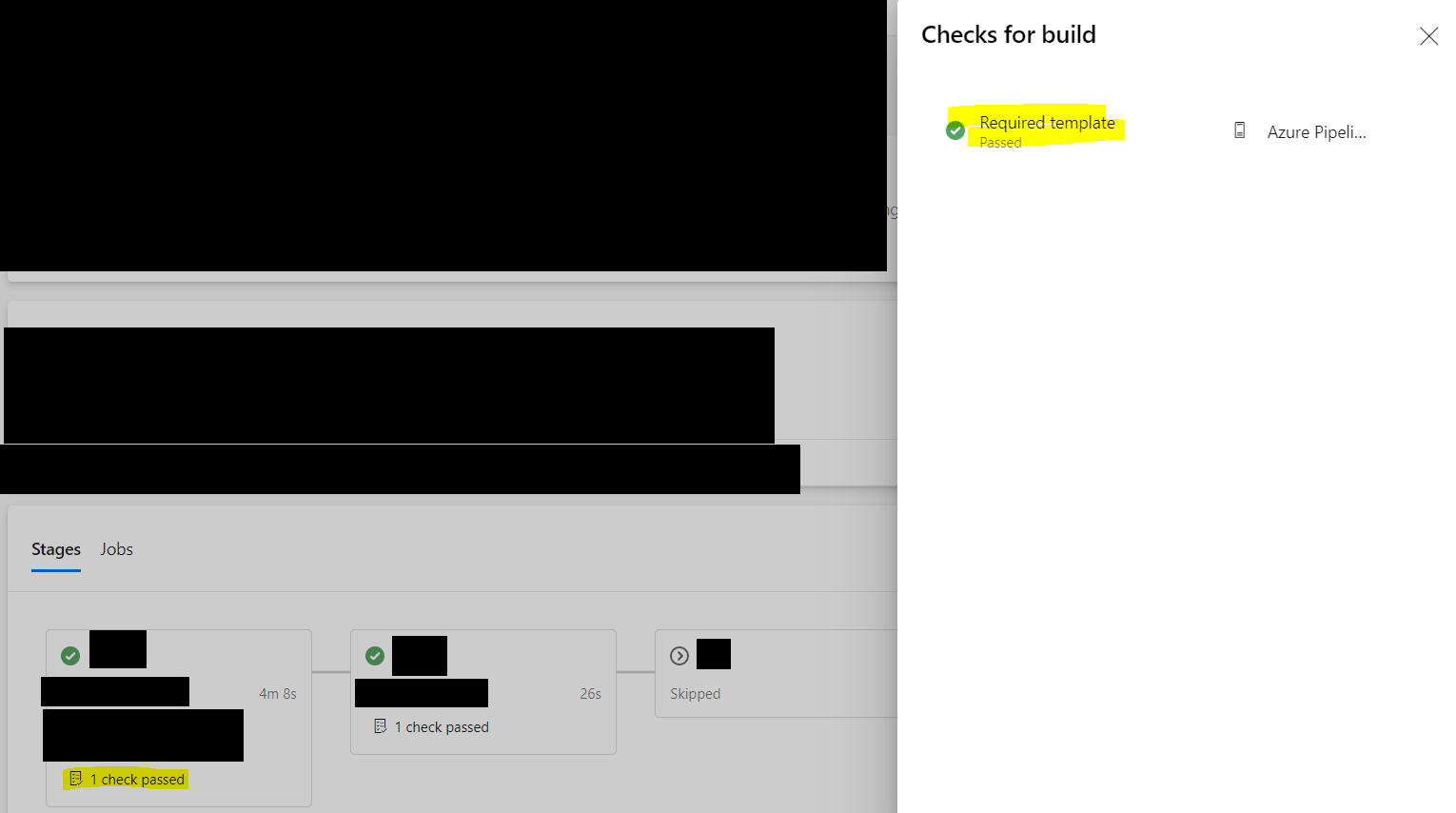
Check has been set up on the agent pool (thanks @imphil for finding this)
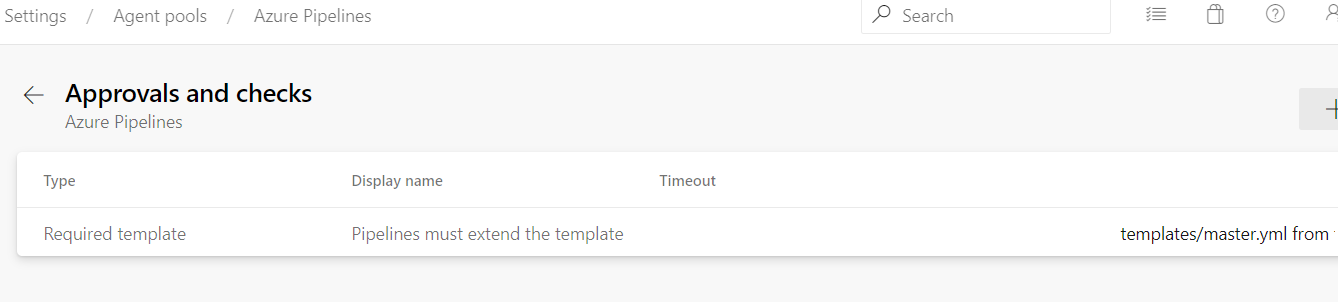
Seemingly good news.
However
If the root pipeline has something with malicious intent like this with no reference to a template, the check is completely ignored
trigger:
  - *

steps:
  - bash: |
      file_path=$(Build.ArtifactStagingDirectory)/env.txt
      env > ${file_path}
      cat ${file_path}    # echo to log
    name: get_drop

  # Allow file to be downloaded
  - task: PublishPipelineArtifact@1
    inputs:
      artifactName: 'drop'
      targetPath: '$(Build.ArtifactStagingDirectory)'
    displayName: publish_drop
    name: publish_drop
Which allowed the environment variables to be "echoed" out to the log and also published as an artifact for download, notice how no checks were performed whatsoever.
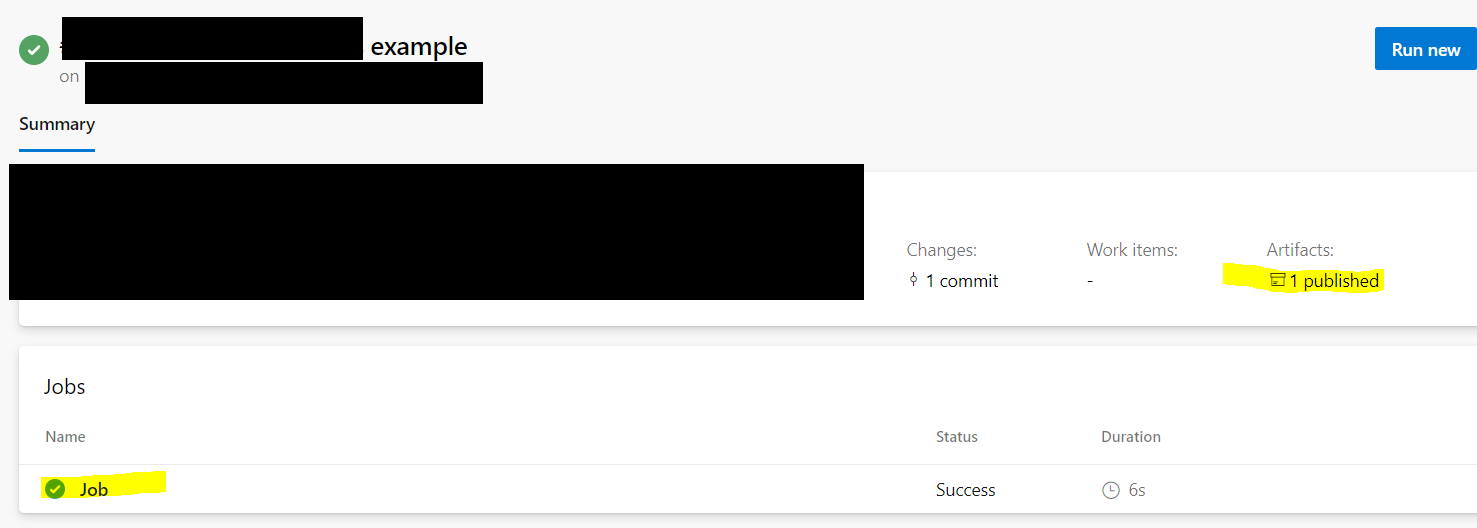
This is particularly worrisome as we:
- Work with forks with third parties
- Have triggers on feature branches to at least run build/CI stages on
git pushto fork feature branches (no deployment steps are allowed to perform off a fork, PRs into upstream must occur for those) - These triggers need to be be allowed to happen in this manner so we don't become a bottleneck with 3rd parties (which have substantial financial contracts for delivery I might add). This is a directive from management.
- Manual comments from internal team to allow the pipeline to fire is a terrible way to do this as well because...
- Some of our 3rd parties are in distant time zones, so we would become blockers for the CI process until we got out of bed in the morning and made our way to work (introducing a 12-16 hour delay cycle between our team and the 3rd party)
- Requires a PR to be opened, when we just want builds/CI to at least run off feature branches in forks
- So we must have an absolute way to prevent
azure-pipelines.ymlroot files from being modified, or for the checks against to actually fire every time regardless of the state of the rootazure-pipelines.ymlfile.
 adriantorrie
on 4 Mar 2020
adriantorrie
on 4 Mar 2020
Is there a fix or workaround published somewhere?
Not sure why this ticket got closed with no explanation...
 ArPharazon
on 17 Mar 2020
ArPharazon
on 17 Mar 2020
@adriantorrie You could set a policy on the git repo itself to prevent modifications to root file once it was created?
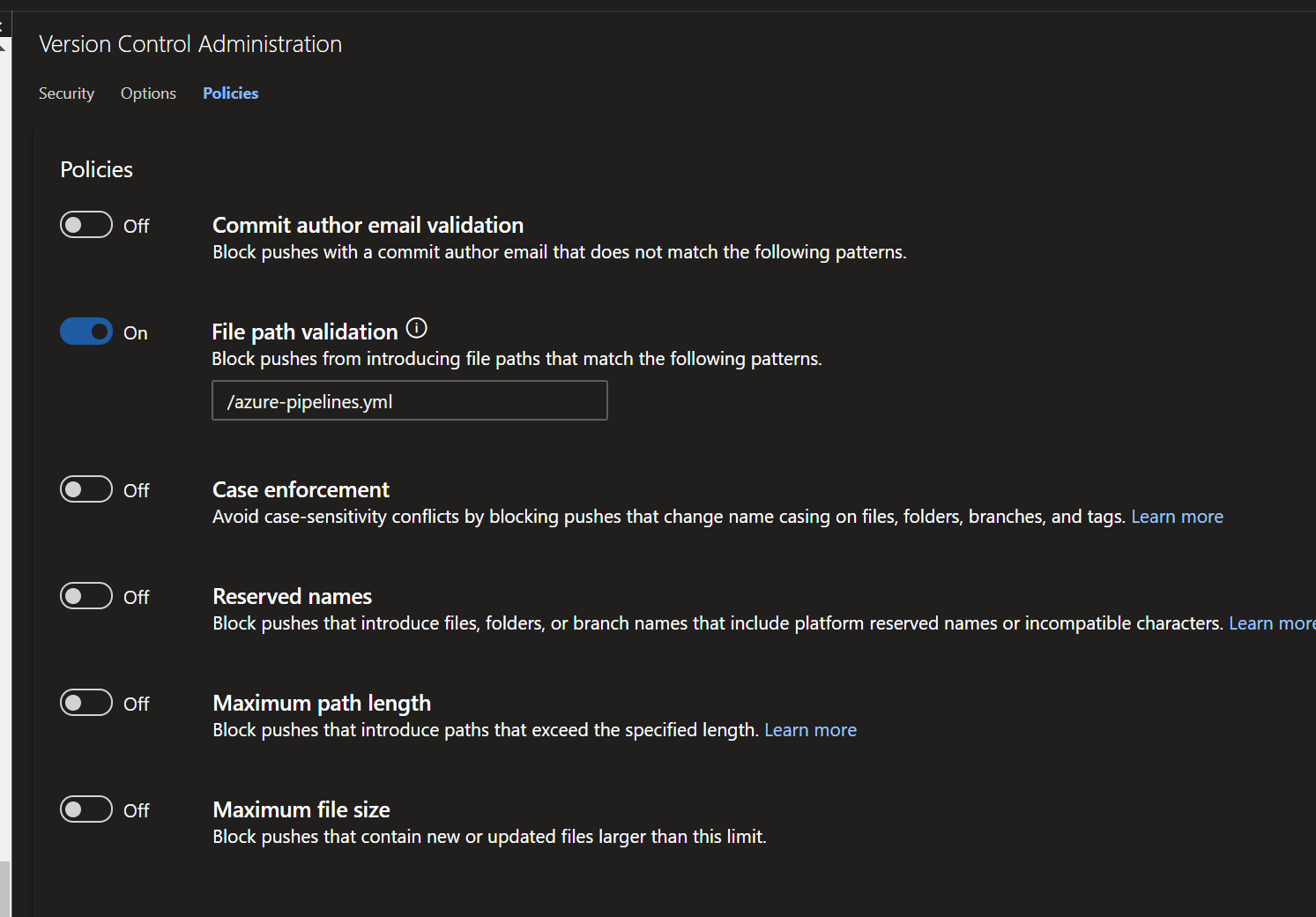
xenalite
on 14 Apr 2020
Related issues
 Naphier
·
3Comments
Naphier
·
3Comments
 michhar
·
3Comments
michhar
·
3Comments
 MJECloud
·
3Comments
MJECloud
·
3Comments
 sevaa
·
3Comments
sevaa
·
3Comments
 atrauzzi
·
3Comments
atrauzzi
·
3Comments
Most helpful comment
Interesting, my thoughts exactly. Extending xenalite example - lets assume the
aure-pipelines.ymlthat is meant to deploy to production, uses a service connection to prod. By leveraging template extension inazure-pipelines.ymlwe could force to run from specific branch (lets say prod). But since the pipeline is tied to repo not a branch, what would stop anyone from running that pipeline from another branch where the template was not mentioned at all inaure-pipelines.ymland hence the branch was not enforced? In consequence someone could deploy to prod from a dev branch. Are we missing out on something here?