Azure-devops-docs: How to register an OAuth 2.0 app in Azure DevOps on-premise?
The Authorize access to REST APIs with OAuth 2.0 document listed under Azure DevOps Server 2019 describes the steps to be taken to register an OAuth 2.0 app.
The first step is to register an app here: https://app.vsaex.visualstudio.com/app/register
My question is, how do I register an OAuth 2.0 app for Azure DevOps Server? For an on-premise installation. And what are the oauth urls used for an on-premise installation?
Also, is the Git REST API (https://docs.microsoft.com/en-us/rest/api/azure/devops/git/?view=azure-devops-rest-5.1) available in the on-premise version of Azure DevOps?
Document Details
⚠ Do not edit this section. It is required for docs.microsoft.com ➟ GitHub issue linking.
- ID: ac47cbcf-45ed-81aa-b532-e7ad0046658e
- Version Independent ID: 7aa1f60e-069f-3d62-5cac-b65e4b1116ef
- Content: Authorization using OAuth 2.0
- Content Source: docs/integrate/get-started/authentication/oauth.md
- Product: devops
- Technology: devops-ecosystem
- GitHub Login: @chcomley
- Microsoft Alias: chcomley
 ggbt
ggbt
All 7 comments
Hi @ggbt, I've reached out to our PM and will be in touch as soon as possible. Thanks for reaching out!
 chcomley
on 20 Aug 2019
chcomley
on 20 Aug 2019
We would very much like to know this as well. Due to various reasons it's impossible for us to migrate to the Microsoft hosted version of Azure DevOps / TFS / VSTS / VSO.
 govert-w3s
on 9 Sep 2019
govert-w3s
on 9 Sep 2019
I hear you, @govert-co-co...stand by and I hope you're having a great day. I've re-reached out. :)
chcomley
on 9 Sep 2019
Hi @govert-co-co and @ggbt,
I have info for you! Please see the Q&A where it states that this is not supported for on-premises.
As for your second question, please filter the docs for the Server version you are using. That way you'll know if an API is supported for on-premises or not.
Here's where you can select the version from the dropdown menu:

Thanks! Let me know if you have any further questions.
chcomley
on 9 Sep 2019
Hi @chcomley, thanks for the information, effort and quick response, much appreciated. However, I did use that version filter dropdown. I selected TFS 2018, as you can see in this link: https://docs.microsoft.com/en-us/azure/devops/integrate/get-started/authentication/oauth?view=tfs-2018
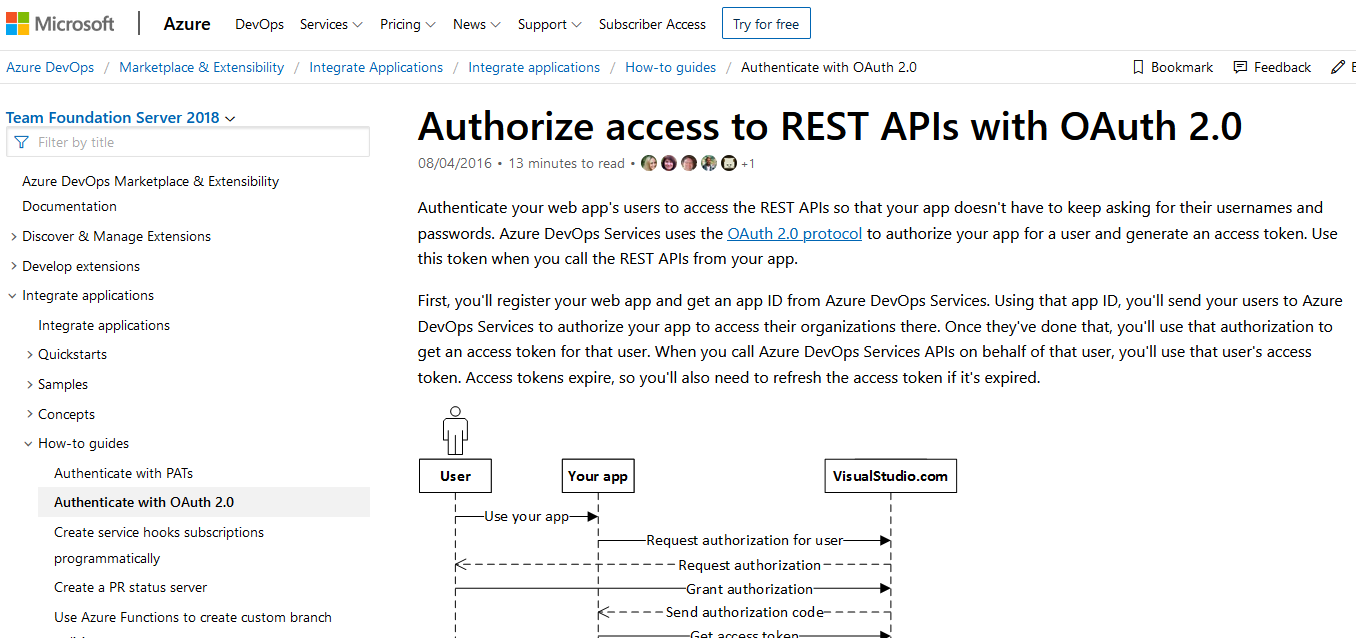
Would you like me to open a separate issue to fix the documentation?
govert-w3s
on 10 Sep 2019
Hi @gover-co-co, I've reopened the issue. Thanks very much.
chcomley
on 10 Sep 2019
Hi @gover-co-co, If the article doesn't apply to the version you've selected, a banner appears, telling you that the requested page isn't available for that version. The purple banner wasn't present in your screenshot, I've realized.
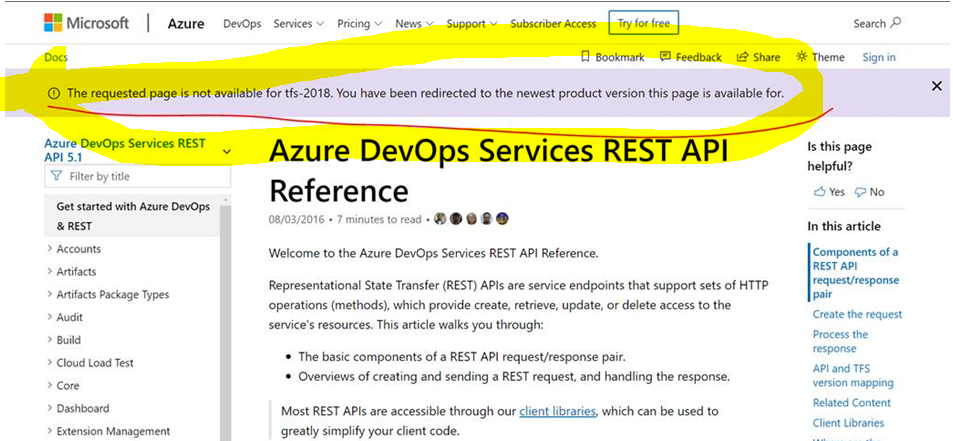
You're redirected to the newest product version that the page is for, and that can be confusing. So, I've published an addition to the article, a NOTE that appears for all versions of the documentation. This should go live sometime this afternoon, however here's the note:
_"NOTE: The following guidance is intended for Azure DevOps Services users, since OAuth 2.0 is not supported on Team Foundation Server or Azure DevOps Server. Client Libraries are a series of packages built specifically for extending TFS functionality. For on-premises users, we recommend using Client Libraries, Windows Auth, or Personal Access Tokens (PATs) to authenticate on behalf of a user._
Sorry for any confusion and thanks so much for your feedback!
chcomley
on 11 Sep 2019
Related issues
 cijujoseph
·
3Comments
cijujoseph
·
3Comments
 o-o00o-o
·
3Comments
o-o00o-o
·
3Comments
 EM1L
·
3Comments
EM1L
·
3Comments
 atrauzzi
·
3Comments
atrauzzi
·
3Comments
 michhar
·
3Comments
michhar
·
3Comments
Most helpful comment
Hi @ggbt, I've reached out to our PM and will be in touch as soon as possible. Thanks for reaching out!