Azure-devops-docs: "Pipelines retention has been streamlined. Please go to the project settings to configure."
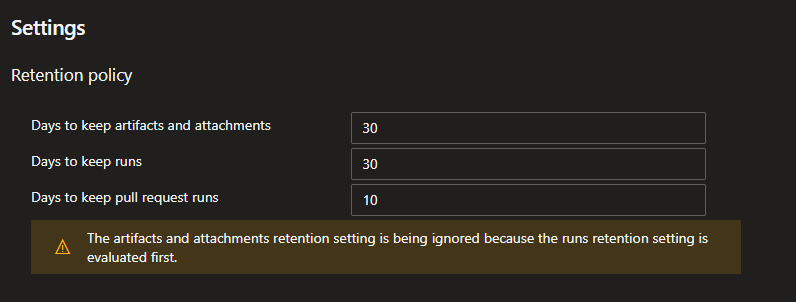
Aside from the fact that the project settings page does not explain what exactly is considered "streamlined", going to the project settings takes me to a set of values that I cant seem to edit.
I used to be able to override the default (way too short) values of 30 days. My permissions level has not changed for this team project.
Its not streamlining when you remove functionality. Streamlining is when you make an existing functionality usable with less work.
Document Details
⚠ Do not edit this section. It is required for docs.microsoft.com ➟ GitHub issue linking.
- ID: 43a285f9-738d-9f76-4de0-a4c4ecf6f5f5
- Version Independent ID: 9581a043-4873-bf0a-138f-85f6a61ae950
- Content: Build and release retention policies - Azure Pipelines
- Content Source: docs/pipelines/policies/retention.md
- Product: devops
- Technology: devops-cicd
- GitHub Login: @steved0x
- Microsoft Alias: sdanie
 StingyJack
All 12 comments
I encountered this as well. Branch-specific retention options may not be possible anymore.
However, I eventually figured out that retention settings are now editable within a release pipeline's settings, and that was good enough for me. Go to the release pipeline then click Edit then choose the 'Retention' tab.
Note that each stage of the pipeline has its own retention settings. Also I'm not sure if this works for the new multi-stage pipelines currently in preview.
 UniSnake
on 30 Jul 2019
UniSnake
on 30 Jul 2019
I get the message when looking at individual build definitions
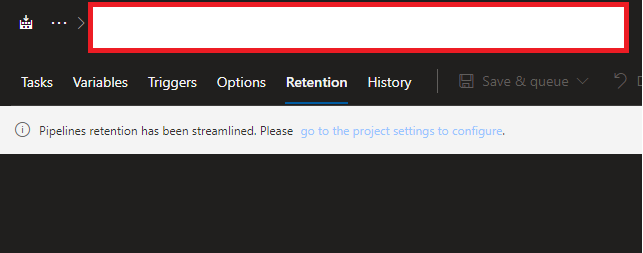
Clicking on the link takes me to the project settings, that are all uneditable.
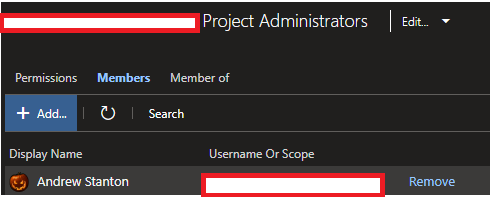
despite being a project administrator
"Docs" may not ultimately be the best place to open an issue, but as a customer I cant (and frankly shouldnt have to) determine if the problem is that the program is broken or the documentation is out of date.
StingyJack
on 31 Jul 2019
It looks like you've encountered an issue with the product itself, rather than an issue with the documentation. To make sure it gets in front of the right people, please submit your bug here.
 WilliamAntonRohm
on 1 Aug 2019
WilliamAntonRohm
on 1 Aug 2019
It looks like you've encountered an issue with the product itself, rather than an issue with the documentation
The docs team says program issue, despite the referenced page being out of date, and the program change seems to be intentional as of sprint 150 (I think that's the #). This feels like swag and "issue closure hope".
Since the docs need an update anyway to describe how retention policy is supposed to be configured now, would you mind sharing that at some point before more of my builds disappear from history?
Transfer of issue reports between docs and products isn't a user or customer's burden. They are already burdened due to either confusion between docs and program or program defect. Adding to that doesn't do any good things for the relationship.
StingyJack
on 1 Aug 2019
@WilliamAntonRohm - Despite the deflection attempt, the docs team still has some work to do on this, Reopen this issue until the documentation is updated properly and found to be matching the programs current state, and cc whomever is your manager at MSFT on this issue so this can be tracked.
StingyJack
on 3 Aug 2019
The documentation is updated and will be live within the next 24 hours. Feel free to create a new issue if you have any more feedback. Thank you all for your feedback!
 chasewilson
on 9 Sep 2019
chasewilson
on 9 Sep 2019
@chasewilson - i am not seeing any changes. The git history for this page shows the last time update was in May. Am I missing something?
StingyJack
on 16 Sep 2019
I'm assuming you are talking about not being able to adjust the Global Release retention policies. In Azure DevOps you cannot adjust them. While I agree with you on this thread it doesn't seem to be a docs issue? have you reached out to the developer community for a feature request?
chasewilson
on 1 Oct 2019
I'm assuming you are talking about not being able to adjust the Global Release retention policies. In Azure DevOps you cannot adjust them.
@chasewilson - I am talking about the screenshots depicted in https://github.com/MicrosoftDocs/vsts-docs/issues/4953#issuecomment-516648890. They are for the project, not the organization and are not editable. While they are part of retention settings, this document does not cover build specific settings very well.
There is a devcomm issue that is going nowhere and a proper support case that is also going nowhere. Due to that negligence on MSFT's part, I've lost the ability to make a hotfix for software in production because the deletion of the build histories took all our version control labels with it.
StingyJack
on 1 Oct 2019
@chasewilson - please either reopen this request or point me to where the build (not test run, not release pipeline) retention settings are documented.
StingyJack
on 24 Nov 2019
@StingyJack I'm running into the same problem and only the Collection Administrators have ability to change this. https://stackoverflow.com/a/58811077/124331
I'm not really a fan of this, I think it's too restrictive for a Project Administrator to lack the ability to change a project specific function.
 Stevoni
on 2 Dec 2019
Stevoni
on 2 Dec 2019
@Stevoni - do you see this functionality covered or explained in any docs or release notes?
@chasewilson - same question for you
StingyJack
on 2 Dec 2019
Related issues
 MJECloud
·
3Comments
MJECloud
·
3Comments
 michhar
·
3Comments
michhar
·
3Comments
 letmaik
·
3Comments
letmaik
·
3Comments
 adnanebrahimi
·
3Comments
adnanebrahimi
·
3Comments
 dannyvv
·
3Comments
dannyvv
·
3Comments
Most helpful comment
@WilliamAntonRohm - Despite the deflection attempt, the docs team still has some work to do on this, Reopen this issue until the documentation is updated properly and found to be matching the programs current state, and cc whomever is your manager at MSFT on this issue so this can be tracked.