Azure-devops-docs: search for the Azure Pipelines app
Azure Piplines does not exist in teams App Store.
Document Details
⚠ Do not edit this section. It is required for docs.microsoft.com ➟ GitHub issue linking.
- ID: b9adc845-adee-a494-79b4-3466f51d3ec9
- Version Independent ID: 12445205-8acc-98e6-fe65-9508e0dccb5c
- Content: Azure Pipelines with Microsoft Teams - Azure Pipelines
- Content Source: docs/pipelines/integrations/microsoft-teams.md
- Product: devops
- Technology: devops-collab
- GitHub Login: @atinb
- Microsoft Alias: atinb
 docgregt
All 25 comments
@steved0x I also couldn't find it searching the Microsoft Teams app store.
 thomps23
on 7 May 2019
thomps23
on 7 May 2019
Same here. I couldn't find Azure Pipelines in the store
 miladnzsuperfund
on 8 May 2019
miladnzsuperfund
on 8 May 2019
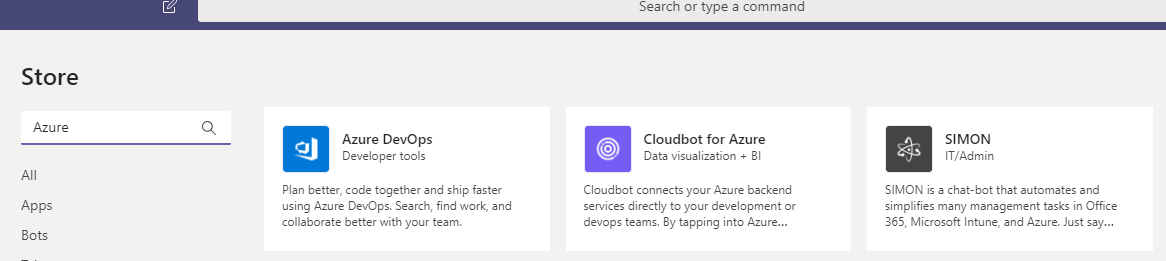
I see the same issue. Azure Pipelines does not exist in the Teams app store.
 n122vu
on 9 May 2019
n122vu
on 9 May 2019
The Same. I couldn't find Azure Pipelines in the store....
 KingstonFE
on 10 May 2019
KingstonFE
on 10 May 2019
It will probably take a couple of weeks. Just like the releases in DevOps, they appear a week or more after the release note is published.
 nonameolsson
on 10 May 2019
nonameolsson
on 10 May 2019
I have asked the product team to see if I can get an ETA for when the app will appear in the Teams store and will report back.
 steved0x
on 10 May 2019
steved0x
on 10 May 2019
Thanks for the interest and sorry about the wait. It took a little while to get through the approval pipeline. The app is now live on the Teams store. Thanks!
 atinb
on 11 May 2019
atinb
on 11 May 2019
Still unable to find the app in the teams store. Anyone else able to install it? Am I doing something wrong?
 JoepKillaars
on 13 May 2019
JoepKillaars
on 13 May 2019
@JoepKillaars @miladnzsuperfund The app is live. Can you try the "Get it now" on the Microsoft appsource link : https://appsource.microsoft.com/en-us/product/office/WA200000055?tab=Overview
atinb
on 13 May 2019

JoepKillaars
on 13 May 2019
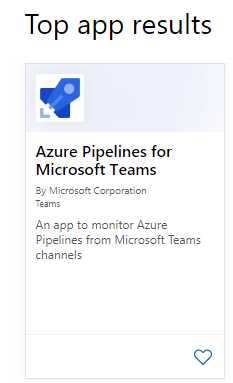
@JoepKillaars Sorry about that. If you go to appsource.microsoft.com and search for Azure Pipelines, what do you see? This is what I get -
atinb
on 13 May 2019
@atinb This works, I can find the app in appsource using search, and the installer popup opens as well, however, when opening the teams app to install, it throws an error.
JoepKillaars
on 13 May 2019
@JoepKillaars, I got that error too. After clicking "Get it Now" from the link provided by @atinb, choose "Use the web app instead". This worked for me, and it shows up in the channel using the client once you set it up on the web app.
 ljfraney
on 13 May 2019
ljfraney
on 13 May 2019
I dont see in the web app either, get same error in web app
 rpulijala
on 13 May 2019
rpulijala
on 13 May 2019
I was able to install it via the web version of Teams without issue, but not the desktop client.
 kylepauljohnson
on 13 May 2019
kylepauljohnson
on 13 May 2019
@atinb I get the error regardless whether I use the web app or the desktop client.
JoepKillaars
on 13 May 2019
I already loo it and can use it. But I hope I only receive "Release deployment approval pending notifications" in release pipeline
KingstonFE
on 14 May 2019
@KingstonFE Once you subscribe to a pipeline, you can always to go your subscriptions and add/remove to get only the notifications you need.
atinb
on 14 May 2019
I can also confirm, I can't find the app within MS Teams... the direct link posted above works, but when I try to install the app, I get the "Something went wrong" error, regardless of whether I use the desktop or web client.
 dotnetcanuck
on 14 May 2019
dotnetcanuck
on 14 May 2019
@dotnetcanuck @JoepKillaars Is there a chance that 3rd party apps (non-Microsoft apps) are disabled on your Teams account? That could be one reason why the app fails to install. Can you please confirm? Thanks!
atinb
on 15 May 2019
@dotnetcanuck @JoepKillaars We think this issue should not be fixed. Can you please confirm? Thanks!
atinb
on 16 May 2019
@atinb I'll dig into this for you by Friday
dotnetcanuck
on 16 May 2019
@atinb It appears to be installing correctly now. The app appeared in the app search within MS Teams as well.
Some kind of replication issue, perhaps?
dotnetcanuck
on 17 May 2019
Great, thank you for confirming that things are working now!
@steved0x Feel free to resolve the issue. Thanks!
atinb
on 18 May 2019
@atinb Thank you, will do.
steved0x
on 28 May 2019
Related issues
 michhar
·
3Comments
michhar
·
3Comments
 letmaik
·
3Comments
letmaik
·
3Comments
 dannyvv
·
3Comments
dannyvv
·
3Comments
 robinmanuelthiel
·
3Comments
robinmanuelthiel
·
3Comments
 KacperMucha
·
3Comments
KacperMucha
·
3Comments
Most helpful comment
I dont see in the web app either, get same error in web app