Azure-devops-docs: Azure PowerShell Az module
Per documentation, all new cmdlets are only added to the Az module, not AzureRM. Is there a way to use this task and have the Az module loaded? For example, I'm trying to manage the azure blob storage lifecycle but am not sure that this is the right task to use in the new world.
Reference:
https://docs.microsoft.com/en-us/powershell/azure/new-azureps-module-az?view=azps-1.6.0
Document Details
⚠ Do not edit this section. It is required for docs.microsoft.com ➟ GitHub issue linking.
- ID: fb215324-b1a0-93b5-5022-4bcc7da93bb7
- Version Independent ID: 9eb2977b-ac34-9d53-670e-04fa027bc8e4
- Content: Azure PowerShell task - Azure Pipelines
- Content Source: docs/pipelines/tasks/deploy/azure-powershell.md
- Product: devops
- Technology: devops-cicd
- GitHub Login: @steved0x
- Microsoft Alias: dastahel
 tpeiffer
All 26 comments
For those who follow my breadcrumbs here, the solution as of this comment is to use v4 of the Azure Powershell task. This loads the Az cmdlets.
tpeiffer
on 5 Apr 2019
Fantastic! Worked perfectly thank you for your input.
 chrissans777
on 18 Apr 2019
chrissans777
on 18 Apr 2019
Worked! thanks
 mzaatar
on 11 Jun 2019
mzaatar
on 11 Jun 2019
Any ETA for upgrading agent pools to Az 1.1.0?
 alex-zyl
on 18 Jun 2019
alex-zyl
on 18 Jun 2019
This module is soooooooooooooooo far behind. Look at the current version!
 fluffy-cakes
on 22 Jul 2019
fluffy-cakes
on 22 Jul 2019
@fluffy-cakes
Yeah, I meant to say 2.1.0 while thinking of Az-ApiManagement 1.1.0. Good catch
alex-zyl
on 22 Jul 2019
So even using the Preview version I am prompted with an error because it can't even log in to run commands:
##[error]Could not find the modules: 'Az.Accounts' with Version: '1.0.0'. If the module was recently installed, retry after restarting the Azure Pipelines task agent.
I've also tried this with v2.1.0, 2.4.0 and 'latest'. Anyone else actually get this going?
fluffy-cakes
on 23 Jul 2019
Works for me.
 MisinformedDNA
on 23 Jul 2019
MisinformedDNA
on 23 Jul 2019
Do we have any estimates for when Azure PowerShell v4 task in Azure DevOps will be out of preview? We need GA ;)
 dannradkov
on 2 Aug 2019
dannradkov
on 2 Aug 2019
not working for me "This module requires Az.Accounts version 1.6.2. An earlier version of Az.Accounts is imported in the current PowerShell session. Please open a new session before importing this module. This error could indicate that multiple incompatible versions of the Azure PowerShell cmdlets are installed on your system. Please see https://aka.ms/azps-version-error for troubleshooting information."
 akshaykg
on 23 Sep 2019
akshaykg
on 23 Sep 2019
Regarding the version 4 Preview - It looks like the module Az.ManagedServiceIdentity is not automatically installed with AZ . See https://github.com/Azure/azure-powershell/issues/8555 for details.
Can this task be updated so it also installs that module?
 grlima
on 16 Oct 2019
grlima
on 16 Oct 2019
Okay, version 4 is out of preview and it seems I can no longer use Az.ManagedServiceIdenty. The first thing I do in my script is to install it (Install-Module Az.ManagedServiceIdenty). This was working fine, but I now I get the following error (later in the script when I try to use one of the cmdlets):
The 'Get-AzUserAssignedIdentity' command was found in the module 'Az.ManagedServiceIdentity', but the module could not be loaded. For more information, run 'Import-Module Az.ManagedServiceIdentity'.
Update: After running "Import-Module Az.ManagedServiceIdentity" (as suggested by the error above), this is what I get:
"This module requires Az.Accounts version 1.6.5. An earlier version of Az.Accounts is imported in the current PowerShell session. Please open a new session before importing this module. This error could indicate that multiple incompatible versions of the Azure PowerShell cmdlets are installed on your system. Please see https://aka.ms/azps-version-error for troubleshooting information."
grlima
on 18 Dec 2019
Have tried using version 4 and 5.* (preview) and get the same error:
[error]Could not find the modules: 'Az.Accounts' with Version: ''. If the module was recently installed, retry after restarting the Azure Pipelines task agent.
 sdavis3
on 19 Dec 2019
sdavis3
on 19 Dec 2019
Reverting the task to version 3 solves the issue as a workaround for me. This implies something related to Az.Accounts is broken in version 4 and has not yet been resolved in version 5.* (preview).
sdavis3
on 19 Dec 2019
Just to clarify one possible confusion (had same issue today) - task until v4 does require a "azureps" capability from your build agent. V4 and v5 doesn't and this can confuse you that there is no need to install Az powershell module on build machine. But that is required anyway...
Solved "Сould not find the modules: 'Az.Accounts' with Version: ''.
 igor-teresco
on 28 Jan 2020
igor-teresco
on 28 Jan 2020
When I use version 4.159.11 of the Azure PowerShell task on a self-hosted Windows Build agent, I get the following error:
2020-01-31T04:31:41.5076616Z ##[error]Could not find the modules: 'Az.Accounts' with Version: ''. If the module was recently installed, retry after restarting the Azure Pipelines task agent.

When I run the pipeline again, with this exact same Azure PowerShell task, but on a self-hosted Linux Build agent, the task executes successfully.
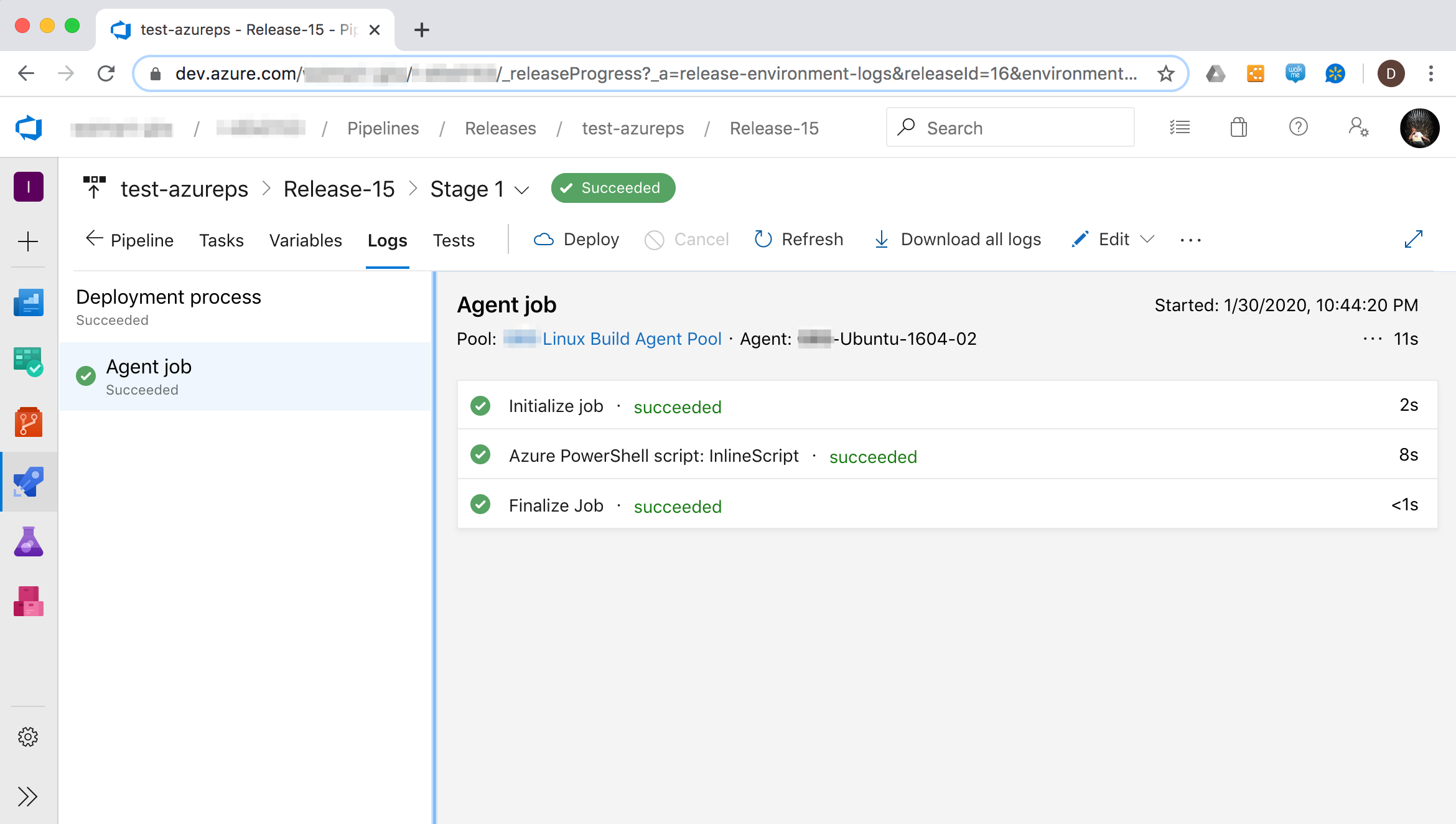
Here is what my Azure PowerShell task configuration looks like:
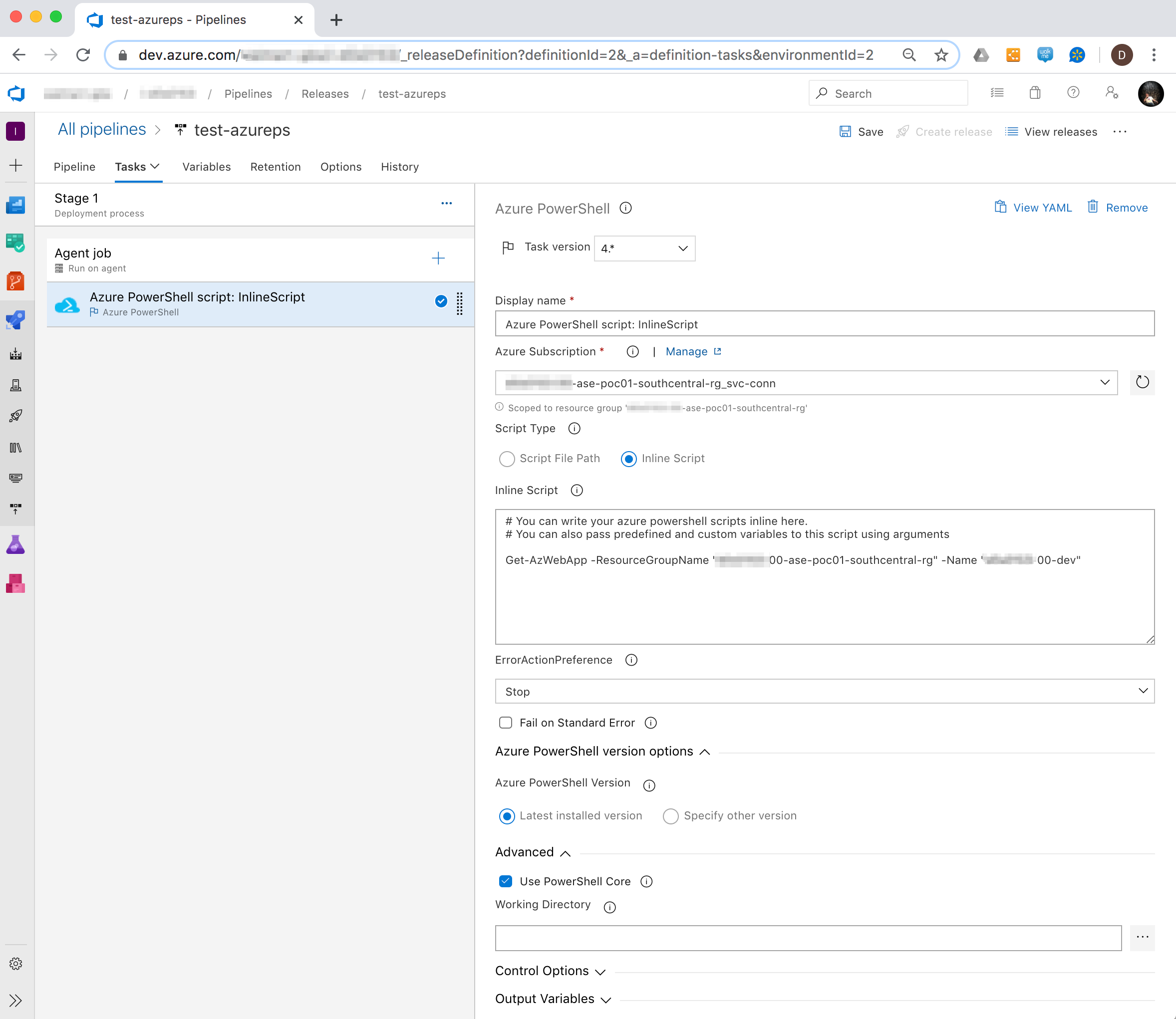
When I switch the Task version to "5.* (preview)", then the task successfully executes on the self-hosted Windows Build Agent.
I am suspicious that there is a bug in version 4 of the Azure PowerShell task that is specific to Windows Build Agents.
On my self-hosted Windows Build Agent, the following is installed:
- PowerShell 6.2.3
- Azure PowerShell module 3.3.0
- azureps capability is specified
On my self-hosted Linux Build Agent, the following is installed:
- PowerShell 6.2.4
- Azure PowerShell module 3.3.0
- azureps capability is specified
@Microsoft - Can you confirm that there is, indeed, an issue with version 4 of the Azure PowerShell task that is specific to Windows build agents?
Thanks,
-David Shaevel
 dshaevel
on 1 Feb 2020
dshaevel
on 1 Feb 2020
No matter what version I try (4.x or 5.x preview) and what option I select I'm getting the following error:
Could not find the modules: 'Az.Accounts' with Version: ''
When select use the latest version (of PowerShell Core), or
Could not find the modules: 'Az.Accounts' with Version: 'x.y.z'
When select to use version x.y.z (again, not matter what I try, from 1.0.0 to 6.2.2).
 abatishchev
on 4 Mar 2020
abatishchev
on 4 Mar 2020
Facing similar issue with Az.Accounts not found module error with Task versions 4 and 5.
Any resolution here?
Thanks
 raghavkochhar
on 22 Apr 2020
raghavkochhar
on 22 Apr 2020
@steved0x I see the issue assigned to you. Can you please comment? Do you know who's the technical owner of this task?
abatishchev
on 22 Apr 2020
I create an account here just for reply this because I'm stuck on this same exact problem for a while.
Here is what I did:
Problem:
Error message: Could not find the modules: 'Az.Accounts' with Version: '' on Azure pipeline

Solution:
- In the host you want to run the PoweShell script (in my case an Azure VM) open PowerShell and run
Get-InstalledModule Az.Accounts -AllVersions
if that gave you an error that's your problem (it was mine) and you have to install the Az.Accounts basically. For that it's easy like this:
Install-Module -Name Az.Accounts -RequiredVersion 1.6.2(https://www.powershellgallery.com/packages/Az.Accounts/1.6.2)Reply 'Y' to everything.
Now if you try the
Get-InstalledModule Az.Accounts -AllVersionsagain it will give you the version of your Az.AccountsAfter that I run the pipeline again and the error goes away and the script run on server!

I used version 5 Preview
 lucianogelasio
on 23 Apr 2020
lucianogelasio
on 23 Apr 2020
When I use version 4.159.11 of the Azure PowerShell task on a self-hosted Windows Build agent, I get the following error:
2020-01-31T04:31:41.5076616Z ##[error]Could not find the modules: 'Az.Accounts' with Version: ''. If the module was recently installed, retry after restarting the Azure Pipelines task agent.
When I run the pipeline again, with this exact same Azure PowerShell task, but on a self-hosted Linux Build agent, the task executes successfully.
Here is what my Azure PowerShell task configuration looks like:
When I switch the Task version to "5.* (preview)", then the task successfully executes on the self-hosted Windows Build Agent.
I am suspicious that there is a bug in version 4 of the Azure PowerShell task that is specific to Windows Build Agents.
On my self-hosted Windows Build Agent, the following is installed:
- PowerShell 6.2.3
- Azure PowerShell module 3.3.0
- azureps capability is specified
On my self-hosted Linux Build Agent, the following is installed:
- PowerShell 6.2.4
- Azure PowerShell module 3.3.0
- azureps capability is specified
@microsoft - Can you confirm that there is, indeed, an issue with version 4 of the Azure PowerShell task that is specific to Windows build agents?
Thanks,
-David Shaevel
@dshaevel I get the exact same behavior on my Windows agents.
 jeremytbrun
on 14 May 2020
jeremytbrun
on 14 May 2020
I've been trying to get this task to work with the provided Microsoft docker image of Azure PowerShell using the target container spec for the task and that errors out with the same error.
 marchenm
on 27 May 2020
marchenm
on 27 May 2020
@steved0x gentle ping, please.
abatishchev
on 27 May 2020
Facing the same issue with Azure Powershell v5 and v4. Eagerly waiting for resolution.
@steved0x
 rahg-bmake
on 7 Jul 2020
rahg-bmake
on 7 Jul 2020
@mijacobs do you know who can help us on this, please?
abatishchev
on 8 Jul 2020
Using Powershell from Azure CLI task worked.
rahg-bmake
on 8 Jul 2020
Related issues
 o-o00o-o
·
3Comments
o-o00o-o
·
3Comments
 michhar
·
3Comments
michhar
·
3Comments
 kieronlanning
·
3Comments
kieronlanning
·
3Comments
 dtamai
·
3Comments
dtamai
·
3Comments
 letmaik
·
3Comments
letmaik
·
3Comments
Most helpful comment
For those who follow my breadcrumbs here, the solution as of this comment is to use v4 of the Azure Powershell task. This loads the Az cmdlets.