Azure-devops-docs: Is there an example for deploying a WebJob (and each of the other types named in the description) available?
This task has _many_ options. Which options are relevant for a WebJob (or set of webjobs)?
The same question can be asked about the other app types named in the description (_Azure App Services on Windows, Web App on Linux with built-in images or Docker containers, ASP.NET, .NET Core, PHP, Python or Node.js based Web applications, Function Apps on Windows or Linux with Docker Containers, Mobile Apps, API applications, Web Jobs_).
Without this kind of example using this task is a time vampire.
Document Details
⚠ Do not edit this section. It is required for docs.microsoft.com ➟ GitHub issue linking.
- ID: 29c94df7-9de9-ea1a-8b77-d1e6023694dc
- Version Independent ID: a525989e-2e0a-0399-556e-9011ee95da4e
- Content: Azure App Service Deploy task - Azure Pipelines
- Content Source: docs/pipelines/tasks/deploy/azure-rm-web-app-deployment.md
- Product: devops
- GitHub Login: @erickson-doug
- Microsoft Alias: dastahel
 StingyJack
All 11 comments
Same question, the lack of a webjob examples seems to indicate it isn't possible without a lot of custom scripting.
 pictoric
on 14 Oct 2019
pictoric
on 14 Oct 2019
@pictoric - I have webjobs that are not part of any webapp. The way we found to deploy these using the app service task is to create a virtual application on the app service, and then direct the app service task to use that virtual app.
The virtual app path's (in the configuration page of the app service) target path should match the app data location for the type of webjob (triggered or continuous).
MSFT seems to be under the impression that webjobs are generally part of some web app, and in that situation the app service deployment task will deploy the webjobs without as much reconfiguration.
StingyJack
on 15 Oct 2019
@StingyJack Are you using webdeploy or zipdeploy? I actually solved this a different way:
- publish artifact which is a zip file containing the published build (build pipeline)
- Deploy script downloads artifact and unzips it into a path like pipeline-artifacts\App_Datajobs\continuous\mywebjobname
- Rezips the files so it maintains the structure and then zip publish this to the web app
I could have done the zip in the build step but the deployment is really independent of the actual artifact.
I may try your way if that can eliminate a few of my steps which makes it easier to maintain.
As a side note, we have both webjobs that are part of a web app and some that do not have a corresponding web app. I didn't try to publish the WebJob project b/c quite frankly it is just a console app and nothing special and the tasks do not have any variables to set that would determine the webjob name/etc, I don't see how it would deploy the webjob in the first place.
pictoric
on 15 Oct 2019
Neither; I have an inline powershell script in the build pipeline that copies the project output for each webjob into its own artifact staging folder. (EDIT: The first pipeline had to build and prepare five webjobs and a single script seemed like a better idea than 5 copy files tasks, but YMMV.)
The release pipeline just copies each of those artifact folders to the virtual application specified in each of the the app service deployment tasks.
The zip deploy seems harder to troubleshoot for missing files or config issues. Maybe it's not, idk. I do want to avoid the ridiculous nesting in the webdeploy zips, and this seemed pretty straightforward for everyone else to follow.
StingyJack
on 15 Oct 2019
If your deploying webjobs you need to use WebDeploy and windows and it works out of the box.
 TroyArrandale
on 26 Nov 2019
TroyArrandale
on 26 Nov 2019
@TroyArrandale this issue is for how to use the release pipeline task to achieve the result in a mostly automated fashion. I've not been interested in publishing things into test or prod environments directly from someones PC for a long time
StingyJack
on 26 Nov 2019
@StingyJack it works from a release pipeline is you use a Web App Deployment like below. You need to use WebDeploy property for the web job to be set up correctly and it needs to be from an Agent on a windows OS.
steps:
- task: AzureRmWebAppDeployment@3
displayName: 'Deploy Web Jobs.'
inputs:
azureSubscription: '$(Subscription)'
WebAppName: '$(AppServiceName)'
Package: '$(System.DefaultWorkingDirectory)***.zip'
TakeAppOfflineFlag: true
UseWebDeploy: true
AdditionalArguments: '-retryAttempts:10 -retryInterval:6000'
RenameFilesFlag: true
TroyArrandale
on 27 Nov 2019
@TroyArrandale I would believe that works, but I'd need to have a webdeploy zip. I won't have one of those unless I configured the release branch build to make one.
@RoopeshNair - I asked for better instructions like 10 months ago. What happened?
StingyJack
on 27 Nov 2019
This task was auto-generated from the Deployment Center in the Azure portal. https://github.com/Microsoft/azure-pipelines-tasks/issues/4127 describes a chronic issue with deploying node / React apps. This task should "just work" if npm is really going to be a supported technology.
The build archive from building our app packaged 38K Files.
Either the packaging should be updated to just deploy the packages and the deployment task should run npm install -or- the installer should be able to deploy the built package. Either one would be acceptable.
 DonFrazier-zz
on 10 Jan 2020
DonFrazier-zz
on 10 Jan 2020
I too would find these instructions really helpful - it's all very well saying it can be used for WebJobs, but how? Currently having to do this from scratch with a really hacky solution
 ttjackott
on 3 Jul 2020
ttjackott
on 3 Jul 2020
@ttjackott - Are you deploying the webjobs as part of a web site/app, or are they independent? If its the latter, then the basic steps are as follows...
Make sure a build pipeline is creating an artifact that has all of the files that are needed for the webjob to operate correctly either alone in a published artifact, or in a folder if there are many programs in the artifact. This is what a copy step can look like
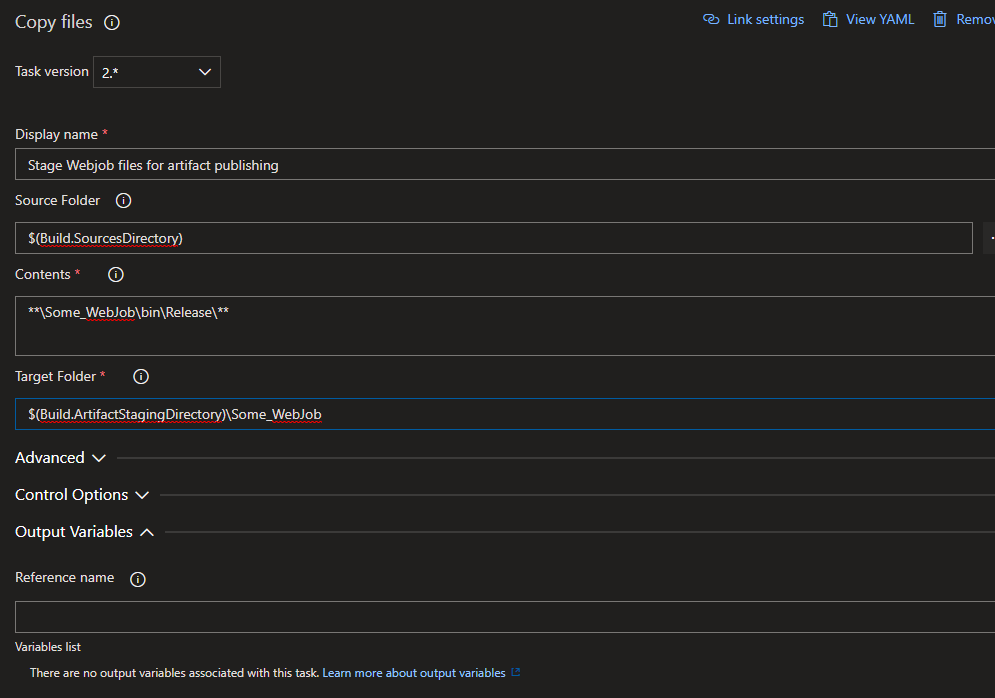
And this would be the corresponding artifact publishing step....
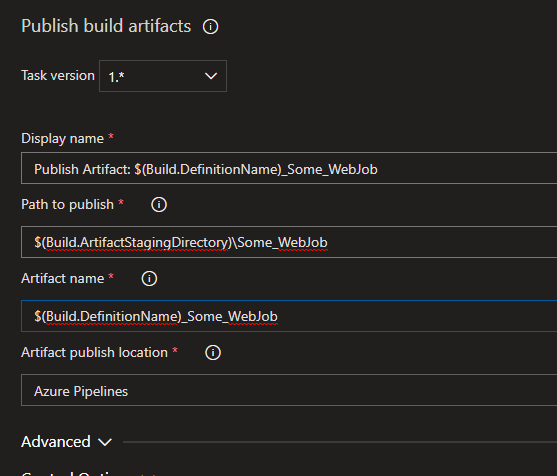
When thats done, run that build def and make sure the artifact you want is visible on the summary page and has all the files it needs.
Then, on the target app service's configuration page create a virtual application for your webjob that has paths that look like this...
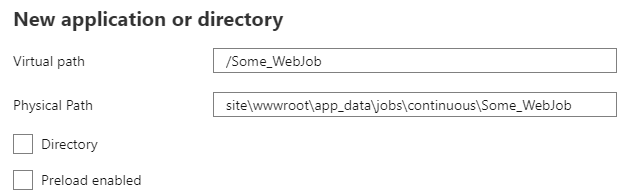
In the release pipeline, make sure that artifact that the build def created is referenced. Then add an app service deploy task and fill out the target system connection info, and then make sure to set the virtual application value to the virtual path that was just created in the app service configuration page, and then use the ellipses button for package or folder to browse to the artifact and then the Some_Webjob folder and select it.
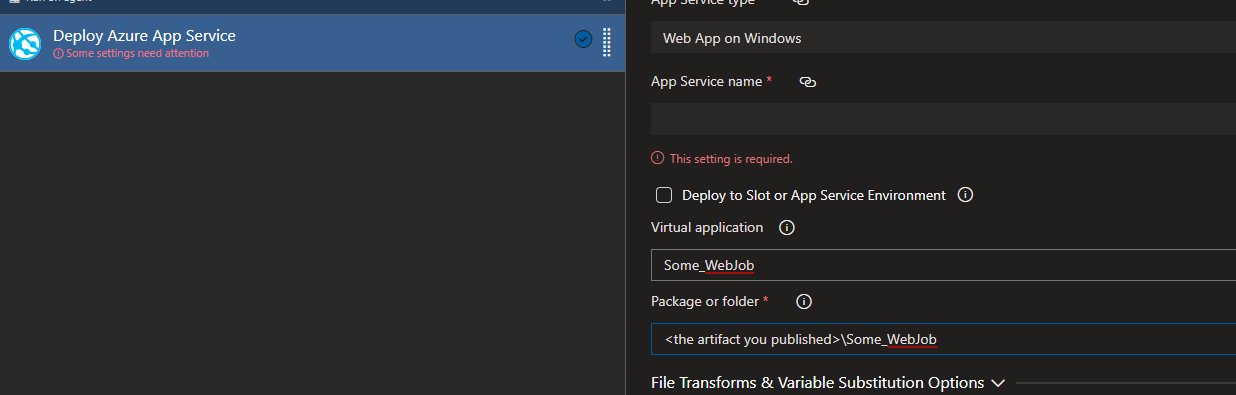
That is it, really. (I would also strongly recommend using that app service configuration page as the place where you define the appSettings/connectionstrings/etc properties that your webjob will need and foregoing any XDT or variable substitution if you can.)
StingyJack
on 4 Jul 2020
Related issues
 MJECloud
·
3Comments
MJECloud
·
3Comments
 dannyvv
·
3Comments
dannyvv
·
3Comments
 michhar
·
3Comments
michhar
·
3Comments
 cijujoseph
·
3Comments
cijujoseph
·
3Comments
 Naphier
·
3Comments
Naphier
·
3Comments