Azure-devops-docs: Doc for multiple azure-devops pipelines in one repo
I see there're multiple azure devops pipelines under AspNetCore repo but there seems no doc about it.
Document Details
⚠ Do not edit this section. It is required for docs.microsoft.com ➟ GitHub issue linking.
- ID: 7458d5b2-1bb7-7d87-7ce6-2b0c430b0155
- Version Independent ID: edf5bbd3-a3f0-5426-e985-31290f8afd05
- Content: YAML schema - Azure Pipelines
- Content Source: docs/pipelines/yaml-schema.md
- Product: devops
- GitHub Login: @erickson-doug
- Microsoft Alias: macoope
 yhvicey
All 6 comments
Not sure I understand the issue. We do have docs on using Azure Pipelines with ASP.NET Core: https://docs.microsoft.com/en-us/azure/devops/pipelines/languages/dotnet-core. If you have questions or requests for info about https://github.com/aspnet/AspNetCore/tree/master/.azure/pipelines, please open a PR or issue over there.
 andyjlewis
on 11 Dec 2018
andyjlewis
on 11 Dec 2018
No, I'm not talking about "Using Azure Pipelines with ASP.NET Core", but "Using multiple Azure Pipelines within one git repo". The ASP.NET Core repo link here is for an example, because it contains multiple Azure Pipelines.
yhvicey
on 11 Dec 2018
I see. OK, yeah, I think there's a bit of a hole that I was thinking about too.
andyjlewis
on 11 Dec 2018
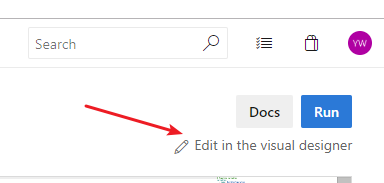
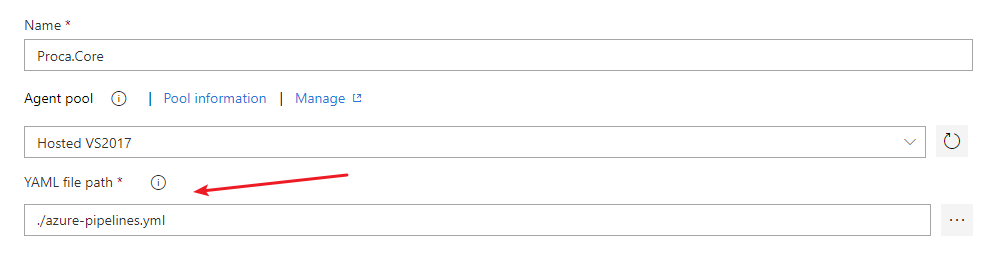
Found how to config this. It's a little bit confusing that cannot be accomplished without visual designer.
Steps: Go to Azure DevOps -> Your Project -> Build -> Edit your Build Definition -> Switch to Visual Designer -> Edit YAML file path.
yhvicey
on 21 Dec 2018
This issue has been automatically marked as stale because it has not had recent activity. It will be closed if no further activity occurs. Thank you for your contributions.
![stale[bot] picture](https://avatars3.githubusercontent.com/in/1724?v=4&s=40) stale[bot]
on 21 Mar 2019
stale[bot]
on 21 Mar 2019
Yes you can create a pipeline manually and target it to the yaml in a sub-folder, but that's some external configuration which somewhat contradicts the Infrastructure-as-Code principle. Therefore I have created a separate issue https://github.com/MicrosoftDocs/vsts-docs/issues/6367.
 M0ns1gn0r
on 14 Nov 2019
M0ns1gn0r
on 14 Nov 2019
Related issues
 cijujoseph
·
3Comments
cijujoseph
·
3Comments
 robinmanuelthiel
·
3Comments
robinmanuelthiel
·
3Comments
 michhar
·
3Comments
michhar
·
3Comments
 mikedouglasdev
·
3Comments
mikedouglasdev
·
3Comments
 dtamai
·
3Comments
dtamai
·
3Comments
Most helpful comment
Found how to config this. It's a little bit confusing that cannot be accomplished without visual designer.
Steps: Go to Azure DevOps -> Your Project -> Build -> Edit your Build Definition -> Switch to Visual Designer -> Edit YAML file path.