Azure-devops-docs: Missing instructions how to label (git tag) using pipeline scripts
It took a long time to find out that there is a way to "manually" label the repository using the pipeline script. Nearly gave up using the Azure Devops pipelines.
Please add the instructions somewhere for these "hidden features". Example
- powershell: Write-Host '##vso[build.addbuildtag]$(GitVersion.SemVer)'
  displayName: 'Git tag'

- powershell: Write-Host '##vso[build.updatebuildnumber]$(GitVersion.SemVer)'
  displayName: 'Set the build number'
Document Details
⚠ Do not edit this section. It is required for docs.microsoft.com ➟ GitHub issue linking.
- ID: 800c5477-b39f-48e6-6f9c-aa7994b2ec2a
- Version Independent ID: db9e2e97-d44d-734e-6a6f-b01f60f01c95
- Content: Pipeline options for Git repositories - Azure Pipelines & TFS
- Content Source: docs/pipelines/repos/pipeline-options-for-git.md
- Product: devops
- GitHub Login: @steved0x
- Microsoft Alias: sdanie
 Ozzian
All 10 comments
Ozzian
on 15 Nov 2018
@Ozzian Thank you for this feedback and sorry that you ran into trouble. I'll take a look at getting this added.
 steved0x
on 30 Nov 2018
steved0x
on 30 Nov 2018
+1
 celamb4
on 26 Feb 2019
celamb4
on 26 Feb 2019
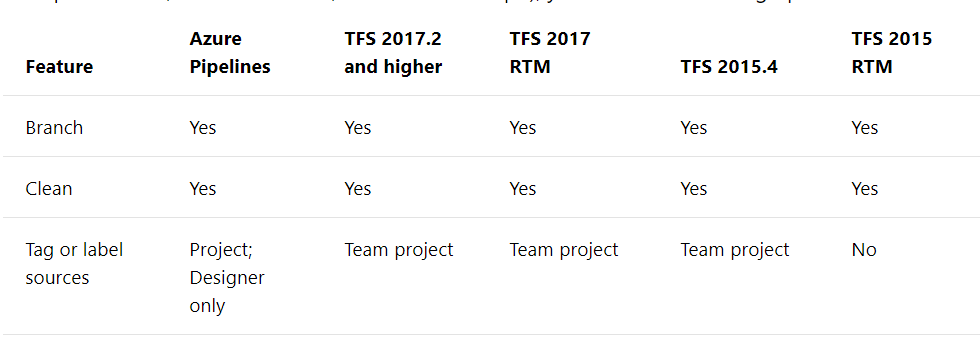
Based on this table, it's impossible for yaml builds
 SychevIgor
on 29 May 2019
SychevIgor
on 29 May 2019
Based on this table, it's impossible for yaml builds
But still there is a way. (Hack)
1) Open up the _triggers_ of your azure pipeline (the three dots on the upper-right-hand-corner when you edit the pipeline). Note that the "settings" doesn't help you here.
2) Go to the first tab (YAML)
3) Pick task "Get Sources"
4) Select your preferred option from "Tag sources" and there you can use the $(build.buildNumber) that you have overwritten.
I hope that helps
Ozzian
on 29 May 2019
This, very much! Thanks @Ozzian for finding a way to do it with the yaml. Yaml support to tag repos needs to be added to yaml pipelines
 LordObsidian01
on 22 Oct 2019
LordObsidian01
on 22 Oct 2019
This, very much! Thanks @Ozzian for finding a way to do it with the yaml. Yaml support to tag repos needs to be added to yaml pipelines
I have found an "easier" way to tag from yaml files from https://docs.microsoft.com/en-us/azure/devops/pipelines/yaml-schema?view=azure-devops&tabs=schema#checkout
- checkout: self
  submodules: true
  persistCredentials: true

# later on in tasks

- script: |
     git tag $(GitVersion.SemVer)
     git push $(GitVersion.SemVer)
  condition: and(succeeded(), ne(variables['Build.SourceBranch'], 'refs/heads/master'))
Based on this table, it's impossible for yaml builds
But still there is a way. (Hack)
- Open up the _triggers_ of your azure pipeline (the three dots on the upper-right-hand-corner when you edit the pipeline). Note that the "settings" doesn't help you here.
- Go to the first tab (YAML)
- Pick task "Get Sources"
- Select your preferred option from "Tag sources" and there you can use the $(build.buildNumber) that you have overwritten.
I hope that helps
Thanks Ozzian thats great...but when i do that i cannot put a description, there is no date or user assigned to the tag

1.0.25 was done using your method 1.0.25-beta was manual
thanks again
 garylogin
on 20 Dec 2019
garylogin
on 20 Dec 2019
I had to make some slight changes to @Ozzian's script to make it work for me...
- checkout: self
  persistCredentials: true

- script: |
     git tag $(GitVersion.NugetVersionV2)
     git push origin $(GitVersion.NugetVersionV2)
  workingDirectory: $(Build.SourcesDirectory)
Note the assignment of the workingDirectory, otherwise I had an error that the location was not a git repository. Also I think there's a syntax error in Ossian's script in that it has to be git push orgin <tag>
@garylogin For your use case, you would need to create an annotated tag rather than lightweight tag, so the syntax would look like this...
- script: |
     git tag -a <tagname> -m <message>
To get a user against it you might need to set the user name/email as well e.g.
- script: |
    git config --global user.name "BuildService"
    git config --global user.email "[email protected]"
    git tag -a <tagname> -m <message>
 phatcher
on 21 Mar 2020
phatcher
on 21 Mar 2020
This issue hasn't been updated in more than 180 days, so we've closed it. If you feel the issue is still relevant and needs fixed, please reopen it and we'll take another look. We appreciate your feedback and apologize for any inconvenience.
 cxwtool
on 25 Nov 2020
cxwtool
on 25 Nov 2020
Related issues
 anlatsko
·
3Comments
anlatsko
·
3Comments
 sevaa
·
3Comments
sevaa
·
3Comments
 LennartAJansson
·
3Comments
LennartAJansson
·
3Comments
 dtamai
·
3Comments
dtamai
·
3Comments
 o-o00o-o
·
3Comments
o-o00o-o
·
3Comments
Most helpful comment
I have found an "easier" way to tag from yaml files from https://docs.microsoft.com/en-us/azure/devops/pipelines/yaml-schema?view=azure-devops&tabs=schema#checkout