Azure-devops-docs: How do you configure a NuGet package source on your local drive?
It would be helpful to leave some instructions as to how to configure a source on a local drive. (Or, if this isn't possible, leave some notes as to what software needs to be installed to set up your own nuget source. I'm running a VSTS agent on my local machine. I'm trying to restore a NuGet package from a local directory on my hard drive (C:nugetpackages for example). I can't get this to work. I can restore packages doing this easily from the NuGet Package manager in Visual Studio.
Document Details
⚠ Do not edit this section. It is required for docs.microsoft.com ➟ GitHub issue linking.
- ID: c78a9f20-b8d2-4aa7-c52d-a968ab87315d
- Version Independent ID: 3880a787-8f70-8c13-176e-c732b619fb06
- Content: Restore Package Management NuGet packages in Team Build
- Content Source: docs/pipelines/packages/nuget-restore.md
- Product: devops
- GitHub Login: @erickson-doug
- Microsoft Alias: amullans
 sean-buchanan
All 13 comments
hey @mitchdenny , mind taking a look at this for me?
 elbatk
on 1 Oct 2018
elbatk
on 1 Oct 2018
Your scenario is a little unusual, most folks publish their packages to Azure Artifacts and consume them in their build from there. Are you trying to test packages out before you publish them?
 mitchdenny
on 1 Oct 2018
mitchdenny
on 1 Oct 2018
I have two sets of code…A and B. I have a NuGet package for A that the B code uses. They are separate build pipelines. I want the build pipeline for code B to be able to pick up my NuGet package for code A in the NuGet task. Neither code A or code B are public so I’m using a local Nuget source…which is just a folder on a disk right now. If some other private local source works better, I can use that. But, I don’t see anything that works. I tried the web application template in the NuGet doc. But, the NuGet task doesn’t seem to work with that.
If you have an easier way to do this, I’d welcome any info you have.
Sean Buchanan
From: Mitch Denny notifications@github.com
Sent: Monday, October 1, 2018 12:42:07 PM
To: MicrosoftDocs/vsts-docs
Cc: sean-buchanan; Author
Subject: Re: [MicrosoftDocs/vsts-docs] How do you configure a NuGet package source on your local drive? (#1579)
Your scenario is a little unusual, most folks publish their packages to Azure Artifacts and consume them in their build from there. Are you trying to test packages out before you publish them?
—
You are receiving this because you authored the thread.
Reply to this email directly, view it on GitHubhttps://github.com/MicrosoftDocs/vsts-docs/issues/1579#issuecomment-426017712, or mute the threadhttps://github.com/notifications/unsubscribe-auth/AUFmzC02IDdGlI9TfmukQFxqukwn9mSoks5ugmH_gaJpZM4WGji5.
sean-buchanan
on 1 Oct 2018
In my case, I have some nupkg in my repo under libs folder :
repo\
-- libs\
---- x.nupkg
-- solution\
---- y.csproj
---- ...
---- ...
-- NuGet.config
-- solution.sln
I configure this in the NuGet.config file :
<add key="localnuget" path="./libs" />
It seems to work in VS2017, but agent fails :
C:\Program Files\dotnet\sdk\2.1.400\NuGet.targets(114,5): error : The local source 'D:\a\1\Nuget\libs' doesn't exist. [D:\a\1\s\solution\solution.csproj]
 GnoZ
on 3 Oct 2018
GnoZ
on 3 Oct 2018
I have the same issue with relative path to local feed.
My nuget.config is placed in '[repository]\srcnuget.config'
which contains '
VS2017 is using relative path from nuget.config file and successfully restore the packages from '[repository]\src\lib folder'
But Azure DevOps is trying to find the packages in '[repository]\Nuget\lib\' folder which is incorrect.
Any ideas for fast fix?
 Lapov
on 9 Jan 2019
Lapov
on 9 Jan 2019
Hi everyone, I work on the docs for Azure Artifacts. If you're having product-specific issues, I'd suggest posting them to Stack Overflow, or the Azure DevOps Developer Community. Both are monitored by the product team, and you'll find quicker response times and generally better answers there. If there are documentation changes that you feel should be made as a result, please feel free to open a doc ticket and I'll see that they get made for future users to see. Closing this issue here for now, as the only product team members that monitor this are PMs that I've added, and they're really busy right now and I'm not sure of their timeline!
elbatk
on 9 Jan 2019
Hi there, I'm going to create a bug on our side for this to make sure we properly support local feeds. You could also check-out Azure Artifacts which provides package hosting.
mitchdenny
on 9 Jan 2019
Would you mind posting a link here when you do?
Sean Buchanan
From: Mitch Denny notifications@github.com
Sent: Wednesday, January 9, 2019 11:38:13 AM
To: MicrosoftDocs/vsts-docs
Cc: sean-buchanan; Author
Subject: Re: [MicrosoftDocs/vsts-docs] How do you configure a NuGet package source on your local drive? (#1579)
Hi there, I'm going to create a bug on our side for this to make sure we properly support local feeds. You could also check-out Azure Artifacts which provides package hosting.
—
You are receiving this because you authored the thread.
Reply to this email directly, view it on GitHubhttps://github.com/MicrosoftDocs/vsts-docs/issues/1579#issuecomment-452796871, or mute the threadhttps://github.com/notifications/unsubscribe-auth/AUFmzPTjMQlwbQGxYP6DAncE18jkPqciks5vBjcVgaJpZM4WGji5.
sean-buchanan
on 9 Jan 2019
The bug is in our private work item tracker for Azure DevOps. I've created a link from that work item to this issue so we'll close the loop when that bug gets closed.
mitchdenny
on 10 Jan 2019
Same issue here, any progress on the fix?
 sbuendia
on 4 Jun 2019
sbuendia
on 4 Jun 2019
This issue still exists and shouldn't be closed. If anyone has found a solution, please reply.
 Victorealvirus
on 6 May 2020
Victorealvirus
on 6 May 2020
I had the same issue, here is my work-around:
1.) In the solution root created a file called DevOpsNuGet.config. The contents of this file includes both the my local NuGet files (located in the LocalNugetPackages folder under my solution) and the public feed (or any other feed your solution needs to build). For example:
<?xml version="1.0" encoding="utf-8"?>
<configuration>
  <packageSources>
    <add key="nuget.org" value="https://api.nuget.org/v3/index.json" protocolVersion="3" />
    <add key="ComponentSpace - Local" value=".\LocalNugetPackages" />
  </packageSources>
</configuration>
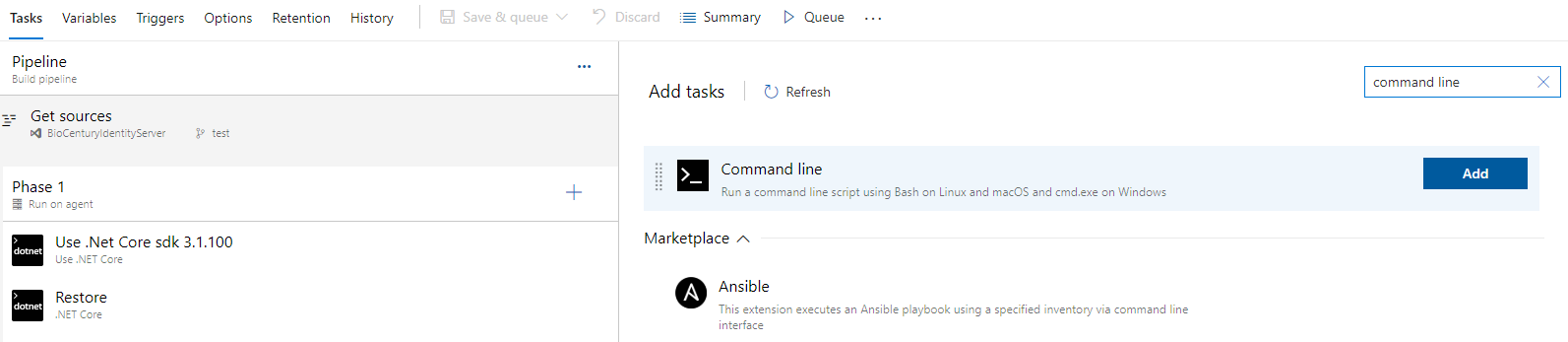
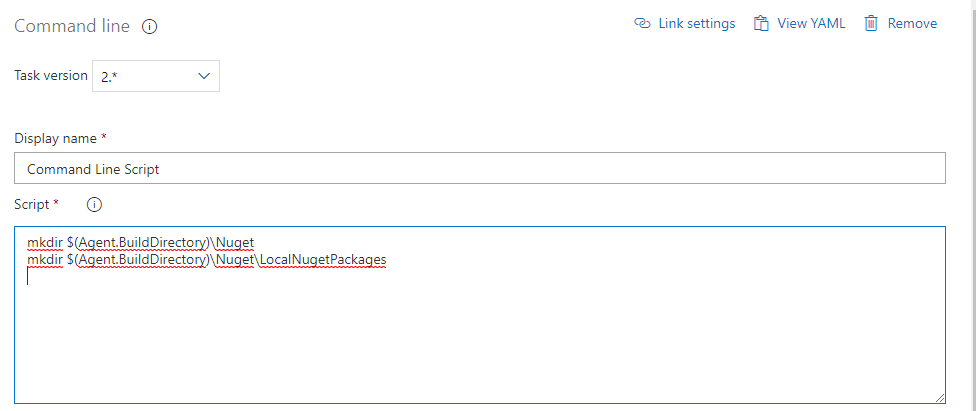
2.) In the pipeline build definition add a Command Line Script task before the "Nuget Restore" task. This task will create the folders we'll need. The contents of the script are:
mkdir $(Agent.BuildDirectory)\Nuget
mkdir $(Agent.BuildDirectory)\Nuget\LocalNugetPackages
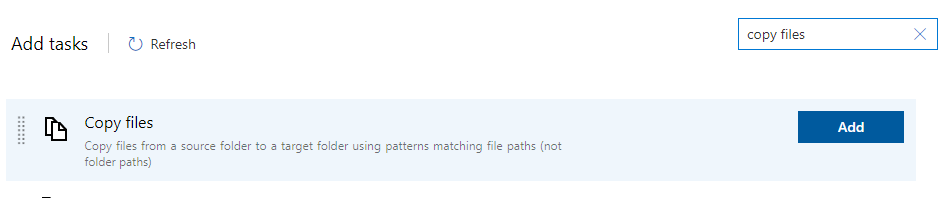
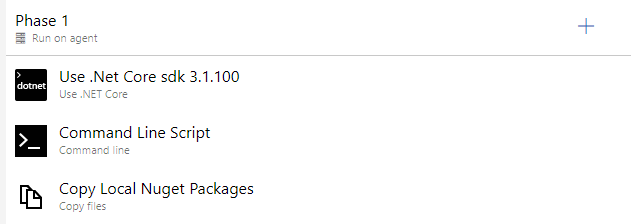
3.) In the pipeline build definition add a Copy Files task before the "Nuget Restore" task, but after the above "Command Line Script" task. This task will copy the local NuGet files to the right relative path the dotnet.restore will look for when reading DevOpsNuGet.config.
A.) Set the "Source Folder" field to the name of the folder under the solution where your local NuGet files are located. In this example: LocalNugetPackages
B.) Set the "Target Folder" the same folder name under "$(Agent.BuildDirectory)\Nuget" folder, in this example: $(Agent.BuildDirectory)\Nuget\LocalNugetPackages
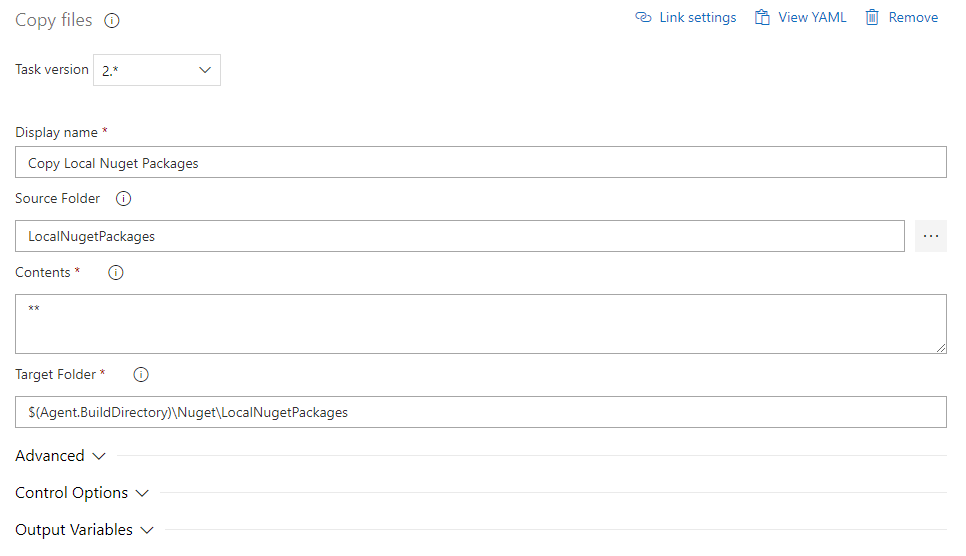
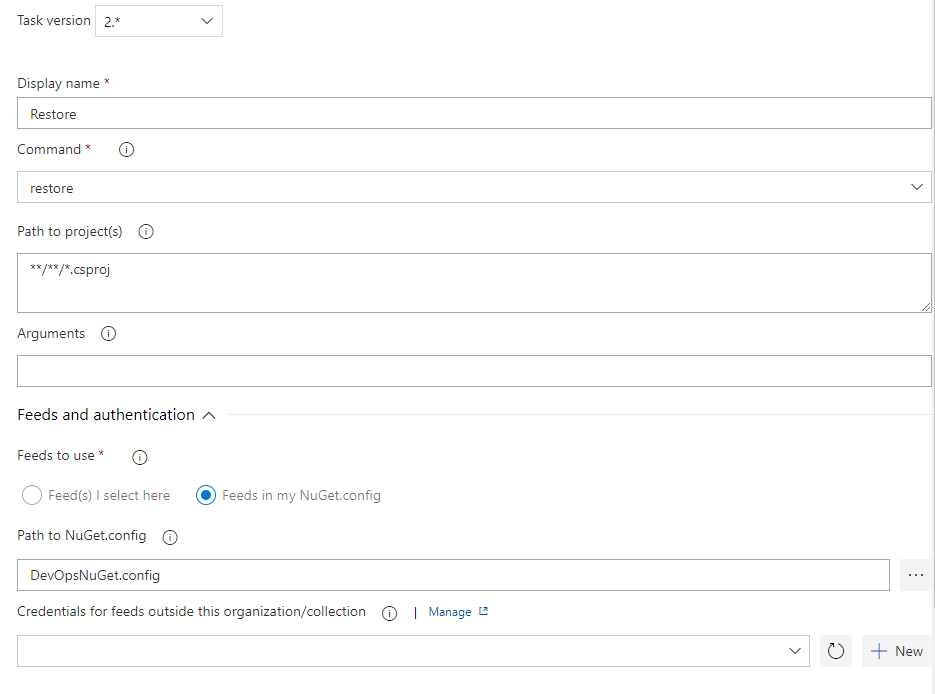
4.) In the dotnet "Restore" step
A.) Set "Feeds to use" to the "Feeds in my NuGet.config" radio button value.
B.) Set the "Path to NuGet.config" to DevOpsNuGet.config
 talynone
on 8 May 2020
talynone
on 8 May 2020
Thank you. If this issue is closed, I wonder if there is an official way of doing this too. In the meantime, this will work in our case.
Victorealvirus
on 8 May 2020
Related issues
 adnanebrahimi
·
3Comments
adnanebrahimi
·
3Comments
 Naphier
·
3Comments
Naphier
·
3Comments
 michhar
·
3Comments
michhar
·
3Comments
 sevaa
·
3Comments
sevaa
·
3Comments
 atrauzzi
·
3Comments
atrauzzi
·
3Comments
Most helpful comment
I had the same issue, here is my work-around:
1.) In the solution root created a file called DevOpsNuGet.config. The contents of this file includes both the my local NuGet files (located in the LocalNugetPackages folder under my solution) and the public feed (or any other feed your solution needs to build). For example:
2.) In the pipeline build definition add a Command Line Script task before the "Nuget Restore" task. This task will create the folders we'll need. The contents of the script are:
3.) In the pipeline build definition add a Copy Files task before the "Nuget Restore" task, but after the above "Command Line Script" task. This task will copy the local NuGet files to the right relative path the dotnet.restore will look for when reading DevOpsNuGet.config.
A.) Set the "Source Folder" field to the name of the folder under the solution where your local NuGet files are located. In this example: LocalNugetPackages
B.) Set the "Target Folder" the same folder name under "$(Agent.BuildDirectory)\Nuget" folder, in this example: $(Agent.BuildDirectory)\Nuget\LocalNugetPackages
4.) In the dotnet "Restore" step
A.) Set "Feeds to use" to the "Feeds in my NuGet.config" radio button value.
B.) Set the "Path to NuGet.config" to DevOpsNuGet.config