Azure-devops-docs: I'd like vsts to do what this article says
It appears that you can no longer apply a wild card to for example include all feature branches with "feature/*". It appears that now you can only select existing feature branches from a list. We'd really like to be able to have a single build for a microservice that is used across multiple branches so that we can publish them all with a single publish. Ideally we'd like an easy way to filter the source files to only the branch that is being built and also add the branch name as a suffix to the build number/name that appears in the dropdown in the publish (which we are currently doing with a powershell script). If any or all of this is possible, please let us know.
Document Details
⚠ Do not edit this section. It is required for docs.microsoft.com ➟ GitHub issue linking.
- ID: 521b594c-dbb9-54d5-f56f-00e2f5fa1d92
- Version Independent ID: 509d3e4e-23db-8493-e1a6-acb67ec47e81
- Content: Define a CI build process for your Git repo
- Content Source: docs/pipelines/build/ci-build-git.md
- Service: unspecified
- Product: devops
- GitHub Login: @mlearned
- Microsoft Alias: mlearned
 cResults
All 7 comments
@cResults … you can customize your build number format in VSTS. Here is the docs which talks about this - https://docs.microsoft.com/en-us/vsts/pipelines/build/options?view=vsts
If you use the format:
$(TeamProject)_$(BuildDefinitionName)_$(SourceBranchName)_$(Date:yyyyMMdd)$(Rev:.r)
generates
Fabrikam_CIBuild_master_20090805.2
There are bunch of prebuilt variables you can use. do check the docs.
Hope this helps
 lohithgn
on 17 Jun 2018
lohithgn
on 17 Jun 2018
@lohithgn you are correct, it is still possible to name builds with the prebuilt variables. Our dilemma is that it appears that we can no longer implement the process described in this post Define a CI build process for your Git repo, since we can no longer add a wild card in the CI trigger definition (ie: "feature/*"). If there are new ways to achieve this goal, please let us know.
cResults
on 18 Jun 2018
@cResults I'm looking into this as well, and will be back. (just FYI)
 mlearned
on 18 Jun 2018
mlearned
on 18 Jun 2018
This is an issue with bad UX causing confusion. The select dropdown for "Branch specification" does not hint to the user that you can type whatever you want in the drop down. This feature does exist however (Gif 1), with the exception documented below.
When you click on the dropdown, you get a list of branches, and a "Filter my branches" text input. Typing in the filter input narrows down your available options, so the user thinks this behavior is a "filter available" because of this interaction. There is a disconnect now between wanting to _define your own specification_ and _filtering an existing branch_. Couple that with what appears to be an actual bug (Gif 2, appears in different use cases, shown here when switching branch specifications) that when you type in a wildcard selector, it doesn't always filter down to the point of using the selector and instead just uses the first branch in the list, and this "branch specification wildcard" feature does "appear" to be missing.
So with all that, @mlearned and @cResults, this issue could be closed, however a new one should be opened to handle the bug for selecting branch specifications.
Gif 1
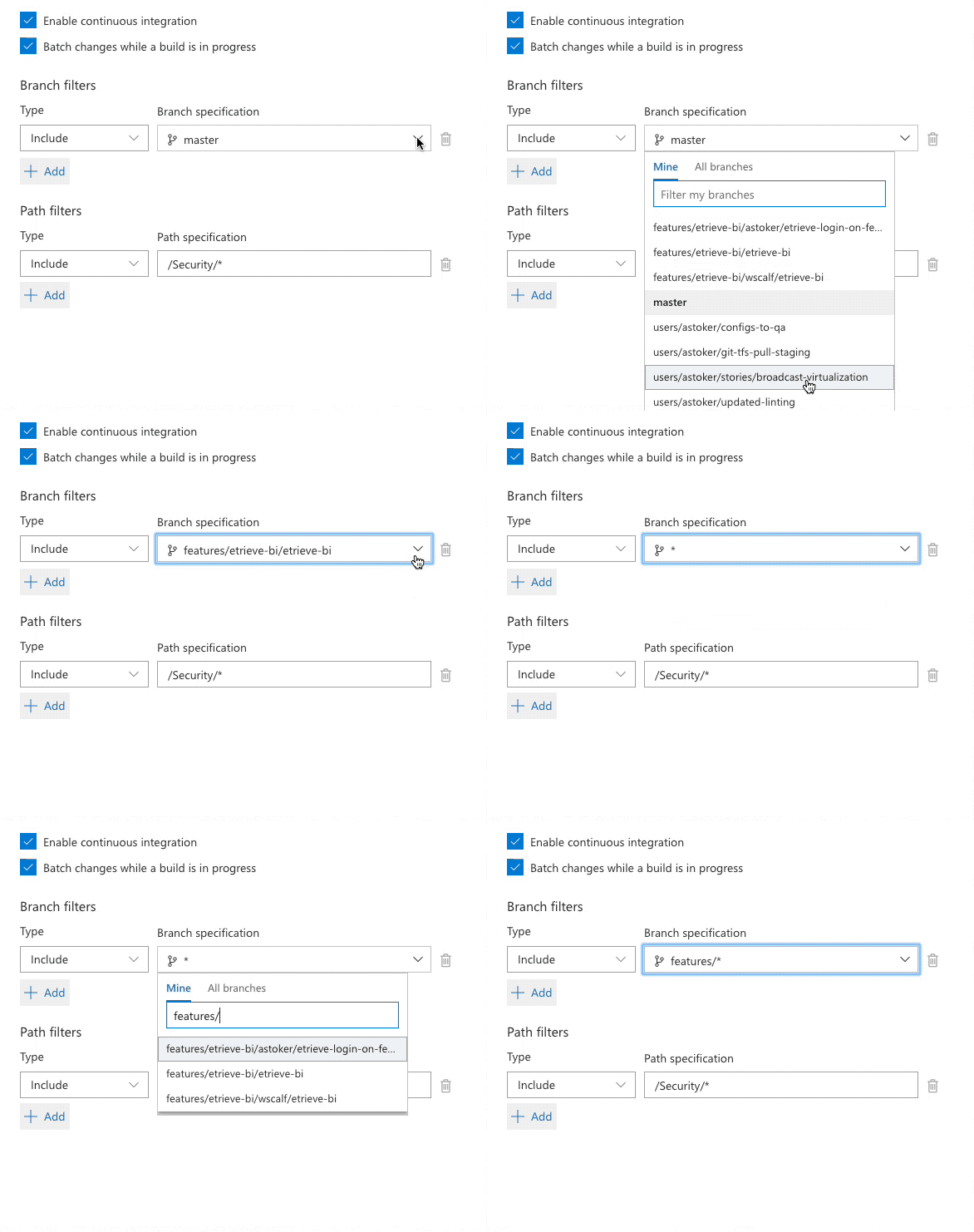
Gif 2 (Bug)

 AStoker
on 18 Jun 2018
AStoker
on 18 Jun 2018
Thanks @Astoker for the detailed explanation. This is certainly an area of improvement that we would like to make. As you rightly pointed out, you can use wild cards, it is just hard to discover that you can.
 adventworks
on 28 Jun 2018
adventworks
on 28 Jun 2018
Well, the original problem described still exists (even with being able to change the trigger to "features/*"), I cannot change the branch used! On the Get Sources (Designer) no filters or wildcards are allowed. Thus, I can trigger a build off of a "feature" branch - but it would still build the master branch, not the "feature" branch - like was stated by bravecobra and others - this is not really supporting multiple branches.
 GManCoding
on 28 Feb 2019
GManCoding
on 28 Feb 2019
I have just recently taken ownership of this area of the docs, and I can do the following:
- I can call out that you can type filters and wildcards into the box although it looks like you have to pick.
You can also use YAML triggers to specify your triggers and builds which may give you more flexibility/control. It looks like you are using GitHub (from this article?) so you can check out Triggering a pipeline - this may allow you to do what you need and work around what sounds like it might be a product bug? For that bug, you can file an issue with the product team directly here
I am checking in a fix to clarify this article, and when it hits this issue will auto-close, but please reactivate it if you still have more questions/feedback about this article. Thank you.
 steved0x
on 25 Jun 2019
steved0x
on 25 Jun 2019
Related issues
 robinmanuelthiel
·
3Comments
robinmanuelthiel
·
3Comments
 letmaik
·
3Comments
letmaik
·
3Comments
 anlatsko
·
3Comments
anlatsko
·
3Comments
 KacperMucha
·
3Comments
KacperMucha
·
3Comments
 michhar
·
3Comments
michhar
·
3Comments
Most helpful comment
This is an issue with bad UX causing confusion. The select dropdown for "Branch specification" does not hint to the user that you can type whatever you want in the drop down. This feature does exist however (Gif 1), with the exception documented below.
When you click on the dropdown, you get a list of branches, and a "Filter my branches" text input. Typing in the filter input narrows down your available options, so the user thinks this behavior is a "filter available" because of this interaction. There is a disconnect now between wanting to _define your own specification_ and _filtering an existing branch_. Couple that with what appears to be an actual bug (Gif 2, appears in different use cases, shown here when switching branch specifications) that when you type in a wildcard selector, it doesn't always filter down to the point of using the selector and instead just uses the first branch in the list, and this "branch specification wildcard" feature does "appear" to be missing.
So with all that, @mlearned and @cResults, this issue could be closed, however a new one should be opened to handle the bug for selecting branch specifications.
Gif 1
Gif 2 (Bug)