Azure-devops-docs: WIQL Reference documentation lacking
how hard is it to have some documentation on what fields I can query with WIQL and what the relations are?
Document Details
⚠ Do not edit this section. It is required for docs.microsoft.com ➟ GitHub issue linking.
- ID: e978322f-15ae-3a89-ae89-497cdfa5070a
- Version Independent ID: f8654902-e266-c12b-8e25-a2fa7a2ac626
- Content: Get work items programmatically from Visual Studio Team Services
- Content Source: docs/integrate/quickstarts/work-item-quickstart.md
- Service: devops
- GitHub Login: @elbatk
- Microsoft Alias: elbatk
 mikesavino85
All 34 comments
Hi, @mikesavino85 , does this help?
https://docs.microsoft.com/en-us/rest/api/vsts/wit/wiql?view=vsts-rest-5.0
If not, let me know and I'll reach out to someone from the product team and get you what you're looking for.
 elbatk
on 10 May 2018
elbatk
on 10 May 2018
Sort of. Not really. I was hoping for documentation on what fields I could query with WIQL and the relations between the things in the from clause. I assume this is like some wrapper above a SQL query but I can't find the relations between the things or the architecture.
I'd like to just query TFS to bring back the things I want instead of instantiating a bunch of objects and traversing TFS that way but whatever.
mikesavino85
on 10 May 2018
Am I missing something in that documentation?
Seriously, I found this after like 2 days of searching: https://blogs.msdn.microsoft.com/duat_le/2010/02/25/wiql-for-test/
Some dudes blog is the source of truth for your table schema in TFS?
mikesavino85
on 11 May 2018
Hellooooo.
I'm confused as to how I'm supposed to use WIQL queries without knowing the underlying schema that TFS is running off of. But, okay, fine.
However, if I'm trying to use C# to get test steps out of TFS, I'm looking at the actions and I don't see the test step details anywhere on it? What can I do to get this information? WHY DO YOU HATE ME?
mikesavino85
on 11 May 2018
I've reached out to the product team and they're working to get you the reference/information you need.
elbatk
on 11 May 2018
Thanks much. Honestly, I'm juts being dramatic.
mikesavino85
on 11 May 2018
It's okay! I can understand the frustration! Hopefully we can get this sorted out and get better reference published. Impossible to work with this without that so I agree.
elbatk
on 11 May 2018
Okay, my friend, I solved my immediate problem with quite a lot of trial and error. I don't know if these threads are public but in case they are:
simply calling action.tostring() will print the test step -_-
mikesavino85
on 11 May 2018
However. I still sort of need that documentation. This is a proof of concept, not the final product. If you could. Thanks a lot for your help though.
mikesavino85
on 11 May 2018
@mikesavino85 I'm having a hard time understanding what exactly you're looking for. Do you mean where can you go to find out more about how to write WIQL, or specifically how can you get the field reference names for a given project?
I definitely think we need to include links to the WIQL syntax guide from our REST API page, as well as a few other pages. Let me know if the syntax guide is still missing important information or provide a little more detail on what you are trying to accomplish so we can have a better idea of the content that may be missing / linked improperly to make it easier to find the next time!
 labrose
on 15 May 2018
labrose
on 15 May 2018
SELECT [System.Id], [System.Title]
FROM WorkItems
WHERE [System.TeamProject] = @project
AND [System.AssignedTo] = 'Judy Lew'
Okay. So, that's listed on that page, right? What exactly is in the WorkItems table? Where can I see this? If I want, say, the description on the work item, when I query it do I say select [description] or is it select [differently_named_description]? I'd love to look at the database schema documentation which is apparently not available online anywhere?
Are there meta data tables? Like sys.columns? I suppose I could just...you know...trial and error but that's pretty not fun.
What I want to be able to do is go to TFS and pull out features, stories epics, test cases, test case actions based on a set of criteria.
mikesavino85
on 16 May 2018
Hello again, just checking in.
mikesavino85
on 16 May 2018
Our Work Item Query Language (WIQL) is not SQL, it is our own language that we parse to understand what the set of criteria is for the work items you want to see. It follows similar SQL syntax because that is what is most familiar to users (at the time WIQL was created).
FROM WorkItems in this case just means "all work items in my collection" and then you are filtering from there based on your specified criteria. The field that you use in WIQL can be the nitty gritty system name or the field reference name ([System.Description] or [Description] respectively). The field reference name can be found on the work item form via a tooltip when you hover on the field. We can also clarify this in our documentation.
An alternative to looking at the work item for fields is to use our field REST APIs to get the complete list of fields for the project.
labrose
on 16 May 2018
I have found that the rest APIs might not work with an on-premise installation of TFS.
And, I understand that WIQL is basically a wrapper into the SQL underlying the TFS installation. But that's kind of what I'm saying, if I want to do something in C# like
I am happy to admit I am an idiot and may be misreading these things.
mikesavino85
on 17 May 2018
What version of TFS are you working with?
labrose
on 18 May 2018
About Microsoft Visual Studio Team Foundation Server
Microsoft Visual Studio Team Foundation Server
Version 16.122.27409.2
mikesavino85
on 18 May 2018
Hi,
I'd like to second the request for more extensive WIQL documentation as it pertains to TFS. In our case, we are using TFS 2015, and I am trying to query a list of a certain type of WorkItemLink ("Defect"). I found some examples online which seem to be working, but I'm really just missing a main hub which tells me what I'm allowed to query for in TFS.
For example, I'd like to know the difference between [System] and [Target], but I'm not finding this anywhere. Maybe I'm just looking in the wrong place? I would greatly appreciate any info you could provide.
Thanks for your help,
Jesse
 ozyx
on 25 Jun 2018
ozyx
on 25 Jun 2018
Hi, I would like to follow the request with other two for the WIQL documentation references with regards to schema. Although I found some examples online these are not enough to get all the information that I am needing. Also I have question with regards to WIQL queries.
when I use {
"query": "SELECT [State], [Title] FROM WorkItems"
}
it returns me list of:
```{
"asOf": "2018-07-22T19:02:46.53Z",
"queryResultType": "workItem",
"columns": [
{
"name": "State",
"url": "https://XXXXXXXXXX/_apis/wit/fields/System.State",
"referenceName": "System.State"
},
{
"name": "Title",
"url": "https://XXXXXXXXXX/_apis/wit/fields/System.Title",
"referenceName": "System.Title"
}
],
"workItems": [
{
"id": 1,
"url": "https://XXXXXXXXXXXXXXX/_apis/wit/workItems/1"
} ....
"ur
but is there really a way to get only the workitem and details instead of selected types and then separate columns as above with only reference urls i.e. I would like to see the result as only
"workItems": [
{
"id": 1,
"url": "https://XXXXXXXXXXXXXXX/_apis/wit/workItems/1",
"Name":"XXXXXX",
"description": "XXXXXXXXX"
}
```
It would be great if there is documentation showing any of this
 SaiManikantaG
on 22 Jul 2018
SaiManikantaG
on 22 Jul 2018
@SaiManikantaG Today there is not. The WIQL endpoint is design to give you up to 20k results as just the ids of the work items. The intent is to then take this in pages of 200 to the /Workitems?ids=1,2,3 api to get the full work item data. It is designed this way to allow building a virtualized list of items and populate them as needed.
That said, we are discussing if there is a middle ground we can support for the case of I just want all work item data from a query and I am ok if it is capped to a much lower number.
 mmanela
on 26 Jul 2018
mmanela
on 26 Jul 2018
@mmanela thank you for the response, I actually did exactly as you said.
For someone who might refer this thread:
select [system.id] from workitems
and then when I got the result, I have extracted all the id's from the body -> field -> {id, url} [list]
with the list of Id's as specified I've sent the list of id's to _list workitems_ endpoint
i.e. /workitems?ids=1,2, ... and you should be getting the result for all the work items..
interesting thing is we can also pass where in (ids, ids2 ..) clause while querying for all the workitems _(Just incase someone provides where clause in the API)_ in fields query parameter to the second request in this chain call.
however @mmanela a quick note and information needed, does /workitems endpoint support paging?? i.e page, pageSize or $top, $skip
I've seen lot of endpoint never referencing a paging information (workitems)
and few I saw supporting $top and $skip, for example:
*Note: This only returns 200 results. As @yewmsft pointed out the List WorkitemsAPI only returns 200 results per call and we need recall the API after 200 results and so on to get all the list
SaiManikantaG
on 26 Jul 2018
+1 with the above experts' request for more WIQL documentation.
In my case I've been asked to create an dashboard by reverse-engineering various users' saved searches. I can get from the saved searches to the WIQL, but am unable to translate 'FROM WorkItems' to T-SQL in any of the five TFS_ prefixed databases on our server, and researching via Google has not led to an answer.
 jimhorn33
on 31 Jul 2018
jimhorn33
on 31 Jul 2018
@SaiManikantaG For the workitem API, https://docs.microsoft.com/en-us/rest/api/vsts/wit/work%20items/list?view=vsts-rest-4.1
we support up to 200 workitems being returned in one call. For $top or $pageSize smaller than 200, you can achieve that through passing in the specific number of workitemIds you want. (e.g. If you want 100 items per page, you can just feed the API 100 Ids).
For the WIQL (select [system.id] from workitems) you execute, we support a $top parameter in the API:
https://docs.microsoft.com/en-us/rest/api/vsts/wit/wiql/query%20by%20wiql?view=vsts-rest-4.1
This API will give you $top number of Ids from the WIQL query.
Does this answer your question?
 yewmsft
on 1 Aug 2018
yewmsft
on 1 Aug 2018
@SaiManikantaG You can achieve paging in WIQL API in this way:
Let's say for example, you want to page 1000 Ids per call.
First run WIQL: SELECT [System.Id] FROM workitems WHERE [System.Id] > 0 ORDER BY [System.Id] ASC with $top = 1000.
And in your API response, you should get a list of workItem Ids in ascending order. So you can get the last Work Item Id in the list, let's say it is 25876. So your next WIQL to call will be something like this:
SELECT [System.Id] FROM workitems WHERE [System.Id] > 25876 ORDER BY [System.Id] ASC
Also with parameter $top=1000
So keep calling the WIQL API until you reach to the end.
yewmsft
on 1 Aug 2018
@jimhorn33 Could you be more specific on the task you want to achieve? And the reason you want to find the T-SQL "translation" of the WIQL? Are you doing perf tuning? We do not expose our T-SQL DB schemas in public documentations, because public access to DB is not supported.However, if you are running an on-prem TFS, there are other ways to get the query T-SQL script, such as running a SQL Server Profiler when you executing a WIQL.
yewmsft
on 1 Aug 2018
@mikesavino85 VSTS REST APIs should work on both on-prem and hosted environment. Could you share with us, which API is not working on your environment?
yewmsft
on 1 Aug 2018
We do not expose our T-SQL DB schemas in public documentations
That does make the public exposure to WIQL pretty pointless then.
there are other ways to get the query T-SQL script,
Correct, I was able to re-create the query manually against database TFS_Warehouse.
jimhorn33
on 1 Aug 2018
@jimhorn33 for creating/updating/executing a query, all can be done through WIQL, and the actual T-SQL script is transparent to the end user. I am curious what is the scenario that requires you to know the "translation" between WIQL and T-SQL? Are you trying to fine tune the performance for some queries that are slow? Or Do you want to know the performance complications between different fields and operators, such as [System.Title] CONTAINS 'foo' vs. [System.Title] CONTAINS WORDS 'foo'
yewmsft
on 1 Aug 2018
@yewmsft makes sense. Thanks 👍
SaiManikantaG
on 2 Aug 2018
I unfortunately no longer work with a company that uses TFS so I can't.
But I can tell you what I was able to do--write a C# console application that would slurp up features+user stores+test cases+ test steps from TFS and take that data into HP ALM. I was able to do that but not using WIQL because the documentation is super lacking. It would have made my life a whole lot easier to write the WIQL but without really knowing how the tables were organized I couldn't compose proper queries. I just used the objects, which is fine if not what I wished I could do.
mikesavino85
on 2 Aug 2018
@mikesavino85 I hear you. You want to write a wit query, but it is not intuitive to craft one in WIQL. That is something we may address in the future with more examples in the documentations.
Meanwhile, do you think it will be easier for you to create such queries with the query editor from web access or in Visual Studio? Such as this:
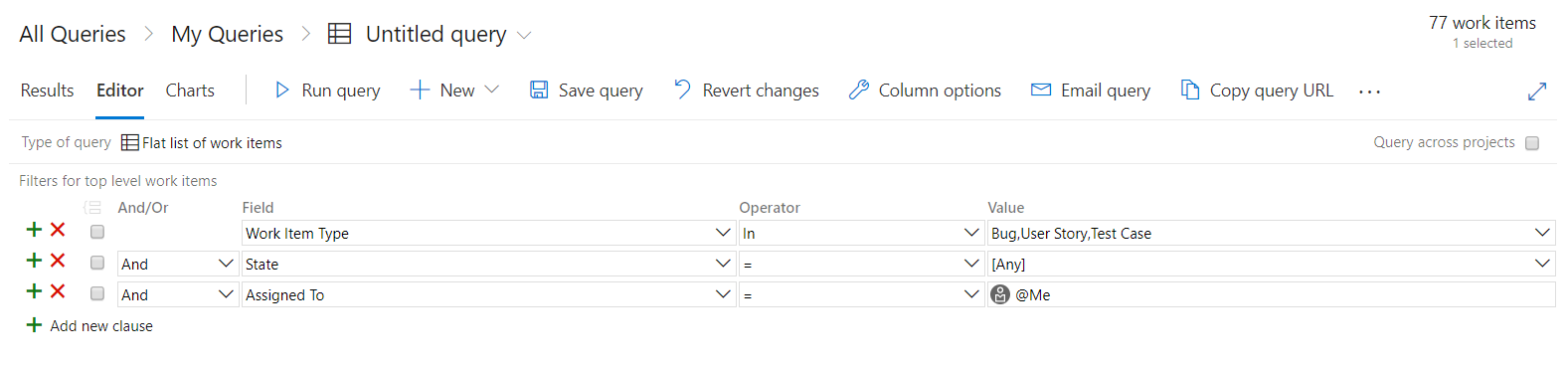
If that is the case, we have an extension that can help you get the WIQL of saved queries in query editor easily: https://marketplace.visualstudio.com/items?itemName=ottostreifel.wiql-editor
With this extension, you can easily get/edit/convert between your saved queries and WIQL. Maybe this could be an alternative to your WIQL crafting task.
yewmsft
on 2 Aug 2018
I have the feeling this is still an issue.
What I want to do: Regularly fetch the work items, check whether they have changed and if they have changed fetch all the data about them and pass that data on.
How I'm doing it:
- I'm running a
POSTagainst/_apis/wit/wiqlwith{query: "Select [System.Id] From WorkItems Where [System.TeamProject] = @project"} - With the IDs I get, I batch run requests against
/_apis/wit/workItems/${id}/updates - Based on ID and the number of updates I determine whether an item has changed and if it has
- I again batch run requests against
/_apis/wit/workItems?ids=${ids}&$expand=All"
This works, but it doesn't seem very efficient so I might be doing something wrong. Is this the way it's supposed to go? The documentation is very confusing to me and not clear at all. Move involved examples are missing. There's no explanation of how Wiql works, how it's supposed to be used. Some things I don't understand the design decisions for:
- Why is
revnot increased when for example therelationsfor a work item change? One cannot use this field reliably to determine whether a work item has changed or not. - Why is there a top limit of 200 imposed instead of making this optional/configurable?
- Why would you use a SQL-like language for an API and then make the user use both that and a REST API?
- Why does one have to specify the limit of items with
$topinstead of intuitively viaLIMIT 10in the SQL-like query? - Why are some query parameters with a
$, some are camelCase, some are-? - Why does
Select [System.Id], [System.Rev], [System.Title] From WorkItems Where [System.TeamProject] = @projectproduce the same usable results asSelect [System.Id] From WorkItems Where [System.TeamProject] = @project? - Also.. who writes SQL-like queries with a UI?
 endor
on 30 Oct 2018
endor
on 30 Oct 2018
Hi @endor,
Looking at what you are trying to do you could achieve this using Service Hocks. You can have a web hook or azure service bus to be triggered based on some basic rules around what type of work items you want.
You could trigger some custom code or even use Flow or Logic Apps to do further processing.
Look at https://docs.microsoft.com/en-us/azure/devops/service-hooks/overview?view=azure-devops .
 jonmorleyjones
on 22 Mar 2019
jonmorleyjones
on 22 Mar 2019
Following up on this issue. Hi @mikesavino85 and @ozyx, is there work to do on our side still? Have your questions/concerns been addressed? Please let me know. Thanks!
 chcomley
on 31 May 2019
chcomley
on 31 May 2019
@yewmsft I was wondering more about the "$top" function. I literally tried to put in a URL that triggers a query in WIQL to be this: "https://office.visualstudio.com/GSX/_workitems?_a=query&wiql=SELECT [System.ID], [System.Title], [System.State], [System.CreatedDate]
FROM WorkItems
WHERE [System.WorkItemType]='Bug'
AND [System.Tags] contains 'Aug Loop'
ORDER BY [System.CreatedDate] desc with $top=1"
However, it says there is an error that "with" is not acceptable and causes an error. I'm thinking I am not putting the "$top=1" in the right spot. Where do I put the "$top=1" in this URL (for the purpose of limiting my query to the first row only)?
 haiku08
on 9 May 2020
haiku08
on 9 May 2020
Related issues
 EM1L
·
3Comments
EM1L
·
3Comments
 letmaik
·
3Comments
letmaik
·
3Comments
 atrauzzi
·
3Comments
atrauzzi
·
3Comments
 michhar
·
3Comments
michhar
·
3Comments
 cijujoseph
·
3Comments
cijujoseph
·
3Comments
Most helpful comment
@SaiManikantaG You can achieve paging in WIQL API in this way:
Let's say for example, you want to page 1000 Ids per call.
First run WIQL: SELECT [System.Id] FROM workitems WHERE [System.Id] > 0 ORDER BY [System.Id] ASC with $top = 1000.
And in your API response, you should get a list of workItem Ids in ascending order. So you can get the last Work Item Id in the list, let's say it is 25876. So your next WIQL to call will be something like this:
SELECT [System.Id] FROM workitems WHERE [System.Id] > 25876 ORDER BY [System.Id] ASC
Also with parameter $top=1000
So keep calling the WIQL API until you reach to the end.