Azuracast: Clone radio and media shared
After we clone the radio station, the media folder displays File Not Processed.
The problem is that we have a large number of radio stations that share one shared folder. Thousands of songs.
Why is the second folder cloning and processing, if it has already been processed on main server and main folder?
Can help
Thank you.
 skoja
skoja
All 38 comments
The directory itself should not be duplicated on the filesystem. When you share the media directory each station will keep its own StationMedia list in order to be able to have different advanced configurations for a song for each station. I think after the recent rewrite of the cloning tool by @SlvrEagle23 the StationMedia should also be copied over to the cloned station thus not needing to re-process them again.
 Vaalyn
on 10 May 2019
Vaalyn
on 10 May 2019
@Vaalyn @SlvrEagle23
We have 50 station and 20 000 songs.
- OPTION : Share the same folder on disk between the stations
Does not work
This page isn’t working OURWEB.COM is currently unable to handle this request.
HTTP ERROR 500
OPTION : Do not share or copy media between the stations
Although we put this option, all songs are available, but have not been processed.Let's go to manual synchronization.
3.1.
Debug
Media processed for station "TEST".
total_size
"182967559048 (183.0 GB)"
total_files
16588
unchanged
0
updated
0
created
16588
deleted
0
3.2
Timer "Media" completed in 12.499 second(s).
3.3.
HTTP client POST call to https://central.azuracast.com/api/update produced response 200
3.4
AzuraCast Central returned code 200
response_body
"{\"success\":true,\"last_update\":1558593236,\"updates\":{\"needs_rolling_update\":false,\"rolling_updates_available\":0,\"rolling_updates_list\":[],\"needs_release_update\":false,\"current_release\":\"0.9.5\",\"latest_release\":\"0.9.5\"}}"
3.5
Successfully checked for updates.
results
{
"success": true,
"last_update": 1558593236,
"updates": {
"needs_rolling_update": false,
"rolling_updates_available": 0,
"rolling_updates_list": [],
"needs_release_update": false,
"current_release": "0.9.5",
"latest_release": "0.9.5"
}
}
And after the manual synchronization of all songs :
File Not ProcessedI do not understand why the Azuracast system processes a complete songs database, if the first server (main radio station) completes process.
If there is a shared folder, why does a new radio station work for processing for the same database of songs?
Do you have an idea to solve the problem?
Thank you.
skoja
on 23 May 2019
There are still folders left on the server, although we have deleted radio streams.
skoja
on 23 May 2019
@skoja If you don't mind I could take a look at your server / installation to see if I can find out what's happening there. I'd need an SSH user and an AzuraCast user for that. If that is okay for you please send the login details to [email protected]
Vaalyn
on 23 May 2019
Thank you for letting me take a look at it.
I've tried to reproduce the 500 error you mentioned by cloning one of the stations with the option to share the media directory. After the cloning ran for some time the page showed a 500 error but there is nothing in the Application logs and the station wasn't cloned. That could be an error with the cloning process itself and not necessarily with the amount of media files on your stations. I'll need to look into that process a bit more to figure out what could be going on there.
I'm not sure though why the directories of previously existing stations still exist in the filesystem after you've deleted those stations. The contents of the directories are deleted so there are only empty directories left. I also couldn't see any issues with the permissions for these directories.
If there is a shared folder, why does a new radio station work for processing for the same database of songs?
Like I already wrote earlier, when you share the media directory each station will keep its own StationMedia list in order to be able to have different advanced configurations for a song for each station. It would be possible to improve the performance of the sync process by updating the StationMedia entities for each station that shares a folder together but that is no small task for us and will take some time to get that implemented correctly and stable. You should create a feature request over at https://features.azuracast.com for that and get people to vote for it.
Vaalyn
on 23 May 2019
It means nothing of accelerating cloning.
This takes too long for one stream :(
skoja
on 23 May 2019
I haven't really paid attention to the time it took for a single station on your system to be synced. Would you mind telling me how long it takes? And that is for around 20k files, correct?
Vaalyn
on 23 May 2019
@skoja There's going to be a performance penalty when you're dealing with a station that has 20,000 media files. We could more ruthlessly optimize that cloning process, but then it wouldn't be nearly as maintainable for us.
 SlvrEagle23
on 23 May 2019
SlvrEagle23
on 23 May 2019
@SlvrEagle23 @Vaalyn
It takes about 6-7 hours per station on Azuracast.
The problem is when you have 50 clients and create 50 streamings account x 6 hours.
Azuracast is super made. Modern, clean, fast.But this is really a big problem.
We use several programs, amongst others like Centova, which has a shared folder option.
Reindex takes a maximum of 20 000 songs for roughly 20 minutes.
But I think Centova is working on another reindex principle.It does not push all song through the database.
skoja
on 23 May 2019
@skoja You're saying it takes 6-7 hours between when you click the "Clone Station" button and it actually produces the resulting clone? Or do you mean the amount of time it takes for all media on the new station to be processed?
The former I would find extremely hard to believe, even at its most inefficient...
Also, I would imagine if you're operating 50 radio stations with 20k music files each, you aren't the typical radio station operator that AzuraCast is built for, and you may benefit from commercial software in that relatively outlying situation.
SlvrEagle23
on 23 May 2019
@SlvrEagle23
Amount of time it takes for all media on the new station to be processed about 6 hours.If you want to be convinced i can give you SSH and Azuracast access .
OPTION : Share the same folder on disk between the stations
Does not work
This page isn’t working OURWEB.COM is currently unable to handle this request.
HTTP ERROR 500OPTION : Do not share or copy media between the stations
Although we put this option, all songs are available, but have to be processed.
The problem is that there is no commercial software for our specific business.
All we found, we tried.
We've been modifying something right now and doing so.
If you have someone to recommend us, please feel free to contact us.
skoja
on 23 May 2019
@skoja The HTTP 500 error you're seeing is not normal and is likely something we can resolve.
I was under the impression that the clone process itself, even when sharing media, was taking you 6 hours, since that's what this issue is about.
SlvrEagle23
on 23 May 2019
If there is a chance to accelerate this, it would be an ideal option.
If it does not exist, then nothing :(
When you have time i can send you SSH and Azuracast access, look for this HTTP 500 error and file processing time.
skoja
on 24 May 2019
@SlvrEagle23 regarding that 500 error on cloning, I couldn't see any errors in the logs when I tested this (which is strange already) and I can confirm this is happening on the installation. Not sure where it's coming from though. Might have to setup locally with a big load of files to better debug that.
Vaalyn
on 24 May 2019
@skoja Does your server use an HDD or SSD?
I'm not sure where the bottleneck is exactly for the media processing but you may be able to speed up the process by utilizing an SSD for the media files.
Vaalyn
on 24 May 2019
600GB SSD :)
skoja
on 24 May 2019
@skoja Then it's definitely CPU bound and not IO. Just to have some baseline, what CPU does your server have?
Vaalyn
on 24 May 2019
6 CORES
16 GB RAM
skoja
on 24 May 2019
@skoja I'm actually more interested in the clock speed of the CPU and generation of it. PHP processes are single threaded so if your CPU can handle a lot of threads but has a low performance per thread this is detrimental for the performance of such CPU heavy tasks.
Vaalyn
on 24 May 2019
skoja
on 24 May 2019
Hmmm... I can't find any information about the CPU itself on their page. Can you execute this command lscpu on your server and post the output here?
Vaalyn
on 24 May 2019
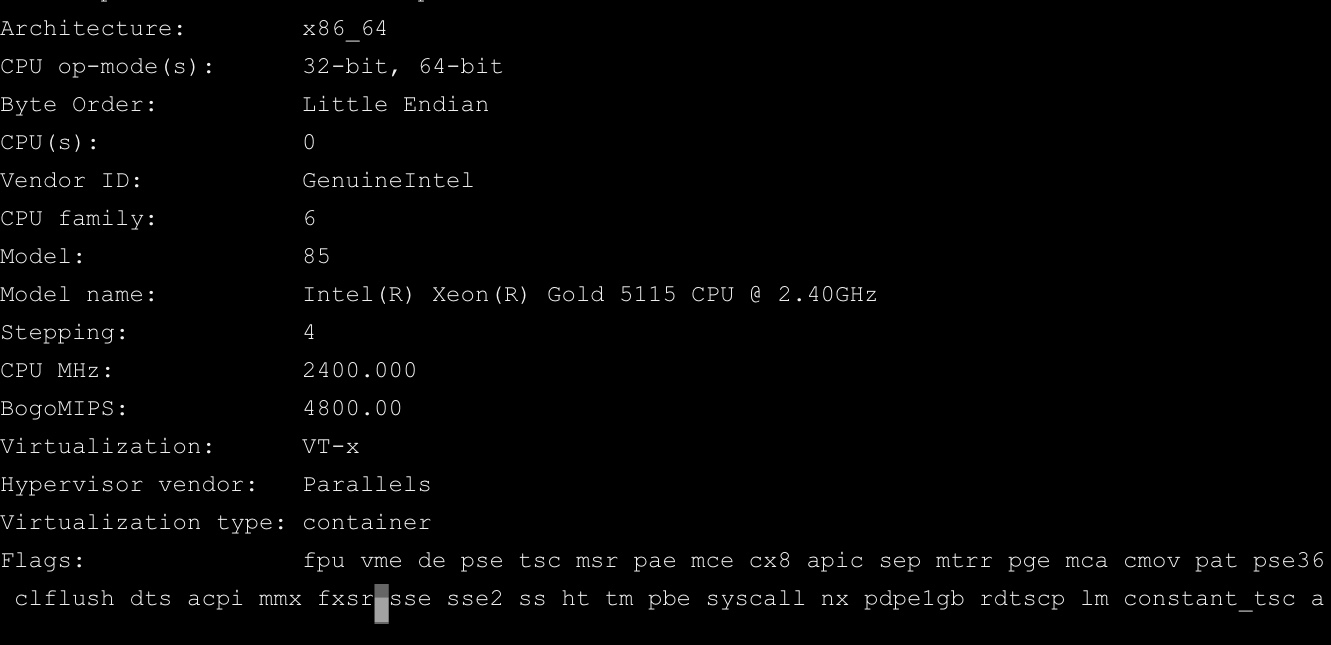
skoja
on 24 May 2019
@skoja We've added a new environment variable that let's users chose the amount of worker processes for the Media Sync. Increasing the amount of worker processes will help with scaling this process for bigger workloads. This is what you need to put in your azuracast.env to add 2 additional worker processes:
ADDITIONAL_MEDIA_SYNC_WORKER_COUNT=2
Would you mind testing that feature a bit and report to us how much impact these additional worker processes have on the time it takes to finish the Media Sync for your stations?
Vaalyn
on 26 May 2019
@Vaalyn How to edit azuracast.env ?
skoja
on 26 May 2019
@skoja Look into the directory where your docker-compose.yml is located at and edit the azuracast.env file that is in the same directory. You can do that with the editor nano directly in the terminal or via SFTP / FTPS and an editor on your PC.
Vaalyn
on 26 May 2019
After the last update, File processed 2.5 hours for the new stream.
skoja
on 27 May 2019
@skoja How many additional worker processes did you use?
Vaalyn
on 27 May 2019
I did not understand the question.
skoja
on 27 May 2019
Yesterday I asked you if you could test how long the Media Sync takes after updating to the newest version of AzuraCast where we added support for increasing the amount of worker processes for the Media Sync. To add additional worker processes you add ADDITIONAL_MEDIA_SYNC_WORKER_COUNT=x (where x stands for the amount of additional workers) to your azuracast.env.
Today you posted:
After the last update, File processed 2.5 hours for the new stream.
I assume that you have updated AzuraCast to the newest version and added the configuration I mentioned above to your azuracast.env. Now I want to know what value for ADDITIONAL_MEDIA_SYNC_WORKER_COUNT you tested this with to get the 2.5h you mentioned. The more workers you add the faster it should get (as long as your hardware can make use of the additional processes).
Vaalyn
on 27 May 2019
1.
I did the first thing yesterday you said, edited azuracast.env
Put on 2 processes.
I did not notice any difference.
I've made update this morning on the last version. And in the latest version when I'm creating a new radio station, it takes 2.5 to 3 hours to process the complete song database.
I hope you understand me.
skoja
on 27 May 2019
Yes I understood you. Let me explain why 1. did not have any impact for you. Your installation was probably not updated to the version where we included this scaling functionality. Thus adding the line to the env file had no effect.
Also as a sidenote the workers will be started on startup of the web container so if you change the amount again you'll have to restart AzuraCast for it to take effect.
Vaalyn
on 27 May 2019
I think my usage case is somewhat similar but still different than the one from the @skoja, but I'd like to give some ideas from my perspective and my usage case, it might be a pointer for some improvements without much work (at least I think).
I work on to run about 30 AutoDJ channels on one server.
I have about 1000-2000 songs for each channel.
But for some of the channels I'd like to share the media folder between them, because each will use some songs from several related folders.
So if the "Channel Cloning" function would allow to just copy the already parsed metadata for media files, that would tremendously speed up the process.
The idea about separate copies of metadata for each channel of the same files is OK, presuming every channel will in some moment want to change some data. But I am sure that could be optimized by separating the metadata into two tables with one-to-many relation:
- [mediafiles_core] core, non-changeable data about media files (path, size, file type, length, hash)
- [mediafiles_individual] data that is likely to be edited by someone (artist, title, album name...), and separate for each station
 btoplak
on 3 Jun 2019
btoplak
on 3 Jun 2019
So if the "Channel Cloning" function would allow to just copy the already parsed metadata for media files, that would tremendously speed up the process.
This is already implemented. The issue with cloning in this case was / is that there seems to be a bug in the cloning process that results in a 500 error thus the station needed to be copied without that sharing, then edit the station to point to the shared directory and then manually re-sync the media for that station. When the bug is fixed there is no need to re-sync it when copying a station.
The idea about separate copies of metadata for each channel of the same files is OK, presuming every channel will in some moment want to change some data. But I am sure that could be optimized by separating the metadata into two tables with one-to-many relation:
Database normalization is a good thing and in general it can make sense to reference the same base information for multiple entries but in this case I think this is an unnecessary premature optimization. We have no information about any bottlenecks on that specific table yet. From my experience I'd say that even on an installation with more than 100k media files this table will still not be the bottleneck. For the media handling / sync the bottleneck is in most cases the HDD (iops) or CPU as PHP is single threaded. This is also the reason why we implemented the ADDITIONAL_MEDIA_SYNC_WORKER_COUNT env var.
If you can provide us with some benchmarks of the database where the performance goes down significantly because of this table I'd gladly take a look at it but if the performance just decreases with over 1 million rows then okay that's not a use-case that we anticipated as a station with that many songs is definitely an edge case and not the normal use-case.
Splitting that data up can also increase the load on the database and thus slow it down more than speeding it up as joins can become rather costly for bigger operations. I'm also not sure if Doctrine allows to merge 2 Tables into a single entity (which is probably a bad idea anyways) so everywhere the
StationMedia entity is used would then have to be revisited to adapt it for 2 entities. This would be a rather big change for probably little gain.
Vaalyn
on 4 Jun 2019
@Vaalyn thanks for your thoughts.
... there seems to be a bug in the cloning process that results in a 500 error
I forgot to mention that 500 from Nginx most probably comes because PHP process has timed out and left the Nginx to wait for response until it also times out.
Does Nginx log say something about upstream (PHP) has "gone away"?
Database normalization is a good thing and in general it can make sense to reference the same base information for multiple entries but in this case I think this is an unnecessary premature optimization. We have no information about any bottlenecks on that specific table yet. From my experience I'd say that even on an installation with more than 100k media files this table will still not be the bottleneck.
I work professionally with MySQL / MariaDB / Percona DB optimizations, so I can make an informed statement that in this particular situation normalizing data to a properly indexed tables won't have any major disadvantages (that I could think of as of today). But it definitely can bring more advantages, like table size reduction, speedups if the code mostly accesses "static data" (file location, length, size) etc.
But this all being said without me digging deeper into the PHP code and how the media data is being handled by Azura and LiquidSoap, I guess there could be even more advantages and optimizations.
If you can provide us with some benchmarks of the database where the performance goes down significantly because of this table I'd gladly take a look at it but if the performance just decreases with over 1 million rows then okay that's not a use-case that we anticipated as a station with that many songs is definitely an edge case and not the normal use-case.
One important thing to point out about me is that I'm an "optimization nazi" :D
I know that Skoja's use case is not the usual use case, but it is logical one for Auto-DJ based stations.
According to his example, his media DB table will have 50 stations x 20k records = 1M records, with 98% of that data being useless duplicates ("just in case").
I didn't want to over-complicate my previous post, but I believe the ideal situation would be that extra metadata record would be made only if needed - when one user decides to edit a metadata field.... that would keep metadata table as minimal as possible.
I am well aware that those optimizations are not necessary or priority in any way, I don't expect code changes anytime soon. I'm just giving some hints on possible optimizations from my perspective.
And when I get the free time I'll dig into metadata related PHP code and table, and maybe provide some proof of concept branch
btoplak
on 4 Jun 2019
@btoplak When you get to investigate this topic some more would you mind creating a new issue for that so that we don't "spam" this issue? =)
You are also welcome to ask via slack regarding anything about the application.
Vaalyn
on 4 Jun 2019
@btoplak When you get to investigate this topic some more would you mind creating a new issue for that so that we don't "spam" this issue? =)
Sure, will do.
btoplak
on 4 Jun 2019
@skoja @Vaalyn I looked into the issue and I found a potentially quite large problem: in the process of checking for songs to reprocess, if there are already items in the processing queue that haven't been processed yet, it can possibly stack new items on the queue that duplicate those existing items, and then the message queue will try to process that same file twice, which just adds to the overall workload without any real benefit.
The reason we don't notice this in our regular everyday use is because in all of our testing cases, processing the media files takes quite a bit _less_ than the 5 minutes between syncs (at a measured approx 150ms per file, it would take about 2,000 media files to possibly cause an overlap), and because in smaller cases this was just a fairly short bump in time to process the extra, unneeded queue items.
In your case, however, the difference should be quite staggering. I would recommend updating to the latest rolling-release version and testing to see if it improves things.
SlvrEagle23
on 7 Jun 2019
Closing this issue as there have been a lot of improvements to optimize the media sync process and we implemented an option to add additional workers to speed up the process.
Vaalyn
on 9 Jul 2019
Related issues
 Tolarion
·
4Comments
Tolarion
·
4Comments
 Rafaelrds2017
·
3Comments
Rafaelrds2017
·
3Comments
 dpcee30
·
3Comments
dpcee30
·
3Comments
 susl16c
·
3Comments
susl16c
·
3Comments
 hecgua
·
3Comments
hecgua
·
3Comments