Azuracast: scheduled playlist only works after restart radio?
Hello
I try to explain, I have a scheduled playlist that plays on monday and wednesday, this works perfectly, but if I say in this same playlist play, lets say on friday to then this doesnt work, it works but I need to say restart broadcast before liquadsoap sees I added friday to, I hope you understand me . Now my question is, is there a way to let this work without a restart?
And is it possible to add more time? I mean like start scheduled playlist at 12:55.
Its Ubuntu 16.04 , traditional installation.
Greets
Roy
 stemvantwente
All 20 comments
Advanced playlists go directly through Liquidsoap for their playback and need a restart of Liquidsoap to apply changes. See #1269 for more information about this.
Regarding the question about start times I'm not sure what you mean. You can already say that a scheduled playlist should start at 12:55. Can you clarify what exactly you mean?
 Vaalyn
on 20 Mar 2019
Vaalyn
on 20 Mar 2019
Advanced playlists go directly through Liquidsoap for their playback and need a restart of Liquidsoap to apply changes. See #1269 for more information about this.
Regarding the question about start times I'm not sure what you mean. You can already say that a scheduled playlist should start at 12:55. Can you clarify what exactly you mean?
can only choose per 15 min
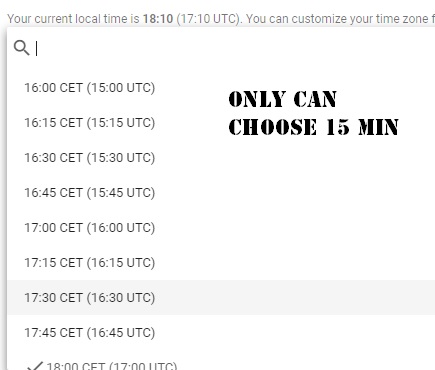
stemvantwente
on 20 Mar 2019
Ah okay, my bad. I thought it was already in 5 minute intervals. Thank you for clarifying 👍
Vaalyn
on 20 Mar 2019
For the feature request about selecting more granular intervals please follow issue #568
Vaalyn
on 20 Mar 2019
Ah okay, my bad. I thought it was already in 5 minute intervals. Thank you for clarifying 👍
no problem!
stemvantwente
on 20 Mar 2019
For the feature request about selecting more granular intervals please follow issue #568
oke 👍 so hope this option will come in an update :) and again thank you for all the info! still works awesome this azuracast :D
stemvantwente
on 20 Mar 2019
I'll close this issue now since the feature request is already tracked in the issue mentioned and the live-reloading of playlists should work like mentioned in #1269. If the reloading does not work like mentioned in that issue please notify me and I'll re-open the issue.
Vaalyn
on 20 Mar 2019
@Vaalyn is see that post is 3 days old, I need to update azuracast to I think I dont have the newest version yet, but can do that later tonight otherwise the listeners dont have music :D haha, I come back with what happens when I update azuracast
Greets
Roy
stemvantwente
on 20 Mar 2019
@Vaalyn Have updated to the new version of azuracast, love this option Apply Compression and Normalization!
But if I change a scheduled playlist I still need to restart radio to get the new times the playlist needs to play.
By the way I use a direct stream url, I relay another stream not sure if this matters? just tought I mention this.
Not really a big problem, just need to plan a little more and restart the server at a late time in the night so listeners dont hear the restart.
Again thank you guys from azuracast for this awesome work!
stemvantwente
on 21 Mar 2019
@stemvantwente You are not using the Advanced Playlists but normal Scheduled Playlists correct?
Then after a full playthrough of a playlist the playlist should be reloaded. Can you check if this is working for you?
Vaalyn
on 21 Mar 2019
@Vaalyn Yes I use the normal Scheduled Playlists.
How can I do this best then? I use allot playlist hihi, maybe best way to add a playlist with 2 songs and let say let that play in the middle of the night so it resets if I say play lets say 3 from that playlist?
I'm not really sure how to do this, here is a screenshot of my playlist ( sorry its in dutch)
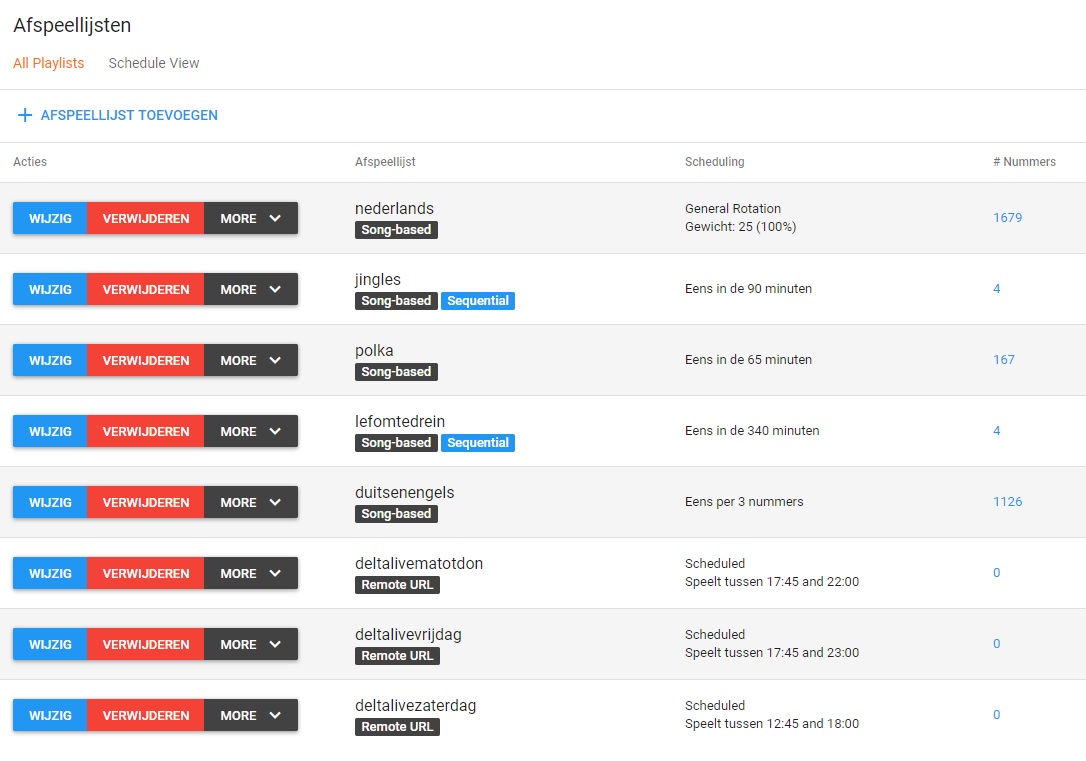
Greets
Roy
stemvantwente
on 21 Mar 2019
I'm not 100% sure on how liquidsoap is doing the reloading internally. There are 2 possibilities that I can imagine how it's working.
- LS reloads only the playlist that it has played through after it has done so
- LS reloads all playlists after one of them has been played through
@SlvrEagle23 Do you know which of these is the case?
Vaalyn
on 21 Mar 2019
@Vaalyn Currently, LS is set to reload playlists on "watch" mode, i.e. any time it detects that changes are written to disk. In some instances, Docker can prevent this watch mode from working correctly, but the only alternative is to set a fixed time period for reloads (which could interfere with shuffled playlists) or to tell it to reload at the end of every playlist (which, in the event of zero-song playlists, causes it to loop infinitely and consume huge resources).
 SlvrEagle23
on 21 Mar 2019
SlvrEagle23
on 21 Mar 2019
@SlvrEagle23 Ah okay, I didn't see that you changed it back from reload to watch. Thanks for the clarification.
Vaalyn
on 21 Mar 2019
@Vaalyn @SlvrEagle23
Thank you both for the info, I just let this be as it is, I let the server restart @ night so that the new input I made are going true.
Greets
Roy
stemvantwente
on 21 Mar 2019
Advanced playlists go directly through Liquidsoap for their playback and need a restart of Liquidsoap to apply changes. See #1269 for more information about this.
Regarding the question about start times I'm not sure what you mean. You can already say that a scheduled playlist should start at 12:55. Can you clarify what exactly you mean?
@Vaalyn By the way is this option coming? that I can choose in 5 min steps? if not can I do this with advanced playlist? looked at Liquadsoap but cant really find how to make a line with direct stream url.
Greets
Roy
stemvantwente
on 22 Mar 2019
@stemvantwente We have it on our TODO list for playlist enhancements. It will eventually find its way into the codebase.
You can take a look at the generated liquidsoap.liq to see how scheduled playlists are configured and use that as a template for how to to that manually.
Here is an example from one of my stations:
radio = fallback(id="brg_playlist_fallback", track_sensitive = false, [dynamic, switch([ ({ 0h0m-5h0m }, playlist_nightdj), ({ true }, radio) ]), blank(duration=2.)])
See the switch([ ({ 0h0m-5h0m }, playlist_nightdj) part, there you could say switch([ ({ 0h45m-5h0m }, playlist_nightdj) for example.
Vaalyn
on 22 Mar 2019
@Vaalyn Thank you!, and where can I find this file liquidsoap.liq ? is it in the /var azuracast map?
stemvantwente
on 22 Mar 2019
We have a handy Viewer tool where you can take a look at that file from the web interface. Go to Utilities -> Log Viewer and select the Liquidsoap Configuration
Vaalyn
on 22 Mar 2019
@Vaalyn aaah of course totally forgot about that haha thank you! I go try it out have a nice weekend
stemvantwente
on 22 Mar 2019
Related issues
 hecgua
·
3Comments
hecgua
·
3Comments
 Rafaelrds2017
·
3Comments
Rafaelrds2017
·
3Comments
 adamderann
·
4Comments
adamderann
·
3Comments
adamderann
·
4Comments
adamderann
·
3Comments
 susl16c
·
3Comments
susl16c
·
3Comments