Azuracast: Shuffle option not working
Installation method
Docker
Host OS (for Docker installations)
Ubuntu 18.04 LTS fully updated with the latest updates
Describe the bug
When selecting the "shuffle" method in "Song Playback Order" it just plays all tracks just like "Sequential" only the "Random" option works sort of, the issue with the "Random" mode is that tracks are played to frequently; eg playing the same track within the hour, while other tracks never play.
All updates are installed, and I'm running the lastest release of azuracast.
To Reproduce
Steps to reproduce the behavior:
- Go to Playlists
- Click on any random playlist
- Scroll down to 'Song playback order'
- Skip songs or wait for the next song, you will see that all songs will be played in alphabetic order
Expected behavior
A real shuffle without having the issue that some songs are played a lot while other never get played
This is not limited to one station only all my stations (5 to be precise) are having the same issue.
Desktop (please complete the following information):
- OS: [e.g. iOS] : Windows 10
- Browser [Chrome / Edge / IE
- Version all are updated to the latest version
 netbladenl
All 9 comments
@netbladenl Did you just change the playback order for the playlist from something other than Shuffled to Shuffled? If so, it probably didn't immediately trigger a "re-shuffle" of the playlist. Adding or removing a single song from the playlist should trigger the necessary re-shuffle action. I'll make sure the relevant code makes it into the actual playlist editing page so this isn't necessary shortly.
 SlvrEagle23
on 19 Oct 2018
SlvrEagle23
on 19 Oct 2018
@SlvrEagle23 Thanks for your quick reply, I've tried this last night without any success, it keeps on playing sequential, I've rebooted my server multiple times. I've changed my setting from "Random" to "Shuffle" 30 minutes ago and this is the effect of it :
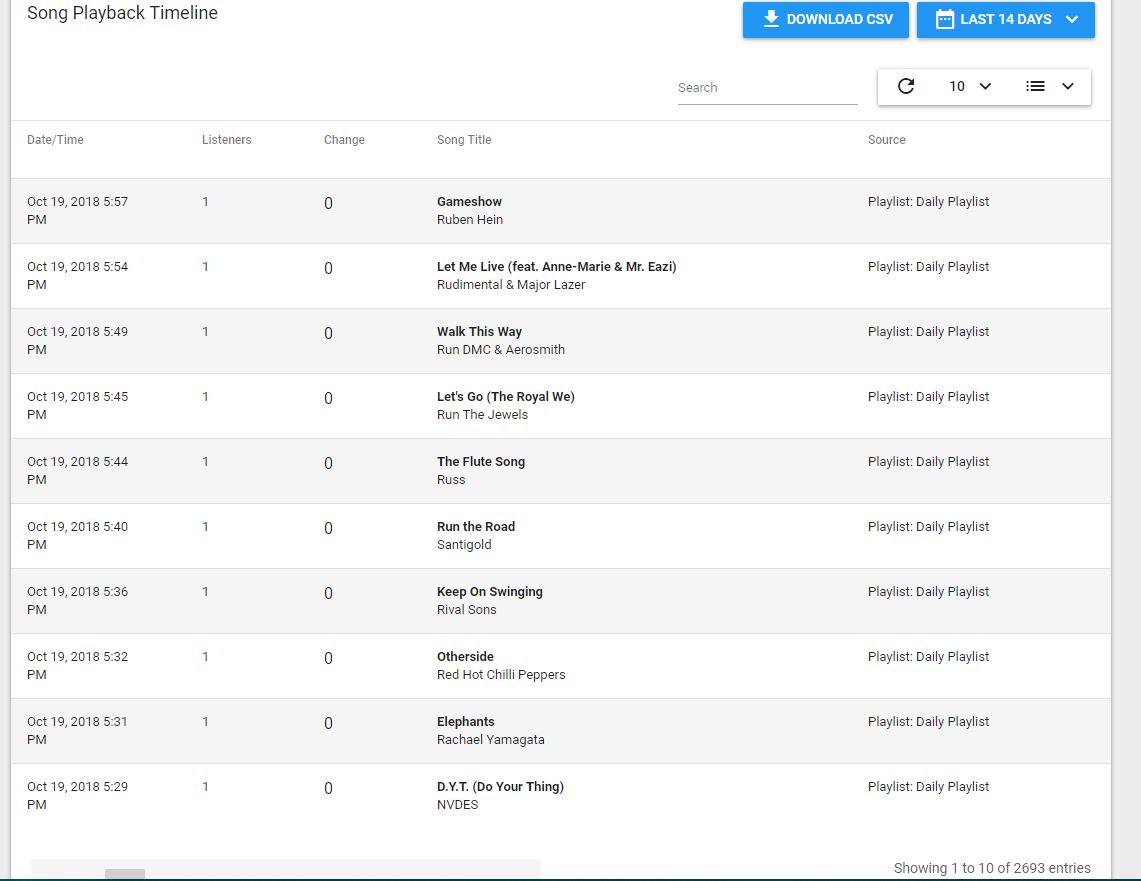
Most of my playlists are alphabetic ordered
netbladenl
on 19 Oct 2018
@netbladenl What I'm saying is, if you switch from anything else to Shuffle, you should remove/re-add a song to the playlist _after_ switching it, and it'll trigger the "re-shuffle" of the playlist and should clear the cache. I'll work on making this happen automatically under the hood, but I probably can't get to that today.
SlvrEagle23
on 19 Oct 2018
@netbladenl What I'm saying is, if you switch from anything else to Shuffle, you should remove/re-add a song to the playlist _after_ switching it, and it'll trigger the "re-shuffle" of the playlist and should clear the cache. I'll work on making this happen automatically under the hood, but I probably can't get to that today.
I've tried this and it doesn't solve my problem, Should I reinstall everything? Maybe something broke during all those updates I've received lately?
netbladenl
on 19 Oct 2018
@netbladenl The latest code updates should help resolve this. Since you set your playlist to shuffle after the database migration that automatically reshuffled items, you'll want to visit the shuffled playlists that aren't shuffling correctly, edit them without making any changes, and then save the changes. This should immediately reshuffle the playlists.
Sorry for the inconvenience in this case.
SlvrEagle23
on 20 Oct 2018
@SlvrEagle23 Thank you for your quick actions, it seems that with this last update the issue has been resolved. Thank you for all your effort in this wonderfull product :)
netbladenl
on 20 Oct 2018
@netbladenl I'll work on making this happen automatically under the hood, but I probably can't get to that today.
@SlvrEagle23 - Is this change made, because my playlist on shuffle does play the songs on alphabetical order. I use a hosted Azuracast plan from shoutcastsolutions.com with Azuracast v0.9.6.1 installed.
 gentle-media
on 20 Aug 2019
gentle-media
on 20 Aug 2019
@gentle-media We've received some more reports of shuffled playlists playing in sequential order, and earlier this week I released some updates that should help resolve the issue in a more permanent fashion.
You may need to contact your hosting provider and ask them to update again to make sure the new version is running.
SlvrEagle23
on 20 Aug 2019
Ok, thanks for the heads up! I will contact them.
gentle-media
on 20 Aug 2019
Related issues
 dpcee30
·
3Comments
dpcee30
·
3Comments
 frozenplaya
·
4Comments
frozenplaya
·
4Comments
 bo2008
·
3Comments
bo2008
·
3Comments
 Yusadolat
·
3Comments
Yusadolat
·
3Comments
 Blazedallup
·
3Comments
Blazedallup
·
3Comments
Most helpful comment
@netbladenl The latest code updates should help resolve this. Since you set your playlist to shuffle after the database migration that automatically reshuffled items, you'll want to visit the shuffled playlists that aren't shuffling correctly, edit them without making any changes, and then save the changes. This should immediately reshuffle the playlists.
Sorry for the inconvenience in this case.