Azerothcore-wotlk: [Docker] Error docker-compose up
[Docker] Error docker-compose up
SMALL DESCRIPTION:
When use command [docker-compose up] After compile with docker Errored
EXTRA NOTES:
Error
Step 8/11 : RUN chmod 755 azerothcore/apps/db_assembler/db_assembler.sh; /az erothcore/apps/db_assembler/db_assembler.sh 1 ---> Running in c5f85b2f1147 ': No such file or directory Service 'ac-database' failed to build: The command '/bin/sh -c chmod 755 azeroth core/apps/db_assembler/db_assembler.sh; /azerothcore/apps/db_assembler/db_as sembler.sh 1' returned a non-zero code: 127
--
===
I test more changes from commit https://github.com/azerothcore/azerothcore-wotlk/commit/76772e434d5d01f996adb03b44698fc352e0fd7c#diff-58b62ab6edcc2363b1add8382ec5163d - roll back and more test .but dont work
BRANCH(ES):
master
AC HASH/COMMIT:
https://github.com/azerothcore/azerothcore-wotlk/commit/b578bce1d1b7de2254ec2aacb19bed40a0732997
OPERATING SYSTEM:
windows 10 Enterprise
MODULES:
nothing - clean
OTHER CUSTOMIZATIONS:
nothing
 Nephelion
All 30 comments
@nephelion are you running it from the root azerothcore-wotlk directory?
 FrancescoBorzi
on 17 Jan 2019
FrancescoBorzi
on 17 Jan 2019
@FrancescoBorzi
NOPE
D:\test\source\
Nephelion
on 17 Jan 2019
As the guide says, you have to run all commands from the same directory where the azerothcore sources are.
FrancescoBorzi
on 17 Jan 2019
@FrancescoBorzi sry thats wrong on my translate your text
yes I'm run from root
PC@DESKTOP-CH9JBUO MINGW64 /d/test/source (master)
$ docker-compose up
! source compile 100% complete
Nephelion
on 17 Jan 2019
can you try the following?
docker-compose downdocker system prune -aWARNING: this will clean ALL your docker images and containers on your system- try to install again
if it give again error, can you please post the full log ?
FrancescoBorzi
on 17 Jan 2019
@FrancescoBorzi error again
Nephelion
on 17 Jan 2019
@Nephelion can you try this branch? https://github.com/azerothcore/azerothcore-wotlk/pull/1308
FrancescoBorzi
on 17 Jan 2019
git pull
git checkout fix-windows-docker
docker-compose down
docker-compose up
FrancescoBorzi
on 17 Jan 2019
i tested more change .but not work
i tested your branch + / before azerothcore
i test
RUN chmod 755 /azerothcore/apps/db_assembler/db_assembler.sh [with and without /]
RUN /azerothcore/apps/db_assembler/db_assembler.sh 1
and tested before this commit https://github.com/azerothcore/azerothcore-wotlk/commit/76772e434d5d01f996adb03b44698fc352e0fd7c#diff-58b62ab6edcc2363b1add8382ec5163d
Nephelion
on 17 Jan 2019
@Nephelion can you post the full error of when you tried that branch ?
FrancescoBorzi
on 17 Jan 2019
@FrancescoBorzi like first error
Nephelion
on 17 Jan 2019
Ok @Nephelion I made some changes and tested on macOS, for me it works.
I don't have Windows at the moment, but the setup I've tried macOS is similar to Windows because both of them use Docker Desktop.
Can you update your sources to latest master and try again?
FrancescoBorzi
on 17 Jan 2019
@FrancescoBorzi i'm waiting for Build complete
i see some warning in build [ end of test put full log ]
WARNING: apt does not have a stable CLI interface. Use with caution in scripts.
Get:143 http://archive.ubuntu.com/ubuntu bionic/universe amd64 libomp-dev amd64 5.0.1-1 [5088 B] debconf: delaying package configuration, since apt-utils is not installed Fetched 146 MB in 23min 34s (103 kB/s)
Detecting CXX compile features - done CMake Deprecation Warning at CMakeLists.txt:16 (cmake_policy): The OLD behavior for policy CMP0005 will be removed from a future version of CMake. The cmake-policies(7) manual explains that the OLD behaviors of all policies are deprecated and that a policy should be set to OLD only under specific short-term circumstances. Projects should be ported to the NEW behavior and not rely on setting a policy to OLD.
but compile complete
now i'm waiting
Nephelion
on 17 Jan 2019
that warning is not an issue, don't worry I got it too
FrancescoBorzi
on 17 Jan 2019
@FrancescoBorzi complete build and compile with error for new branch update https://github.com/azerothcore/azerothcore-wotlk/pull/1308
full log without build log
http://pasted.co/1ccdf586
Nephelion
on 17 Jan 2019
@FrancescoBorzi last commit https://github.com/azerothcore/azerothcore-wotlk/commit/62b05683f5271121599480b7e38751737bfad8cf compile complete but Error docker-compose up
error
http://pasted.co/4d377553
i love docker
but i think must use old install steps
Nephelion
on 17 Jan 2019
@Nephelion don't give up. I've just introduced the Docker system in AzerothCore and it's normal to have some issues at the beginning.
You are probably the first person who is using it on Windows (while I tried first on Linux and Mac).
The last error that you got (after the updates) was:
Service 'ac-database' failed to build: The command '/bin/sh -c ./azerothcore/bin/acore-db-asm 1' returned a non-zero code: 127
I did a quick research and it looks like:
Exit code 127 from shell commands means "command not found"
(from https://stackoverflow.com/questions/31876031/the-command-bin-sh-c-returned-a-non-zero-code-127)
let's try to understand why this happens on Windows. I will investigate this further.
FrancescoBorzi
on 17 Jan 2019
i searched and read more 10 guide about error 127 i think need some update or install something
i searching again
Nephelion
on 17 Jan 2019
@Nephelion good! feel free to reach us on Discord
I also keep investigating the issue, you are not alone!
FrancescoBorzi
on 17 Jan 2019
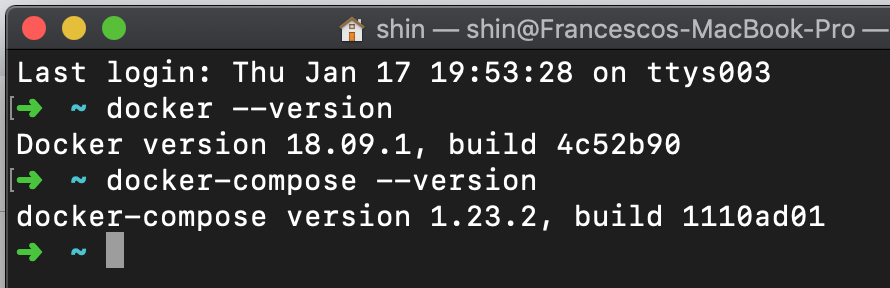
@Nephelion can you provide the versions of your docker, docker-compose and Docker Desktop?
Those are mine:

FrancescoBorzi
on 17 Jan 2019
C:\WINDOWS\system32>docker --version
Docker version 18.09.1, build 4c52b90
C:\WINDOWS\system32>docker-compose --version
docker-compose version 1.23.2, build 1110ad01

Nephelion
on 17 Jan 2019
try copy db_assembler.sh
COPY db_assembler.sh /azerothcore/apps/db_assembler/db_assembler.sh
then run it
RUN ./db_assembler.sh 1
but
Step 8/13 : COPY db_assembler.sh /azerothcore/apps/db_assembler/db_assembler.sh Service 'ac-database' failed to build: COPY failed: stat /var/lib/docker/tmp/doc ker-builder715175190/db_assembler.sh: no such file or directory
and found something for runing .sh files
RUN sh ./azerothcore/bin/acore-db-asm 1
but
Step 9/12 : RUN sh ./azerothcore/bin/acore-db-asm 1 ---> Running in a00da849c23a : not foundre/bin/acore-db-asm: line 2: ./azerothcore/bin/acore-db-asm: line 3: syntax error: bad substitution : not foundre/bin/acore-db-asm: line 4: ': No such file or directoryembler.she: line 5: can't open '/ Service 'ac-database' failed to build: The command '/bin/sh -c sh ./azerothcore/ bin/acore-db-asm 1' returned a non-zero code: 2
and something found about
[#!/bin/sh at the beggining of the shell script.]
maybe help
please share a discord @FrancescoBorzi
Nephelion
on 17 Jan 2019
@Nephelion so we have the exact same versions
https://discordapp.com/channels/217589275766685707/284406375495368704
let's discuss it tomorrow or this weekend
FrancescoBorzi
on 18 Jan 2019
@Nephelion have you tried to "Switch to Linux Containers" ?
https://docs.docker.com/docker-for-windows/#switch-between-windows-and-linux-containers
FrancescoBorzi
on 18 Jan 2019
no i dont switch linux
but i delet docker and use old install steps [Traditional setup]
Nephelion
on 18 Jan 2019
@Nephelion I meant the Docker Desktop settings... I didn't mean changing your operating system..
FrancescoBorzi
on 18 Jan 2019
@FrancescoBorzi last commit 62b0568 compile complete but Error docker-compose up
error
http://pasted.co/4d377553i love docker
but i think must use old install steps
I'm having this same issue, I'm at this exact point - I'm currently at commit: 2729b35bb378f16a
 mhhussain
on 19 Jan 2019
mhhussain
on 19 Jan 2019
@mhhussain thanks for the report. What operating system do you use ?
FrancescoBorzi
on 19 Jan 2019
I’m on a fresh install of win-10 64 bit.
mhhussain
on 19 Jan 2019
@Nephelion @mhhussain the issue with Docker on Windows has been fixed. Thank you very much for reporting this issue.
In your case, you need to clean up your environment and restart the install procedure again.
- Delete the
azerothcore-wotlksources directory - Stop all docker containers
docker-compose down - Delete all docker images on your system & reset docker
docker system prune -a
Then start again following the Docker setup instructions.

FrancescoBorzi
on 22 Jan 2019
Related issues
 lineagedr
·
3Comments
lineagedr
·
3Comments
 CyberFoxHax
·
3Comments
CyberFoxHax
·
3Comments
 wowissues
·
3Comments
wowissues
·
3Comments
 Wokwer
·
4Comments
Wokwer
·
4Comments
 wetbrownsauce
·
3Comments
wetbrownsauce
·
3Comments
Most helpful comment
@Nephelion @mhhussain the issue with Docker on Windows has been fixed. Thank you very much for reporting this issue.
In your case, you need to clean up your environment and restart the install procedure again.
azerothcore-wotlksources directorydocker-compose downdocker system prune -aThen start again following the Docker setup instructions.