Azerothcore-wotlk: Vmaps | Mmaps | Recastnav and FleeingMovement
STEPS TO REPRODUCE THE PROBLEM:
- run Server for 10 characters
- inv group ,go DF , if die can't load graveyard for revive
- inv group. join BG, dismount don't work in place's must dis
- portal after use for again use not work and dissapper
- Some spells for characters have problem (sorry , spells sum pet's)
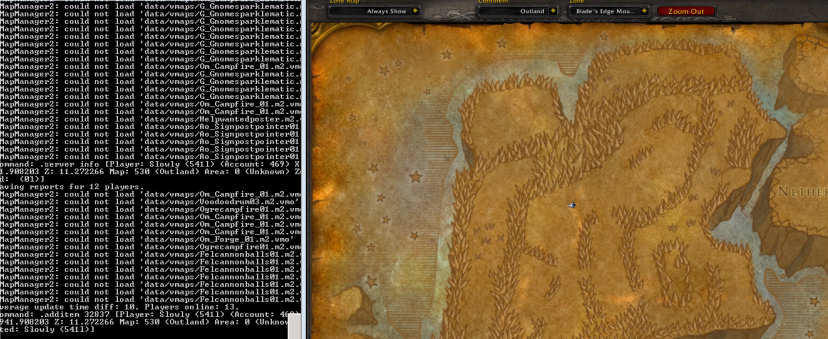
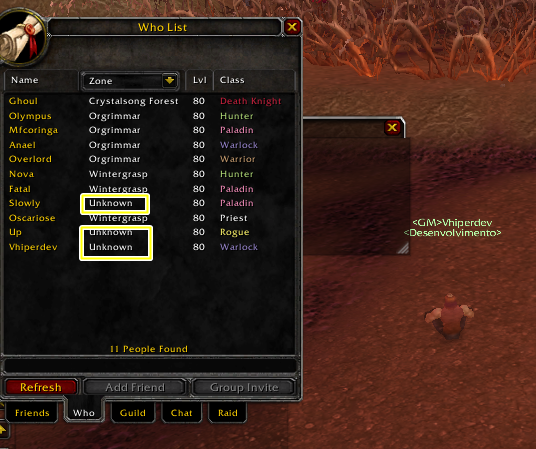
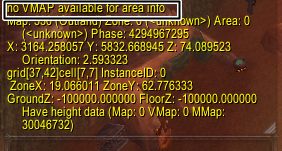
- Some characters show unknow Zone map
- And ...
Test With 40 characters , Without modules
maybe problems is for this commit e772b08c6808bae29db96ed2f51ee5b34d768da4
BRANCH(ES):
master
AC HASH/COMMIT:
8767372ebfad4713d3e8b60a5331ee1f705cc267
OPERATING SYSTEM:
Win 10, 7 & Ubuntu 16
MODULES:
OTHER CUSTOMIZATIONS:
 SoulBasementGc
All 30 comments
Some spells for characters have problem
helpful
 BarbzYHOOL
on 18 Jul 2018
BarbzYHOOL
on 18 Jul 2018
Hmm, you need to reextract the mmaps and vmaps because we changed them again and didn't upload them yet
BarbzYHOOL
on 18 Jul 2018
@BarbzYHOOL
I extracted these maps 7-18-2018.
https://mega.nz/#!A3ISTICZ!IqhgC7AqlCvIJaFeFjsN35iJW_8WinOMbVuRi9J5NMc
But, I don't think the worldserver would load with incorrect maps. (I have not confirmed the issue yet)
 dunjeon
on 18 Jul 2018
dunjeon
on 18 Jul 2018
for this particular case yes because the maps number hasn't been increased (maybe a mistake)
BarbzYHOOL
on 18 Jul 2018
I confirm this, even with new maps extracted these errors still continues
 devfrom
on 19 Jul 2018
devfrom
on 19 Jul 2018
Worldserver Can't load maps so unknow Zone in maps , If this problem is re-created, the data maps must be replaced with the new data card as it is damaged .
These problems are very clear and bug the whole system.
Now you can see that most of the issues that are being republished are on the maps side of the story.
Despite this problem, no fixed fixes remain .
It is not possible to view this problem by testing a character , With revert this comment e772b08c6808bae29db96ed2f51ee5b34d768da4, the problem will be fixed or the comment will be reviewed and corrected
SoulBasementGc
on 20 Jul 2018
@BarbzYHOOL @Stoabrogga @FALL1N1
I confirm this problem.
below some images to be analyzed.

 vhiperdev
on 20 Jul 2018
vhiperdev
on 20 Jul 2018
@vhipercode thank you.
This issue is important and has created a very bad challenge
SoulBasementGc
on 20 Jul 2018
Sorry, but I cannot reproduce the errors. I compiled the core including the tools (commit 8767372ebfad4713d3e8b60a5331ee1f705cc267, Ubuntu 16.04):
cmake ../ -DCMAKE_INSTALL_PREFIX=/home/testuser/server/ -DTOOLS=1 -DSCRIPTS=1
make -j 2
make install
extracted everything again to build up a new "data" directory:
~/server/bin/mapextractor
mkdir ~/server/data
cp -r dbc maps ~/server/data
~/server/bin/vmap4extractor
mkdir vmaps
~/server/bin/vmap4assembler Buildings vmaps
cp -r vmaps ~/server/data
mkdir mmaps
~/server/bin/mmaps_generator
cp -r mmaps ~/server/data
I can only test alone, though, but don't see any errors in the server log.
 ghost
on 20 Jul 2018
ghost
on 20 Jul 2018
Can someone clearly explain how to reproduce that issue??? damn you guys think it's going to be magically fixed or what?? @SoulBasementGc @devfrom @vhipercode
BarbzYHOOL
on 20 Jul 2018
I am unable to confirm. Like Stoabrogga, I was only able to test solo, but my logs are clean.
The error report is a little hard to track so I tested it the best I could. (My test server was built with windows 10 x64 running on windows server 2012.
dunjeon
on 21 Jul 2018
Delay my last. While testing Kelthuzad, I can confirm a zone Unknown error log says:
Command: .die [Player: Dunjeon (2l) (Account: 11) X: 3719.723633 Y: -5109.121582 Z: 141.288605 Map: 533 (Naxxramas) Area: 3456 (Naxxramas) Zone: Unknown Selected: Soldier of the Frozen Wastes (2026316l)]
EDIT: This 'error' is likely unrelated, but the issue report is confusing and I don't want to discredit anyone.
dunjeon
on 21 Jul 2018
Can't confirm this - Tested mentioned maps and etc, but everything works fine for me.
Maybe you had error if you extracted your own maps - Try using one Talamortis uploaded.
 Knindzagxg
on 21 Jul 2018
Knindzagxg
on 21 Jul 2018
@Knindzagxg How did you test?!!! . This is a complete problem inside the WordServer. Also inside the game , solo test is not suitable for appearing, please correct test.
SoulBasementGc
on 21 Jul 2018
Was checking mentioned maps while monitoring WS -> Had 0 errors during that.
Also, no "Unknown" part for while on any map (O option)
Knindzagxg
on 21 Jul 2018
@Knindzagxg test with 10 or more players
vhiperdev
on 22 Jul 2018
@Knindzagxg with a player test , There is no specific map for this problem and there is no problem with the start server.
You join Dungeon with 5 characters in a group after some time you can see or 10 characters online and move maps so Unknown
SoulBasementGc
on 22 Jul 2018
I confirm this, even with new maps extracted these errors still continues
2018-07-22 12:29:45 ERROR: VMapManager2: could not load 'data/vmaps/Sholazar_Crystal_07.m2.vmo'
2018-07-22 12:29:45 ERROR: VMapManager2: could not load 'data/vmaps/Sholazar_Crystal_07.m2.vmo'
2018-07-22 12:30:18 ERROR: VMapManager2: could not load 'data/vmaps/He_Tent_01.m2.vmo'
2018-07-22 12:30:24 ERROR: VMapManager2: could not load 'data/vmaps/Titanchest_Noanim.m2.vmo'
2018-07-22 12:38:10 ERROR: VMapManager2: could not load 'data/vmaps/Wg_Wall01C.wmo.vmo'
2018-07-22 12:38:45 ERROR: VMapManager2: could not load 'data/vmaps/Wg_Wall01D.wmo.vmo'
 btechn01
on 22 Jul 2018
btechn01
on 22 Jul 2018
Confirm!
ghost
on 23 Jul 2018
4 people said there is no bug though
can someone tell exact steps?
BarbzYHOOL
on 23 Jul 2018
I just want to point a few things out on why these errors are here, but need to confirm some things here.
1) What version of TrinityCore is you guys merge the tools and map updates from?
2) Why are there different versions of maps used in the tools, from different commits made?
Just wanted to point some of the main issue that will cause these issues. Also, I was testing this project with some thing and while in the world server, I was seeing loads of issues with VMaps not loading in zones/areas.
By comparing some of the commits for these updates, it appears these were taken from 7.2.x Tool/Map update from TrinityCore instead of 3.3.5a.
 Meltie2013
on 23 Jul 2018
Meltie2013
on 23 Jul 2018
I took the modifications from 3.3.5:
Original PR: #926 (see AC commit a18d1474a3691f34b763925ff2cc922828394e42)
TC commits from where I took over the changes:
https://github.com/TrinityCore/TrinityCore/commit/c35793941b3aae9b54dce92389aa528d40050754
https://github.com/TrinityCore/TrinityCore/commit/89d641f1e68d11359a2398ff51d3d6eee1470ae8
https://github.com/TrinityCore/TrinityCore/commit/f8fd0b7a2c0a9acd084f011c614d529e49397479
https://github.com/TrinityCore/TrinityCore/commit/7ef22e43057080926685eb45f0fce3f2f3d58c61
Because of an issue affecting Wintergrasp (#972 ) I created a second PR #976 (see AC commit 8e9faf848865769d8e1d851889f04eae07fb976a) which reverted the WMO changes from the first two TC commits mentioned:
https://github.com/TrinityCore/TrinityCore/commit/c35793941b3aae9b54dce92389aa528d40050754
https://github.com/TrinityCore/TrinityCore/commit/89d641f1e68d11359a2398ff51d3d6eee1470ae8
So effectively only changes from these two TC commits are currently active in AC:
https://github.com/TrinityCore/TrinityCore/commit/f8fd0b7a2c0a9acd084f011c614d529e49397479
https://github.com/TrinityCore/TrinityCore/commit/7ef22e43057080926685eb45f0fce3f2f3d58c61
ghost
on 23 Jul 2018
@dunjeon the issue you reported is already there BEFORE stoabrogga's commits so not related (still an issue)
BarbzYHOOL
on 23 Jul 2018
I tested myself and I see 0 issue... this feels like a conspiracy
BarbzYHOOL
on 23 Jul 2018
Confirm problem,
Edit: I test with area quest Zone DK , area zone Unkonw and all quest bug and after Some time
4e27109
 DeActiver
on 24 Jul 2018
DeActiver
on 24 Jul 2018
Still 0 issues for me.
Wasn't lazy so did full test on DK chain quests and had only 1 error inside my log - SAI wise.
2018-07-24 13:11:42 ERROR: Vehicle GuidLow: 2027917, Entry: 28670 attempts to uninstall, but already has STATUS_UNINSTALLING! Check Uninstall/PassengerBoarded script hooks for errors.
Full preview of quests and as i said above, i had 0 issues with maps, grip or quests itself.
I'm guessing you guys extracted your own maps, and from what i heard, you had some RAM issues as well. Try to download maps which Tala updated few days ago.


Knindzagxg
on 24 Jul 2018
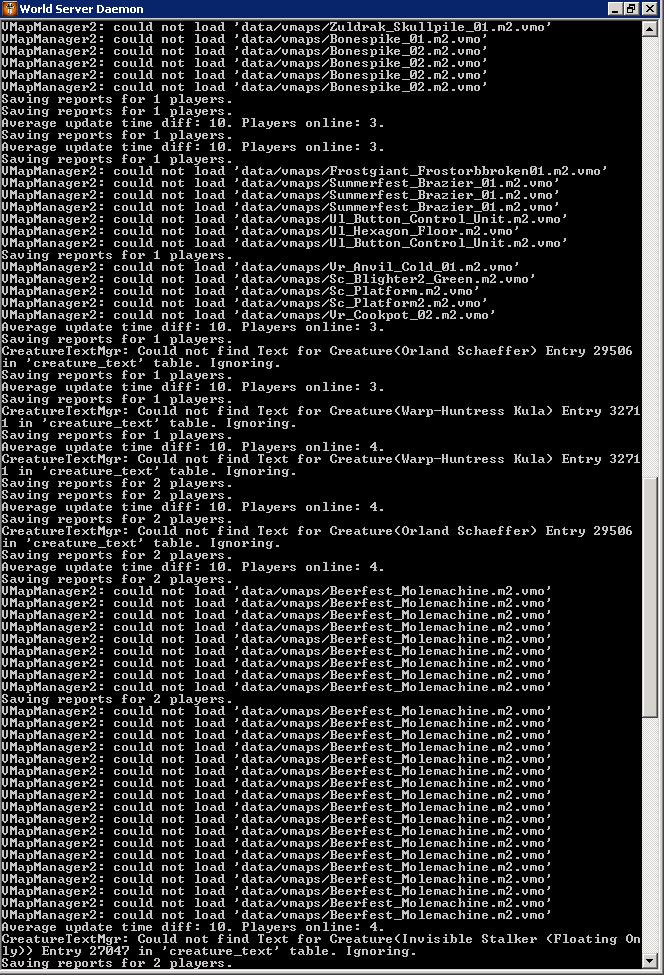
You still keep insisting that there is no mistake, and that has been done several tests, understand that the error is linked in the vmapas.
the error in the worldserver log does not stay all the time, it pops up a few times.
because of the error being in the vmaps it is as if certain maps were not extracted so this map is not loaded in the game, so the reason to appear (Zone Unknown) and players can not explore maps and gain experience in them is because of this.
It is no use to want to inform that there is no mistake, because it has. there's no use wanting to test for a few minutes alone that nothing appears.
I have tested it several times in the clean source code, with new maps extracted and the error still continues.
@BarbzYHOOL @Stoabrogga
I urge you to remove the modifications that have been made to TrinityCore and correct these errors after correcting this you can place in the official repository.
devfrom
on 24 Jul 2018
Been checking / running trough mentioned zones to see will i get any error ... Still nothing.
Knindzagxg
on 24 Jul 2018
I urge you to remove the modifications that have been made to TrinityCore and correct these errors after correcting this you can place in the official repository.
You urge us nothing especially if you really don't know what you're talking about. Nobody clearly showed us how to reproduce the issue.
We all spent a lot of time testing this issue, Knindza just tried to load the "wmo" in your screenshot and it worked fine, so I'm closing this issue because nothing has been proven.
BarbzYHOOL
on 24 Jul 2018
Sorry I know this is a closed report however:
I was experiencing this issue too and finally found that it was related to creature_template table. I am still trying to figure out what has changed in the table to break it. That said once you start using a fresh world it fixes the above issue.
 Swiftsmoke
on 25 Jul 2018
Swiftsmoke
on 25 Jul 2018
Related issues
 wowissues
·
3Comments
wowissues
·
3Comments
 CyberFoxHax
·
3Comments
CyberFoxHax
·
3Comments
 fragcamp
·
4Comments
fragcamp
·
4Comments
 lineagedr
·
3Comments
lineagedr
·
3Comments
 aradep
·
3Comments
aradep
·
3Comments