Axe-core: Add support for SVG images
We do not handle SVG images correctly at the moment, need to be able to calculate the accessible name correctly for inline SVG and report when not present.
 dylanb
All 46 comments
I remember looking into this a while ago; there did not seem to be a consensus as to the proper or recommended way to add alt-text to inline SVG images.
Needs research and specification.
 dsturley
on 16 Jun 2015
dsturley
on 16 Jun 2015
@dylanb Can you define some requirements for this? Browser support is flaky and I didn't see a definite answer from the specifications.
dsturley
on 9 Sep 2015
deferring until better browser support
dylanb
on 29 Jan 2016
Looking for help to document what portions of the accessible name calculation work properly for svg images (both inline and referenced via a src attribute on an <img> element.
Platforms that need to be supported are:
- NVDA and FF on Windows (7 or 10)
- JAWS and IE on Windows (7 or 10)
- Safari VO on OS X latest
- Safari and VO on iOS latest
- Firefox and Talkback on Android
- Chrome and Talkback on Android
dylanb
on 22 Feb 2017
http://www.stommepoes.nl/work/firefox_svg.html This is a bit special because it's using a sprite and they're not nested. Would be great if mobile users could test these (I don't own an Android nor an iThing).
 StommePoes
on 4 Mar 2017
StommePoes
on 4 Mar 2017
@StommePoes could you add a failing example to that page? There are two types we need:
- An inline SVG image without any alt,
- An
<img>element that references an SVG image
dylanb
on 6 Mar 2017
Yes.
StommePoes
on 10 Mar 2017
This page has interesting data about support http://simplyaccessible.com/article/7-solutions-svgs/
dylanb
on 17 Mar 2017
Re that link ^ for Windows High Contrast, we've been avoiding inline fill colours and instead have set it that the SVGs fill in CSS equals "currentColor" and that it must have a parent wrapped around it with a set color: someAccessibleColor. When our text colours change on WHC settings, the SVG should follow suit.
Setting a background for when we cannot do that is a good idea though.
StommePoes
on 17 Mar 2017
@StommePoes example pretty please...
dylanb
on 19 Mar 2017
Of using currentColor? Sure.
StommePoes
on 21 Mar 2017
Southwest Airlines uses svg for images sometimes. See example in footer of the Southwest Cargo logo/link on www.southwest.com of /assets/images/globalnav/logos/swa_footer_logo_swa_cargo.svg
 goodwitch
on 26 Jun 2017
goodwitch
on 26 Jun 2017
@goodwitch That example clearly shows how SVG is currently not supported.
I have created this variant of the code http://dylanb.github.io/SVG/southwest.html There are two almost identical markups - except in the one instance the role="img" is attached to the <svg> element and in the other case, to the enclosing <div>.
In the case of the <svg> element, the role is completely ignored by Safari (iOS and OS X), in the case of the <div> it is correctly exposed.
dylanb
on 26 Jun 2017
Good examples of SVG with notes on current support by browsers https://weboverhauls.github.io/demos/svg/ Thanks to @weboverhauls
dylanb
on 4 Jul 2017
Paciello Group have a good article on this:
https://www.paciellogroup.com/blog/2013/12/using-aria-enhance-svg-accessibility/
The "ARIA enhanced SVG accessibility" method appears to have full browser/screen reader support:
<svg xmlns=http://www.w3.org/2000/svg role="img" aria-labelledby="title  desc">
   <title id="title">Circle</title>
   <desc id="desc">Large red circle with a black border</desc>
   <circle role="presentation" cy="60" r="55" stroke="black" stroke-width="2"
   fill="red" />
</svg>
 jacksleight
on 30 Aug 2017
jacksleight
on 30 Aug 2017
Jack: except with JAWS on *FF, I never hear these. EDIT (It was FF, not IE, where I could not hear otherwise properly written SVGs even with the aria-labellebdy hack)
Dylan (had forgotten about this):

StommePoes
on 31 Aug 2017
@jacksleight That example is exactly the same as one of the ones that @weboverhauls has on his test page that is shown not to work properly with VO
dylanb
on 31 Aug 2017
@dylanb @weboverhauls Ah OK, my mistake. Saw the compatibility table on paciellogroup.com and assumed it was right (don't have a Windows box to test on currently). Never mind.
jacksleight
on 31 Aug 2017
Well, the example by @StommePoes is within a button element so results may vary, who knows! I'll need to add button use cases to my test page.
 weboverhauls
on 31 Aug 2017
weboverhauls
on 31 Aug 2017
For me it's the same for all icons, it's just that at my job they're almost always inside buttons, otherwise they're decorative. Silent with JAWS on FF but I could hear with NVDA in FF, I did file a bug on the button not getting the acc name from the SVG as it should and so have been using aria-label, but I'm not using aria-label on the SVGs that are "loose" (I guess I could since we're giving them the img role, but I'd rather be able to just use the <title> like we're supposed to).
I can't tell if it's a JAWS thing or an FF thing.
StommePoes
on 1 Sep 2017
Thanks for the info @StommePoes. I added test cases for buttons with SVG content to my test page. I believe it reproduces the issue with JAWS you mentioned (see second test under Buttons).
https://weboverhauls.github.io/demos/svg/#buttons
weboverhauls
on 2 Sep 2017
Thanks @weboverhauls yeah we have some QA testers with more versions of JAWS and they're still getting it too (I'd been hoping it was maybe a JAWS thing and that 18 would fix this... Jamie from NVDA said he's not diving into the DOM for SVGs in buttons despite the Firefox bug being an actual bug). I'm starting to think I should just have all our devs not follow my code but use aria-label all over the place since icon-buttons are designers' fave things around here :/
StommePoes
on 4 Sep 2017
We have a bug about this down in Lighthouse: https://github.com/GoogleChrome/lighthouse/issues/2425
Should we just exclude SVGs from the results for now? (Or should you?)
 paulirish
on 13 Oct 2017
paulirish
on 13 Oct 2017
@paulirish There is some test data in this thread that suggests svg titles isn't fully supported yet. I don't know about svg alt. If you can provide data showing otherwise we can certainly add it to aXe. We generally don't add things to axe-core until they are well supported, so without evidence to the contrary, I think aXe should keep treating this as an error.
 WilcoFiers
on 13 Oct 2017
WilcoFiers
on 13 Oct 2017
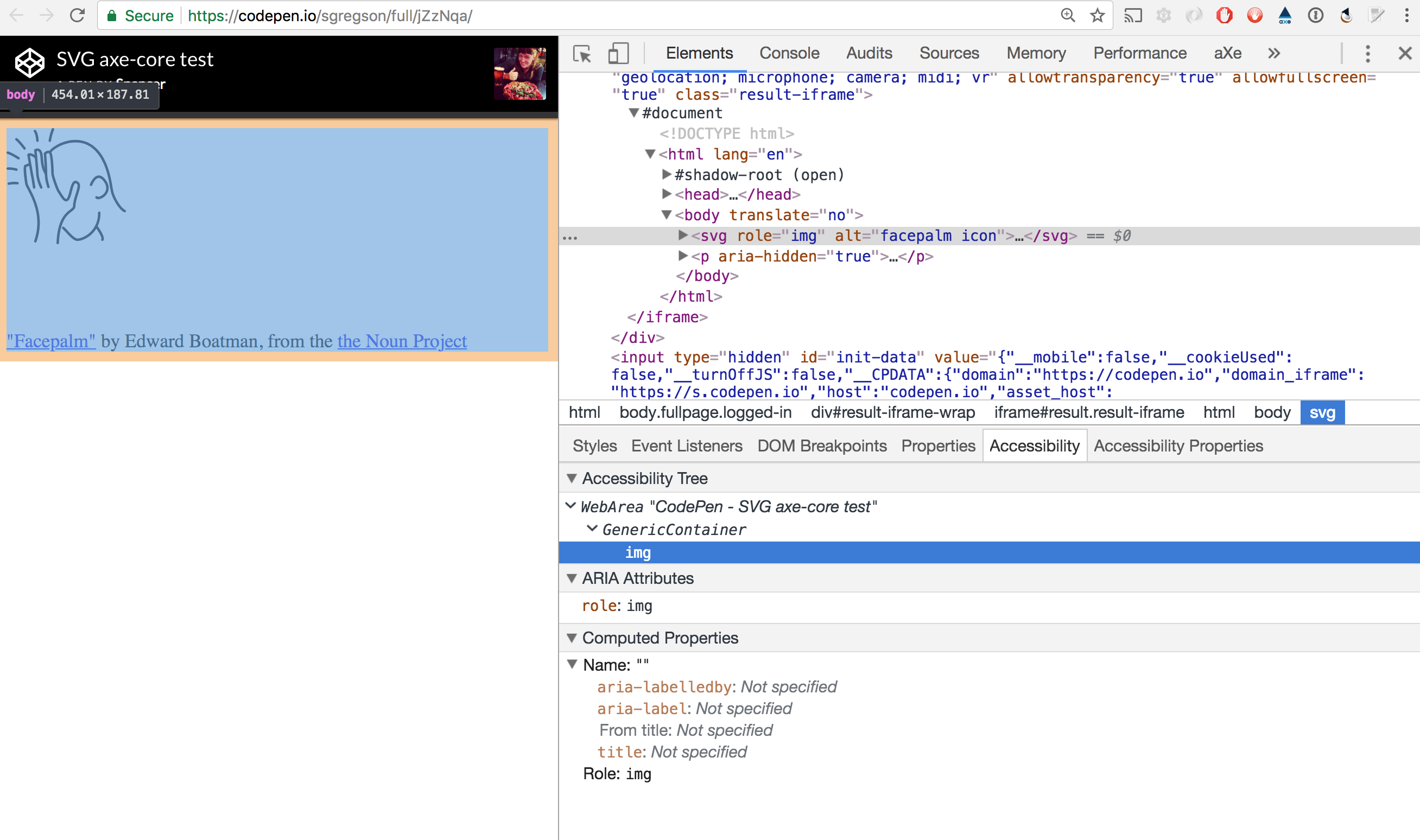
Would it be possible to get #683 cherry-picked into the stable aXe extension channel as a patch version? The current experience seems rather broken as the issue citation isn't internally consistent with the markup cited.
Example
Stable aXe extension run against https://codepen.io/sgregson/full/jZzNqa/

 sgregson
on 19 Feb 2018
sgregson
on 19 Feb 2018
@sgregson the alt attribute doesn't expose an accessible name on an SVG element even with role="img", so that markup won't ever work. However, the change you're referencing was released as part of axe-core 3.0.0-beta.1 today. You'll have to wait for an extension release.
 marcysutton
on 19 Feb 2018
marcysutton
on 19 Feb 2018
sorry for the delay, thanks for the feedback @marcysutton !
sgregson
on 21 Feb 2018
I've been working on a test for this - but until my outstanding editorial PR is dealt with, hopefully today, I won't publish. (I wasn't thinking carefully and mixed two branches. I don't think it is worth trying to disentangle it all properly, since just waiting half a day or so should save that work at no appreciable cost).
At the moment it looks at inline SVG (where the img element is used to bring in an SVG, the normal tests for that element apply). The test warns of a problem unless it finds one of:
- A
titlechild of thesvgitself aria-labelledby(using an existing test)role="presentation"on thesvgelement, under the assumption that means no alternative is needed- a single
textelement, under the assumption that while multipletextelements means there is something else to understand, a single one represents a styling effect, e.g. for a button, and the content oftextelements is exposed.
In any event it most obviously needs to check for an aria-label attribute. It also makes sense to fit the rule, or the checks, into one that tests if the image is inside a figure that has a figcaption.
 chaals
on 26 Mar 2018
chaals
on 26 Mar 2018
OK, I have a Rule, and a dozen integration tests. The rule determines whether an SVG (e.g. inline or standalone) provides an alternative for the image as a whole. The checks pass if any of the following are true:
- There is a
titleelement as a direct child of thesvgelement, which may have no text content as an equivalent toalt="". Atitledescendant, that is a child of something else deeper in the tree does not cause the test to pass, since that might be a deeper explorable structure. - There is an
aria-labelledbyattribute that points to something (re-uses the existing check for this). - There is
role="none"orrole="presentation"on thesvgelement (using existing checks). - The
svgelement has anaria-labelattribute - which can have an empty value. - There is a single
textelement as a descendant of thesvg.tspanchildren of thetextelement have no impact on the outcome.
I have integration tests for these, and I am working them into the right shape.
So,
- Should I continue down this path to a Pull Request for an SVG-specific test? (In the medium-term I think it makes sense to refactor the rules for text alternatives, but that can be done later using the checks, and trying them on reality for a while isn't a bad first step IMHO)
- Is there a test I should do differently for real-world compat?
chaals
on 28 Mar 2018
@chaals in order to pass any rule, we must show that it passes markup that is "accessibility supported", to do this we have to validate that the same markup works in all the combinations listed here: https://github.com/dequelabs/axe-core/blob/develop/doc/accessibility-supported.md
Have you validated that all of the above work in all these combinations?
dylanb
on 1 Apr 2018
Not yet, since I am still working from memory of what actually works, and checking whether the rough approach seems OK before sinking a whole lot more time into it.
When I next have some time I'll set up the tests properly (I has them, but I'm busy this week).
chaals
on 2 Apr 2018
FYI: Updated my test page with TalkBack/Chrome & latest NVDA/FFX https://weboverhauls.github.io/demos/svg/
weboverhauls
on 3 Apr 2018
@weboverhauls Why did you fail the VO with Chrome on this markup
<p><img src="checkmark.svg" width="50" alt="checkmark"></p>
For me it reads the alt attribute but gets the role wrong. I would count this as minimally passing on the alt text at least.
Update: does not work on iOS with VoiceOver - could you add operating system to your test matrix?
dylanb
on 3 Apr 2018
Can you check again Dylan? VO testing thus far is only on Safari 11.
weboverhauls
on 3 Apr 2018
@weboverhauls sorry - check what?
dylanb
on 3 Apr 2018
There should be no test results for VO with Chrome so far.
PS: added JAWS 18/IE 11 results--all pass, as did TalkBack/Chrome!
weboverhauls
on 3 Apr 2018
are you testing VO on iOS?
dylanb
on 3 Apr 2018
On OSX. Will work to add iOS and clarify OS.
weboverhauls
on 3 Apr 2018
There is new work in the WAI-ARIA group that relates to this, we need to track support for this https://www.w3.org/TR/graphics-aria-1.0/
dylanb
on 25 Oct 2018
rule help infrastructure in place 1/27/2020
 jeankaplansky
on 28 Jan 2020
jeankaplansky
on 28 Jan 2020
Release notes and rule content in place 2/03/2020
jeankaplansky
on 4 Feb 2020
"svg-img-alt" rule checking the svg elements with role=graphics-document, role=img and role=graphics-symbol through ARIA label, the title attribute or by having a non-empty child title element.
This rule limits the role-img-alt rule to elements in the HTML namespace to avoid overlap with the svg-img-alt rule.


 padmavemulapati
on 7 Feb 2020
padmavemulapati
on 7 Feb 2020
Hello, I have a related problem like the last message, the axe extension is returning error for nodes with role="graphics-document", I'm getting the ARIA roles used must conform to valid values issue. Is it something not supported ?. Thank you.
 devniel
on 23 May 2020
devniel
on 23 May 2020
Hi @devniel that role does not appear to be an authorable role. If I go by this list: https://www.w3.org/WAI/PF/aria/roles notice it's not listed. So I think it makes sense that aXe would complain; this doesn't look like a valid role --for web developers to use--.
graphics-document appears to be an internal AAM-used role for browsers to know where to expose things. SVGs have been voted to be graphics-document by default, which I read in a Github issue is considered to be a type of document, while in a webkit ticket I saw Apple was committing to eventually exposing at least inline SVGs as images (Apple exposed them as "group"). Firefox exposed SVGs as "diagram" for years but I saw on an old ticket that they've changed this too?
If you want your SVGs to expose themselves as images to AT esp for (older) Safari, use role="img" if they're inside image tags (<img src="foo.svg" alt="foo">) otherwise, for inline SVG (<svg.../>) leave it with no specified role.
StommePoes
on 25 May 2020
Here's the graphics-document role from the WAI-ARIA Graphics Module specification (Oct 2018), which has very limited browser/AT support as far as I know.
https://www.w3.org/TR/graphics-aria-1.0/#role_definitions
weboverhauls
on 25 May 2020
While I've been quick to roll my eyes at developers complaining that "accessibility is hard", I'm absolutely willing to go to bat for developers who try to look up a list of roles only to miss completely that there are other lists of roles elsewhere that they would never have thought to go looking for. That whole "role" section appears to list all roles:
Roles are categorized as follows:

1. Abstract Roles
2. Widget Roles
3. Document Structure Roles
4. Landmark Roles
5. Live Region Roles
6. Window Roles
...with no mention of a separate "graphics roles" list.
Not aXe's fault and not the place to complain about it, but it's pretty frustrating.
StommePoes
on 26 May 2020
Related issues
 Seirdy
·
5Comments
Seirdy
·
5Comments
 keeganbrown
·
4Comments
keeganbrown
·
4Comments
 JoshuaKGoldberg
·
5Comments
JoshuaKGoldberg
·
5Comments
 straker
·
5Comments
straker
·
5Comments
 cycomachead
·
6Comments
cycomachead
·
6Comments
Most helpful comment
http://www.stommepoes.nl/work/firefox_svg.html This is a bit special because it's using a sprite and they're not nested. Would be great if mobile users could test these (I don't own an Android nor an iThing).