awx 11.2 : unable to sync vmware vcenter inventory
ISSUE TYPE
- Bug Report
SUMMARY
Upon upgrading from 11 to 11.2 I no longer able to sync my vcenter dynamic inventory objects within the GUI.
ENVIRONMENT
- AWX version: 11.2.0
- AWX install method: docker
- Ansible version: ansible-2.9.7-1.el8.noarch
- Operating System: RHEL 8
- Web Browser: Chrome, Firefox, IE
STEPS TO REPRODUCE
When running the job for vmware inventory sync the job is failling with "ERROR! No inventory was parsed, please check your configuration and options."
EXPECTED RESULTS
The expected outcome should reflect successful and the inventory should get updated from vcenter objects.
ACTUAL RESULTS
2.030 INFO Updating inventory 4: vCenter-DI
2.452 INFO Reading Ansible inventory source: /tmp/awx_1072_i0i4h5_1/vmware_vm_inventory.yml
2.454 INFO Using VIRTUAL_ENV: /var/lib/awx/venv/ansible
2.454 INFO Using PATH: /var/lib/awx/venv/ansible/bin:/var/lib/awx/venv/awx/bin:/usr/pgsql-10/bin:/usr/local/sbin:/usr/local/bin:/usr/sbin:/usr/bin:/sbin:/bin
2.454 INFO Using PYTHONPATH: /var/lib/awx/venv/ansible/lib/python3.6/site-packages:
Traceback (most recent call last):
File "/var/lib/awx/venv/awx/bin/awx-manage", line 8, in
sys.exit(manage())
File "/var/lib/awx/venv/awx/lib/python3.6/site-packages/awx/__init__.py", line 152, in manage
execute_from_command_line(sys.argv)
File "/var/lib/awx/venv/awx/lib/python3.6/site-packages/django/core/management/__init__.py", line 381, in execute_from_command_line
utility.execute()
File "/var/lib/awx/venv/awx/lib/python3.6/site-packages/django/core/management/__init__.py", line 375, in execute
self.fetch_command(subcommand).run_from_argv(self.argv)
File "/var/lib/awx/venv/awx/lib/python3.6/site-packages/django/core/management/base.py", line 323, in run_from_argv
self.execute(args, *cmd_options)
File "/var/lib/awx/venv/awx/lib/python3.6/site-packages/django/core/management/base.py", line 364, in execute
output = self.handle(args, *options)
File "/var/lib/awx/venv/awx/lib/python3.6/site-packages/awx/main/management/commands/inventory_import.py", line 1139, in handle
raise exc
File "/var/lib/awx/venv/awx/lib/python3.6/site-packages/awx/main/management/commands/inventory_import.py", line 1029, in handle
venv_path=venv_path, verbosity=self.verbosity).load()
File "/var/lib/awx/venv/awx/lib/python3.6/site-packages/awx/main/management/commands/inventory_import.py", line 215, in load
return self.command_to_json(base_args + ['--list'])
File "/var/lib/awx/venv/awx/lib/python3.6/site-packages/awx/main/management/commands/inventory_import.py", line 198, in command_to_json
self.method, proc.returncode, stdout, stderr))
RuntimeError: ansible-inventory failed (rc=1) with stdout:
stderr:
ansible-inventory 2.9.7
config file = /etc/ansible/ansible.cfg
configured module search path = ['/var/lib/awx/.ansible/plugins/modules', '/usr/share/ansible/plugins/modules']
ansible python module location = /usr/lib/python3.6/site-packages/ansible
executable location = /usr/bin/ansible-inventory
python version = 3.6.8 (default, Nov 21 2019, 19:31:34) [GCC 8.3.1 20190507 (Red Hat 8.3.1-4)]
Using /etc/ansible/ansible.cfg as config file
with auto plugin: Invalid empty host name provided: None
File "/usr/lib/python3.6/site-packages/ansible/inventory/manager.py", line 280, in parse_source
plugin.parse(self._inventory, self._loader, source, cache=cache)
File "/usr/lib/python3.6/site-packages/ansible/plugins/inventory/auto.py", line 58, in parse
plugin.parse(inventory, loader, path, cache=cache)
File "/var/lib/awx/vendor/inventory_collections/ansible_collections/community/vmware/plugins/inventory/vmware_vm_inventory.py", line 606, in parse
cacheable_results = self._populate_from_source()
File "/var/lib/awx/vendor/inventory_collections/ansible_collections/community/vmware/plugins/inventory/vmware_vm_inventory.py", line 689, in _populate_from_source
self._populate_host_properties(host_properties, host)
File "/var/lib/awx/vendor/inventory_collections/ansible_collections/community/vmware/plugins/inventory/vmware_vm_inventory.py", line 720, in _populate_host_properties
self.inventory.add_host(host)
File "/usr/lib/python3.6/site-packages/ansible/inventory/data.py", line 230, in add_host
raise AnsibleError("Invalid empty host name provided: %s" % host)
inventory source
ERROR! No inventory was parsed, please check your configuration and options.
ADDITIONAL INFORMATION
No additional details as provided.
 lgrullon-gilead
All 33 comments
We are experiencing the same problem. The error only occurs on one inventory though and is consistent (the inventory hasn't successfully synced since the update).
The main problem seems to be:
Failed to parse /tmp/awx_6730_ke6qpmjv/vmware_vm_inventory.yml
with auto plugin: Invalid empty host name provided: None
Here's the contents of the /tmp/awx_6730_ke6qpmjv directory during execution if it's of any help:
tmp.zip
We updated from 9.1.0 and are running in docker on top of OEL 8. Creating a new inventory with the same source results in the same problem. Vcenter version is 6.7.0 and my guess is that it's specific to the content or name of one of the hosts. Running ansible-inventory with the vmware plugin succeeds outside AWX.
 zigaSRC
on 18 May 2020
zigaSRC
on 18 May 2020
I'm experiencing the same issue, but for us if we setup a new vmWare inventory it does give the same error, does not matter which vmWare cluster we try or host it's always the same error:
File "/usr/lib/python3.6/site-packages/ansible/inventory/data.py", line 230, in add_host
    raise AnsibleError("Invalid empty host name provided: %s" % host)
inventory source
ERROR! No inventory was parsed, please check your configuration and options.
 mYzk
on 18 May 2020
mYzk
on 18 May 2020
We are experiencing the same problem. The error only occurs on one inventory though and is consistent (the inventory hasn't successfully synced since the update).
The main problem seems to be:
Failed to parse /tmp/awx_6730_ke6qpmjv/vmware_vm_inventory.yml
with auto plugin: Invalid empty host name provided: None
Here's the contents of the /tmp/awx_6730_ke6qpmjv directory during execution if it's of any help:
tmp.zipWe updated from 9.1.0 and are running in docker on top of OEL 8. Creating a new inventory with the same source results in the same problem. Vcenter version is 6.7.0 and my guess is that it's specific to the content or name of one of the hosts. Running ansible-inventory with the vmware plugin succeeds outside AWX.
I am spinning around trying to find the answer for this one, I had this working flawlessly and suddenly the new update appears to be incompatible with the existing vmwa_vm_inventory script. I follow the instruction from the docs at ansible.com, but still unable to get it working. Clues?
lgrullon-gilead
on 18 May 2020
I'm experiencing the same issue, but for us if we setup a new vmWare inventory it does give the same error, does not matter which vmWare cluster we try or host it's always the same error:
File "/usr/lib/python3.6/site-packages/ansible/inventory/data.py", line 230, in add_host raise AnsibleError("Invalid empty host name provided: %s" % host) [WARNING]: Unable to parse /tmp/awx_5681_bhruamm_/vmware_vm_inventory.yml as an inventory source ERROR! No inventory was parsed, please check your configuration and options.
This is the only inventory that I am having issues with, I also run a separate inventory for Satellite and Foreman and those are working fine....if someone can please provide some assistance for the vmware inventory it would be very helpful. Thanks.
lgrullon-gilead
on 18 May 2020
We no longer use the vmware inventory script, we now use the inventory plugin from the VMware collection.
with auto plugin: Invalid empty host name provided: None
This is definitely the issue. CC @AlanCoding @Akasurde
 wenottingham
on 18 May 2020
wenottingham
on 18 May 2020
We no longer use the vmware inventory script, we now use the inventory plugin from the VMware collection.
with auto plugin: Invalid empty host name provided: NoneThis is definitely the issue. CC @AlanCoding @Akasurde
wenottingham, please provide further guidance on this transition....some of us are struggling trying to get our VMware inventory back in sync mode. Thank you for your input.
lgrullon-gilead
on 18 May 2020
@lgrullon-gilead I am able to gather inventory using the given vmware_vm_inventory.yml.
{
    "_meta": {
        "hostvars": {
            "Win2k16_4217531d-f175-cc54-812c-61d3ccfb04db": {
                "ansible_host": "192.168.122.36",
                "ansible_ssh_host": "192.168.122.36",
                "ansible_uuid": "b03032c5-ee50-509c-8e50-b536b2587bce",
                "availableField": [],
                "availablefield": [],
                "capability": {
...
    },
    "all": {
        "children": [
            "guests",
            "ungrouped",
            "windows9Server64Guest"
        ]
    },
    "guests": {
        "hosts": [
            "Win2k16_4217531d-f175-cc54-812c-61d3ccfb04db",
            "debian_10_clone_42170ec3-c667-e94f-95eb-584fc55833c2"
        ]
    },
    "windows9Server64Guest": {
        "hosts": [
            "Win2k16_4217531d-f175-cc54-812c-61d3ccfb04db"
        ]
    }
}
After looking at error it seems that inventory plugin is failing to generate hostname and generating None which is being passed to the core engine and the core engine is generating this error.
Could you please provide strict: True and re-run the inventory, this will give us more information about the error? I totally agree that we should give a more precise error while parsing.
You can ping me (@akasurde) on irc #ansible-devel and #ansible-vmware channel hosted on irc.freenode.net.
 Akasurde
on 19 May 2020
Akasurde
on 19 May 2020
@lgrullon-gilead I am able to gather inventory using the given
vmware_vm_inventory.yml.{ "_meta": { "hostvars": { "Win2k16_4217531d-f175-cc54-812c-61d3ccfb04db": { "ansible_host": "192.168.122.36", "ansible_ssh_host": "192.168.122.36", "ansible_uuid": "b03032c5-ee50-509c-8e50-b536b2587bce", "availableField": [], "availablefield": [], "capability": { ... }, "all": { "children": [ "guests", "ungrouped", "windows9Server64Guest" ] }, "guests": { "hosts": [ "Win2k16_4217531d-f175-cc54-812c-61d3ccfb04db", "debian_10_clone_42170ec3-c667-e94f-95eb-584fc55833c2" ] }, "windows9Server64Guest": { "hosts": [ "Win2k16_4217531d-f175-cc54-812c-61d3ccfb04db" ] } }After looking at error it seems that inventory plugin is failing to generate hostname and generating
Nonewhich is being passed to the core engine and the core engine is generating this error.Could you please provide
strict: Trueand re-run the inventory, this will give us more information about the error? I totally agree that we should give a more precise error while parsing.You can ping me (@Akasurde) on irc #ansible-devel and #ansible-vmware channel hosted on irc.freenode.net.
Hi Akasurde, it looks like in this new released something changed resulting in this outcome on vmware plugin sync. Perhaps Alan or alternate team resource can provide guidance on a fix. Thank you.
lgrullon-gilead
on 19 May 2020
@lgrullon-gilead The suggestion above is that you try again after applying this diff to your source.
diff --git a/awx/main/models/inventory.py b/awx/main/models/inventory.py
index e80e8dd565..d64dd02972 100644
--- a/awx/main/models/inventory.py
+++ b/awx/main/models/inventory.py
@@ -2265,7 +2265,7 @@ class vmware(PluginFileInjector):

     def inventory_as_dict(self, inventory_update, private_data_dir):
         ret = super(vmware, self).inventory_as_dict(inventory_update, private_data_dir)
-        ret['strict'] = False
+        ret['strict'] = True
         # Documentation of props, see
         # https://github.com/ansible/ansible/blob/devel/docs/docsite/rst/scenario_guides/vmware_scenarios/vmware_inventory_vm_attributes.rst
         UPPERCASE_PROPS = [
The issue, as I read it, is that it fails to template the hostname entry to the inventory plugin. So that leads to questions:
- do the source vars for your vmware inventory source have
groupby_patternsin it? If it does, what is it? - If not, is there an obvious reason that the default template for the host name of
['config.name + "_" + config.uuid']would fail? Do all of your hosts have a value forconfig.nameandconfig.uuid? You could find this out by checkingansible-inventoryon your local command line with an inventory file that you manually created.
 AlanCoding
on 19 May 2020
AlanCoding
on 19 May 2020
@lgrullon-gilead The suggestion above is that you try again after applying this diff to your source.
diff --git a/awx/main/models/inventory.py b/awx/main/models/inventory.py
index e80e8dd565..d64dd02972 100644
--- a/awx/main/models/inventory.py
+++ b/awx/main/models/inventory.py
@@ -2265,7 +2265,7 @@ class vmware(PluginFileInjector):

     def inventory_as_dict(self, inventory_update, private_data_dir):
         ret = super(vmware, self).inventory_as_dict(inventory_update, private_data_dir)
-        ret['strict'] = False
+        ret['strict'] = True
         # Documentation of props, see
         # https://github.com/ansible/ansible/blob/devel/docs/docsite/rst/scenario_guides/vmware_scenarios/vmware_inventory_vm_attributes.rst
         UPPERCASE_PROPS = [
The issue, as I read it, is that it fails to template the
hostnameentry to the inventory plugin. So that leads to questions:
- do the source vars for your vmware inventory source have
groupby_patternsin it? If it does, what is it?- If not, is there an obvious reason that the default template for the host name of
['config.name + "_" + config.uuid']would fail? Do all of your hosts have a value forconfig.nameandconfig.uuid? You could find this out by checkingansible-inventoryon your local command line with an inventory file that you manually created.
Hi Alan,
Thank you for your response....we did work in those value changes with akasurde via IRC but it seems the effect is the same....we worked with a few others testing in the channel but they all appear to be having the same result....hope you can help us dig this one out soon. Thanks
lgrullon-gilead
on 19 May 2020
I have also starting seeing this issue.
For me, i seem to be seeing this when an inventory update is run immediately following a new VM being created / powered on in vmware. I have tried adding host name defaulting to prevent it from being none:
host_pattern: "{{ ( guest.ipAddress if (guest.hostName is defined and 'vmt' in guest.hostName) else (guest.hostName | default(guest.ipAddress | default('unknown') ) ) ) | lower }}"
however this did not change anything.
Re running the inventory update seems to resolve the issue, but this does not help when the inventory update is in the middle of a workflow.
Also seeing the warning:
config.instanceuuid is undefined - i'm reviewing the versions of the vmware SDKs im running to make sure there isnt a conflict here.
 MrBones757
on 20 May 2020
MrBones757
on 20 May 2020
I have also starting seeing this issue.
For me, i seem to be seeing this when an inventory update is run immediately following a new VM being created / powered on in vmware. I have tried adding host name defaulting to prevent it from being none:
host_pattern: "{{ ( guest.ipAddress if (guest.hostName is defined and 'vmt' in guest.hostName) else (guest.hostName | default(guest.ipAddress | default('unknown') ) ) ) | lower }}"however this did not change anything.
Re running the inventory update seems to resolve the issue, but this does not help when the inventory update is in the middle of a workflow.Also seeing the warning:
config.instanceuuid is undefined - i'm reviewing the versions of the vmware SDKs im running to make sure there isnt a conflict here.
We hope someone can provide further guidance on this one soon, this appear to be impacting a series of folks and many of them are joining the #ansible-vmware channel in freenode. Alan, if possible, can we ask someone from the team to help out on this issue? Thanks.
lgrullon-gilead
on 20 May 2020
With the help of @mYzk, I was able to find out several issues with inventory plugin
- Keyed groups are not working
customValueis not workingparentVAppis not working- config contains
vmxConfigChecksumhas binary data which is parsed as Unicode
Here is working VMware inventory YAML -
compose:
  ansible_host: guest.ipAddress
  ansible_ssh_host: guest.ipAddress
  ansible_uuid: 99999999 | random | to_uuid
  availablefield: availableField
  configissue: configIssue
  configstatus: configStatus
# customvalue: customValue
  effectiverole: effectiveRole
  guestheartbeatstatus: guestHeartbeatStatus
  layoutex: layoutEx
  overallstatus: overallStatus
# parentvapp: parentVApp
  recenttask: recentTask
  resourcepool: resourcePool
  rootsnapshot: rootSnapshot
  triggeredalarmstate: triggeredAlarmState
filters:
- runtime.powerState == "poweredOn"
#keyed_groups:
#- key: guest.guestId
#  prefix: ''
#  separator: ''
#- key: '"templates" if config.template else "guests"'
#  prefix: ''
#  separator: ''
properties:
- availableField
- configIssue
- configStatus
#- customValue
- datastore
- effectiveRole
- guestHeartbeatStatus
- layout
- layoutEx
- name
- network
- overallStatus
#- parentVApp
- permission
- recentTask
- resourcePool
- rootSnapshot
- snapshot
- tag
- triggeredAlarmState
- value
- capability
- config.uuid
- config.guestId
- config.name
- guest
- runtime
- storage
- summary
with_nested_properties: true
NOT RECOMMENED FOR PRODUCTION!
THIS MIGHT WORK FOR YOU OR MIGHT NOT! THIS FIX WORKED FOR ME
I will update this with a temporary fix. Remember this is not a verified fix to this issue, but this fix populates the inventory again and the sync is working.
_Also remember that this might mess up your groups in AWX!_
You need to edit inventory.yml file inside the docker container and after editing it you need to restart the container with command _docker container restart awx_task_.
Inventory file is located in: _/var/lib/awx/venv/awx/lib/python3.6/site-packages/awx/main/models/inventory.py_
Remember to back up the original file!
Update: You may also need to remove any instance filters.
Update: Once you run this inventory file you will see the hosts names as hostname_uuid, but this can be fixed by adding _alias_pattern: "{{ config.name }}"_ to source variables under the _---_. After adding this run the inventory and your hosts names will be the same as in vmWare without the UUID.
Change the file to match below:
First edit is to make sure that customValue, parentVApp or vmxConfigChecksum won't give you a error (_edits are marked in bold!_):
Under _NESTED_PROBS_ make sure you remove _config_ and replace it with the edits that I have marked!
This is edited file of inventory.py if you do not want to do the changes yourself:
https://github.com/mYzk/awx_inventory/blob/master/inventory.py
2265 def inventory_as_dict(self, inventory_update, private_data_dir):
2266 ret = super(vmware, self).inventory_as_dict(inventory_update, private_data_dir)
2267 ret['strict'] = True
2268 # Documentation of props, see
2269 # https://github.com/ansible/ansible/blob/devel/docs/docsite/rst/scenario_guides/vmware_scenarios/vmware_inventory_vm_attributes.rst
2270 UPPERCASE_PROPS = [
2271 "availableField",
2272 "configIssue",
2273 "configStatus",
2274 #"customValue", # optional
2275 "datastore",
2276 "effectiveRole",
2277 "guestHeartbeatStatus", # optonal
2278 "layout", # optional
2279 "layoutEx", # optional
2280 "name",
2281 "network",
2282 "overallStatus",
2283 #"parentVApp", # optional
2284 "permission",
2285 "recentTask",
2286 "resourcePool",
2287 "rootSnapshot",
2288 "snapshot", # optional
2289 "tag",
2290 "triggeredAlarmState",
2291 "value"
2292 ]
2293 NESTED_PROPS = [
2294 "capability",
2295 "config.uuid",
2296 "config.name",
2297 "guest",
2298 "runtime",
2299 "storage",
2300 "summary", # repeat of other properties
2301 ]
Second edit is to comment out groups so keyed groups won't give you a error. This means all your hosts will have a group _all_:
2357 #else:
2358 # # default groups from script
2359 # for entry in ('guest.guestId', '"templates" if config.template else "guests"'):
2360 # ret['keyed_groups'].append({
2361 # 'prefix': '', 'separator': '',
2362 # 'key': entry
2363 # })
REMEMBER THIS IS A TEMPORARY FIX TO THE ISSUE! THIS NOT VERIFIED BY DEVS! IF YOU CAN WAIT FOR THEIR FIX!
mYzk
on 20 May 2020
NOT RECOMMENED FOR PRODUCTION!
THIS MIGHT WORK FOR YOU OR MIGHT NOT! THIS FIX WORKED FOR ME
I will update this with a temporary fix. Remember this is not a verified fix to this issue, but this fix populates the inventory again and the sync is working.
_Also remember that this might mess up your groups in AWX!_
You need to edit inventory.yml file inside the docker container and after editing it you need to restart the container with command _docker container restart awx_task_.
Inventory file is located in: _/var/lib/awx/venv/awx/lib/python3.6/site-packages/awx/main/models/inventory.py_
Remember to back up the original file!
Update: You also need to remove any instance filters or variables from AWX inventory source.Change the file to match below:
First edit is to make sure that
customValue,parentVApporvmxConfigChecksumwon't give you a error (_edits are marked in bold!_):
Under _NESTED_PROBS_ make sure you remove _config_ and replace it with the edits that I have marked!
This is edited file of inventory.py if you do not want to do the changes yourself:
https://github.com/mYzk/awx_inventory/blob/master/inventory.py2265 def inventory_as_dict(self, inventory_update, private_data_dir):
2266 ret = super(vmware, self).inventory_as_dict(inventory_update, private_data_dir)
2267 ret['strict'] = True
2268 # Documentation of props, see
2269 # https://github.com/ansible/ansible/blob/devel/docs/docsite/rst/scenario_guides/vmware_scenarios/vmware_inventory_vm_attributes.rst
2270 UPPERCASE_PROPS = [
2271 "availableField",
2272 "configIssue",
2273 "configStatus",
2274 #"customValue", # optional
2275 "datastore",
2276 "effectiveRole",
2277 "guestHeartbeatStatus", # optonal
2278 "layout", # optional
2279 "layoutEx", # optional
2280 "name",
2281 "network",
2282 "overallStatus",
2283 #"parentVApp", # optional
2284 "permission",
2285 "recentTask",
2286 "resourcePool",
2287 "rootSnapshot",
2288 "snapshot", # optional
2289 "tag",
2290 "triggeredAlarmState",
2291 "value"
2292 ]
2293 NESTED_PROPS = [
2294 "capability",
2295 "config.uuid",
2296 "config.name",
2297 "guest",
2298 "runtime",
2299 "storage",
2300 "summary", # repeat of other properties
2301 ]Second edit is to comment out groups so keyed groups won't give you a error. This means all your hosts will have a group _all_:
2357 #else:
2358 # # default groups from script
2359 # for entry in ('guest.guestId', '"templates" if config.template else "guests"'):
2360 # ret['keyed_groups'].append({
2361 # 'prefix': '', 'separator': '',
2362 # 'key': entry
2363 # })REMEMBER THIS IS A TEMPORARY FIX TO THE ISSUE! THIS NOT VERIFIED BY DEVS! IF YOU CAN WAIT FOR THEIR FIX!
I have validated this work around and it works....hopefully Alan and the team can review this one and merge into the upcoming code release. Thank you so much team, inventory is back and working for VMware.
lgrullon-gilead
on 20 May 2020
The effective diff from that
diff --git a/awx/main/models/inventory.py b/awx/main/models/inventory.py
index 7bc3c80b5e..ae062f57aa 100644
--- a/awx/main/models/inventory.py
+++ b/awx/main/models/inventory.py
@@ -2264,14 +2264,14 @@ class vmware(PluginFileInjector):

     def inventory_as_dict(self, inventory_update, private_data_dir):
         ret = super(vmware, self).inventory_as_dict(inventory_update, private_data_dir)
-        ret['strict'] = False
+        ret['strict'] = True
         # Documentation of props, see
         # https://github.com/ansible/ansible/blob/devel/docs/docsite/rst/scenario_guides/vmware_scenarios/vmware_inventory_vm_attributes.rst
         UPPERCASE_PROPS = [
             "availableField",
             "configIssue",
             "configStatus",
-            "customValue",  # optional
+            #"customValue",  # optional
             "datastore",
             "effectiveRole",
             "guestHeartbeatStatus",  # optonal
@@ -2280,7 +2280,7 @@ class vmware(PluginFileInjector):
             "name",
             "network",
             "overallStatus",
-            "parentVApp",  # optional
+            #"parentVApp",  # optional
             "permission",
             "recentTask",
             "resourcePool",
@@ -2292,7 +2292,8 @@ class vmware(PluginFileInjector):
         ]
         NESTED_PROPS = [
             "capability",
-            "config",
+            "config.uuid",
+            "config.name",
             "guest",
             "runtime",
             "storage",
@@ -2353,13 +2354,13 @@ class vmware(PluginFileInjector):
                     'prefix': '', 'separator': '',
                     'key': stripped_pattern
                 })
-        else:
-            # default groups from script
-            for entry in ('guest.guestId', '"templates" if config.template else "guests"'):
-                ret['keyed_groups'].append({
-                    'prefix': '', 'separator': '',
-                    'key': entry
-                })
+        #else:
+        #    # default groups from script
+        #    for entry in ('guest.guestId', '"templates" if config.template else "guests"'):
+        #        ret['keyed_groups'].append({
+        #            'prefix': '', 'separator': '',
+        #            'key': entry
+        #        })

         return ret
You set it strict=true, of course, and unsurprisingly you had to comment out the keyed_groups when you did that.
I think a better solution for the customValue and other one should be cooked up. It's better if an if else in the jinja2 expression in the compose option than to have the non-strictness error and then exclude it. But this still doesn't get to the root problem.
The root problem certainly looks related to the uuid and name. I don't think we should remove config from the list there, but maybe just adding these 2 new ones will address the issue.
AlanCoding
on 20 May 2020
The effective diff from that
diff --git a/awx/main/models/inventory.py b/awx/main/models/inventory.py
index 7bc3c80b5e..ae062f57aa 100644
--- a/awx/main/models/inventory.py
+++ b/awx/main/models/inventory.py
@@ -2264,14 +2264,14 @@ class vmware(PluginFileInjector):

     def inventory_as_dict(self, inventory_update, private_data_dir):
         ret = super(vmware, self).inventory_as_dict(inventory_update, private_data_dir)
-        ret['strict'] = False
+        ret['strict'] = True
         # Documentation of props, see
         # https://github.com/ansible/ansible/blob/devel/docs/docsite/rst/scenario_guides/vmware_scenarios/vmware_inventory_vm_attributes.rst
         UPPERCASE_PROPS = [
             "availableField",
             "configIssue",
             "configStatus",
-            "customValue",  # optional
+            #"customValue",  # optional
             "datastore",
             "effectiveRole",
             "guestHeartbeatStatus",  # optonal
@@ -2280,7 +2280,7 @@ class vmware(PluginFileInjector):
             "name",
             "network",
             "overallStatus",
-            "parentVApp",  # optional
+            #"parentVApp",  # optional
             "permission",
             "recentTask",
             "resourcePool",
@@ -2292,7 +2292,8 @@ class vmware(PluginFileInjector):
         ]
         NESTED_PROPS = [
             "capability",
-            "config",
+            "config.uuid",
+            "config.name",
             "guest",
             "runtime",
             "storage",
@@ -2353,13 +2354,13 @@ class vmware(PluginFileInjector):
                     'prefix': '', 'separator': '',
                     'key': stripped_pattern
                 })
-        else:
-            # default groups from script
-            for entry in ('guest.guestId', '"templates" if config.template else "guests"'):
-                ret['keyed_groups'].append({
-                    'prefix': '', 'separator': '',
-                    'key': entry
-                })
+        #else:
+        #    # default groups from script
+        #    for entry in ('guest.guestId', '"templates" if config.template else "guests"'):
+        #        ret['keyed_groups'].append({
+        #            'prefix': '', 'separator': '',
+        #            'key': entry
+        #        })

         return ret
You set it strict=true, of course, and unsurprisingly you had to comment out the keyed_groups when you did that.
I think a better solution for the customValue and other one should be cooked up. It's better if an
if elsein the jinja2 expression in thecomposeoption than to have the non-strictness error and then exclude it. But this still doesn't get to the root problem.The root problem certainly looks related to the uuid and name. I don't think we should remove
configfrom the list there, but maybe just adding these 2 new ones will address the issue.
Hi, @AlanCoding
Thank you for explaining that setting strict=true is messing with the groups. Changed it to false and uncommented the groups and it works.
Regarding config on the other hand if I add it to with config.uuid and config.name it gives me a error on composing config.name + "_" + config.uuid as hostnames.
[WARNING]:  * Failed to parse /tmp/awx_5710_hhmq2adz/vmware_vm_inventory.yml
with auto plugin: Could not compose config.name + "_" + config.uuid as
hostnames - An unhandled exception occurred while templating
As I understand it might be caused because config takes config.uuid and config.name as well from the VM info and having it doubled is giving out this error. On this part I'm not 100% sure but it seems like it.
mYzk
on 21 May 2020
Regarding
configon the other hand if I add it to withconfig.uuidandconfig.name it gives me a error on composingconfig.name + "_" + config.uuidas hostnames.
Thanks for trying that.
Did the error text from that paste have an "original message" with it? I expected something formatted along the lines of:
An unhandled exception occurred while templating '%s'. Error was a %s, original message: %s
Did you have any other things defined under source variables for this inventory source, aside from alias_pattern you mentioned earlier?
AlanCoding
on 21 May 2020
Regarding
configon the other hand if I add it to withconfig.uuidandconfig.name it gives me a error on composingconfig.name + "_" + config.uuidas hostnames.Thanks for trying that.
Did the error text from that paste have an "original message" with it? I expected something formatted along the lines of:
An unhandled exception occurred while templating '%s'. Error was a %s, original message: %s
Did you have any other things defined under source variables for this inventory source, aside from
alias_patternyou mentioned earlier?
Hi @AlanCoding
No it did not give me a "original message", the only error I got was the one that I pasted.
On that test I did not have any alias_pattern defined or filters. The inventory was as basic as it can be.
Also me and @Akasurde have found the problem. It was due to vmWare having binary data inside config.vmxConfigChecksum and it was making the JSON code break. @Akasurde has found a fix to this and is making the PR's for AWX and inventory.
mYzk
on 22 May 2020
Thank you team for working around the clock on fixing this issue, hope we can merge these changes in the next 11.3 release.
lgrullon-gilead
on 23 May 2020
@Akasurde @AlanCoding do you anticipate AWX changes here beyond "get the latest fixes in the new collection version" ?
 ryanpetrello
on 26 May 2020
ryanpetrello
on 26 May 2020
do you anticipate AWX changes here beyond "get the latest fixes in the new collection version" ?
Yes, I anticipate #7124 is necessary. It may not be necessary in all cases, but may be involved in the specific imports here, and are probably changes we want. I'm still trying to finish all the testing I have against the 2 linked PRs.
AlanCoding
on 26 May 2020
not closing, moving to needs_test
AlanCoding
on 28 May 2020
This was never closed intentionally. #7368 reports the issue in 12.0.0
AlanCoding
on 19 Jun 2020
Several people were reporting using no custom alias_pattern. That being the case, the issue could from the default template for hostnames, that template is config.name + "_" + config.uuid. Because the default behavior is to parse non-strict, the templating of this _tries_ to use None for a host name because one of those config values is missing. It should probably never do that in practice, but it would be hard to surface this error because turning off strictness would be bogged down in templating errors that happen before that point.
AlanCoding
on 19 Jun 2020
It is possible to debug this, but only with code changes that would be difficult to communicate and debug.
So instead, I put up this PR:
https://github.com/ansible-collections/vmware/pull/253
If we can get that in, then we may get better detail about this situation.
AlanCoding
on 22 Jun 2020
the commit https://github.com/ansible-collections/vmware/commit/dd8add6d842ea595f34a461e0216a01501b8f874 has made it into the community.vmware 1.0.0 release.
I don't know for sure if the AWX 13.0.0 release will have this or not, but regardless, I would like to ask if the issue can be replicated with the updated collection, and if it does, if there are any new hints as to the root cause in the error messages.
AlanCoding
on 13 Jul 2020
Hello,
We are experiencing a similar issue with dynamic VMware inventory.
It happens only with vSphere 7 with workload management enabled (Kubernetes).
"version": "v0.7.2_vmware.1", "type": "inline"}
File "/usr/lib/python3.6/site-packages/ansible/inventory/manager.py", line 280, in parse_source
plugin.parse(self._inventory, self._loader, source, cache=cache)
File "/usr/lib/python3.6/site-packages/ansible/plugins/inventory/auto.py", line 58, in parse
plugin.parse(inventory, loader, path, cache=cache)
File "/var/lib/awx/vendor/awx_ansible_collections/ansible_collections/community/vmware/plugins/inventory/vmware_vm_inventory.py", line 656, in parse
cacheable_results = self._populate_from_source()
File "/var/lib/awx/vendor/awx_ansible_collections/ansible_collections/community/vmware/plugins/inventory/vmware_vm_inventory.py", line 747, in _populate_from_source
host = self._get_hostname(host_properties, hostnames, strict=strict)
File "/var/lib/awx/vendor/awx_ansible_collections/ansible_collections/community/vmware/plugins/inventory/vmware_vm_inventory.py", line 776, in _get_hostname
', '.join(['%s: %s' % (pref, err) for pref, err in errors])
inventory source
ERROR! No inventory was parsed, please check your configuration and options.
It doesn't happens with a "normal" vSphere 7 cluster.
Please let me know if there is something to provide for help.
Best regards.
 clem13960
on 7 Sep 2020
clem13960
on 7 Sep 2020
@clem13960 what's your AWX version? Can you try on AWX 13.0 or higher?
 blomquisg
on 14 Sep 2020
blomquisg
on 14 Sep 2020
@blomquisg We are using the AWX version 14.1.0
clem13960
on 15 Sep 2020
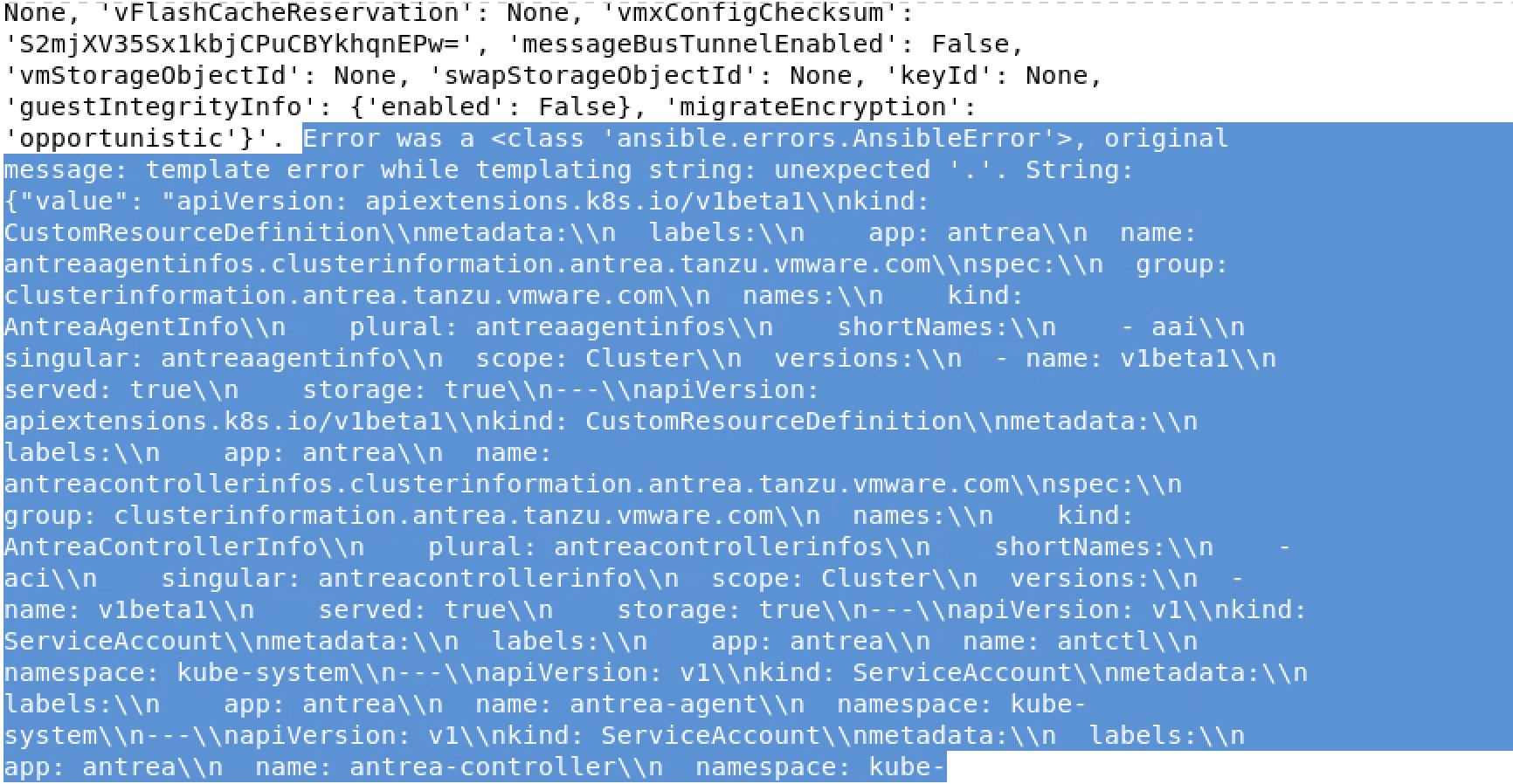
Looks like the whole Kubernetes manifest is present in custom vm fields, see attached screenshots :
[...]

There is some "." character who aren't handled correctly.
clem13960
on 25 Sep 2020
We changed how this is configured in 15.0 - please try that release.
wenottingham
on 2 Oct 2020
We changed how inventory sources are configured in v15.
blomquisg
on 23 Oct 2020
Related issues
 artmakh
·
3Comments
artmakh
·
3Comments
 FloThinksPi
·
3Comments
FloThinksPi
·
3Comments
 mwiora
·
3Comments
mwiora
·
3Comments
 pebbledavec
·
3Comments
pebbledavec
·
3Comments
 IMOKURI
·
3Comments
IMOKURI
·
3Comments