Aws-sdk-ios: Build failure with 2.15.x in Xcode 12
Describe the bug
Getting the following build failure:
/Users/user/Desktop/aws-test/Pods/AWSCognitoIdentityProviderASF/AWSCognitoIdentityProviderASF/Internal/libAWSCognitoIdentityProviderASFBinary.a(AWSCognitoIdentityASF.o), building for iOS Simulator, but linking in object file built for iOS, for architecture arm6
These errors also occur in 2.15.0 and 2.14.2, so this is not specific to 2.15.
To Reproduce
Steps to reproduce the behavior:
- In Xcode 12.0 Beta 4 (the current beta at the time of opening this issue) create a new project
- Initialize Cocoapods and install the following pods: AWSMobileClient, AWSAuthUI, AWSUserPoolsSignIn
- Open the project in Xcode using the .xcworkspace file
- Build
Observed Behavior
Build will fail with the following error:
/Users/user/Desktop/aws-test/Pods/AWSCognitoIdentityProviderASF/AWSCognitoIdentityProviderASF/Internal/libAWSCognitoIdentityProviderASFBinary.a(AWSCognitoIdentityASF.o), building for iOS Simulator, but linking in object file built for iOS, for architecture arm6
Expected Behavior
A successful build.
Stack Trace
There is no stack trace, but here is a snippet from the build log:
Ld /Users/user/Library/Developer/Xcode/DerivedData/aws-test-ghjmeyubqzmpsyevlhtmgwyoogpf/Build/Intermediates.noindex/Pods.build/Release-iphonesimulator/AWSCognitoIdentityProviderASF.build/Objects-normal/arm64/Binary/AWSCognitoIdentityProviderASF normal arm64 (in target 'AWSCognitoIdentityProviderASF' from project 'Pods')
cd /Users/user/Desktop/aws-test/Pods
/Applications/Xcode-12.0b4.app/Contents/Developer/Toolchains/XcodeDefault.xctoolchain/usr/bin/clang -target arm64-apple-ios8.0-simulator -dynamiclib -isysroot /Applications/Xcode-12.0b4.app/Contents/Developer/Platforms/iPhoneSimulator.platform/Developer/SDKs/iPhoneSimulator14.0.sdk -L/Users/user/Library/Developer/Xcode/DerivedData/aws-test-ghjmeyubqzmpsyevlhtmgwyoogpf/Build/Products/Release-iphonesimulator/AWSCognitoIdentityProviderASF -L/Users/user/Desktop/aws-test/Pods/AWSCognitoIdentityProviderASF/AWSCognitoIdentityProviderASF/Internal -F/Users/user/Library/Developer/Xcode/DerivedData/aws-test-ghjmeyubqzmpsyevlhtmgwyoogpf/Build/Products/Release-iphonesimulator/AWSCognitoIdentityProviderASF -filelist /Users/user/Library/Developer/Xcode/DerivedData/aws-test-ghjmeyubqzmpsyevlhtmgwyoogpf/Build/Intermediates.noindex/Pods.build/Release-iphonesimulator/AWSCognitoIdentityProviderASF.build/Objects-normal/arm64/AWSCognitoIdentityProviderASF.LinkFileList -install_name @rpath/AWSCognitoIdentityProviderASF.framework/AWSCognitoIdentityProviderASF -Xlinker -rpath -Xlinker @executable_path/Frameworks -Xlinker -rpath -Xlinker @loader_path/Frameworks -dead_strip -Xlinker -object_path_lto -Xlinker /Users/user/Library/Developer/Xcode/DerivedData/aws-test-ghjmeyubqzmpsyevlhtmgwyoogpf/Build/Intermediates.noindex/Pods.build/Release-iphonesimulator/AWSCognitoIdentityProviderASF.build/Objects-normal/arm64/AWSCognitoIdentityProviderASF_lto.o -Xlinker -objc_abi_version -Xlinker 2 -fobjc-arc -fobjc-link-runtime -lAWSCognitoIdentityProviderASFBinary -framework Foundation -compatibility_version 1 -current_version 1 -Xlinker -dependency_info -Xlinker /Users/user/Library/Developer/Xcode/DerivedData/aws-test-ghjmeyubqzmpsyevlhtmgwyoogpf/Build/Intermediates.noindex/Pods.build/Release-iphonesimulator/AWSCognitoIdentityProviderASF.build/Objects-normal/arm64/AWSCognitoIdentityProviderASF_dependency_info.dat -o /Users/user/Library/Developer/Xcode/DerivedData/aws-test-ghjmeyubqzmpsyevlhtmgwyoogpf/Build/Intermediates.noindex/Pods.build/Release-iphonesimulator/AWSCognitoIdentityProviderASF.build/Objects-normal/arm64/Binary/AWSCognitoIdentityProviderASF
Code Snippet
Not applicable: This happens in a newly created project with no code other than the Xcode boilerplate code.
Unique Configuration
Not applicable.
Areas of the SDK you are using (AWSMobileClient, Cognito, Pinpoint, IoT, etc)?
AWSMobileClient
Screenshots
Not applicable.
Environment(please complete the following information):
SDK Version: 2.15.1
Dependency Manager: Cocoapods
Swift Version: 5.0
Xcode Version: 12.0
Device Information (please complete the following information):
Device: Simulator
iOS Version: iOS 14.0
Additional context
If I switch the scheme to use the Debug build configuration I get the following build error:
Ld /Users/user/Library/Developer/Xcode/DerivedData/aws-test-ghjmeyubqzmpsyevlhtmgwyoogpf/Build/Products/Debug-iphonesimulator/AWSUserPoolsSignIn/AWSUserPoolsSignIn.framework/AWSUserPoolsSignIn normal (in target 'AWSUserPoolsSignIn' from project 'Pods')
cd /Users/user/Desktop/aws-test/Pods
/Applications/Xcode-12.0b4.app/Contents/Developer/Toolchains/XcodeDefault.xctoolchain/usr/bin/clang -target x86_64-apple-ios8.0-simulator -dynamiclib -isysroot /Applications/Xcode-12.0b4.app/Contents/Developer/Platforms/iPhoneSimulator.platform/Developer/SDKs/iPhoneSimulator14.0.sdk -L/Users/user/Library/Developer/Xcode/DerivedData/aws-test-ghjmeyubqzmpsyevlhtmgwyoogpf/Build/Products/Debug-iphonesimulator/AWSUserPoolsSignIn -F/Users/user/Library/Developer/Xcode/DerivedData/aws-test-ghjmeyubqzmpsyevlhtmgwyoogpf/Build/Products/Debug-iphonesimulator/AWSUserPoolsSignIn -F/Users/user/Library/Developer/Xcode/DerivedData/aws-test-ghjmeyubqzmpsyevlhtmgwyoogpf/Build/Products/Debug-iphonesimulator/AWSAuthCore -F/Users/user/Library/Developer/Xcode/DerivedData/aws-test-ghjmeyubqzmpsyevlhtmgwyoogpf/Build/Products/Debug-iphonesimulator/AWSCognitoIdentityProvider -F/Users/user/Library/Developer/Xcode/DerivedData/aws-test-ghjmeyubqzmpsyevlhtmgwyoogpf/Build/Products/Debug-iphonesimulator/AWSCognitoIdentityProviderASF -F/Users/user/Library/Developer/Xcode/DerivedData/aws-test-ghjmeyubqzmpsyevlhtmgwyoogpf/Build/Products/Debug-iphonesimulator/AWSCore -filelist /Users/user/Library/Developer/Xcode/DerivedData/aws-test-ghjmeyubqzmpsyevlhtmgwyoogpf/Build/Intermediates.noindex/Pods.build/Debug-iphonesimulator/AWSUserPoolsSignIn.build/Objects-normal/x86_64/AWSUserPoolsSignIn.LinkFileList -install_name @rpath/AWSUserPoolsSignIn.framework/AWSUserPoolsSignIn -Xlinker -rpath -Xlinker @executable_path/Frameworks -Xlinker -rpath -Xlinker @loader_path/Frameworks -dead_strip -Xlinker -object_path_lto -Xlinker /Users/user/Library/Developer/Xcode/DerivedData/aws-test-ghjmeyubqzmpsyevlhtmgwyoogpf/Build/Intermediates.noindex/Pods.build/Debug-iphonesimulator/AWSUserPoolsSignIn.build/Objects-normal/x86_64/AWSUserPoolsSignIn_lto.o -Xlinker -export_dynamic -Xlinker -no_deduplicate -Xlinker -objc_abi_version -Xlinker 2 -fobjc-arc -fobjc-link-runtime -framework AWSAuthCore -framework AWSCognitoIdentityProvider -framework Foundation -compatibility_version 1 -current_version 1 -Xlinker -dependency_info -Xlinker /Users/user/Library/Developer/Xcode/DerivedData/aws-test-ghjmeyubqzmpsyevlhtmgwyoogpf/Build/Intermediates.noindex/Pods.build/Debug-iphonesimulator/AWSUserPoolsSignIn.build/Objects-normal/x86_64/AWSUserPoolsSignIn_dependency_info.dat -o /Users/user/Library/Developer/Xcode/DerivedData/aws-test-ghjmeyubqzmpsyevlhtmgwyoogpf/Build/Products/Debug-iphonesimulator/AWSUserPoolsSignIn/AWSUserPoolsSignIn.framework/AWSUserPoolsSignIn
Undefined symbols for architecture x86_64:
"_OBJC_CLASS_$_AWSTask", referenced from:
objc-class-ref in AWSCognitoUserPoolsSignInProvider.o
"_OBJC_CLASS_$_AWSDDLog", referenced from:
objc-class-ref in AWSUserPoolSignUpViewController.o
objc-class-ref in AWSUserPoolsUIOperations.o
"_OBJC_CLASS_$_AWSServiceConfiguration", referenced from:
objc-class-ref in AWSCognitoUserPoolsSignInProvider.o
ld: symbol(s) not found for architecture x86_64
clang: error: linker command failed with exit code 1 (use -v to see invocation)
Relevant Console Output
Not applicable.
 corey-plugshare
All 31 comments
I realize that I forgot to mention something very important: this issue only happens when building to run on the simulator, it does not happen when building to run on a physical device.
corey-plugshare
on 12 Aug 2020
Just started experiencing the same issue. Oddly I've been using the Xcode 12 beta for almost two months now but just ran into this problem today.
 tylerjames
on 14 Aug 2020
tylerjames
on 14 Aug 2020
Hey guys, Just ran into same issue. Did you find any reason/solution to it ? Or is it a bug in SDK ? Thanks
 ahmad4tigerspike
on 20 Aug 2020
ahmad4tigerspike
on 20 Aug 2020
This issue appeared to me with Xcode beta 5. Any solutions?
 AugustDev
on 20 Aug 2020
AugustDev
on 20 Aug 2020
@ahmad4tigerspike @AugustDev The only way I can work right now is to build for a physical device. I have not found a workaround to get a build for the simulator. I'm surprised that there hasn't been a single word from the Amplify team on this issue.
corey-plugshare
on 20 Aug 2020
I have gotten this to work again by building it with Xcode 11 first. I may have done the derived data/clean/build dance as well. In any case it is somehow working again on Xcode 12
"material-automation[bot]" notifications@github.com wrote:
“@ahmad4tigerspike@AugustDev The only way I can work right now is to build for a physical device. I have not found a workaround to get a build for the simulator. I'm surprised that there hasn't been a single word from the Amplify team on this issue.”
—
You are receiving this because you commented.
Reply to this email directly, view it on GitHub, or unsubscribe.
tylerjames
on 20 Aug 2020
I was finally able to get this to work for me Xcode 12 Beta 5 | AWSMobileClient 2.15.1
I had same problem as OP with 2.15.1. Occurred after update from Xcode 12 Beta 3 to Beta 5 (skipped 4) two days ago.
My issue was it would build for the Simulator but would not build for Canvas Previews. Unfortunately, I failed so many times in a row, I'm not sure which thing or set of things made it able to build... but I took another crack at it tonight and I believe I only did two things, and possibly only one of those actually helped. Did the whole "pod deintegrate, clean build folder, pod install, say some prayers" thing, then in my project's workspace, after the fresh pod install:
Changed the iOS deployment target of the pods _AWSMobileClient_, _AWSCognitoIdentityProvider_ and _AWSCognitoIdentityProviderASF_ , [EDIT: looks like I actually set the target for all AWS dependencies] to iOS 14 (what's another couple deprecation warnings?)
Added arm64 to the Excluded Architectures list on all pods
I think that's all I did. I have a feeling the second step is what did it. The main issue for me came from the Cognito frameworks [EDIT: removed speculative reasoning. Don't want to steer anyone in the wrong direction, but it was an issue with those two frameworks]. Sorry all, I'd investigate further into my "solution", but I really don't want to start undoing anything--I've really gotten spoiled by Previews.
Good luck!
 end3r117
on 21 Aug 2020
end3r117
on 21 Aug 2020
I was finally able to get this to work for me Xcode 12 Beta 5 | AWSMobileClient 2.15.1
I had same problem as OP with 2.15.1. Occurred after update from Xcode 12 Beta 3 to Beta 5 (skipped 4) two days ago.
My issue was it would build for the Simulator but would not build for Canvas Previews. Unfortunately, I failed so many times in a row, I'm not sure which thing or set of things made it able to build... but I took another crack at it tonight and I believe I only did two things, and possibly only one of those actually helped. Did the whole "pod deintegrate, clean build folder, pod install, say some prayers" thing, then in my project's workspace, after the fresh pod install:
- Changed the iOS deployment target of the pods _AWSMobileClient_, _AWSCognitoIdentityProvider_ and _AWSCognitoIdentityProviderASF_ , [EDIT: looks like I actually set the target for all AWS dependencies] to iOS 14 (what's another couple deprecation warnings?)
- Added arm64 to the Excluded Architectures list on all pods
I think that's all I did. I have a feeling the second step is what did it. The main issue for me came from the Cognito frameworks [EDIT: removed speculative reasoning. Don't want to steer anyone in the wrong direction, but it was an issue with those two frameworks]. Sorry all, I'd investigate further into my "solution", but I really don't want to start undoing anything--I've really gotten spoiled by Previews.
Good luck!
Could you please share your Podfile? I am struggling to find how to add "arm64" architecture.
AugustDev
on 23 Aug 2020
Hi @AugustDev,
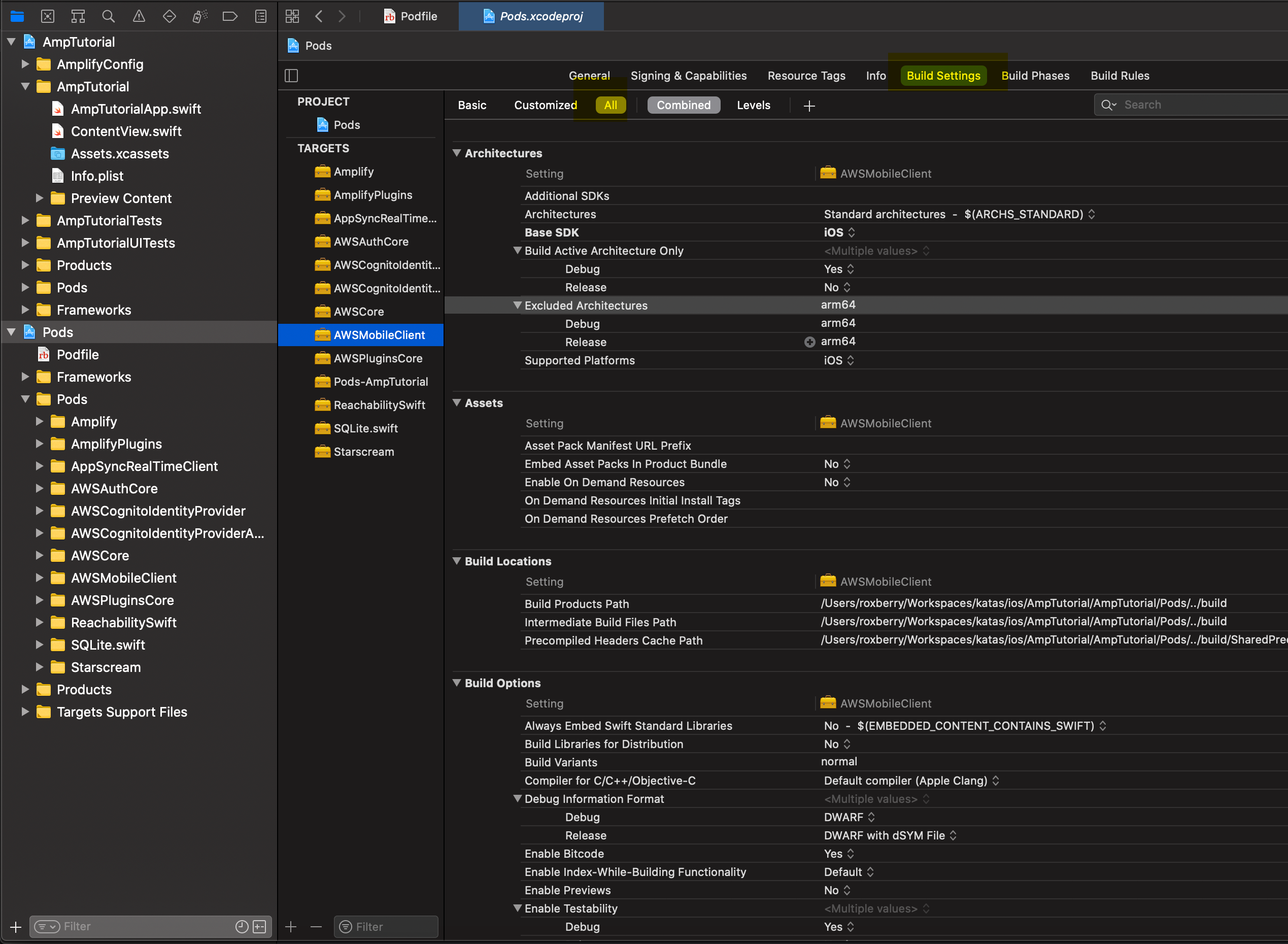
Added a screenshot - add Excluded Architectures in Xcode > Pods > Targets > {{Target Pod}} > Build Settings
Change to ALL
Add arm64 at the Excluded Architectures link, a text entry dialog will open.
 roxberry
on 23 Aug 2020
roxberry
on 23 Aug 2020
Hi @end3r117.
Added arm64 to the Excluded Architectures list on all pods
worked for me. Thanks alot
ahmad4tigerspike
on 24 Aug 2020
Hello, I think the fix is required on the SDK side. I tried updating the deployment target of each package to iOS 9.0 https://github.com/aws-amplify/aws-sdk-ios/pull/2981 . Things seems to check out when i test it with local pods, warnings about The iOS Simulator deployment target 'IPHONEOS_DEPLOYMENT_TARGET' is set to 8.0, but the range of supported deployment target versions is 9.0 to 14.0.99. disappeared, and was able to get the build to run successfully on the simulator and canvas. This should be related to Xcode 12 dropping support for iOS 8
 lawmicha
on 28 Aug 2020
lawmicha
on 28 Aug 2020
https://github.com/aws-amplify/aws-sdk-ios/pull/2981 has been released in 2.16.0. Please upgrade to this version when using Xcode 12, and let us know if you are still facing problems
lawmicha
on 4 Sep 2020
@lawmicha Thanks for your work on this issue. Unfortunately, I am still seeing build issues. I am testing in the same empty project I mentioned at the top of this ticket with only this Podfile:
source 'https://github.com/CocoaPods/Specs.git'
use_frameworks!
project 'aws-test'

target 'aws-test' do
  platform :ios, '13.5'
  pod 'AWSMobileClient'
  pod 'AWSAuthUI'
  pod 'AWSUserPoolsSignIn'
end
Using 2.16.0 with Xcode 12.0b6 with iOS deployment target 13.5, building produces this error:
Undefined symbols for architecture x86_64:
  "_OBJC_CLASS_$_AWSCognitoIdentityProviderASF", referenced from:
      objc-class-ref in AWSCognitoAuth.o
ld: symbol(s) not found for architecture x86_64
clang: error: linker command failed with exit code 1 (use -v to see invocation)
I cleaned the project, deleted the derived data, but I still see the same issue.
I've tried keeping my info limited to an empty project to make troubleshooting easier, but here is something interesting that I hope doesn't confuse things. In the project I actually care about, an Objc/Swift codebase, using 2.16.0 on Xcode 12.0b6 with deployment target 13.0 (but I tested 13.5 also), cleaned project and deleted derived data, I get this error build error:
duplicate symbol '_OBJC_CLASS_$_AWSCognitoIdentityASF' in:
    /Users/coreydavis/Library/Developer/Xcode/DerivedData/Plugshare-eyazekuckqreoqaxzwdqhkemrtdl/Build/Products/Release-iphoneos/AWSCognitoIdentityProviderASF/libAWSCognitoIdentityProviderASF.a(AWSCognitoIdentityASF.o)
    /Users/coreydavis/Documents/plugshare-ios/Pods/AWSCognitoIdentityProviderASF/AWSCognitoIdentityProviderASF/Internal/libAWSCognitoIdentityProviderASFBinary.a(AWSCognitoIdentityASF.o)
duplicate symbol '_OBJC_METACLASS_$_AWSCognitoIdentityASF' in:
    /Users/coreydavis/Library/Developer/Xcode/DerivedData/Plugshare-eyazekuckqreoqaxzwdqhkemrtdl/Build/Products/Release-iphoneos/AWSCognitoIdentityProviderASF/libAWSCognitoIdentityProviderASF.a(AWSCognitoIdentityASF.o)
    /Users/coreydavis/Documents/plugshare-ios/Pods/AWSCognitoIdentityProviderASF/AWSCognitoIdentityProviderASF/Internal/libAWSCognitoIdentityProviderASFBinary.a(AWSCognitoIdentityASF.o)
ld: 2 duplicate symbols for architecture arm64
clang: error: linker command failed with exit code 1 (use -v to see invocation)
Again, I did delete derived data. Since both projects reference AWSCognitoIdentityProviderASF I assume they may be related. I hope this helps.
corey-plugshare
on 4 Sep 2020
I had the same Xcode duplicate symbol '_OBJC_CLASS_$_AWSCognitoIdentityASF' issue.
I fixed it by downreving AWS pods from
AWSAPIGateway (2.15.3):
AWSCore (= 2.15.3)
AWSCognito (2.15.3):
AWSCore (= 2.15.3)
AWSCognitoIdentityProvider (2.15.3):
AWSCognitoIdentityProviderASF (= 1.0.2)
AWSCore (= 2.15.3)
AWSCognitoIdentityProviderASF (1.0.2)
AWSCore (2.15.3)
AWSLambda (2.15.3):
AWSCore (= 2.15.3)
to
- AWSAPIGateway (2.15.1):
- AWSCore (= 2.15.1)
- AWSCognito (2.15.1):
- AWSCore (= 2.15.1)
- AWSCognitoIdentityProvider (2.15.1):
- AWSCognitoIdentityProviderASF (= 1.0.1)
- AWSCore (= 2.15.1)
- AWSCognitoIdentityProviderASF (1.0.1)
- AWSCore (2.15.1)
- AWSLambda (2.15.1):
- AWSCore (= 2.15.1)
After I did this, I was able to link again!
 salem0426
on 8 Sep 2020
salem0426
on 8 Sep 2020
@salem0426 you went down to 2.15.1 and then up to 2.16.0? Or you stayed at 2.15.1?
corey-plugshare
on 8 Sep 2020
I was having the same problem as @salem0426 on 2.15.3. Downgraded back to 2.15.1 and it works
 marciogranzotto
on 9 Sep 2020
marciogranzotto
on 9 Sep 2020
1. new xcode 12 beta 6 app, default Podfile with pods
# Uncomment the next line to define a global platform for your project
# platform :ios, '9.0'

target 'aws2927' do
  # Comment the next line if you don't want to use dynamic frameworks
  use_frameworks!

  # Pods for aws2927
  pod 'AWSMobileClient'
  pod 'AWSAuthUI'
  pod 'AWSUserPoolsSignIn'

  target 'aws2927Tests' do
    inherit! :search_paths
    # Pods for testing
  end

  target 'aws2927UITests' do
    # Pods for testing
  end

end
When i open the workspace, from Xcode 12 beta 6, I noticed the deployment target is iOS 14. Running on Iphone touch 7th gen - 14.0 is fine.
2. xcode 12 beta 6 app, updated Podfile similar to corey-plugshare's
Updating Podfile, removing workspace, Pods/, Podfile.lock, reinstall
# Uncomment the next line to define a global platform for your project
source 'https://github.com/CocoaPods/Specs.git'

use_frameworks!

target 'aws2927' do
  # Comment the next line if you don't want to use dynamic frameworks

  platform :ios, '13.5'
  # Pods for aws2927
  pod 'AWSMobileClient'
  pod 'AWSAuthUI'
  pod 'AWSUserPoolsSignIn'

  target 'aws2927Tests' do
    inherit! :search_paths
    # Pods for testing
  end

  target 'aws2927UITests' do
    # Pods for testing
  end

end
Even though I have iOS 13.5 in the Podfile, when i check the project and target settings, it also appears to be on iOS 14 for the deployment target (so not sure how to downgrade). I'm still able to run the app on "iPhone 11 Pro Max 14.0"
3. new app with Xcode 11.7, pod init, default pods (same as 1, but with app made from Xcode 11)
After pod install, I opened the app using xcode 12 beta 6, and was able to successfully run the app on iPhone 11 Pro/IPhone 11. the deployment target for the project and target shows iOS 13.7.
4. using the same app from 3, updated Podfile to 2.
No change from 3, still able to run the app
lawmicha
on 9 Sep 2020
@corey-plugshare Coud you share a sample app repo that contains the issue you are seeing? I can try and reproduce it on my machine
lawmicha
on 9 Sep 2020
@lawmicha You can find my test project here: https://github.com/corey-plugshare/aws-test
corey-plugshare
on 11 Sep 2020
Hi @corey-plugshare, so I was able to build and run https://github.com/corey-plugshare/aws-test successfully from xcode 12 beta 6 on the simulators. Although I could not reproduce an error, i noticed that there might be something going on with AWSCognitoIdentityProviderASF.
The iOS Simulator deployment target 'IPHONEOS_DEPLOYMENT_TARGET' is set to 8.0, but the range of supported deployment target versions is 9.0 to 14.0.99.
This is what I tried to do earlier for dropping iOS 8 support. It looks like we missed bumping the podspec version from 1.0.2 to 1.0.3 for AWSCognitoIdentityProviderASF in the release. new PR here https://github.com/aws-amplify/aws-sdk-ios/pull/3012
I don't know for sure but could you try selecting the Pods, Targets, AWSCognitoIdentityProviderASF, and bump deployment target from iOS 8.0 to 9.0? Does that help with build on your machine?
lawmicha
on 11 Sep 2020
@lawmicha I have done that, cleaned the project, and deleted derived data but get this error when I build which is very similar but not exactly the same error as previously:
Ld /Users/coreydavis/Library/Developer/Xcode/DerivedData/aws-test-ghjmeyubqzmpsyevlhtmgwyoogpf/Build/Intermediates.noindex/Pods.build/Release-iphonesimulator/AWSUserPoolsSignIn.build/Objects-normal/x86_64/Binary/AWSUserPoolsSignIn normal x86_64 (in target 'AWSUserPoolsSignIn' from project 'Pods')
    cd /Users/coreydavis/Desktop/aws-test/Pods
    /Applications/Xcode-12.0b6.app/Contents/Developer/Toolchains/XcodeDefault.xctoolchain/usr/bin/clang -target x86_64-apple-ios9.0-simulator -dynamiclib -isysroot /Applications/Xcode-12.0b6.app/Contents/Developer/Platforms/iPhoneSimulator.platform/Developer/SDKs/iPhoneSimulator14.0.sdk -L/Users/coreydavis/Library/Developer/Xcode/DerivedData/aws-test-ghjmeyubqzmpsyevlhtmgwyoogpf/Build/Products/Release-iphonesimulator/AWSUserPoolsSignIn -F/Users/coreydavis/Library/Developer/Xcode/DerivedData/aws-test-ghjmeyubqzmpsyevlhtmgwyoogpf/Build/Products/Release-iphonesimulator/AWSUserPoolsSignIn -F/Users/coreydavis/Library/Developer/Xcode/DerivedData/aws-test-ghjmeyubqzmpsyevlhtmgwyoogpf/Build/Products/Release-iphonesimulator/AWSAuthCore -F/Users/coreydavis/Library/Developer/Xcode/DerivedData/aws-test-ghjmeyubqzmpsyevlhtmgwyoogpf/Build/Products/Release-iphonesimulator/AWSCognitoIdentityProvider -F/Users/coreydavis/Library/Developer/Xcode/DerivedData/aws-test-ghjmeyubqzmpsyevlhtmgwyoogpf/Build/Products/Release-iphonesimulator/AWSCognitoIdentityProviderASF -F/Users/coreydavis/Library/Developer/Xcode/DerivedData/aws-test-ghjmeyubqzmpsyevlhtmgwyoogpf/Build/Products/Release-iphonesimulator/AWSCore -filelist /Users/coreydavis/Library/Developer/Xcode/DerivedData/aws-test-ghjmeyubqzmpsyevlhtmgwyoogpf/Build/Intermediates.noindex/Pods.build/Release-iphonesimulator/AWSUserPoolsSignIn.build/Objects-normal/x86_64/AWSUserPoolsSignIn.LinkFileList -install_name @rpath/AWSUserPoolsSignIn.framework/AWSUserPoolsSignIn -Xlinker -rpath -Xlinker @executable_path/Frameworks -Xlinker -rpath -Xlinker @loader_path/Frameworks -dead_strip -Xlinker -object_path_lto -Xlinker /Users/coreydavis/Library/Developer/Xcode/DerivedData/aws-test-ghjmeyubqzmpsyevlhtmgwyoogpf/Build/Intermediates.noindex/Pods.build/Release-iphonesimulator/AWSUserPoolsSignIn.build/Objects-normal/x86_64/AWSUserPoolsSignIn_lto.o -Xlinker -objc_abi_version -Xlinker 2 -fobjc-arc -fobjc-link-runtime -framework AWSAuthCore -framework AWSCognitoIdentityProvider -framework Foundation -compatibility_version 1 -current_version 1 -Xlinker -dependency_info -Xlinker /Users/coreydavis/Library/Developer/Xcode/DerivedData/aws-test-ghjmeyubqzmpsyevlhtmgwyoogpf/Build/Intermediates.noindex/Pods.build/Release-iphonesimulator/AWSUserPoolsSignIn.build/Objects-normal/x86_64/AWSUserPoolsSignIn_dependency_info.dat -o /Users/coreydavis/Library/Developer/Xcode/DerivedData/aws-test-ghjmeyubqzmpsyevlhtmgwyoogpf/Build/Intermediates.noindex/Pods.build/Release-iphonesimulator/AWSUserPoolsSignIn.build/Objects-normal/x86_64/Binary/AWSUserPoolsSignIn

Undefined symbols for architecture x86_64:
  "_OBJC_CLASS_$_AWSTask", referenced from:
      objc-class-ref in AWSCognitoUserPoolsSignInProvider.o
  "_OBJC_CLASS_$_AWSDDLog", referenced from:
      objc-class-ref in AWSUserPoolSignUpViewController.o
      objc-class-ref in AWSUserPoolsUIOperations.o
  "_OBJC_CLASS_$_AWSServiceConfiguration", referenced from:
      objc-class-ref in AWSCognitoUserPoolsSignInProvider.o
ld: symbol(s) not found for architecture x86_64
clang: error: linker command failed with exit code 1 (use -v to see invocation)
Before the _OBJC_CLASS references were for AWSCognitoIdentityASF but now it is AWSTask, AWSDDLog, and AWSServiceConfiguration. I committed the change and pushed to the https://github.com/corey-plugshare/aws-test repo so that you can verify I did what you were expecting. Let me know if I can do anything else to help you.
corey-plugshare
on 11 Sep 2020
Hi @corey-plugshare, sorry I'm still not able to reproduce what your seeing on your machine.
- Is the error consistant? I've seen
Undefined symbolserrors fixed with a clean then build. This would be equivalent to deleting derived data folder (Xcode -> Preferences -> Locations -> open Derived Data in finder -> delete folders - On the same window, there's Command Line Tools. Which is your xcode using? Mine is selected on
Xcode 12.0 (12A7209)which should be xcode 12 GM seed. There's a drop down so perhaps you can try different ones from Xcode 12 if you have them installed. - Are you able to run other sample apps that depend on the SDKs? There are a few samples here that depend on pod installations https://github.com/awslabs/aws-sdk-ios-samples
lawmicha
on 18 Sep 2020
Hi @lawmicha, I also cannot get past build issues. I tried cloning @corey-plugshare 's aws-test project and doing a build for the simulator. Running Xcode Version 12.0 (12A7209) and the matching version of the command line tools I get the same linker error posted above:
Undefined symbols for architecture x86_64:
  "_OBJC_CLASS_$_AWSTask", referenced from:
      objc-class-ref in AWSCognitoUserPoolsSignInProvider.o
  "_OBJC_CLASS_$_AWSDDLog", referenced from:
      objc-class-ref in AWSUserPoolSignUpViewController.o
      objc-class-ref in AWSUserPoolsUIOperations.o
  "_OBJC_CLASS_$_AWSServiceConfiguration", referenced from:
      objc-class-ref in AWSCognitoUserPoolsSignInProvider.o
ld: symbol(s) not found for architecture x86_64
clang: error: linker command failed with exit code 1 (use -v to see invocation)
 alex-lampila
on 18 Sep 2020
alex-lampila
on 18 Sep 2020
Hi @lawmicha I appreciate you sticking with this because this is a critical blocker for us.
- Yes, the issue is consistent. No combination of cleaning the project or deleting derived data resolves it.
- Throughout this issue I have been using the most recent Xcode 12 command line tools which, as you mention, is currently
Xcode 12.0 (12A7209). I have double-checked and verified that I am set correctly. - Regarding the sample project. That was a great idea which I had not tried. It did build successfully, but I am not sure if it is a valid test because the pods in use are different. The sample project uses AWSCognitoAuth (2.15.3), my app and my test projects uses AWSMobileClient, AWSAuthUI, and AWSUserPoolsSignIn (2.16.0). So, after the successful build I modified the Podfile and removed AWSCognitoAuth and instead added AWSMobileClient, AWSAuthUI, and AWSUserPoolsSignIn. I cleaned, build, and got the same build error.
To be totally honest, offhand I don’t know the differences between these different pods. It has been too long since we first integrated Cognito into our app for me to remember exact reasons for choosing these, but I will look into it. Regardless, I hope knowing that AWSCognitoAuth builds successfully while the other three do not provides some insight.
corey-plugshare
on 18 Sep 2020
@lawmicha This may not help, but trying to narrow things down I notice that if I remove the AWSUserPoolsSignIn pod the project now compiles. This was mentioned in https://github.com/aws-amplify/aws-sdk-ios/issues/2978 so I thought I'd try it. Just thought I'd throw it out there in case it helps you.
corey-plugshare
on 19 Sep 2020
I had similar problems with GM Xcode 12. Here's how I resolved it using info from various posts on the subject. Building 2.15.3 using Carthage
1) Create tmp.xccconfig (lipo fix and only build for iphone, not simulator)
EXCLUDED_ARCHS__EFFECTIVE_PLATFORM_SUFFIX_simulator__NATIVE_ARCH_64_BIT_x86_64=arm64 arm64e armv7 armv7s armv6 armv8
EXCLUDED_ARCHS=$(inherited) $(EXCLUDED_ARCHS__EFFECTIVE_PLATFORM_SUFFIX_$(EFFECTIVE_PLATFORM_SUFFIX)__NATIVE_ARCH_64_BIT_$(NATIVE_ARCH_64_BIT))
SUPPORTED_PLATFORMS=iphoneos
2) only build schemes that I need
carthage checkout aws-sdk-ios
find Carthage/Checkouts/aws-sdk-ios -iname '*.xcscheme' | grep -v -E 'AWSAuthCore|AWSUserPoolsSignIn|AWSCognito|AWSCognitoAuth|AWSCognitoIdentityProvider|AWSCognitoIdentityProviderASF|AWSCore|AWSMobileClient' | xargs -Jrepl rm repl
carthage build aws-sdk-ios --platform iOS --no-use-binaries --verbose
Finally back up and running
 deepwinter
on 21 Sep 2020
deepwinter
on 21 Sep 2020
FYI, we are seeing the same issue with AWSUserPoolsSignIn, running Xcode Version 12.0 (12A7209) with AWS SDK version 2.16.0:
Undefined symbols for architecture arm64:
  "_OBJC_CLASS_$_AWSTask", referenced from:
      objc-class-ref in AWSCognitoUserPoolsSignInProvider.o
  "_OBJC_CLASS_$_AWSDDLog", referenced from:
      objc-class-ref in AWSUserPoolSignUpViewController.o
      objc-class-ref in AWSUserPoolsUIOperations.o
  "_OBJC_CLASS_$_AWSServiceConfiguration", referenced from:
      objc-class-ref in AWSCognitoUserPoolsSignInProvider.o
ld: symbol(s) not found for architecture arm64
clang: error: linker command failed with exit code 1 (use -v to see invocation)
 afriedmanGlacier
on 22 Sep 2020
afriedmanGlacier
on 22 Sep 2020
It seems we have gotten past this issue by doing what @marciogranzotto suggested, downgrading AWSUserPoolsSignIn (from 2.16.0) to 2.15.1. In our case, that also meant downgrading AWSAppSync to 3.1.5 due to competing dependencies.
Now on to other non-AWS build errors since updating to XCode 12. Always an adventure!
afriedmanGlacier
on 22 Sep 2020
@afriedmanGlacier Glad you are up and running. I tried this workaround earlier and again this morning, but it does not work for me.
corey-plugshare
on 22 Sep 2020
Hi all, this should be fixed with the 2.17.0 release. If you pin to a particular version of the SDK, please update your Podfiles to point to at least ~> 2.17.0.
Please note that this release includes a couple of breaking changes, one directly related to supporting Xcode 12 (we no longer ship the libAWSCognitoIdentityProviderASFBinary.a static library. This won't affect most customers, since most projects don't directly depend on the AWSCognitoIdentityProviderASF framework. However, if you do depend directly on AWSCognitoIdentityProviderASF, make sure you remove any project references to that static library and link to the dynamic framework instead.
Please let us know if you have any questions.
 palpatim
on 29 Sep 2020
palpatim
on 29 Sep 2020
@palpatim Thanks for this! The test project I linked to above does compile now. I cannot verify in my real project because now another library (not an AWS library) is exhibiting the issue, but I assume if it works in the test project it works in my real project. Thank you!
corey-plugshare
on 29 Sep 2020
Related issues
 aymericio
·
5Comments
aymericio
·
5Comments
 fs-bonlook
·
3Comments
fs-bonlook
·
3Comments
 dougboberg
·
5Comments
dougboberg
·
5Comments
 r-plus
·
3Comments
r-plus
·
3Comments
 motivus
·
4Comments
motivus
·
4Comments
Most helpful comment
Hi all, this should be fixed with the 2.17.0 release. If you pin to a particular version of the SDK, please update your Podfiles to point to at least
~> 2.17.0.Please note that this release includes a couple of breaking changes, one directly related to supporting Xcode 12 (we no longer ship the
libAWSCognitoIdentityProviderASFBinary.astatic library. This won't affect most customers, since most projects don't directly depend on the AWSCognitoIdentityProviderASF framework. However, if you do depend directly on AWSCognitoIdentityProviderASF, make sure you remove any project references to that static library and link to the dynamic framework instead.Please let us know if you have any questions.