Aws-sdk-ios: AWS Amplify iOS SDK problem after adding REST API to Swift project
Describe the bug
Three compiler errors result after setting up and attempting to connect to my REST API back end according to the instructions in the AWS Amplify iOS SDK guide. The errors occur in the XXXXXXXXClient.swift file in the generated-src folder.
To Reproduce
Steps to reproduce the behavior:
From the project folder, according to the guide
- In the terminal, issue the command:
$ amplify add api - Choose
REST - Choose
CRUD function for Amazon DynamoDB table - Choose
Restrict API Access - Choose only authenticated user access
- Complete and then from the terminal,
$ amplify push - Add
AWSAPIGatewayto the Podfile - Run
$ pod install --repo-updateand then add thegenerated-srcfolder - Add
generated-srcfolder to the project - Build the project results in 3 compiler errors due to errors in the XXXXXXXXClient.swift file:
/Users/xxxxx/Dev/iOS/xxxxxxxxxx/generated-src/xxxxxxxxxxxClient.swift:148:34:
Cannot assign to property: 'endpoint' is a get-only property

/Users/xxxxx/Dev/iOS/xxxxxxxxxx/generated-src/xxxxxxxxxxxClient.swift:174:13:
Value of type 'xxxxxxxxxxxClient' has no member 'invokeHTTPRequest'

/Users/xxxxx/Dev/iOS/xxxxxxxxxxx/generated-src/xxxxxxxxxxxClient.swift:195:13:
Value of type 'xxxxxxxxxxxClient' has no member 'invokeHTTPRequest'
Which AWS service(s) are affected?
None, really. Cannot build the project after setting up REST API backend.
Expected behavior
Basically, I didn't expect there to be any errors and that I could proceed to the next step of setting the bridging header. However, Objective-C Bridging Header cannot be found under the Build Settings tab for the project. Perhaps because I am unable to build?
Also, it was NOT my expectation that the generated CloudFormation stack would create a new Cognito User Pool for the REST API access. I already have a Cognito User Pool which I successfully accessed via the Drop-in UI in an earlier step. (If this problem can't be easily solved, can someone point me at info on how to back out everything Amplify did to install the REST API?)
Screenshots
If applicable, add screenshots to help explain your problem.
Environment(please complete the following information):
- SDK Version: 2.8.4, I think. Just installed.
- Dependency Manager: Cocoapods
- Swift Version : 4.2
Device Information (please complete the following information):
- Device: Simulator (iPhone XR)
- iOS Version: iOS 12.1
- Specific to simulators:
Additional context
Add any other context about the problem here.
 motivus
All 4 comments
Hello @motivus
Sorry that you are having issues using the SDK. This error is due to the bridging header not being linked to the project which causes the ObjC SDK code not visible to Swift. You need to add the bridging header path in your build settings. I have tried to capture it in the following image:
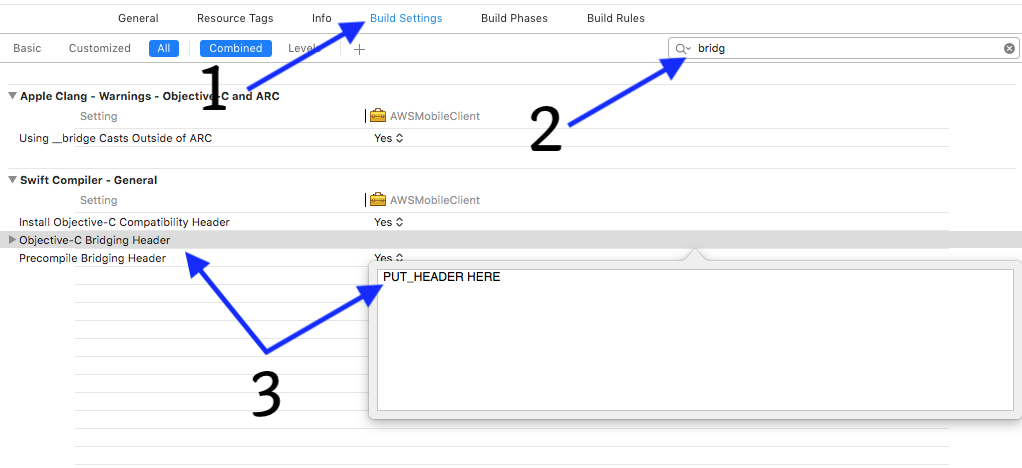
Please let us know if you continue facing issues.
Hope this helps,
Rohan
 rohandubal
on 7 Feb 2019
rohandubal
on 7 Feb 2019
Thanks @rohandubal! I will attempt to add the bridging header straightaway. I was not able to search / filter on it last night. Let me see if I can find it based on what you shared...
motivus
on 7 Feb 2019
Awesome. Thank you! That took care of the problem. You may want to update the guide so that the developer builds only after adding the bridging header. As it stands, it directs the developer to build prior to that step. (Granted, someone smarter than I would have figured it out!)
Now, where can I inquire about the unneeded Cognito User Pool the CloudFormation stack created? And where can I find info about undoing an API install into my Amplify project, for future reference?
motivus
on 7 Feb 2019
Thanks for the feedback @motivus. I will update the documentation to reflect these steps.
Regarding the stacks created and removing API, you can file an issue in this repository: https://github.com/aws-amplify/amplify-cli and someone will answer the questions.
Best,
Rohan
rohandubal
on 7 Feb 2019
Related issues
 aymericio
·
5Comments
aymericio
·
5Comments
 cornr
·
4Comments
cornr
·
4Comments
 premiumbosslimited
·
3Comments
premiumbosslimited
·
3Comments
 lazy-var
·
4Comments
lazy-var
·
4Comments
 aTylerRice
·
3Comments
aTylerRice
·
3Comments