Aws-sam-cli: Function returned an invalid response (must include one of: body, headers or statusCode in the response object).
Description
I am trying to test my local function with sam local start-api but it appears to make an useless validation to the response. And since the code above works on perfectly when I submitted to aws lambda, I cannot see the real value of that validation and it does not allow me to test the function in local
Steps to reproduce
create your function and return an array, let's say
 index.handler = async () => {
    return [
        {"key":"jsandjsnckads","name":"name1"},
        {"key":"asjncjaNCJKndsc","name":"name2"}
    ];
};
execute sam local start-api
go to http://127.0.0.1:3000/users
Observed result
brwoser output
no data
console output
 Function returned an invalid response (must include one of: body, headers or statusCode in the response object). Response received: [
        {"key":"jsandjsnckads","name":"name1"},
        {"key":"asjncjaNCJKndsc","name":"name2"}
    ]
Expected result
browser output
[
        {"key":"jsandjsnckads","name":"name1"},
        {"key":"asjncjaNCJKndsc","name":"name2"}
    ]
no console output
 luillyfe
All 12 comments
@luillyfe This is not useless validation. According to API Gateway Docs, the Lambda must return a specific json format. More details can be found here and here.
Closing as the validation matches API Gateways expectations.
 jfuss
on 28 Jan 2019
jfuss
on 28 Jan 2019
@luillyfe did you solve this problem?
I'm having the same issue. This is my handler:
public APIGatewayProxyResponse Handle() => new APIGatewayProxyResponse
{
    Body = "The lambda function is working!",
    StatusCode = 200,
    Headers = new Dictionary<string, string>
    {
        { "Content-Type", "application/json" },
        { "Access-Control-Allow-Origin", "*" }
    }
};
This is the error:
2019-05-31 16:00:15 Invalid API Gateway Response Keys: {'multiValueHeaders'} in {'statusCode': 200, 'headers': {'Content-Type': 'application/json', 'Access-Control-Allow-Origin': '*'}, 'multiValueHeaders': None, 'body': 'The lambda function is working!', 'isBase64Encoded': False}
2019-05-31 16:00:15 Function returned an invalid response (must include one of: body, headers or statusCode in the response object). Response received: {"statusCode":200,"headers":{"Content-Type":"application/json","Access-Control-Allow-Origin":"*"},"multiValueHeaders":null,"body":"The lambda function is working!","isBase64Encoded":false}
2019-05-31 16:00:15 127.0.0.1 - - [31/May/2019 16:00:15] "GET / HTTP/1.1" 502 -
2019-05-31 16:00:15 127.0.0.1 - - [31/May/2019 16:00:15] "GET /favicon.ico HTTP/1.1" 403
 rsibanez89
on 31 May 2019
rsibanez89
on 31 May 2019
I solved it by downgrading the SAM CLI version to 0.15.0
sam local start-api doesn't work on SAM CLI v0.16.1. However, if you deploy it to AWS you won't get the error.
rsibanez89
on 3 Jun 2019
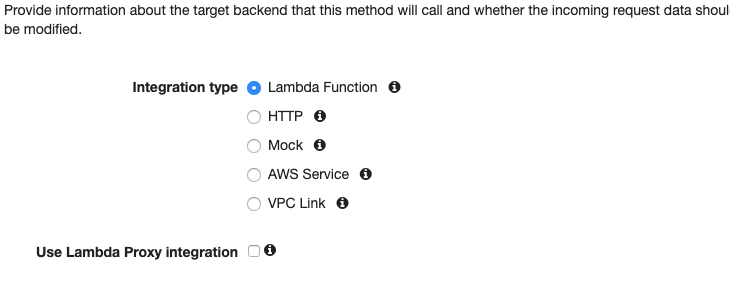
@rsibanez89 sorry for the late answer. I am glad it is working for you now. The thing to keep in mind here is the Output Format of a Lambda Function for Proxy Integration requires that validation but when we are in the console we do not normally (by default) mark the Lambda proxy integration checkbox. That is why it behaves differently from AWS Console to local-api server. I hope this clarify a little bit this topic.
luillyfe
on 7 Jun 2019
Hi rsibanez89,
I am also facing same issue for version 0.19.0. But I tried to download SAM CLI version to 0.15.0. But did not get link. Can you please provide the link.
Regards,
Sukumar
 sukumarbarman
on 17 Aug 2019
sukumarbarman
on 17 Aug 2019
@luillyfe ,
I did not get your solution. What changes you did in the following handler:
public APIGatewayProxyResponse Handle() => new APIGatewayProxyResponse
{
Body = "The lambda function is working!",
StatusCode = 200,
Headers = new Dictionary
{
{ "Content-Type", "application/json" },
{ "Access-Control-Allow-Origin", "*" }
}
};
sukumarbarman
on 17 Aug 2019
@sukumarbarman These are my steps:
https://github.com/rsibanez89/aws-projects/tree/master/SAMApiGatewayLambda
rsibanez89
on 19 Aug 2019
@rsibanez89 Thanks for your reply. Tried to install SAM CLI version 0.15.0. But I did not get the link to download. Can you please provide the link.
sukumarbarman
on 19 Aug 2019
@sukumarbarman Check all the releases here: https://github.com/awslabs/aws-sam-cli/releases
rsibanez89
on 25 Aug 2019
@rsibanez89 sorry for the late answer. I am glad it is working for you now. The thing to keep in mind here is the Output Format of a Lambda Function for Proxy Integration requires that validation but when we are in the console we do not normally (by default) mark the Lambda proxy integration checkbox. That is why it behaves differently from
AWS Consoletolocal-api server. I hope this clarify a little bit this topic.
How can we disable response validation in sam local start-api?
 ianpogi5
on 12 Oct 2019
ianpogi5
on 12 Oct 2019
In my case I upgraded to the latest version (0.22), that did the trick 🌬 🏆
brew upgrade aws-sam-cli
 chunkjs
on 16 Oct 2019
chunkjs
on 16 Oct 2019
@rsibanez89 sorry for the late answer. I am glad it is working for you now. The thing to keep in mind here is the Output Format of a Lambda Function for Proxy Integration requires that validation but when we are in the console we do not normally (by default) mark the Lambda proxy integration checkbox. That is why it behaves differently from
AWS Consoletolocal-api server. I hope this clarify a little bit this topic.
From the AWS 'Running API Gateway Locally' tutorial it says 'By default, AWS SAM uses Proxy Integration'. Since you already assume our confuse of why AWS Console to local-api server behaves differently, so would you mind share how to uncheck the Running API Gateway Locally?
 BJCheng
on 16 Dec 2019
BJCheng
on 16 Dec 2019
Related issues
 Inkromind
·
4Comments
Inkromind
·
4Comments
 bjea
·
3Comments
bjea
·
3Comments
 goldenbearkin
·
3Comments
goldenbearkin
·
3Comments
 debuggins
·
4Comments
debuggins
·
4Comments
 PhungXuanAnh
·
3Comments
PhungXuanAnh
·
3Comments
Most helpful comment
@luillyfe This is not useless validation. According to API Gateway Docs, the Lambda must return a specific json format. More details can be found here and here.
Closing as the validation matches API Gateways expectations.