Aws-sam-cli: java.lang.ClassNotFoundException: helloworld.App
Simplest hello world example fails. Didn't change anything after sam init
See below:
$ pip install --user aws-sam-cli
$ sam init --runtime java8
$ cd sam-app
$ mvn compile package
$ sam local start-api
2018-07-23 17:59:27 Mounting HelloWorldFunction at http://127.0.0.1:3000/hello [GET]
2018-07-23 17:59:27 You can now browse to the above endpoints to invoke your functions. You do not need to restart/reload SAM CLI while working on your functions changes will be reflected instantly/automatically. You only need to restart SAM CLI if you update your AWS SAM template
2018-07-23 17:59:27  * Running on http://127.0.0.1:3000/ (Press CTRL+C to quit)
2018-07-23 17:59:33 Invoking helloworld.App::handleRequest (java8)
2018-07-23 17:59:33 Found credentials in shared credentials file: ~/.aws/credentials
2018-07-23 17:59:33 Decompressing /home/eugenevd/dev/advance/projects/aws/sam-test-java/sam-test-java/target/HelloWorld-1.0.jar

Fetching lambci/lambda:java8 Docker container image......
2018-07-23 17:59:37 Mounting /tmp/tmpAUnDiP as /var/task:ro inside runtime container
START RequestId: 82172e78-ce88-447a-8893-88a6cb0e2389 Version: $LATEST
java.lang.ClassNotFoundException: helloworld.App
        at java.net.URLClassLoader.findClass(URLClassLoader.java:381)
        at java.lang.ClassLoader.loadClass(ClassLoader.java:424)
        at java.lang.ClassLoader.loadClass(ClassLoader.java:357)
        at java.lang.Class.forName0(Native Method)
        at java.lang.Class.forName(Class.java:348)

END RequestId: 82172e78-ce88-447a-8893-88a6cb0e2389
REPORT RequestId: 82172e78-ce88-447a-8893-88a6cb0e2389  Duration: 2.82 ms       Billed Duration: 100 ms Memory Size: 128 MB    Max Memory Used: 3 MB
2018-07-23 17:59:38 Function returned an invalid response (must include one of: body, headers or statusCode in the response object). Response received:
2018-07-23 17:59:38 127.0.0.1 - - [23/Jul/2018 17:59:38] "GET /hello HTTP/1.1" 502 -
2018-07-23 17:59:38 127.0.0.1 - - [23/Jul/2018 17:59:38] "GET /favicon.ico HTTP/1.1" 403 -
I checked the code, the package, the classname, function name, and template.yaml
All appears correct.
.jar file contents also look correct to me:
$ jar -tvf target/HelloWorld-1.0.jar
     0 Mon Jul 23 18:05:18 SAST 2018 META-INF/
   134 Mon Jul 23 18:05:18 SAST 2018 META-INF/MANIFEST.MF
     0 Mon Jul 23 18:05:18 SAST 2018 helloworld/
  2699 Mon Jul 23 18:05:18 SAST 2018 helloworld/App.class
  1216 Mon Jul 23 18:05:18 SAST 2018 helloworld/GatewayResponse.class
     0 Mon Jul 23 18:05:18 SAST 2018 META-INF/maven/
     0 Mon Jul 23 18:05:18 SAST 2018 META-INF/maven/helloworld/
     0 Mon Jul 23 18:05:18 SAST 2018 META-INF/maven/helloworld/HelloWorld/
  1509 Mon Jul 23 18:05:04 SAST 2018 META-INF/maven/helloworld/HelloWorld/pom.xml
   104 Mon Jul 23 18:05:18 SAST 2018 META-INF/maven/helloworld/HelloWorld/pom.properties
     0 Mon Jul 23 18:05:18 SAST 2018 com/
     0 Mon Jul 23 18:05:18 SAST 2018 com/amazonaws/
     0 Mon Jul 23 18:05:18 SAST 2018 com/amazonaws/services/
     0 Mon Jul 23 18:05:18 SAST 2018 com/amazonaws/services/lambda/
     0 Mon Jul 23 18:05:18 SAST 2018 com/amazonaws/services/lambda/runtime/
   288 Mon Jul 23 18:05:18 SAST 2018 com/amazonaws/services/lambda/runtime/Client.class
   367 Mon Jul 23 18:05:18 SAST 2018 com/amazonaws/services/lambda/runtime/ClientContext.class
   224 Mon Jul 23 18:05:18 SAST 2018 com/amazonaws/services/lambda/runtime/CognitoIdentity.class
   636 Mon Jul 23 18:05:18 SAST 2018 com/amazonaws/services/lambda/runtime/Context.class
   181 Mon Jul 23 18:05:18 SAST 2018 com/amazonaws/services/lambda/runtime/LambdaLogger.class
   761 Mon Jul 23 18:05:18 SAST 2018 com/amazonaws/services/lambda/runtime/LambdaRuntime$1.class
   688 Mon Jul 23 18:05:18 SAST 2018 com/amazonaws/services/lambda/runtime/LambdaRuntime.class
   580 Mon Jul 23 18:05:18 SAST 2018 com/amazonaws/services/lambda/runtime/LambdaRuntimeInternal.class
   408 Mon Jul 23 18:05:18 SAST 2018 com/amazonaws/services/lambda/runtime/RequestHandler.class
   327 Mon Jul 23 18:05:18 SAST 2018 com/amazonaws/services/lambda/runtime/RequestStreamHandler.class
     0 Mon Jul 23 18:05:18 SAST 2018 META-INF/maven/com.amazonaws/
     0 Mon Jul 23 18:05:18 SAST 2018 META-INF/maven/com.amazonaws/aws-lambda-java-core/
  3892 Wed Oct 07 16:34:36 SAST 2015 META-INF/maven/com.amazonaws/aws-lambda-java-core/pom.xml
   118 Wed Oct 07 16:43:16 SAST 2015 META-INF/maven/com.amazonaws/aws-lambda-java-core/pom.properties
Advice?
 eugenevd
All 13 comments
@eugenevd Can you please provide the following:
sam --versionpython --version
The only difference I see from the README that is generated is you used mvn compile package and the README suggests to use mvn package link. I am not mvn expert (so not sure if there is any real difference between the commands) but do you see the same error following the README?
 jfuss
on 23 Jul 2018
jfuss
on 23 Jul 2018
@jfuss
$ sam --version
SAM CLI, version 0.5.0
$ python --version
Python 2.7.12
I doubt the mvn compile package to be an issue. Maven has phases it executes in sequence; by default package requires compile which means maven will execute compile first in the case of mvn package
An example to check what sequence will execute for a task:
$ mvn fr.jcgay.maven.plugins:buildplan-maven-plugin:list -Dbuildplan.tasks=package
[INFO] Scanning for projects...
[INFO]
[INFO] ------------------------------------------------------------------------
[INFO] Building A sample Hello World created for SAM CLI. 1.0
[INFO] ------------------------------------------------------------------------
[INFO]
[INFO] --- buildplan-maven-plugin:1.3:list (default-cli) @ HelloWorld ---
[INFO] Build Plan for A sample Hello World created for SAM CLI.:
---------------------------------------------------------------------------------------
PLUGIN                 | PHASE                  | ID                    | GOAL
---------------------------------------------------------------------------------------
maven-resources-plugin | process-resources      | default-resources     | resources
maven-compiler-plugin  | compile                | default-compile       | compile
maven-resources-plugin | process-test-resources | default-testResources | testResources
maven-compiler-plugin  | test-compile           | default-testCompile   | testCompile
maven-surefire-plugin  | test                   | default-test          | test
maven-jar-plugin       | package                | default-jar           | jar
maven-shade-plugin     | package                | default               | shade
[INFO] ------------------------------------------------------------------------
[INFO] BUILD SUCCESS
[INFO] ------------------------------------------------------------------------
[INFO] Total time: 0.677 s
[INFO] Finished at: 2018-07-24T10:39:01+02:00
[INFO] Final Memory: 10M/147M
[INFO] ------------------------------------------------------------------------
It seems like (for the java runtime anyways), unpacking in SAM local doesn't work for the helloworld app. but if you unpack the jar into another folder, and point the template YAML to the path to there, it will work. I know, not the best answer, but a workaround for now.
 gtaws
on 26 Jul 2018
gtaws
on 26 Jul 2018
+1 ClassNotFoundException with
Sam: 0.5.0
Python: 3.6.6
 mani0608
on 26 Jul 2018
mani0608
on 26 Jul 2018
I had the same issue.
Resolved by running maven clean package prior to running sam local start-api.
 richogreen
on 14 Aug 2018
richogreen
on 14 Aug 2018
If you are running on Windows, make sure to double-check the Docker folder sharing settings. SAM CLI unpacks the JAR in a temporary folder before running the function. Make sure these directories are also shared.
To find location of temporary folder on your computer, run the following command: python -c "import tempfile; print(tempfile.gettempdir())"
@eugenevd Looks like in your case, /tmp is the temp folder. Make sure this folder is shared in Docker's File Sharing Settings
 sanathkr
on 7 Sep 2018
sanathkr
on 7 Sep 2018
@sanathkr there is nothing in the temp folder when I look at it after the ClassNotFoundException has happened. What other information could I provide to troubleshoot this? Note that I use a docker-machine as docker daemon.
Here is my reproduction:
$ sam --version
SAM CLI, version 0.10.0
$ python --version
Python 2.7.12
$ cd /tmp
$ docker-machine create sam-helloworld
$ eval "$(docker-machine env sam-helloworld)"
$ sam init --runtime java8
$ cd sam-app
$ mvn package
$ sam local invoke --debug --no-event
...
2018-12-27 13:32:09 Decompressing /tmp/sam-app/target/HelloWorld-1.0.jar
...
2018-12-27 13:32:09 File helloworld/App.class in zipfile does not have permission information
...
2018-12-27 13:32:11 Mounting /tmp/tmpI6a0hy as /var/task:ro inside runtime container
...
java.lang.ClassNotFoundException: helloworld.App
    at java.net.URLClassLoader.findClass(URLClassLoader.java:381)
    at java.lang.ClassLoader.loadClass(ClassLoader.java:424)
    at java.lang.ClassLoader.loadClass(ClassLoader.java:357)
    at java.lang.Class.forName0(Native Method)
    at java.lang.Class.forName(Class.java:348)
...
$ docker-machine ssh sam-helloworld
docker@sam-helloworld:~$ ls -la /tmp/tmpI6a0hy
total 8
drwxr-xr-x    2 root     root          4096 Dec 27 11:32 .
drwxrwxrwt    7 root     staff         4096 Dec 27 11:32 ..
 lestephane
on 27 Dec 2018
lestephane
on 27 Dec 2018
@lestephane This is the temp folder on your machine no in docker.
As @sanathkr described above, make sure the share settings on docker are set correctly.
Closing as @sanathkr's answer is the solution here.
jfuss
on 27 Dec 2018
I have the same problem here. I have shared the entire C drive:
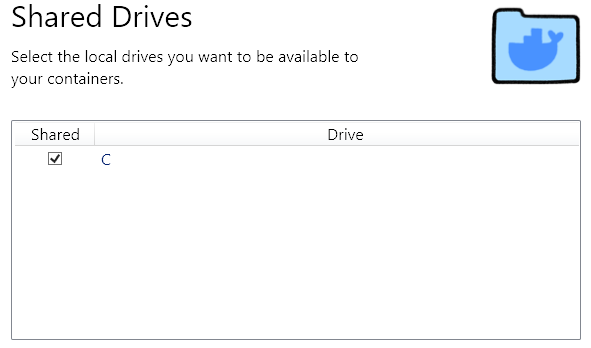
is this what you are talking about? What exactly does : "Make sure this folder is shared in Docker's File Sharing Settings" mean? If this is it, then there is still a problem here.
 markthegrea
on 6 Mar 2019
markthegrea
on 6 Mar 2019
@markthegrea I'm also unclear what ensure the share settings are correct means, so I left it at that, and moved on to other things.
lestephane
on 13 Mar 2019
@eugenevd, I had the same error until I ran sam build before running sam local start-api
 florentcuret
on 20 Mar 2019
florentcuret
on 20 Mar 2019
@jfuss I have the same error and the same Docker configuration as the picture above, what sharing configuration is missing then?
 feinstein
on 5 Jul 2019
feinstein
on 5 Jul 2019
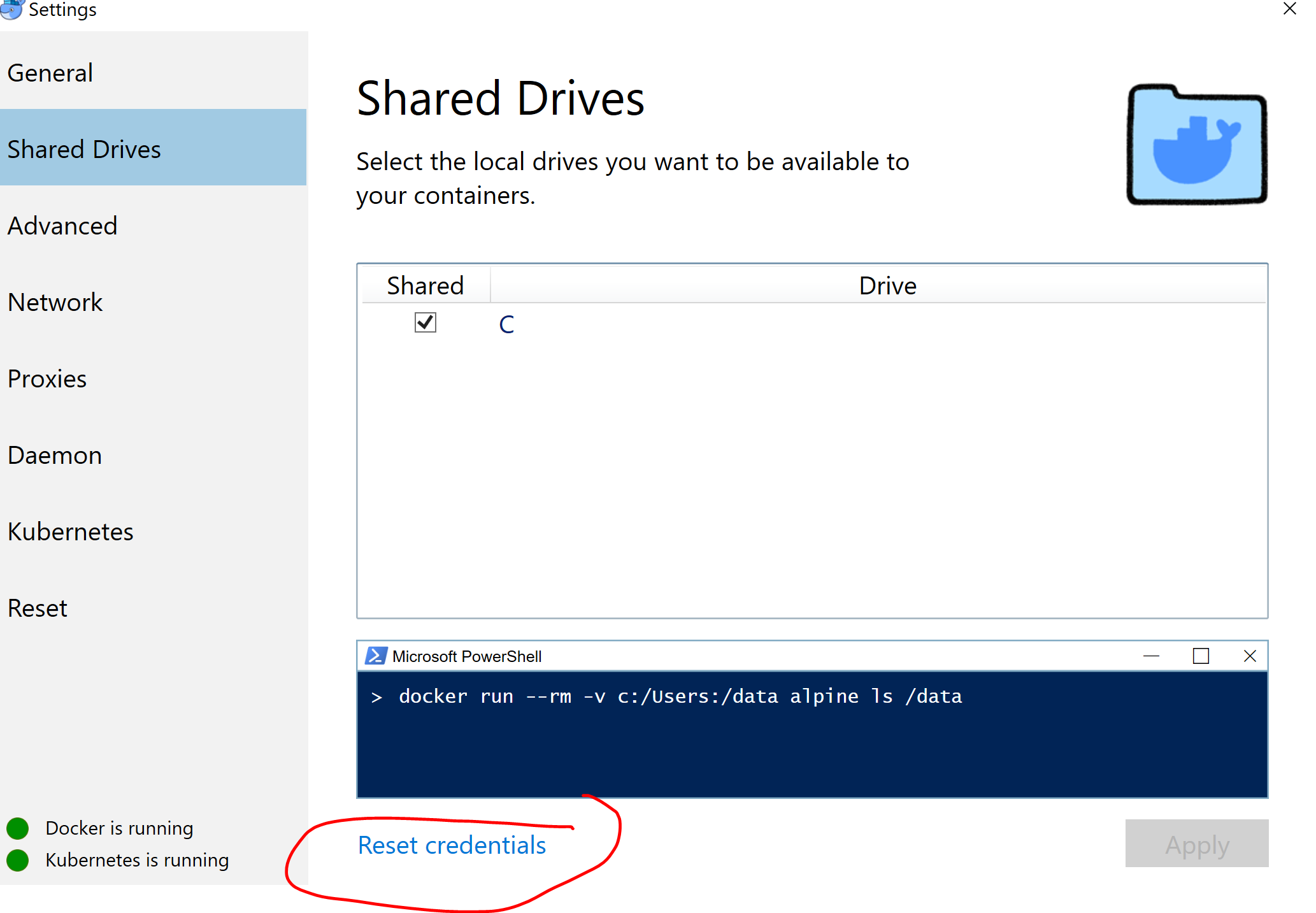
I had the same issue and problem was I had reset the local machine password.
Resetting the credentials solved the problem. Once I click on reset credentials , then when I add "C" as shared drive . It asks for credentials again, and this time I had to provide the new password.
Then I did mvn clean package. And sam build .
Above steps solved the problem
 awasthibrijendra
on 5 May 2020
awasthibrijendra
on 5 May 2020
Related issues
 cmccoypdx
·
3Comments
cmccoypdx
·
3Comments
 goldenbearkin
·
3Comments
goldenbearkin
·
3Comments
 bjea
·
3Comments
bjea
·
3Comments
 dschu-lab
·
3Comments
dschu-lab
·
3Comments
 asyba
·
3Comments
asyba
·
3Comments
Most helpful comment
@eugenevd, I had the same error until I ran
sam buildbefore runningsam local start-api