Aws-sam-cli: [Feature Request] CORS Support in start-api
Full disclosure, this is my first attempt at working with a SAM template so it's likely I'm doing something wrong, but I can't get CORS working for the life of me. My functions work when I hit the endpoints using Insomnia, but when trying to hit it from my app, I get a 404 on the options request. Also, when I run sam local start-api, I get a message saying WARNING: Could not find function for [OPTIONS] to /login resource right above a message saying Mounting index.login (nodejs6.10) at http://127.0.0.1:3000/login [POST]
Below is my template.yaml. I attempted to follow the example here, but still no luck.
However, if I remove the "options" part of the swagger definition, I don't get the OPTIONS warning.
            options:
              consumes:
              - application/json
              produces:
              - application/json
              responses:
                '200':
                  description: 200 response
                  headers:
                    Access-Control-Allow-Origin:
                      type: string
                    Access-Control-Allow-Methods:
                      type: string
                    Access-Control-Allow-Headers:
                      type: string
              x-amazon-apigateway-integration:
                responses:
                  default:
                    statusCode: 200
                    responseParameters:
                      method.response.header.Access-Control-Allow-Methods: "'DELETE,GET,HEAD,OPTIONS,PATCH,POST,PUT'"
                      method.response.header.Access-Control-Allow-Headers: "'Content-Type,Authorization,X-Amz-Date,X-Api-Key,X-Amz-Security-Token'"
                      method.response.header.Access-Control-Allow-Origin: "'*'"
                passthroughBehavior: when_no_match
                requestTemplates:
                  application/json: "{\"statusCode\": 200}"
                type: mock
Any help / suggestions would be greatly appreciated
AWSTemplateFormatVersion: '2010-09-09'
Transform: 'AWS::Serverless-2016-10-31'

Parameters:
  TableName:
    Default: <TableName>
    Type: String
  FunctionNamePrefix:
    Default: <TableName>
    Type: String
  Secret:
    Default: ""
    Type: String
  AppConfigReadCapacity:
    Default: 5
    Type: Number
  AppConfigWriteCapacity:
    Default: 5
    Type: Number
  AppConfigPrimaryKey:
    Default: id
    Type: String
  Env:
    Default: dev
    Type: String
  S3Bucket:
    Default: <S3Bucket>
    Type: String

Resources:
  EnterpriseApi:
    Type: AWS::Serverless::Api
    Properties:
      StageName: dev
      DefinitionBody:
        swagger: '2.0'
        info:
          title: 'API Gateway Endpoints'
        basePath: '/dev'
        schemes:
          - 'https'
        paths:
          "/login":
            post:
              x-amazon-apigateway-integration:
                httpMethod: POST
                type: aws_proxy
                uri: "arn:aws:apigateway:${awsRegion}lambda:path/2015-03-31/functions/arn:aws:lambda:${awsRegion}l:${awsAccount}:function:${function}/invocations"
                responses: {}
                passthroughBehavior: when_no_match
            options:
              consumes:
              - application/json
              produces:
              - application/json
              responses:
                '200':
                  description: 200 response
                  headers:
                    Access-Control-Allow-Origin:
                      type: string
                    Access-Control-Allow-Methods:
                      type: string
                    Access-Control-Allow-Headers:
                      type: string
              x-amazon-apigateway-integration:
                responses:
                  default:
                    statusCode: 200
                    responseParameters:
                      method.response.header.Access-Control-Allow-Methods: "'DELETE,GET,HEAD,OPTIONS,PATCH,POST,PUT'"
                      method.response.header.Access-Control-Allow-Headers: "'Content-Type,Authorization,X-Amz-Date,X-Api-Key,X-Amz-Security-Token'"
                      method.response.header.Access-Control-Allow-Origin: "'*'"
                passthroughBehavior: when_no_match
                requestTemplates:
                  application/json: "{\"statusCode\": 200}"
                type: mock

  LoginFunction:
    Type: AWS::Serverless::Function
    Properties:
      Handler: index.login
      Runtime: nodejs6.10
      CodeUri: 's3://${s3Bucket}/${s3Folder}/test.zip'
      FunctionName:
        Fn::Join:
          - "-"
          -
            - Ref: FunctionNamePrefix
            - login
      Description: ''
      Timeout: 30
      Environment:
        Variables:
          TABLE_NAME:
            Ref: TableName
          NODE_ENV:
            Ref: Env
          S3_BUCKET: <BucketName>
          SECRET:
            Ref: Secret
          AWS_PROFILE:
            Ref: AwsProfile
          POSTGRES_HOST:
            Ref: PostgresHost
          POSTGRES_DB:
            Ref: PostgresDb
          POSTGRES_USER:
            Ref: PostgresUser
          POSTGRES_PASSWORD:
            Ref: PostgresPassword
          POSTGRES_DB:
            Ref: PostgresDb
          API_Key:
            Ref: ApiKey
      Events:
        LoginResource:
          Type: Api
          Properties:
            Path: /login
            Method: post
            RestApiId:
              Ref: EnterpriseApi
 walkerlangley
All 41 comments
Your options block looks pretty good. I've got a just a few differences, most notably that you don't have a "responseTemplates" property inside the default response, and you don't have the httpMethod property.
              x-amazon-apigateway-integration:
                requestTemplates:
                  application/json: '{"statusCode" : 200}'
                responses:
                  default:
                    statusCode: '200'
                    responseParameters:
                      method.response.header.Access-Control-Allow-Headers: "'Content-Type,X-Amz-Date,Authorization,X-Api-Key'"
                      method.response.header.Access-Control-Allow-Methods: "'POST, GET, PUT, DELETE'"
                      method.response.header.Access-Control-Allow-Origin: "'*'"
                    responseTemplates:
                      application/json: "{}"
                passthroughBehavior: when_no_match
                httpMethod: OPTIONS
                type: mock
The above config is just to get the options endpoint executing in a deployed SAM app. Local execution is a different beast. SAM Local doesn't yet create endpoints for "mock" integration requests. So I've gotten around this by creating an extra Lambda function for local CORS requests:
  # This Lambda Function is defined ONLY for local development,
  # to stub the "AWS_Mock" API Endpoints that will be created when the API Gateway is deployed
  # When deployed to AWS, the API Gateway configuration will override the lambda events defined here
  # We tried using a CloudFormation "Condition" statement on this resource, but that didn't work with SAM Local tools
  resLambdaLocalCorsStub:
    Type: AWS::Serverless::Function
    Properties:
      Handler: corsOptions.handler
      Runtime: nodejs6.10
      FunctionName: !Sub "${paramEnvironment}${paramFeatureBranch}_${paramServiceName}_corsOptions"
      CodeUri: dist
      Timeout: 30
      Events:
        healthOptions: # This block must be repeated for each endpoint that needs CORS support in SAM Local
          Type: Api
          Properties:
            RestApiId: !Ref resApiGateway
            Path: /health
            Method: OPTIONS
        loginOptions:
          Type: Api
          Properties:
            RestApiId: !Ref resApiGateway
            Path: /login
            Method: OPTIONS
Also, once you get the OPTIONS endpoint working, your Lambda function for each endpoint needs to return the "Access-Control-Allow-Origin" header on every response. I've made that header a standard part of the response object from every lambda function.
 michaelj-smith
on 12 Mar 2018
michaelj-smith
on 12 Mar 2018
And here's the content of corsOptions.js:
"use strict";

// ***** This handler is used only in local development, for mocking the OPTIONS responses
// ***** This enables API Tests to pass CORS tests when running locally
exports.handler = (event, context, callback) => {
  callback(null, {
    statusCode: 200,
    headers: {
      "Access-Control-Allow-Headers": "Content-Type,X-Amz-Date,Authorization,X-Api-Key",
      "Access-Control-Allow-Methods": "POST, GET, PUT, DELETE",
      "Access-Control-Allow-Origin": "*"
    },
    body: ""
  });
};
Thanks for the detailed response @michaelj-smith. I'll take a look at this tomorrow. Seems like a lot of work to allow testing locally :)
This weekend I ended up moving everything over to serverless and got things working pretty easily (that cors: true is pretty nice) but I'm interested to see if I can get things working with sam-local as well.
walkerlangley
on 13 Mar 2018
Your welcome. Sorry to hear you couldn't get it working yet.
I agree that there are some less-than-ideal workarounds needed for SAM Local, but it's still a very new tool. I'm impressed at the active development and general responsiveness to such a wide variety of use cases used by the tool. I recently made the switch to SAM from serverless.com framework, because of the power of all of the CloudFormation tools. Still, SAM might not yet be a full solution for everyone.
There was a big release to the SAM tools today (v1.4.0): https://github.com/awslabs/serverless-application-model/releases/tag/1.4.0
This will undoubtedly help unblock the ability for SAM Local developers to start supporting CORS in a future release of SAM Local.
michaelj-smith
on 13 Mar 2018
@michaelj-smith no worries. I'm sure the tool will evolve. Thanks for the link to the new SAM tools and thanks again for all the help.
walkerlangley
on 13 Mar 2018
@michaelj-smith Hate to bother you again, but I feel like I'm so close....
I got the options to return a 200 (huge thanks), however the follow-up POST isn't being sent. Here is my updated template.yml (and I added the corsOptions.js file you added above.) Any ideas what's causing the request to hang?
AWSTemplateFormatVersion: '2010-09-09'
Transform: 'AWS::Serverless-2016-10-31'

Parameters:
  TableName:
    Default: <name>
    Type: String
  FunctionNamePrefix:
    Default: <name>
    Type: String
  Secret:
    Default: ""
    Type: String
  AppConfigReadCapacity:
    Default: 5
    Type: Number
  AppConfigWriteCapacity:
    Default: 5
    Type: Number
  AppConfigPrimaryKey:
    Default: id
    Type: String
  Env:
    Default: dev
    Type: String
  S3Bucket:
    Default: <name>
    Type: String

Resources:
  resLambdaLocalCorsStub:
    Type: AWS::Serverless::Function
    Properties:
      Handler: corsOptions.handler
      Runtime: nodejs6.10
      FunctionName: !Sub "${paramEnvironment}${paramFeatureBranch}_${paramServiceName}_corsOptions"
      CodeUri: dist
      Timeout: 30
      Events:
        loginOptions: # This block must be repeated for each endpoint that needs CORS support in SAM Local
          Type: Api
          Properties:
            RestApiId: !Ref EnterpriseApi
            Path: /api/login
            Method: OPTIONS

  Login:
    Type: 'AWS::Serverless::Function'
    Properties:
      Handler: auth.login
      Runtime: nodejs6.10
      CodeUri: 's3://<name>-<region>/<directory>/latest.zip'
      FunctionName:
        Fn::Join:
          - "-"
          -
            - Ref: FunctionNamePrefix
            - login
      Timeout: 30
      Environment:
        Variables:
          TABLE_NAME: !Ref TableName
          NODE_ENV: !Ref Env
          S3_BUCKET: !Ref S3Bucket
          SECRET: !Ref Secret
          AWS_PROFILE: !Ref AwsProfile
          POSTGRES_HOST: !Ref PostgresHost
          POSTGRES_DB: !Ref PostgresDb
          POSTGRES_USER: !Ref PostgresUser
          POSTGRES_PASSWORD: !Ref PostgresPassword
          POSTGRES_DB: !Ref PostgresDb
          API_Key: !Ref ApiKey
      Events:
        LoginResource:
          Type: Api
          Properties:
            RestApiId: !Ref EnterpriseApi
            Path: /api/login
            Method: post

  EnterpriseApi:
    Type: 'AWS::Serverless::Api'
    Properties:
      StageName: dev
      Cors: "'*'"
      DefinitionBody:
        swagger: '2.0'
        info:
          version: '1.0'
        schemes:
          - 'https'
        produces:
          - 'application/json'
        paths:
          /api/login:
            options:
              x-amazon-apigateway-integration:
                type: mock
                requestTemplates:
                  application/json: '{ "statusCode" : 200 }'
                httpMethod: OPTIONS
                responses:
                  default:
                    statusCode: 200
                    responseParameters:
                      method.response.header.Access-Control-Allow-Headers: "'Content-Type,X-Amz-Date,Authorization,X-Api-Key'"
                      method.response.header.Access-Control-Allow-Methods: "'DELETE,GET,HEAD,OPTIONS,PATCH,POST,PUT'"
                      method.response.header.Access-Control-Allow-Origin: "'*'"
                    responseTemplates:
                      application/json: '{}'
              responses:
                '200':
                  headers:
                    Access-Control-Allow-Headers:
                      type: string
                    Access-Control-Allow-Methods:
                      type: string
                    Access-Control-Allow-Origin:
                      type: string
            post:
              summary: 'Log users in'
              description: 'For Login Page'
              parameters:
                - name: 'user'
                  in: 'body'
                  description: 'The person to log in.'
                  schema:
                    required:
                      - 'email'
                      - 'password'
                    properties:
                      email:
                        type: 'string'
                      password:
                        type: 'string'
              x-amazon-apigateway-integration:
                httpMethod: POST
                type: aws_proxy
                uri:
                  'Fn::Sub': >-
                    arn:aws:apigateway:${AWS::Region}:lambda:path/2015-03-31/functions/${Login.Arn}/invocations
                responses:
                  default:
                    statusCode: 200
                    responseParameters:
                      method.response.header.Access-Control-Allow-Headers: "'Content-Type,X-Amz-Date,Authorization,X-Api-Key'"
                      method.response.header.Access-Control-Allow-Methods: "'post'"
                      method.response.header.Access-Control-Allow-Origin: "'*'"
                    responseTemplates:
                      application/json: '{}'
              responses:
                '200':
                  headers:
                    Access-Control-Allow-Headers:
                      type: string
                    Access-Control-Allow-Methods:
                      type: string
                    Access-Control-Allow-Origin:
                      type: string
                400:
                  description: 'Something went wrong'
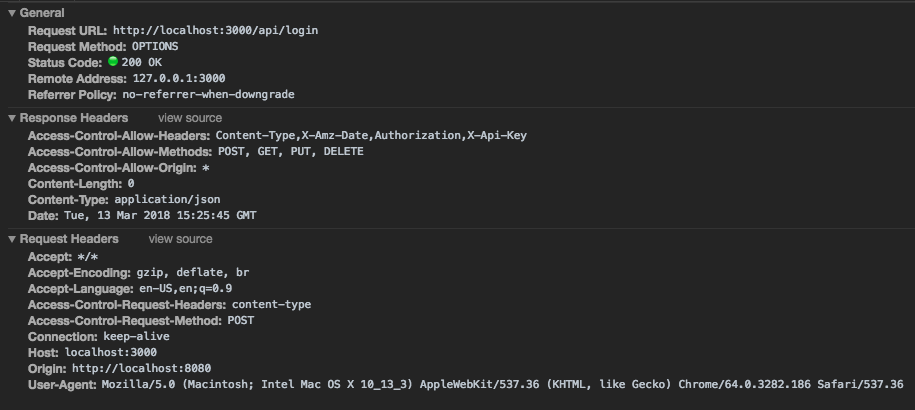
walkerlangley
on 13 Mar 2018
Ok. I got it sorted out.
Thanks again for the help!
walkerlangley
on 13 Mar 2018
walkerlangley, how did you got it sorted out?
 snavarro89
on 22 Mar 2018
snavarro89
on 22 Mar 2018
@snavarro89 Sorry, just seeing this. To be honest I forgot what I did at the time to fix this. Are you having any issues?
walkerlangley
on 16 Apr 2018
Updated description to '[Feature Request] CORS Support in start-api' and adding labels.
 jfuss
on 12 May 2018
jfuss
on 12 May 2018
Just in case it might be of some use, here's an example of SAM with CORS enabled: https://github.com/aws-samples/startup-kit-serverless-workload.
 rabowskyb
on 28 May 2018
rabowskyb
on 28 May 2018
There's no SAM Template in that repo that you've linked there.
 ChadElias
on 26 Jun 2018
ChadElias
on 26 Jun 2018
The template is in there at https://github.com/aws-samples/startup-kit-serverless-workload/blob/master/serverless.cfn.yml.
rabowskyb
on 26 Jun 2018
@rabowskyb does this example work with SAM CLI?
This does not seem to do anything for me when using sam local start-api
Globals:
  Api:
    Cors:
      AllowMethods: "'*'"
      AllowHeaders: "'*'"
      AllowOrigin: "'*'"
 skylerrichter
on 24 Jul 2018
skylerrichter
on 24 Jul 2018
I did not test this with SAM local in particular; I tested using SAM for a cloud-based deployment.
rabowskyb
on 24 Jul 2018
I am having the same issue as @skylerrichter.
Globals:
  Api:
    Cors:
      AllowMethods: "'*'"
      AllowHeaders: "'*'"
      AllowOrigin: "'*'"
The above code works when I deploy to api gateway, however when running sam local start-api the options method does not respond with any of the headers specified.
I am not sure if this is a seperate issue?
 alechewitt
on 26 Jul 2018
alechewitt
on 26 Jul 2018
I assume sam local should follow the sam standard, including CORS support, so sam local should eventually support that same syntax mentioned in the immediately previous comment. Probably don't need to open a separate issue.
rabowskyb
on 26 Jul 2018
Is there any update on this?
In the meantime, I just have all methods returning something along the lines of:
return {
  "statusCode": 200,
  "headers": {
    "Access-Control-Allow-Origin": "*"
  },
  "body": body
}
 holtc
on 18 Sep 2018
holtc
on 18 Sep 2018
@jfuss - I can give this a try next Friday afternoon (Sep 28th) if you
like; assign that to me
On Tue, 18 Sep 2018 at 12:18 Chris Holt notifications@github.com wrote:
Is there any update on this?
—
You are receiving this because you are subscribed to this thread.
Reply to this email directly, view it on GitHub
https://github.com/awslabs/aws-sam-cli/issues/323#issuecomment-422354331,
or mute the thread
https://github.com/notifications/unsubscribe-auth/ADL4BARiWWE101tEil_bwIjssA2TQYmbks5ucNaPgaJpZM4SlEzo
.
 heitorlessa
on 18 Sep 2018
heitorlessa
on 18 Sep 2018
It would be great to have support for the Api.Cors setting in Sam Local.
The current lack of support forces you to do some hacky workarounds such as handling the CORS OPTIONS request in the Lambda code itself.
 sgronblo
on 19 Oct 2018
sgronblo
on 19 Oct 2018
If nothing else, can the documentation at least be updated to not suggest that the API Gateway handles anything for CORS?
For example, this series of steps led me to believe that CORS configuration would be supported:
- Run
sam init --runtime dotnetcore2.0 - Open
template.yamland follow the reference in the comments to the template format - Follow that to the API section, then to the CORS section.
I'm not seeing anything saying that this configuration would only work under certain circumstances, leading me to believe that it should work. However, my experiences have been much the same as everyone else's using aws-sam-cli 0.6.0.
 kkrull
on 24 Oct 2018
kkrull
on 24 Oct 2018
I'm using sam 0.7.0 and having same issue as described in this thread - namely trying to enable CORS when running sam local start-api -p 9000. What's the current status of this? Thanks in advance!
My 0.02
Ideally, as suggested above, I'd like to simply have something like in Serverless where I can say Cors: true in the template and have this setting make my local functions behave as if I had set Enable CORS in the API Gateway with a mock handling the OPTIONS request.
 tkaria
on 25 Nov 2018
tkaria
on 25 Nov 2018
I'm having the same problem with aws sam cli local. It won't accept Authorization in my request header. Is there any update on this issue for sam cli local ?
 lyxhaven
on 20 Dec 2018
lyxhaven
on 20 Dec 2018
Same issue, doesn't seem to work locally :/
 Buzzology
on 1 Feb 2019
Buzzology
on 1 Feb 2019
We have CORS working nicely through SAM and the API gateway, but not locally. It would have saved a lot of time if the documentation had made it clear that this didn't work. (And would be even better if it did of course! :))
 johnc44
on 16 Apr 2019
johnc44
on 16 Apr 2019
It occurred to me that a simpler solution than the lambda posted above would probably be to simply proxy all requests to sam.
I did a (very) quick Google and found this: https://www.npmjs.com/package/local-cors-proxy
To make this work, I simply need to start SAM locally, then do this:
npm install local-cors-proxy
npx lcp --proxyUrl http://localhost:3000/
(where "3000" is the port SAM is running)
I then reference the API using http://localhost:8010/proxy/.
Not as good as a fully integrated SAM solution, but at least it doesn't involve any code changes.
johnc44
on 16 Apr 2019
The solution proposed by @johnc44 works for me and it seems the less invasive one. Hopefully we will get a "start-api" version on a short term.
Cheers
 fcasals
on 16 Apr 2019
fcasals
on 16 Apr 2019
Many thanks @johnc44 for your proxy solution to getting SAM working locally while we wait for a start-api version from AWS.
 stephen-mi11er
on 20 Apr 2019
stephen-mi11er
on 20 Apr 2019
Thank you @johnc44! it works, but CORS support in aws-sam-cli is a must
 a-bx
on 26 Apr 2019
a-bx
on 26 Apr 2019
We need CORS locally ... What is going on ?
 acstan
on 11 May 2019
acstan
on 11 May 2019
I will jump on this to confirm this is a pain in the * to get the cors to work on sam start-api. I don't know about others but I am using lambda locally with my web-app and not having this is problematic to develop our software. It would be really great if local support could be handled.
 klanthier
on 29 May 2019
klanthier
on 29 May 2019
We have CORS working nicely through SAM and the API gateway, but not locally. It would have saved a lot of time if the documentation had made it clear that this didn't work. (And would be even better if it did of course! :))
Exactly. Would have saved me a lot of time if this had been documented up front.
 de1mat
on 4 Jun 2019
de1mat
on 4 Jun 2019
+1 For CORS support. It's pretty hard to test locally without it.
 mcshaman
on 8 Aug 2019
mcshaman
on 8 Aug 2019
Release in v0.21.0.
Closing
jfuss
on 16 Sep 2019
Thank you! I've confirmed that this works great locally in the new versions!
michaelj-smith
on 31 Oct 2019
Just wanted to let others know that you can now correctly use start-api with CORS settings like so :
Globals:
  Api:
    Cors:
      AllowMethods: "'*'"
      AllowHeaders: "'*'"
      AllowOrigin: "'*'"
This works for me with the latest version (0.30 as of writing)
klanthier
on 6 Nov 2019
Same issue on version 0.38.0 😓
 franbueno
on 20 Dec 2019
franbueno
on 20 Dec 2019
I hit the same error. The server return http 200 without Cors headers. Is there any hint on how to get it passed?
SAM CLI, version 0.39.0
2020-01-05 21:40:19 127.0.0.1 - - [05/Jan/2020 21:40:19] "OPTIONS /orders/193061421222 HTTP/1.1" 200 -
 cesarho
on 5 Jan 2020
cesarho
on 5 Jan 2020
I had this working by setting up a "corsHandler" that just returned a status code of 200, but that doesn't seem to be working anymore and neither does adding a Cors "section" in the AWS Sam Template. Any ideas? Cors section of template is below. I also still have the CORS Options handler set up but that doesn't seem to be called (I'm logging before returning the code but the logs aren't printing).
Update: it looks like the issue is the AllowCredentials property isn't setting the Access-Control-Allow-Credentials header to true and I'm getting an error saying it's value is ''.
The Cors response is returning a 200 with
Access-Control-Allow-Headers: Content-Type,X-Amz-Date,Authorization,X-Api-Key
Access-Control-Allow-Methods: DELETE,GET,OPTIONS,POST,PUT
Access-Control-Allow-Origin: http://localhost:8080
sam--version = 0.40.0
EnterpriseApi:
    Type: 'AWS::Serverless::Api'
    Properties:
      StageName: !Ref Env
      Cors:
        AllowCredentials: "'true'"
        AllowMethods: "'POST, GET, PUT, DELETE, OPTIONS'"
        AllowHeaders: "'Content-Type,X-Amz-Date,Authorization,X-Api-Key'"
        #AllowOrigin: "'*'"
        AllowOrigin: "'http://localhost:8080'"
      DefinitionBody:
        swagger: '2.0'
        info:
          version: '1.0'
          title: !Sub '${CompanyName}'
          description: !Sub 'Endpoints for ${CompanyName}'
walkerlangley
on 13 Jan 2020
I'm having the same issue here, can we open this up again
 imoby
on 14 Feb 2020
imoby
on 14 Feb 2020
The answer by @klanthier worked for me and added these headers:
/// OPTIONS / HTTP/1.1
Access-Control-Allow-Origin: "*"
Access-Control-Allow-Methods: "DELETE,GET,HEAD,OPTIONS,PATCH,POST,PUT"
Access-Control-Allow-Headers: "*"
 jakebrinkmann
on 11 Mar 2020
jakebrinkmann
on 11 Mar 2020
Related issues
 debuggins
·
4Comments
debuggins
·
4Comments
 Caian
·
3Comments
Caian
·
3Comments
 rhlsthrm
·
4Comments
rhlsthrm
·
4Comments
 goldenbearkin
·
3Comments
goldenbearkin
·
3Comments
 jpbarto
·
4Comments
jpbarto
·
4Comments
Most helpful comment
It occurred to me that a simpler solution than the lambda posted above would probably be to simply proxy all requests to sam.
I did a (very) quick Google and found this: https://www.npmjs.com/package/local-cors-proxy
To make this work, I simply need to start SAM locally, then do this:
npm install local-cors-proxy
npx lcp --proxyUrl http://localhost:3000/
(where "3000" is the port SAM is running)
I then reference the API using http://localhost:8010/proxy/.
Not as good as a fully integrated SAM solution, but at least it doesn't involve any code changes.