Aws-parallelcluster: compute instances fail health check in endless loop
Environment:
aws-parallelcluster-2.4.1
centos7
sge
master: c5.9xlarge
compute: c5n.18xlarge
The compute nodes never become live because they continually fail the health check on start-up and are terminated. Here's the output from /var/log/sqswatcher on the master node:
2019-10-25 02:56:16,247 INFO [sqswatcher:_retrieve_all_sqs_messages] Retrieving messages from SQS queue
2019-10-25 02:56:18,259 INFO [sqswatcher:_retrieve_all_sqs_messages] Retrieved 0 messages from SQS queue
2019-10-25 02:56:48,289 INFO [sqswatcher:_retrieve_all_sqs_messages] Retrieving messages from SQS queue
2019-10-25 02:56:50,324 INFO [sqswatcher:_retrieve_all_sqs_messages] Retrieved 0 messages from SQS queue
2019-10-25 02:57:20,354 INFO [sqswatcher:_retrieve_all_sqs_messages] Retrieving messages from SQS queue
2019-10-25 02:57:22,363 INFO [sqswatcher:_retrieve_all_sqs_messages] Retrieved 0 messages from SQS queue
2019-10-25 02:57:52,393 INFO [sqswatcher:_poll_queue] Refreshing cluster properties
2019-10-25 02:57:52,499 INFO [utils:get_asg_settings] min/desired/max 0/1/6
2019-10-25 02:57:52,564 INFO [sqswatcher:_retrieve_all_sqs_messages] Retrieving messages from SQS queue
2019-10-25 02:57:54,574 INFO [sqswatcher:_retrieve_all_sqs_messages] Retrieved 0 messages from SQS queue
2019-10-25 02:58:24,604 INFO [sqswatcher:_retrieve_all_sqs_messages] Retrieving messages from SQS queue
2019-10-25 02:58:26,613 INFO [sqswatcher:_retrieve_all_sqs_messages] Retrieved 0 messages from SQS queue
2019-10-25 02:58:56,643 INFO [sqswatcher:_retrieve_all_sqs_messages] Retrieving messages from SQS queue
2019-10-25 02:58:58,703 INFO [sqswatcher:_retrieve_all_sqs_messages] Retrieved 1 messages from SQS queue
2019-10-25 02:58:58,739 ERROR [sqswatcher:_process_instance_terminate_event] Instance i-0012f6c570f00bcd9 not found in the database.
2019-10-25 02:58:58,739 WARNING [sqswatcher:_parse_sqs_messages] Discarding message sqs.Message(queue_url='https://queue.amazonaws.com/684353139040/parallelcluster-meredithk-test-efa-nohyper1-intel3-SQS-1Q2QW8X745LEM', receipt_handle='AQEBc+SA48ZuhUmx1xVpZQipj8SM8xXztziZmkdk1lQjLwNB+F2rGHWrbG2ZKDtvMG4VsI1ek2PgC9fcw/aY6+Q/Tt+0jEMzYZhrDtwqycJpKYdFJzWjY5/blVSNbuc1ZQTqi7QhxlKkySEZ/igX4uFTGgVoZxGw6SFrDzq9IWjn7yJ54ZyJN8rPIthi57QmkU5inlSwPV5pcj6oAftOMPzGxcxv56KoMlqmgof6RIIW66esYzm89d4zWewk+iAolrmtkzD4eJoZQS/jbQT0HMRTFMlt5ufT48WEaKt5WUyL86i6UgCwKtuINdyqi3e/CeUEtxdU+n9oPvpn2im8+vth8dzg1JughlcSsJAJCKohHSamTpSaOhd4DWOW9DOnvGpjl/KBBodTAsg/6073UEr2mE2B8Qbjir3Nt7hwVKJD8iED8YVsMp3SdAfdcyg7naR94n1sZdcvi/PTx7/3K3WY7g==')
2019-10-25 02:59:28,779 INFO [sqswatcher:_retrieve_all_sqs_messages] Retrieving messages from SQS queue
2019-10-25 02:59:30,787 INFO [sqswatcher:_retrieve_all_sqs_messages] Retrieved 0 messages from SQS queue
2019-10-25 03:00:00,818 INFO [sqswatcher:_retrieve_all_sqs_messages] Retrieving messages from SQS queue
2019-10-25 03:00:02,827 INFO [sqswatcher:_retrieve_all_sqs_messages] Retrieved 0 messages from SQS queue
2019-10-25 03:00:32,857 INFO [sqswatcher:_retrieve_all_sqs_messages] Retrieving messages from SQS queue
2019-10-25 03:00:34,865 INFO [sqswatcher:_retrieve_all_sqs_messages] Retrieved 0 messages from SQS queue
2019-10-25 03:01:04,895 INFO [sqswatcher:_poll_queue] Refreshing cluster properties
2019-10-25 03:01:04,988 INFO [utils:get_asg_settings] min/desired/max 0/1/6
2019-10-25 03:01:05,057 INFO [sqswatcher:_retrieve_all_sqs_messages] Retrieving messages from SQS queue
2019-10-25 03:01:07,065 INFO [sqswatcher:_retrieve_all_sqs_messages] Retrieved 0 messages from SQS queue
2019-10-25 03:01:37,095 INFO [sqswatcher:_retrieve_all_sqs_messages] Retrieving messages from SQS queue
2019-10-25 03:01:39,183 INFO [sqswatcher:_retrieve_all_sqs_messages] Retrieved 1 messages from SQS queue
2019-10-25 03:01:39,218 ERROR [sqswatcher:_process_instance_terminate_event] Instance i-07a689ee5610c8c26 not found in the database.
2019-10-25 03:01:39,218 WARNING [sqswatcher:_parse_sqs_messages] Discarding message sqs.Message(queue_url='https://queue.amazonaws.com/684353139040/parallelcluster-meredithk-test-efa-nohyper1-intel3-SQS-1Q2QW8X745LEM', receipt_handle='AQEByn1myDFouo6xqD1TvU+X7fZdqAVZhrqalZ47BunjAEM4egT7VKB1bGmRvyhzge+1CdZTJUyL6iFp5e/2HeAqCmeObPsaxQkFIUr7IdoplLIEqhuufuCdo/k2Z2BwJlW5naxLgrkHdPXqXl0t/xx06fN3lEnsiC3e1mSwxRyPqk1vxtFGInr8zMLk4Y8FSok91AYXmfQ+sBwcL4xASfBoz9AU9tqqhQA2KzHZltOA891GAi/HIp+lAvYvqWqiG9g03m7iAMzNEtq4beBeqhb4jkTAi8MuziLh/7ggezcLH2H6C9W4En/pEKK98zPqQwKdBHrP4anvelEBas9AvsoBKkTotnbH1bdIrljIe9sJmZLXZTGeWh/26b1AgITyJ5W5anZtPoh4t/t2L+Q5P9yH4Y3n2pLtQxwXVzjrCdJ0txy8KcjglI3vSmsznkg3iVqV7N+dXY5RhXhrA+k+csEWkA==')
Here is the config file:
[aws]
aws_access_key_id = ###
aws_secret_access_key = ###
#aws_region_name = us-east-1

[cluster default]
key_name = fire
master_instance_type = c5.9xlarge
compute_instance_type = c5n.18xlarge
base_os = centos7
#cluster_type = spot
spot_price = 5
initial_queue_size = 0
maintain_initial_size = true
max_queue_size = 6
vpc_settings = poc_vpn
tags = {"user" : "meredithk"}
fsx_settings = custom_fs
ebs_settings = shared
fs_settings = customefs
placement_group = DYNAMIC
enable_efa = compute
# centos7
#post_install = s3://postinstallfmg/parallelcluster-postinstall-centos7-v1.sh
# alinux
#post_install = s3://postinstallfmg/parallelcluster-postinstall-v1.sh
extra_json = { "cfncluster" : { "cfn_scheduler_slots" : "cores" } }
master_root_volume_size = 50

[vpc poc_vpn]
vpc_id = vpc-b53f65d1
use_public_ips = false
# useast1a
#master_subnet_id = subnet-a6a304fe
# useast1b
master_subnet_id = subnet-0f2f6a50145d03c60
# additional_sg necessary for efs mounting
additional_sg = sg-0b39ee73

[global]
sanity_check = true
update_check = true
cluster_template = default

[aliases]
ssh = ssh {CFN_USER}@{MASTER_IP} {ARGS}

[fsx custom_fs]
shared_dir = /fsx
storage_capacity = 3600
imported_file_chunk_size = 1024
import_path = s3://fmglobal-virtual-fire-scenarios

[ebs shared]
shared_dir = /shared
volume_size = 2000

[efs customefs]
shared_dir = /efs
efs_fs_id = fs-4b70dd00
I've attached a screenshot of the autoscaling group from the AWS console

 karlvirgil
All 27 comments
@karlvirgil Can you grab the nodewatcher logs from the compute nodes? They should be logged to a directory shared with the master /home/logs. Also does this happen right after cluster creation?
 sean-smith
on 25 Oct 2019
sean-smith
on 25 Oct 2019
They are not up long enough to grab it. It happens right after creation
On Fri, Oct 25, 2019 at 3:33 PM Sean Smith notifications@github.com wrote:
@karlvirgil https://github.com/karlvirgil Can you grab the nodewatcher
logs from the compute nodes? They should be logged to a directory shared
with the master /home/logs. Also does this happen right after cluster
creation?—
You are receiving this because you were mentioned.
Reply to this email directly, view it on GitHub
https://github.com/aws/aws-parallelcluster/issues/1383?email_source=notifications&email_token=ABT2AWN5XLMSN4UTXD4D7YDQQNCXPA5CNFSM4JE564JKYY3PNVWWK3TUL52HS4DFVREXG43VMVBW63LNMVXHJKTDN5WW2ZLOORPWSZGOECJK7JQ#issuecomment-546484134,
or unsubscribe
https://github.com/notifications/unsubscribe-auth/ABT2AWPO37PFR4MIUSZESL3QQNCXPANCNFSM4JE564JA
.>
梅豪偉
karlvirgil
on 25 Oct 2019
Can you re-run with -nr and look at those logs on the master - after it fails. A couple of reasons we've seen this happen in the past are:
- scaledown_idletime is less than instance initialization time. It looks like you commented out the post install script and are not using a
custom_amiso I'm going to rule this out. - SGE is marking the nodes as zombie nodes, then nodewatcher is killing them
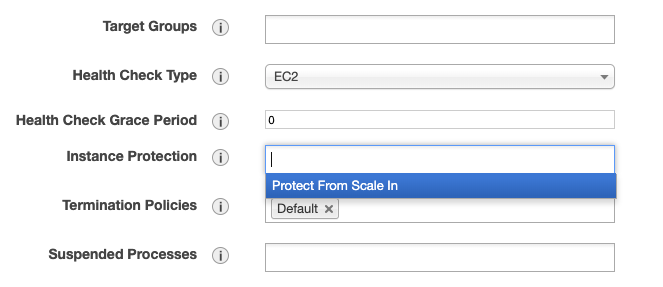
It'll be clear if we can get that nodewatcher log. You can change the ASG settings to keep the node by setting "Instance Protection = Protect from scale in"
sean-smith
on 25 Oct 2019
What command do I re-run with -nr? the pcluster create command? the sge job submission command?
karlvirgil
on 27 Oct 2019
pcluster create
sean-smith
on 27 Oct 2019
It looks like "protect from scale in" doesn't keep the compute node around. It still gets killed.
With the -nr command, the compute node still gets killed, and the master node doesn't get created:
$ )pcluster create -nr meredithk-test-efa-nohyper1-intel6
Beginning cluster creation for cluster: meredithk-test-efa-nohyper1-intel6
Creating stack named: parallelcluster-meredithk-test-efa-nohyper1-intel6
Status: parallelcluster-meredithk-test-efa-nohyper1-intel6 - CREATE_FAILED
Cluster creation failed.  Failed events:
  - AWS::CloudFormation::Stack parallelcluster-meredithk-test-efa-nohyper1-intel6 The following resource(s) failed to create: [MasterServerWaitCondition, ComputeFleet].
  - AWS::AutoScaling::AutoScalingGroup ComputeFleet Resource creation cancelled
  - AWS::CloudFormation::WaitCondition MasterServerWaitCondition Failed to receive 1 resource signal(s) within the specified duration
karlvirgil
on 1 Nov 2019
Hi @karlvirgil,
what does the "CloudFormation Stack - Events Tab" reports for the cluster created with the -nr flag?
 lukeseawalker
on 5 Nov 2019
lukeseawalker
on 5 Nov 2019
minor:
in your config there is a typo:
fs_settings = customefs should be efs_settings = customefs
lukeseawalker
on 5 Nov 2019
@karlvirgil Any update on this issue?
To keep compute nodes from terminating, manually set Suspended Processes in ASG to suspend all actions except for Launch. You can connect directly to the compute node after this and retrieve the logs.
Also failure in MasterServerWaitCondition does not mean the master server is not created. You can manually connect to the master server via ssh after create fails.
 rexcsn
on 11 Nov 2019
rexcsn
on 11 Nov 2019
Okay. I wasn't aware that the master was still created. Let me try again...
karlvirgil
on 12 Nov 2019
Okay. Here's what I've done:
$ )pcluster create -nr meredithk-test-efa-nohyper1-intel6
Beginning cluster creation for cluster: meredithk-test-efa-nohyper1-intel6
Creating stack named: parallelcluster-meredithk-test-efa-nohyper1-intel6
Status: parallelcluster-meredithk-test-efa-nohyper1-intel6 - CREATE_FAILED
Cluster creation failed. Failed events:
- AWS::CloudFormation::Stack parallelcluster-meredithk-test-efa-nohyper1-intel6 The following resource(s) failed to create: [MasterServerWaitCondition, ComputeFleet].
- AWS::AutoScaling::AutoScalingGroup ComputeFleet Resource creation cancelled
- AWS::CloudFormation::WaitCondition MasterServerWaitCondition Failed to receive 1 resource signal(s) within the specified duration
pcluster instances meredithk-test-efa-nohyper1-intel6
MasterServer         i-056b69a4a2854e1a1
ComputeFleet         i-043289a5028509bc7
These two instances have ip addresses
10.15.32.31
10.15.32.173
respectively.
Logging on to 10.15.32.31 there is no /home/logs file on either machine.
[centos@ip-10-15-32-31 ~]$ ls /home/logs
ls: cannot access /home/logs: No such file or directory
[centos@ip-10-15-32-31 ~]$ ssh -i fire.pem 10.15.32.173
Last login: Tue Nov 12 16:42:51 2019 from ip-10-15-32-31.ec2.internal
[centos@ip-10-15-32-173 ~]$ ls /home/logs
ls: cannot access /home/logs: No such file or directory
Not sure what else to look at here.
karlvirgil
on 12 Nov 2019
I seem to have fixed the issue. I only had my efs mount available on us-east1a . When trying to create a pcluster in us-east1b it couldn't mount efs and failed the health check.
karlvirgil
on 15 Nov 2019
It seems that efs was not the culprit. This issue is still unresolved. I was finally able to get a compute node to stay alive and have attached the /home/logs/compute/i-0db91e101ae1628db.tar.gz file. Hopefully this can help diagnose why the compute nodes are constantly failing the health check on startup.
i-0db91e101ae1628db.tar.gz
karlvirgil
on 20 Nov 2019
How do I remove the "waiting customer response" lablel?
karlvirgil
on 20 Nov 2019
The compute node still eventually fails the health check. I was looking through the log files from /home/logs/compute/i-0db91e101ae1628db.tar.gz, and I noticed in one /var/log/cfn-init-cmd.log there is this error message at the end of the file:
2019-11-20 01:15:28,020 P4412 [INFO]    Chef Client failed. 22 resources updated in 12 seconds
2019-11-20 01:15:28,020 P4412 [INFO]    [2019-11-20T01:15:27+00:00] FATAL: Stacktrace dumped to /etc/chef/local-mode-cache/cache/chef-stacktrace.out
2019-11-20 01:15:28,020 P4412 [INFO]    [2019-11-20T01:15:27+00:00] FATAL: Stacktrace dumped to /etc/chef/local-mode-cache/cache/chef-stacktrace.out
2019-11-20 01:15:28,020 P4412 [INFO]    [2019-11-20T01:15:27+00:00] FATAL: Please provide the contents of the stacktrace.out file if you file a bug report
2019-11-20 01:15:28,020 P4412 [INFO]    [2019-11-20T01:15:27+00:00] FATAL: Please provide the contents of the stacktrace.out file if you file a bug report
2019-11-20 01:15:28,020 P4412 [INFO]    [2019-11-20T01:15:27+00:00] FATAL: Mixlib::ShellOut::ShellCommandFailed: mount[/home] (aws-parallelcluster::_compute_base_config line 45) had an error: Mixlib::ShellOut::ShellCommandFailed: Expected process to exit with [0], but received '32'
2019-11-20 01:15:28,020 P4412 [INFO]    ---- Begin output of mount -t nfs -o hard,intr,noatime,vers=3,_netdev ip-10-15-33-53.ec2.internal:/home /home ----
2019-11-20 01:15:28,020 P4412 [INFO]    STDOUT:
2019-11-20 01:15:28,020 P4412 [INFO]    STDERR: mount.nfs: access denied by server while mounting ip-10-15-33-53.ec2.internal:/home
2019-11-20 01:15:28,020 P4412 [INFO]    ---- End output of mount -t nfs -o hard,intr,noatime,vers=3,_netdev ip-10-15-33-53.ec2.internal:/home /home ----
2019-11-20 01:15:28,020 P4412 [INFO]    Ran mount -t nfs -o hard,intr,noatime,vers=3,_netdev ip-10-15-33-53.ec2.internal:/home /home returned 32
2019-11-20 01:15:28,020 P4412 [INFO]    [2019-11-20T01:15:27+00:00] FATAL: Mixlib::ShellOut::ShellCommandFailed: mount[/home] (aws-parallelcluster::_compute_base_config line 45) had an error: Mixlib::ShellOut::ShellCommandFailed: Expected process to exit with [0], but received '32'
2019-11-20 01:15:28,020 P4412 [INFO]    ---- Begin output of mount -t nfs -o hard,intr,noatime,vers=3,_netdev ip-10-15-33-53.ec2.internal:/home /home ----
2019-11-20 01:15:28,021 P4412 [INFO]    STDOUT:
2019-11-20 01:15:28,021 P4412 [INFO]    STDERR: mount.nfs: access denied by server while mounting ip-10-15-33-53.ec2.internal:/home
2019-11-20 01:15:28,021 P4412 [INFO]    ---- End output of mount -t nfs -o hard,intr,noatime,vers=3,_netdev ip-10-15-33-53.ec2.internal:/home /home ----
2019-11-20 01:15:28,021 P4412 [INFO]    Ran mount -t nfs -o hard,intr,noatime,vers=3,_netdev ip-10-15-33-53.ec2.internal:/home /home returned 32
2019-11-20 01:15:28,021 P4412 [INFO] ------------------------------------------------------------
2019-11-20 01:15:28,021 P4412 [ERROR] Exited with error code 1
I'm pretty sure this has to do with why the health check fails. The /home directory from the master node is failing to mount on the compute node. I don't know why that is happening though.
Looking in /etc/chef/local-mode-cache/cache/chef-stacktrace.out on the compute node, I see
STDERR: mount.nfs: access denied by server while mounting ip-10-15-33-53.ec2.internal:/home
Karl
karlvirgil
on 20 Nov 2019
So the issue we discovered was that the VPC has 3 CIDR ranges, when the subnet was switched, /etc/exports exported /home to a CIDR range that the compute nodes (and master) were not in.
There are two workarounds
- Create a new VPC with a single CIDR range and subnets that split that single range. This can be done with
pcluster configure - Create a post-install script that takes the CIDR range from the current subnet (which you can get via ec2 metadata) and changes
/etc/exportsto use this value:
# from the master instance
curl http://169.254.169.254/latest/meta-data/network/interfaces/macs/$(curl -s http://169.254.169.254/latest/meta-data/network/interfaces/macs)/vpc-ipv4-cidr-block -s
Same problem with VPC CIDRs was reported in this older issue: https://github.com/aws/aws-parallelcluster/issues/993#issuecomment-480837238
 demartinofra
on 28 Nov 2019
demartinofra
on 28 Nov 2019
Regarding workaround #1 as proposed by @sean-smith, we currently have many parallelcluster instances up and running on this VPC and I don't think that I will be able to create a new VPC with a single CIDR range without affecting the existing instances. Regarding workaround #2, I'm not very good at working with /etc/exports. What would that command look like?.
It'd be nice to have the bug fixed in the long term. Is the team planning on fixing the issue, as it seems that my current configuration (VPC, subnets, CIDR ranges, etc.) is a very valid configuration?
karlvirgil
on 30 Nov 2019
Yes I can confirm that we do plan to fix this and we'll do our best to include the fix in the next patch release.
demartinofra
on 2 Dec 2019
@karlvirgil
That post install script to fix it, is as simple as:
sudo sed -i 's/10\.0\.0\.0\/16/10\.1\.0\.0\/16/g' /etc/exports
sudo service restart nfs
Where 10.0.0.0/16 is the CIDR range currently in /etc/exports and 10.1.0.0/16 is the compute subnet CIDR range (or master if no compute) which you can get via:
aws ec2 describe-subnets --subnet-ids [subnet_id] | jq '.Subnets[0].CidrBlock'
Note, you'll need the subnet_id.
sean-smith
on 4 Dec 2019
Thanks Sean. I'll give this a try.
-Karl
On Wed, Dec 4, 2019 at 12:30 AM Sean Smith notifications@github.com wrote:
@karlvirgil https://github.com/karlvirgil
That post install script to fix it, is as simple as:
sudo sed -i 's/10.0.0.0\/16/10.1.0.0\/16/g' /etc/exports
sudo service restart nfsWhere 10.0.0.0/16 is the CIDR range currently in /etc/exports and
10.1.0.0/16 is the compute subnet CIDR range (or master if no compute)
which you can get via:aws ec2 describe-subnets --subnet-ids [subnet_id] | jq '.Subnets[0].CidrBlock'
Note, you'll need the subnet_id.
—
You are receiving this because you were mentioned.
Reply to this email directly, view it on GitHub
https://github.com/aws/aws-parallelcluster/issues/1383?email_source=notifications&email_token=ABT2AWNFCM3INIGUMAY5QWTQW5TCNA5CNFSM4JE564JKYY3PNVWWK3TUL52HS4DFVREXG43VMVBW63LNMVXHJKTDN5WW2ZLOORPWSZGOEF4E6QA#issuecomment-561532736,
or unsubscribe
https://github.com/notifications/unsubscribe-auth/ABT2AWNA6AFVVM26LXT5CV3QW5TCNANCNFSM4JE564JA
.
--
梅豪偉
karlvirgil
on 5 Dec 2019
This worked! Just fyi, on centos7 the restart command is
sudo systemctl restart nfs
Could we keep this issue open so that when the bug is officially fixed I get notified?
karlvirgil
on 5 Dec 2019
@karlvirgil Sure! We have a solution forthcoming and we'll update this issue to link to it shortly.
sean-smith
on 5 Dec 2019
VPC with multiple CIDR blocks is now supported as part of v2.5.1: https://github.com/aws/aws-parallelcluster/releases/tag/v2.5.1
demartinofra
on 13 Dec 2019
This problem still exists for me. My environment details are:
Parallel cluster version: aws-parallelcluster-2.6.1
OS: centos7
Scheduler: slurm
Master instance type: m3.medium
Compute instance type: m3.medium
The VPC I am using has only one CIDR range. Hence, I tried the second workaround suggested here. Unfortunately, the issue persisted. The only difference between the original issue posted and mine, that I can think of, is I am using a custom ami created using EC2 Image Builder service. Any idea what could be going wrong here?
Additional log-related info:
Unlike mentioned here, my cfn-init-cmd.log of master node instance ends with a Completed successfully info message.
 ahseena96
on 20 May 2020
ahseena96
on 20 May 2020
Hi @ahseena96,
can you please open a new issue with all the information?
- configuration file (i.e. ~/.parallelcluster/config) without any credentials or personal data.
- if the cluster fails creation, please re-execute
createaction using--norollbackoption and attach/var/log/cfn-init.log,/var/log/cloud-init.logand/var/log/cloud-init-output.logfiles from the Master node - if a compute node was terminated due to failure, there will be a directory
/home/logs/computein the master node. Attach one of theinstance-id.tar.gzfrom that directory
If there is no /home/logs/compute in the master node we need to retrieve the logs from the compute node in an alternative way:
- re-create the cluster with the --norollback flag
- go to EC2 > Autoscaling > parallelcluster-[cluster_name]
- check Enable instance scale-in protection and suspend all processes
- go to EC2 > Security Groups > search for parallelcluster-[cluster_name]-ComputeSecurityGroup
- edit the inbound rule and add SSH access from your IP address (or anywhere)
Now find the ip address of the compute node from the EC2 console and ssh into the instance. Once on the instance retrieve the /var/log/cfn-* and /var/log/cloud-* logs.
Please remember to remove the configuration done in the above steps and to remove the instance by hand once the logs are retrieved.
lukeseawalker
on 21 May 2020
Hi, @lukeseawalker
Thank you for your response, and apologies for my later reply. Sure, I will open a new issue with required information.
ahseena96
on 24 May 2020
Related issues
 bonetblai
·
3Comments
bonetblai
·
3Comments
 huffmabc
·
3Comments
huffmabc
·
3Comments
 chrisdag
·
4Comments
chrisdag
·
4Comments
 senorkrabs
·
7Comments
senorkrabs
·
7Comments
 huribeir
·
3Comments
huribeir
·
3Comments