Aws-data-wrangler: pandas.to_parquet breaks with pandas 1.0.1 - ImportError:cannot import name 'infer_compression'
I'm using awswrangler version 0.3.1
executing this:
import awswrangler as wr
wr.pandas.to_parquet(
    dataframe=df,
    path="s3://..."
)
results in:
---------------------------------------------------------------------------
ImportError                               Traceback (most recent call last)
<ipython-input-17-fae4f78166b2> in <module>()
----> 1 import awswrangler as wr
      2 wr.pandas.to_parquet(
      3     dataframe=df2,
      4     path="s3://sherlock-raw/test_parquet/df.parquet"
      5 )
~/anaconda3/envs/python3/lib/python3.6/site-packages/awswrangler/__init__.py in <module>()
     15 from awswrangler.emr import EMR  # noqa
     16 from awswrangler.glue import Glue  # noqa
---> 17 from awswrangler.pandas import Pandas  # noqa
     18 from awswrangler.redshift import Redshift  # noqa
     19 from awswrangler.s3 import S3  # noqa
~/anaconda3/envs/python3/lib/python3.6/site-packages/awswrangler/pandas.py in <module>()
     17 from boto3 import client  # type: ignore
     18 from botocore.exceptions import ClientError, HTTPClientError  # type: ignore
---> 19 from pandas.io.common import infer_compression  # type: ignore
     20 from pyarrow import parquet as pq  # type: ignore
     21 from s3fs import S3FileSystem  # type: ignore
ImportError: cannot import name 'infer_compression'
it may have to do with the dependency on pandas 1.0.1
 vincentclaes
All 8 comments
@vincentclaes thanks for report it.
1 - How did you install the Wrangler package? (Pip, Conda, Lambda Layer, Glue Wheel, Glue Egg)
2 - Which Python version?
3 - Can you execute a pip freeze and double check the versions of these packages, please:
- awswrangler
- pandas
- pyarrow
P.S. @tuliocasagrande
 igorborgest
on 13 Feb 2020
igorborgest
on 13 Feb 2020
@vincentclaes thanks for report it.
1 - How did you install the Wrangler package? (Pip, Conda, Lambda Layer, Glue Wheel, Glue Egg)
2 - Which Python version?
3 - Can you execute apip freezeand double check the versions of these packages, please:
- awswrangler
- pandas
- pyarrow
P.S. @tuliocasagrande
1) !pip install awswrangler==0.3.1 (on a sagemaker instance with conda_python3 kernel)
2) Python 3.6.5 :: Anaconda, Inc.
3)
- awswrangler==0.3.1
- pandas==1.0.1
- pyarrow==0.16.0
there is a function infer_compression on the 1.0.1 tag https://github.com/pandas-dev/pandas/blob/v1.0.1/pandas/io/common.py
vincentclaes
on 13 Feb 2020
Yeah, it is really strange.
You are right, this function does exist in this version of Pandas.
I've just tested the same code snippet here in my SageMaker notebook with the same Kernel and the same installation command and everything is working well.
I will keep investigating it, but let me know if you find out something in your side.
igorborgest
on 13 Feb 2020
Hey guys, I double checked if pandas 1.0.1 still has infer_compression:
In [1]: import pandas as pd

In [2]: pd.__version__
Out[2]: '1.0.1'

In [3]: hasattr(pd.io.common, 'infer_compression')
Out[3]: True
Maybe the problem is with old .pyc files. Deleting them should be harmless as they're created again when needed. Can you give it a try, @vincentclaes?
To list:
find . -name "*.pyc"
To delete:
find . -name "*.pyc" -delete
 tuliocasagrande
on 16 Feb 2020
tuliocasagrande
on 16 Feb 2020
Hey guys.
I have encountered the same problem, in a SageMaker instance, when I was trying to pip install "awswrangler" package.
I was getting "ImportError: cannot import name 'infer_compression'".
I solved this problem by pip installing the "awswrangler" BEFORE importing pandas. In this way I did not get this error!
I do not know or understand why .. but that was the solution that worked for me. Hope you guys can figure out the reason.
 mksadoughi
on 1 Apr 2020
mksadoughi
on 1 Apr 2020
Hey @mksadoughi, thanks for sharing that.
Here are some findings:
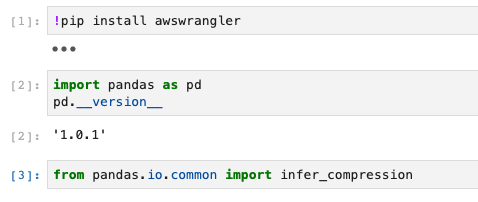
- The pandas version pre-installed in SageMaker (at least on conda_python3 environment) is 0.24.2.
- If you import pandas before installing awswrangler, even though awswrangler updates pandas to 1.0.1, the imported library in the kernel would still be attached to 0.24.2:

- For that to work, you need to restart the kernel to put pandas 1.0.1 live, or as you mentioned you can install awswrangler first:
tuliocasagrande
on 2 Apr 2020
Thank you for the contribution. Please, reopen the issue if it persists even after the version 1.0.0.
igorborgest
on 11 Apr 2020
TL;DR
This error only happens if your environment has Pandas < 1.0.0. So please, update Pandas.
igorborgest
on 1 Sep 2020
Related issues
 radcheb
·
4Comments
radcheb
·
4Comments
 andymcarter
·
3Comments
andymcarter
·
3Comments
 bryanyang0528
·
3Comments
bryanyang0528
·
4Comments
bryanyang0528
·
3Comments
bryanyang0528
·
4Comments
 vfrank66
·
3Comments
vfrank66
·
3Comments
Most helpful comment
Hey @mksadoughi, thanks for sharing that.
Here are some findings: