Avideo: Selected Video Plays Different Video
Has anyone experienced this issue. When selecting a video from playlist. A different video loads.
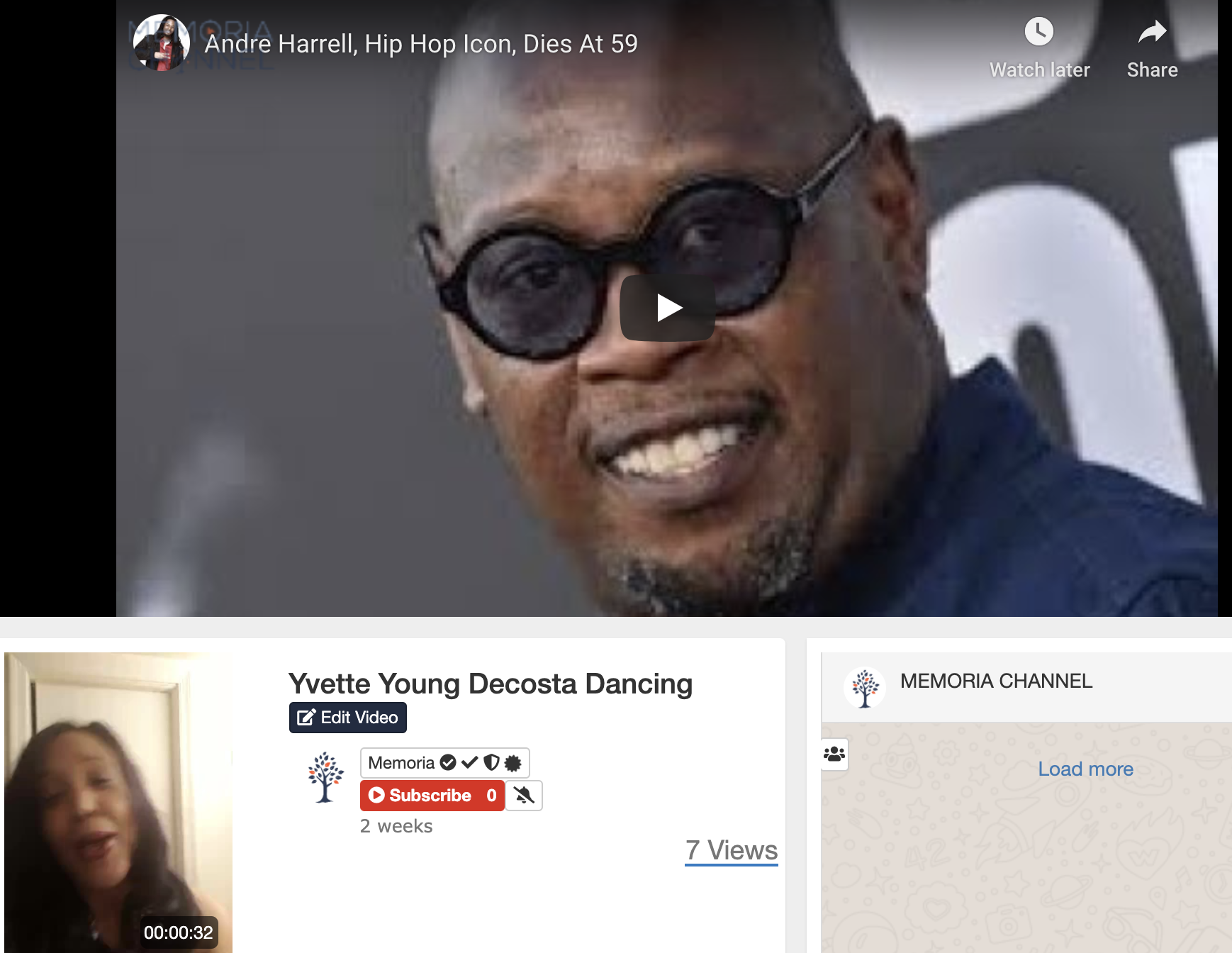
2nd Video: same behavior
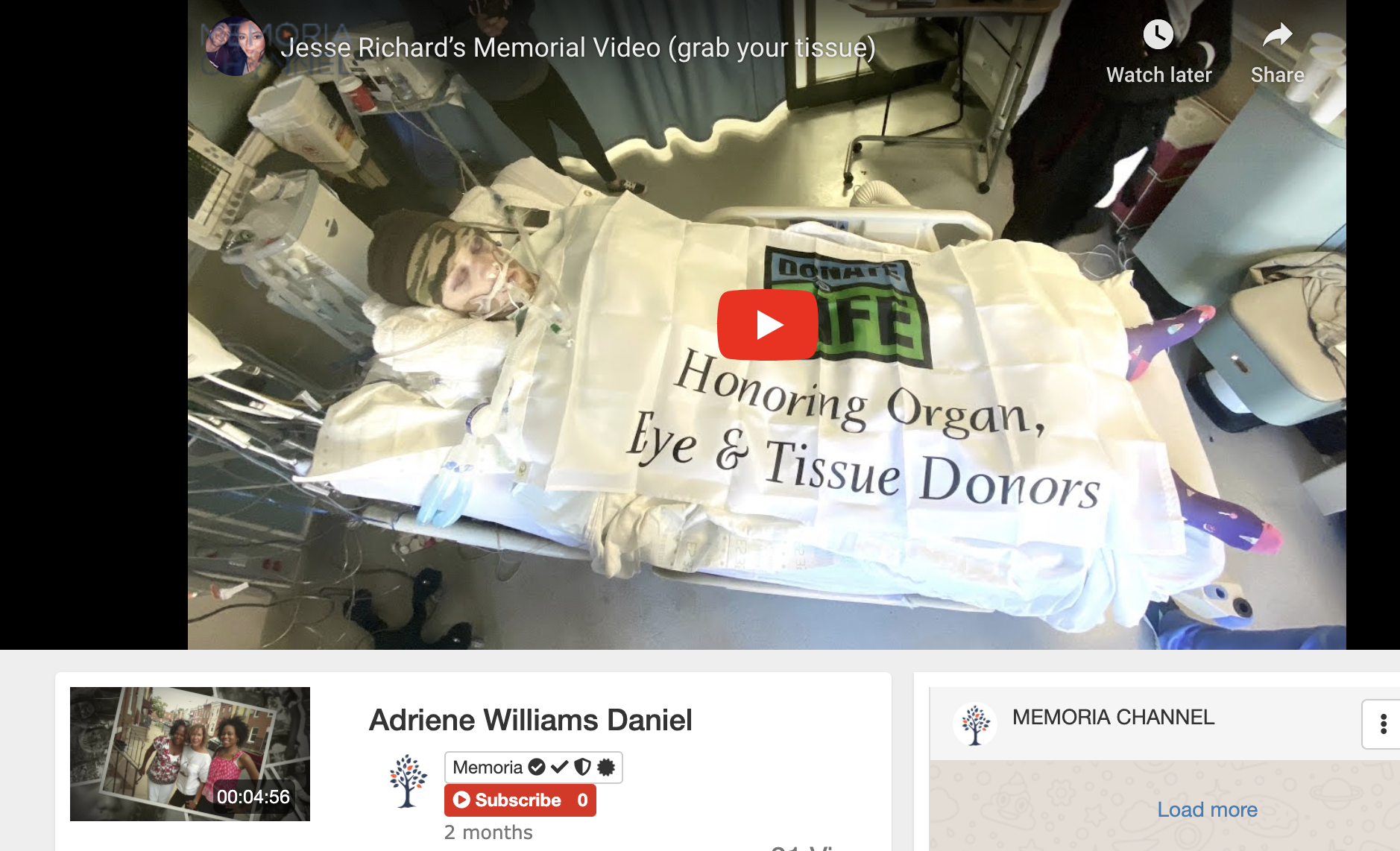
The thumb nail shows the video I selected to play but as you can see in player it's another video.
 willpower68
All 38 comments
I notice this problem in the past but should be fixed in the latest release
 DanielnetoDotCom
on 25 May 2020
DanielnetoDotCom
on 25 May 2020
@DanielnetoDotCom
You game me an update about 3 week ago. Is there more recent update?
willpower68
on 26 May 2020
@willpower68 we have updates almost every day.
Please check this https://github.com/WWBN/AVideo/wiki/How-to-Update-your-AVideo-Platform
DanielnetoDotCom
on 26 May 2020
@DanielnetoDotCom
Hi Daniel,
I hope you can give me a little more information to install the update. I know that there is a command I am missing which is why I am not able to perform the update properly.
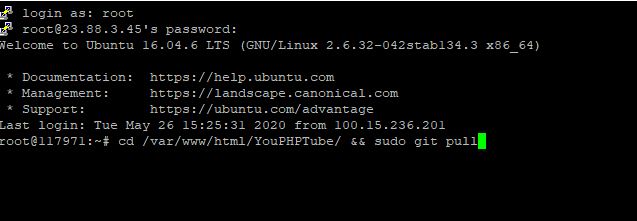
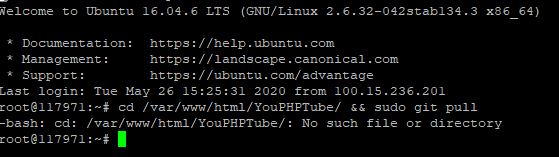
I'm logging into the root dir. What are the commands to find the Avideo directory.
Hope the images below will give insight into what I've done.
willpower68
on 26 May 2020
the command is only sudo git pull
with out the &&
DanielnetoDotCom
on 26 May 2020
locate first your home dir where the installation is installed. Mostly with ubuntu the directory is located in the /var/www/ Then you go into that directory then run that sudo git pull
 ronaldod
on 26 May 2020
ronaldod
on 26 May 2020
@DanielnetoDotCom @ronaldod thank you.
I am updating and hope I didn't break anything in the process.
This next part is for anyone people at my level. BTW my level is 0.
In the update directions, it gives you the following command:
cd /var/www/html/YouPHPTube/ && sudo git pull
Don't add "&& sudo git pull" on the same command line
Also ....YouPHPTube_yoursitehere/... make sure you have the correct directory name. It may not be YouPHPTube. This is key because you will not be able update unless you know the exact name of that directory.
cd /var/www/html/YouPHPTube_yoursite/
Next command is
sudo git pull
If you updated correctly, goto your website click on "Update version" and update. I added my master copy of AVIDEO files before I went to the website and clicked update button. NOTE that 6 months from now these tips may not be relevant.
willpower68
on 27 May 2020
@DanielnetoDotCom
I have updated the website but I still have issue of the when I select video A but video B plays. I cleared cash and refreshed the browser history.
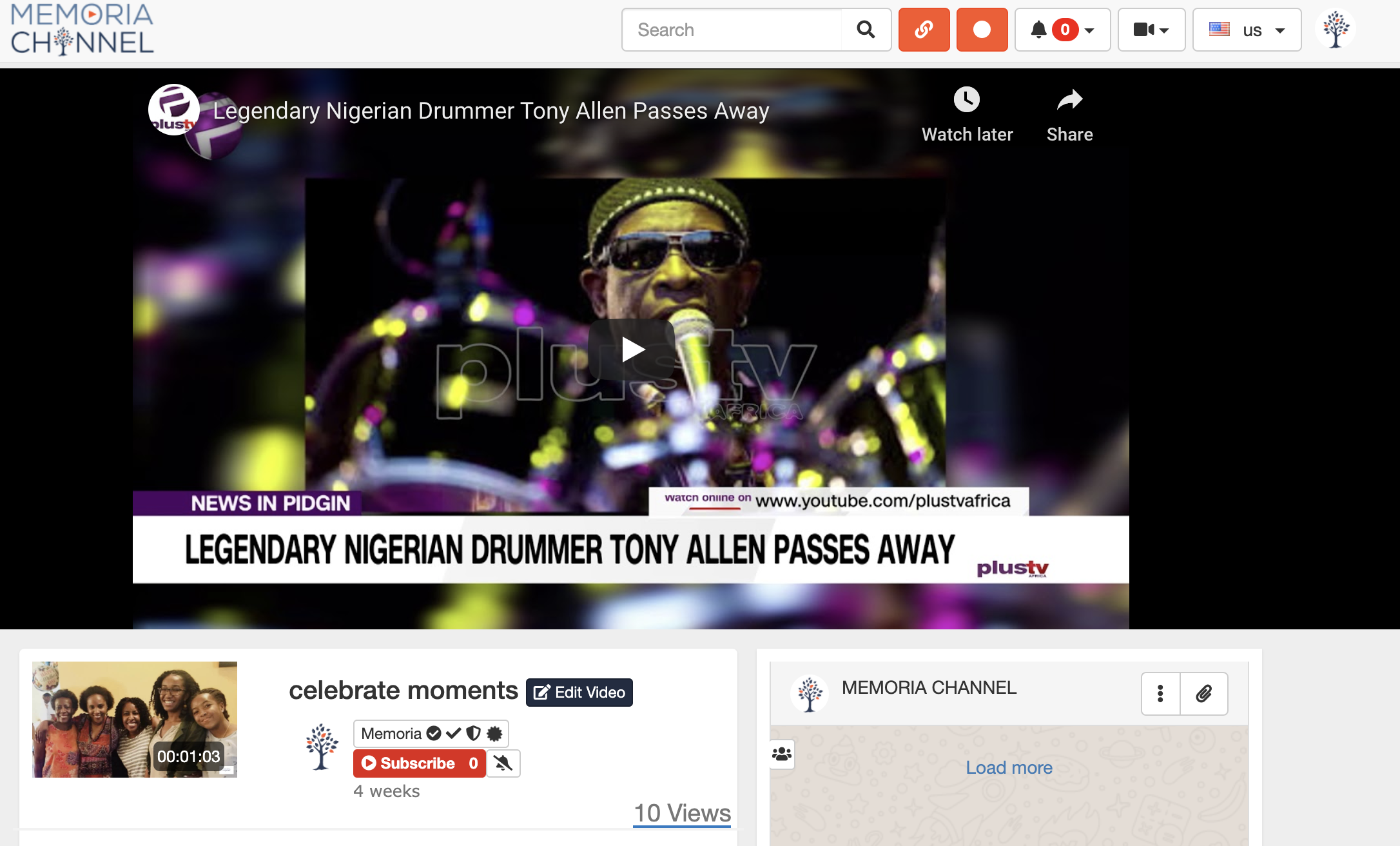
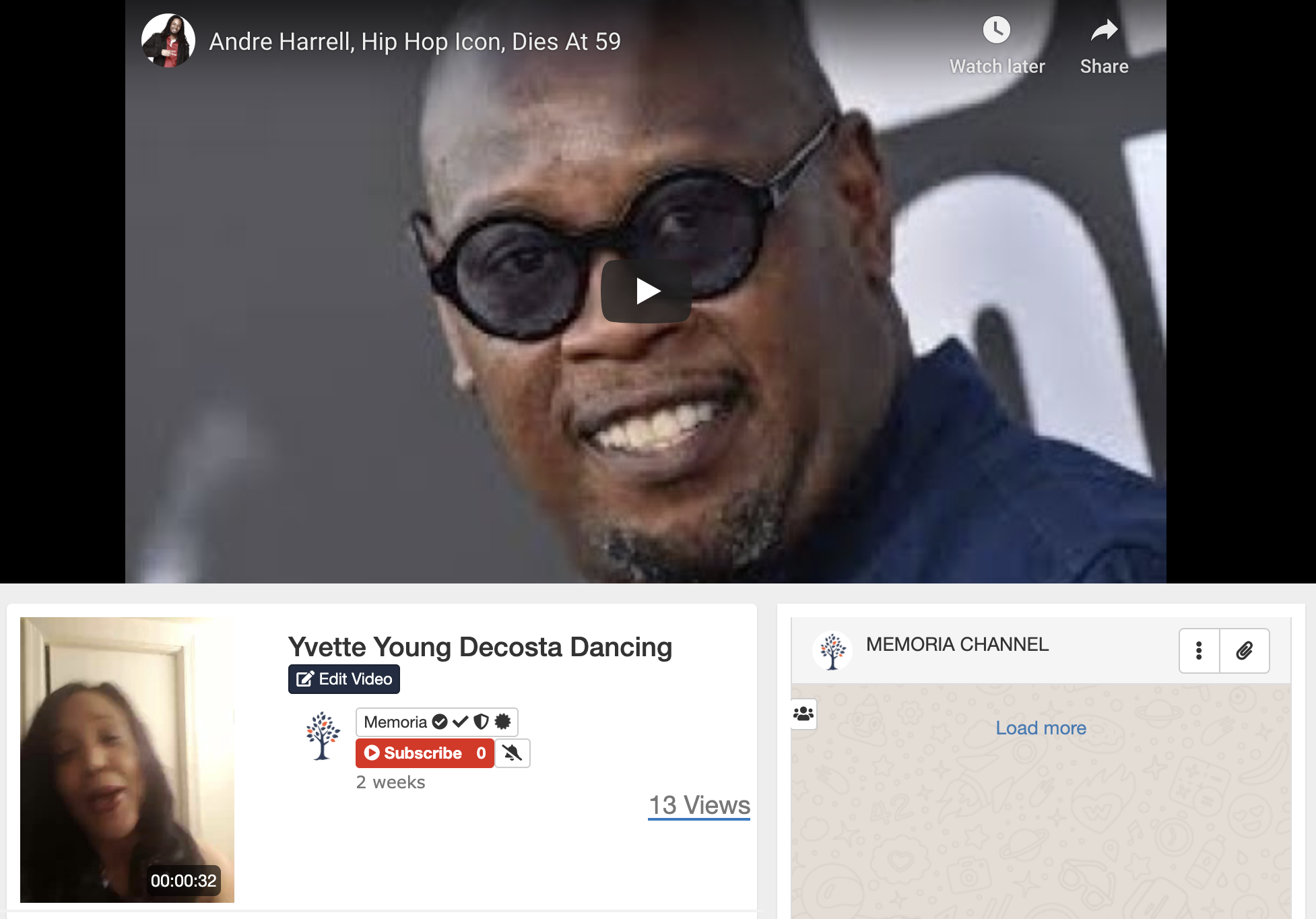
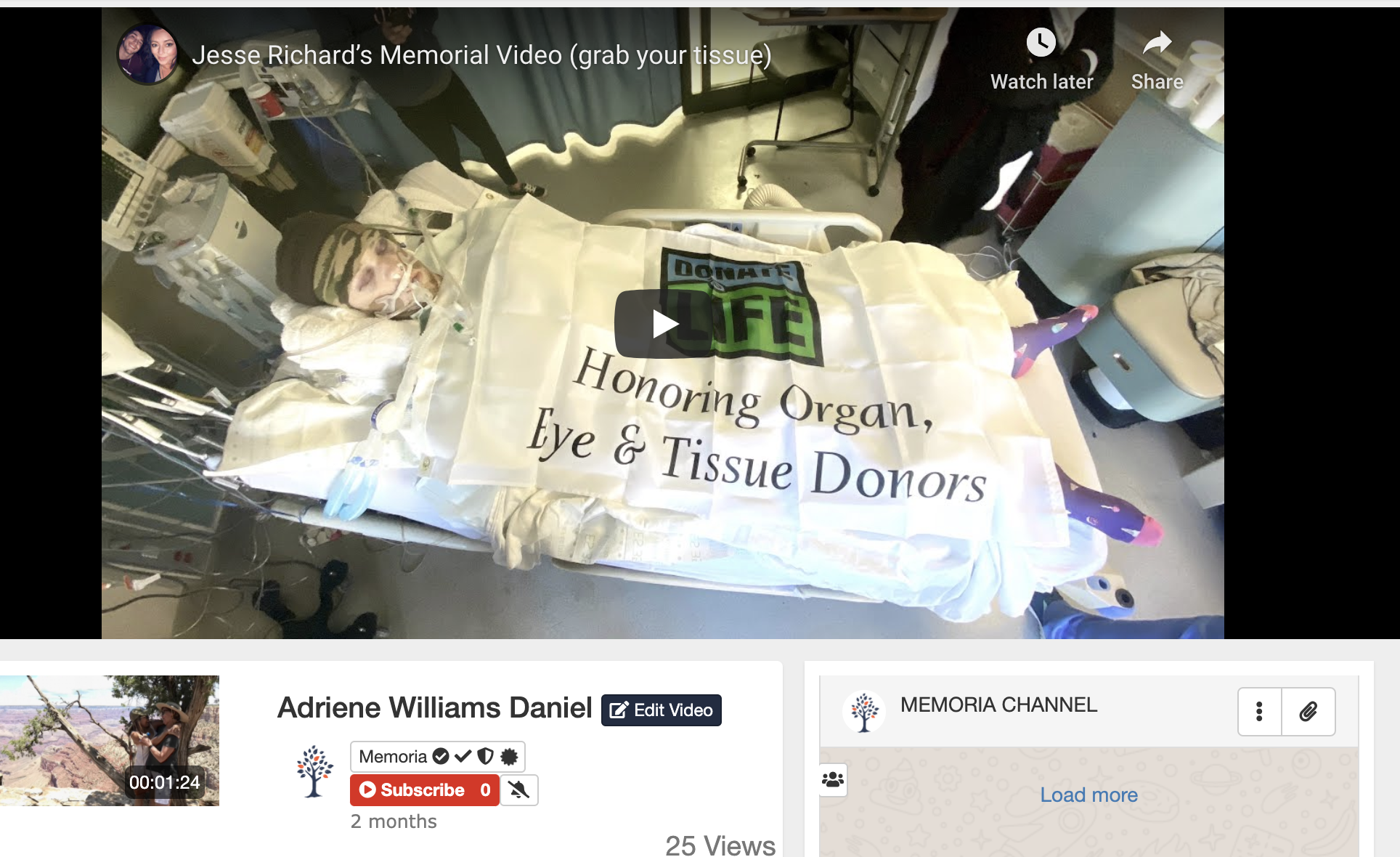
willpower68
on 27 May 2020
It seem the embed url ends up in Video Link field. I deleted video link and hit save but the link is not removed.

willpower68
on 27 May 2020
@willpower68 is not clear what you are trying to do.
do you still have problems with the playlist order?
why do you want to remove the video link?
DanielnetoDotCom
on 27 May 2020
@DanielnetoDotCom
Yes I am still having a problem.
The video link (youtube link) is the video that is showing up. I thought if I removed the link the correct video would play.
if you choose 'Adriene Williams Daniel' video, the embeded youtube video of Jess Richard's..." will play and the link of that video is appearing in Video Link section of 'Adriene William Daniel'. the Adriene video is not embeded. It was uploaded video file.
willpower68
on 27 May 2020
Hi
to remove the videoLink you must do it directly from the database.
the question is, how this video link appears there?
can you reproduce? it is probably a bug somewhere but we must reproduce it to be able to fix.
DanielnetoDotCom
on 27 May 2020
@DanielnetoDotCom
I will do my best to reproduce. I have the same issue with 4 other videos.
willpower68
on 27 May 2020
i am also having same issue
 WGtechy
on 28 May 2020
WGtechy
on 28 May 2020
i am also having same issue. that's it exactly
willpower68
on 29 May 2020
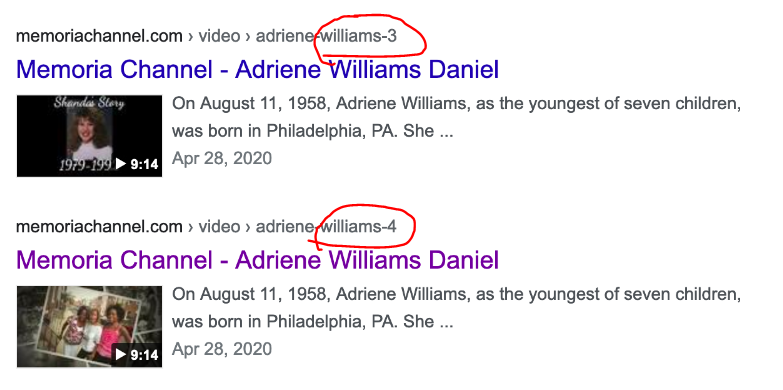
I'm not sure if this is related. When I use 'site' command in google the results have the title and images aren't corresponding. It seems to only occur with active videos and embed video. In the example below, the name and picture is don't match.
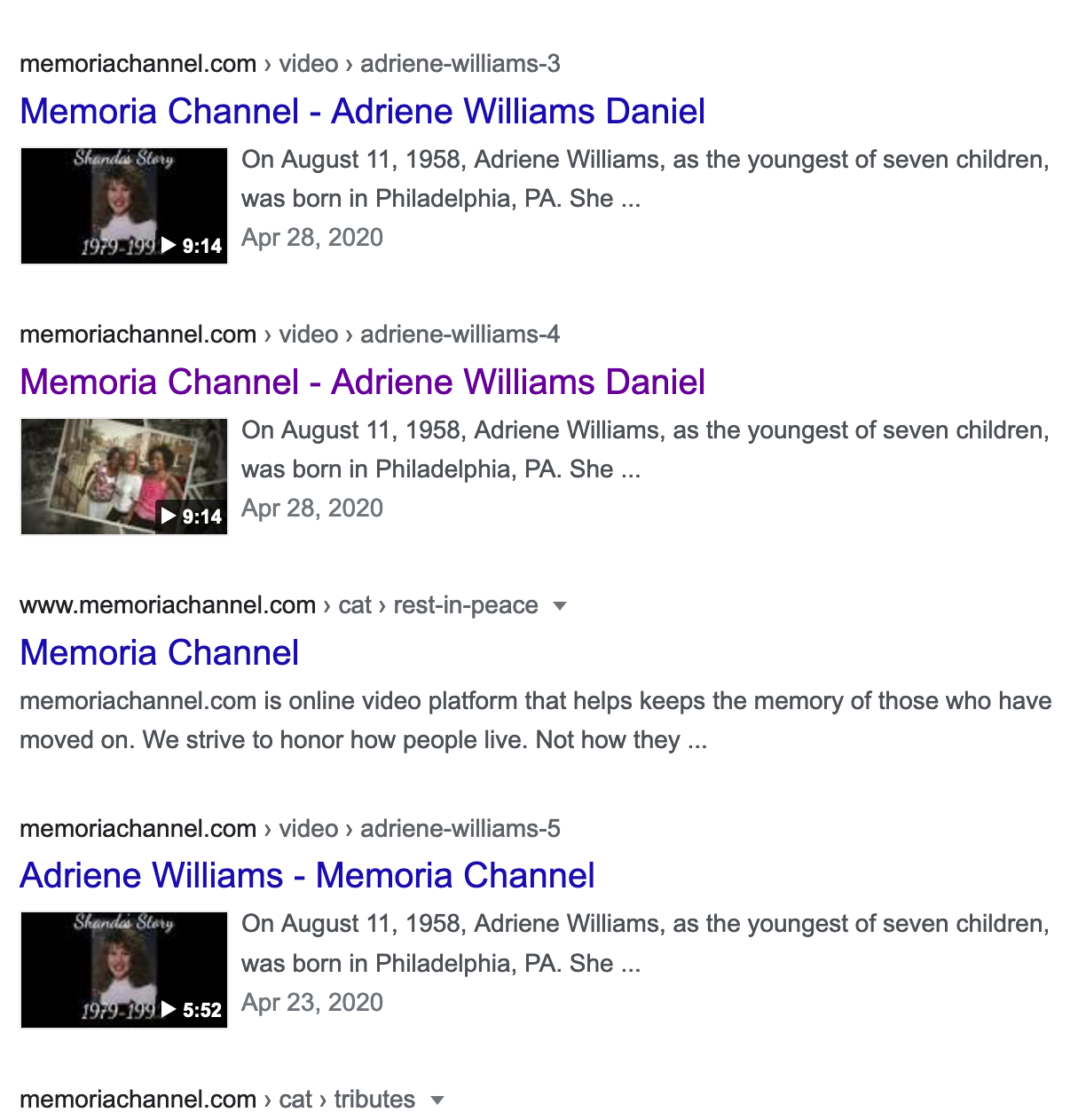
willpower68
on 29 May 2020
I've talked with daniel about this time ago , we have some html description issues .
Also we need to implement
 akhilleusuggo
on 29 May 2020
akhilleusuggo
on 29 May 2020
i am also having same issue. that's it exactly
i need to confirm; did you delete the category that the videos were originally uploaded ?
WGtechy
on 29 May 2020
I've talked with daniel about this time ago , we have some html description issues .
Also we need to implement video:content_loc on the sitemaps . If google can't download a portion of the video , will take longer to crawl the site ( maybe up to 2-3 months ) to get it right .
Okay its an issue that needs to be fixed.
WGtechy
on 29 May 2020
I'm not sure if this is related. When I use 'site' command in google the results have the title and images aren't corresponding. It seems to only occur with active videos and embed video. In the example below, the name and picture is don't match.
As I can see they are not the same video, looks like you uploaded twice and they have different posters
DanielnetoDotCom
on 29 May 2020
@DanielnetoDotCom
Yes, I know they aren't the same video. I have 4 videos with Adriene Williams as title.
if you clicked on link that video would not be in the player.
"...-3" link and image are not related and if you click on "..-4" another video will play
This issue regarding how they appear in search has been there since site launched.
However, the issue with selecting a video from playlist and another video plays has been happening for about 3 or 4 weeks. The videos played fine until 3 or 4 weeks ago.
willpower68
on 29 May 2020
i am also having same issue. that's it exactly
@WGtechy
i need to confirm; did you delete the category that the videos were originally uploaded ?
I did not delete any categories. This issue started about 3 or 4 weeks ago. Prior to that the videos played as expected.
willpower68
on 29 May 2020
i am also having same issue. that's it exactly
@WGtechy
i need to confirm; did you delete the category that the videos were originally uploaded ?I did not delete any categories. This issue started about 3 or 4 weeks ago. Prior to that the videos played as expected.
Im also facing exactly the same issue. I asked that question to see if the problem has something to do with categories. The affected files on my platform is more than 50 videos. If you check the tag section in the MY VIDEO dashboard, you will see that the type automatically changed from video to embed but still occupying space on the server. Embed videos are not suppose to take space since they are not hosted on the server.
We hope there is a solution to this issue, some of my subscribers videos are affected.
WGtechy
on 30 May 2020
@willpower68 can you please share a link from a playlist with this error?
About the google indexing problem, it looks like Google is indexing the image from the first item from your left list.
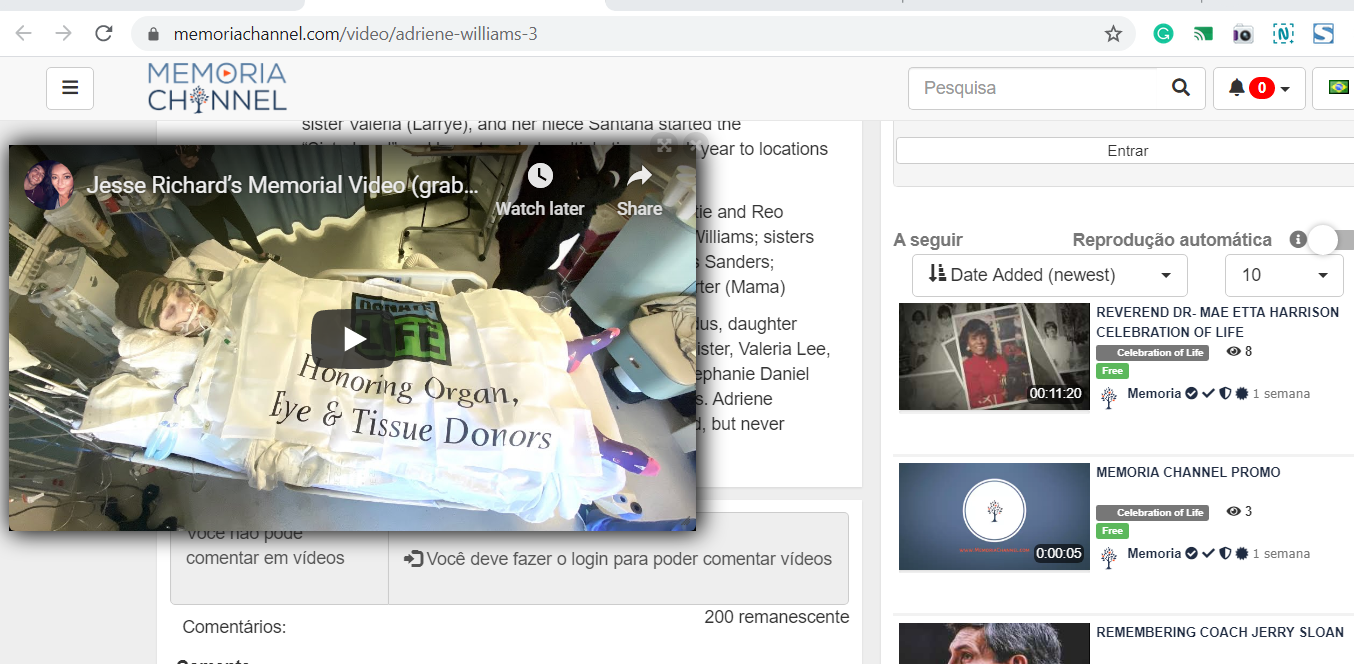
I will see what I can do to decrease the relevance on it on the page, so google will not use that image anymore
DanielnetoDotCom
on 1 Jun 2020
@willpower68 can you please share a link from a playlist with this error?
About the google indexing problem, it looks like Google is indexing the image from the first item from your left list.
I will see what I can do to decrease the relevance on it on the page, so google will not use that image anymore
@DanielnetoDotCom
Here is link to the playlist with error:
https://memoriachannel.com/?search=adriene%20williams
willpower68
on 1 Jun 2020
The provided link is not a playlist
DanielnetoDotCom
on 1 Jun 2020
The provided link is not a playlist
@DanielnetoDotCom
My mistake
https://memoriachannel.com/plugin/PlayLists/player.php?playlists_id=3
willpower68
on 1 Jun 2020
I guess something happens with the last video. (I guess that is the one you are talking about)
So the issue is not the playlist, it is the video itself. maybe the error on the last video is related to it https://github.com/WWBN/AVideo/issues/3156
DanielnetoDotCom
on 2 Jun 2020
@DanielnetoDotCom
Yes that's the video but it issue is with all her videos and few other that I uploaded. I don't have any issue with embeded videos.
Here all the videos in one playlist.
https://memoriachannel.com/plugin/PlayLists/player.php?playlists_id=25
missed a few videos
https://memoriachannel.com/plugin/PlayLists/player.php?playlists_id=26
willpower68
on 2 Jun 2020
@willpower68 sorry still not very clear for me...
the videos with errors in the playlist someone else upload it correct?
I am trying to see if the person who is uploading is doing something that rises a bug.
Here all the videos in one playlist.
https://memoriachannel.com/plugin/PlayLists/player.php?playlists_id=25
missed a few videos
https://memoriachannel.com/plugin/PlayLists/player.php?playlists_id=26
I do not understand the quoted above.
One thing...
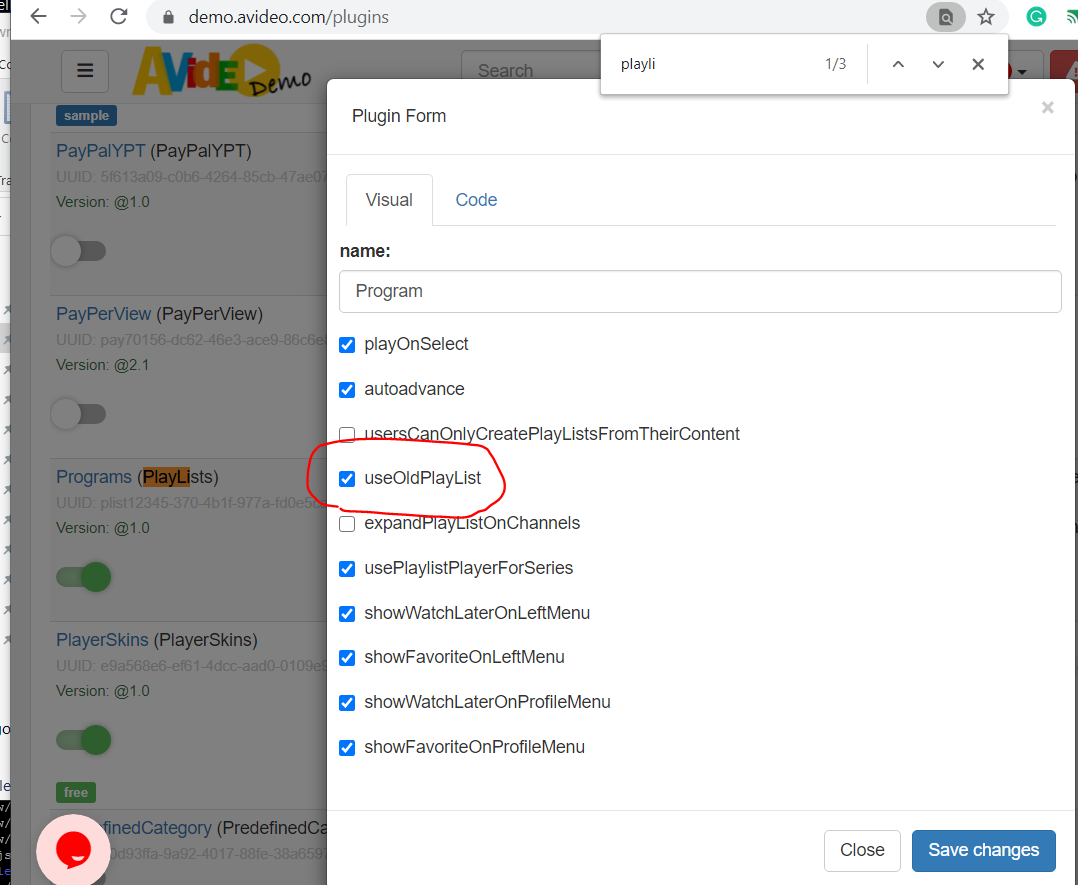
the playlist the main propose is for self-hosted videos, the ajax layout may have a hard time to use embed content and embed videos may not work properly.
try to check this option
DanielnetoDotCom
on 3 Jun 2020
@DanielnetoDotCom
thank you for the additional information regarding playlist.
The
@willpower68 sorry still not very clear for me...
the videos with errors in the playlist someone else upload it correct?
I am trying to see if the person who is uploading is doing something that rises a bug.
Here all the videos in one playlist.
https://memoriachannel.com/plugin/PlayLists/player.php?playlists_id=25
missed a few videos
https://memoriachannel.com/plugin/PlayLists/player.php?playlists_id=26I do not understand the quoted above.
One thing...
the playlist the main propose is for self-hosted videos, the ajax layout may have a hard time to use embed content and embed videos may not work properly.
try to check this option
the video in the playlist are self-hosted, I uploaded those videos myself. I had no issues with the video's a few weeks ago.
willpower68
on 3 Jun 2020
@DanielnetoDotCom
thank you for the additional about playlist
The video's are self-hosted. I added the video's myself.
willpower68
on 3 Jun 2020
@WGtechy I wanted to reach out because you mentioned you have paying members for you website. Are you will to discuss your strategy for getting paying members to join. Thanks
willpower68
on 3 Jun 2020
But on the videos samples, you sent they are embedded.
maybe the problem I mention here https://github.com/WWBN/AVideo/issues/3125#issuecomment-637599214
So the videos are basically lost. and something that I could not detect yet. made this happen.
that is why I am asking a way to reproduce it.
who is uploading the videos for that woman? you or her?
can you or here reproduce this error to have the self-hosted video replaced by an embed?
DanielnetoDotCom
on 3 Jun 2020
Hi Daniel!
Your job with this tool is amazing! Thanks a lot.
I had the same problem and I found that when I created an LinkedVideo in the table videos, the link was applied to all the records, in the field videoLink. Also the field type were all of them as 'embed' and also the field externalOptions had the incorrect values for a video.
I modified all these fields and is working again!
Thanks a lot
 leonidaswilliams
on 18 Jun 2020
leonidaswilliams
on 18 Jun 2020
Hi
do you mean when you create a LinkedVideo (can you please screenshot where do you use to create it)
then a bug update multiple videos or all videos?
can you reproduce it once more?
DanielnetoDotCom
on 18 Jun 2020
Sorry
I tried to reproduce but was not possible. So there is some scenario where the table videos is updated as I explained.
I will try more times! But the bug is what I told you.
Thanks
leonidaswilliams
on 18 Jun 2020
This issue has been automatically marked as stale because it has not had recent activity. It will be closed if no further activity occurs. Thank you for your contributions.
![stale[bot] picture](https://avatars3.githubusercontent.com/in/1724?v=4&s=40) stale[bot]
on 18 Jul 2020
stale[bot]
on 18 Jul 2020
Related issues
 JoshWho
·
3Comments
JoshWho
·
3Comments
 matthall1998
·
4Comments
matthall1998
·
4Comments
 syldri
·
3Comments
syldri
·
3Comments
 moses268
·
3Comments
moses268
·
3Comments
 gujarraju
·
4Comments
gujarraju
·
4Comments