Avideo: Plugins SubtitleSwitcher not working
I've placed the SubtitleSwitcher plugin and enabled it
However, I've tried adding the subtitle and save, but it seems not save as expected
No Error, popup shows
here's the screenshot
 boom02456
All 31 comments
man , where is the screenshot ?
Do I have to download your entire server to see a screenshot ? xD
 akhilleusuggo
on 5 Apr 2020
akhilleusuggo
on 5 Apr 2020
ah! so sorry
here's the link of screenshot
https://drive.google.com/file/d/1mlsGQwSROvHS21wNuJEAHcFRcC_UUS1F/view?usp=drivesdk
boom02456
on 5 Apr 2020
Check the streamer log file
 DanielnetoDotCom
on 5 Apr 2020
DanielnetoDotCom
on 5 Apr 2020
Here's the log, nothing shows when I click add or save subtitle
root@75486153982e:/var/www/html/YouPHPTube/videos# tail -f avideo.log
[06-Apr-2020 15:54:03 Asia/Shanghai] updateFilesize: videos_id=5
filename=EmptyTitleon31Mar20115222_YPTuniqid_5e82bf2f8e6296.59187476
filesize=0
[06-Apr-2020 15:54:03 Asia/Shanghai] getUsageFromFilename: start
/var/www/html/YouPHPTube/videos/EmptyTitleon31Mar20114051_YPTuniqid_5e82bd69bbbc41.81579356
[06-Apr-2020 15:54:03 Asia/Shanghai] updateFilesize: videos_id=4
filename=EmptyTitleon31Mar20114051_YPTuniqid_5e82bd69bbbc41.81579356
filesize=0
[06-Apr-2020 15:57:36 Asia/Shanghai] Plugin Not Found: Statistics
[06-Apr-2020 15:57:50 Asia/Shanghai] Plugin Not Found: Statistics
[06-Apr-2020 15:58:05 Asia/Shanghai] modeYoutube: session_id =
b8574b8d311b75531beaa72f3ece375c IP = 172.17.0.1
[06-Apr-2020 15:58:09 Asia/Shanghai] getUsageFromFilename: start
/var/www/html/YouPHPTube/videos/EmptyTitleon31Mar20115222_YPTuniqid_5e82bf2f8e6296.59187476
[06-Apr-2020 15:58:09 Asia/Shanghai] updateFilesize: videos_id=5
filename=EmptyTitleon31Mar20115222_YPTuniqid_5e82bf2f8e6296.59187476
filesize=0
[06-Apr-2020 15:58:09 Asia/Shanghai] getUsageFromFilename: start
/var/www/html/YouPHPTube/videos/EmptyTitleon31Mar20114051_YPTuniqid_5e82bd69bbbc41.81579356
[06-Apr-2020 15:58:09 Asia/Shanghai] updateFilesize: videos_id=4
filename=EmptyTitleon31Mar20114051_YPTuniqid_5e82bd69bbbc41.81579356
filesize=0
[06-Apr-2020 15:59:49 Asia/Shanghai] getUsageFromFilename: start
/var/www/html/YouPHPTube/videos/EmptyTitleon31Mar20115222_YPTuniqid_5e82bf2f8e6296.59187476
[06-Apr-2020 15:59:49 Asia/Shanghai] updateFilesize: videos_id=5
filename=EmptyTitleon31Mar20115222_YPTuniqid_5e82bf2f8e6296.59187476
filesize=0
[06-Apr-2020 15:59:49 Asia/Shanghai] getUsageFromFilename: start
/var/www/html/YouPHPTube/videos/EmptyTitleon31Mar20114051_YPTuniqid_5e82bd69bbbc41.81579356
[06-Apr-2020 15:59:49 Asia/Shanghai] updateFilesize: videos_id=4
filename=EmptyTitleon31Mar20114051_YPTuniqid_5e82bd69bbbc41.81579356
filesize=0
On Sun, Apr 5, 2020 at 9:27 PM Daniel Neto notifications@github.com wrote:
Check the streamer log file
—
You are receiving this because you authored the thread.
Reply to this email directly, view it on GitHub
https://github.com/WWBN/AVideo/issues/2818#issuecomment-609424736, or
unsubscribe
https://github.com/notifications/unsubscribe-auth/AIXJB46NG67QXFDZF5ORJ7TRLCINDANCNFSM4MAYOMGQ
.
boom02456
on 6 Apr 2020
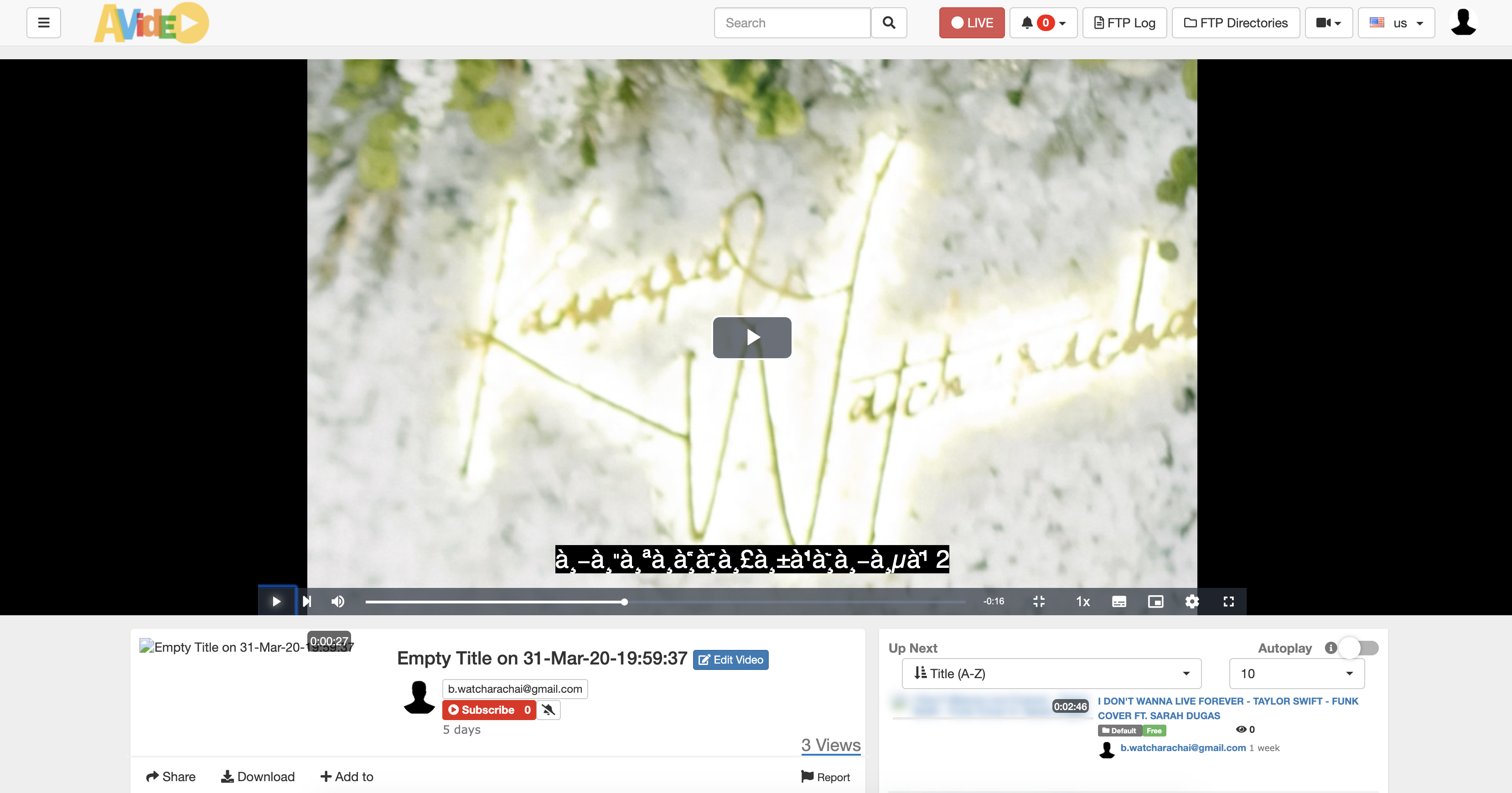
Also, I found another problem, when I upload .srt subtitle in Thai language, select language to Thai and upload. The subtitle in Video shows error in language
here's the screenshot
https://drive.google.com/open?id=1nR4btbRDI_H1_wu09ofAGYP3Pf9JB6fu
boom02456
on 6 Apr 2020
boom02456
on 6 Apr 2020
I don't have the plugin , but I guess it saves the data on dabatase , that means you need utf8 encoding or ut8mb4 to support non-latin characters .
akhilleusuggo
on 6 Apr 2020
okay, so I need to change utf8 in db. thanks.
But how about the create subtitle that not working after I save it?
On Mon, 6 Apr 2020 at 20:36 akhilleusuggo notifications@github.com wrote:
I don't have the plugin , but I guess it saves the data on dabatase , that
means you need utf8 encoding or ut8mb4 to support non-latin characters .—
You are receiving this because you authored the thread.
Reply to this email directly, view it on GitHub
https://github.com/WWBN/AVideo/issues/2818#issuecomment-609798827, or
unsubscribe
https://github.com/notifications/unsubscribe-auth/AIXJB4266OZKKOR2LQAPX63RLHLF7ANCNFSM4MAYOMGQ
.>
Warm Regards,
Watcharachai Buranapinyo
E-mail: b.[email protected]
Phone: (+66)93-691-6299
boom02456
on 6 Apr 2020
The logs you provided have to relevance to the error you're having .
You should upload a subtitle , then print the logs to look for the error . tail -f avideo.log will only show the latest lines , not the error .
All your logs are related to update size videos , when you access to my videos or when you click on "update disk usage"
akhilleusuggo
on 6 Apr 2020
yes, I thought it would show error of the subtitle create, but it not
showing up at all.
On Mon, 6 Apr 2020 at 20:42 akhilleusuggo notifications@github.com wrote:
The logs you provided have to relevance to the error you're having .
You should upload a subtitle , then print the logs to look for the error . tail
-f avideo.log will only show the latest lines , not the error .
All your logs are related to update size videos , when you access to my
videos or when you click on "update disk usage"—
You are receiving this because you authored the thread.
Reply to this email directly, view it on GitHub
https://github.com/WWBN/AVideo/issues/2818#issuecomment-609802243, or
unsubscribe
https://github.com/notifications/unsubscribe-auth/AIXJB4ZIA47LT6EUDG7YCMTRLHL4PANCNFSM4MAYOMGQ
.>
Warm Regards,
Watcharachai Buranapinyo
E-mail: b.[email protected]
Phone: (+66)93-691-6299
boom02456
on 6 Apr 2020
do you know which log do I need to track for subtitle switcher plugin?
On Mon, 6 Apr 2020 at 20:43 Watcharachai Buranapinyo <
[email protected]> wrote:
yes, I thought it would show error of the subtitle create, but it not
showing up at all.On Mon, 6 Apr 2020 at 20:42 akhilleusuggo notifications@github.com
wrote:The logs you provided have to relevance to the error you're having .
You should upload a subtitle , then print the logs to look for the error
. tail -f avideo.log will only show the latest lines , not the error .
All your logs are related to update size videos , when you access to my
videos or when you click on "update disk usage"—
You are receiving this because you authored the thread.
Reply to this email directly, view it on GitHub
https://github.com/WWBN/AVideo/issues/2818#issuecomment-609802243, or
unsubscribe
https://github.com/notifications/unsubscribe-auth/AIXJB4ZIA47LT6EUDG7YCMTRLHL4PANCNFSM4MAYOMGQ
.>
Warm Regards,
Watcharachai Buranapinyo
E-mail: b.[email protected]
Phone: (+66)93-691-6299>
Warm Regards,
Watcharachai Buranapinyo
E-mail: b.[email protected]
Phone: (+66)93-691-6299
boom02456
on 6 Apr 2020
Hi
lets do it in small steps...
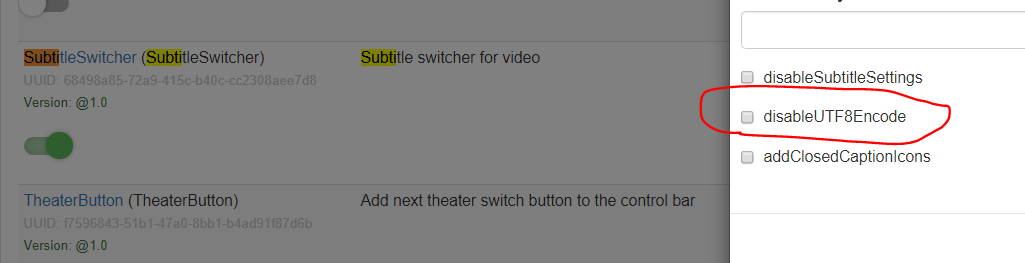
About your UTF8 error try this option
DanielnetoDotCom
on 6 Apr 2020
Thanks Daniel, right now upload subtitle is working,
but create subtitle still not works
boom02456
on 6 Apr 2020
about create, please share your log at the right time when you try to save the subtitle
DanielnetoDotCom
on 6 Apr 2020
I just do it, but nothing shows in the /var/www/html/YouPHPTube/videos/avideo.log
boom02456
on 6 Apr 2020
I already tail -f avideo.log
but nothing update in here since I create the subtitle
boom02456
on 6 Apr 2020
If there is nothing in the log, the save option was not submitted.
2 thing...
- check the javascript console for errors when you click in the save button.
- test it on the demo site, if the same error happens.
DanielnetoDotCom
on 6 Apr 2020
Question: How can I check the javascript console for errors when click in the save button ?
boom02456
on 6 Apr 2020
akhilleusuggo
on 6 Apr 2020
thanks :)
boom02456
on 6 Apr 2020
I got it working now, need to clear cache directory once from the menu
boom02456
on 7 Apr 2020
Hi all,
I installed the SubtitlePlugin today an uploaded some .vtt subtitles on a video. The plugin is enabled and installed like the recommendations here. During the video I can choose the subs but they are not shown. I have following errors in the log.
04-May-2020 12:57:54 Europe/Berlin] PHP Warning:  Creating default object from empty value in /var/www/html/AVideo/plugin/SubtitleSwitcher/functions.php(14) : eval()'d code(1) : eval()'d code on line 51
[04-May-2020 12:57:54 Europe/Berlin] PHP Notice:  Undefined offset: 1 in /var/www/html/AVideo/plugin/SubtitleSwitcher/functions.php(14) : eval()'d code(1) : eval()'d code on line 57
[04-May-2020 12:57:54 Europe/Berlin] PHP Warning:  A non-numeric value encountered in /var/www/html/AVideo/plugin/SubtitleSwitcher/functions.php(14) : eval()'d code(1) : eval()'d code on line 85
[04-May-2020 12:57:54 Europe/Berlin] PHP Warning:  A non-numeric value encountered in /var/www/html/AVideo/plugin/SubtitleSwitcher/functions.php(14) : eval()'d code(1) : eval()'d code on line 85
[04-May-2020 12:57:54 Europe/Berlin] PHP Notice:  Undefined offset: 2 in /var/www/html/AVideo/plugin/SubtitleSwitcher/functions.php(14) : eval()'d code(1) : eval()'d code on line 85
[04-May-2020 12:57:54 Europe/Berlin] PHP Warning:  A non-numeric value encountered in /var/www/html/AVideo/plugin/SubtitleSwitcher/functions.php(14) : eval()'d code(1) : eval()'d code on line 85
[04-May-2020 12:57:54 Europe/Berlin] PHP Notice:  Undefined offset: 1 in /var/www/html/AVideo/plugin/SubtitleSwitcher/functions.php(14) : eval()'d code(1) : eval()'d code on line 85
[04-May-2020 12:57:54 Europe/Berlin] PHP Notice:  Undefined offset: 2 in /var/www/html/AVideo/plugin/SubtitleSwitcher/functions.php(14) : eval()'d code(1) : eval()'d code on line 85
[04-May-2020 12:57:54 Europe/Berlin] PHP Notice:  Undefined offset: 1 in /var/www/html/AVideo/plugin/SubtitleSwitcher/functions.php(14) : eval()'d code(1) : eval()'d code on line 57
i'm on version 8.7
@DanielnetoDotCom
 SaliC-re
on 4 May 2020
SaliC-re
on 4 May 2020
Please check if the files were correct created
If the content is correct
If you can please test the same file on demo site
DanielnetoDotCom
on 4 May 2020
@DanielnetoDotCom thanks - you were correct as always. My vtt had some "uncommented comments" in it. But I noticed that if you reupload subtitles for the same language they are not recognized as new. I had to delete the video at first and then reupload the subs from new. then it worked
SaliC-re
on 4 May 2020
how can i control the default style of subtitles? via divstyle? but what do i type in there? i want do have a fix sub style an then deactivate the sub settings. thanks in advance
SaliC-re
on 4 May 2020
@SaliC-re thanks for the feedback.
about the default status, to be honest I am not sure. did you try to add a custom CSS ?
DanielnetoDotCom
on 4 May 2020
@SaliC-re thanks for the feedback.
about the default status, to be honest I am not sure. did you try to add a custom CSS ?
@DanielnetoDotCom will it (reupload of subs) be fixed in the next patches?
unfortunately I'm not good at any developing :D I just hoped that anyone has kind of documentation for the subtitle plugin so I can see and use the variables to set a default subtitle style.
SaliC-re
on 5 May 2020
fix what?
DanielnetoDotCom
on 5 May 2020
fix what?
i uploaded the invalid .vtt file into the video and it did not work. after that i fixed the vtt file, deleted the old one over "upload subs" and uploaded the new one. but it still didnt work. but i deleted the video an reuploaded it and then i uploaded the same subs - it worked. so it caches the first vtt file, even if you delete it for a specific language.
SaliC-re
on 5 May 2020
This is your browser cache, we do not cache subtitles.
DanielnetoDotCom
on 5 May 2020
This is your browser cache, we do not cache subtitles.
i'll try thanks
SaliC-re
on 5 May 2020
Related issues
 moses268
·
3Comments
moses268
·
3Comments
 wetubeclub
·
3Comments
wetubeclub
·
3Comments
 KazeroG
·
4Comments
KazeroG
·
4Comments
 hrt644
·
3Comments
hrt644
·
3Comments
 syldri
·
3Comments
syldri
·
3Comments
Most helpful comment
https://github.com/WWBN/AVideo/wiki/Using-Your-Browser-Console-to-Diagnose-JavaScript-Errors