When I have auto play, there is a way to keep the full screen for all the videos
 sergioloyola
All 15 comments
That is a good idea I will research how to do it
 DanielnetoDotCom
on 1 Mar 2018
DanielnetoDotCom
on 1 Mar 2018
i also thinked about this and became feedback from useres there...
i assume (!) that it leaves the fullscreen when the new page loads (not when the video ended) and that this feature would need to load the new video via ajax (so replacing videolink in mainVideo only), to not leave fullscreen..
when it is like this, it would need some work.. i'm very interessted in how the solution will be! :)
 hersche
on 4 Mar 2018
hersche
on 4 Mar 2018
This function may help this
https://github.com/DanielnetoDotCom/YouPHPTube/blob/master/view/js/script.js#L126
DanielnetoDotCom
on 5 Mar 2018
I check it with the script that you told me but it does not work
2018-03-05 11:09 GMT-03:00 YouPHPTube notifications@github.com:
This function may help this
https://github.com/DanielnetoDotCom/YouPHPTube/
blob/master/view/js/script.js#L126—
You are receiving this because you authored the thread.
Reply to this email directly, view it on GitHub
https://github.com/DanielnetoDotCom/YouPHPTube/issues/401#issuecomment-370430164,
or mute the thread
https://github.com/notifications/unsubscribe-auth/AYUwgOMhZgZWyoAaE6FMkhAIrxNZRO8tks5tbUcjgaJpZM4SY1ep
.
sergioloyola
on 5 Mar 2018
@sergioloyola i think Daniel just wanted to say that this would be a ajax-method, that can be used for load the next video.. but when it's not used in youphptube, it doesn't help - we have to build this into the next-video-function correctly, and when we do this, the website won't reload and the video (maybe) stays in fullscreen then.
hersche
on 5 Mar 2018
OK thank you very much. I thought that not that scrip to which
reference could solve the problem.
2018-03-05 14:09 GMT-03:00 Vinzenz Hersche notifications@github.com:
@sergioloyola https://github.com/sergioloyola i think Daniel just
wanted to say that this would be a ajax-method, that can be used for load
the next video.. but when it's not used in youphptube, it doesn't help - we
have to build this into the next-video-function correctly, and when we do
this, the website won't reload and the video (maybe) stays in fullscreen
then.—
You are receiving this because you were mentioned.
Reply to this email directly, view it on GitHub
https://github.com/DanielnetoDotCom/YouPHPTube/issues/401#issuecomment-370490773,
or mute the thread
https://github.com/notifications/unsubscribe-auth/AYUwgFrA4mbWc7DjlTojcN_cf5PrW6jKks5tbXExgaJpZM4SY1ep
.
sergioloyola
on 5 Mar 2018
@DanielnetoDotCom currently, i try to solve this issue with your method in this two places: L122 and Line 149 of view/include/video.php , my code looks like
$sources = getSources($autoPlayVideo['filename'], true);
?>
else if (Cookies.get('autoplay') && Cookies.get('autoplay') !== 'false') {
changeVideoSrc(player, <?php echo json_encode($sources); ?>);
//document.location = '<?php echo $autoPlayVideo['url']; ?>';
}
like what i find here
you do use this method with the usual player-variable, as it looks, but in my case i have this exception:
TypeError: player.updateSrc is not a function
so i am not shure, why this object should have the method downer, but not where i am using them.
maybe you have any hints there?
edit: updateSrc look like part of videos-resolution-switcher-plugin, so does this load late? how do you activate it?
in the js-console, i also saw, that js/videojs-contrib-ads/videojs.ads.min.js did not load correctly, but this doesn't contain anything about updateSrc anyway.. :/
hersche
on 5 Mar 2018
Try to make the changes you indicated but I can not keep the full screen
2018-03-05 15:41 GMT-03:00 Vinzenz Hersche notifications@github.com:
@DanielnetoDotCom https://github.com/danielnetodotcom currently, i try
to solve this issue with your method in this two places: L122
https://github.com/DanielnetoDotCom/YouPHPTube/blob/master/view/include/video.php#L122
and Line 149 of view/include/video.php
https://github.com/DanielnetoDotCom/YouPHPTube/blob/master/view/include/video.php#L149
, my code looks like$sources = getSources($autoPlayVideo['filename'], true);
?>
else if (Cookies.get('autoplay') && Cookies.get('autoplay') !== 'false') {
changeVideoSrc(player, );
//document.location = '';
}like what i find here
https://github.com/DanielnetoDotCom/YouPHPTube/blob/master/view/include/video.php#L173you do use this method with the usual player-variable, as it looks, but in
my case i have this exception:
TypeError: player.updateSrc is not a functionso i am not shure, why this object should have the method downer, but not
where i am using them.maybe you have any hints there?
—
You are receiving this because you were mentioned.
Reply to this email directly, view it on GitHub
https://github.com/DanielnetoDotCom/YouPHPTube/issues/401#issuecomment-370519782,
or mute the thread
https://github.com/notifications/unsubscribe-auth/AYUwgLvDDXKks6EUZ6BMADlGMDuOULd3ks5tbYbVgaJpZM4SY1ep
.
sergioloyola
on 5 Mar 2018
@sergioloyola no, it is still NOT working, i need to have more information about the whole thing.
but i think, when we load videojs-resolution-switcher good enough, it could PARTIALLY work (i think, not all infos on the website will be updated with this function).
when i solve it, i will send the link of my commit :)
btw, i've tried it also with loading the js-file before and add this to the videojs-constructor, still NO success:
plugins: {
            videoJsResolutionSwitcher: {
                default: 'low',
                dynamicLabel: true
            }
hersche
on 5 Mar 2018
horray, i've got the begin :D
my code basicly works, solution is basicly simple: https://github.com/hersche/YouPHPTube/commit/6d4d29392a18f5273e6bd2f6ade5a04f96a75359
the .src-method do the same and works withouth any plugin!
also, it definently stays in fullscreen between changes.
now, there has other stuff to be done as well, for example:
- after the first "autoplayed" video, the video repeats, because this is set via php only - update via js would be needed.
- update all the other content on the site
change the address as well (without reloading)
and when we do a such big structure change, it may would be cool to have this as default for changing videos at all (performance)..
edit: i made a branch with the full-code for interessted.. https://github.com/hersche/YouPHPTube/tree/stay-in-fullscreen
hersche
on 5 Mar 2018
sorry, but I do not understand much programming, make the modification that
you recommend, but I still can not keep the full screen. what am I missing
2018-03-05 18:17 GMT-03:00 Vinzenz Hersche notifications@github.com:
horray, i've got the begin :D
my code basicly works, solution is basicly simple: hersche/YouPHPTube@
6d4d293
https://github.com/hersche/YouPHPTube/commit/6d4d29392a18f5273e6bd2f6ade5a04f96a75359the .src-method do the same and works withouth any plugin!
also, it definently stays in fullscreen between changes.
now, there has other stuff to be done as well, for example:
-
after the first "autoplayed" video, the video repeats, because this is
set via php only - update via js would be needed.
-update all the other content on the site
-change the address as well (withouth reloading)
-and when we do a such big structure change, it may would be cool to
have this as default for changing videos at all (performance)—
You are receiving this because you were mentioned.
Reply to this email directly, view it on GitHub
https://github.com/DanielnetoDotCom/YouPHPTube/issues/401#issuecomment-370568863,
or mute the thread
https://github.com/notifications/unsubscribe-auth/AYUwgC3C3_M9PaLIhxjiq99CAOT_8-QHks5tbatmgaJpZM4SY1ep
.
sergioloyola
on 5 Mar 2018
when you want to try it, download this version:
https://github.com/hersche/YouPHPTube/tree/stay-in-fullscreen
but several things has to be done, before it will work completly. at the moment, it only autoplay one video correctly, after you have to reload the page, select "next" video manualy, etc etc etc.
ONLY the technical aspect that it loads one video correctly and stays in fullscreen for this SINGLE change of the video means that it's on the right way (proof of concept). To make this working as you want it, it will use a lot of changes.
i do absolutly NOT recommend to use this on a productive server!
edit:
@DanielnetoDotCom how do you handle to get video-information/a source via json? i saw videos.json, but have no clue how i should fill the search-post-request to keep continuing the videos.. is the id only needed? when i have the id of the php-$autoPlayVideo, how should i increase the id (i assume by get the playlist for the next video - is that possible as json-answer only already?)? questions over questions there..
@sergioloyola sorry for the maybe harsh answers, i just want to clarify that it use some more steps for what you're except.. but your request is a cool challenge :)
hersche
on 5 Mar 2018
i close this because we have #760 which is more "clean" and a link to this issue. it needs to be done, but not to be duplicated.
hersche
on 14 Jun 2018
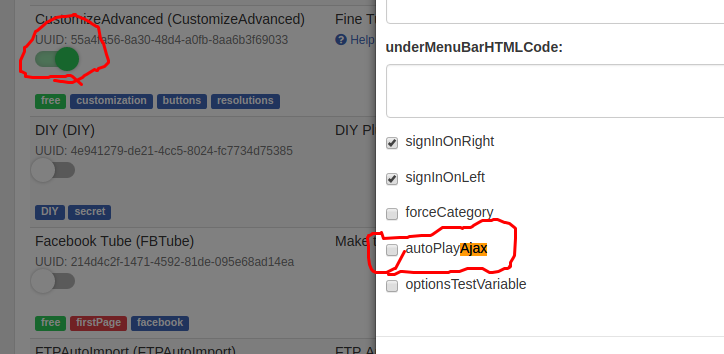
When I have auto play, there is a way to keep the full screen for all the videos
Plz provide the solution of above #401
 finesofttest
on 15 Sep 2018
finesofttest
on 15 Sep 2018
Try this
DanielnetoDotCom
on 16 Sep 2018
Related issues
 KazeroG
·
4Comments
KazeroG
·
4Comments
 moses268
·
3Comments
moses268
·
3Comments
 hrt644
·
3Comments
hrt644
·
3Comments
 syldri
·
3Comments
syldri
·
3Comments
 gamersalpha
·
3Comments
gamersalpha
·
3Comments