Auth0-spa-js: Inactivity timeout is not respected when cacheLocation is localStorage
Describe the problem
When using localStorage and refresh tokens, inactivity timeout/ "require login after" (set in auth0 tenant settings -> advanced) does not cause auth0.isAuthenticated() to return false. The documentation around inactivity logouts is badly lacking, both for this SDK as well as on the auth0 doc pages. For example, I have no idea how the inactivity timeout is actually enforced (i assume via the expiration date on the auth0.isAuthenticated cookie?)
What was the expected behavior?
When the inactivity timeout is reached, auth0.isAuthenticated() should return false. Or there should be some other documented means of checking if the timeout has been reached in order to redirect user to login page.
Access tokens should also be invalidated.
The mechanism of inactivity timeout should also be documented somewhere (is it looking at the cookie expiration date? I have no idea because I couldn't find docs)
Reproduction
Set "inactivity timeout" and "require login after" to one minute in the auth0 dashboard for your tenant.
Configure library with options { cacheLocation: 'localstorage', useRefreshTokens: true, ...otherOptions }
Add some arbitrary code that checks the return value of auth0.isAuthenticated(), for example:
 setInterval(() => {
    check();
  }, 30000);
}

async function check() {
  const auth0 = await configureClient();
  const isAuthed = await auth0.isAuthenticated();
  if (!isAuthed) {
    sessionLogout();
  }
}
Log in with any account.
Wait more than one minute
auth0.isAuthenticated() continues to return true
Rerun the same configuration, but with cacheLocation: memory
auth0.isAuthenticated() returns false, as expected
Environment
Using "@auth0/auth0-spa-js": "^1.13.3" in a react application. Tested in a stable version of Chrome
 oneillsp96
All 14 comments
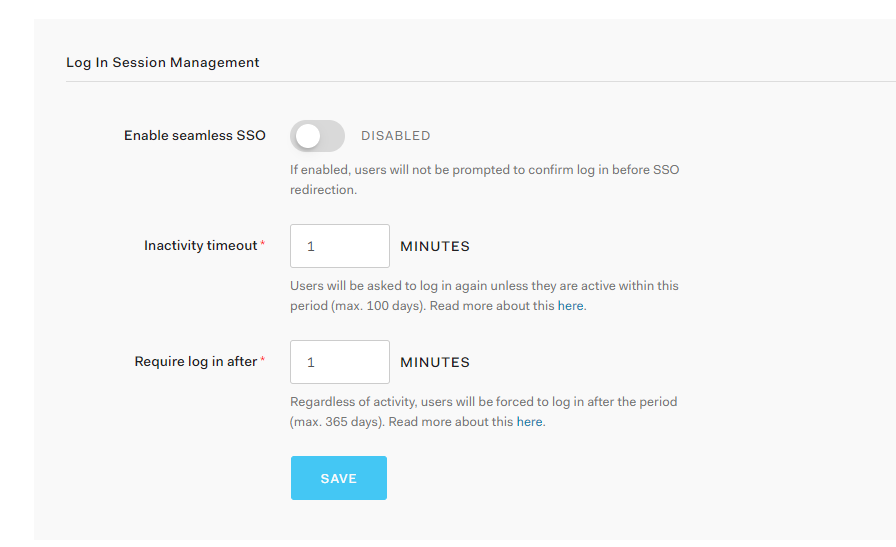
Maybe I am confused....does this ^ tenant-level setting only apply to SSO?
Really, I'm just trying to figure out a way to enforce an inactivity timeout, or if it is even possible
oneillsp96
on 30 Nov 2020
Hi,
Would this comment resolve some of your questions? https://github.com/auth0/auth0-spa-js/issues/655#issuecomment-735865411
Mainly there is no direct relation between a user's session and the validity of an access token and refresh token.
If you issue access tokens and refresh tokens, then log out in your Auth0 session, those tokens will still be valid and usable.
 frederikprijck
on 30 Nov 2020
frederikprijck
on 30 Nov 2020
"there is no direct relation between a user's session and the validity of an access token and refresh token"
That is fine. I just want to know how I can actually interact with the session to check whether IT is expired.
oneillsp96
on 30 Nov 2020
In the simplest possible terms: If you were using this SDK to build an app and wanted to check whether a session has expired (disregarding whether the access tokens are still valid or not) how would you do it?
Here is a thread from a while ago asking basically the same question, that was never really answered
https://community.auth0.com/t/how-to-use-sessions-properly/28993
oneillsp96
on 30 Nov 2020
I just want to know how I can actually interact with the session to check whether IT is expired.
As far as I know, the SPA is not able to check that session in a cross browser way. You could implement an iframe solution, but that is not supported by Safari due to ITP2: https://digiday.com/marketing/what-is-itp2-2/.
Chrome might also implement ITP2 in the future, dropping support for that approach as well (not sure about other browsers).
Keep in mind that in case of an SPA that is using Refresh Tokens, a user should only log in once, and as long as the refresh tokens are not expired, the user will be able to communicate with the API in question (so even if the session is set to 5 minutes, the user could keep using your application for days, or weeks). Incase you are not using Refresh Tokens, our SDK will use iframes under the hood and will throw a "login required" error when calling getTokenSilently without having an active session with Auth0. However, as we know about the issues with ITP2, this is not our recommended approach and we might drop support for iframes in the future.
Regarding your community post:
If you get a moment can you reply to norayr’s latest question? I have the same questions (what do I need to do, beyond just changing the inactivity timeout value in the auth0 UI, to make the logout actually take place?)
As mentioned above, logging out of the SPA does not rely on the session with Auth0 (or any other Identity Provider), unless you use the iframe approach. Loging out of an SPA comes down to throwing away the access and refresh tokens.
The code for this is here:
https://github.com/auth0/auth0-spa-js/blob/master/src/Auth0Client.ts#L771
Ofcourse, when logging out from the SPA we can also kill the Auth0 session by doing an HTTP GET to the logout url: https://github.com/auth0/auth0-spa-js/blob/master/src/Auth0Client.ts#L777. However, it does not work the other way around (being logging out of the SPA when expiring/killing the Auth0 session)
However, we do understand your question and the use-case you want to have. As mentioned in https://github.com/auth0/auth0-spa-js/issues/655#issuecomment-735865411 (even tho not entirely the same, I think they are both relatable), we are going to have some conversations internally on what the recommendations around this could be.
frederikprijck
on 1 Dec 2020
In the meantime, I will probably just implement a timer of some sort that looks at the access token expiresAt. Like the user in #655 basically was asking, is there some escape hatch to get the access token from localStorage via the SDK or will I just have to use localStorage.getItem and pass in the string @@auth0spajs@@::clientid::audience::scope scope scope scope?
oneillsp96
on 1 Dec 2020
is there some escape hatch to get the access token from localStorage via the SDK or will I just have to use localStorage.getItem and pass in the string @@auth0spajs@@::clientid::audience::scope scope scope scope?
Calling getTokenSilently will get you that access token, but will not return the expiresAt value. As @frederikprijck mentioned above, we wouldn't recommend relying on that value as it's not related to the user's authentication session.
I would also warn against accessing the local storage data directly, as it's really for internal use and you should assume we might change that in any release going forward.
As mentioned above, we are getting together to discuss this gap in guidance this week and are hoping to come back to you shortly with something you can work with.
 stevehobbsdev
on 2 Dec 2020
stevehobbsdev
on 2 Dec 2020
Thanks for the quick responses. Overall I’m really enjoying the new SDK, and the fact that it handles refresh token rotation automatically is a huge benefit.
oneillsp96
on 2 Dec 2020
As mentioned above, relying on the iframe approach to check for the browser session might not be a good idea because of ITP2 and whatever browser precautions that could prevent the session cookie from reaching the server. You could get a lot of false negatives for the "Is the session still valid" question.
The good news is that a new feature with refresh tokens, sliding expiration time, is coming soon to the product. With this in place, if you configure the sliding expiration time of the refresh token and the browser session with similar values then getTokenSilently will fail once that sliding window passes, and users will be forced to do an interactive authentication.
 nicosabena
on 4 Dec 2020
nicosabena
on 4 Dec 2020
Sounds good. Just one question.
"if you configure the sliding expiration time of the refresh token and the browser session with similar values"
Is there really any point in setting the session timeout, since in this case it has no bearing on the token lifetime and there is no way to interact with it?
oneillsp96
on 4 Dec 2020
Auth0-spa-js, when you do getTokenSilently(), will try the refresh token flow first and if it doesn't work then it will try to use the browser session (i.e. the session cookie) doing a fallback silent authentication request. This silent authentication request might fail because of a browser blocking the cookie in the request, but could also work well (and, in most scenarios, you'd want this to work, to spare the user from having to authenticate again).
If that fails, the application might want to try an interactive authentication (with either a full redirection or a popup) and if the browser session is still valid then the user won't be prompted to authenticate again. Which, again, is what you'd want under normal circumstances.
If your use case require the user to re-authenticate after a period of inactivity, then you'll need to coordinate the refresh token lifetime with the session lifetime. Otherwise the session will work as a fallback even when the refresh token is no longer valid.
Does that make sense?
nicosabena
on 4 Dec 2020
Thanks for chiming in here @nicosabena.
Happy to close this @oneillsp96, or do you have anything else you'd like to cover?
stevehobbsdev
on 7 Dec 2020
Where will the announcement come out for the new refresh token expiration feature? Other than that I’m good for now. Thank you.
oneillsp96
on 7 Dec 2020
I would keep an eye on our socials and the community forums, those are probably the best places currently where you will be apprised of our big new features. I'm unsure, but you may also get something in your Auth0 Dashboard for this which will highlight the new feature for you.
stevehobbsdev
on 8 Dec 2020
Related issues
 alvarocjunq
·
4Comments
alvarocjunq
·
4Comments
 ed-sparkes
·
7Comments
ed-sparkes
·
7Comments
 Hawxy
·
7Comments
Hawxy
·
7Comments
 jgbpercy
·
7Comments
jgbpercy
·
7Comments
 philipp-tailor
·
4Comments
philipp-tailor
·
4Comments