Auth0.js: Browser keeps "loading" after auth0.checkSession
In order to efficiently and accurately address your issue or feature request, please read through the template below and answer all relevant questions. Your additional work here is greatly appreciated and will help us respond as quickly as possible. Please delete any sections or questions below that do not pertain to this request.
For general support or usage questions, please use the Auth0 Community or Auth0 Support.
Description
I know this is hard to estimate without seeing the full code, but maybe one of you smart people can put me on the right track to find a solution.
I have implemented auth0 into a Next.js app and can successfully log in and out. (see code below)
Problem is that after log in Chrome keeps indicating the loading spinner (where the favicon should be) and the reload button is a X (which shows the page is still loading).
This 'fake loading state' obviously looks weird so I would love to pinpoint what the issue is
Interesting part is that when I change to a different tab and come back to the my app, "webpack-hmr?page=/" gets called again and the page stops "fake loading" immediately
Prerequisites
[✓ ] I have checked the documentation for this library.
[✓ ] I have checked the Auth0 Community for related posts.
[✓ ] I have checked for related or duplicate Issues and PRs.
[✓ ] I have read the Auth0 general contribution guidelines.
[✓ ] I have read the Auth0 Code of Conduct.
Environment
Please provide the following:
- Version of Auth0.js used: 9.11.3
- Browser and OS version(s) affected: Mac OS High Sierra, Chrome latest version
- Additional libraries or browser extensions being used that might affect behavior:
Reproduction
I have narrowed down the culprit to be this function in my special AuthProvider (wrapper) file:
```
useEffect(() => {
dispatch({
type: "toggleAuthenticating"
});
    if (!auth0) {
        throw new Error('Auth library is not initialised in checkSession');
    }
    auth0.checkSession({}, (err, authResult) => {
        if (err) {
            dispatch({
                type: "error",
                errorType: "checkSession",
                error: err
            });
        } else {
            console.log("handleAuthResult");
            handleAuthResult({ dispatch, auth0, authResult });
        }
    });
}, []);
handleAuthResult looks like this:
```export const handleAuthResult = async ({
    err,
    dispatch,
    auth0,
    authResult
}) => {
    if (authResult && authResult.accessToken && authResult.idToken) {
        await setSession({ dispatch, auth0, authResult });

        dispatch({
            type: "toggleAuthenticating"
        });

        return true;
    } else if (err) {
        console.error(err);
        dispatch({
            type: "error",
            error: err,
            errorType: "authResult",
            isAuthenticating: false
        });

        return false;
    }
};
 b2times4
All 9 comments
this also happens in the new sdk: https://github.com/auth0/auth0-spa-js/issues/240 we're investigating how to fix it
 luisrudge
on 23 Oct 2019
luisrudge
on 23 Oct 2019
I'm running into this right now and the only workaround I've found is setting a short timeout before calling checkSession.
 tonyjmartinez
on 5 Mar 2020
tonyjmartinez
on 5 Mar 2020
@tonyjmartinez We have the same issue on auth0-spa-js but so far we haven't managed to reproduce it. Can you share a small repro that demonstrates the problem?
 stevehobbsdev
on 5 Mar 2020
stevehobbsdev
on 5 Mar 2020
@stevehobbsdev Sure thing. Here's my repo. You'll have to replace the params for webauth init in auth0-helper.js. Then you'll notice that loading hangs if you comment out the setTimeout in App.tsx.
tonyjmartinez
on 5 Mar 2020
I'm experiencing the same issue in an app I'm building with Gatsby + client-only routes.
I am using auth0-js v9.12.2.
Some similar patterns between my code and @tonyjmartinez's code are:
- The
checkSessioncall is initiated from auseEffecthook. checkSessionis wrapped innew Promise((resolve, reject) => { ... }
The app is deployed here: https://friendly-shaw-c46610.netlify.com/
 BrandonNoad
on 14 Mar 2020
BrandonNoad
on 14 Mar 2020
Thanks for providing that test app @BrandonNoad!
Couple of questions:
- Are you able to consistently reproduce the issue (on every page refresh) - or is it intermittent?
- Do you get the issue where "Chrome keeps indicating the loading spinner (where the favicon should be) and the reload button is a X" or do you just see the loading status indicator in the bottom left "Waiting for xxx.auth0.com..."?
- What browser/OS versions are you on?
Also - can you reproduce the issue on this version of your app https://dazzling-meninsky-b45df2.netlify.com/ ?
 adamjmcgrath
on 16 Mar 2020
adamjmcgrath
on 16 Mar 2020
Are you able to consistently reproduce the issue (on every page refresh) - or is it intermittent?
It happens most of the time, but not 100% of the time.
Do you get the issue where "Chrome keeps indicating the loading spinner (where the favicon should be) and the reload button is a X" or do you just see the loading status indicator in the bottom left "Waiting for xxx.auth0.com..."?
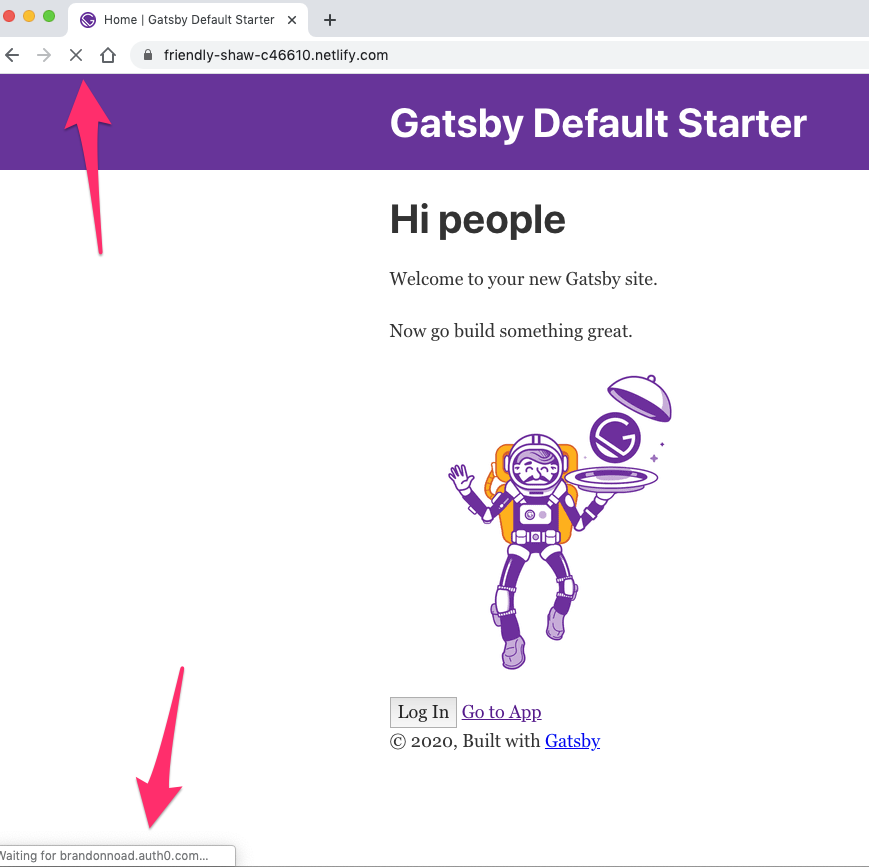
Here is a screenshot of what it looks like. The loading spinner around the favicon stops, but the reload button stays as an "X". What's weird is that if you click into a different tab, then immediately click back, the reload button goes back to its normal icon.
What browser/OS versions are you on?
I am using Chrome Version 80.0.3987.132 (Official Build) (64-bit) on macOS 10.14.6.
Also - can you reproduce the issue on this version of your app https://dazzling-meninsky-b45df2.netlify.com/ ?
No, that app loads fine.
BrandonNoad
on 16 Mar 2020
Just catching up with this issue and I apologise for the delay here. I'm still unable to reproduce this on the latest versions of Chrome - are you still seeing the issue? I understand that you don't see it 100%, but if you are still seeing it sometimes, I can take an even deeper look.
stevehobbsdev
on 11 Jan 2021
Closing this for now, but if we can get more details then I can reopen and take a look.
stevehobbsdev
on 18 Jun 2021
Related issues
 javiercejudo
·
5Comments
javiercejudo
·
5Comments
 jorgeucano
·
6Comments
jorgeucano
·
6Comments
 duongmanhhoang
·
3Comments
duongmanhhoang
·
3Comments
 lorensr
·
6Comments
lorensr
·
6Comments
 peterblazejewicz
·
3Comments
peterblazejewicz
·
3Comments
Most helpful comment
It happens most of the time, but not 100% of the time.
Here is a screenshot of what it looks like. The loading spinner around the favicon stops, but the reload button stays as an "X". What's weird is that if you click into a different tab, then immediately click back, the reload button goes back to its normal icon.
I am using Chrome Version 80.0.3987.132 (Official Build) (64-bit) on macOS 10.14.6.
No, that app loads fine.