Auth-module: Why @nuxt/auth-next doesn't fetch user automatically after successfully login?
Hello, why @nuxt/auth not fetch user endpoint automatically after login success? here's the screenshot and here's the current config (i've tried almost everything). Thank you
The cookies

The request

nuxt.config.js
// ...
    auth: {
        strategies: {
            local: {
                scheme: 'refresh',
                token: {
                    property: 'access_token',
                    maxAge: 1800,
                    type: 'Bearer'
                },
                refreshToken: {
                    property: 'refresh_token',
                    data: 'refresh_token',
                    maxAge: 60 * 80 * 24
                },
                user: {
                    property: 'user',
                    autoFetch: true
                },
                endpoints: {
                    user: { url: "/api/v1/u/me", method: "get", propertyName: "user" },
                    login: { url: '/api/v1/auth/login', method: 'post', propertyName: "access_token" },
                    refresh: { url: '/api/v1/auth/refresh', method: 'post', propertyName: "refresh_token" },
                    // logout: false
                    logout: { url: '/api/v1/auth/logout', method: 'delete' }
                }
            }
        },
        cookie: {
            options: {
                sameSite: 'lax',
            },
        },
        redirect: {
            login: '/',
            logout: '/',
            callback: '/dash',
            home: '/dash'
        }
    }
 fahmiegerton
All 20 comments
Hello @fahmiegerton you should check how your token is being returned from the login response. This is usually what nuxt auth uses for authorization to fetch your user details.
From your token settings your token property is access_token which might not be how it is returned from your login data response
 token: {
                    property: 'access_token',
                    maxAge: 1800,
                    type: 'Bearer'
                },
 ```

For Example if your data  is returned  like so
```{
    "status": "success",
    "message": "The process was completed successully",
    "data": {
        "token": "xxxxxxxxx"
    }
}
In this response the token is a level down and you have to set your property as { property: 'data.token'}
Or If your data was returned like so
```{
"token": "xxx",
"message": "The process was completed successully",
"data": {
"name": "xxxxxxxxx"
}
}
There's no need to go a level deeper, You  can just simply set your  property as ```{property: 'token'}```or whatever name it is.
---
Lastly if your user data is not being returned as 'user' just update the property to false
Also, you can simply remove the ```propertyName``` from your endpoints object.

So your configuration might look something like this
auth: {
strategies: {
local: {
scheme: 'refresh',
token: {
property: 'whatever_token_property_returned_from_login_response',
maxAge: 1800,
name: 'Authorization',
type: 'Bearer' // or just leave as empty there is no Bearer attached to your token
},
refreshToken: {
property: 'refresh_token',
data: 'refresh_token',
maxAge: 60 * 80 * 24
},
user: {
property: false,
autoFetch: true
},
endpoints: {
user: { url: "/api/v1/u/me", method: "get" },
login: { url: '/api/v1/auth/login', method: 'post'},
refresh: { url: '/api/v1/auth/refresh', method: 'post'},
// logout: false
logout: { url: '/api/v1/auth/logout', method: 'delete' }
}
}
},
cookie: {
options: {
sameSite: 'lax',
},
},
redirect: {
login: '/',
logout: '/',
callback: '/dash',
home: '/dash'
}
}
```
I hope this helps
 joshtom
on 26 Mar 2021
joshtom
on 26 Mar 2021
Hello @fahmiegerton you should check how your token is being returned from the login response. This is usually what nuxt auth uses for authorization to fetch your user details.
From your token settings your token property is
access_tokenwhich might not be how it is returned from your login data responsetoken: { property: 'access_token', maxAge: 1800, type: 'Bearer' },For Example if your data is returned like so
    "status": "success",
    "message": "The process was completed successully",
    "data": {
        "token": "xxxxxxxxx"
    }
}
In this response the token is a level down and you have to set your property as
{ property: 'data.token'}Or If your data was returned like so
    "token": "xxx",
    "message": "The process was completed successully",
    "data": {
        "name": "xxxxxxxxx"
    }
}
There's no need to go a level deeper, You can just simply set your property as
{property: 'token'}or whatever name it is.Lastly if your user data is not being returned as 'user' just update the property to false
Also, you can simply remove thepropertyNamefrom your endpoints object.So your configuration might look something like this
 auth: {
        strategies: {
            local: {
                scheme: 'refresh',
                token: {
                    property: 'whatever_token_property_returned_from_login_response',
                    maxAge: 1800,
                   name: 'Authorization',
                    type: 'Bearer' // or just leave as empty there is no Bearer attached to your token
                },
                refreshToken: {
                    property: 'refresh_token',
                    data: 'refresh_token',
                    maxAge: 60 * 80 * 24
                },
                user: {
                    property: false,
                    autoFetch: true
                },
                endpoints: {
                    user: { url: "/api/v1/u/me", method: "get" },
                    login: { url: '/api/v1/auth/login', method: 'post'},
                    refresh: { url: '/api/v1/auth/refresh', method: 'post'},
                    // logout: false
                    logout: { url: '/api/v1/auth/logout', method: 'delete' }
                }
            }
        },
        cookie: {
            options: {
                sameSite: 'lax',
            },
        },
        redirect: {
            login: '/',
            logout: '/',
            callback: '/dash',
            home: '/dash'
        }
    }
I hope this helps
Hello @joshtom , thanks for your replied. This is how my response from backend :
{
   "access_token":"xxxxx",
   "token_type":"bearer",
   "expires_in":3600
}
That's fine. Try to change your user configuration property to false. Like I mentioned above
joshtom
on 26 Mar 2021
That's fine. Try to change your user configuration property to false. Like I mentioned above
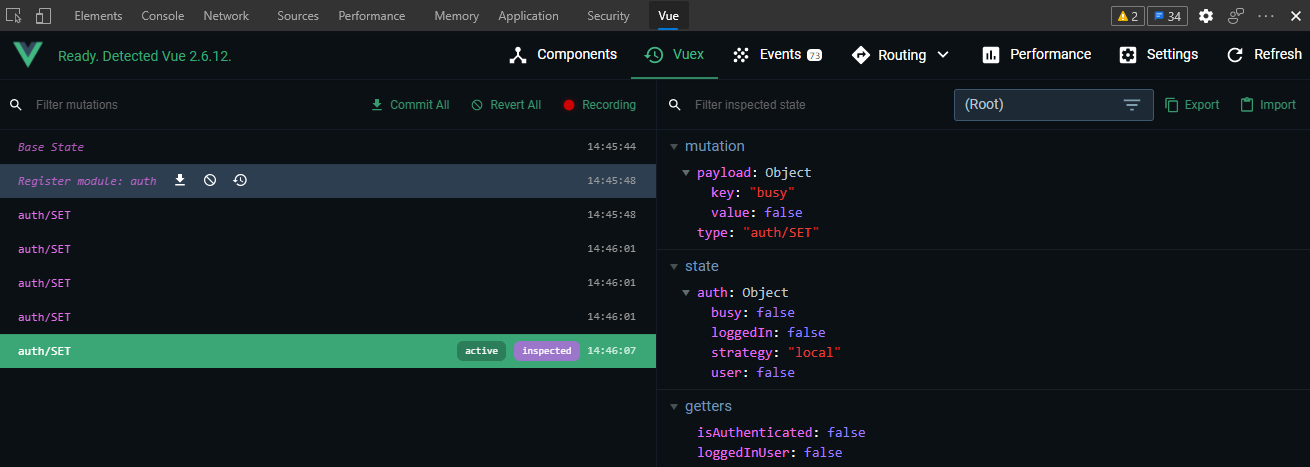
Unfortunately, it's still the same :(. Here's also from Vue devtools

fahmiegerton
on 26 Mar 2021
That's fine. Try to change your user configuration property to false. Like I mentioned above
Unfortunately, it's still the same :(. Here's also from Vue devtools
Did you try fetching the user endpoint alone? Maybe with postman or something. Can you try it again and see if it's still returning a response
joshtom
on 26 Mar 2021
That's fine. Try to change your user configuration property to false. Like I mentioned above
Unfortunately, it's still the same :(. Here's also from Vue devtools
Did you try fetching the user endpoint alone? Maybe with postman or something. Can you try it again and see if it's still returning a response
Tried using postman. It returned apparently.

fahmiegerton
on 26 Mar 2021
Everything seem correct. I would suggest you remove all the token property except required true to be double sure it's sending the request in the first place. So If it's sending the request you should get an authorization error.
Set your token like so
token : {
 required: true
               }
Without no type or bearer. So once your send the login request check if it's trying to send a request to fetch the user details as well but returning the authorization error
joshtom
on 26 Mar 2021
Everything seem correct. I would suggest you remove all the token property except required true to be double sure it's sending the request in the first place. So If it's sending the request you should get an authorization error.
Set your token like so
token : {
 required: true
               }
Without no type or bearer. So once your send the login request check if it's trying to send a request to fetch the user details as well but returning the authorization error
No error, everything looks fine and same as before :(.
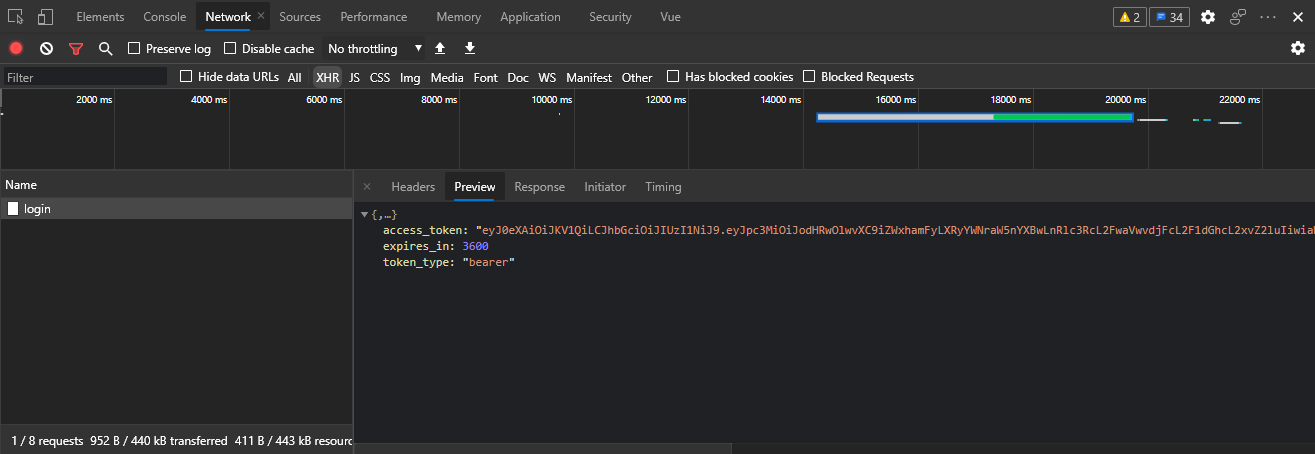
And here's from vue devtools
fahmiegerton
on 26 Mar 2021
Can you try to put this on codesandbox and share the url so that I can give it direct look?
joshtom
on 26 Mar 2021
Can you try to put this on codesandbox and share the url so that I can give it direct look?
I don't understand how to put there but I'll try 😅.
Also, is this issue also maybe related because I'm using typescript?
And I'm using @nuxt/auth-next version 5.0.0-1616003482.75c20e6
fahmiegerton
on 26 Mar 2021
I'm not sure. Cause I encountered a similar issue a couple of days back which I was able to fix
joshtom
on 26 Mar 2021
Hi @fahmiegerton! The problem here is because no refresh token was provided in your response. So the check is failing and the user is not being set. If you don't need the refresh token in order to refresh the access token, you can simply add required: false to refreshToken option. If you don't need the refresh token at all, you can use local scheme instead.
Let me know if it woked! :)
 JoaoPedroAS51
on 26 Mar 2021
JoaoPedroAS51
on 26 Mar 2021
Hi @fahmiegerton! The problem here is because no refresh token was provided in your response. So the check is failing and the user is not being set. If you don't need the refresh token in order to refresh the access token, you can simply add
required: falsetorefreshTokenoption. If you don't need the refresh token at all, you can use local scheme instead.Let me know if it woked! :)
Hi, I've tried with another api (from my ex-lecturer app for a moment) that returned with refresh token, but the problem still happened. I've also tried with removing the refresh prop and endpoint , still happened. Tried with that required false on refreshToken is also not working. I'm still trying to downgrade the version and refresh the whole packages and see if it affected. Thank you.
fahmiegerton
on 26 Mar 2021
the same problem happens to me too. But mine is not happening in login, when log in was successful after making the site idle for 15-20 minutes it logs out me. When I try to log in again, it doesn't matter Login and User API are returning access_token and user data. Both requests are 200. But auth module not changing anything. When I clear the Local storage. Everything is working perfectly.
My configuration is:
...
 "dependencies": {
    "@nuxtjs/axios": "^5.13.1",
    "@nuxtjs/auth-next": "5.0.0-1616003482.75c20e6",
    "@nuxtjs/recaptcha": "^1.0.3",
    "@nuxtjs/sentry": "^5.0.3",
    "core-js": "^3.9.1",
    "nuxt": "^2.15.3"
  },
...
````
export default {
// Plugins to run before rendering page: https://go.nuxtjs.dev/config-plugins
plugins: [
{ src: '@/plugins/action' },
{ src: '@/plugins/message.client' },
{ src: '@/plugins/axios' },
],
// Auto import components: https://go.nuxtjs.dev/config-componentss
components: true,
// Modules for dev and build (recommended): https://go.nuxtjs.dev/config-modules
buildModules: [],
router: {
middleware: ['auth'],
linkExactActiveClass: 'active',
},
// Modules: https://go.nuxtjs.dev/config-modules
modules: [
// https://go.nuxtjs.dev/axios
'@nuxtjs/axios',
'@nuxtjs/auth-next',
'@nuxtjs/recaptcha',
'@nuxtjs/sentry',
],
recaptcha: {
hideBadge: true,
siteKey: process.env.RECAPTCHA_SITE_KEY,
version: 3,
},
sentry: {
dsn: process.env.SENTRY_DSN,
config: {
tracesSampleRate: 1.0,
vueOptions: {
tracing: true,
tracingOptions: {
hooks: ['mount', 'update'],
timeout: 2000,
trackComponents: true,
},
},
browserOptions: {},
},
},
proxy: {
'/api': {
target: process.env.API_PROXY,
pathRewrite: { '^/api': '/v1/u-side' },
changeOrigin: true,
},
},
loading: {
height: '3px',
duration: 3000,
throttle: 100,
continuous: true,
color: '#069F4F',
},
loadingIndicator: {
name: 'circle',
color: '#3B8070',
background: 'white',
},
auth: {
strategies: {
laravelJWT: {
provider: 'laravel/jwt',
url: process.env.BASE_URL,
endpoints: {
login: {
url: '/api/user',
method: 'post',
},
logout: {
url: '/api/user',
method: 'delete',
},
refresh: {
url: '/api/user',
method: 'patch',
},
user: {
url: '/api/user',
method: 'get',
},
},
token: {
property: 'body.access_token',
maxAge: 60 * 60 * 4, // 4 hours
},
user: {
property: 'body',
},
refreshToken: {
maxAge: 20160 * 60, // 2 weeks
},
},
},
},
// Axios module configuration: https://go.nuxtjs.dev/config-axios
axios: {
proxy: true,
baseURL: process.env.BASE_URL + '/api',
browserBaseURL: process.env.BASE_URL + '/api',
prefix: 'api',
retry: true,
https: process.env.NODE_ENV === 'production',
debug: process.env.NODE_ENV !== 'production',
},
// Build Configuration: https://go.nuxtjs.dev/config-build
build: {
extend(config, ctx) {
config.devtool = ctx.isClient ? 'eval-source-map' : 'inline-source-map'
},
},
}
````

 samirmhsnv
on 26 Mar 2021
samirmhsnv
on 26 Mar 2021
Hi @samirmhsnv! Can you open a new issue for your case? I believe it's not related to this one. Then I'll be able to look better at it. Thank you in advance :)
JoaoPedroAS51
on 26 Mar 2021
Hi @fahmiegerton! I believe we're close to find where is the issue. If your login request is successful, then the problem should be related either to the internal check or the fetchUser method. Do you have Discord, so we can work better on this?
Joao Pedro AS51#1284
@samirmhsnv You can also add me on Discord if you want.
JoaoPedroAS51
on 26 Mar 2021
Update, refreshing the whole packages now working. Thank you all for your help!
fahmiegerton
on 27 Mar 2021
the same problem happens to me too. But mine is not happening in login, when log in was successful after making the site idle for 15-20 minutes it logs out me. When I try to log in again, it doesn't matter Login and User API are returning access_token and user data. Both requests are 200. But auth module not changing anything. When I clear the Local storage. Everything is working perfectly.
My configuration is:
...
 "dependencies": {
    "@nuxtjs/axios": "^5.13.1",
    "@nuxtjs/auth-next": "5.0.0-1616003482.75c20e6",
    "@nuxtjs/recaptcha": "^1.0.3",
    "@nuxtjs/sentry": "^5.0.3",
    "core-js": "^3.9.1",
    "nuxt": "^2.15.3"
  },
...
export default { // Plugins to run before rendering page: https://go.nuxtjs.dev/config-plugins plugins: [ { src: '@/plugins/action' }, { src: '@/plugins/message.client' }, { src: '@/plugins/axios' }, ], // Auto import components: https://go.nuxtjs.dev/config-componentss components: true, // Modules for dev and build (recommended): https://go.nuxtjs.dev/config-modules buildModules: [], router: { middleware: ['auth'], linkExactActiveClass: 'active', }, // Modules: https://go.nuxtjs.dev/config-modules modules: [ // https://go.nuxtjs.dev/axios '@nuxtjs/axios', '@nuxtjs/auth-next', '@nuxtjs/recaptcha', '@nuxtjs/sentry', ], recaptcha: { hideBadge: true, siteKey: process.env.RECAPTCHA_SITE_KEY, version: 3, }, sentry: { dsn: process.env.SENTRY_DSN, config: { tracesSampleRate: 1.0, vueOptions: { tracing: true, tracingOptions: { hooks: ['mount', 'update'], timeout: 2000, trackComponents: true, }, }, browserOptions: {}, }, }, proxy: { '/api': { target: process.env.API_PROXY, pathRewrite: { '^/api': '/v1/u-side' }, changeOrigin: true, }, }, loading: { height: '3px', duration: 3000, throttle: 100, continuous: true, color: '#069F4F', }, loadingIndicator: { name: 'circle', color: '#3B8070', background: 'white', }, auth: { strategies: { laravelJWT: { provider: 'laravel/jwt', url: process.env.BASE_URL, endpoints: { login: { url: '/api/user', method: 'post', }, logout: { url: '/api/user', method: 'delete', }, refresh: { url: '/api/user', method: 'patch', }, user: { url: '/api/user', method: 'get', }, }, token: { property: 'body.access_token', maxAge: 60 * 60 * 4, // 4 hours }, user: { property: 'body', }, refreshToken: { maxAge: 20160 * 60, // 2 weeks }, }, }, }, // Axios module configuration: https://go.nuxtjs.dev/config-axios axios: { proxy: true, baseURL: process.env.BASE_URL + '/api', browserBaseURL: process.env.BASE_URL + '/api', prefix: 'api', retry: true, https: process.env.NODE_ENV === 'production', debug: process.env.NODE_ENV !== 'production', }, // Build Configuration: https://go.nuxtjs.dev/config-build build: { extend(config, ctx) { config.devtool = ctx.isClient ? 'eval-source-map' : 'inline-source-map' }, }, }
Oh wow mine too, I forgot about this because I set the expiration token to one day.
Also, it's OOT from this topic, but are you using tymondesigns/jwt-auth module? If so, how did you include the refresh_token on that JSON response? I couldn't seem to find a way. Thanks.
fahmiegerton
on 27 Mar 2021
the same problem happens to me too. But mine is not happening in login, when log in was successful after making the site idle for 15-20 minutes it logs out me. When I try to log in again, it doesn't matter Login and User API are returning access_token and user data. Both requests are 200. But auth module not changing anything. When I clear the Local storage. Everything is working perfectly.
My configuration is:... "dependencies": { "@nuxtjs/axios": "^5.13.1", "@nuxtjs/auth-next": "5.0.0-1616003482.75c20e6", "@nuxtjs/recaptcha": "^1.0.3", "@nuxtjs/sentry": "^5.0.3", "core-js": "^3.9.1", "nuxt": "^2.15.3" }, ...export default { // Plugins to run before rendering page: https://go.nuxtjs.dev/config-plugins plugins: [ { src: '@/plugins/action' }, { src: '@/plugins/message.client' }, { src: '@/plugins/axios' }, ], // Auto import components: https://go.nuxtjs.dev/config-componentss components: true, // Modules for dev and build (recommended): https://go.nuxtjs.dev/config-modules buildModules: [], router: { middleware: ['auth'], linkExactActiveClass: 'active', }, // Modules: https://go.nuxtjs.dev/config-modules modules: [ // https://go.nuxtjs.dev/axios '@nuxtjs/axios', '@nuxtjs/auth-next', '@nuxtjs/recaptcha', '@nuxtjs/sentry', ], recaptcha: { hideBadge: true, siteKey: process.env.RECAPTCHA_SITE_KEY, version: 3, }, sentry: { dsn: process.env.SENTRY_DSN, config: { tracesSampleRate: 1.0, vueOptions: { tracing: true, tracingOptions: { hooks: ['mount', 'update'], timeout: 2000, trackComponents: true, }, }, browserOptions: {}, }, }, proxy: { '/api': { target: process.env.API_PROXY, pathRewrite: { '^/api': '/v1/u-side' }, changeOrigin: true, }, }, loading: { height: '3px', duration: 3000, throttle: 100, continuous: true, color: '#069F4F', }, loadingIndicator: { name: 'circle', color: '#3B8070', background: 'white', }, auth: { strategies: { laravelJWT: { provider: 'laravel/jwt', url: process.env.BASE_URL, endpoints: { login: { url: '/api/user', method: 'post', }, logout: { url: '/api/user', method: 'delete', }, refresh: { url: '/api/user', method: 'patch', }, user: { url: '/api/user', method: 'get', }, }, token: { property: 'body.access_token', maxAge: 60 * 60 * 4, // 4 hours }, user: { property: 'body', }, refreshToken: { maxAge: 20160 * 60, // 2 weeks }, }, }, }, // Axios module configuration: https://go.nuxtjs.dev/config-axios axios: { proxy: true, baseURL: process.env.BASE_URL + '/api', browserBaseURL: process.env.BASE_URL + '/api', prefix: 'api', retry: true, https: process.env.NODE_ENV === 'production', debug: process.env.NODE_ENV !== 'production', }, // Build Configuration: https://go.nuxtjs.dev/config-build build: { extend(config, ctx) { config.devtool = ctx.isClient ? 'eval-source-map' : 'inline-source-map' }, }, }
Oh wow mine too, I forgot about this because I set the expiration token to one day.
Also, it's OOT from this topic, but are you using tymondesigns/jwt-auth module? If so, how did you include the
refresh_tokenon that JSON response? I couldn't seem to find a way. Thanks.
No, I don't use tymondesigns/jwt-auth. I have implemented my own Jwt handler with Firebase/PHP-Jwt.
Let's continue on https://github.com/nuxt-community/auth-module/issues/1102
samirmhsnv
on 27 Mar 2021
Update, refreshing the whole packages now working. Thank you all for your help!
I'm happy to know it's working now! Closing here then. Let's continue on #1102
JoaoPedroAS51
on 27 Mar 2021
Related issues
 AhmedAtef07
·
3Comments
AhmedAtef07
·
3Comments
 manniL
·
4Comments
manniL
·
4Comments
 ishitatsuyuki
·
4Comments
ishitatsuyuki
·
4Comments
 dasisyouyu
·
3Comments
dasisyouyu
·
3Comments
 weijinnx
·
3Comments
weijinnx
·
3Comments