Audio_service: MediaItem playback fail error handling - AudioServiceBackground._shutdown() does not remove notification
Which API doesn't behave as documented, and how does it misbehave?
In the example, failing to play a MediaItem, will result in onStop() being called.
// Load and broadcast the queue
    AudioServiceBackground.setQueue(queue);
    try {
      await _player.load(ConcatenatingAudioSource(
        children:
            queue.map((item) => AudioSource.uri(Uri.parse(item.id))).toList(),
      ));
      // In this example, we automatically start playing on start.
      onPlay();
    } catch (e) {
      print("Error: $e");
      onStop();
    }
The onStop() normally handles cleanup/shutting down background task, but for some reason it does not remove the notification on Android on playback fail.
@override
  Future<void> onStop() async {
    await _player.pause();
    await _player.dispose();
    _eventSubscription.cancel();
    // It is important to wait for this state to be broadcast before we shut
    // down the task. If we don't, the background task will be destroyed before
    // the message gets sent to the UI.
    await _broadcastState();
    // Shut down this task
    await super.onStop();
  }
Why doesn't the super call properly shutdown?
@mustCallSuper
  Future<void> onStop() async {
    await AudioServiceBackground._shutdown();
  }
Minimal reproduction project
The example, but modify a media items URL so that the playback will fail
To Reproduce (i.e. user steps, not code)
Steps to reproduce the behaviour:
- Modify URL of a media item
- Click on 'AudioPlayer'
- The session should have been ended and the notification removed since onStop() was called.
Error messages
E/ExoPlayerImplInternal(12723): Source error
E/ExoPlayerImplInternal(12723):   com.google.android.exoplayer2.upstream.HttpDataSource$InvalidResponseCodeException: Response code: 403
E/ExoPlayerImplInternal(12723):       at com.google.android.exoplayer2.upstream.DefaultHttpDataSource.open(DefaultHttpDataSource.java:300)
E/ExoPlayerImplInternal(12723):       at com.google.android.exoplayer2.upstream.DefaultDataSource.open(DefaultDataSource.java:177)
E/ExoPlayerImplInternal(12723):       at com.google.android.exoplayer2.upstream.StatsDataSource.open(StatsDataSource.java:83)
E/ExoPlayerImplInternal(12723):       at com.google.android.exoplayer2.source.ProgressiveMediaPeriod$ExtractingLoadable.load(ProgressiveMediaPeriod.java:962)
E/ExoPlayerImplInternal(12723):       at com.google.android.exoplayer2.upstream.Loader$LoadTask.run(Loader.java:415)
E/ExoPlayerImplInternal(12723):       at java.util.concurrent.ThreadPoolExecutor.runWorker(ThreadPoolExecutor.java:1167)
E/ExoPlayerImplInternal(12723):       at java.util.concurrent.ThreadPoolExecutor$Worker.run(ThreadPoolExecutor.java:641)
E/ExoPlayerImplInternal(12723):       at java.lang.Thread.run(Thread.java:919)
E/AudioPlayer(12723): TYPE_SOURCE: Response code: 403
I/flutter (12723): Error: (0) com.google.android.exoplayer2.upstream.HttpDataSource$InvalidResponseCodeException: Response code: 403
I/ExoPlayerImpl(12723): Release c0143fb [ExoPlayerLib/2.11.7] [generic_x86, Android SDK built for x86, Google, 29] [goog.exo.core]
E/flutter (12723): [ERROR:flutter/lib/ui/ui_dart_state.cc(166)] Unhandled Exception: PlatformException(0, com.google.android.exoplayer2.upstream.HttpDataSource$InvalidResponseCodeException: Response code: 403, null)
E/flutter (12723):
W/FlutterJNI(12723): Tried to send a platform message response, but FlutterJNI was detached from native C++. Could not send. Response ID: 22
Expected behavior
When onStop() was called and the background task was shut down, the notification should be removed as in all other cases when onStop() is called.
Screenshots
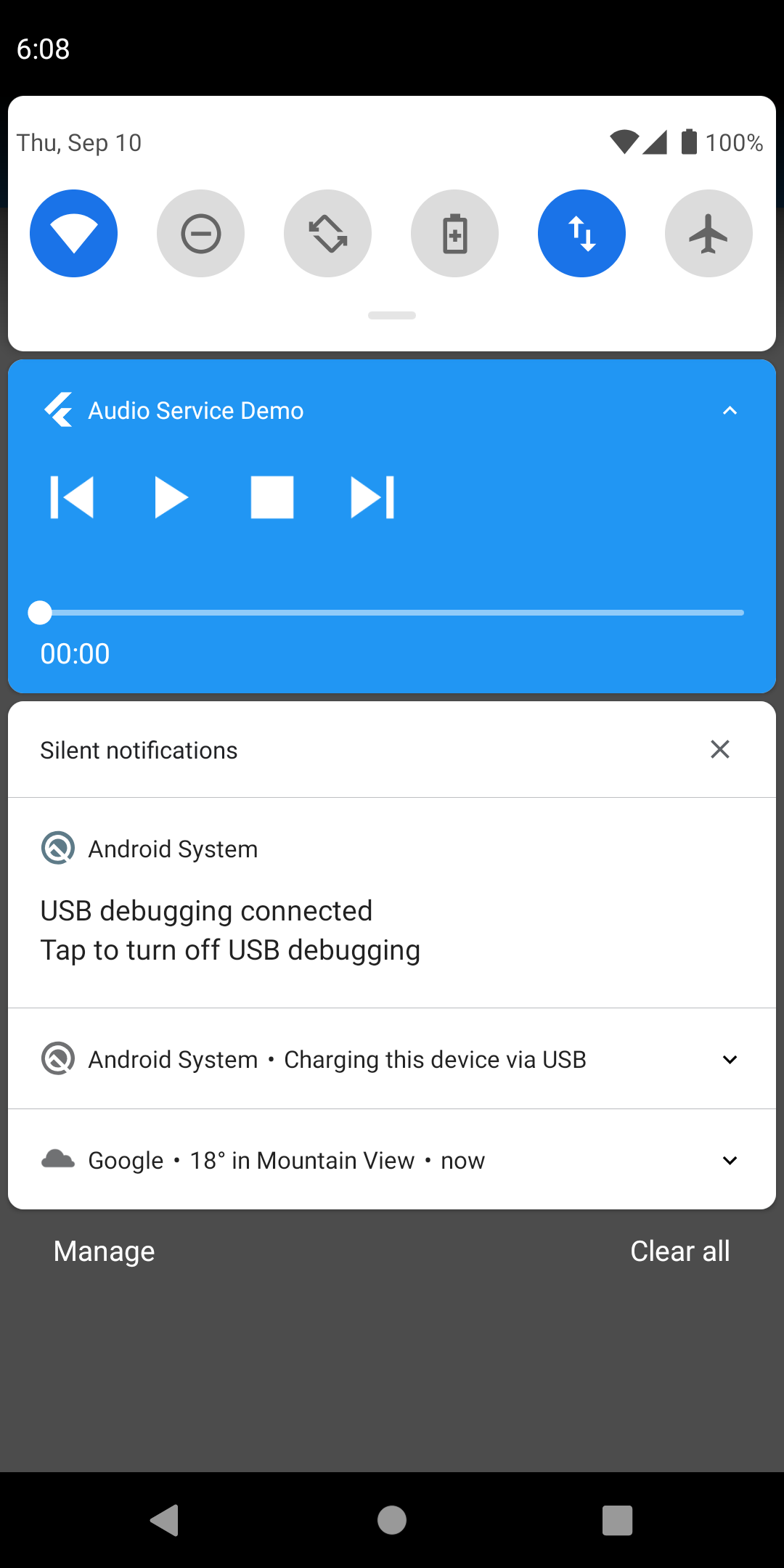
Uninitialised notification still showing.
Runtime Environment (please complete the following information if relevant):
- Device: OnePlus Nord (and simulators)
- OS: Android 10
Flutter SDK version
[✓] Flutter (Channel stable, 1.20.3, on Mac OS X 10.15.6 19G2021, locale en-SE)
    • Flutter version 1.20.3 at /Users/fredrik.dahlen/DEV/flutter
    • Framework revision 216dee60c0 (9 days ago), 2020-09-01 12:24:47 -0700
    • Engine revision d1bc06f032
    • Dart version 2.9.2

[✓] Android toolchain - develop for Android devices (Android SDK version 29.0.2)
    • Android SDK at /Users/fredrik.dahlen/Library/Android/sdk
    • Platform android-29, build-tools 29.0.2
    • ANDROID_HOME = /Users/fredrik.dahlen/Library/Android/sdk
    • Java binary at: /Users/fredrik.dahlen/Library/Application Support/JetBrains/Toolbox/apps/AndroidStudio/ch-0/193.6626763/Android Studio.app/Contents/jre/jdk/Contents/Home/bin/java
    • Java version OpenJDK Runtime Environment (build 1.8.0_242-release-1644-b3-6222593)
    • All Android licenses accepted.

[✓] Xcode - develop for iOS and macOS (Xcode 11.7)
    • Xcode at /Applications/Xcode.app/Contents/Developer
    • Xcode 11.7, Build version 11E801a
    • CocoaPods version 1.8.4

[✓] Android Studio (version 4.0)
    • Android Studio at /Users/fredrik.dahlen/Library/Application Support/JetBrains/Toolbox/apps/AndroidStudio/ch-0/193.6626763/Android Studio.app/Contents
    • Flutter plugin version 49.0.2
    • Dart plugin version 193.7547
    • Java version OpenJDK Runtime Environment (build 1.8.0_242-release-1644-b3-6222593)

[✓] VS Code (version 1.48.2)
    • VS Code at /Applications/Visual Studio Code.app/Contents
    • Flutter extension version 3.13.2

[✓] Connected device (3 available)
    • AC2003 (mobile)                    • 4ae6f3bf                                 • android-arm64 • Android 10 (API 29)
    • Android SDK built for x86 (mobile) • emulator-5554                            • android-x86   • Android 10 (API 29) (emulator)
    • Fredrik’s iPhone (mobile)          • f6414d51c92a4d1e13c55cc0b2b04547651d022b • ios           • iOS 13.7

• No issues found!
Additional context
 ninnepinne
All 9 comments
Interesting. I've got a growing list of things to get through, but I should eventually get to this one. I suspect onStart needs to complete before onStop will work.
 ryanheise
on 10 Sep 2020
ryanheise
on 10 Sep 2020
@ryanheise Yes, that was my first idea too...
BUT, I did som more testing and even if you successfully call onStart() and then later on a button click trigger the setting of media item, loading etc, it will still not work.
According to my testing what is needed is at least ONE playing == true status broadcast!
await AudioServiceBackground.setState(
      controls: [
        MediaControl.rewind,
        if (_player.playing) MediaControl.pause else MediaControl.play,
        MediaControl.fastForward,
      ],
      systemActions: [
        MediaAction.seekTo,
        MediaAction.seekForward,
        MediaAction.seekBackward,
      ],
      processingState: _getProcessingState(),
      playing: true, <----------------------------------- what is needed
      position: _player.position,
      bufferedPosition: _player.bufferedPosition,
      speed: _player.speed,
    );
If you have successfully called onPlay() (or do a fake broadcast as above) the "connection/state" on the android side seems to be correct for the onStop() shutdown to correctly work.
I guess this loosely ties in to #415 .
It becomes weird when you need to call onStart(), a blank notification is triggered, you can set the style/media item and initialise the notification, but you can't hide it until something has successfully been played.
Too me this indicates that you would either need to:
- broaden the API to give finer control over when the notification is shown/can be shown
- narrow down the API to not show any notification until something is actually playing
Thank you for your fine Flutter audio efforts!
ninnepinne
on 11 Sep 2020
Thanks, and you might be right about offering finer control over when to show the notification. This will need to be one of the things I consider with #415 , although if there is a way to do it in a sensible way without requiring extra API calls to explicitly show the notification, I would prefer that.
ryanheise
on 11 Sep 2020
After upgrading to Android 11, I found that this delay is no longer happening. That's both good and bad... Good because the problem will eventually go away by itself as people get the latest software, but bad because it's no longer practical for me to test this to know if I fix it. My plan is to make this issue a lower priority since it may go away after the #415 refactor and it will also go away with software upgrades.
ryanheise
on 12 Sep 2020
@ryanheise
Well, it can easily be tested in an emulator...
And Android 11 won't be dominating for years.
Android adoption is slow...
Also tried it out on Android 11 and what seems to trigger the display of a notification in 11 is the setting of a media item (AudioServiceBackground.setMediaItem(mediaItem)).
So, as long as you only call that after successful media loading you are fine.
A much simpler situation.
But, I really hope you could add this to your checklist for #415 for the most common Android versions.
Thanks.
ninnepinne
on 14 Sep 2020
@ninnepinne apologies, my previous comment was posted in the wrong issue. It was meant for #460 .
But regarding the notification being tied to the state mechanics, there are various reasons for this implementation approach which can be found in the archives. The alternative of having an explicit API to set the service's foreground state was considered, but the goal is not to just model the API after the way Android works, but to design a cross-platform API that works for both Android and iOS. Following Android's best practices for media apps, a lot of the different Android APIs are supposed to always be used together in certain combinations. For example, onPlay should go along with setting the current state to playing and should also go along with elevating the service to a foreground service with a notification, so it is quite easy to avoid having redundant APIs. What would be non-standard would be to enter the foreground state without playing.
There is certainly an issue in the plugin that needs to be addressed, since the scenario you describe results in a notification that can't be dismissed. Although a solution consistent with the current design approach would be for the example to enter the playing state immediately on start. It could perhaps be helpful if the plugin automatically set the initial state to playing, or otherwise there should at least be some code to correctly remove the notification all else being the same as it currently is.
But in the short term, the workaround is for the app to immediately set the state to playing in onStart. I had intended to do that in the example, but I haven't fully tested just_audio's ability to set the playing state before load (since playing really corresponds to ExoPlayer's playWhenReady status).
ryanheise
on 14 Sep 2020
@ryanheise Haha, ok.
Interesting that the behaviour actually IS completely different in Android 11.
But I didn't understand what you meant by "delay"...
I understand your ambition keeping the API clean and simple (and the same for all platforms).
I do agree that the API ideally should hide the state complexity and just show a notification when the audio is paused or playing for all platforms and versions.
But I know that is easier said than done...
Thank you!
ninnepinne
on 14 Sep 2020
I've finally taken a look at this and tracked it down. Technically it's not a bug in audio_service but rather just_audio's dispose() method wasn't behaving as intended. When you press the stop button, and onStop is called, that calls _player.dispose() which SHOULD interrupt any load that is currently in progress by causing it to throw an exception. However, I forgot to add that logic into dispose(). The latest git commit on just_audio should now do that, and the the knock-on effect is that the audio_service example will work.
ryanheise
on 15 Oct 2020
Great! Thanks for the update.
ninnepinne
on 15 Oct 2020
Related issues
 Drabuna
·
7Comments
Drabuna
·
7Comments
 mohammadne
·
7Comments
mohammadne
·
7Comments
 mrxten
·
5Comments
ryanheise
·
6Comments
mrxten
·
5Comments
ryanheise
·
6Comments
 suragch
·
4Comments
suragch
·
4Comments