Audio_service: Multiple isolates
If I calling AudioService.stop() isolate created from AudioService.start(backgroundTaskEntrypoint:...) won't kill.
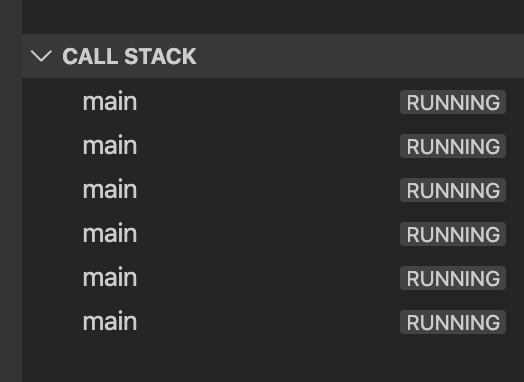
So, after few showing/hiding media notification we have multiple unused isolates
 mrxten
All 5 comments
Can you show me your onStop implementation?
 ryanheise
on 15 Dec 2019
ryanheise
on 15 Dec 2019
@override
  void onStop() {
    AudioServiceBackground.setState(
      controls: [],
      basicState: BasicPlaybackState.stopped,
    );
    _playPauseCompleter?.complete();
  }
_playPauseCompleter used in onStart like in your example
mrxten
on 15 Dec 2019
Correct @mrxten
This happens when running the example project.
The call stack gets piled up with multiple isolates if the audioservice is started and then stopped and repeated.
It seems that a brand new isolate is being created for every AudioService.start.
Not sure why this is happening but ideally the AudioService.stop should terminate the background isolate.
Steps to produce this bug:
- Run the example.
- Play the audioplayer science Friday podcast.
- Then stop the player.
- Again tap on audioplayer.
- Keep repeating the above steps to see the call stack piling up with multiple main running statements.
I have also noticed that this seems to increase the memory in both debug and profile mode.
 rohansohonee
on 15 Dec 2019
rohansohonee
on 15 Dec 2019
Thanks for clarifying. I had an open issue on this with the Flutter team when I first created the plugin, although it hasn't been answered yet. But I'll do some digging and see if I can figure out a solution.
ryanheise
on 16 Dec 2019
This is now fixed in 0.5.7.
ryanheise
on 28 Dec 2019
Related issues
 Okladnoj
·
6Comments
Okladnoj
·
6Comments
 austinbyron
·
4Comments
austinbyron
·
4Comments
 AhmadAbdollah
·
6Comments
AhmadAbdollah
·
6Comments
 Divyanshu133
·
5Comments
Divyanshu133
·
5Comments
 hemalmoradiya
·
4Comments
hemalmoradiya
·
4Comments
Most helpful comment
Thanks for clarifying. I had an open issue on this with the Flutter team when I first created the plugin, although it hasn't been answered yet. But I'll do some digging and see if I can figure out a solution.