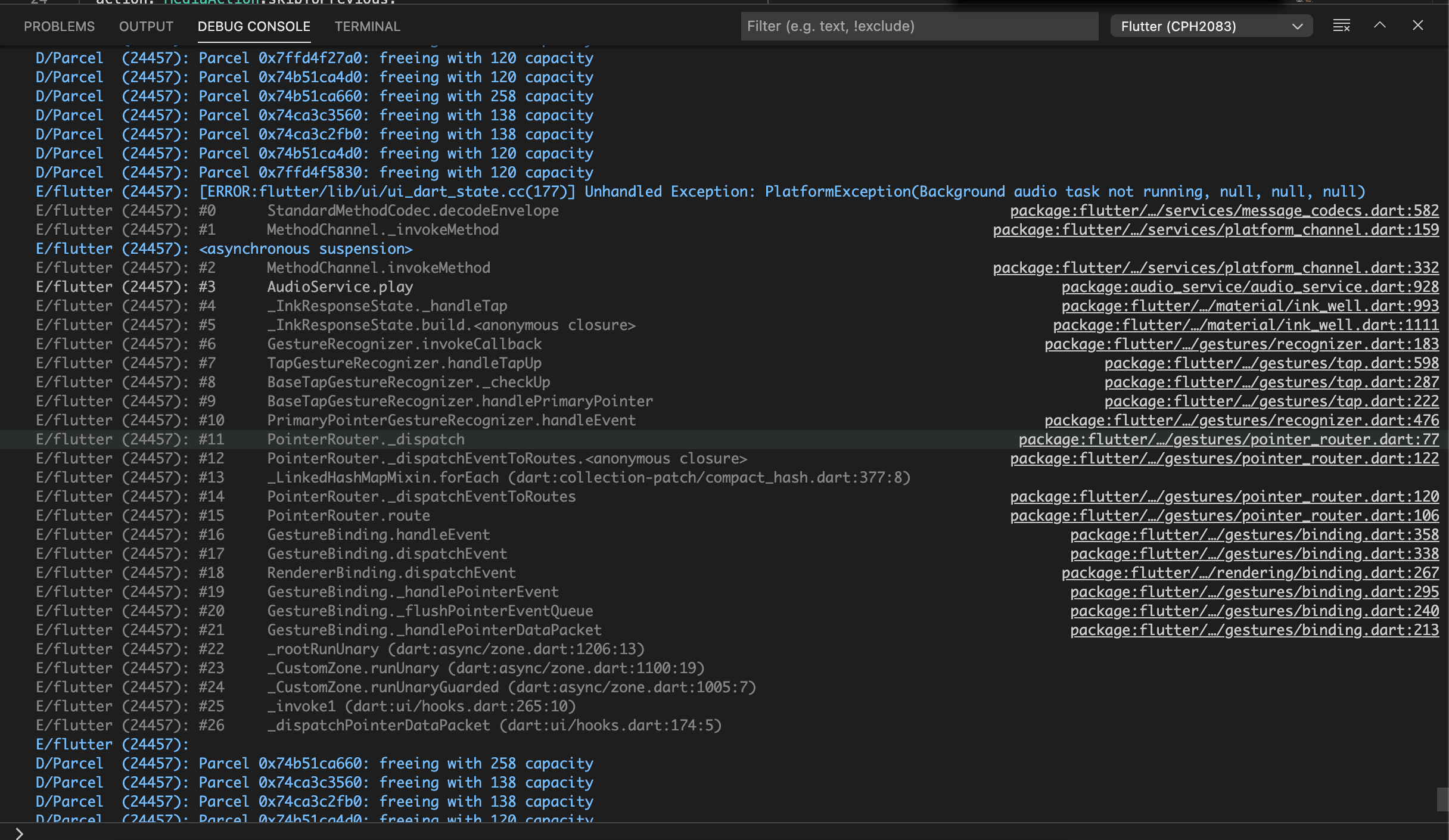
Audio_service: PlatformException(Background audio task not running, null, null, null)
Which API doesn't behave as documented, and how does it misbehave?
AudioService.start();
Minimal reproduction project
Provide a link here using one of two options:
- Fork this repository and modify the example to reproduce the bug, then provide a link here.
- If the unmodified official example already reproduces the bug, just write "The example".
To Reproduce (i.e. user steps, not code)
Steps to reproduce the behavior:
- Go to 'Initialization audioplayer'
- Click on '....'
- Scroll down to '....'
- See error
Error messages
Unhandled Exception: PlatformException(Attempt to invoke virtual method 'void io.flutter.plugin.common.MethodChannel.invokeMethod(java.lang.String, java.lang.Object, io.flutter.plugin.common.MethodChannel$Result)' on a null object reference, null, null, null)
[38;5;244mI/flutter (24457): #10 Element.inflateWidget[39;49m
package:flutter/…/widgets/framework.dart
I/flutter (24457): #11 Element.updateChild (pa
I/flutter (24457): ----------------------------------------------------
I/flutter (24457): ----------------FIREBASE CRASHLYTICS----------------
I/flutter (24457): PlatformException(Background audio task not running, null, null, null)
D/Parcel (24457): Parcel 0x7ffd4f5830: freeing with 120 capacity
D/Parcel (24457): Parcel 0x74ca3c2fb0: freeing with 138 capacity
I/flutter (24457):
[38;5;244mI/flutter (24457): #0 StandardMethodCodec.decodeEnvelope[39;49m
package:flutter/…/services/message_codecs.dart
[38;5;244mI/flutter (24457): #1 MethodChannel._invokeMethod[39;49m
package:flutter/…/services/platform_channel.dart
I/flutter (24457): <asynchronous suspension>
[38;5;244mI/flutter (24457): #2 MethodChannel.invokeMethod[39;49m
package:flutter/…/services/platform_channel.dart
[38;5;248mI/flutter (24457): #3 AudioService.updateQueue[39;49m
package:audio_service/audio_service.dart
[38;5;248mI/flutter (24457): #4 _StudySessionState.setupPlaylist[39;49m
package:chinese_pod/…/study_sessions/study_sessions.dart
[38;5;248mI/flutter (24457): #5 _StudySessionState.createPlayList[39;49m
package:chinese_pod/…/study_sessions/study_sessions.dart
[38;5;248mI/flutter (24457): #6 _StudySessionState.initState[39;49m
package:chinese_pod/…/study_sessions/study_sessions.dart
[38;5;244mI/flutter (24457): #7 StatefulElement._firstBuild[39;49m
package:flutter/…/widgets/framework.dart
[38;5;244mI/flutter (24457): #8 ComponentElement.mount[39;49m
package:flutter/…/widgets/framework.dart
[38;5;244mI/flutter (24457): #9 Element.inflateWidget[39;49m
package:flutter/…/widgets/framework.dart
I/flutter (24457): #10 Element.updateChild (package:flutter/src/w
I/flutter (24457): ----------------------------------------------------
Expected behavior
A clear and concise description of what you expected to happen.
Screenshots
Runtime Environment (please complete the following information if relevant):
- Device: [e.g. Samsung Galaxy Note 8]
- OS: [e.g. Android 8.0.0]
Flutter SDK version
Doctor summary (to see all details, run flutter doctor -v):
[✓] Flutter (Channel stable, 1.22.2, on macOS 11.0.1 20B50, locale en-IN)

[✓] Android toolchain - develop for Android devices (Android SDK version 30.0.2)
[✓] Xcode - develop for iOS and macOS (Xcode 12.2)
[!] Android Studio (version 4.1)
    ✗ Flutter plugin not installed; this adds Flutter specific functionality.
    ✗ Dart plugin not installed; this adds Dart specific functionality.
[✓] VS Code (version 1.51.1)
[✓] Connected device (1 available)
    ! Error: Nikos’s iPhone is not connected. Xcode will continue when Nikos’s iPhone is connected. (code -13)

! Doctor found issues in 1 category.
Additional context
 Divyanshu133
All 5 comments
I am closing this issue since it does not fill in the required sections of the issue template.
 ryanheise
on 4 Dec 2020
ryanheise
on 4 Dec 2020
@ryanheise Whats your proper format can you mention here because its to much to submit some issue.
If you think the issue is not in proper format or you can't understand your code structure better from here.
Divyanshu133
on 4 Dec 2020
Whats your proper format
It is mentioned right in your issue above. For example:
Minimal reproduction project
Provide a link here using one of two options:1. Fork this repository and modify the example to reproduce the bug, then provide a link here. 2. If the unmodified official example already reproduces the bug, just write "The example".
That was copied and pasted directly from the issue you submitted above. You don't need to ask me for the instructions, you just need to read them (instead of skipping over them or ignoring them) and then fill in each section appropriately.
its to much to submit some issue.
If you think submitting a bug is difficult, just think how difficult it is to fix a bug.
I will try to be fair with you and will match your commitment and attitude. If you ignore my instructions, then I will equally ignore your request. And if you don't want to put in the effort to submit a complete bug report, then I will not put in the effort to investigate your bug report. Fair?
ryanheise
on 4 Dec 2020
@ryanheise Okay, man I definietly agree with you. I update the existing one but you directly closed without give any suggestions so its not right thing. Atleast some users have to face some difficulties so he/she will posted over here.
Divyanshu133
on 4 Dec 2020
Hi @Divyanshu133
Thanks for understanding. My suggestion was that you need to fill in the required sections of your issue.
I would ask you to open a new bug report. Make sure you read the first sentence of the instructions to understand, and also read the complete instructions carefully, thanks.
ryanheise
on 4 Dec 2020
Related issues
 trighomautumnatg
·
7Comments
trighomautumnatg
·
7Comments
 MohamedAbdallah-14
·
7Comments
MohamedAbdallah-14
·
7Comments
 Drabuna
·
7Comments
Drabuna
·
7Comments
 Okladnoj
·
6Comments
Okladnoj
·
6Comments
 hpuriamanesh
·
7Comments
hpuriamanesh
·
7Comments