Audio_service: API PROPOSAL: Remove start()
For historical reasons, and the fact that higher priority issues have tended to get in the way, I have never addressed this until now. But this is an important API improvement that I will be turning my attention to now that we have achieved feature parity between Android and iOS.
The background audio task is intended to be a self-sufficient isolate that can run even when the UI is absent. It should therefore contain all audio playback logic, and should also be self-sufficient in terms of being able to access the library of media items that it wishes to play. This background task was originally intended to be the source of truth in an app regarding audio content and state.
The problem is that the UI can't access this data until the service is started. When the app starts, it would like to be able to display the queue and any other state information, and it should be able to do this even before the service is started.
In Android, a service actually can run even before it is started, as long as something is bound to it, and that is typically the UI. So what's currently missing from this plugin is the ability to communicate with the service before it has been started. Under the hood, the service is only started when onPlay() is called, and so we don't actually need an explicit API to start the audio service. We can have this happen transparently under the hood
In iOS, there are no special requirements on how this is done, so the lowest common denominator is to do it in a way that fits into Android's service model.
Once this change is implemented, the background audio task would be created on the first connection, it will be (internally) started via onPlay, and it will be destroyed when BOTH no active connections exist AND the service has been stopped (implicitly either via onPause or onStop). Thus, calling AudioService.stop() would not necessarily cause the background audio task to disappear, as long as the UI is still present, and as long as the UI is still present, it will be able to query the background audio task for any data from this "single source of truth".
This could take a few weeks to implement (on the optimistic end), and so in the meantime I would like to pin this issue to collect feedback and suggestions regarding the API change.
 ryanheise
All 174 comments
How would the service be able to handle Android Auto connections?
In the current implementation, if there is nothing currently playing, android auto will run the onGetRoot and onLoadChildren methods, but nothing will be returned because isolate isn't actually around. It feels like the background task should be able to respond (maybe spin up the isolate) at any time without the need for an item to be played.
I also think coupling the audio service to onPlay is a little problematic in this regard. The way I see it, if a subscriber attaches to the service, the service should be able to respond regardless of whether an item is playing (creating an empty notification when the service is started is an odd user experience). My suggestion is that the service start internally without attempting to play a maybe non-existent item or creating a notification until an item is chosen and played.
It would also be useful to keep the media notification around without the foreground service and wakelock. I think there's another issue for that though.
 keaganhilliard
on 10 Aug 2020
keaganhilliard
on 10 Aug 2020
Hi @keaganhilliard , Android Auto was definitely one of the motivating use cases for this change.
The lifecycle will be:
AudioService.connect(): create the service and the isolate.AudioServiceBackground.setState(playing: true, ...): start the service in foreground mode and show the notification.AudioServiceBackground.setState(playing: false, ...): exit the service's foreground mode and optionally leave the notification there.BackgroundAudioTask.onStop(): stop the service, and destroy the isolate and service if no client is connected.AudioService.disconnect(): destroy the isolate and service if no other client is connected and the service is stopped.BackgroundAudioTask.onPlay(): If the app is no longer running but it's notification was left there, or its media session was the last active media session and the user triggers play remotely, then create the service and isolate.
ryanheise
on 10 Aug 2020
Maybe the new media control in Android 11 will also be the motivating case, which use onGetRoot and onLoadChildren methods, too.
https://developer.android.com/preview/features/media-controls
 stonega
on 10 Aug 2020
stonega
on 10 Aug 2020
Yes, there's also lots of other cool things in media2 that I would like to eventually use. The support library doesn't expose any of it yet, so I'll have to wait, but at least getting onGetRoot and onLoadChildren to work in this situation should be an achievable goal.
ryanheise
on 11 Aug 2020
Awesome! That makes a lot of sense and it should solve a lot of the pain points I'm finding with the service. Thanks for all of the hard work. I'm happy to jump in and implement something to help out 😄
keaganhilliard
on 11 Aug 2020
@keaganhilliard I'm going to create a branch for it so maybe it will be possible to collaborate.
I actually attempted to do this a couple of months ago but ran into a bug in the Flutter engine, so I put it on hold. When I get a chance (hopefully soon) I will try again and get the ball rolling. If the Flutter engine bug still exists, it will be good if I actually reported it to the Flutter team ASAP.
ryanheise
on 11 Aug 2020
Yes, there's also lots of other cool things in media2 that I would like to eventually use. The support library doesn't expose any of it yet, so I'll have to wait
Actually, it seems I had that wrong. media2 supersedes the support libraries and is also an unbundled library, so it's technically safe for me to upgrade now.
It may make sense to upgrade to media2 first, and then see how the current proposal can be built on top of that, because media2 has a different lifecycle than the old APIs and that may affect how I implement the proposal.
ryanheise
on 18 Aug 2020
That sounds good! Another thought I had was that we will need to start supporting the search functions if we want to be able to publish apps with Android Auto available. We will need to expose onPrepareFromSearch and onPlayFromSearch along with some way to send over the extras bundle. Seems like it might be a good time to get that incorporated as well.
keaganhilliard
on 19 Aug 2020
I have one thought about this. My current implementation depends on being able to start different tasks depending on what type of streams i'm about to play that require different kind of behaviours. For example, one for podcasts and another for live streaming.
Would this API change remove the option of having different BackgroundAudioPlayerTask implementations?
void backgroundAudioPlayerTask() async {
  await AudioServiceBackground.run(() => BackgroundAudioPlayerTask());
}

void backgroundAudioPlayerTaskDirect() async {
  await AudioServiceBackground.run(() => BackgroundAudioPlayerDirectTask());
}
 snaeji
on 19 Aug 2020
snaeji
on 19 Aug 2020
@keaganhilliard sounds good to me!
@snaeji Technically you "could" pass in different entrypoints by managing the connection yourself. However, the intention will be to have a 1-to-1 correspondence between the background isolate and the service, so it would be better to move this decision point into the background isolate itself. Within the background isolate, you could create a "player" abstraction with two implementations and delegate all requests to that, and have a custom action to switch between them. This would avoid having to shut down and restart the isolate which is an expensive operation.
ryanheise
on 20 Aug 2020
Sounds good @ryanheise this logic can of course just be placed in the isolate 👍
snaeji
on 21 Aug 2020
it will be able to query the background audio task for any data from this "single source of truth"
This is reason enough for me! I currently have an overly complex system, where the ui and background isolate rely on the same data store... but the data store (hivedb) only works single threaded. So the UI has to switch between using the data store and querying the audio_service, at just the right times (too soon, and there's nothing to query because the background service isn't running, too late and everthing fails because of multiple access to the datastore).
I have it wrapped up nicely in a class (state pattern or something), worked hard on it, it runs well, and I'm eager to toss the whole thing in the garbage bin.
Thank you @ryanheise!
I hope to upgrade my just_audio_service plugin in the next couple days to the latest version, very exciting.
 yringler
on 7 Sep 2020
yringler
on 7 Sep 2020
I think this is going to be more important as the new media resumption features are rolled out in Android 11. I'm already noticing some odd things (multiple dead notifications) with Audio service on 11. I'll file an issue once I can make a replication project, but I figured I would drop a note here.
keaganhilliard
on 10 Sep 2020
I'm just downloading the Android 11 update now to see what you mean.
The options androidNotificationOngoing and androidResumeOnClick were originally intended to handle this use case, although only the former is implemented so far while the latter is waiting until I implement this proposal.
ryanheise
on 10 Sep 2020
I noticed the dead notification thing too while briefly testing the Android 11 GSI, with my own app (so the issue's not in the example).
 hacker1024
on 10 Sep 2020
hacker1024
on 10 Sep 2020
I haven't been able to reproduce it yet. Can either of you share what steps are required to make it happen?
A dead notification can also be caused by an uncaught exception in onStop, but that's probably not it otherwise it would have caused the same issue pre-Android 11.
ryanheise
on 10 Sep 2020
@ryanheise Created an issue (#462) to track this separately. Outlined how I was able to replicate the issue. Hope that helps!
keaganhilliard
on 10 Sep 2020
Any updates on this? I'm not in a hurry, just curious ;)
 moritz-weber
on 2 Nov 2020
moritz-weber
on 2 Nov 2020
Sort of. I don't have any updates for you to get excited about, but I basically have 2 local dev branches, one is a really old branch with my first attempt to implement this (which ran into a bug in the Flutter engine), and the other is my attempt to convert the library to media2.
I figured it would be a good idea to make the switch to media2 first and then build everything on top of that, but it turns out media2 has very poor documentation, no examples, and it seems no other open source projects are using it yet. I'm getting there, but honestly I plan to put that effort aside and for the moment see how far I can push the old app-compat media library.
Now, one of the issues with my original attempt to implement the current proposal was that I hit a deadlock in the Flutter engine when trying to dispose of it in the activity's onDestroy callback. Perhaps things have improved in the Flutter engine since then and I will investigate that.
HOWEVER, there is another idea that has been bubbling in my head, actually since the inception of the project, that I also want to try out which may help to avoid this sort of issue, and bring with it a whole lot of other benefits. When I describe it, you might wonder why I hadn't tried this earlier, or you might wonder why you didn't think of it yourself or question it ;-)
Basically what I want to try to do is use a "single" Flutter engine for everything, and avoid this whole isolate business. If this is possible, it will result in lower startup overheads, lower memory overheads, less hassle, a simpler iOS implementation, and no deadlock when I try to shutdown the second engine.
How could this potentially work?
Scenario 1: The user launches the app. The activity is started and the FlutterEngine is created. Now we immediately "bind" to the service which runs entirely in this engine. When the app "starts" the service, no new FlutterEngine is created, the existing service running in the main FlutterEngine just changes states to started. If the user swipes away and destroys the activity while the service is running, we convert the existing FlutterEngine into a headless FlutterEngine and keep running. If the user launches the activity again while the service is still started, that activity reconnects to the same FlutterEngine and runs main() inside there.
Scenario 2: The app's process is no longer alive, but the media notification is still present. The user clicks the play button, the OS reactivates the media session and starts the service. We detect that there's no FlutterEngine so we create one and from this point carry on as if we were in the middle of Scenario 1. The issue here is how to supply the entrypoint to the FlutterEngine.
I might run into some show stoppers here but I think it's worth a try. Conceptually it should be possible given the way FlutterEngine is supposed to work, but if there is anything I need from FlutterEngine that is not currently there, I'll need to submit a feature request.
As for why I hadn't tried to do it yet, the background execution APIs were quite immature when I started developing this thing, so I went with what was the most straightforward use of those APIs. Since then, I just never had the time, as it was always more important to work on stability and missing features.
Having said all of the above, I think it's quite important to consider that the fact that you can currently very easily communicate with the background audio task from another FlutterEngine (e.g. one provided by android_alarm_manager) is very convenient, and it's a use case I wouldn't want to throw out. So if all of the above works, I still plan to keep the code that allows one FlutterEngine to communicate to another FlutterEngine.
ryanheise
on 3 Nov 2020
Sounds interesting, thank you for taking the time to explain that.
I think I understand what you're saying, can you please correct me if I'm wrong?
I gather that the flutter engine is like this 18 wheeler, driving your dart code down the highway.

When you start up, the load it's pulling is a UI, which also has all the audio code running (no background isolate! Yes!).
If the user swipes away the app, the engine ditches the UI load and pulls just the audio. If the app is reopened, the engine starts pulling the UI again, also.
It seems like attempting to implement the transition is not for the faint of heart, but if you could pull that off - that would remove a big load from adoption, and massively simplify usage.
Most notably (IMO) - the whole headache with keeping progress synced from background to UI would disappear, because if there on the same thread there can just be a normal stream directly from the service to the UI, without the delays from using channels.
yringler
on 3 Nov 2020
I'm planning on having an offline storage (a cache) which can be queried from UI. And since playback and caching is service's business there must be a way for UI to query for cache contents even before playback is started. And I'm actively looking at Hive database to use it for implementation.
So I'm probably going to have to implement some switching mechanism between querying cache from UI and querying cache from service, just like @yringler because Hive's documentation says that multithreaded access is not recommended and may lead to bugs.
If API change is going to decouple service startup and media playback start then I highly approve it. And it would be even better if we can get rid of isolate communication and use common thread(s) for UI and the service.
The idea sounds very promising. I really appreciate your work, Ryan. If you're waiting for a sign to try it out, this is it!
 nuc134r
on 3 Nov 2020
nuc134r
on 3 Nov 2020
@yringler that's mostly correct, although I'm not sure how much of the UI load can be ditched. The real saving will probably be that we avoid having two almost duplicate trucks with copies of the same stuff, and instead have just one. On the topic of delays communicating over channels, there is a proposal out there to support synchronous platform channel communication which would be amazing and solve that issue. The delay is already quite small, but it is just large enough to cause jitters in a seek bar when seeking (although I've done my best to get around this in the new positionStream available now on the master branch).
@nuc134r I wouldn't necessarily want to get your hopes up as this option may turn out to be a dead end. But if it turns out that way, there are persistence solutions that already work correctly in multiple isolates. See for example: https://moor.simonbinder.eu/docs/advanced-features/isolates/ . But yes, it would be great to see Hive address this.
ryanheise
on 3 Nov 2020
Thank you for the detailed update. Having everything in a single FlutterEngine sounds like another promising idea.
But I agree that features and stability are/were more important than this API/architecture change.
Thanks again for your amazing work :)
moritz-weber
on 4 Nov 2020
Update: I now have this working on my local repository, and I'll push it to GitHub as soon as I can clean up the code and the API. Non-Android implementations will probably come after getting a consensus on the new API.
There is now a single flutter engine that is shared by both the activity and the service. If the user clicks the play button on a persistent Android 11 media notification (or headset media button) after the app has stopped running, this will successfully wake up the app and create a new flutter engine (assuming the androidResumeOnClick option is enabled). If the user then opens the activity, that flutter engine will also be shared with the activity to run the app's user-interface.
What hasn't been tested and what will probably require more work is when audio service is started from another flutter engine such as one created by android_alarm_manager.
ryanheise
on 24 Nov 2020
Awesome news! Will this also handle a connect call from android auto?
keaganhilliard
on 24 Nov 2020
Would this also be a good time to switch to a federated plugin architecture? It would make it easier to add new platforms or use implementations that may be under a different license.
hacker1024
on 24 Nov 2020
Awesome news! Will this also handle a connect call from android auto?
One of the goals is definitely to make this work. I'll add in the appropriate code and API although I could probably use some help with testing since I don't personally have an ideal environment for testing this feature.
Would this also be a good time to switch to a federated plugin architecture? It would make it easier to add new platforms or use implementations that may be under a different license.
The roadmap would be to first reach a consensus on the API. Once we switch to the federated plugin architecture, making API changes will be a lot more difficult, so it would be best to sort out the API before this happens.
Therefore, part of this change will be to try to think of any API design issues that should be resolved now.
For starters, since the new code will operate in a single isolate, I have decided not to have two separate APIs, the client API with the play/pause/etc methods, and the background API with the onPlay/onPause/etc methods. Instead, we'll just have the former and the background task will just implement these methods directly.
I'd also like to incorporate some form of composition similar to what @yringler has done, also similar to the way Shelf pipelines work. For now, I have replaced BackgroundAudioTask with an interface called AudioHandler:
abstract class AudioHandler {
  AudioHandler._();
  Future<void> prepare();
  Future<void> prepareFromMediaId(String mediaId);
  Future<void> play();
  Future<void> playFromMediaId(String mediaId);
  Future<void> playMediaItem(MediaItem mediaItem);
  Future<void> pause();
  Future<void> click([MediaButton button]);
  Future<void> stop();
  Future<void> addQueueItem(MediaItem mediaItem);
  Future<void> addQueueItems(List<MediaItem> mediaItems);
  Future<void> insertQueueItem(int index, MediaItem mediaItem);
  Future<void> updateQueue(List<MediaItem> queue);
  Future<void> updateMediaItem(MediaItem mediaItem);
  Future<void> removeQueueItem(MediaItem mediaItem);
  Future<void> skipToNext();
  Future<void> skipToPrevious();
  Future<void> fastForward([Duration interval]);
  Future<void> rewind([Duration interval]);
  Future<void> skipToQueueItem(String mediaId);
  Future<void> seekTo(Duration position);
  Future<void> setRating(Rating rating, Map<dynamic, dynamic> extras);
  Future<void> setRepeatMode(AudioServiceRepeatMode repeatMode);
  Future<void> setShuffleMode(AudioServiceShuffleMode shuffleMode);
  Future<void> seekBackward(bool begin);
  Future<void> seekForward(bool begin);
  Future<void> setSpeed(double speed);
  Future<dynamic> customAction(String name, dynamic arguments);
  Future<void> onTaskRemoved();
  Future<void> onNotificationDeleted();
  Future<List<MediaItem>> getChildren(String parentMediaId);
  ValueStream<List<MediaItem>> getChildrenStream(String parentMediaId);
  ValueStream<PlaybackState> get playbackStateStream;
  PlaybackState get playbackState => playbackStateStream.value;
  ValueStream<List<MediaItem>> get queueStream;
  List<MediaItem> get queue => queueStream.value;
  ValueStream<MediaItem> get mediaItemStream;
  MediaItem get mediaItem => mediaItemStream.value;
  Stream<dynamic> get customEventStream;
}
You will no longer use the AudioServiceBackground API to broadcast state changes. Rather, you will just emit events on these streams, and since these will be broadcast streams, not only will your UI be able to subscribe to them directly, but the platform side will also be able to subscribe to them in order to relay state changes to external agents listening on the media session, such as the notification, headset and Android Auto.
You can't subclass AudioHandler directly, but there will be two abstract subclasses classes that you can subclass:
BaseAudioHandlerprovides default implementations of all of these methods (in most cases empty stubs), along with controllers backing each of the streams (rxdart subjects, since they provide value streams).CompositeAudioHandlerwraps around an innerAudioHandlerand provides default implementations of all members that simply forward the call to the inner handler. Subclasses must call super on all methods they override.
Effectively, BaseAudioHandler corresponds to a Handler in Shelf, while CompositeAudioHandler corresponds to Middleware in Shelf. You can chain together handlers like this:
handler = AnalyticsLogHandler(PersistenceHandler(PlayerHandler()));
(Naming suggestions are welcome on the API.)
I have been considering whether or not to also include mixins in the equation, or whether this composition feature above is enough. For example, I can offer a mixin that provides default implementations for the queue-related methods, and that can be optionally mixed into your AudioHandler if your app needs a queue:
mixin QueueHandler on BaseAudioHandler {
  @override
  Future<void> addQueueItem(MediaItem mediaItem) async {
    queueSubject.add(queue..add(mediaItem));
    await super.addQueueItem(mediaItem);
  }

  ...
}
The difference between a mixin and a CompositeAudioHandler is that methods in a mixin can safely call other methods on this which may even be provided by other mixins, or your own implementations of these methods. With CompositeAudioHandler, there are several distinct instances of this linked in a chain, and you can only call other methods at the same point in this chain. This also means that the sequence of chaining is significant. Mixins make it perfectly possible for methods offered by different mixins to interact with each other while composite audio handlers may lead to surprises if you do this. On the other hand, overlapping mixins will override each other (again the sequence of application is important), while CompositeAudioHandler allows stacking additionally functionality on top of other functionality for the same method.
So my current thinking is to offer both mechanisms. Of course it's not up to me whether mixins are offered. They are a feature of the Dart language so they'll always be an option in addition to the composition feature.
Now for the state model. Looking ahead to the media2 APIs (which I'm not actually implementing in this release), I noticed that they simplified the state model by removing states such as skippingToNext and connecting. We currently have too many states in the AudioProcessingState enum which reflect the legacy Android API plus the addition of a non-standard state completed which corresponds to a useful state in just_audio. Since many legacy states are going to disappear, I decided to update the state enum as a blend between what media2 provides and what just_audio provides, which itself is based on ExoPlayer:
enum AudioProcessingState {
  idle,
  loading,
  buffering,
  ready,
  completed,
  error,
}
It's interesting that media2 didn't just copy ExoPlayer's state model as they're both designed at Google. But we should be fine implementing a blend between the two state models as long as we can define a mapping between the two models.
The other main part of the audio_service state model is PlaybackState. One of my regrets with the original design was that AudioServiceBackground.setState could not simply take a PlaybackState as a parameter, and yet it is the PlaybackState that is ultimately broadcast to clients. The reason for this is that this is a lossy process. On the input side, we must specify which media controls should appear and in which order, while on the receiving end the Android media session only exposes the "set" of media actions that are currently enabled. Looking at the way media2 does it, again for inspiration, I noticed that they haven't fully sorted out this lossy process yet either, and they have TODO comments throughout the code on how they "might" address this in the future. Anyway, what I've decided to do is just include "all" of the information in PlaybackState since the UI will subscribe to that stream directly and will not go through the Android platform's lossy process. Of course, if one day I add an API to subscribe to the media session of another process, we'll have no choice but to go through this lossy process, and we'll have some null fields showing up in PlaybackState events sourced from the external media session.
The final significant change I want to mention is what you'll now need to do instead of AudioService.start since that method is now gone. This method used to be where you'd pass in a whole bunch of configuration options. In fact, as demonstrated in the example, you could even have two different configurations and background audio tasks within the same app, and that was fine because you could pass these in as parameters when calling start. But that will no longer be the case. Now, you'll call something like this during your app's startup:
AudioService.init(handler, config);
This design makes it feasible for your app to respond to a cold restart of the media session without needing to know which of multiple alternative configurations and handlers to use (because there is now only one). At that point the user clicks the play button in the notification, that notification button press is only going to send your app a very primitive message indicating that the user hit the PLAY button without being able to tell you which of 2 configurations apply. There might be a way do support that use case down the road, but I have a feeling there's not much demand for this ability, and for anyone who needs to have two different handlers within the same app, they could actually implement that switching behaviour themselves within their "single" AudioHandler.
For now, I have a bit more cleanup to do after which I'll push the code, but in the meantime if anyone has any feedback on the above, I would appreciate hearing your thoughts :-)
ryanheise
on 25 Nov 2020
The new code is now available for experimentation on the one-isolate branch (note: the doc comments are out of date!)
ryanheise
on 25 Nov 2020
One of my regrets with the original design was that AudioServiceBackground.setState could not simply take a PlaybackState as a parameter, and yet it is the PlaybackState that is ultimately broadcast to clients.
Of course, if one day I add an API to subscribe to the media session of another process, we'll have no choice but to go through this lossy process, and we'll have some null fields showing up in PlaybackState events sourced from the external media session.
Why not make a base PlaybackState class containing all fields used by both the audio and UI code, and then subclass it to add additional properties that the plugin uses? This way, the additional parameters could be passed in, but it would still be the same type as what's broadcast to clients (to all intents and purposes).
On the occasion that a client may need to access the additional properties, the object can always be casted (with a type check first).
hacker1024
on 26 Nov 2020
lib/audio_service.dart is now over 1,800 lines long... Are there any plans to split it up a bit?
hacker1024
on 26 Nov 2020
Also, is there still a need for custom actions? It looks like custom functions can just be called directly now.
hacker1024
on 26 Nov 2020
Why not make a base
PlaybackStateclass containing all fields used by both the audio and UI code, and then subclass it to add additional properties that the plugin uses? This way, the additional parameters could be passed in, but it would still be the same type as what's broadcast to clients (to all intents and purposes).On the occasion that a client may need to access the additional properties, the object can always be casted (with a type check first).
There are a few things I would keep in mind:
- In the primary use case for this plugin, the process will not be lossy because the media session is hosted within the same app, so we can successfully pass all of the data we want. We can even bundle in other non-standard pieces of state that we think might be useful.
- In the secondary use case (not currently supported) where you use audio_service to connect to an external media session, keep in mind that there are now multiple protocols for the media session, and not all state data is supported in all models. media2 adds new state that's not broadcast in legacy, and legacy contains state that is not broadcast in media2. I think it will be more convenient to just define
PlaybackStateas effectively a union type where some state data can be null depending on which media session protocol is being used. We are effectively adding a 3rd media session protocol to the mix.
One interesting thing about the way media2 works is that it no longer encapsulates all state within a single state object which you subscribe to. In the legacy approach, even if just one piece of state changed, you had to broadcast the whole record again with one field changed. In media2, you can listen to each individual piece of state separately. This is something to think about down the track, but I probably won't change things in this direction until I implement media2 support. So at this point in time, we probably don't need to think of a perfect design based around the legacy protocol when an even better design might be possible when the media2 implementation arrives.
lib/audio_service.dartis now over 1,800 lines long... Are there any plans to split it up a bit?
There are plans, but it's not the most important thing right at this moment. After the API stabilises, it will be clear how best to split up and name the files.
Also, is there still a need for custom actions? It looks like custom functions can just be called directly now.
The reason custom actions are still there is that custom actions are part of the media session protocol. Granted, I haven't implemented the protocol faithfully, but ideally it would be possible for an external client to invoke one of your app's custom actions if it knew its name, as well as pass in a bundle of parameters to it.
Also note that direct custom functions wouldn't be available to clients that are in different isolates (e.g. android_alarm_manager). For that, one idea is to go through the custom actions mechanism, but to make it more convenient to call, you could create an extension method for each custom method that wraps a call to customAction.
ryanheise
on 26 Nov 2020
I've now updated all documentation and the README which should hopefully make it easier to understand the changes.
This is not to suggest that everything is now set in stone. I certainly don't have everything figured out yet, and the more I work on it, the more I can see room for further improvements.
Fun fact: When I first created the plugin, the name "audio_service" was inspired by Android terminology and effectively the goal was to allow you to implement your own service in Dart. It is interesting that almost all of the methods in the AudioService class are now gone, so what does this class represent? It is common practice to have a class representing the plugin, but based on the original intent, maybe AudioHandler is the REAL AudioService. I am seriously tempted to rename it as such.
A counter-argument is that in media2 it is possible to host multiple media session in the same service, each one managing different audio. So maybe this thing that we currently call AudioHandler is really the thing living on the other end of the media session rather than being the service itself.
Still, after removing so much of the responsibility from the AudioService class, I do want to question what still remains there and whether it should also be moved elsewhere.
Feedback is super appreciated, particularly if you have a good API idea or a niggling annoyance with a particular API, because it would be better to have that corrected before the API is cemented. There will be one more major revision after this one to support media2, however the aim is to try to arrive at something now that will satisfy the various use cases until then.
By the way, I also encountered an interesting bug which I have commented in the example:
        // After a cold restart (on Android), _player.load jumps straight from
        // the loading state to the completed state. Inserting a delay makes it
        // work. Not sure why!
        //await Future.delayed(Duration(seconds: 2)); // magic delay
        await _player.load(ConcatenatingAudioSource(
          children:
              queue.map((item) => AudioSource.uri(Uri.parse(item.id))).toList(),
        ));
It could be a bug in ExoPlayer. If anyone has any ideas on what's going on here, I'd be interested to hear it.
ryanheise
on 27 Nov 2020
@keaganhilliard I've just added more support for Android Auto. As before, the root of the media library is hardcoded to have the ID "root". This is because the underlying Android API (onGetRoot) requires a synchronous response and that means I can't forward it on to the Dart code (method channels are asynchronous). This may change in media2. The methods you need to implement are:
  /// Get the children of a parent media item.
  Future<List<MediaItem>> getChildren(String parentMediaId,
      [Map<String, dynamic> options]);

  /// Get a value stream of the children of a parent media item.
  ValueStream<List<MediaItem>> getChildrenStream(String parentMediaId,
      [Map<String, dynamic> options]);

  /// Get a particular media item.
  Future<MediaItem> getMediaItem(String mediaId);

  /// Search for media items.
  Future<List<MediaItem>> search(String query, [Map<String, dynamic> extras]);
It is common practice to have a class representing the plugin, but based on the original intent, maybe AudioHandler is the REAL AudioService. I am seriously tempted to rename it as such.
I agree with that.
A counter-argument is that in media2 it is possible to host multiple media session in the same service, each one managing different audio.
The plugin does not expose such functionality, so the AudioHandler still looks like the one and only service.
hacker1024
on 30 Nov 2020
In the example, you use a map like this (which is quite clever; I had been using a switch statement):
{
  ProcessingState.none: AudioProcessingState.idle,
  ProcessingState.loading: AudioProcessingState.loading,
  ProcessingState.buffering: AudioProcessingState.buffering,
  ProcessingState.ready: AudioProcessingState.ready,
  ProcessingState.completed: AudioProcessingState.completed,
}[_player?.processingState ?? ProcessingState.none]
As almost everyone who uses just_audio and audio_service together will need to do this, would it be possible to include it in a function somewhere? Maybe a new package could be made that includes things like these to bridge the two plugins.
Alternatively, could they just be made to use the same enum?
hacker1024
on 30 Nov 2020
It is common practice to have a class representing the plugin, but based on the original intent, maybe AudioHandler is the REAL AudioService. I am seriously tempted to rename it as such.
I agree with that.
A counter-argument is that in media2 it is possible to host multiple media session in the same service, each one managing different audio.
The plugin does not expose such functionality, so the
AudioHandlerstill looks like the one and only service.
That's not to say I wouldn't add such functionality in the future (#451 and #467). What is your preference in name?
In the example, you use a map like this (which is quite clever; I had been using a switch statement):
{
  ProcessingState.none: AudioProcessingState.idle,
  ProcessingState.loading: AudioProcessingState.loading,
  ProcessingState.buffering: AudioProcessingState.buffering,
  ProcessingState.ready: AudioProcessingState.ready,
  ProcessingState.completed: AudioProcessingState.completed,
}[_player?.processingState ?? ProcessingState.none]
As almost everyone who uses
just_audioandaudio_servicetogether will need to do this, would it be possible to include it in a function somewhere? Maybe a new package could be made that includes things like these to bridge the two plugins.Alternatively, could they just be made to use the same enum?
As far as audio_service is concerned, I want to avoid any tight coupling with a particular player plugin.
However, I'd like to make it easy for 3rd party plugins to provide default implementations of AudioHandler callbacks which can be either mixed together or composed, so someone (me or someone else) could create a package that provides a default implementation for just_audio or for other players. Of course, it's really important for the API to stabilise before that happens.
ryanheise
on 30 Nov 2020
Any objections if I change this:
  ValueStream<PlaybackState> get playbackStateStream;
  PlaybackState get playbackState => playbackStateStream.value;
  ValueStream<List<MediaItem>> get queueStream;
  List<MediaItem> get queue => queueStream.value;
  ValueStream<MediaItem> get mediaItemStream;
  MediaItem get mediaItem => mediaItemStream.value;
to this:
ValueStream<PlaybackState> get playbackState;
ValueStream<List<MediaItem>> get queue;
ValueStream<MediaItem> get mediaItem;
?
I plan to add more streams and don't particularly want to double up every stream by providing a stream getter and a value getter, when ValueStream encapsulates both.
ryanheise
on 30 Nov 2020
As far as audio_service is concerned, I want to avoid any tight coupling with a particular player plugin.
What about a third audio plugin, audio_primitives ?
Maybe a new package could be made that includes things like these to bridge the two plugins.
I have such a thing here but its far from feature complete. Most notably, playlists. It's stable - I'm using it in production - but possibly over engineered.
I plan to add more streams
On the subject of streams - I find it to be more ergonomic if all streams also have the media id they're associated with. In my own application, I map the audio_service streams to such streams, notably the PositionStream. In general, it makes it much more trivial to see if the current stream state applies to the current app route.
yringler
on 30 Nov 2020
As far as audio_service is concerned, I want to avoid any tight coupling with a particular player plugin.
What about a third audio plugin, audio_primitives ?
I understand the motivation here, and in fact audio_session was created for much the same reasons. I ended up duplicating the same enums in both just_audio and audio_service so they got moved into a 3rd package that both could reuse.
However, the difference here is that I do not view the state models of the audio player and the media session to be necessarily the same. I wouldn't want to get into a situation where media2 leads me to add to the state model in a way that doesn't make sense for an audio player. So I definitely do not think there should be a shared state enum used across audio_service and an independent audio player plugin. However, I do think that a 3rd party plugin that provides a default implementation of the audio_service callbacks for a particular player can also provide an internal mapping function between the two state models.
Maybe a new package could be made that includes things like these to bridge the two plugins.
I have such a thing here but its far from feature complete. Most notably, playlists. It's stable - I'm using it in production - but possibly over engineered.
To me, just_audio_service is 2 things combined together:
- It provides a default implementation of the audio_service callbacks, backed by just_audio and hive, that is "ready to use".
- It is (as someone from Google might say...) a "reimagined" version of the audio_service API that addresses some of its limitations.
I think in terms of (2), I would love to see these more widely-applicable ideas merged into audio_service itself since they are not specific to a just_audio-backed implementation, and of course, if there is a limitation in the audio_service API, I want to address it. Obviously the composition idea is something I have just added, plus there is the mixin idea which was introduced alongside it and needs to be evaluated, and I'd be interested to see your feedback on whether it solves your use case.
I wasn't quite convinced of adding your state model to audio_service. I understand the value of this model, although it is probably overkill for what is necessary here. 95% of the callbacks can be implemented in a way that is independent of state, and if there is a case where a player such as just_audio is inconvenient to use because it requires different code to handle the request depending on the state, then I would prefer to improve just_audio. In the latest version of just_audio, almost all of the methods can be called from any state and they should just work. For example play can be called while it's already playing and it will be a no-op as expected. play can also be called before load has occurred, and this is interpreted in the same way as ExoPlayer's playWhenReady concept. So all play does is set the playWhenReady status to true, and that is something that is valid to do from any state. Of course, if there is any method in just_audio that doesn't follow this principle, I would like to fix it upstream.
I plan to add more streams
On the subject of streams - I find it to be more ergonomic if all streams also have the media id they're associated with. In my own application, I map the audio_service streams to such streams, notably the PositionStream. In general, it makes it much more trivial to see if the current stream state applies to the current app route.
Looking at the underlying media session API, I notice that the media ID is actually bundled with the playback state object and I just neglected to include it. So I can add that.
Of the 3 streams in AudioHandler:
- playbackState
- mediaItem
- queue
it seems to me that it is only the first one that needs it (and by extension positionStream which is derived from it). Obviously the second one doesn't need anything added because it already represents the media item itself, and I'd need to be convinced of the 3rd one. The legacy media session API currently being used doesn't bundle this with queue change events but maybe the new media2 API does:
        public void onPlaylistChanged(@NonNull MediaController controller,
                @Nullable List<MediaItem> list, @Nullable MediaMetadata metadata) {}
Maybe that metadata parameter is intended for this purpose, but I am not sure yet. The documentation for media2 does also say that you EITHER set the current playlist or the current media item, so maybe it is intended that the playlist event also includes the current media item within that playlist. But the documentation for media2 is just too poor to make heads or tails of it.
This makes me a bit hesitant to make a commitment to adding a media ID to the queue event stream at this stage.
Thoughts?
ryanheise
on 1 Dec 2020
I plan to add more streams and don't particularly want to double up every stream by providing a stream getter and a value getter, when
ValueStreamencapsulates both.
I see some thumbs up on this, but are we happy with the proposed naming? It all comes down to how we would like to refer to them when we need to access them. I have actually thought of 4 different alternatives. Which do you find the most elegant?
Option 1: (Current approach but a bit redundant)
Stream: playbackStateStream
Value: playbackState
Option 2: (proposal above)
Stream: playbackState
Value: playbackState.value
Option 3: (similar but more verbose)
Stream: playbackStateStream
Value: playbackStateStream.value
Option 4:
Stream: playbackState.stream
Value: playbackState.value
The 4th one can be achieved with this encapsulation:
class StreamableValue<T> {
   final ValueStream<T> stream;
   final T value;
}
Option 2 is inspired by Google's original BLoC presentation where they didn't use the Stream suffix in their naming of the streams. This is fine if everything is a stream, but may be confusing if we ever have a mix of streams and ordinary values.
Option 3 therefore may be safer, but just a little verbose.
Option 4 may solve the verbosity problem as well as the original redundancy problem.
ryanheise
on 1 Dec 2020
I like option 4, as it makes it very clear that both stream and value options exist.
hacker1024
on 1 Dec 2020
if there is a case where a player such as just_audio is inconvenient to use because it requires different code to handle the request depending on the state, then I would prefer to improve just_audio. In the latest version of just_audio, almost all of the methods can be called from any state and they should just work.
When I initially started, just_audio wasn't quite as consistent as I would have liked, and I distinctly remember considering whether my time would be better spent creating a "reimagined" plugin or being more involved with just_audio.
Based on what you're writing - 100% it's better to make just_audio more state friendly than implement a carefully designed state machine to tip toe around it. For example, I handle calling play before its loaded, but now that's handled in just_audio, and that's much better.
Some other things I handle over there:
- Seeking before the audio is loaded; maybe that should be in just_audio.
- Speed - the (old?) behavior was that pause set speed to 0, and changing it to 1.5 would remove the pause. I worked around that, and made the speed independent of play/pause - playback could be paused, and the state would say "paused" and "1.5x speed"
- (_I use the ID as the URL, and support a mapping, so that if you play a file URL, the mediastate will use the source URL instead. When there isn't a background isolate, though, the audio_service will have access to all the data sources (hive, sqllite etc) that the rest of the app does, so there will be much better ways of handling that._)
Would (the first 2) behaviors fit into just_audio? Methinks perhaps I should open up a discussion issue on just_audio.
That and giving a media id to the progress stream in just_audio would negate the need for all my state handling, and allow focusing on the default implementation part.
Which gets to a recurring theme of yours, of waiting until just_audio and audio_service have settled down a bit before creating a default implementation between the two.
adding a media ID to the queue
I haven't started using a queue yet, but we're talking about a queue of medias, right? And each media has an id. I'm probably missing something, but I don't thing the queue as a whole needs to be associated with an id.
yringler
on 1 Dec 2020
Just added more support for Android Auto and content styles. AudioServiceConfig.androidBrowsableRootExtras lets declare the extras you want to be returned with onGetRoot. I have provided some constants in AndroidContentStyle for common keys/values, although I think I missed one to declare that searching is supported. But you can still hard code any String key in case I've missed constants for certain keys. The key for this should be "android.media.browse.SEARCH_SUPPORTED".
If I do provide a constant for this, it probably doesn't fit in AndroidContentStyles, so maybe I should rename that class.
If you use Android Auto, I'd be interested to know whether it works.
The other thing that onGetRoot is used for is when the Android 11 media session is resumed, as pointed out by @stonega . audio_service will now detect this type of request by the presence of the EXTRA_RECENT extra, and will automatically respond with a browsable root of "recent" as defined by the AudioService.recentRootId constant (as opposed to AudioService.browsableRootId in normal scenarios.)
There is currently no way to synchronously forward onGetRoot to the Dart layer to decide whether to accept or deny the connection based on the client ID because platform channels currently do not support synchronous methods. That is why instead you pre-configure this with the AudioServiceConfig parameter that you pass into AudioService.init. The values you pass in here are persisted for later so that the native code can give an immediate response when required by the system. Maybe in the future, I could also provide some rules based pattern language for specifying in advance which clients to accept or deny, with built-in support for recognising certain standard clients made by Google.
ryanheise
on 2 Dec 2020
Also in this latest commit, I have updated the naming convention for the streams and values as proposed up above. We'll see how it feels, whether we like it or want to revert it.
Edit: Oh, and I added some more callbacks from the legacy media session protocol, including the ability to manually override volume control and listen to the up/down volume button presses.
I still haven't added the media item ID to PlaybackState as I haven't fully thought through the use cases and how to keep it in sync. If the app is also broadcasting the metadata for that media item via mediaItem.stream, then I wonder whether we can just auto-fill this property of PlaybackState based on most recently broadcast mediaItem, or whether it should just be manually supplied.
ryanheise
on 2 Dec 2020
if there is a case where a player such as just_audio is inconvenient to use because it requires different code to handle the request depending on the state, then I would prefer to improve just_audio. In the latest version of just_audio, almost all of the methods can be called from any state and they should just work.
When I initially started, just_audio wasn't quite as consistent as I would have liked
Ah, that makes complete sense. Not only was there an inconsistency between Android and iOS, but I remember initially following a design decision where methods would throw an exception on invalid state transitions, which was difficult to handle especially in asynchronous code. It is certainly much simpler to allow all methods to be called from any state.
Some other things I handle over there:
Seeking before the audio is loaded; maybe that should be in just_audio.
Speed - the (old?) behavior was that pause set speed to 0, and changing it to 1.5 would remove the pause. I worked around that, and made the speed independent of play/pause - playback could be paused, and the state would say "paused" and "1.5x speed"
[...]
Would (the first 2) behaviors fit into just_audio? Methinks perhaps I should open up a discussion issue on just_audio.
(2) is already implemented in just_audio, and (1) is definitely worth having (I feel like I may have already implemented this, too, although I don't remember). Here I mean seeking during a load rather than seeking before a load. The latter is best handled by the initialPosition parameter of load.
That and giving a media id to the progress stream in just_audio would negate the need for all my state handling, and allow focusing on the default implementation part.
The alternative would be to merge the two streams yourself like this:
Rx.combineLatest(AudioService.positionStream, _audioHandler.mediaItem.stream,
    (pos, item) => PositionAndItem(pos, item));
adding a media ID to the queue
I haven't started using a queue yet, but we're talking about a queue of medias, right? And each media has an id. I'm probably missing something, but I don't thing the queue as a whole needs to be associated with an id.
Thanks for confirming that. When you said you'd like the media ID added to all streams, I wasn't quite sure how far you wanted to take that! The latest commit has grown to 8 different streams.
ryanheise
on 2 Dec 2020
The alternative would be to merge the two streams yourself like this:
I'm doing something like that. The issue is that in between when the media item is changed and the state is updated, such a combining returns the old state with the new position. I can't remember now if this has caused issues, but it does disturb my mental model. I want to know what my state applies to, not just assume.
yringler
on 2 Dec 2020
That's a good point. The same issue exists when updating the queue and the current media item, and keeping those events in sync.
The underlying media session API doesn't work this way, but I'm inclined to combine all state into a single state object à la just_audio, and then the smaller streams can be derived from the master stream. The difference would be that in audio_service, we'll broadcast the master stream only within the same isolate with pass by reference, and we'll use the smaller derived streams when communicating over the platform channels and through to external clients of the media session.
ryanheise
on 2 Dec 2020
@ryanheise I'm working on updating my app to use the new one-isolate branch... It's slow going, but I am super excited to see all of the android auto improvements. I will let you know what I find in my testing as it progresses
keaganhilliard
on 2 Dec 2020
@ryanheise Follow up... I think I've got my code migrated alright, but I'm still seeing two isolates in the call stack and both are trying to register callbacks for the platform channels which somehow makes neither work. I can't seem to reproduce in the example app so it might be something I'm doing. I can't for the life of me figure out what that would be. Any ideas? I'll keep looking. It's so weird.
keaganhilliard
on 3 Dec 2020
Hmm, since this plugin no longer creates a second isolate, maybe you have another plugin in your project that creates the second isolate. Would you mind sharing your pubspec dependencies?
Of course if an app does include a plugin that creates a second isolate, we will need a way of dealing with that.
ryanheise
on 4 Dec 2020
Yeah that's what I was thinking but it's literally running the main() function in two isolates. I've been banging my head against the wall with it haha.
Here's my pubspec. This is kind of my playground for experimenting with flutter so there are a lot of random packages. I was using moor in an isolate, but that code has long since been removed.
name: audiobookly
description: An audiobook player for Plex built using Flutter.

# The following defines the version and build number for your application.
# A version number is three numbers separated by dots, like 1.2.43
# followed by an optional build number separated by a +.
# Both the version and the builder number may be overridden in flutter
# build by specifying --build-name and --build-number, respectively.
# In Android, build-name is used as versionName while build-number used as versionCode.
# Read more about Android versioning at https://developer.android.com/studio/publish/versioning
# In iOS, build-name is used as CFBundleShortVersionString while build-number used as CFBundleVersion.
# Read more about iOS versioning at
# https://developer.apple.com/library/archive/documentation/General/Reference/InfoPlistKeyReference/Articles/CoreFoundationKeys.html
version: 1.0.0+1

environment:
  sdk: ">=2.6.0 <3.0.0"

publish_to: none
dependencies:
  flutter:
    sdk: flutter
  http:
  plex_api:
    path: ./plex_api
  provider:
  cached_network_image:
  audio_session:
  audio_service:
    git:
      url: https://github.com/RyanHeise/audio_service.git
      ref: one-isolate
  just_audio:
  just_audio_web:
  shared_preferences:
  marquee_widget:
  path:
  path_provider:
  moor: ^3.3.1
  animations:
  dio:
  url_launcher:
  rxdart:
  flutter_inappwebview:
  freezed_annotation:
  bloc:
  flutter_bloc:

  # The following adds the Cupertino Icons font to your application.
  # Use with the CupertinoIcons class for iOS style icons.
  cupertino_icons: ^0.1.3

dev_dependencies:
  moor_generator:
  build_runner:
  freezed:
  flutter_test:
    sdk: flutter

# For information on the generic Dart part of this file, see the
# following page: https://dart.dev/tools/pub/pubspec

# The following section is specific to Flutter.
flutter:
  # The following line ensures that the Material Icons font is
  # included with your application, so that you can use the icons in
  # the material Icons class.
  uses-material-design: true
  # To add assets to your application, add an assets section, like this:
  assets:
    - assets/
  # An image asset can refer to one or more resolution-specific "variants", see
  # https://flutter.dev/assets-and-images/#resolution-aware.
  # For details regarding adding assets from package dependencies, see
  # https://flutter.dev/assets-and-images/#from-packages
  # To add custom fonts to your application, add a fonts section here,
  # in this "flutter" section. Each entry in this list should have a
  # "family" key with the font family name, and a "fonts" key with a
  # list giving the asset and other descriptors for the font. For
  # example:
  # fonts:
  #   - family: Schyler
  #     fonts:
  #       - asset: fonts/Schyler-Regular.ttf
  #       - asset: fonts/Schyler-Italic.ttf
  #         style: italic
  #   - family: Trajan Pro
  #     fonts:
  #       - asset: fonts/TrajanPro.ttf
  #       - asset: fonts/TrajanPro_Bold.ttf
  #         weight: 700
  #
  # For details regarding fonts from package dependencies,
  # see https://flutter.dev/custom-fonts/#from-packages
Oh, I think I have a theory on what it is. In this version of audio_service, you need to either use the provided AudioServiceActivity class or create your own custom class that includes the magic code that reuses the shared isolate/engine.
Sorry for not mentioning that earlier!
You can find details in the README under the "Android setup" section.
ryanheise
on 4 Dec 2020
Sweet that seems to have worked, it might be helpful to make that section a little more clear on how to use the AudioServiceActivity .
I ended up with my main activity looking like this.
import com.ryanheise.audioservice.AudioServiceActivity

class MainActivity: AudioServiceActivity() {
}
I get a bunch of these:
Attempted to register plugin (com.ryanheise.audioservice.AudioServicePlugin@efcb337) but it was already registered with this FlutterEngine (io.flutter.embedding.engine.FlutterEngine@3bd40a4).
So I'm not 100% sure what I'm doing wrong, but it's working better now. I should be able to get this on my device and test out Android Auto in the next couple of days.
Thanks for all of your help.
keaganhilliard
on 4 Dec 2020
If you're not making other customisations to the activity, you could just directly refer to AudioServiceActivity in your manifest, but subclassing it should also work. I agree prominent warnings will need to be displayed. I haven't written the migration notes and obviously they will mention this, but it would help to also highlight it under the "Android setup" section, too.
The errors are interesting. Are you observing that with the example?
ryanheise
on 4 Dec 2020
Not that I've noticed. I switched over to using the AudioServiceActivity in the manifest, I was hoping that would clear the errors, but no dice. I'll keep playing with it and see if I can reproduce in the example.
EDIT:
I'm actually seeing those errors on the example as well. I didn't make any changes.
keaganhilliard
on 4 Dec 2020
One thing I have noticed is that the seek bar in the notification is not progressing as the audio progresses. If you pause, it jumps to the correct position, but it doesn't advance on it's own.
keaganhilliard
on 4 Dec 2020
I'm actually seeing those errors on the example as well. I didn't make any changes.
Glad to know. Fortunately that should make it easy for me to reproduce.
One thing I have noticed is that the seek bar in the notification is not progressing as the audio progresses. If you pause, it jumps to the correct position, but it doesn't advance on it's own.
I haven't noticed that in the example, but at the same time the example media items are long enough that gradual changes in the seek bar position would be imperceptible.
I really appreciate your testing this as it is what will allow me to get this new version ready and released sooner.
ryanheise
on 4 Dec 2020
No worries!
I am having trouble understanding how to implement the getChildren and getChildrenStream. I am not sure how these two methods interact or how the children are actually sent to the subscriber. In prior versions I would just need to return the results in onLoadChildren. It's a little murky to me what needs to happen to wire everything up.
Any help would be appreciated 😄.
keaganhilliard
on 4 Dec 2020
Let me know if I should start logging bugs over in another issue, but android auto seems to have a few problems with the way playback state is being reported now. In the example app if you set it up to use Android auto, playing an item on the phone works (you see the metadata and such) but the play button is always in a loading state, which is maybe what we want? Not sure about that. But then if you pause the icon switches to a stop icon (pictured below). Clicking the stop button doesn't appear to do anything. The progress doesn't reflect track position correctly either.
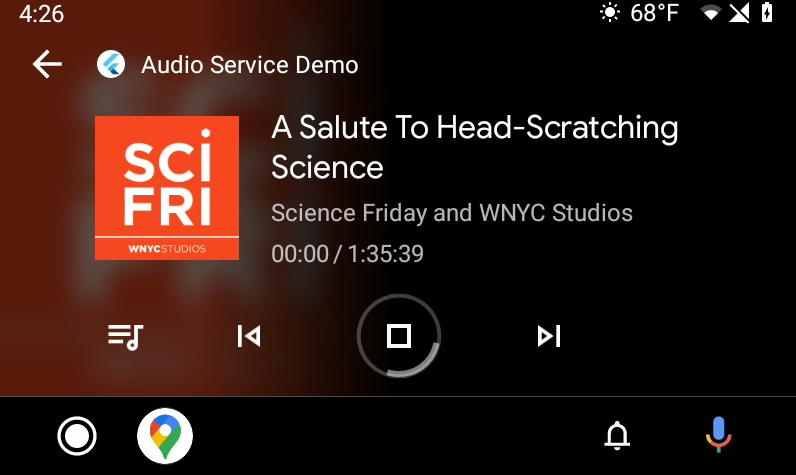
FWIW all of this worked in the previous versions.
keaganhilliard
on 5 Dec 2020
I am having trouble understanding how to implement the
getChildrenandgetChildrenStream. I am not sure how these two methods interact or how the children are actually sent to the subscriber. In prior versions I would just need to return the results inonLoadChildren. It's a little murky to me what needs to happen to wire everything up.
I almost couldn't remember myself why I created two separate methods.
But now I remember: I was planning ahead for media2 which actually provides two methods. One method allows you to query the children at any time, and the other allows you to subscribe for changes.
Maybe an alternative design would have been to just provide getChildrenStream and then getChildren could be derived from it by temporarily subscribing only to consume the first stream event, and then immediately unsubscribe. Not sure if that is very elegant, though.
At the moment, you need to implement them both, and probably you'll implement getChildrenStream in terms of your implementation of getChildren.
One other thing is that I'm not actually using media2 under the hood, so this was really just forward planning. I could delete getChildren for now but I would eventually re-introduce something like it once the internals migrate to media2.
Do you have any suggestions/ideas?
As for the state issues, I think I'll have to do a review of all of the state code since you mentioned earlier another bug with the state not updating correctly in a normal media notification independently of Android Auto.
ryanheise
on 5 Dec 2020
I'm not sure what I should be doing in the getChildrenStream . The parentId is passed in to getChildrenStream and it should return a stream that then emits the actual children of that parent Id. Then if a different parentId is passed in I should return another stream that then emits the children for the next parentId. I must be missing something but the stream seems extraneous. Right now I'm using my app for audiobooks. My media hierarchy looks something like this:
@recentlyAdded
    Ruin
@authors
   John Gwynne
        Malice
        Ruin
@collections
    The Faithful and the Fallen
        Malice
        Ruin
@books
    Malice
    Ruin
I would need a separate stream for each level until the actual books, correct? In the past there was just the onLoadChildren method, it would get a MediaId and I would respond with a list of MediaItems. I found that intuitive and I actually assumed that getChildren was analogous to that method.
It would make more sense to me, if we were to create the stream on the plugin side. Something like the Queue or the MediaItem so you can just add a list of MediaItems to the subject and that could notify the platform code.
keaganhilliard
on 5 Dec 2020
I'm not sure if I've interpreted the documentation correctly, but essentially the client can subscribe to a particular parent ID and should be notified whenever the children of that parent change. In the past, I provided AudioServiceBackground.notifyChildrenChanged for this.
The media2 documentation states this of your implementation of the service:
It's your responsibility to keep subscriptions by your own and call
MediaLibrarySession#notifyChildrenChanged()when the parent is changed until it's unsubscribed.
In the new audio_service API, you can create a stream controller and define the onListen and onCancel callbacks which "should" notify you whenever clients subscribe to or unsubscribe from your stream for that particular parent ID (if I have implemented it correctly).
This is in a sense reflecting your responsibility to keep track of client subscriptions to a parent.
ryanheise
on 5 Dec 2020
I started porting my code to the new API and was happy to remove all the customAction and customEventStream overhead, as I thought I could call the public methods of MyAudioHandler directly. Unfortunately, I have trouble to cast the result of AudioService.init to MyAudioHandler. Are customAction and customEventStream still the way to go or am I missing something here?
moritz-weber
on 5 Dec 2020
@moritz-weber Take a look at our disussion at #541.
hacker1024
on 6 Dec 2020
Successfully migrated my BackgroundAudioTask to AudioHandler in one night, it seems to work perfectly.
The only issue I ran into while migrating was stop method. When I swipe notification away with UI still running AudioHandler.stop() is called (which was implemented using code from BackgroundAudioTask's onStop) and I dispose player and everything else but AudioHandler object is not destroyed so I basically kill my handler while it is still in use. I think this change in lifecycle is worth mentioning in migration guide.
Or should I still dispose my player and other resources in stop and then reinitialize when playback is requested again? I need to keep a web server running in the background at all times and stop it only when the isolate is destroyed, not when notification is dismissed. Is there (or going to be) a callback for that?
And another question. I noticed that when I remove UI from Android recents screen and then tap notification I basically resume my UI at where I left. Does that mean that it is safe now to create an object in my main(), pass it into AudioHandler constructor and share this instance of that object between UI and handler? Is there a guarantee that main() won't be called again until I dismiss notification with UI closed to kill the engine?
nuc134r
on 6 Dec 2020
Successfully migrated my BackgroundAudioTask to AudioHandler in one night, it seems to work perfectly.
Great! Did you notice any issues with the state (e.g. position of the seekbar) not updating correctly as mentioned by @keaganhilliard ?
The only issue I ran into while migrating was
stopmethod. When I swipe notification away with UI still runningAudioHandler.stop()is called (which was implemented using code fromBackgroundAudioTask'sonStop) and I dispose player and everything else butAudioHandlerobject is not destroyed so I basically kill my handler while it is still in use. I think this change in lifecycle is worth mentioning in migration guide.Or should I still dispose my player and other resources in
stopand then reinitialize when playback is requested again? I need to keep a web server running in the background at all times and stop it only when the isolate is destroyed, not when notification is dismissed. Is there (or going to be) a callback for that?
Since the lifecycle now corresponds exactly to the lifecycle of the underlying Android service, we have two orthogonal states: started/stopped and bound/unbound. The service is destroyed when stopped and unbound.
What you would need is a way to hook into the underlying service's onDestroy method, but this could be a bit tricky since I would need to send a platform message to the Dart layer which is asynchronous. There is no way for this Dart code to complete its cleanup before the platform side's onDestroy method completes and the Android context is destroyed. I don't know if the FlutterEngine will function correctly if the Android context is destroyed before the FlutterEngine finishes executing. Maybe there is some sort of clever trick I can do to keep the application context around just long enough.
A simpler solution would be if Flutter supported synchronous method calls over platform channels, so that the Dart callback would be able to complete before onDestroy completes. This feature was being considered by the Flutter team but they are concerned that this would open the door to deadlocks so I'm not sure if that will happen.
You can try a trick similar to the old AudioServiceWidget but that is not truly the same thing as an onDestroy callback. For example, if the service is bound and started, then you swipe away the activity, then the service is unbound and started, then you press the stop button in the notification and the service is then stopped, onDestroy will be called on the Android side at this point but your UI will know nothing about it since the user already swiped away the activity.
I think all you can hope is that when Android destroys the application context, it will kill the process along with your web server.
And another question. I noticed that when I remove UI from Android recents screen and then tap notification I basically resume my UI at where I left. Does that mean that it is safe now to create an object in my
main(), pass it intoAudioHandlerconstructor and share this instance of that object between UI and handler? Is there a guarantee thatmain()won't be called again until I dismiss notification with UI closed to kill the engine?
That's right. This may relate to @moritz-weber 's question:
I started porting my code to the new API and was happy to remove all the
customActionandcustomEventStreamoverhead, as I thought I could call the public methods ofMyAudioHandlerdirectly. Unfortunately, I have trouble to cast the result ofAudioService.inittoMyAudioHandler. ArecustomActionandcustomEventStreamstill the way to go or am I missing something here?
Because everything happens in one isolate/engine and main is called once, you can do something similar to what was discussed in #541 .
ryanheise
on 6 Dec 2020
Great! Did you notice any issues with the state (e.g. position of the seekbar) not updating correctly as mentioned by @keaganhilliard ?
I haven't yet tested everything but a seekbar in my UI worked in the same way as before, without noticable bugs. Not sure that my emulator has a seekbar in notification, I'll look.
I think all you can hope is that when Android destroys the application context, it will kill the process along with your web server.
That's what I thought as well. Thanks for the explanation.
Just as always, when I start facing a problem and thinking about a messy solution here comes Ryan and makes everything easy.
Good job and thank you! Can't wait to use always running background code possibilities!
nuc134r
on 6 Dec 2020
Great! Did you notice any issues with the state (e.g. position of the seekbar) not updating correctly as mentioned by @keaganhilliard ?
Actually yes. Same thing, the notification seekbar updates only when pause button is pressed. Reproduced on a real device since my emulator works on an old Android version.
nuc134r
on 7 Dec 2020
@keaganhilliard , @nuc134r , the seek bar bug should hopefully be fixed now.
ryanheise
on 7 Dec 2020
@ryanheise Everything is looking good! It's working a lot better with Android auto than the previous paradigm. I think it's going to be helpful to incorporate some changes into the example app to show how to enable AA support. I'll make a PR with it in a bit if you want. The only weirdness I'm seeing is that if the app activity is removed and AA switches to another app. AA is no longer able to communicate with the app because the app is killed. Not sure how to get around that but it's all looking good beyond that. Thanks for all of the hard work.
keaganhilliard
on 8 Dec 2020
Awesome! After using it, are you finding the API for getChildren and getChildrenStream reasonable or do you see a way it could be changed for the better?
Regarding the weirdness, I think the way that AA discovers an available media session is by sending an onGetRoot request which is, as explained above, completely implemented on the platform side to allow for a synchronous response, and the plugin is supposed to now wake up when receiving such a request. Maybe you could try inserting debug statements in there to see whether it is being hit and what extras are being returned.
ryanheise
on 8 Dec 2020
I don't love the API, but I think that's more a function of the Android API in general than the plugin. It seems to work pretty well. I ended up creating a map of ParentIds to StreamableValueSubjects in the getChildrenStream I return the stream and then call my getChildren method which gets the children, publishes them to the respective stream, and then returns the children. This has the benefit of finally being able to just use the AudioHandler to get MediaItems for the UI.
Map<String, StreamableValueSubject<List<MediaItem>>> _childrenSubjects;

  @override
  ValueStream<List<MediaItem>> getChildrenStream(String parentMediaId,
      [Map<String, dynamic> extras]) {
    ValueStream stream = _childrenSubjects
        .putIfAbsent(
            parentMediaId, () => StreamableValueSubject<List<MediaItem>>())
        .stream;
    getChildren(parentMediaId);
    return stream;
  }

  @override
  Future<List<MediaItem>> getChildren(String parentMediaId,
      [Map<String, dynamic> extras]) async {
    List<MediaItem> children = await _communicator.getChildren(parentMediaId);
    _childrenSubjects
        .putIfAbsent(
            parentMediaId, () => StreamableValueSubject<List<MediaItem>>())
        .add(children);
    return children;
  }
If there's a way to make that cleaner I'd be open to it. But it's not super hard to use once you get your head around it. I think as long as there's an example it will be relatively painless to implement for most devs.
The only thing that is new is requiring a ValueStream return type puts a hard dependency on RxDart for any app that needs AA functionality. Not sure if that was intentional.
I will try to see if I can get logging going. It's a little complicated because the activity is dead, so I'll have to logcat myself or use Android Studio, but I will see what I can come up with.
Finally, I'm not sure how we want to handle updating the web support to work in this paradigm. Previously there were static AudioService methods that the plugin could call. Now it depends on the handler implementation. Do you have any suggestions for getting that up and running?
keaganhilliard
on 8 Dec 2020
I don't love the API, but I think that's more a function of the Android API in general than the plugin.
I feel the same way, but I still think it's possible to do a better job of wrapping that API. The tricky part is planning ahead for media2 while designing an API that works for the legacy media session API.
It seems to work pretty well.
It probably make sense to make things work first and then refine it, so I'm glad to hear confirmation it works.
Looking at the code, I can see I still didn't implement some things correctly, particularly with subscribing. In media2, the service gets notified when a client subscribes, and my API design makes sense for that. But in legacy, the service is not notified about subscriptions, so setting the onCancel callback will have no effect anyway.
Maybe I made the right API decision because the fact that onCancel won't be called when using legcay but it will be called when moving to media2 is consistent with the way those libraries work...
I ended up creating a map of
ParentIdstoStreamableValueSubjectsin thegetChildrenStreamI return the stream and then call mygetChildrenmethod which gets the children, publishes them to the respective stream, and then returns the children. This has the benefit of finally being able to just use theAudioHandlerto getMediaItems for theUI.
...
If there's a way to make that cleaner I'd be open to it. But it's not super hard to use once you get your head around it. I think as long as there's an example it will be relatively painless to implement for most devs.
Thanks for sharing that. It may even be worth providing a default implementation via a mixin based on your experience with it.
The only thing that is new is requiring a
ValueStreamreturn type puts a hard dependency onRxDartfor any app that needs AA functionality. Not sure if that was intentional.
rxdart is a Flutter Favorite so I expect that should be OK. though, the reason why I exposed it initially is that I personally use a subclass of StreamBuilder that takes ValueStreams which allow it to immediately render the value without having to wait asynchronously for the first event on the stream to arrive.
Finally, I'm not sure how we want to handle updating the web support to work in this paradigm. Previously there were static
AudioServicemethods that the plugin could call. Now it depends on the handler implementation. Do you have any suggestions for getting that up and running?
I think it should be a lot easier to integrate with the web platform now that there's no need for switches between isolate and non-isolate implementations, so you can use the Android implementation as an easy guide. Note that the plugin will simply listen to your handler's streams and then pass the information onto the platform implementation.
But, if you're not in a rush to do that, you can wait as I'd be happy to do this work. I also do expect to do some further cleanup on the method channel protocol so it may make sense to do that first.
ryanheise
on 9 Dec 2020
Used the app I'm developing for some time after migrating to one-isolate on a real device and faced frequent crashes.
551
nuc134r
on 12 Dec 2020
Thanks for reporting @nuc134r , I'll have a look at it next. I was just in the middle of implementing (and have now finished implementing) the method AudioService.connectFromIsolate which restores some lost functionality in this new branch.
ryanheise
on 12 Dec 2020
Updates:
- Added TTS back to the example.
- Provided a
SwitchAudioHandlerthat allows hot-switching differentAudioHandlers. - Provided a
customStatein addition to acustomEvent. The state is a streamable value so clients can read its current value immediately upon subscribing.
One thing I'd like to work on next is some lifecycle improvements to just_audio to more easily fit into the new service lifecycle (https://github.com/ryanheise/just_audio/issues/249).
My goal is for just_audio to slot into audio_service out of the box so that in the simplest case all requests and streams can easily be forwarded between the two. The main friction point between the two now is that when audio_service is stopped, we should release the decoders in the player and I currently do this by calling _player.dispose(). This also renders the player and its streams useless, so if your app is tied to the lifecycle of that player instance, you won't be able to skip between tracks or display the tracks until the player instance is re-instantiated. It would be more convenient to be able to keep the same player instance and have it continue to function even when it has been temporarily asked to release its decoders and other resources.
I'm not sure what would be the best design yet. One idea is that stop can have an optional parameter indicating whether to release the resources. A subsequent play will cause the decoders to be created. This leaves the question of how things should be handled on load since this already starts allocating platform resources. If it's a web URL, it will start loading that over the Internet. I could do loading in two stages:
- Stage 1:
setAudioSourcejust sets the audio source without loading it, and allows the streams to reflect the state while also allowing skipping between items without loading it. - Stage 2:
loadloads the current audio source and it can be called explicitly by the app, or indirectly/lazily whenever calling something likeplaywhich could the audio source if it hasn't already been loaded.
If you have any ideas or thoughts on this, I've copied the above comment over to https://github.com/ryanheise/just_audio/issues/249 for further discussion.
ryanheise
on 13 Dec 2020
Another update:
playbackStateSubjectandplaybackStatehave been merged into a single field calledplaybackState(and so have the other streamable values). This is because all theplaybackStategetter did was returnplaybackStateSubjectand cast it. This change makes use of the covariance of Dart final fields.
The end result of this is that in your audio handler, you now do everything through playbackState that reaults to the playback state:
playbackState.valuegives you the current valueplaybackState.streamgives you the streamplaybackState.addlets you emit new items on the stream
This very much emulates the interface of Dart's BehaviorSubject with the difference that it is possible to cast the instance to a type that removes the add method and keeps everything else the same, for consumption by clients.
The problem now is that I'd like to use a similar interface in my other plugins and that will lead me to either duplicating this class in each plugin or defining another package just to host it. On the other hand, I could go back to the original design using rxdart's own class and have all of those duplicate fields again.
ryanheise
on 13 Dec 2020
https://github.com/ryanheise/just_audio/issues/249 is now implemented.
The audio_service example could now be simplified like this:
Future<void> stop() async {
  await _player.stop(); // release the decoders, but allow resurrection on play()
  await super.stop();
}
I need to release just_audio first after testing.
Once that is released, I'd like to finalise the audio_service API and start updating the other platform implementations.
ryanheise
on 16 Dec 2020
@ryanheise I'm noticing that if I resume playback with a bluetooth headset the app doesn't seem to be able to connect to the network. If I click the notification play icon it works fine, and if I open the app after clicking the headset then it will eventually load, sometimes skipping to the next track, which is a separate issue (one for just_audio). Is there any reason the functionality should be different between these two scenarios? (This was not an issue with multiple isolates).
The problem now is that I'd like to use a similar interface in my other plugins and that will lead me to either duplicating this class in each plugin or defining another package just to host it. On the other hand, I could go back to the original design using rxdart's own class and have all of those duplicate fields again.
Seems useful enough to be it's own package. I like not having the duplicate fields, FWIW.
keaganhilliard
on 20 Dec 2020
@keaganhilliard Does this happen even while the screen is turned on and the app is running? If not, I suspect that might be something to do with battery saving modes on your phone. By the time you turn the screen on to press the notification, you would have already woken up the device and the network layer.
But if this issue happens even with the screen turned on, that's strange and I'll have to investigate further to understand what's happening.
Seems useful enough to be it's own package. I like not having the duplicate fields, FWIW.
Although I might be able to get close to the goal by using existing classes in rxdart. For example, I could define playbackState like this:
abstract class AudioHandler {
  StreamableValue<PlaybackState> get playbackState;
  ...
}
class BaseAudioHandler extends AudioHandler {
  @override
  final BehaviorSubject<PlaybackState> playbackState = BehaviorSubject();
  ...
}
Then, you could work with with it like this:
playbackState.valuegives you the value.playbackStategives you the stream.playbackState.addlets you emit new items on the stream.
So the only usability difference is that the stream becomes playbackState instead of playbackState.stream but the maintainability difference is that I would no longer need to maintain an extra library that adds questionable value on top of rxdart.
I do think playbackState.stream is clearer from a naming point of view, but I'm not sure that benefit outweighs the cost of creating this extra library.
Another option is to add the stream field to rxdart's ValueStream via an extension method, but I would need to see what happens if defining such an extension method in audio_service and just_audio will cause a conflict for an app that imports both. I'm also not sure if there would be any issues cause by the fact that the BehaviorSubject subtype of ValueStream actually defines a stream field (I would not want to expose the BehaviorSubject type in the AudioHandler interface, though, since it has the add method.)
ryanheise
on 20 Dec 2020
I just tested the extension method approach:
extension AudioServiceValueStream<T> on ValueStream<T> {
  ValueStream<T> get stream => this;
}
It works, but if an app imports a similar extension method from just_audio (or audio_session) it will lead to a conflict. It is possible to work around this by selective importing, but that would require extra documentation and maybe it would defeat the original purpose of trying to make things self-explanatory.
ryanheise
on 20 Dec 2020
The latest commit implements the above proposal, and (temporarily) includes the extension method so that the surface API is the same as before, i.e. it provides the .stream getter. If you created your own stream subjects, you will need to do the following search and replace:
StreamableValueSubject->BehaviorSubjectStreamableValue->ValueStream
This commit also makes onLoadChildren return an empty list if your app doesn't implement it (this was causing errors otherwise).
The extension method may be temporary until we resolve the issue mentioned in my previous comment.
ryanheise
on 20 Dec 2020
Then, you could work with with it like this:
- playbackState.value gives you the value.
- playbackState gives you the stream.
- playbackState.add lets you emit new items on the stream.
So the only usability difference is that the stream becomes playbackState instead of playbackState.stream but the maintainability difference is that I would no longer need to maintain an extra library that adds questionable value on top of rxdart.
With intellisense and typing I would think that this is plenty understandable and succinct.
I will see if I can make the error happen more consistently. The notification seems to get out of sync as well, but it could be my implementation.
keaganhilliard
on 20 Dec 2020
@ryanheise on another note, it seems like a connection from Android Auto does spin up the engine, but I don't think it does so fast enough to allow the onLoadChildren call to get data from the Listener. The only workaround to actually get the children to show up is to open the app in AA, open another app, and reopen the original app. Is there a way to make sure to wait for a listener initialization in the onLoadChildren call rather than returning an empty list? Maybe detaching from the result and waiting for a listener to exist would work?
keaganhilliard
on 21 Dec 2020
In that case, onLoadChildren wouldn't be the only call that could happen too early, and I might need to create a queue of pending requests to be handled once the engine has fully started up. I had mistakenly thought that this should be fine since the engine spin-up happens synchronously, although on the Dart side there is some asynchronous code which has to happen first before the listeners are attached, and I'll need to make that code signal to the platform side once it's ready to listen to messages. The solution will probably involve detaching the result as well.
ryanheise
on 21 Dec 2020
Hi all,
with one-isolate branch example app on IOS emulator I think that "await audioService.init()" never returns.
The application hangs on startup and the log screen of VSCode displays "flutter: ### AudioService.init" and nothing more after that.
thanks for your help and for this great package :)
 pureimpro
on 31 Dec 2020
pureimpro
on 31 Dec 2020
It's currently "Android only" because the feature is being designed around the constraints imposed by Android. It should be easier to update the other non-Android platforms but the plan is to get the Android implementation working first. If you are interested in testing it, that means Android-focused testing is what is needed at this stage.
There are still some issues I've noticed with the Android implementation. For example, recently I've noticed the behaviour of notifications on Android 11 change. One thing that's changed is that Android 11 no longer seems to persist the media notification which makes it difficult to test that feature (not sure if anyone else is experiencing the same?), and another issue that's started happening around the same time is that when I click the notification's stop button in the example, it stops the service but the service is immediately restarted (which it shouldn't do). I have not investigated the latter yet. Aside from that, I'd like to also sort out the API before duplicating the effort across multiple platforms.
ryanheise
on 31 Dec 2020
Actually I have a problem with notifications on Android in this branch. After I stop the app or swipe away notification after some time it appears back in it's last state and won't go away. I think I had this problem even before one-isolate.
The app is not running at this moment (or is it?), the notification is not responding to clicks and the only way to make it go away is tap "Force stop" from Android app settings (where you also can clear cache and data). If you start the app, summon notification and then stop it still appears back after some time.
@ryanheise Maybe it's the same problem you're describing, I'm not sure.
I'm using Android 10 (MIUI 12.0.2.0) on Xiaomi Mi Mix 3.
nuc134r
on 31 Dec 2020
It's currently "Android only" because the feature is being designed around the constraints imposed by Android. It should be easier to update the other non-Android platforms but the plan is to get the Android implementation working first. If you are interested in testing it, that means Android-focused testing is what is needed at this stage.
There are still some issues I've noticed with the Android implementation. For example, recently I've noticed the behaviour of notifications on Android 11 change. One thing that's changed is that Android 11 no longer seems to persist the media notification which makes it difficult to test that feature (not sure if anyone else is experiencing the same?), and another issue that's started happening around the same time is that when I click the notification's stop button in the example, it stops the service but the service is immediately restarted (which it shouldn't do). I have not investigated the latter yet. Aside from that, I'd like to also sort out the API before duplicating the effort across multiple platforms.
Thanks for the clarification @ryanheise .
I didn't notice this Android only feature and already migrated my app to one-isolate, thinking that IOS side was ready for testing ! I didn't face any issues on Android so far. I bought an IOS physical device for Christmas especially for testing purpose lol. I'll see how to revert back to audio_service master and keep one-isolate apart until you make IOS feature available.
Thanks for your help.
pureimpro
on 31 Dec 2020
@nuc134r Accidentally I deleted my previous reply to you (maybe you have an email notification of it?) Anyway, I will try to write it again from memory... The issue I'm referring to is a new Android 11 feature that keeps all media notifications around in a special area where you can easily access all of your media sessions from different apps and resume them. Even if your app is no longer running, Android 11 would keep your app's media session available in that area and clicking the play button would allow your app to be restarted. One of the things I was working on in the one-isolate branch was to properly take advantage of that new Android 11 feature. However, since the December Android update, it seems that the media notification no longer persists, and my code to take advantage of this feature (which was working in November) no longer works. I did find this article which describes a change in the media notification since the December update, but it doesn't exactly describe the problem I observed:
Anyway, I'm not aware of this being a feature of Android 10, though, so the behaviour you're noticing shouldn't happen. I have seen that behaviour before when an app fails to call super.onStop() and the service doesn't actually shut down rendering the media notification unresponsive. You could check if that is the case by inserting some logging/tracing into the code (including potentially the plugin code). If that's not it, maybe Xiaomi Mi Mix 3 has a non-standard version of Android 10, but I can't confirm this.
ryanheise
on 31 Dec 2020
@pureimpro Oops, sorry about the misunderstanding. Yes, I think the fact that I haven't ported this branch over to other platforms yet is probably lost among the long chain of comments above and you'd have to read the whole discussion to find it. But this will give me some motivation to try to get things moving a bit more quickly! The iOS implementation should be easy to do, but I just need to sort out the Android side first.
ryanheise
on 31 Dec 2020
However, since the December Android update, it seems that the media notification no longer persists, and my code to take advantage of this feature (which was working in November) no longer works.
Ah, I just remembered I haven't actually implemented onLoadChildren in the example which is necessary to support this feature:
https://developer.android.com/guide/topics/media/media-controls
It will also be worth building Android Auto support into the example while I'm at it, and I'll get to see if the API for this is workable or could be improved.
ryanheise
on 31 Dec 2020
@ryanheise any update on this change?
 smkhalsa
on 25 Jan 2021
smkhalsa
on 25 Jan 2021
@ryanheise any update on this change?
I'm currently working on the iOS implementation. The API might not be perfectly designed yet but I think it is probably best to start porting it to the other platforms so that more people can try it out, test it, and hopefully give some feedback on the API. Maybe one such API issue is how to preserve state consistency between the different streams which are currently updated independently. Hopefully I'll have an update for you on the iOS side today or tomorrow.
ryanheise
on 26 Jan 2021
The latest commit implements the iOS side (and maybe macOS, too).
Note that I have done very little testing (the play button works!), I basically wanted to get something out there ASAP as a start. Unfortunately, it is no longer possible for me to test the control center through the simulator (since after the Big Sur update), so I'll probably need to buy an iPhone at some point so that I can test that aspect. But in the meantime, if you notice anything in the control centre not working, please let me know.
ryanheise
on 26 Jan 2021
macOS wasn't compiling, but it should now work in the latest commit.
ryanheise
on 27 Jan 2021
I've just updated the example to include a simple implementation of getChildrenStream:
  @override
  ValueStream<List<MediaItem>> getChildrenStream(String parentMediaId,
      [Map<String, dynamic> options]) {
    switch (parentMediaId) {
      case AudioService.recentRootId:
        // When the user resumes a media session, tell the system what the most
        // recently played item was.
        return _recentSubject;
      case AudioService.browsableRootId:
        // Allow Android Auto to browse available items.
        return queue;
      default:
        return null;
    }
  }
where _recentSubject is a BehaviorSubject that is updated like so:
mediaItem.listen((item) => _recentSubject.add([item]));
Note, I don't really have my dev environment set up for testing Android Auto - @keaganhilliard maybe you could try out the example and see if it works?
I'd also like to sort out this API if it can be improved at all. I agree with you that having two methods: getChildren and getChildrenStream is not ideal, and one could be defined in terms of the other.
In fact, at the moment getChildren isn't actually used, so I am inclined to delete it.
When I look at the above implementation, it actually seems like a reasonable default that the plugin could provide, either as part of the QueueHandler mixin or perhaps its own mixin.
ryanheise
on 8 Feb 2021
Hi,
there's something wrong in rewind function on android (not tested IOS so far).
See the one-isolate branch minimal reproduction project here
(simply add two buttons rewindand fastForwardin the UI with corresponding helper functions from _audiohandlerobject)
Note that everything is fine with fastForward.
Here is VSCode output after clicking rewind button :
E/flutter ( 5114): [ERROR:flutter/lib/ui/ui_dart_state.cc(177)] Unhandled Exception: NoSuchMethodError: The method 'unary-' was called on null.
E/flutter ( 5114): Receiver: null
E/flutter ( 5114): Tried calling: unary-()
E/flutter ( 5114): #0      Object.noSuchMethod (dart:core-patch/object_patch.dart:51:5)
E/flutter ( 5114): #1      SeekHandler.rewind
package:audio_service/audio_service.dart:2115
E/flutter ( 5114): #2      CompositeAudioHandler.rewind
package:audio_service/audio_service.dart:1427
E/flutter ( 5114): #3      CompositeAudioHandler.rewind
package:audio_service/audio_service.dart:1427
E/flutter ( 5114): #4      _ClientAudioHandler.rewind
package:audio_service/audio_service.dart:1806
......
@pureimpro can you try the latest commit? I had forgotten to pass through the rewind parameter.
P.S. I really appreciate that you're trying out this branch. I am thinking about advertising its existence more prominently in the README of the stable version just to get more eyes on it. More testers => more bug reports => more stability => ready to release.
I'll probably do this after I figure out what to do with the remaining methods in the ever shrinking AudioService class. Plus I'll need to put a serious effort into documenting the goals and benefits of the new version and a migration guide.
ryanheise
on 10 Feb 2021
@ryanheise : Bug fixed !
Many thanks for your efficient support.
I'm focused on one-isolate branch only since last december and didn't notice any other bug so far, but actively trying out.
I may help you in documentation review if you like to.
Have a nice day & Kudos to you and all contributors of this wonderful project !
pureimpro
on 10 Feb 2021
@ryanheise I have been in the middle of a rearchitecture of my app, so my testing bandwidth hasn't been super high.
A number of things I have noticed using one-isolate as a daily app:
- Bluetooth pausing almost always causes the app to lose internet access, I think the wake lock is lost too quickly, also might be my phone's powersaving stuff. Not a problem on the other version. This also has the side effect of
just-audiojumping through the queue which is less than ideal for an audiobook. - The recent media api still needs some work. I have yet to figure out how to get the play button on the resume notification to actually launch the app or media.
- Android auto does work better, but auto launching the last played track is temperamental at best
- Android Auto strangely cannot call the skipToNext handler... The skipToPrevious one does work.
- No way to mark the currently playing item in the queue. This results in the queue UI always starting at the top even if you are 30 tracks down.
As far as your example, it seems to work. I would suggest not using the Queue as root, for the example it kind of makes sense because the queue always has both tracks that are possible. But for any other use-case, having a root should be a browsable library so it should return something like ["Artists", "Albums"] both of which would also be browsable. I think it would be helpful to come up with an example that shows that nesting. I think a Mix-In would be possible but I wouldn't tie it to the queue as they are pretty separate functions.
keaganhilliard
on 11 Feb 2021
I may help you in documentation review if you like to.
Thanks, @pureimpro ! That would definitely be appreciated.
ryanheise
on 11 Feb 2021
- Bluetooth pausing almost always causes the app to lose internet access, I think the wake lock is lost too quickly, also might be my phone's powersaving stuff. Not a problem on the other version. This also has the side effect of
just-audiojumping through the queue which is less than ideal for an audiobook.
Thanks for the in depth feedback!
Regarding the first point, I did change the androidStopForegroundOnPause default value to true in the one-isolate branch which may be the cause of this. When users manually switched this option on in the stable version, they found that pausing audio playback caused the Android system to kill the app, presumably to save memory.
I do think true is the correct default, and the only reason I hadn't set it to true until now is because there was no way previously to resume the media session if the OS decided to kill the app. Now there is.
The recent media api still needs some work. I have yet to figure out how to get the play button on the resume notification to actually launch the app or media.
Android auto does work better, but auto launching the last played track is temperamental at best
Does it work in my latest example? It seems to be working for me, but again note the ExoPlayer bug where audio won't actually play if you start playback too soon after the process is started. I found inserting a delay of a couple of seconds before playback after a cold restart does the trick. The ExoPlayer team are currently looking into it, and it seems to be a bug that affects different phones differently.
As for any confusing behaviour related to onGetRoot and onLoadChildren, I'm just as confused as you. If I put log calls in there, I can see when and what exactly the Android system is querying, and am trying to figure out the behaviour that way. Sometimes it wasn't querying when I thought it should, but I think that's because it keeps a cache of the previous query results.
Anyway, there will be an update to the getChildrenStream API, this will need to be redesigned to accommodate the options bundle parameter.
- Android Auto strangely cannot call the skipToNext handler... The skipToPrevious one does work.
I've just looked through the code and don't see anything obvious. The code looks completely symmetrical. It would be interesting to insert a log message in this method in AudioService.java:
        @Override
        public void onSkipToNext() {
            if (listener == null) return;
            listener.onSkipToNext();
        }
If that's not being called at all, that's a mystery. If it is being called, then that's sort of good news because it just means the message is being lost somewhere between here and the handler, and we'll be able to do something about it.
- No way to mark the currently playing item in the queue. This results in the queue UI always starting at the top even if you are 30 tracks down.
Hmm, this should be tied to mediaItem.add(...) if it's not already. The media session listens to this stream and will use it to update the current media item on the media notification, for example. Is it that this works for the media notification but it doesn't work for Android Auto?
As far as your example, it seems to work. I would suggest not using the Queue as root, for the example it kind of makes sense because the queue always has both tracks that are possible. But for any other use-case, having a root should be a browsable library so it should return something like
["Artists", "Albums"]both of which would also be browsable. I think it would be helpful to come up with an example that shows that nesting. I think a Mix-In would be possible but I wouldn't tie it to the queue as they are pretty separate functions.
That's reasonable, I think I can skip the "Artists" item for the example, but I could put "Albums" as a child of the browsable root and then put the entire library into there (i.e. MediaLibrary rather than queue).
ryanheise
on 11 Feb 2021
Latest commits:
- Slight change to the Android Auto API for subscribing to changes to children. The
getChildrenStreammethod has been replaced bysubscribeToChildrenand the return type has also changed. Instead of returning the actual children, it now returns a map of "optional" options that will be passed to the media session to indicate the reason for the change. There are some standard option keys recognised by Android for supporting paging, and I have considered making them more explicit in the audio_service API but for now you just need to look up the Android documentation to see what they are and set those keys to use that feature. Now since the children aren't actually returned by this stream, the listener who subscribes to this will only be notified of the change and will then have to query yourgetChildrenimplementation to see what the new children are. - I have made my first attempt at providing a backwards compatibility layer that tries to emulate the beheaviour of the old API, to hopefully ease the migration. So
BackgroundAudioTaskshould continue to work, although firstly, it's marked as a deprecated API, and secondly, the "onStart" method is now gone since that is after all the main conceptual change with this new version.
ryanheise
on 18 Feb 2021
So after reading through this thread and having run into the issue with firebase not working with the old implementation due to the second isolate, I've been trying to convert my app over to using the one-isolate branch (which so far, I really like the idea to be able to keep this in one flutter engine). On iOS, it seems to be working beautifully (and does seem to solve the problem with firebase!). On Android, however, I keep running into this error. It appears to be coming from this line _handler.playbackState.stream.listen((playbackState) async {
await _backgroundChannel.invokeMethod('setState', playbackState.toJson());
}); as it's not recognizing setState:
E/flutter (19091): [ERROR:flutter/lib/ui/ui_dart_state.cc(177)] Unhandled Exception: MissingPluginException(No implementation found for method setState on channel ryanheise.com/audioServiceBackground)
E/flutter (19091): #0      MethodChannel._invokeMethod (package:flutter/src/services/platform_channel.dart:157:7)
E/flutter (19091): <asynchronous suspension>
E/flutter (19091): #1      MethodChannel.invokeMethod (package:flutter/src/services/platform_channel.dart:332:12)
E/flutter (19091): #2      AudioService._register.<anonymous closure> (package:audio_service/audio_service.dart:916:32)
E/flutter (19091): #3      _rootRunUnary (dart:async/zone.dart:1198:47)
E/flutter (19091): #4      _CustomZone.runUnary (dart:async/zone.dart:1100:19)
E/flutter (19091): #5      _CustomZone.runUnaryGuarded (dart:async/zone.dart:1005:7)
E/flutter (19091): #6      _BufferingStreamSubscription._sendData (dart:async/stream_impl.dart:357:11)
E/flutter (19091): #7      _BufferingStreamSubscription._add (dart:async/stream_impl.dart:285:7)
E/flutter (19091): #8      _SyncBroadcastStreamController._sendData (dart:async/broadcast_stream_controller.dart:385:25)
E/flutter (19091): #9      _BroadcastStreamController.add (dart:async/broadcast_stream_controller.dart:250:5)
E/flutter (19091): #10     _StartWithStreamSink.add (package:rxdart/src/transformers/start_with.dart:15:10)
E/flutter (19091): #11     forwardStream.<anonymous closure>.<anonymous closure>.<anonymous closure> (package:rxdart/src/utils/forwarding_stream.dart:31:49)
E/flutter (19091): #12     forwardStream.runCatching (package:rxdart/src/utils/forwarding_stream.dart:21:12)
E/flutter (19091): #13     forwardStream.<anonymous closure>.<anonymous closure> (package:rxdart/src/utils/forwarding_stream.dart:31:28)
E/flutter (19091): #14     _rootRunUnary (dart:async/zone.dart:1198:47)
E/flutter (19091): #15     _CustomZone.runUnary (dart:async/zone.dart:1100:19)
E/flutter (19091): #16     _CustomZone.runUnaryGuarded (dart:async/zone.dart:1005:7)
E/flutter (19091): #17     _BufferingStreamSubscription._sendData (dart:async/stream_impl.dart:357:11)
E/flutter (19091): #18     _DelayedData.perform (dart:async/stream_impl.dart:611:14)
E/flutter (19091): #19     _StreamImplEvents.handleNext (dart:async/stream_impl.dart:730:11)
E/flutter (19091): #20     _PendingEvents.schedule.<anonymous closure> (dart:async/stream_impl.dart:687:7)
E/flutter (19091): #21     _rootRun (dart:async/zone.dart:1182:47)
E/flutter (19091): #22     _CustomZone.run (dart:async/zone.dart:1093:19)
E/flutter (19091): #23     _CustomZone.runGuarded (dart:async/zone.dart:997:7)
E/flutter (19091): #24     _CustomZone.bindCallbackGuarded.<anonymous closure> (dart:async/zone.dart:1037:23)
E/flutter (19091): #25     _rootRun (dart:async/zone.dart:1190:13)
E/flutter (19091): #26     _CustomZone.run (dart:async/zone.dart:1093:19)
E/flutter (19091): #27     _CustomZone.runGuarded (dart:async/zone.dart:997:7)
E/flutter (19091): #28     _CustomZone.bindCallbackGuarded.<anonymous closure> (dart:async/zone.dart:1037:23)
E/flutter (19091): #29     _microtaskLoop (dart:async/schedule_microtask.dart:41:21)
E/flutter (19091): #30     _startMicrotaskLoop (dart:async/schedule_microtask.dart:50:5)
Thank you so much for all the work you've done on this. I haven't checked in and had a chance to work on my project in a few months and its amazing how far this plugin has come!
 kbanta11
on 21 Feb 2021
kbanta11
on 21 Feb 2021
@kbanta11 , thanks for testing! Out of curiosity, did you follow the new Android setup instructions with regard to changing your activity class in AndroidManifest.xml?
ryanheise
on 21 Feb 2021
@kbanta11 , thanks for testing! Out of curiosity, did you follow the new Android setup instructions with regard to changing your activity class in
AndroidManifest.xml?
I believe I have it updated, following the example from the one-isolate branch:
```
android:launchMode="singleTop"
android:theme="@style/LaunchTheme"
android:configChanges="orientation|keyboardHidden|keyboard|screenSize|locale|layoutDirection|fontScale|screenLayout|density"
android:hardwareAccelerated="true"
android:windowSoftInputMode="adjustResize">
    <service android:name="com.ryanheise.audioservice.AudioService">
        <intent-filter>
            <action android:name="android.media.browse.MediaBrowserService" />
        </intent-filter>
    </service>

    <receiver android:name="com.ryanheise.audioservice.MediaButtonReceiver" >
        <intent-filter>
            <action android:name="android.intent.action.MEDIA_BUTTON" />
        </intent-filter>
    </receiver>
    ```
Thanks, @kbanta11 . This looks like something really crucial to investigate. Are you able to modify the example to reproduce the bug? If so, would you be willing to submit a bug report as a new issue?
ryanheise
on 21 Feb 2021
@ryanheise The example from the project seems to work, and I can see in the output that it is successfully finding the setState, setState, setMediaItem (which all fail in my app), etc. in the background handlers. It seems like it can't find anything from channel ryanheise.com/audioServiceBackground. It does seem like it can find some of the audio_service classes as I do get this in my output:
I/flutter (24610): ### AudioService.init
I/flutter (24610): ### UI received onPlaybackStateChanged
I/flutter (24610): ### UI received onQueueChanged
I/flutter (24610): ### UI received onMediaChanged
I/flutter (24610): ### AudioServiceBackground._register
I/flutter (24610): ### AudioService.init
I/flutter (24610): ### UI received onQueueChanged
I/flutter (24610): ### UI received onPlaybackStateChanged
I/flutter (24610): ### UI received onMediaChanged
I/flutter (24610): ### UI received onQueueChanged
I/flutter (24610): ### UI received onPlaybackStateChanged
I/flutter (24610): ### AudioServiceBackground._register
I/flutter (24610): ### UI received onQueueChanged
I/flutter (24610): ### UI received onPlaybackStateChanged
I/flutter (24610): ### UI received onQueueChanged
I/flutter (24610): ### UI received onPlaybackStateChanged
I'm currently trying to dig through and see what differences I have between my use of the plugin and the example.
kbanta11
on 21 Feb 2021
Since all lines of your log indicate flutter output, and not Java output, it does look like the Java side of the plugin is not being loaded. If you have followed the Android setup instructions then it is probably a weird interaction with one of the other plugins in your project that's causing the issue. So to create a reproduction project, you could try adding your dependencies to the example to try to make it fail.
ryanheise
on 21 Feb 2021
I can't seem to break the example project (even after including all of my other plugins). I can see that I'm getting some non-flutter output in console, (like System.out: ###BackgroundHandler message: setQueue (or setMediaItem, etc). But I still also get the same error that it can't find an implementation for setQueue. Oddly, it still seems to work and my queue is updated. I can also call and play audio, and they begin to play and seemingly update the state of the handler in my app UI, but the notification area is never started.:
Edit: It seems like my _init() is being run twice (the Queue Set: ... output is from within that _init() method). Is it possibly detaching from the background service if the same handler is _init()ed more than once?
I/flutter ( 1450): ### AudioService.init
Waiting for Pixel 3 to report its views...
Debug service listening on ws://127.0.0.1:51643/x2GPQzE2gs8=/ws
Syncing files to device Pixel 3...
I/System.out( 1450): ### ClientHandler message: configure
I/flutter ( 1450): ### UI received onPlaybackStateChanged
I/flutter ( 1450): ### UI received onQueueChanged
I/flutter ( 1450): ### UI received onMediaChanged
I/flutter ( 1450): ### AudioServiceBackground._register
I/System.out( 1450): ### BackgroundHandler message: setQueue
I/System.out( 1450): ### BackgroundHandler message: setState
I/flutter ( 1450): ### AudioService.init
I/flutter ( 1450): ### UI received onQueueChanged
I/flutter ( 1450): ### UI received onPlaybackStateChanged
I/flutter ( 1450): ### UI received onMediaChanged
I/System.out( 1450): ### ClientHandler message: configure
I/flutter ( 1450): ### UI received onQueueChanged
I/flutter ( 1450): ### UI received onPlaybackStateChanged
I/flutter ( 1450): ### AudioServiceBackground._register
I/System.out( 1450): ### BackgroundHandler message: setQueue
I/System.out( 1450): ### BackgroundHandler message: setState
I/flutter ( 1450): ### UI received onQueueChanged
I/flutter ( 1450): ### UI received onPlaybackStateChanged
I/flutter ( 1450): ### UI received onQueueChanged
I/flutter ( 1450): ### UI received onPlaybackStateChanged
I/flutter ( 1450): Prompt Update: null
W/DynamiteModule( 1450): Local module descriptor class for providerinstaller not found.
I/DynamiteModule( 1450): Considering local module providerinstaller:0 and remote module providerinstaller:0
W/ProviderInstaller( 1450): Failed to load providerinstaller module: No acceptable module found. Local version is 0 and remote version is 0.
I/TetheringManager( 1450): registerTetheringEventCallback:com.test.perklapp
I/m.test.perklap( 1450): The ClassLoaderContext is a special shared library.
I/m.test.perklap( 1450): The ClassLoaderContext is a special shared library.
I/flutter ( 1450): Queue set: [{id: http://feedproxy.google.com/~r/twist-audio/~5/5JQ3VSTprek/TWiST-E1176.mp3, album: , title: Ask Jason! All-In origins, avoiding common investor mistakes, defining “lifestyle” business vs. venture scale & more! | E1176, artist: This Week in Startups - Audio, genre: null, duration: null, artUri: null, playable: true, displayTitle: null, displaySubtitle: null, displayDescription: null, rating: null, extras: {isDirect: false, conversationId: null, userId: null, postId: null}}, {id: http://feedproxy.google.com/~r/twist-audio/~5/TTNs-BqCdGM/TWiST-E1175.mp3, album: , title: News! Bitcoin hits $50K, monetizing Clubhouse, drafting the Mount Rushmore of Tech CEOs & more with Acquired FM | E1175, artist: This Week in Startups - Audio, genre: null, duration: null, artUri: null, playable: true, displayTitle: null, displaySubtitle: null, displayDescription: null, rating: null, extras: {isDirect: false, conversationId: null, userId: null, postId: null}}]
I/System.out( 1450): ### BackgroundHandler message: setQueue
I/flutter ( 1450): ### UI received onQueueChanged
V/NativeCrypto( 1450): Registering com/google/android/gms/org/conscrypt/NativeCrypto's 287 native methods...
W/m.test.perklap( 1450): Accessing hidden method Ljava/security/spec/ECParameterSpec;->getCurveName()Ljava/lang/String; (greylist, reflection, allowed)
I/ProviderInstaller( 1450): Installed default security provider GmsCore_OpenSSL
W/m.test.perklap( 1450): Accessing hidden field Ljava/net/Socket;->impl:Ljava/net/SocketImpl; (greylist, reflection, allowed)
W/m.test.perklap( 1450): Accessing hidden method Ldalvik/system/CloseGuard;->get()Ldalvik/system/CloseGuard; (greylist,core-platform-api, linking, allowed)
W/m.test.perklap( 1450): Accessing hidden method Ldalvik/system/CloseGuard;->open(Ljava/lang/String;)V (greylist,core-platform-api, linking, allowed)
W/m.test.perklap( 1450): Accessing hidden field Ljava/io/FileDescriptor;->descriptor:I (greylist, JNI, allowed)
W/m.test.perklap( 1450): Accessing hidden method Ljava/security/spec/ECParameterSpec;->setCurveName(Ljava/lang/String;)V (greylist, reflection, allowed)
W/m.test.perklap( 1450): Accessing hidden method Ldalvik/system/BlockGuard;->getThreadPolicy()Ldalvik/system/BlockGuard$Policy; (greylist,core-platform-api, linking, allowed)
W/m.test.perklap( 1450): Accessing hidden method Ldalvik/system/BlockGuard$Policy;->onNetwork()V (greylist, linking, allowed)
I/flutter ( 1450): ### UI received onQueueChanged
I/flutter ( 1450): Queue set: [{id: http://feedproxy.google.com/~r/twist-audio/~5/5JQ3VSTprek/TWiST-E1176.mp3, album: , title: Ask Jason! All-In origins, avoiding common investor mistakes, defining “lifestyle” business vs. venture scale & more! | E1176, artist: This Week in Startups - Audio, genre: null, duration: null, artUri: null, playable: true, displayTitle: null, displaySubtitle: null, displayDescription: null, rating: null, extras: {isDirect: false, conversationId: null, userId: null, postId: null}}, {id: http://feedproxy.google.com/~r/twist-audio/~5/TTNs-BqCdGM/TWiST-E1175.mp3, album: , title: News! Bitcoin hits $50K, monetizing Clubhouse, drafting the Mount Rushmore of Tech CEOs & more with Acquired FM | E1175, artist: This Week in Startups - Audio, genre: null, duration: null, artUri: null, playable: true, displayTitle: null, displaySubtitle: null, displayDescription: null, rating: null, extras: {isDirect: false, conversationId: null, userId: null, postId: null}}]
I/flutter ( 1450): Prompt Update: null
I/flutter ( 1450): Current Build Number: 29/Current Version: 0.0.29
I/flutter ( 1450): Min Version: 24; Current Build Number: 29
E/flutter ( 1450): [ERROR:flutter/lib/ui/ui_dart_state.cc(177)] Unhandled Exception: MissingPluginException(No implementation found for method setQueue on channel ryanheise.com/audioServiceBackground)
E/flutter ( 1450): #0      MethodChannel._invokeMethod (package:flutter/src/services/platform_channel.dart:157:7)
E/flutter ( 1450): <asynchronous suspension>
E/flutter ( 1450): #1      MethodChannel.invokeMethod (package:flutter/src/services/platform_channel.dart:332:12)
E/flutter ( 1450): #2      AudioService._register.<anonymous closure> (package:audio_service/audio_service.dart:912:32)
E/flutter ( 1450): #3      _rootRunUnary (dart:async/zone.dart:1198:47)
E/flutter ( 1450): #4      _CustomZone.runUnary (dart:async/zone.dart:1100:19)
E/flutter ( 1450): #5      _CustomZone.runUnaryGuarded (dart:async/zone.dart:1005:7)
E/flutter ( 1450): #6      _BufferingStreamSubscription._sendData (dart:async/stream_impl.dart:357:11)
E/flutter ( 1450): #7      _BufferingStreamSubscription._add (dart:async/stream_impl.dart:285:7)
E/flutter ( 1450): #8      _SyncBroadcastStreamController._sendData (dart:async/broadcast_stream_controller.dart:385:25)
E/flutter ( 1450): #9      _BroadcastStreamController.add (dart:async/broadcast_stream_controller.dart:250:5)
E/flutter ( 1450): #10     _StartWithStreamSink.add (package:rxdart/src/transformers/start_with.dart:15:10)
E/flutter ( 1450): #11     forwardStream.<anonymous closure>.<anonymous closure>.<anonymous closure> (package:rxdart/src/utils/forwarding_stream.dart:31:49)
E/flutter ( 1450): #12     forwardStream.runCatching (package:rxdart/src/utils/forwarding_stream.dart:21:12)
E/flutter ( 1450): #13     forwardStream.<anonymous closure>.<anonymous closure> (package:rxdart/src/utils/forwarding_stream.dart:31:28)
E/flutter ( 1450): #14     _rootRunUnary (dart:async/zone.dart:1198:47)
E/flutter ( 1450): #15     _CustomZone.runUnary (dart:async/zone.dart:1100:19)
E/flutter ( 1450): #16     _CustomZone.runUnaryGuarded (dart:async/zone.dart:1005:7)
E/flutter ( 1450): #17     _BufferingStreamSubscription._sendData (dart:async/stream_impl.dart:357:11)
E/flutter ( 1450): #18     _DelayedData.perform (dart:async/stream_impl.dart:611:14)
E/flutter ( 1450): #19     _StreamImplEvents.handleNext (dart:async/stream_impl.dart:730:11)
E/flutter ( 1450): #20     _PendingEvents.schedule.<anonymous closure> (dart:async/stream_impl.dart:687:7)
E/flutter ( 1450): #21     _rootRun (dart:async/zone.dart:1182:47)
E/flutter ( 1450): #22     _CustomZone.run (dart:async/zone.dart:1093:19)
E/flutter ( 1450): #23     _CustomZone.runGuarded (dart:async/zone.dart:997:7)
E/flutter ( 1450): #24     _CustomZone.bindCallbackGuarded.<anonymous closure> (dart:async/zone.dart:1037:23)
E/flutter ( 1450): #25     _rootRun (dart:async/zone.dart:1190:13)
E/flutter ( 1450): #26     _CustomZone.run (dart:async/zone.dart:1093:19)
E/flutter ( 1450): #27     _CustomZone.runGuarded (dart:async/zone.dart:997:7)
E/flutter ( 1450): #28     _CustomZone.bindCallbackGuarded.<anonymous closure> (dart:async/zone.dart:1037:23)
E/flutter ( 1450): #29     _microtaskLoop (dart:async/schedule_microtask.dart:41:21)
E/flutter ( 1450): #30     _startMicrotaskLoop (dart:async/schedule_microtask.dart:50:5)
So I was able to get it stop running main twice (which did appear to be causing the problem in this plugin) though it's not clear why. The last thing that I did was remove the second of these two activities, but then noticed that after I added it back in to test that its what caused main to run twice, the problem didn't re-appear /shrug
<activity
            android:name="com.ryanheise.audioservice.AudioServiceActivity"
            android:launchMode="singleTop"
            android:theme="@style/LaunchTheme"
            android:configChanges="orientation|keyboardHidden|keyboard|screenSize|locale|layoutDirection|fontScale|screenLayout|density"
            android:hardwareAccelerated="true"
            android:windowSoftInputMode="adjustResize">
            <intent-filter>
                <action android:name="android.intent.action.MAIN"/>
                <category android:name="android.intent.category.LAUNCHER"/>
            </intent-filter>
        </activity>
        <activity
            android:name=".MainActivity"
            android:launchMode="singleTop"
            android:theme="@style/LaunchTheme"
            android:configChanges="orientation|keyboardHidden|keyboard|screenSize|locale|layoutDirection|fontScale|screenLayout|density|uiMode"
            android:hardwareAccelerated="true"
            android:windowSoftInputMode="adjustResize">
            <!-- This keeps the window background of the activity showing
                 until Flutter renders its first frame. It can be removed if
                 there is no splash screen (such as the default splash screen
                 defined in @style/LaunchTheme). -->
            <meta-data
                android:name="io.flutter.app.android.SplashScreenUntilFirstFrame"
                android:value="true" />
            <intent-filter>
                <action android:name="android.intent.action.MAIN"/>
                <category android:name="android.intent.category.LAUNCHER"/>
            </intent-filter>
        </activity>
The issue that I'm seeing now is a bit different. Everything seems to mostly work, except I'm not able to get the updated position in my UI (it works in the notification area to update the position), I think because it keeps throwing this error (which I think might be the same as referenced above for Android Auto, but this is on a Pixel 3):
I/flutter (21470): ### background received onLoadChildren
I/flutter (21470): #0      Object.noSuchMethod (dart:core-patch/object_patch.dart:51:5)
I/flutter (21470): #1      AudioService._register.<anonymous closure> (package:audio_service/audio_service.dart:738:28)
I/flutter (21470): <asynchronous suspension>
I/flutter (21470): #2      AudioService._register.<anonymous closure> (package:audio_service/audio_service.dart)
I/flutter (21470): #3      MethodChannel._handleAsMethodCall (package:flutter/src/services/platform_channel.dart:430:55)
I/flutter (21470): #4      MethodChannel.setMethodCallHandler.<anonymous closure> (package:flutter/src/services/platform_channel.dart:383:34)
I/flutter (21470): #5      _DefaultBinaryMessenger.handlePlatformMessage (package:flutter/src/services/binding.dart:283:33)
I/flutter (21470): #6      _invoke3.<anonymous closure> (dart:ui/hooks.dart:280:15)
I/flutter (21470): #7      _rootRun (dart:async/zone.dart:1190:13)
I/flutter (21470): #8      _CustomZone.run (dart:async/zone.dart:1093:19)
I/flutter (21470): #9      _CustomZone.runGuarded (dart:async/zone.dart:997:7)
I/flutter (21470): #10     _invoke3 (dart:ui/hooks.dart:279:10)
I/flutter (21470): #11     _dispatchPlatformMessage (dart:ui/hooks.dart:154:5)
E/MethodChannel#ryanheise.com/audioServiceBackground(21470): Failed to handle method call result
E/MethodChannel#ryanheise.com/audioServiceBackground(21470): java.lang.UnsupportedOperationException: It is not supported to send an error for recent
E/MethodChannel#ryanheise.com/audioServiceBackground(21470):    at androidx.media.d$m.a(:939)
E/MethodChannel#ryanheise.com/audioServiceBackground(21470):    at androidx.media.d$m.b(:884)
E/MethodChannel#ryanheise.com/audioServiceBackground(21470):    at com.ryanheise.audioservice.c$d$a.error(:492)
E/MethodChannel#ryanheise.com/audioServiceBackground(21470):    at io.flutter.plugin.common.MethodChannel$IncomingResultHandler.reply(:212)
E/MethodChannel#ryanheise.com/audioServiceBackground(21470):    at io.flutter.embedding.engine.dart.DartMessenger.handlePlatformMessageResponse(:103)
E/MethodChannel#ryanheise.com/audioServiceBackground(21470):    at io.flutter.embedding.engine.FlutterJNI.handlePlatformMessageResponse(:703)
E/MethodChannel#ryanheise.com/audioServiceBackground(21470):    at android.os.MessageQueue.nativePollOnce(Native Method)
E/MethodChannel#ryanheise.com/audioServiceBackground(21470):    at android.os.MessageQueue.next(MessageQueue.java:335)
E/MethodChannel#ryanheise.com/audioServiceBackground(21470):    at android.os.Looper.loop(Looper.java:183)
E/MethodChannel#ryanheise.com/audioServiceBackground(21470):    at android.app.ActivityThread.main(ActivityThread.java:7660)
E/MethodChannel#ryanheise.com/audioServiceBackground(21470):    at java.lang.reflect.Method.invoke(Native Method)
E/MethodChannel#ryanheise.com/audioServiceBackground(21470):    at com.android.internal.os.RuntimeInit$MethodAndArgsCaller.run(RuntimeInit.java:592)
E/MethodChannel#ryanheise.com/audioServiceBackground(21470):    at com.android.internal.os.ZygoteInit.main(ZygoteInit.java:947)
So I was able to get it stop running main twice (which did appear to be causing the problem in this plugin) though it's not clear why. The last thing that I did was remove the second of these two activities, but then noticed that after I added it back in to test that its what caused
mainto run twice, the problem didn't re-appear /shrug
That makes sense, since both activities have the same intent filter that responds to the app launch, but they each have different activity classes which load your app (twice) into different engines. And since they both respond at launch, they both load at launch. I am not sure why the problem didn't come back when you added back in the second activity, we probably don't need to investigate it.
Configuring the Android activity correctly is a crucial setup step, and the current documentation is not clear enough about it, so this is something that needs to be improved.
The issue that I'm seeing now is a bit different. Everything seems to mostly work, except I'm not able to get the updated position in my UI (it works in the notification area to update the position), I think because it keeps throwing this error (which I think might be the same as referenced above for Android Auto, but this is on a Pixel 3):
I/flutter (21470): ### background received onLoadChildren
I/flutter (21470): #0      Object.noSuchMethod (dart:core-patch/object_patch.dart:51:5)
I/flutter (21470): #1      AudioService._register.<anonymous closure> (package:audio_service/audio_service.dart:738:28)
Can you try the latest commit?
I believe this was because you may not have provided your own implementation of getChildren. I've done a quick fix so that an empty list will be used if getChildren is not implemented.
ryanheise
on 23 Feb 2021
Ahh yes! The new commit takes care of the issue. I was digging around and figured it had to do with loading a library right away for Android Auto from the comments (which my app does not do), but I couldn't find where to call and set these children for the library (I was just going to set an empty list as well). Thank you so much for the quick fix! This seems to be working very well on iOS and Android for me so far now that its worked out!
kbanta11
on 23 Feb 2021
Great! For a moment I was worried there could have been a serious flaw in the shared Flutter engine implementation, but surprisingly it seems to be holding up pretty well so far.
ryanheise
on 23 Feb 2021
The getChildren call in this instance was probably not due to Android Auto but rather Android querying your app's most recently played media (if the parentMediaId parameter is AudioService.recentRootId). I'm still not completely sure how this Android feature is supposed to work. In the example, the Android system does query this method with the recents parameter, but doesn't then send a play request with the provided recent media ID. But in any case, the default empty list return value should at least void an error.
ryanheise
on 24 Feb 2021
I am trying out the audio_service one_isolate branch for my app. And I have a problem with the iOS control center not updating at first.
One thing though,
I have used the example in the github repo:
Starting the app and starting playing (it starts) playing.
If I go directly to iOS control center the buttons are all disabled (greyed out).
If I press pause (in the app) and go back to control center, now the play button is active.
So it seems it is not correctly initialized somehow.
Anyone see the same? Any ideas on what to do? @ryanheise has given me some pointers to look for in the plugin. Will report back if I find something.
 stagis
on 26 Feb 2021
stagis
on 26 Feb 2021
I found a fix for my issue above.
It seems that I need to add a MediaAction.playPause, to the systemActions in _broadcastState method. With this the play/pause buttons in control center have the correct state and works, even from first use.
Not sure why this is significant, but if it is it should be added to the example code.
stagis
on 27 Feb 2021
@stagis Thanks for investigating that. I think it's certainly unexpected behaviour or the user, so probably something should be done to handle this within audio_service. I would assume that the previous version of audio_service actually does handle this and I've introduced a mistake into the new version. Or does the old version of audio_service also exhibit this behaviour for you? (i.e. if you test the example app?)
ryanheise
on 27 Feb 2021
@ryanheise this did not happen with the old version of audio_service, I only experienced it with the new branch
stagis
on 27 Feb 2021
I made some updates for the MediaAction.playPause stuff listed above and since that change, I've started receiving this error (even if I comment out the lines where I call the systemActions). Not sure if its related to the issue I had above, its also from the onLoadChildren method:
I/System.out( 2770): ### onGetRoot. isRecentRequest=true
I/System.out( 2770): ### onLoadChildren
I/flutter ( 2770): ### background received onLoadChildren
I/flutter ( 2770): #0      BaseAudioHandler.subscribeToChildren (package:audio_service/audio_service.dart:2585:7)
I/flutter ( 2770): #1      AudioService._onLoadChildren (package:audio_service/audio_service.dart:1113:20)
I/flutter ( 2770): #2      AudioService._register.<anonymous closure> (package:audio_service/audio_service.dart:732:38)
I/flutter ( 2770): #3      MethodChannel._handleAsMethodCall (package:flutter/src/services/platform_channel.dart:430:55)
I/flutter ( 2770): #4      MethodChannel.setMethodCallHandler.<anonymous closure> (package:flutter/src/services/platform_channel.dart:383:34)
I/flutter ( 2770): #5      _DefaultBinaryMessenger.handlePlatformMessage (package:flutter/src/services/binding.dart:283:33)
I/flutter ( 2770): #6      _invoke3.<anonymous closure> (dart:ui/hooks.dart:280:15)
I/flutter ( 2770): #7      _rootRun (dart:async/zone.dart:1190:13)
I/flutter ( 2770): #8      _CustomZone.run (dart:async/zone.dart:1093:19)
I/flutter ( 2770): #9      _CustomZone.runGuarded (dart:async/zone.dart:997:7)
I/flutter ( 2770): #10     _invoke3 (dart:ui/hooks.dart:279:10)
I/flutter ( 2770): #11     _dispatchPlatformMessage (dart:ui/hooks.dart:154:5)
E/MethodChannel#ryanheise.com/audioServiceBackground( 2770): Failed to handle method call result
E/MethodChannel#ryanheise.com/audioServiceBackground( 2770): java.lang.UnsupportedOperationException: It is not supported to send an error for recent
E/MethodChannel#ryanheise.com/audioServiceBackground( 2770):    at androidx.media.d$m.a(:939)
E/MethodChannel#ryanheise.com/audioServiceBackground( 2770):    at androidx.media.d$m.b(:884)
E/MethodChannel#ryanheise.com/audioServiceBackground( 2770):    at com.ryanheise.audioservice.c$d$a.error(:492)
E/MethodChannel#ryanheise.com/audioServiceBackground( 2770):    at io.flutter.plugin.common.MethodChannel$IncomingResultHandler.reply(:212)
E/MethodChannel#ryanheise.com/audioServiceBackground( 2770):    at io.flutter.embedding.engine.dart.DartMessenger.handlePlatformMessageResponse(:103)
E/MethodChannel#ryanheise.com/audioServiceBackground( 2770):    at io.flutter.embedding.engine.FlutterJNI.handlePlatformMessageResponse(:703)
E/MethodChannel#ryanheise.com/audioServiceBackground( 2770):    at android.os.MessageQueue.nativePollOnce(Native Method)
E/MethodChannel#ryanheise.com/audioServiceBackground( 2770):    at android.os.MessageQueue.next(MessageQueue.java:335)
E/MethodChannel#ryanheise.com/audioServiceBackground( 2770):    at android.os.Looper.loop(Looper.java:183)
E/MethodChannel#ryanheise.com/audioServiceBackground( 2770):    at android.app.ActivityThread.main(ActivityThread.java:7660)
E/MethodChannel#ryanheise.com/audioServiceBackground( 2770):    at java.lang.reflect.Method.invoke(Native Method)
E/MethodChannel#ryanheise.com/audioServiceBackground( 2770):    at com.android.internal.os.RuntimeInit$MethodAndArgsCaller.run(RuntimeInit.java:592)
E/MethodChannel#ryanheise.com/audioServiceBackground( 2770):    at com.android.internal.os.ZygoteInit.main(ZygoteInit.java:947)
@kbanta11 I did briefly introduce a bug that could cause this error message and then patched it up. It occurs if onLoadChildren throws an exception on the Dart side. The original bug was that if you didn't implement getChildren yourself, the default return value was null and some other code in the plugin would fail to do a null check and cause onLoadChildren to throw an exception.
The second bug was when I introduced a cast error in the default getChildren implementation. I don't think either error should happen anymore after the fixes, but maybe there's a 3rd bug I'm unaware of.
Another way this can happen is if the app itself does override getChildren but it throws an exception.
(Unfortunately I'm off to sleep now so I can't check your reply immediately - hopefully the above helps in the meantime.)
ryanheise
on 28 Feb 2021
@ryanheise I pulled the latest update and it does appear to fix this option again! Thank you! I haven't implemented my own getChildren function yet. Is this function mostly supposed to be for initializing the player from the last listened items?
kbanta11
on 28 Feb 2021
getChildren is used both by Android Auto when browsing your app's available catalogue of playable items, and also by Android 11 when querying your app's recently played items in order to resume your media session from the carousel.
ryanheise
on 1 Mar 2021
I will be looking to migrate this branch to null safety at some point since it will eventually be released after null safety in Dart becomes stable.
ryanheise
on 1 Mar 2021
I found a fix for my issue above.
It seems that I need to add a MediaAction.playPause, to the systemActions in _broadcastState method. With this the play/pause buttons in control center have the correct state and works, even from first use.
Not sure why this is significant, but if it is it should be added to the example code.
@stagis I'm looking into this now, which is difficult considering the simulator no longer exposes the control center. Instead, I'm building for macOS and using its control center (available in Big Sur). But when I try your solution, it doesn't have any effect. However, I can see that the old version does work on macOS, so at least I have some way of investigating and testing this, by seeing what code has changed.
But I am curious why your solution worked for you and not for me. Just to confirm, you just changed this one line to make the example work, correct?
  void _broadcastState(PlaybackEvent event) {
    final playing = _player.playing ?? false;
    playbackState.add(playbackState.value.copyWith(
      controls: [
        MediaControl.skipToPrevious,
        if (playing) MediaControl.pause else MediaControl.play,
        MediaControl.stop,
        MediaControl.skipToNext,
      ],
      systemActions: {
        MediaAction.seek,
        MediaAction.seekForward,
        MediaAction.seekBackward,
        MediaAction.playPause, // ADDED THIS LINE
      },
      androidCompactActionIndices: [0, 1, 3],
      processingState: {
        ProcessingState.idle: AudioProcessingState.idle,
        ProcessingState.loading: AudioProcessingState.loading,
        ProcessingState.buffering: AudioProcessingState.buffering,
        ProcessingState.ready: AudioProcessingState.ready,
        ProcessingState.completed: AudioProcessingState.completed,
      }[_player.processingState ?? ProcessingState.idle],
      playing: playing,
      updatePosition: _player.position ?? Duration.zero,
      bufferedPosition: _player.bufferedPosition ?? Duration.zero,
      speed: _player.speed ?? 1.0,
    ));
  }
Hi @ryanheise, Yes this is the only line. In a clean one-isolate branch.
If you have something you need testing please let me know, and I'll try it out. I am testing on my iPhone. I have not tried on the Mac.
stagis
on 4 Mar 2021
I found a bug that can explain this behaviour and it should be fixed in the latest commit (only tested with the macOS control center).
One weird thing I haven't figured out yet is that if you pause, the artwork disappears, and it reappears when you press play again.
ryanheise
on 4 Mar 2021
Hi @ryanheise , I have tried my code with your new commit, with changes to the plugin. It still needs that extra line to work for me. And yes the artwork in control center also acts strange. When first opening the control center there is a grey box for cover art, it seems as if there are a few lines of pixels at the top that are the correct cover art. For me artwork works when selecting another track, and from then it works.
If you need any help, debugging or testing, let me know.
stagis
on 4 Mar 2021
Hi @ryanheise,
Since flutter 2.0, one-isolate needs nullsafety compliance too, as well as an audio_session dependency upgrade to 0.1.0
pureimpro
on 5 Mar 2021
I'm on it, hopefully it will be finished today or tomorrow.
I will be looking to migrate this branch to null safety at some point since it will eventually be released after null safety in Dart becomes stable.
ryanheise
on 5 Mar 2021
The one-isolate branch is now migrated to null safety.
The migration has exposed some more less-than-ideal aspects to _ClientAudioHandler. It's role is to insert default argument values into client method calls. There are two downsides to this:
- (This one existed before the migration.) Some of you initially (and understandably) got your hopes up that now that we pass by reference within the same isolate, the client would be able to directly call custom methods on the audio handler. But since a
_ClientAudioHandleris returned, you either need to grab a reference to the wrapped audio handler yourself and use that instead, or you need to use custom actions (optionally with extension methods as the example does). - The default parameter values end up being typed as nullable on both the client and supplier sides. That's convenient for the client but not the supplier who must now check for nulls even though they will never be null.
It is tempting to find some alternative way to supply default parameter values so that _ClientAudioHandler can be eliminated and both of the above problems are solved. However, things are not so simple:
- For the first problem above, note that the composability of the audio handler API is only possible because every audio handler implements the same set of methods. Thus, I believe the right way to add custom methods should involve extension methods as the example does. And if you use extension methods, those methods will get added to
_ClientAudioHandleranyway. - For the second problem, it might be tempting to just implement default parameters using the Dart language feature for default parameters. The problem with this is that some of those default parameters are not
const- in particular, the fast forward and rewind intervals (which come from the config object.)
So I see problem number 2 as the bigger issue. Maybe what we may end up doing is removing those interval parameters and letting the app obtain those intervals directly from the config. Then we can implement the default parameter of click as a const default parameter.
Anyway, the next big thing to do here will be to (finally) convert this into a federated plugin. That is a lot of work and it does end up making the project more difficult to maintain, but it will also make it easier for other contributors to add more platform implementations (Windows, Linux, etc.)
ryanheise
on 5 Mar 2021
After sleeping on it, I've gone ahead and removed _ClientAudioHandler. AudioService.init() now returns a direct reference to your audio handler of your specialised type. As mentioned above, this could be abused, and composition won't work well if you start using this facility to directly access custom methods, but I suppose people can do it that way until they run into a composition problem at which point they might be forced to use the extension methods approach.
As a consequence of this change, the interface of AudioHandler has changed. click now takes a default parameter value, and fastForward/rewind take no parameters so you will now need to access the appropriate interval from AudioService.config.fastForwardInterval/rewindInterval.
I have also added a LoggingAudioHandler class to the example to demonstrate how composition could be used to add logging. This feature could also theoretically be used to add firebase analytics, or perhaps even state persistence. Of course in terms of persistence, we no longer have to worry about the major persistence libraries not being able to support multiple isolates now that we run in one isolate.
One more thing that occurred to me while implementing LoggingAudioHandler is that it would have been a lot easier had all methods (play/pause/etc) been implemented as events that get funneled through a single stream. There may be other benefits to designing the API this way, but there would also be drawbacks (e.g. the API would be more verbose in most cases). So I'm not sure if I'm willing to go ahead with that idea (although I'm open to being persuaded otherwise if there are some really convincing arguments. If logging is the only benefit, that's probably not a good enough reason.)
ryanheise
on 6 Mar 2021
OK... before I do the work of making this a federated plugin, I want to just think about the state model. One important thing for an application is to be able to read different pieces of state in a consistent way. For example, when skipping to next, we want to ensure that the position and the duration get updated consistently. If the duration is updated first and the next media item has a shorter duration than the last, then in a brief moment before the position gets reset to zero it will be greater than the new duration. I'm using Android's API as the main design constraint and it fires events for these two pieces of state independently. But I may want to consider a different approach that ensures these different pieces of state are always consistent. I'm not sure yet whether this is feasible given the design of the lower level platform APIs.
ryanheise
on 6 Mar 2021
it would have been a lot easier had all methods (play/pause/etc) been implemented as events that get funneled through a single stream.
This is what I'm currently migrating to in my app. The reasoning is that - while audio_service and just_audio play really nice together - I want to decouple the individual components.
I have 3 layers in my app: UI, domain and system. System contains the components that contain plugin specific code. So the audio stuff is located there. I started with AudioHandler doing everything: audio playback, notification, playlist generation, persistence. It got really messy and actually contained lots of logic that I would rather place in the domain layer.
In my current implementation AudioHandler only handles the notification and platform integration. I just emits events when play, pause etc is called and a component in the domain reacts to those.
moritz-weber
on 6 Mar 2021
Perhaps there is a solution that would make it possible for an app to use either approach. Of course right now you can create a handler implementation or reusable mixin that funnels all actions through a stream.
But actually I could one day make it work the other way around so that internally things are processed as a stream of actions and an interface could be added on top of that exposing each action as a method. I suspect this could simplify the internal implementation, and looking at the media2 API it appears that it also internally implements a queue of media actions.
It's interesting to think about, although of course this will not factor into the next release. The goal is to get the next release out ASAP since it addresses some important technical problems, and to do that, the focus will be on simply getting it stable, and polishing the API without radically changing it further.
ryanheise
on 6 Mar 2021
I've just realised that I have inadvertently ended up tying the lifecycle of the notification to the lifecycle of the service. So if you call stop(), the notification won't be immediately removed if the activity is still bound, but then as soon as you back out of the app and the activity is destroyed, then the notification will be removed. It doesn't need to be this way, though, and it would be nice if stop() immediately removed the notification. Unless anyone objects I'll go and make that change.
I haven't had a chance to investigate the macOS control center issue where the artwork disappears when pausing (and I assume the iOS issue of flickering art is related). This could be a good first issue for someone who would like to help out with the development.
ryanheise
on 11 Mar 2021
The latest commit contains a bit of voodoo to remove the notification in Android on stop().
While looking at this section of code, I noticed that stop() is the only method that must call super, and must be called to cause the desired state change. All other state changes actually happen implicitly through the state streams.
For consistency, it may be a good idea to just treat stop() like all of the other methods and handle this state change through the stream as well. So specifically, if your app emits the AudioProcessingState.idle state, then the notification will be removed.
Any objections?
Edit: Just to rationalise this a bit further, having to call the stop() method is prone to error, in the same way onPlay() was prone to error in a much older version of audio_service. The issue is that there are multiple reasons why state may change. Sometimes it is because of an explicit user action resulting in a call to one of these action methods. But other times state may change due to internal app logic. It gets complicated when you then changed the state via the old setState method but the desired transition didn't occur because you didn't also make an explicit call to the action method. So I expect treating stop() in a uniform way with all the other actions may help to make the plugin more robust.
One counter argument is that we may want to have different stop behaviours, and maybe one day we may want to have parameters to stop to control that. But even then, I think we can still treat stop purely as a callback and provide some other API endpoint to call to customise these behaviours. It is simpler not to overload stop with too many responsibilities when in reality it is intended to be a callback for a user action sent through the media session from some client, or from the Flutter UI.
ryanheise
on 14 Mar 2021
This is something I also need to investigate: https://github.com/flutter/samples/tree/master/add_to_app/multiple_flutters
ryanheise
on 14 Mar 2021
Breaking change: skipToQueueItem now takes a queue index as a parameter rather than a media ID.
PlaybackState also now includes an additional field queueIndex.
ryanheise
on 16 Mar 2021
The latest commit fixes (or at least improves) the issue on macOS where the artwork would not show in the control center's now-playing-info when paused. It seems that the artwork will fail to render if the now-playing-info is updated twice in quick succession, so the latest code will detect if nothing's changed and skip the update request. However, if the user clicks play/pause in quick succession, the issue will still happen, and I'm not sure yet how to get around that.
I haven't been able to test whether this solves the artwork flickering issue on iOS. There is a chance this could improve things slightly by reducing the number of times the now-playing-info is updated, but every time it's updated, there's still a chance you might see some flickering. Maybe one day someone will discover how to improve that further and submit a PR.
I think this is the last significant bug I'm aware of that needs to be fixed before moving onto the next stage. In my previous comment, I mentioned the state model has been updated. I haven't added the mediaId to the position stream, but such a change can be done later without affecting communication over the platform interface, so I think I can soon start working on turning this into a federated plugin.
ryanheise
on 19 Mar 2021
Note to self - add this for macOS: https://developer.apple.com/documentation/mediaplayer/mpnowplayinginfocenter/2588243-playbackstate?language=objc
ryanheise
on 19 Mar 2021
Hi @ryanheise
How stable is the API of current version of the one-isolate branch? I'm working on an app and would like to use this branch, but I'm not sure if I should wait until there's an official release.
Thanks for the great work
 IrosTheBeggar
on 23 Mar 2021
IrosTheBeggar
on 23 Mar 2021
It is fairly stable. There is maybe one more change discussed above to make the service stop in response to an event change rather than an explicit stop call, but other than that, the set of methods in the handler shouldn't be too far from final. That said, if you want to use this branch, it is best to pin your pubspec dependency to a particular commit on this branch. That way if anyone introduces a breaking change, you won't be affected until you manually update your dependencies to the new commit.
ryanheise
on 24 Mar 2021
I have just migrated the one-isolate branch to the federated plugin architecture which may temporarily introduce some instability. I would appreciate your reports of anything breaks so that I can fix them, but if you urgently need to revert, you can pin your pubspec dependency to the commit just before the migration like this:
dependencies:
  audio_service:
    git:
      url: https://github.com/ryanheise/audio_service.git
      ref: 9c1dfc4
See #473 for some details on the federated plugin architecture. For those who are not familiar with federated plugins, it is a way of designing a plugin so that 3rd parties can provide their own platform implementations. So while I may maintain the iOS and Android platform implementations, someone could contribute a Windows or Linux or web implementation. In the case of the web implementation, @keaganhilliard has already contributed this and it is hosted within the plugin itself (not federated yet). For Windows and Linux, we could host them within this repo, but the way the model works is that someone could also opt to create their own Windows implementation that sort of "plugs in" to audio_service, but it gets to have its own repo, its own pub.dev page, and its own maintainer.
ryanheise
on 26 Mar 2021
As for HEAD, the correct git dependency would be something like this:
dependencies:
  audio_service:
    git:
      url: https://github.com/ryanheise/audio_service.git
      ref: one-isolate
      path: audio_service
(path is used because of the federated plugin directory structure.)
ryanheise
on 26 Mar 2021
I've been writing some code based example folder on the one-isolate branch and ran into some unexpected behavior . I commented out the code adding podcasts to the queue in the _init function. I wanted to see how the plugin handles an empty queue.
// queue.add(_mediaLibrary.items[MediaLibrary.albumsRootId]);
This caused some interesting behavior. If I click on the play button the service starts up (the controls are added to the notification menu). On the notification menu the time just keeps going up. Also the play button is changed to a pause button. If I hit the pause button, the time on the notification menu disappears and the pause button turns back into a play button.
If I hit the stop button while the player is 'playing', the service appears to freeze. The pause button no longer works, but the notification panel is kept alive and the time keeps counting up. The notification bar only disappears when I manually close the app.
If I hit the stop button while the player is 'paused', the service stops as expected (and the notification bar disappears).
Is this the expected behavior? I 'fixed' it by adding some code to check for queue length and prevent the play function from running if the queue is empty.
IrosTheBeggar
on 29 Mar 2021
Is this the expected behavior?
It's hard to say at this broad a level whether it's expected, it may help to look at specific states and state transitions you are using. In particular, you need to broadcast these state changes through the playbackState stream to include playing=false to get the timer to stop counting up. But if you suspect a bug, it is best to modify the included example to reproduce the unexpected behaviour and that will make it easier to assess (because the example is theoretically coded in the correct way, you can then be sure about which things you may have changed that are influencing the behaviour.)
ryanheise
on 31 Mar 2021
(Sorry for the wrong reply, was intended for another repo)
I have migrated my application to one_isolate and everything looks fine to me as for now.
However, pub keeps complaining about relative paths because of https://github.com/dart-lang/pub/issues/2447 and I had to depend on a local copy, which makes it difficult to run a CI. Any ideas?
 chengyuhui
on 1 Apr 2021
chengyuhui
on 1 Apr 2021
@chengyuhui thanks for pointing this out. Did anyone else have issues using the pubspec dependencies I suggested above? If so, did you fix it with dependency overrides or just clone the repo to your local filesystem?
ryanheise
on 1 Apr 2021
Only a local copy could fix this, as the override is not evaluated if the
original specification is incorrect.
>
chengyuhui
on 1 Apr 2021
This is unfortunate also because it creates more resistance to people trying out the new version.
One solution could be to publish the platform interface ahead of schedule. That will allow us to avoid path dependencies in the main plugin. But for that I want to wait until I'm sure the platform interface is stable, and it's not had the time to reach that status yet.
Another solution could be to make audio_service depend on audio_service_platform_interface via another git dependency rather than a path dependency.
ryanheise
on 1 Apr 2021
It should be fine if we make the interface another git dependency just for the sake of people using that branch (but it means that development locally can be a problem).
The bug in pub has been there since 2015, and nobody seemed care.
chengyuhui
on 1 Apr 2021
Some question and (possible) bugs:
- Notification clicks seems unstable. Most times it works, but occasionally clicking on the notification does not bring up the activity (while audio is playing).
- I am confused about the lifecycle of
AudioHandler. I wolud like to persist the current configuration, index, and queue when the application exits with Hive, so I chose to do this instop(), but it is never called when the task is removed in task manager, notification swiped when the application is in background, and when the service is stopped when it is paused for a long time.
I'm doing it like this:
  @override
  Future<void> stop() async {
    await _saveState();
    _eventSubscription.dispose();
    await _player.stop();
    await super.stop();
  }
I cloned the repository to here: https://github.com/IrosTheBeggar/audio_service/tree/one-isolate
The only code change is I removed the queue.add() line. I did some more testing and the plugin works fine on Android 30. On Android 29, I see the behavior I described above.
IrosTheBeggar
on 1 Apr 2021
@IrosTheBeggar On my Android 10 the notification shows up without the seek bar but is in a playing state (probably because it has no assiciated MediaItem?).
The fact that just_audio starts playing nothing successfully is another matter (I don't know if this qualifies as a bug).
chengyuhui
on 1 Apr 2021
I cloned the repository to here: https://github.com/IrosTheBeggar/audio_service/tree/one-isolate
The only code change is I removed the
queue.add()line. I did some more testing and the plugin works fine on Android 30. On Android 29, I see the behavior I described above.
I would not be surprised if the example misbehaves with that single change. The example is programmed to depend on the queue via QueueHandler which says in the documentation:
/// This mixin provides default implementations of methods for updating and
/// navigating the queue. When using this mixin, you must add a list of
/// [MediaItem]s to [queue], ...
If you do not intend to use the queue, you should also not set this option:
androidEnableQueue: true,
But if the line you mention is the only line that you changed to cause the bug, then it also implies that you now have the solution, which is to add that missing line to your own app (if you want to use a queue - otherwise you have to make sure you follow the above documentation regarding the queue.)
ryanheise
on 2 Apr 2021
It should be fine if we make the interface another git dependency just for the sake of people using that branch (but it means that development locally can be a problem).
The bug in
pubhas been there since 2015, and nobody seemed care.
The latest commit fixes this. I've commented out different alternatives for the dependency: one for publishing, one for git testing (which is the one enabled now) and one for local development (if you need to make changes to audio_service_*).
ryanheise
on 2 Apr 2021
I am confused about the lifecycle of
AudioHandler. I wolud like to persist the current configuration, index, and queue when the application exits with Hive, so I chose to do this instop(), but it is never called when the task is removed in task manager, notification swiped when the application is in background, and when the service is stopped when it is paused for a long time.
On Android, there are a few lifecycle methods of note:
  /// Handle the task being swiped away in the task manager (Android).
  Future<void> onTaskRemoved();

  /// Handle the notification being swiped away (Android).
  Future<void> onNotificationDeleted();

  /// Stop playback and release resources.
  Future<void> stop();
You want the first one. By default, this does nothing, which is from observation the most common behaviour in Android apps and hence the default. But you can override it to call stop:
Future<void> onTaskRemoved() => stop();
My observation is that onTaskRemoved is also never called (I have it call stop since the first try of migration, and have logs in both functions that are never printed, ever since my migration), maybe it is related to the famously aggresive process management of MIUI?
  @override
  Future<void> onTaskRemoved() async {
    print("### Task Removed");
    await stop();
  }
  @override
  Future<void> stop() async {
    print("### Stop");
    await _saveState();
    _eventSubscription.dispose();
    await _player.stop();
    await super.stop();
  }
Update: stop is called when the notification is swiped, maybe something in my code is bad.
The problem that notification clicks does not bring up the activity still persists.
chengyuhui
on 2 Apr 2021
My observation is that
onTaskRemovedis also never called (I have it callstopsince the first try of migration, and have logs in both functions that are never printed, ever since my migration), maybe it is related to the famously aggresive process management of MIUI?
I just tested this and the behaviour is different depending on whether the android service is running in the foreground or not. If you swipe away the activity in the task manager while audio_service is playing, onTaskRemoved is called. If you swipe while paused and androidStopForegroundOnPause is true (which it is now by default), then it's pot luck whether it gets called because Android may kill the process before that code gets a chance to run. Well, Android destroys the activity, then the plugin makes itself unbind from the service, and because it's not running in the foreground, the service is destroyed and that in turn shuts down the flutter engine.
If it's important to catch this event, the current workaround is to set androidStopForegroundOnPause to false but that may or may not be what you want. Alternatively, there may be something tricky that can be done to delay the destruction of the flutter engine until the callback has been called.
ryanheise
on 2 Apr 2021
I am currently triggering state saving in pause and stop with the help of extra checks that ensures no unnecessary writes are made (changes to the queue is monitored by listening to queue).
This is not ideal, but should work for the time being.
chengyuhui
on 2 Apr 2021
Maybe it is possible to give the control of foreground status to Dart side? Like we manually do stopForeground after we are sure that our state persistence is done.
I now sometimes observe that the audio starts playing in the background when the button on my headphone is pressed (which it should do) after the notification is removed. If playback is started in this state, the audio keeps playing without a notification. I'm looking into reproducing this reliably (it is not 100% and seems dependent on OS).
chengyuhui
on 7 Apr 2021
The foreground is already controlled by the Dart side. It's not an explicit method call, but the foreground status responds to the state changes that you emit through the streams. So when you emit playing==false and androidStopForegroundOnPause is enabled, you can control precisely when you emit that event to trigger that foreground status change.
ryanheise
on 7 Apr 2021
Minor gripe: AudioHandler declares customAction(String name, Map<String, dynamic>? arguments), but BaseAudioHandler overrides it as customAction(String name, Map<String, dynamic>? extras).
hacker1024
on 8 Apr 2021
Would it be possible to add a type argument to SwitchAudioHandler to avoid frequent, verbose casting?
If so, would it be possible to initialise it with a null inner value? (Internally, this could use a BaseAudioHandler that does nothing and inner could return null if the runtime type matches).
hacker1024
on 8 Apr 2021
Oops, do you have a preference for naming? I think Android uses extras but arguments also seems fine.
What is the use case for a null inner value? Do you want it to be declared late?
What type argument do you have in mind? The inner handler is completely internal and isn't exposed in any public type signature so I'm not sure what this would be for.
ryanheise
on 8 Apr 2021
Oops, do you have a preference for naming? I think Android uses extras but arguments also seems fine.
I like extras because it mimics the Android API and is constant with MediaItem.
What is the use case for a null inner value? Do you want it to be declared late?
What type argument do you have in mind? The inner handler is completely internal and isn't exposed in any public type signature so I'm not sure what this would be for.
It's not internal in SwitchAudioHandler.
- My app can play media from a range of sources, including things like custom "stations" and playlists.
- The APIs are different for each source, so I've abstracted the logic with a
MediaProviderinterface.
To handle this, I've made an AudioHandler called MediaProviderAudioHandler, which plays media from a MediaProvider.
- At any point, the user may start playing another audio source.
To handle this, I've extended SwitchAudioHandler to make AppAudioHandler.
AppAudioHandler is in charge of receiving MediaProviders, stopping the old inner (if it exists) and setting its inner handler to a new MediaProviderAudioHandler. If a received MediaProvider is already playing, nothing should be done.
The code at the moment looks like this:
class AppAudioHandler extends SwitchAudioHandler {
  static AudioHandler get _dummyAudioHandler => BaseAudioHandler();

  AppAudioHandler() : super(_dummyAudioHandler);

  Future<void> _launchMediaProvider(MediaProvider mediaProvider) async {
    MediaProviderAudioHandler? mediaProviderHandler =
        inner is MediaProviderAudioHandler
            ? inner as MediaProviderAudioHandler
            : null;
    if (mediaProviderHandler != null) {
      if (mediaProviderHandler.mediaProviderSameAs(mediaProvider)) {
        return;
      } else {
        await mediaProviderHandler.stopPlayback();
      }
    }

    mediaProviderHandler = MediaProviderAudioHandler(mediaProvider);
    inner = mediaProviderHandler;
    await mediaProviderHandler.start();
  }

  @override
  Future<void> stop() async {
    await super.stop();
    inner = _dummyAudioHandler;
  }
}
If SwitchAudioHandler accepted type arguments and null values, the code could be simplified to this:
class AppAudioHandler extends SwitchAudioHandler<MediaProviderAudioHandler> {
  Future<void> _launchMediaProvider(MediaProvider mediaProvider) async {
    if (inner != null) {
      if (mediaProviderHandler.mediaProviderSameAs(mediaProvider)) {
        return;
      } else {
        await mediaProviderHandler.stopPlayback();
      }
    }

    inner = MediaProviderAudioHandler(mediaProvider);
    await inner.start();
  }

  @override
  Future<void> stop() async {
    await super.stop();
    inner = null;
  }
}
On another, unrelated note, just_audio has excellent positionStream / createPositionStream APIs. AFAIK, there's no standard AudioHandler API to expose this. Would it be possible to add one?
hacker1024
on 11 Apr 2021
Hmm, in the simplest view of things without even the composable API, audio_service requires that an AudioHandler always be set, and this is done during init. Thus for the entire lifetime of the app, there is a handler registered. When the app is resurrected (Android 11 media session resumption) it is effectively like the handler continued to exist even after the app was closed, and we try to reestablish that exactly the way it was when the process is restarted. So when we introduce the switch handler, it seems (to me) reasonable to maintain that there is always a handler, and it's that current handler that should be resumed by Android 11 (app logic + persistence) would still be needed to resurrect the right switch case). Basically, we want a handler there at all times for when the OS tries to all on it. Maybe what you could use is a dummy handler if your app has a situation where you don't want any handler at all?
ryanheise
on 12 Apr 2021
I have included positionStream / createPositionStream in audio_service but it did not seem like it should go in the handler. It is not a callback. I think it is more like a utility that can be bound to the handler. I have currently kept it as a static in the AudioService class but am open to suggestions on a better place to put it. As mentioned in one of the earlier comments, things were rapidly disappearing from AudioService and I wonder if we could reach a point where there is actually nothing left in this class besides init. I would want whatever is the most rational API, though.
ryanheise
on 12 Apr 2021
The inner handler could have a setter that converts a null value to a BaseAudioHandler instance. That way, the API would be more intuitive and there would never be a situation where there's no inner handler.
hacker1024
on 12 Apr 2021
Could you use mySwitchHandler.inner = BaseAudioHandler() as a workaround in your own code? I still don't see this as nullable conceptually, and if there is a one-line workaround maybe that would suffice?
ryanheise
on 12 Apr 2021
Related issues
 Divyanshu133
·
5Comments
Divyanshu133
·
5Comments
 austinbyron
·
4Comments
austinbyron
·
4Comments
 pblinux
·
5Comments
pblinux
·
5Comments
 alexelisenko
·
4Comments
alexelisenko
·
4Comments
 lain-ke
·
6Comments
lain-ke
·
6Comments
Most helpful comment
Update: I now have this working on my local repository, and I'll push it to GitHub as soon as I can clean up the code and the API. Non-Android implementations will probably come after getting a consensus on the new API.
There is now a single flutter engine that is shared by both the activity and the service. If the user clicks the play button on a persistent Android 11 media notification (or headset media button) after the app has stopped running, this will successfully wake up the app and create a new flutter engine (assuming the androidResumeOnClick option is enabled). If the user then opens the activity, that flutter engine will also be shared with the activity to run the app's user-interface.
What hasn't been tested and what will probably require more work is when audio service is started from another flutter engine such as one created by android_alarm_manager.