Audio_service: iOS Control center skip buttons
Checklist
- [x] The question is not already in the FAQ.
- [x] The question is not too narrow or specific to a particular application.
Suggested Question
Sorry to bombard with questions. I recently migrated from version 0.8.0, and now instead of skip buttons there are these buttons:
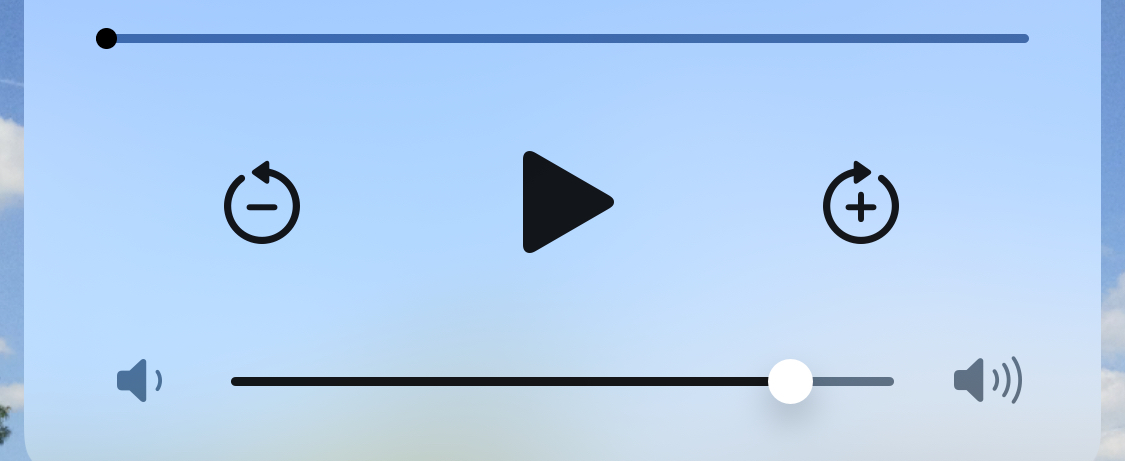
How can I use skip buttons instead?
I think I saw this asked right before I changed versions, but haven't been able to find the question again.
Thanks again for the awesome plugins.
Write the question here.
 austinbyron
All 20 comments
Yes it has been asked a few times before, and it is certainly something that needs to be configurable based on the parameters to AudioServiceBackground.setState. This feature is very much waiting for a contributor who is willing to submit a PR.
I will get around to implementing it eventually, but a PR could help to make it happen faster.
 ryanheise
on 30 Jun 2020
ryanheise
on 30 Jun 2020
@ryanheise can you give us a high level strategy for implementing this feature?
 lukepighetti
on 30 Jul 2020
lukepighetti
on 30 Jul 2020
First, I would look at the Android implementation of setState which interprets all of the parameters and uses them to control what buttons are displayed in the Android notification. You would need to do something similar to that in the iOS implementation. It would need to interpret all of the parameters, and then call the appropriate iOS APIs to enable the right buttons in the control center.
ryanheise
on 30 Jul 2020
I am going to have a go at implementing this now. First, I'm just going to try to find all duplicate issues and consolidate them.
ryanheise
on 5 Aug 2020
After looking into it, this is all very confusing. To someone who is perhaps more familiar with iPhones than I, what exactly is the difference between the "seek forward" button and the "skip forward" button in the control center?
It seems to me that the skip forward button is the right button for this use case and that is what is currently being displayed.
ryanheise
on 5 Aug 2020
Afaik one is skip to next track and the other is seek forward, usually 30 seconds if it's a podcast. We should be able to choose between the two functionalities and also choose which seek forward icon is displayed. Common ones are 15s and 30s afaik.
lukepighetti
on 5 Aug 2020
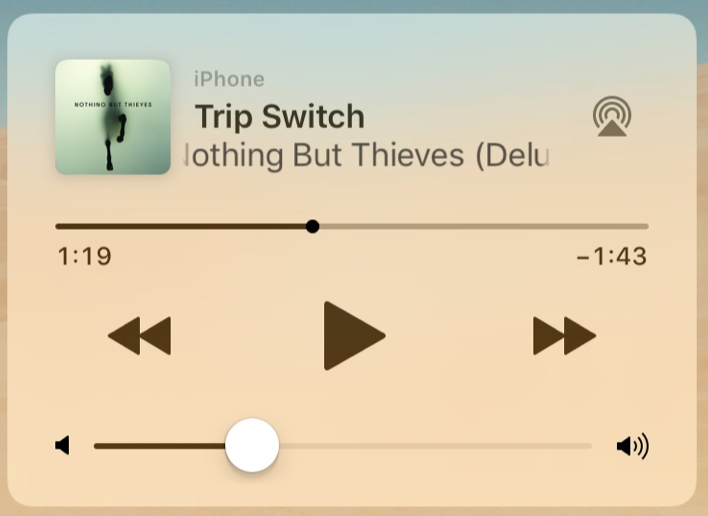
Skip back/forward
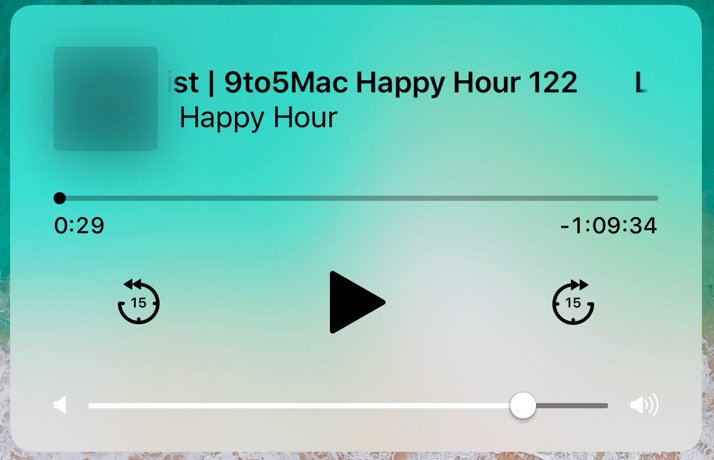
Seek 15s back / 15s forward
lukepighetti
on 5 Aug 2020
By my understanding, the second image shows the skip forward (by 15 seconds) and skip backward (by 15 seconds) buttons.
The first image must be for seek forward / seek backward, although what is strange is that the iOS APIs have another command called next track and previous track, so I'd be curious to understand what the difference is, or whether they are related.
ryanheise
on 5 Aug 2020
I believe if you tap the >> you get next track, if you hold it down you get fast forward.
For the seek 15s buttons I believe you can only tap them, there is no hold down event.
lukepighetti
on 5 Aug 2020
Ah, that makes sense. So "seek forward" is basically "fast forward".
On Android's MediaSession, there is only something called "fast forward" but a lot of people use it to implement behaviour equivalent to iOS's "skip forward" because Android's media notifications don't allow you to press and hold notification buttons, which makes the naming a bit unfortunate. Although the main UI of an Android app can still implement proper fast forward behaviour.
That raises the issue of how best to define these in a cross-platform way. I suspect the right thing to do is for me to add another MediaAction called skipForward which would be non-standard on Android, but maps to the skip-forward behaviour on iOS. Then fastForward can be mapped to "seek forward".
ryanheise
on 5 Aug 2020
Actually, since there really is no way to implement true "fast forward" behaviour on Android (at least in a notification), I think we're stuck with MediaAction.fastForward always mapping to "skip forward", and then I'll add another iOS-specific action called MediaAction.seekForward.
ryanheise
on 5 Aug 2020
I just confirmed that the buttons worked as I explained above (tap to next, hold to fastforward).
FWIW on Spotify it appears to go in 10s increments every 1s for fast forward, but I think that functionality should be left up to the developer if at all possible.
lukepighetti
on 5 Aug 2020
OK, I've just implemented this. I've updated the example to demonstrate it, and the documentation for AudioServiceBackground.setState has also been updated to explain how to use seekForward and seekBackward. Please let me know how it goes for you.
Also included in this change are setRepeatMode and setShuffleMode.
ryanheise
on 6 Aug 2020
Incidentally, do you have a preferred behaviour for seeking forward? My example just skips forward at repeating intervals. If this is commonly desired behaviour, I may consider adding methods to this effect into just_audio so that the background audio task can simply delegate to the player.
ryanheise
on 8 Aug 2020
My preference would be to just have an event handler for functionality like fast forward (long press >> on iOS).onFastForward(bool isPressed) ? It seems like apps like Spotify skip forward 10s every 1s, though.
lukepighetti
on 8 Aug 2020
My preference would be to just have an event handler for functionality like fast forward (long press
>>on iOS).onFastForward(bool isPressed)?
Apologies for the confusion. I have already implemented what you described in my previous post (onSeekForward(bool begin)) and this will not be removed or anything. It also couldn't really be done any other way because audio_service is not in the business of playing audio itself, it only wraps around your own audio code and provides you callbacks such as the one mentioned.
But my question was about my other plugin just_audio, for which I was proposing to add a built-in implementation of seek forward. just_audio is in the business of playing audio, and so it would seem useful to have such a feature in that plugin. When implementing the onSeekForward callback in audio_service, you can still implement it however you want, although if just_audio provided such a feature, you could implement onSeekForward in one line if you were happy with that feature.
So it's a question of implementing the feature in the most common way so that it would be more useful to more people.
It seems like apps like Spotify skip forward 10s every 1s, though.
Thanks, that sounds like it is probably a common approach (same as the one I implemented in the example except for the different parameter values).
It is not a terribly important decision, though, since people will still be able to see how I implemented the feature in the example.
ryanheise
on 8 Aug 2020
I have just released this feature in 0.12.0 so I'll close this issue.
ryanheise
on 9 Aug 2020
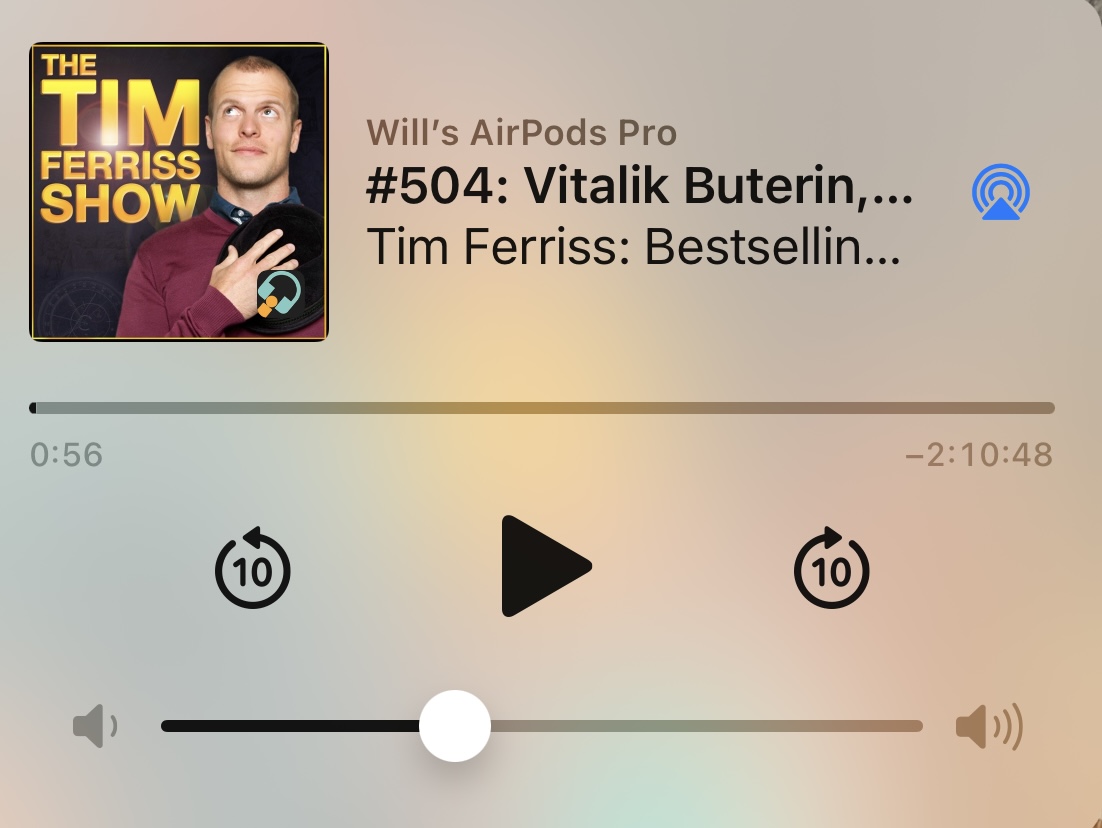
@ryanheise, I see the iOS skip forward icon shows 10 seconds (perfect for music players like Spotify). Is there a way to change the iOS icon to show 30 seconds instead (more ideal for podcast players)?
- It looks like the initial discussion was between showing 10s, 15s or 30s for the icon
- From the documentation, I see how I can customize the Android MediaControl Icon, but it says iOS will not allow adjustments to the icon
- If there was an initial decision for using the 10s icon, then there must be some way to show a 30s icon instead (I just don't see how to do it)
Thank you for creating all of this.
By my understanding, the second image shows the skip forward (by 15 seconds) and skip backward (by 15 seconds) buttons.
The first image must be for seek forward / seek backward, although what is strange is that the iOS APIs have another command called next track and previous track, so I'd be curious to understand what the difference is, or whether they are related.
Example of 10s skip forward/rewind icons in iOS
 PresterJuan
on 25 Mar 2021
PresterJuan
on 25 Mar 2021
There are fastForwardInterval/rewindInterval options which are supposed to support this (in theory). You can try them out.
ryanheise
on 26 Mar 2021
I completely overlooked those parameters in AudioService.start. It works great. Thank you for the guidance!
In case anyone else is looking to change the iOS control center fast forward/rewind icons:
fastForwardInterval and rewindInterval are passed through to your background audio task as properties, and they represent the duration of audio that should be skipped in fast forward / rewind operations. On iOS, these values also configure the intervals for the skip forward and skip backward buttons. Note that both fastForwardInterval and rewindInterval must be positive durations.
PresterJuan
on 26 Mar 2021
Related issues
 Divyanshu133
·
5Comments
Divyanshu133
·
5Comments
 Okladnoj
·
5Comments
Okladnoj
·
5Comments
 alexelisenko
·
4Comments
alexelisenko
·
4Comments
 MahdiPishguy
·
5Comments
MahdiPishguy
·
5Comments
 MohamedAbdallah-14
·
7Comments
MohamedAbdallah-14
·
7Comments
Most helpful comment
I have just released this feature in 0.12.0 so I'll close this issue.