Prerequisites
- [ x] Put an X between the brackets on this line if you have done all of the following:
- Reproduced the problem in Safe Mode: https://flight-manual.atom.io/hacking-atom/sections/debugging/#using-safe-mode
- Followed all applicable steps in the debugging guide: https://flight-manual.atom.io/hacking-atom/sections/debugging/
- Checked the FAQs on the message board for common solutions: https://discuss.atom.io/c/faq
- Checked that your issue isn't already filed: https://github.com/issues?utf8=✓&q=is%3Aissue+user%3Aatom
- Checked that there is not already an Atom package that provides the described functionality: https://atom.io/packages
Description
Atom has been crashing on me ever since upgrading to macOS 10.15 (Catalina). Has never really crashed on me (that I can remember) before Catalina. Now it does it a few times daily. Randomly. Sometimes when deleting a folder or file, duplicating a file, renaming a file, moving a file, and toggling a directory in the file tree. I tried to look in the crash log, but there was none. This the only message I could find related to Atom:
MacBook-Air Atom[11027]: assertion failed: 19A602: libxpc.dylib + 86780 [2E9076CD-6C0E-38B6-8403-B2DDCE125FBF]: 0x89
Steps to Reproduce
Interacting with the file tree (toggle folders, moving a file, renaming, deleting, duplicating, trying to search in a directory, saving, ect..)
Expected behavior:
to interact with file tree without crashing the whole application, generate crash log in console
Actual behavior:
Atom will close at random times during the day only when interacting with file tree. A couple times it had closed when saving a file.
Reproduces how often:
It happens randomly, daily, I guess the more you use file tree you can expect more times.
Versions
Atom : 1.40.1
Electron: 3.1.10
Chrome : 66.0.3359.181
Node : 10.2.0
Update:
Here's a temporary patch that resolves the crashing, replaces the Electron context-menu with a HTML version:
Atom Menu Patch for Catalina
You can also search and install the package inside Atom.
 codenift
All 151 comments
I am having the same exact issue. Atom keeps crashing every 10 min or so. Sometimes when I change something in my code Atom suddenly crashes.
 IdLevi1705
on 20 Oct 2019
IdLevi1705
on 20 Oct 2019
Same problem. I play roulette when I want to rename, duplicate or do something else like that.
 afuno
on 21 Oct 2019
afuno
on 21 Oct 2019
same here
 laradji
on 21 Oct 2019
laradji
on 21 Oct 2019
Thanks for reaching out!
We require the template to be filled out on all new issues and pull requests. We do this so that we can be certain we have all the information we need to address your submission efficiently. This allows the maintainers to spend more time fixing bugs, implementing enhancements, and reviewing and merging pull requests.
Thanks for understanding and meeting us half way :grinning:
Please share all the template details, the information is super helpful when looking at issues - for example, have you tried safe mode or any other debugging suggestions mentioned in the Prerequisites section? What specific version of Atom are you running?
Is everyone else that commented also running Catalina?
 rsese
on 21 Oct 2019
rsese
on 21 Oct 2019
Found this LibreOffice issue that mentions the same assertion failed: 19A602: libxpc.dylib part of the error message:
https://bugs.documentfoundation.org/show_bug.cgi?id=126409
Looks like mention of notarizing applications on Catalina.
rsese
on 21 Oct 2019
I have the exact same issue. For me Atom crashes when I interact with the tree view. Not every time. But every now and then.
Atom: 1.40.1
Mac OS 10.15 (19A583)
 ospaarmann
on 22 Oct 2019
ospaarmann
on 22 Oct 2019
Is that reproducible in safe mode @ospaarmann?
Also, can folks share your crash log?
https://flight-manual.atom.io/hacking-atom/sections/debugging/#find-crash-logs
Curious if everyone is seeing the same "assertion failed: 19A602: libxpc.dylib" error.
rsese
on 22 Oct 2019
I have the same problem..
The bug doesn't happen every time, but it's happen more that once a day (this morning it's happen already 8 times... between 8am and 11am)
And there is no alerte message when Atom crash.
The bug started after I update my Mac to Catalina.
And I tried to re-install Atom but nothing changed.
Atom: 1.40.1
Mac: 10.15
Logs:
Oct 23 08:43:11 macbook-pro-de-natacha AGMService[745]: ProcessPath : /Applications/Atom.app/Contents/MacOS/Atom
Oct 23 08:52:58 macbook-pro-de-natacha Atom[964]: assertion failed: 19A602: libxpc.dylib + 86780 [2E9076CD-6C0E-38B6-8403-B2DDCE125FBF]: 0x89
Oct 23 08:53:31 macbook-pro-de-natacha com.apple.xpc.launchd[1] (com.github.atom.4252[964]): Service exited due to SIGSEGV | sent by exc handler[964]
 NatachaH
on 23 Oct 2019
NatachaH
on 23 Oct 2019
Thanks for updating to add the issue template details @codenift :bow:
@codenift @NatachaH - just to clarify, the error messages you found were from Console.app?
rsese
on 23 Oct 2019
@rsese yes on the Console.app
NatachaH
on 23 Oct 2019
Yes, found in the Console.app but not within a crash log. No Atom log that ends with .crash was generated as mentioned in the debugging guide. I found that error in system.log. I'm guessing it's related to the issue, also no error message after crashing.
codenift
on 24 Oct 2019
system.log for a crash that has just happened on trying to rename a file (macOS 10.15):
Oct 24 12:44:50 MacBook com.apple.xpc.launchd[1] (com.apple.xpc.launchd.oneshot.0x10000004.Atom[347]): Service exited due to SIGSEGV | sent by exc handler[347]
Oct 24 12:45:02 MacBook Atom[5308]: assertion failed: 19A602: libxpc.dylib + 86780 [2E9076CD-6C0E-38B6-8403-B2DDCE125FBF]: 0x89
Oct 24 12:45:31 MacBook com.apple.xpc.launchd[1] (com.apple.xpc.launchd.user.domain.501.100006.Aqua): com.github.atom.ShipIt (lint): Assuming EnablePressuredExit=false given EnableTransactions=false.
Oct 24 12:46:15 MacBook systemstats[98]: assertion failed: 19A602: systemstats + 672924 [84B69988-AB33-3F38-AA3B-B31D9FA23C20]: 0x5
 sergeyfilimonov
on 24 Oct 2019
sergeyfilimonov
on 24 Oct 2019
Yes, found in the Console.app but not within a crash log. No Atom log that ends with .crash was generated as mentioned in the debugging guide. I found that error in system.log. I'm guessing it's related to the issue, also no error message after crashing.
Same here. Atom has crashed more time than I care to count this morning. At random and without leaving a crash report in Mac Console.app.
 JohnSmall
on 24 Oct 2019
JohnSmall
on 24 Oct 2019
I am having the same exact issue. Atom keeps crashing every 10 min or so. Sometimes when I change something in my code Atom suddenly crashes.
Same ! exactly every 10 minutes ....
Atom : 1.41.0
Electron: 4.2.7
Chrome : 69.0.3497.128
Node : 10.11.0
Exception Type: EXC_BAD_ACCESS (SIGSEGV)
Exception Codes: EXC_I386_GPFLT
 yboussard
on 24 Oct 2019
yboussard
on 24 Oct 2019
Actual for version 1.41
afuno
on 28 Oct 2019
I am getting this now. Atom won't even open a new editor window, I just get this that the editor has crashed

MacOS 10.14
 wsabol
on 29 Oct 2019
wsabol
on 29 Oct 2019
I updated atom to version 1.41.0 and now no problems.
wsabol
on 29 Oct 2019
@wsabol It is not true. No need to make hasty conclusions. The problem described by people above exists in version 1.41. I personally observe it periodically in this version.
And it's not clear why you even wrote here if you have macOS 10.14.
afuno
on 29 Oct 2019
@wsabol
MacOS 10.14
This issue is about 10.15 and it seems that your error has nothing to do with it as you get a message no one got here.
The issue stills exists in Atom 1.41.
sergeyfilimonov
on 29 Oct 2019
If someone can give us exact steps to reproduce this, along with a crash log, sys logs, etc, we can take a deeper look. As of right now, we don't have enough information here to dig into this.
 lee-dohm
on 29 Oct 2019
lee-dohm
on 29 Oct 2019
Well, I believe it's been pretty clear already. There's only one step to reproduce: Use Atom in Catalina and interact with the files.
It happens randomly, the more you're dealing with files such as moving, saving, renaming, duplicating, toggling directory, ect... It doesn't produce a crash log, that would have made it easier to figure out. The only error I found is the one I mentioned in the system. Some people have mentioned it happens about every 10 minutes, but I just get it randomly although I'm not changing files around as much and sometimes stay on a group of files I have already open. Sometimes it happens when I try to move a file, deleting or duplicating, but not every time I try to do it. Saving a file, but rarely. I will get several crashes in a day, and it happens only when interacting with the files.
codenift
on 29 Oct 2019
I've been using Atom on Catalina for over two weeks and it hasn't crashed once. I attempted to reproduce this by renaming random files in the Tree View and everything worked flawlessly. So there's something more at work than simply Catalina and manipulating files. So if you can tell us exactly what operations you did before the next several crashes and if you can duplicate this while using Safe Mode, that would give us more information to go on.
lee-dohm
on 29 Oct 2019
Atom was already at the latest version before updating to Catalina and it never crashed on me. The problems only started immediately after updating to Catalina. One of the first things I did after the update was open Catalina since I use a MacBook Air just for Atom and Xcode. Nothing was done before opening Atom, I didn't install anything new to the system or to Atom, I just simply started working on my projects and the crashing began randomly only when interacting with the file tree. It never happens during the time that I'm coding and testing (except for 2 or 3 times while saving). I already did Safe Mode, and it happened a few times as well. Also, it doesn't explain why there's no crash log created when everyone here has reported that Atom crashes without Atom generating one. The app just closes on you randomly.
codenift
on 29 Oct 2019
I think it is not related to catalina (my version of os x is hight sierra) and I have also a crash every 10 minutes (exactly 10 minutes) even with -safe option (first crash the 2019-10-23 15:02:52.122 ) . I reinstall atom multiple time and I revert it to 1.39 version and the bug is always present !
Is it the version of chrome that is in cause (Chrome : 66.0.3359.181) ?
I use Atom since now 2 years and since two days I can not use it any more (switch to pycharm :-( ).
I hope that this critical bug will be fixed soon.
Regards Youenn.
yboussard
on 29 Oct 2019
I don't get a crash every 10 minutes. Could there be something there related to the same issue I have? Perhaps. But my issue only started after Catalina and it's something that happens randomly only after interacting with the file tree for long so I'm not sure. If I was to leave the computer alone or just stay on the same opened files let's say for 2 hours, the app will then stay open. I only notice it when doing many interactions with file tree, like this morning when I dragged some files into Atom, but it's not something that will happen every time I try to drag or rename file, ect.. It's like playing roulette with Atom hoping the app doesn't close on you after making a change.
codenift
on 29 Oct 2019
@codenift : ok. it seems different for you. I'm not the only one. see messsage from IdLevi1705.
One thing it is clear for me, atom instability appear with 1.40.1 version.
yboussard
on 30 Oct 2019
@codenift I can confirm the exact same issue that you are describing.
- After Update to Catalina
- On interaction with the file tree
- App closes randomly
- No crash report or any kind of message
ospaarmann
on 30 Oct 2019
Same issue with 1.41.0 on macOS Catalina
 alizeegtd
on 31 Oct 2019
alizeegtd
on 31 Oct 2019
I get this error, in safe mode, when trying to duplicate a file, about 10% of the time (which means at least once or twice a day). I have managed to experience this issue with:
- mac OS Catalina 10.15 (19A602)
- Atom 1.41.0 x64
- Restart computer
- Launch Atom in safe mode by opening the terminal and typing
atom --safe
Some notes:
- For me at least, this often happens when attempting to duplicate a file in the project tree by control-clicking, then selecting Duplicate as per the enclosed image; The bug is: before showing the popup to ask for the name of the duplicate file, Atom immediately disappears without a trace from your running applications. No error message.
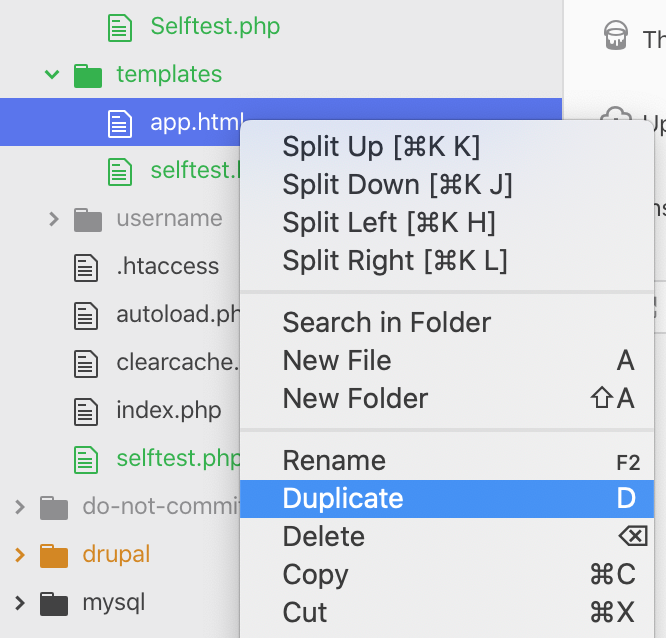
- This bug often happens when I have not interacted with the project tree for a while: if I just successfully duplicated something, it is certain to work again; if the bug just happened and I restarted Atom, it is certain to work.
The logs:
There is nothing in the logs at the moment of the crash. However I did find this, which might provide a clue to people in the know: Atom will sometimes report "UNIX error exception: 17", as happened to me a few minutes ago (in the "Devices" section of my console), but this error report does not seem to be at the time of the crash; it is often several minutes before the crash, which makes me think it is not related, but I'm putting it here nonetheless because it might provide a clue -- see enclosed image.

 alberto56
on 31 Oct 2019
alberto56
on 31 Oct 2019
Same problem. I play roulette when I want to rename, duplicate or do something else like that.
I am having precisely this issue as well. One thing, I feel that it happens more frequently when i've been doing longer/extended sessions in Atom.
 briancabbott
on 2 Nov 2019
briancabbott
on 2 Nov 2019
Same here, I updated the terminal package and suddenly it crashes on every startup.
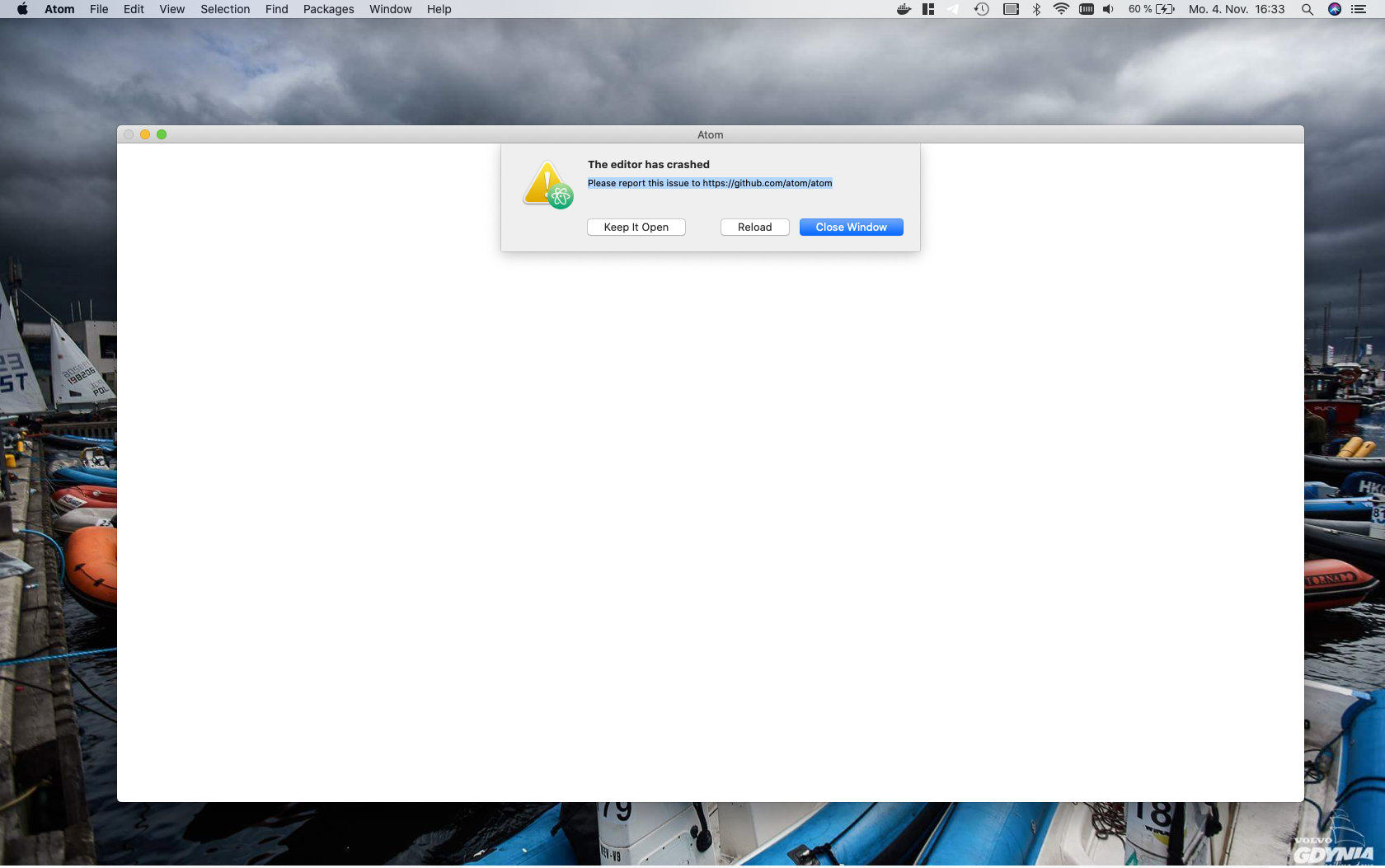
[1104/164037.553704:WARNING:system_snapshot_mac.cc(42)] sysctlbyname kern.nx: No such file or directory (2)
[1104/164037.567229:WARNING:crash_report_exception_handler.cc(242)] UniversalExceptionRaise: (os/kern) failure (5)
Those are messages related to atom and crash I can find in the Console
EDIT
After a reinstall everything works fine now.
Issue was
terminal-tab 0.6.0
[email protected] – The module '/Users/luca/.atom/packages/terminal-tab/node_modules/node-pty-prebuilt-multiarch/build/Release/pty.node' was compiled against a different Node.js version using NODE_MODULE_VERSION 64. This version of Node.js requires NODE_MODULE_VERSION 69. Please try re-compiling or re-installing the module (for instance, using npm rebuild or npm install).
EDIT 2
After terminal-tab package rebuild everything is back to normal.
 b3z
on 4 Nov 2019
b3z
on 4 Nov 2019
It also crashes for me quite often. This is what I see in the Console
Nov 5 16:30:17 MacBook-Pro-de-it-2 com.apple.xpc.launchd[1] (com.apple.xpc.launchd.oneshot.0x10000004.Atom[424]): Service exited due to SIGSEGV | sent by exc handler[424]
 idiaztuenti
on 5 Nov 2019
idiaztuenti
on 5 Nov 2019
Same issue with 1.41.0 on Catalina
I found this crash after update mac OS to Catalina.
Especially when I search some words in my repository, It occurs frequently..
 bapex
on 5 Nov 2019
bapex
on 5 Nov 2019
More logs from today's crash, just in case they are useful
Nov  7 15:20:32 MacBook-Pro-de-it-2 com.apple.xpc.launchd[1] (com.github.atom.2716[5961]): Service exited due to SIGSEGV | sent by exc handler[5961]
Nov  7 15:20:49 MacBook-Pro-de-it-2 Atom[35861]: assertion failed: 19B88: libxpc.dylib + 86572 [99CC9436-D653-3762-ADBB-9054EBD1BA2B]: 0x89
I have the same issues as everyone else here, in MacOS Catalina any activity with the file tree and Atom(v1.410) crashes. I hope this gets fixed ASAP!
 pamo18
on 7 Nov 2019
pamo18
on 7 Nov 2019
Seeing a similar problem Atom 1.41.0 x64 on Catalina 10.15.1
Happens to me intermittently when I copy and paste inside the same file. Atom crashes when I paste. Not every time, but after I have been working on a file for a while.
I don't have any useful reproduction steps, appears to be random at the moment.
 JohnSedgmen
on 8 Nov 2019
JohnSedgmen
on 8 Nov 2019
@lee-dohm When do you plan to fix this problem? The situation is already quite annoying.
afuno
on 8 Nov 2019
Any solution for the issue? not it's painful to use ATOM on Mac 10.15.1
Please provide the solution ASAP
 digital18
on 9 Nov 2019
digital18
on 9 Nov 2019
Last days I watched how the application crashes. There is always something like this in Console.app:
Nov  9 22:05:09 MacBook-Name com.apple.xpc.launchd[1] (com.github.atom.2388[63893]): Service exited due to SIGSEGV | sent by exc handler[63893]
Nov  9 22:05:13 MacBook-Name AGMService[523]: ProcessPath : /Applications/Atom.app/Contents/MacOS/Atom
Nov  9 22:05:15 MacBook-Name Atom[40202]: assertion failed: 19B88: libxpc.dylib + 86572 [99CC9436-D653-3762-ADBB-9054EBD1BA2B]: 0x89
Just an update.
Not on safe mode:
I received this error as soon as I deleted a file in my project in Atom
Nov 10 09:30:25 Alexs-MacBook-Air AGMService[462]: ProcessPath : /Applications/Atom.app/Contents/MacOS/Atom
Nov 10 09:30:27 Alexs-MacBook-Air Atom[14756]: assertion failed: 19A602: libxpc.dylib + 86780 [2E9076CD-6C0E-38B6-8403-B2DDCE125FBF]: 0x89
In Safe Mode:
A few people reported with errors showing 'com.github.atom', I remember seeing something saying that but wasn't sure if I was in safe mode since it was late and forgot to save it before.
This is the message I received today in console after deleting a file (on system.log, no crash log is created when these crashes happen). While using it in Safe Mode. To try and reproduce the error, I just started creating files (eg. '.123a', '.123b', .123c'), renaming, moving and deleting them again until it crashes, took me just a few tries:
Nov 10 10:02:57 Alexs-MacBook-Air com.apple.xpc.launchd[1] (com.github.atom.7560.7B824E44-EFC8-40EF-91B4-8E0ADA112B17[14874]): Service exited due to SIGSEGV | sent by exc handler[14874]
codenift
on 10 Nov 2019
Same issue with 1.41.0 on Catalina
I found this crash after update mac OS to Catalina. I could not open any files in Atom. Please fix the problem ASAP. Thanks.
 macongpeng
on 11 Nov 2019
macongpeng
on 11 Nov 2019
Resolved for me after below Steps...
Has update all the pending package updates and issue get resolved.
Step 1 - Tried to run in Safe mode for 20-30min
Step 2 - Close it and re-open in normal mode
Step 3 - Update all the pending updates of Packages
Step 4 - Restart
From last 1 hr it doesn't crashed, so I think it's get resolved
digital18
on 11 Nov 2019
Same issue here.
When I right click a file to rename, the editor crashes before the modal / rename input box appears. The crash is instant with no warnings or error messages. This seems to happen randomly about 25% of the time. I've tested with the file being renamed open in the editor, and not open in the editor and it seems to happen just as randomly in each case.
 jjstafford
on 11 Nov 2019
jjstafford
on 11 Nov 2019
I think the reason for the crash related to right-click not file tree. Most people experience the crash in file tree because right-click used there mostly. If you press right-click at random times while coding, the editor still crashes. I've also checked the error log, it is same.
Nov 14 15:55:11 gozel-macbook com.apple.xpc.launchd[1] (com.github.atom.2572[9478]): Service exited due to SIGSEGV | sent by exc handler[9478]
Nov 14 15:55:14 gozel-macbook AGMService[553]: ProcessPath : /Applications/Atom.app/Contents/MacOS/Atom
Nov 14 15:55:15 gozel-macbook Atom[27332]: assertion failed: 19B88: libxpc.dylib + 86572 [99CC9436-D653-3762-ADBB-9054EBD1BA2B]: 0x89
- Yes, I have a right-click obsession while coding :)
 muratgozel
on 14 Nov 2019
muratgozel
on 14 Nov 2019
I never noticed before since I don't use right click as often, but you are right. It seems to be doing it even more when right clicking. Still does it on Safe Mode.
Nov 14 08:36:06 Alexs-MacBook-Air AGMService[615]: ProcessPath : /Applications/Atom.app/Contents/MacOS/Atom
Nov 14 08:36:07 Alexs-MacBook-Air Atom[940]: assertion failed: 19A602: libxpc.dylib + 86780 [2E9076CD-6C0E-38B6-8403-B2DDCE125FBF]: 0x89
Nov 14 08:36:23 Alexs-MacBook-Air com.apple.xpc.launchd[1] (com.github.atom.7560.FE45276A-E03C-4917-8025-2EE17B9A57E5[940]): Service exited due to SIGSEGV | sent by exc handler[940]
Although I don't think it fails only when doing right click since it has happened to me a couple times already when closing a tab, saving a file (command+s), dragging a file to another folder or dragging a file into the file tree from desktop, deleting a file (Delete key). But I do agree with it happening more often this way. If anyone wants to reproduce it they just need pull up the context menu several times by right clicking inside an open file, and is probably a faster way to figure out what's going on . It will crash on you with just a few tries.
Update: Could be more than just a few tries, my last attempt took me over 40 right clicks... but eventually it will crash if you keep doing it. Still a faster way for anyone trying to figure this out.
codenift
on 14 Nov 2019
I've taken a look and this is definitely related to context menus. I suspect it's a problem with electron passing a pointer to MacOS that ends up dangling after GC runs. Catalina possibly changes the GC behavior in some way that exposed a pre-existing bug.
You can see some investigation at the electron repo over here: https://github.com/electron/electron/issues/20737
I'm trying to see if I can get the suggested fix there built into a copy of electron and working.
 neilmacintosh
on 15 Nov 2019
neilmacintosh
on 15 Nov 2019
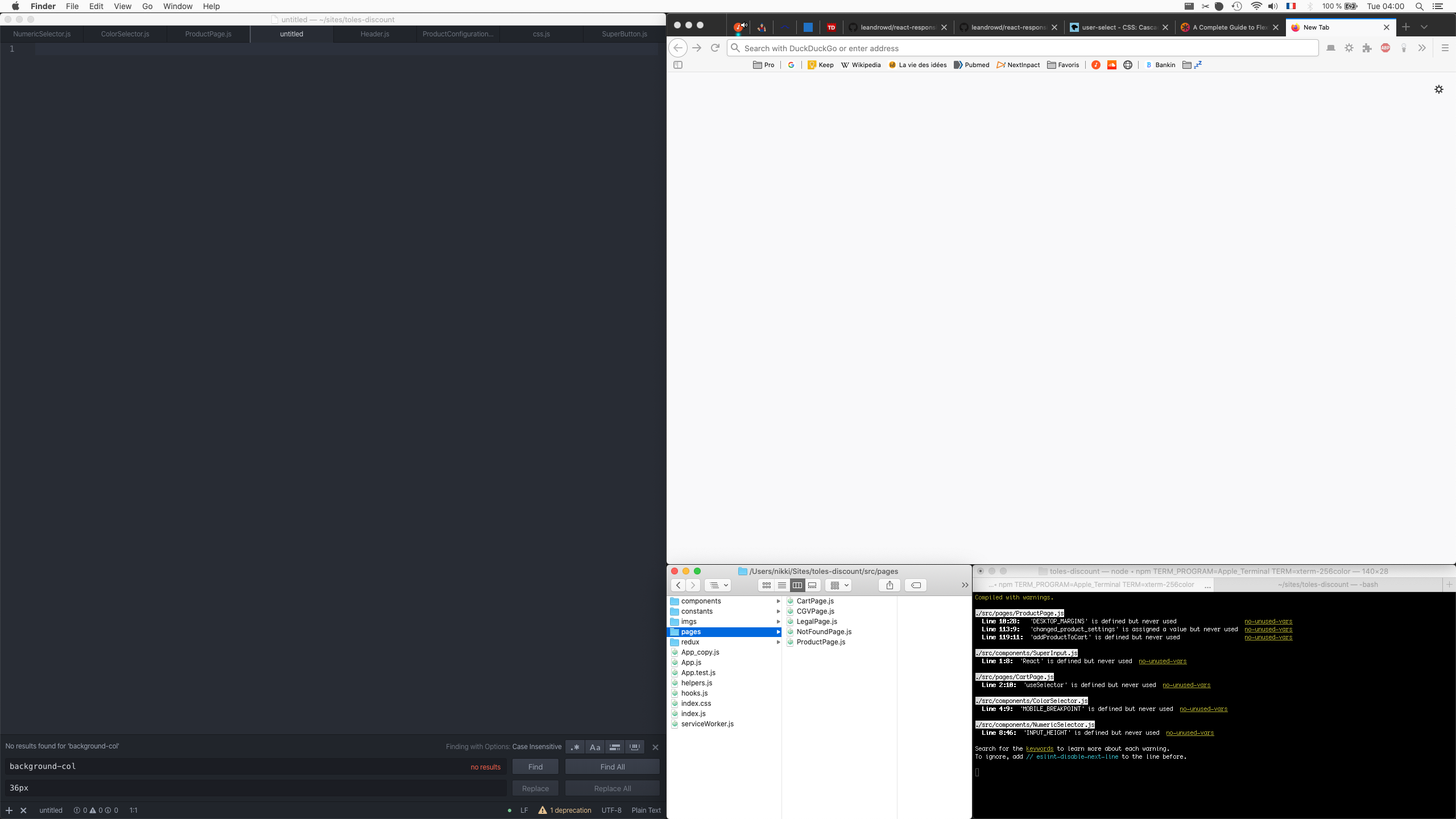
Same issue with 1.41.0 on macOS 10.15.1 (19B88).
Crashing randomly when I use context menus in the tree view.
Temporary fix: I now use the Finder to duplicate&delete files.
 nikkimoreaux
on 18 Nov 2019
nikkimoreaux
on 18 Nov 2019
No update on this? It's been a month, still happening when editing files eg. copying, renaming, saving. Happens constantly with no crash report.
 kenyounot
on 19 Nov 2019
kenyounot
on 19 Nov 2019
Still got the issue (random crash when interacting with the tree-view of an project) on Mac OS 10.15.1 with Atom 1.41.0.
system.log:
com.apple.xpc.launchd[1] (com.github.atom.5816[2618]): Service exited due to SIGSEGV | sent by exc handler[2618]
AGMService[637]: ProcessPath : /Applications/Atom.app/Contents/MacOS/Atom
Atom[8600]: assertion failed: 19B88: libxpc.dylib + 86572 [99CC9436-D653-3762-ADBB-9054EBD1BA2B]: 0x89
I would appreciate a fix as this is really annoying.
Thanks in advance. mat.
 MatLeRock
on 21 Nov 2019
MatLeRock
on 21 Nov 2019
Update: we found a short-term workaround is to monkey-patch the context menus via an extension.
neilmacintosh
on 21 Nov 2019
Update: we found a short-term workaround is to monkey-patch the context menus via an extension.
Can you elaborate? Thanks
kenyounot
on 22 Nov 2019
Of course @kenyounot! Sorry, was being brief before...wasn't sure if anyone would care.
So basically the quick-fix we developed was to monkey-patch at startup via our extension so that `electron.remote.Menu' is not used by Atom for Context menus and instead we install our own handler that draws draws them using HTML. If anyone is interested, I'll ask the person who actually wrote and tested that code to post it up on a gist somewhere.
neilmacintosh
on 22 Nov 2019
@neilmacintosh that would be very useful, thank you!
alberto56
on 22 Nov 2019
Of course @kenyounot! Sorry, was being brief before...wasn't sure if anyone would care.
So basically the quick-fix we developed was to monkey-patch at startup via our extension so that `electron.remote.Menu' is not used by Atom for Context menus and instead we install our own handler that draws draws them using HTML. If anyone is interested, I'll ask the person who actually wrote and tested that code to post it up on a gist somewhere.
Any idea when it will be rolled out?
kenyounot
on 22 Nov 2019
@neilmacintosh if it solves the problem of crashing every time, I think we will all appreciate it.
codenift
on 22 Nov 2019
Ok. I'm sure it's not the right general solution - I think electron people are working on that - but I can see it would have value as a workaround while people wait for that to land. I'll page @evangrayk here (who wrote it) and see what he thinks is the easiest way of offering it to the Atom community.
neilmacintosh
on 22 Nov 2019
Also: note that electron have a fix for the underlying issue: https://github.com/electron/electron/pull/21169.
That might be what @darangi is pointing to as the long-term solution :-)
neilmacintosh
on 22 Nov 2019
I know this isn't true, but I couldn't help feeling this is intentional to move people over to VS Code.
😅😅 Never felt so nervous to copy a file before!
 sbrichardson
on 25 Nov 2019
sbrichardson
on 25 Nov 2019
The past few days , atom is breakdown abrupt on my 👨💻
 Elliot2636
on 26 Nov 2019
Elliot2636
on 26 Nov 2019
I know this isn't true, but I couldn't help feeling this is intentional to move people over to VS Code.
😅😅 Never felt so nervous to copy a file before!
Atom is unusable for me, VSCode it is, roped me right in lol.
kenyounot
on 26 Nov 2019
@sbrichardson Problem solved lol. Moved to VSCode. After using VSCode for one day this seems like a better alternative for now. This bug in Atom ruined it for me and had to go back to Netbeans. Netbeans is great but I wish it was native with a modern interface.
codenift
on 26 Nov 2019
Agreed, this is a nasty bug. But there is a workaround and the Electron team has a fix in the pipeline. Please don't discourage those working on actual solutions by making this a VSCode vs Atom rant. Just pick the editor you like more and be happy. Meanwhile, thanks to those like @neilmacintosh working on a fix and providing the workaround!
 svoop
on 26 Nov 2019
svoop
on 26 Nov 2019
@svoop for now, i think VSCode is a great alternative if people need to work on a project without pulling their hair, it's not like they can't go back to Atom once it's fixed. Nobody is ranting, I see it as a temporary solution. VScode is great with all it's features but I still love how clean, fast and modern Atom is, feels much better to work in. So I do hope a fix is on it's way soon.
codenift
on 26 Nov 2019
After upgrading to Catalina Atom stopped working. I was able to get it working again in 2 steps:
xcode-select --install
removing the .atom directory
Atom opened up fine after that. I copied my Packages folder back over to the .atom directory.
I hope this helps others.
 gandhiShepard
on 27 Nov 2019
gandhiShepard
on 27 Nov 2019
After upgrading to Catalina Atom stopped working. I was able to get it working again in 2 steps:
xcode-select --install
removing the .atom directory
Atom opened up fine after that. I copied my Packages folder back over to the .atom directory.
I hope this helps others.
Xcode has been installed since upgrade, and I tried removed atom completely from my system, I've also disabled most installed packages. Still happens.
kenyounot
on 27 Nov 2019
Ugh! Sounds super annoying. It could also be a package issue too. I don't have any stock in any of this, but I enjoy bug hunting.
So after upgrading to Catalina, did you then run xcode-select --install in the terminal? In my case, I already had xcode dev tools installed before the upgrade, but I guess I had to run it again after the upgrade. Truth be told, this isn't the first time that updating my OS has broken my dev setup.
Also, after removing the .atom directory, I added each plugin back in one-by-one to test if any caused issues. It turns out that a plugin that I had made was making atom crash too. So, I had to fix that.
Good luck dewd. I feel your pain.
gandhiShepard
on 27 Nov 2019
I came here after experiencing several crashes.
Atom: 1.41.0
Mac: Catalina 10.15.1
Nov 27 06:50:54 bens-mbp com.apple.xpc.launchd[1] (com.github.atom.2544.2C5EAEE7-49AC-4D6F-8C12-EEAD5866D127[61365]): Service exited due to SIGSEGV | sent by exc handler[61365]
Nov 27 06:51:08 bens-mbp Atom[92605]: assertion failed: 19B88: libxpc.dylib + 86572 [99CC9436-D653-3762-ADBB-9054EBD1BA2B]: 0x89
and again
Nov 27 06:55:07 bens-mbp com.apple.xpc.launchd[1] (com.github.atom.2544.FB537D97-EA1A-43CB-B9E9-A866F10E0A78[92605]): Service exited due to SIGSEGV | sent by exc handler[92605]
Nov 27 06:56:50 bens-mbp Atom[92705]: assertion failed: 19B88: libxpc.dylib + 86572 [99CC9436-D653-3762-ADBB-9054EBD1BA2B]: 0x89
Steps to Reproduce
In the tree, deleting any file results in the file not/not being deleted and Atom crashing.
My Solution Found (Delete Plists)
Searching the Internet led to this Path finder 9 crash report. In that, the recommendation was to delete ~/Library/Preferences/com.cocoatech.PathFinder.plist. Of course, that doesn't work for us here. Instead I deleted ~/Library/Preferences/com.github.atom.helper.plist and ~/Library/Preferences/com.github.atom.plist (Actually, I just moved them to my home directory).
This fixed my problem.
 Merovex
on 27 Nov 2019
Merovex
on 27 Nov 2019
POSSIBLE SOLUTION:
I was having similar issues (with similar Console logs) on other apps using Catalina 10.15.1
And after trying many solutions the following solved my problems, so i guess it might as well solve yours:
Reset the PRAM on your Mac
Reset the System Management Controller (SMC) on your Mac
To reset PRAM follow this article: https://support.apple.com/en-us/HT204063
To reset SMC follow this article: https://support.apple.com/en-us/HT201295
Notice on reseting SMC that the process changes depending on your computer model. Mine is a MacBook Pro 2018 which has a T2 security chip so I followed the particular instructions for that model.
 lmuzquiz
on 29 Nov 2019
lmuzquiz
on 29 Nov 2019
I came here after experiencing several crashes.
Atom: 1.41.0
Mac: Catalina 10.15.1Nov 27 06:50:54 bens-mbp com.apple.xpc.launchd[1] (com.github.atom.2544.2C5EAEE7-49AC-4D6F-8C12-EEAD5866D127[61365]): Service exited due to SIGSEGV | sent by exc handler[61365] Nov 27 06:51:08 bens-mbp Atom[92605]: assertion failed: 19B88: libxpc.dylib + 86572 [99CC9436-D653-3762-ADBB-9054EBD1BA2B]: 0x89and again
Nov 27 06:55:07 bens-mbp com.apple.xpc.launchd[1] (com.github.atom.2544.FB537D97-EA1A-43CB-B9E9-A866F10E0A78[92605]): Service exited due to SIGSEGV | sent by exc handler[92605]
Nov 27 06:56:50 bens-mbp Atom[92705]: assertion failed: 19B88: libxpc.dylib + 86572 [99CC9436-D653-3762-ADBB-9054EBD1BA2B]: 0x89
Steps to Reproduce
In the tree, deleting any file results in the file not/not being deleted and Atom crashing.
My Solution Found (Delete Plists)
Searching the Internet led to this Path finder 9 crash report. In that, the recommendation was to delete
~/Library/Preferences/com.cocoatech.PathFinder.plist. Of course, that doesn't work for us here. Instead I deleted~/Library/Preferences/com.github.atom.helper.plistand~/Library/Preferences/com.github.atom.plist(Actually, I just moved them to my home directory).This fixed my problem.
This fixed the problem so far for me. No crashes since 2 hours. The file ~/Library/Preferences/com.github.atom.helper.plist just contained one setting:
NSScrollViewRubberbanding = NO
 msccodestuff
on 30 Nov 2019
msccodestuff
on 30 Nov 2019
It seems like what @Merovex mentioned really solved this problem. By simply removing these files:
_~/Library/Preferences/com.github.atom.helper.plist
~/Library/Preferences/com.github.atom.plist_
No crashes after a hour working and testing. I've been right clicking and moving files, ect... so far so good.
Update:
After working on it for nearly two hours, I had about 2 - 3 crashes. It's still happening. It might be doing it less than before, but I think we still need to wait for the Electron update. One crash was caused by moving a file and another by right clicking.
Nov 30 23:26:37 Alexs-MacBook-Air com.apple.xpc.launchd[1] (com.github.atom.7560[10431]): Service exited due to SIGSEGV | sent by exc handler[10431]
Nov 30 23:26:45 Alexs-MacBook-Air AGMService[728]: ProcessPath : /Applications/Atom.app/Contents/MacOS/Atom
Nov 30 23:26:47 Alexs-MacBook-Air Atom[10603]: assertion failed: 19A602: libxpc.dylib + 86780 [2E9076CD-6C0E-38B6-8403-B2DDCE125FBF]: 0x89
Nov 30 23:28:46 Alexs-MacBook-Air com.apple.xpc.launchd[1] (com.github.atom.7560[10603]): Service exited due to SIGSEGV | sent by exc handler[10603]
Update2:
Yeah, crashed on me a few more times after working with it for another hour.
codenift
on 1 Dec 2019
Interestingly, I have started to experience this problem very, very rare for two weeks. Atom is open for three days right now, and I did many things that trigger this problem but no crash happened. I also got rid of my right-click obsession.
muratgozel
on 1 Dec 2019
The workaround suggested by @Merovex helps a lot. I had just one crash after intensive use for one day. After one day atom crashed when I tried to duplicate a file in a project with a right click in the project tree view.
msccodestuff
on 1 Dec 2019
I should stay I still get crashes, about one an hour or longer. But, now it's just an annoyance not a nuisance. A crash or two per session is a lot less of a PITA than a crash per right-click.
Merovex
on 1 Dec 2019
Hey, folks, this issue is related to electron. We are working on upgrade to [email protected] and this can be very tricky, we don’t have a set date for completion but it is already in progress. https://github.com/atom/atom/pull/20172 is a draft PR which you can use to follow up on the progress. Once this upgrade is complete, the problem should be fixed.
 darangi
on 3 Dec 2019
darangi
on 3 Dec 2019
@darangi Any more info on what specifically might be causing the issue at the code level? I stumbled upon this thread as I have had the same issues in my own applications development, and just started really researching this issue, as it happened when I tried to change the extension of a file on my desktop today. Like, just with the enter key and Finder. So now I'm slightly concerned. At this point I think it has something to do with the permissions on the files being accessed, or perhaps the applications granted permission to access Finder.app?
 andrewbluepiano
on 3 Dec 2019
andrewbluepiano
on 3 Dec 2019
Long time reader of this ticket, have to chime in the choir now as it is also still happening here… Highly annoying. Happens mostly on "Collapse All Project Folders", but also randomly every now and then.
Mac OS X 10.15.1
Atom v.1.41.0
 HENNIROCKS
on 5 Dec 2019
HENNIROCKS
on 5 Dec 2019
Same problem here.
Crashes every time I try to rename a file.
Mac OS X 10.15.1
Atom v.1.41.0
 agustisanchez
on 5 Dec 2019
agustisanchez
on 5 Dec 2019
@agustisanchez , try the fix I did above. It is a short-term remedy until the fix on Electron is corrected.
Merovex
on 5 Dec 2019
Constantly crashes during a day. When I try to create a folder, rename a file, or simply open a menu item. I have even lost track of in what cases it crashes. Seems to randomly crash whatever I want to do something. Really annoying. Moving to another editor until it is fixed.
MacOS Catalina
Version 10.15.1
Atom 1.141.0 x 64
Electron 4.2.7
Chrome 69.0.3497.128
Node v10.11.0
 fade2black
on 6 Dec 2019
fade2black
on 6 Dec 2019
@fade2black have you tried removing the plists as a temporary workaround?
Merovex
on 6 Dec 2019
Same problem here (latest Mac OS), rename a file in the tree view and atom crashes but not every time.
I get this in the system.log as soon as it crashes:
com.apple.xpc.launchd[1] (com.github.atom.2628[30956]): Service exited due to SIGSEGV | sent by exc handler[30956]
 RyanRoberts
on 6 Dec 2019
RyanRoberts
on 6 Dec 2019
Try removing all of your plugins as well. Add them back one by one (quit and restart) to see if a plugin is causing a conflict as well.
gandhiShepard
on 6 Dec 2019
@gandhiShepard it also happens in safe mode which does not load any of the packages, it's related to electron and a fix is in progress.
codenift
on 6 Dec 2019
@fade2black The purpose of safe mode is so it doesn't load any packages. The issue still occurs with safe mode. If you did that just now then it's too early to notice a crash. Read this comment
codenift
on 6 Dec 2019
Same issue with change file-tree after upgrade to catelina.
 kid-wumeng
on 8 Dec 2019
kid-wumeng
on 8 Dec 2019
Also having these issues making Atom kind of unusable.
It's always on of those two:
Service exited due to SIGTRAP | sent by exc handler[22499]
Service exited due to SIGSEGV | sent by exc handler[11215]
 MarcelSchulz
on 9 Dec 2019
MarcelSchulz
on 9 Dec 2019
I've been experiencing this since updating to Catalina, in the latest stable atom 1.41, 100% context menu related; Right click to open menu on a file/folder, left click to run action like (copy/paste/rename) and atom will crash and close.
 matt3224
on 9 Dec 2019
matt3224
on 9 Dec 2019
We were finally able to open source our fix for this! (as @neilmacintosh mentioned above) It works around the issue by monkey-patching atom to create HTML menus when you right click. I can't guarantee that this fixes all crashes but it seems to mitigate crashes caused by context menus.
Just install this atom package: https://github.com/facebookexperimental/atom-menu-patch-for-catalina
(It should be available to install inside of atom)
 evangrayk
on 9 Dec 2019
evangrayk
on 9 Dec 2019
In my case it doesn't necessarily have to do with interacting with the context menu. About every 5 minutes Atom will crash even when in background sometimes.
So @evangrayk ’s package unfortunately did not fix it for me so far. Now primarily getting SIGTRAP instead of SIGSEGV not, unfortunately without any further obvious crash logs.
Dec 10 10:01:23 Marcels-MacBook-Pro-2 com.apple.xpc.launchd[1] (com.github.atom.7180[19336]): Service exited due to SIGTRAP | sent by exc handler[19336]
MarcelSchulz
on 10 Dec 2019
@evangrayk I don't understand how it fixes. After I installed your package the context menu simply does not work. When I open the menu it partially overlaps with the background and not visible. It does not scroll up and down either, so I can't reach menu items.
fade2black
on 10 Dec 2019
@MarcelSchulz Seems like another issue that needs to be fixed, two other users mentioned it here, might be unrelated to the electron. Does it happen on safe mode as well?
codenift
on 10 Dec 2019
@fade2black It's more a temporary fix, but yes it does need a little more work to function correctly. It's overlapping for me too and not show the right menu on a file in the tree, I'm guessing after level 3. Maybe if those are fixed then it will be useful in the meantime.
codenift
on 10 Dec 2019
@MarcelSchulz Seems like another issue that needs to be fixed, two other users mentioned it here, might be unrelated to the electron. Does it happen on safe mode as well?
Yep, happens in any imaginable constellation so far. I've tried safe-mode, re-installing Atom, Nightly, everything I can imagine. Unfortunately also not aware of a way to get any more specific crash logs.
MarcelSchulz
on 11 Dec 2019
Any news on this? Working with Atom has got to be almost impossible. It crashes 10 times a day.
sergeyfilimonov
on 19 Dec 2019
@sergeyfilimonov Mine crashes too, at least 10 times. Unbearable.
fade2black
on 19 Dec 2019
For me, it is crashing every time I rename a file from the treeview
 jota12x
on 22 Dec 2019
jota12x
on 22 Dec 2019
Has anyone experienced this behaviour with mac OS 10.15.2? Since upgrading a few days ago I haven't had any crashes.
alberto56
on 22 Dec 2019
Still crashes on 10.15.2 on file operations or sometimes even simple right click from treeview
 glebtv
on 22 Dec 2019
glebtv
on 22 Dec 2019
I've not had any crashes in a few weeks. I had them occasionally after my fix above, but absolutely none lately.
Merovex
on 22 Dec 2019
The problem is present in macOS 10.15.2 and Atom 1.42.0.
afuno
on 23 Dec 2019
Updated to 10.15.2, still crashes. Version 1.42.0.
fade2black
on 23 Dec 2019
I upgraded to Catalina yesterday and immediately ran into the problem with 1.42. I can easily reproduce the problem by simply copying and pasting a file in the project explorer tree. Even though I was on the most recent version I downloaded 1.42 again and ran it from the Downloads directory. The problem went away. I the moved the app to the Applications directory. The problem was back. But if I continue to run it from my personal directory the program runs fine. Perhaps the file control is doing a function that the new security system in Catalina does not like. I'm happy to run it from my home directory. Hope this info helps with the fix.
 open834
on 24 Dec 2019
open834
on 24 Dec 2019
Maybe it helps if you grant Atom access to the filesystem (Settings -> Security & Privacy)?
msccodestuff
on 24 Dec 2019
Atom 1.42.0
MacOS 10.15.1 (19B88)
crash on even times of duplicate file
first time is ok, second time crash
 magicdawn
on 27 Dec 2019
magicdawn
on 27 Dec 2019
No more crashes:
Atom 1.42.0
MacOS 10.15.2
System Settings -> Security & Privacy -> Grant Disk Access for Atom
Thanks a lot for the efforts to fix it!
msccodestuff
on 31 Dec 2019
The problem is still there even after macOS 10.15.2 update, and don't believe that granting 'full disk access' has anything to do with right clicking to pop up the context menu, that's one of the first things I tried... plus you already have access to files and folders. Either way, after macOS update I ran some tests in safe mode with full disk access enabled and it was still crashing. It was known to be an issue with Electron already, and if that's the case we need wait until it gets solved. Atom is running an older version of it and I believe it needs to be updated to a newer+stable version. Using the package evangrayk provided (a temporary fix) stopped the crashes completely but the HTML context menu wasn't fully functional.
codenift
on 3 Jan 2020
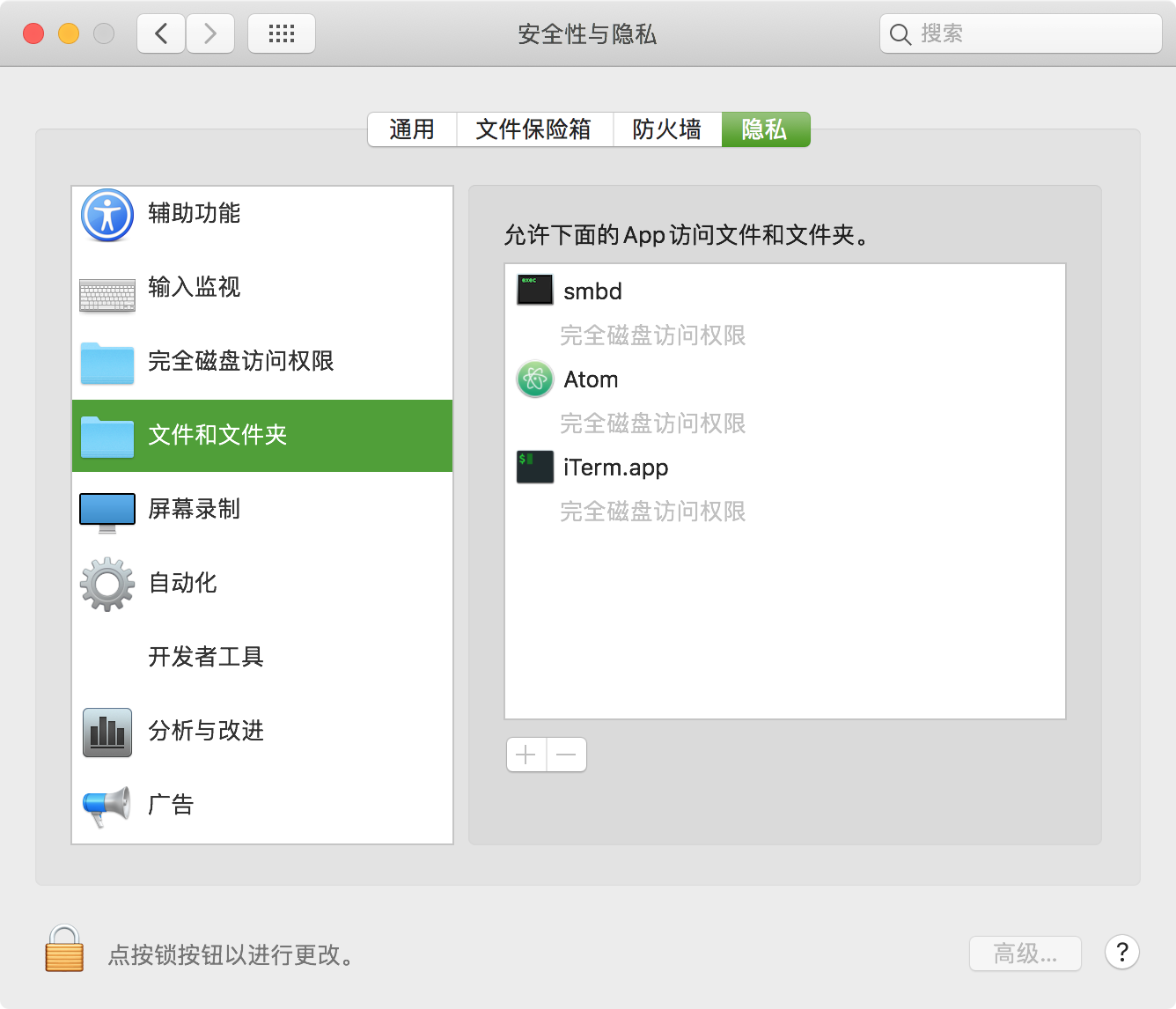
crashed even System Settings -> Security & Privacy -> Grant Disk Access for Atom 😫
magicdawn
on 5 Jan 2020
We know a lot of you are struggling with this issue and have been frustrated by it! We’re still working on a fix, but it involves an Electron upgrade which takes a little while. For the time being, our friends at Facebook have open sourced a workaround! Check it out here: https://github.com/facebookexperimental/atom-menu-patch-for-catalina
darangi
on 7 Jan 2020
@darangi >> "Facebook have open sourced a fix!!"
Are you kidding? It is not a fix. This does not work either. When I right click I don't see, for example, "Add New Folder". Uninstalling it.
fade2black
on 7 Jan 2020
No more crashes:
Atom 1.42.0
MacOS 10.15.2
System Settings -> Security & Privacy -> Grant Disk Access for AtomThanks a lot for the efforts to fix it!
I came here with the same issue as all of you have - upgrading Atom 1.42.0 from Mojave to Catalina started causing it to crash on random file system operations. It seems however that after going to
System Settings -> Security & Privacy -> Files and Folders and
- Unlocking as admin
- "Untick and tick"
Document Foldersfor Atom (and pressingLateron popups)
I no longer am experiencing these issues.
 Coada
on 7 Jan 2020
Coada
on 7 Jan 2020
When I right click I don't see, for example, "Add New Folder"
@darangi, Feel free to file an issue for that, for us it seems to match the native context menu items 1:1. Issues with overlapping should now be fixed.
evangrayk
on 7 Jan 2020
No more crashes:
Atom 1.42.0
MacOS 10.15.2
System Settings -> Security & Privacy -> Grant Disk Access for Atom
Thanks a lot for the efforts to fix it!I came here with the same issue as all of you have - upgrading Atom 1.42.0 from Mojave to Catalina started causing it to crash on random file system operations. It seems however that after going to
System Settings -> Security & Privacy -> Files and Foldersand1. Unlocking as admin 2. "Untick and tick" `Document Folders` for Atom (and pressing `Later` on popups)I no longer am experiencing these issues.
This tip looks like it might be crucial. However, I am not sure how to unlock as admin.
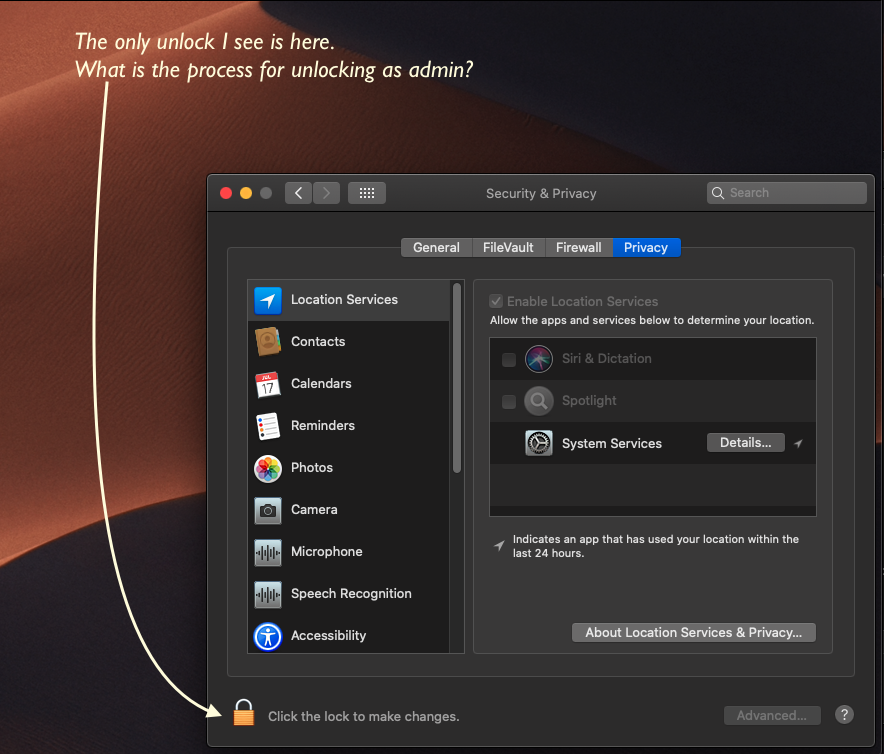
 danallendotcom
on 8 Jan 2020
danallendotcom
on 8 Jan 2020
When I right click I don't see, for example, "Add New Folder"
@darangi, Feel free to file an issue for that, for us it seems to match the native context menu items 1:1. Issues with overlapping should now be fixed.
Before adding the package mentioned by @evangrayk , to see Add New Folder, I had to right click on the target node twice. The first right-click would pop up a short context menu, the 2nd right-click would pop-up a longer one, including Add New Folder, and a few other options.
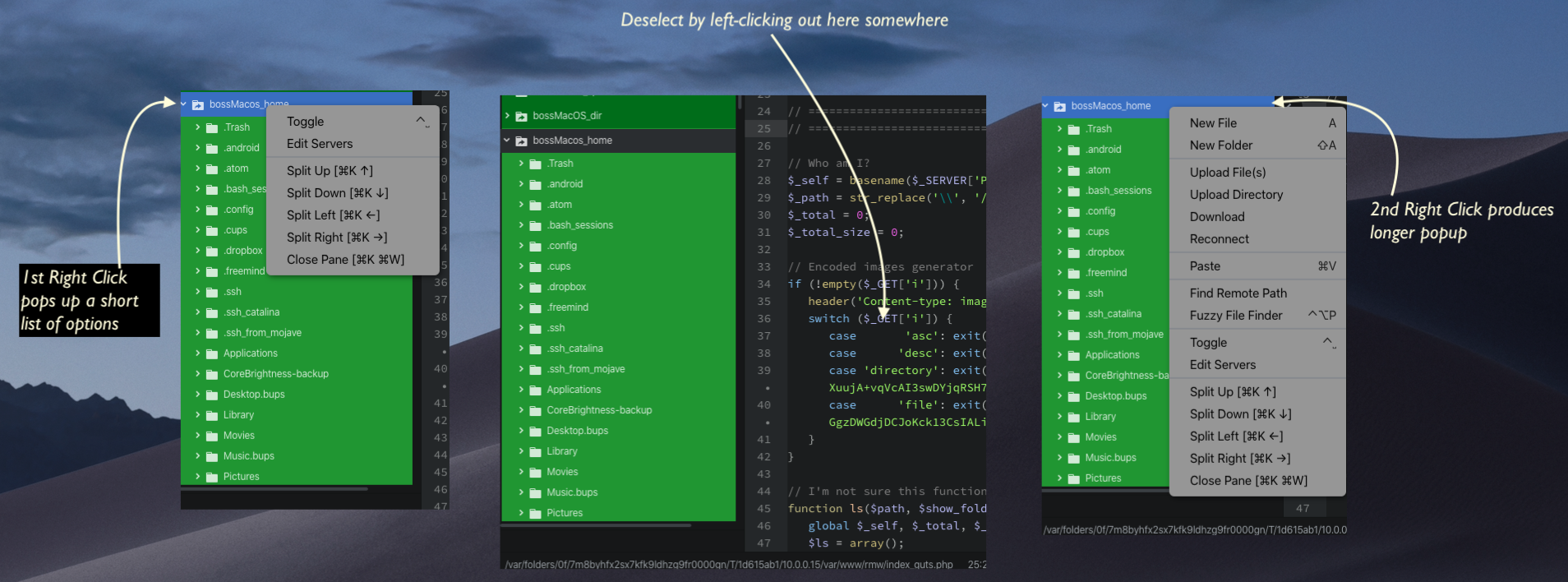
After installing the package suggested by @evangrayk , it still is necessary to right-click twice, but with a twist. After the first right-click, deselect the node by clicking in the text editing area, then right click again, up comes the Add New Folder and other key option.
I have long wondered why the 2nd right click is needed. This behavior predates Catalina on my system.
danallendotcom
on 8 Jan 2020
[ ] Put an X between the brackets on this line if you have done all of the following:
Reproduced the problem in Safe Mode: https://flight-manual.atom.io/hacking-atom/sections/debugging/#using-safe-mode
_I cannot reproduce the problem in safe mode, but the reason for that is telling. All of my interactions with tree view are via a package called FTP REMOTE EDIT. All of the 1st level nodes are configured as remote servers accesses via SFTP. In safe mode, the tree view is empty, because FTP REMOTE EDIT is not running. Evidently, the connections to the servers are handled by FTP_REMOTE EDIT. Until today, I always thought the crashing was due to a bug in FTP REMOTE EDIT, but based on all these reports of the problem happening with Tree View in Safe Mode. it seems clear the problem, is not caused by REMOTE FTP EDIT. A assume this must be consistent with the report regarding the root cause of this problem being within Electron. _
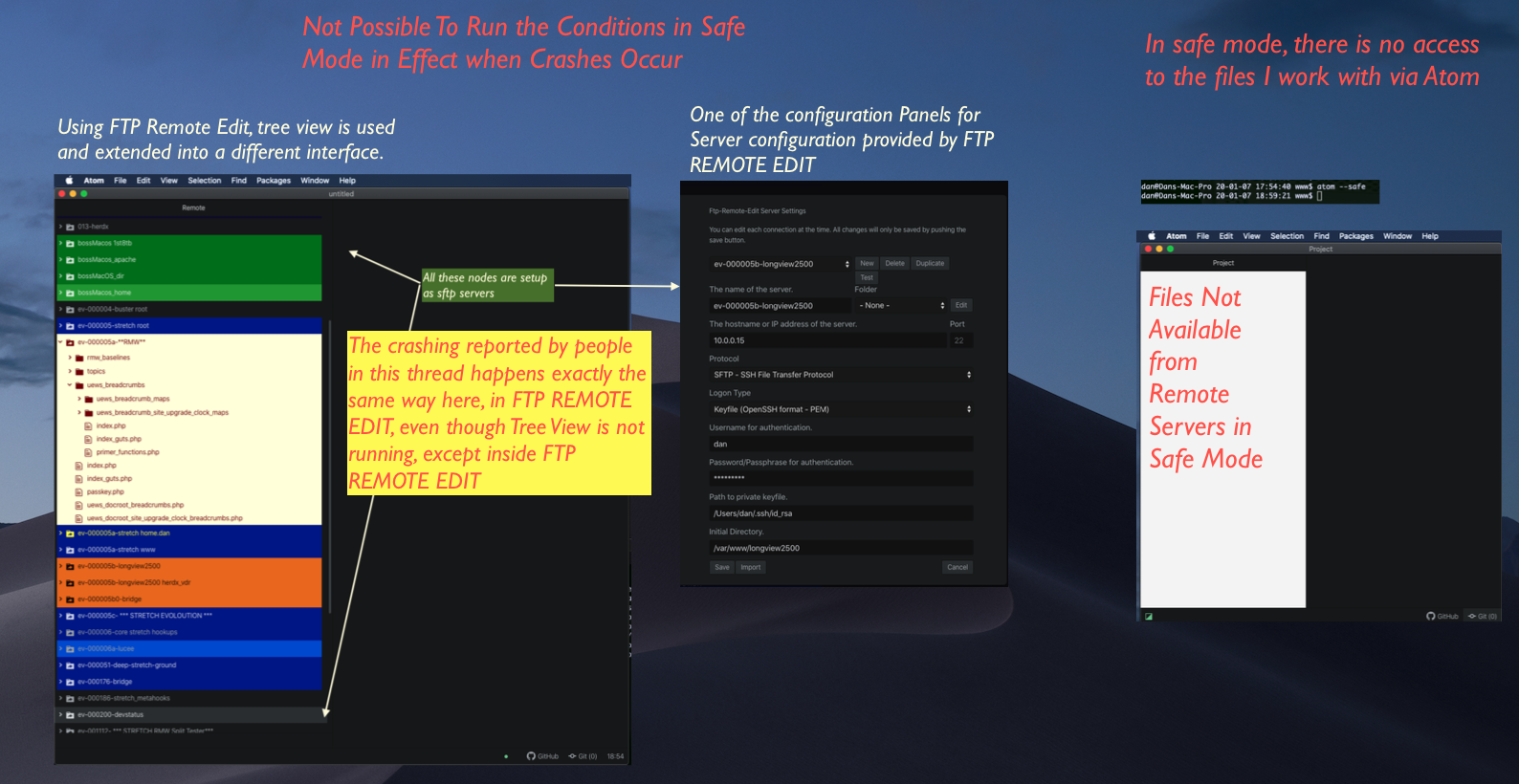
Followed all applicable steps in the debugging guide: https://flight-manual.atom.io/hacking-atom/sections/debugging/ YES
Checked the FAQs on the message board for common solutions: https://discuss.atom.io/c/faq YES
Checked that your issue isn't already filed: https://github.com/issues?utf8=✓&q=is%3Aissue+user%3Aatom YES
Checked that there is not already an Atom package that provides the described functionality: https://atom.io/packages *YES, package found that fixes the problem on my system. The solution in my case is to install the package called Atom menu patch for macOS Catalina, as reported by @evangrayk earlier in this thread (https://github.com/atom/atom/issues/20034#issuecomment-563449809) *
danallendotcom
on 8 Jan 2020
We were finally able to open source our fix for this! (as @neilmacintosh mentioned above) It works around the issue by monkey-patching atom to create HTML menus when you right click. I can't guarantee that this fixes all crashes but it seems to mitigate crashes caused by context menus.
Just install this atom package: https://github.com/facebookexperimental/atom-menu-patch-for-catalina
(It should be available to install inside of atom)
I am one of the lucky ones. This package works for me with no problems. The system crashes brought about by Catalina were a real bummer. Not anymore. Brilliant. My heart goes out to the folks still suffering.
danallendotcom
on 8 Jan 2020
@danallendotcom the package resolves the issue of not crashing but it's not 100% usable. Still needs some work for a temporary fix. Doesn't interact with the correct file, trying to rename a random file will only edit the one you have in an active tab. Still have an overlaying problem even though there's a non-practical way to get around it.
codenift
on 8 Jan 2020
For the record, I consume another Electron-based app (Slack), and it
randomly closes during some file actions, too. The problem is upstream of
Atom. Since my last up-thread reply, I have had one or two crashes, so all
is not perfect. But, this is usable. I have lost no work.
On Tue, Jan 7, 2020 at 9:11 PM Codenift notifications@github.com wrote:
@danallendotcom https://github.com/danallendotcom the package
temporarly resolves the issue of not crashing but it's not 100% usable.
Still needs some work. Doesn't interact with the correct file, trying
rename a random file will only interact with one you have in an active tab.
Still have an overlaying problem even though there's a non-practical way to
get around it.—
You are receiving this because you were mentioned.
Reply to this email directly, view it on GitHub
https://github.com/atom/atom/issues/20034?email_source=notifications&email_token=AAA2SMZFMLEJWXKNW6QSVU3Q4UY6LA5CNFSM4JCSFHTKYY3PNVWWK3TUL52HS4DFVREXG43VMVBW63LNMVXHJKTDN5WW2ZLOORPWSZGOEIK6GRQ#issuecomment-571859782,
or unsubscribe
https://github.com/notifications/unsubscribe-auth/AAA2SM4BMVE5UJXVR7YMMY3Q4UY6LANCNFSM4JCSFHTA
.
--
Post tenebras lux,
Ben Wilson
Merovex
on 8 Jan 2020
Your last reply talked about your “fix” which is not related to the package we’re talking about, which is an actual package for Atom provided by Facebook. I didn’t say the package wasn’t useful, just not 100% due to some bugs on it that doesn’t allow it to function properly. Also, I’ve tried that “fix“ (removing the plists) you mentioned and it didn’t solve anything, if you use Atom as much as I do you will still find many crashes in a day. Sometimes 3-4 times in a row, right after re-opening the application and re-attempting the same task.
codenift
on 8 Jan 2020
No more crashes:
Atom 1.42.0
MacOS 10.15.2
System Settings -> Security & Privacy -> Grant Disk Access for Atom
Thanks a lot for the efforts to fix it!I came here with the same issue as all of you have - upgrading Atom 1.42.0 from Mojave to Catalina started causing it to crash on random file system operations. It seems however that after going to
System Settings -> Security & Privacy -> Files and Foldersand1. Unlocking as admin 2. "Untick and tick" `Document Folders` for Atom (and pressing `Later` on popups)I no longer am experiencing these issues.
This tip looks like it might be crucial. However, I am not sure how to unlock as admin.
When you click on the lock you will attempt to unlock it. If you do it with an account that does not have admin permissions, it will prompt you with a window to sign in with a user which has this. The important part here is that the lock was unlocked.
Coada
on 8 Jan 2020
@danallendotcom the package resolves the issue of not crashing but it's not 100% usable. Still needs some work for a temporary fix. Doesn't interact with the correct file, trying to rename a random file will only edit the one you have in an active tab. Still have an overlaying problem even though there's a non-practical way to get around it.
@codenift Thank you for bringing this to my attention, because I was operating with a false sense of security, thinking that renaming files is operating normally with Atom 1.41 on MacOS 15.2 and the what I thought was a fix available at https://github.com/facebookexperimental/atom-menu-patch-for-catalina
Now my system is all screwed up. I made a very brief video (1 minute 20 seconds) showing multiple files affected, now I cannot figure out what is going on. I know it is a lot to ask but if you get a minute twenty seconds to see if you tell what I have to do to fix this, I would be extremely grateful
https://www.youtube.com/watch?v=xPkMFOfzFG4&feature=youtu.be
@Coada
When you click on the lock you will attempt to unlock it. If you do it with an account that does not have admin permissions, it will prompt you with a window to sign in with a user which has this. The important part here is that the lock was unlocked.
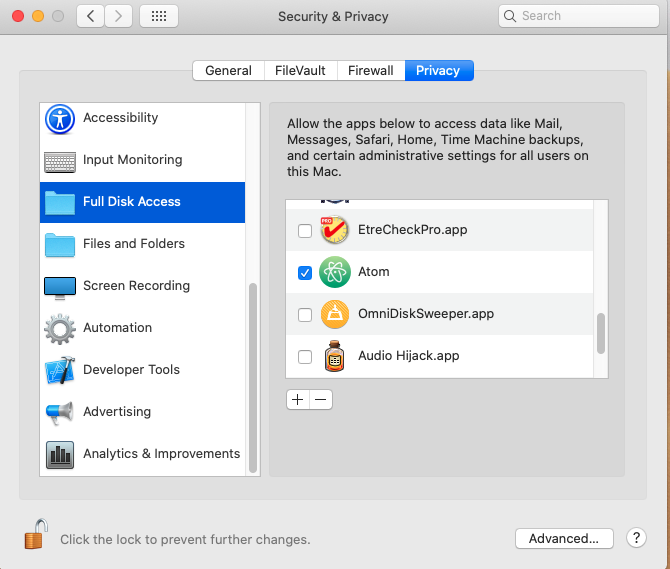
So far so good.
danallendotcom
on 8 Jan 2020
@danallendotcom I made a quick video showing what happens: https://www.youtube.com/watch?v=mojWUG16mQg&feature=youtu.be (on this video i forgot to remove the .php ext when trying to rename folder, trying it will just throw an error)
Notice I wasn't able to rename folders at all, or a file that wasn't active. Same thing happens if you tried deleting or duplicating the file.
As for the "Full Access", I don't believe it does anything. You should have access to files and folders already, which is all you need. It was one of the first things I tried before even creating this issue. Plus it wouldn't make sense for it to be working fine on the same file one minute, and then it doesn't... if it was an access issue. Crashes are still happening on a daily basis, you'll notice it depending how much you use Atom and interact with files. There are times where I need to use it a lot and it's when I notice it more. I run tests on it (and in safe mode), intentionally trying to make it crash to see if it goes away and it still happens. Although the package FB provided didn't function correctly, it made it clear that it was indeed an Electron issue in Atom since crashes disappeared completely, even when intentionally trying to make it crash. Hopefully that will be resolved soon.
codenift
on 8 Jan 2020
@danallendotcom I made a quick video showing what happens: https://www.youtube.com/watch?v=mojWUG16mQg&feature=youtu.be (on this video i forgot to remove the .php ext when trying to rename folder, trying it will just throw an error)
Notice I wasn't able to rename folders at all, or a file that wasn't active. Same thing happens if you tried deleting or duplicating the file.
Yes! I can see that folder renaming was acting in an improper manner not approved by the community.
I did not think of folder renaming, which makes me feel very stupid. When I tried, my lost files from previous renaming returned to normal, as if nothing wrong had occurred in the first place.
This animated gif shows what I mean more specifically.
https://youtu.be/Fpb_6dcktTE
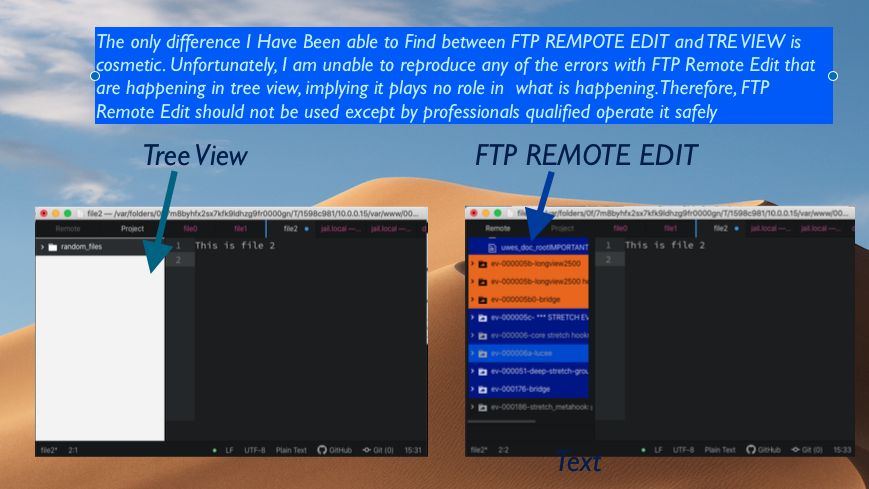
SIGNIFICANT FINDING
The computer in the video you made and the computer I have here in my office behave differently.
When I was a little childrens, my parents told me to expect situations like this when I reached the age of maturity. Boy, were they right! Then they gave me the most important lesson life has provided my peoples thus far: find out WHY there is a difference in the behavior, because only then is it possible be correct regarding the cause of the difference.
The difference in what your computer does and what mine does is not related to FTP Remote Edit vs. Tree View
danallendotcom
on 8 Jan 2020
@codenift I recently added a pull-request to address the issue with that package and it appears to have been merged and published. Update the package and check again to see if your problem persists and perhaps drop a comment over at the actual project instead of here if you notice any further problems.
For anyone else new here and experiencing this problem see this reply from earlier:
We know a lot of you are struggling with this issue and have been frustrated by it! We’re still working on a fix, but it involves an Electron upgrade which takes a little while. For the time being, our friends at Facebook have open sourced a workaround! Check it out here: https://github.com/facebookexperimental/atom-menu-patch-for-catalina
 dbalcomb
on 9 Jan 2020
dbalcomb
on 9 Jan 2020
@dbalcomb thanks for that update. It works now.
codenift
on 9 Jan 2020
Atom 1.43.0 still crashing on Catalina.
msccodestuff
on 18 Jan 2020
@msccodestuff use the 'atom-menu-patch-for-catalina' package for now, it's been updated and works now.
codenift
on 18 Jan 2020
FATAL ERROR: Ineffective mark-compacts near heap limit Allocation failed - JavaScript heap out of memory
 1: 0x10fae9525 node::MakeCallback(v8::Isolate*, v8::Local<v8::Object>, v8::Local<v8::Function>, int, v8::Local<v8::Value>*) [/Applications/Atom.app/Contents/Frameworks/Electron Framework.framework/Versions/A/Electron Framework]
 2: 0x10fae969a node::get_builtin_module(char const*) [/Applications/Atom.app/Contents/Frameworks/Electron Framework.framework/Versions/A/Electron Framework]
 3: 0x10c49baee v8::internal::FatalProcessOutOfMemory(v8::internal::Isolate*, char const*) [/Applications/Atom.app/Contents/Frameworks/Electron Framework.framework/Versions/A/Electron Framework]
 4: 0x10c55ce42 v8::internal::Heap::CreateFillerObjectAt(unsigned long, int, v8::internal::ClearRecordedSlots, v8::internal::ClearFreedMemoryMode) [/Applications/Atom.app/Contents/Frameworks/Electron Framework.framework/Versions/A/Electron Framework]
 5: 0x10c55f583 v8::internal::Heap::CreateFillerObjectAt(unsigned long, int, v8::internal::ClearRecordedSlots, v8::internal::ClearFreedMemoryMode) [/Applications/Atom.app/Contents/Frameworks/Electron Framework.framework/Versions/A/Electron Framework]
 6: 0x10c55b5ac v8::internal::Heap::CreateFillerObjectAt(unsigned long, int, v8::internal::ClearRecordedSlots, v8::internal::ClearFreedMemoryMode) [/Applications/Atom.app/Contents/Frameworks/Electron Framework.framework/Versions/A/Electron Framework]
 7: 0x10c5593e1 v8::internal::Heap::CollectGarbage(v8::internal::AllocationSpace, v8::internal::GarbageCollectionReason, v8::GCCallbackFlags) [/Applications/Atom.app/Contents/Frameworks/Electron Framework.framework/Versions/A/Electron Framework]
 8: 0x10c565af5 v8::internal::Heap::RootIsImmortalImmovable(int) [/Applications/Atom.app/Contents/Frameworks/Electron Framework.framework/Versions/A/Electron Framework]
 9: 0x10c565b5f v8::internal::Heap::RootIsImmortalImmovable(int) [/Applications/Atom.app/Contents/Frameworks/Electron Framework.framework/Versions/A/Electron Framework]
10: 0x10c1028f3 v8::internal::Factory::NewFillerObject(int, bool, v8::internal::AllocationSpace) [/Applications/Atom.app/Contents/Frameworks/Electron Framework.framework/Versions/A/Electron Framework]
11: 0x10c2dee0c v8::internal::RegisterConfiguration::AreAliases(v8::internal::MachineRepresentation, int, v8::internal::MachineRepresentation, int) const [/Applications/Atom.app/Contents/Frameworks/Electron Framework.framework/Versions/A/Electron Framework]
12: 0x10c73ac0e v8::internal::Parser::BuildIteratorCloseForCompletion(v8::internal::ZoneList<v8::internal::Statement*>*, v8::internal::Variable*, v8::internal::Expression*, v8::internal::IteratorType) [/Applications/Atom.app/Contents/Frameworks/Electron Framework.framework/Versions/A/Electron Framework]
 davelaflam
on 27 Jan 2020
davelaflam
on 27 Jan 2020
Don't mean to bother you guys, but I'm still experiencing this issue. Has happened hundreds of times over the past couple months.
 patwalls
on 5 Feb 2020
patwalls
on 5 Feb 2020
@patwalls They haven't updated Atom to fix this problem, but you can add the "atom-menu-patch-for-catalina" package. It's a temporary fix.
codenift
on 5 Feb 2020
This issue makes the app un-usable, even tried the atom-menu-patch-for-catalina package to no avail. This is an excellent use case for a hot fix to solve this issue.
davelaflam
on 8 Feb 2020
Did you try the latest version of the "atom-menu-patch-for-catalina" package? A few of the issues the package had were fixed. Works perfectly fine for me and others, no crashes or any issues since I installed it. I'm sure an update will be available soon for Atom but for now this package works.
codenift
on 8 Feb 2020
atom-menu-patch-for-catalina fixed it, thank you! So nice to not be crashing again.
patwalls
on 8 Feb 2020
Still happens, when I right click on the left sidebar of atom. On a file or whatever. Fix it please, it's Atom, and Mac, c'mon
 davidroyo
on 11 Feb 2020
davidroyo
on 11 Feb 2020
also crashes when you open Atom via command line, atom . Using the atom-menu-patch-for-catalina package only works if you open Atom and then File => Open. Waiting for the latest Electron release to push a fix for a production bug like this isn't following best practices.
davelaflam
on 11 Feb 2020
What do you mean it doesn't open via command line? It works just fine for me, i have no issues with that. Maybe you have another extension causing this. Did you try opening it in safe mode? The "atom-menu-patch-for-catalina" is the best solution we have right now. I'm satisfied with this temporary fix. Keep in mind this is an open source application and it's free, so we can't expect it to be 1000% perfect or expect to have full support on it from Github. You're free to contribute.
codenift
on 11 Feb 2020
It will open via command line, however, it crashes within a handful of minutes. Please be mindful that what might work for one person, might not work for another. Collecting this information will help to provide test cases when a fix is provided to thoroughly QA the project.
davelaflam
on 11 Feb 2020
Ok, well I had it open via command line for 30 minutes so far, still no crash. Will keep it open to see if it happens.
codenift
on 11 Feb 2020
Atom still crashes after installing Catalina atom menu patch. I'm starting Atom from the terminal. Crashes are random, occur after interaction with the Tree View. Last time it crashed after I clicked on a directory and pressed F2 to rename it.
MacOS 10.15.3, Atom 1.44.0, Electron 4.2.7.
Update
I have not noticed any crashes since, after two days of full time work. So, the patch is working great for me.
 evgenyneu
on 13 Feb 2020
evgenyneu
on 13 Feb 2020
Not sure why, there shouldn't be any difference opening Atom from terminal. All it's doing is launching the application. Are you seeing the html context menu with the "catalina atom menu patch" instead of the electron one? That looks like this:

If not, could it be something else preventing it from running? Extensions? I had Atom opened for 2 days straight and using it heavily since the issue was mentioned, launched from terminal and still no crashes. At the time I opened this issue I had different versions of Atom and electron, but I know the issues were still there after updating and seems like they're still working on it. I do have the same versions you have, so far I've been headache-free with the patch.
codenift
on 13 Feb 2020
Are you seeing the html context menu with the "catalina atom menu patch" instead of the electron one?
Yes, the patch has changed the right-click menu appearance to a slightly uglier one. :)
so far I've been headache-free with the patch.
Thanks, I think the patch reduced the number of crashes for me, but definitely not to zero. I'll see how often it crashes today.
evgenyneu
on 14 Feb 2020
Yes, definitely uglier, but i rather have that than headaches. At one point I thought the crashes were done when removing these files:
~/Library/Preferences/com.github.atom.helper.plist
~/Library/Preferences/com.github.atom.plist
...at least some of us thought, it felt like we were getting less crashes than before, but I kept getting more all up until the patch was available. So I knew deleting the files wasn't really the solution to getting rid of them completely, but perhaps those files need to be deleted before using the patch. Not sure. I guess you can try if you haven't. I've been weeks without a single crash. Did you try disabling all the third party extensions except the "catalina atom menu patch"?
codenift
on 14 Feb 2020
I got 1.44.0 and the same problem: randomly, when I try to rename a file or a folder or create a new one
or a new file, it closes...😢
 plasticmik
on 4 Mar 2020
plasticmik
on 4 Mar 2020
I got 1.44.0 and the same problem: randomly, when I try to rename a file or a folder or create a new one
or a new file, it closes...😢
Check out https://github.com/facebookexperimental/atom-menu-patch-for-catalina
Seems to be the working "fix" for the time being
 castorpm
on 4 Mar 2020
castorpm
on 4 Mar 2020
Still crashing with 1.45.
Providing Full Disk Access to Atom as described above seems to make it work.
 janbiedermann
on 13 Mar 2020
janbiedermann
on 13 Mar 2020
Installing the https://atom.io/packages/atom-menu-patch-for-catalina package fixed this for me.
 sethfloydjr
on 16 Mar 2020
sethfloydjr
on 16 Mar 2020
@darangi The problem is not resolved on the Atom side. Why is the issue closed?
afuno
on 16 Mar 2020
Hey @afuno the issue has been resolved by upgrading to Electron 5.0.12 but it's still in Atom Nightly and it will take it's course to go from Nightly to Beta then Stable.
You can get the version running on Electron 5.0.12, where this issue got resolved by downloading the latest nightly version.
Let us know folks if you got the chance to test it out 🙂
 lkashef
on 19 Mar 2020
lkashef
on 19 Mar 2020
Taking it for a spin – will report if it still crashes.
Update: so far so good – no crashes :+1:
 jouni
on 19 Mar 2020
jouni
on 19 Mar 2020
@alonpr right now only the nightly version has electron 5.0.12, because nightly version of atom get every commit
This commit resolve the issue: https://github.com/atom/atom/pull/20172
But there is a process to go from nightly - to beta - to stable.
Here you can see the beta and stable changelog: https://github.com/atom/atom/releases
 luiscobits
on 27 Mar 2020
luiscobits
on 27 Mar 2020
Thought I'd add my voice to make committers aware this has become a serious annoyance for me too. For the last few months, but seemingly more often in the last few weeks, Atom turned from being a very stable application that would just never crash, to one that crashes multiple times per day. It is now the most unstable application I have worked with in years. Please do something to fix this.
I don't seem to lose any work when this happens, I just need to restart, otherwise I would be a lot more upset about how often this is now happening. Especially after I've been working for more than a few minutes after the last post-crash restart, every time I go to duplicate a file, or rename a file, it seems there's a 50% chance of a crash. It is that frequent, multiple times per day.
I'm not sure what happened to turn this from a very stable application into one that has become so crashy - please be aware of this problem and do something to fix it. The issue seems to be concentrated in any type of file-related operation, such as moving, duplicating or renaming a file.
On MacOS 10.15.3, Atom 1.45.0. I am also using BitDefender AntiVirus for Mac 8.1.6.3 - which may be something you should look at. I know if I try to rename or move certain files directly in the OS which Bit Defender thinks should be protected, I get a warning dialog asking for Administrator permissions before this is allowed. This should not be the case with files owned by me within my own home directory, however.
 michael-crawford
on 10 Apr 2020
michael-crawford
on 10 Apr 2020
Thanks for reaching out @michael-crawford.
It sounds like you might be running into the same bug described in this issue. If so, the issue has been resolved by upgrading to Electron 5.0.12 but it’s still in Atom Nightly and it will take it’s course to go from Nightly to Beta then Stable.
You can get the version running on Electron 5.0.12, where this issue got resolved by downloading the latest nightly version.
If you’re running into something different, please open a new issue and completely fill out the template so that we can get to the bottom of things most efficiently.
lkashef
on 10 Apr 2020
Related issues
 alexwhitman
·
119Comments
alexwhitman
·
119Comments
 mjpierce7590
·
109Comments
mjpierce7590
·
109Comments
 pbhogan
·
126Comments
pbhogan
·
126Comments
 marlencrabapple
·
107Comments
marlencrabapple
·
107Comments
 AustP
·
135Comments
AustP
·
135Comments
Most helpful comment
Same problem. I play roulette when I want to rename, duplicate or do something else like that.