Async-storage: Async-Storage compatiblility with react-native 0.62.0-rc2?
You want to:
I am using Async-Storage since it is required by redux-persistence. currently, I have react-native version 0.59 I would like to upgrade to 0.60+ but I am getting some errors during runtime regarding Async Storage not sure if it is a bug or something I missed during the upgrade process.
But the app compiles fine without any issues as I manually linked the library.
Is Async-Storage compabtible with react-native 0.62.0-rc2?
Details:
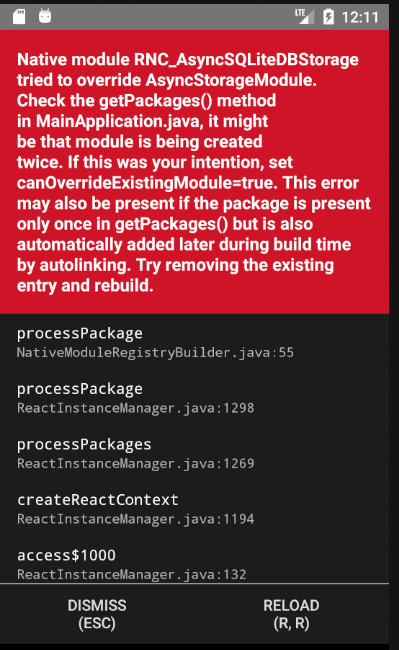
The error I am having:
 rgouzal
All 7 comments
Seems like some "leftovers" from 0.59 are blocking auto-linking. Have you tried what error message says?
 Krizzu
on 18 Feb 2020
Krizzu
on 18 Feb 2020
Seems like some "leftovers" from 0.59 are blocking auto-linking. Have you tried what error message says?
What do you mean by "leftovers"?
If you mean that the code for the module is created in getPackages() twice I already checked that and found that it's not created twice. Not just that I also checked all places that need the library to be created on.
rgouzal
on 18 Feb 2020
Btw the react-native version is 0.62 cause I did the upgrade manually depending on the following git changes here:
https://react-native-community.github.io/upgrade-helper/?from=0.59.10&to=0.62.0-rc.2
rgouzal
on 18 Feb 2020
@Krizzu Can you please tell me what is the problem I am having?
rgouzal
on 19 Feb 2020
Do you have something like the following snippet in your MainApplication?
@Override
protected List<ReactPackage> getPackages() {
    List<ReactPackage> packages = new PackageList(this).getPackages();
    packages.add(new AsyncStoragePackage());
    return packages;
}
If so, you've added AsyncStoragePackage twice. Once with auto-linking, and again manually. You should remove the latter.
 tido64
on 20 Feb 2020
tido64
on 20 Feb 2020
@tido64 That was it, thank you, sir. I am closing this now.
rgouzal
on 21 Feb 2020
@0x01Brain sorry, I've been off for some time.
By "leftovers" I meant code that was used pre-upgraded to link native modules. Since there's auto-linking in place in 0.60+, there's no need for that.
Happy to see that you've got it fixed :)
Krizzu
on 24 Feb 2020
Related issues
 muhammadn
·
58Comments
muhammadn
·
58Comments
 loic-lopez
·
37Comments
loic-lopez
·
37Comments
 josmithua
·
20Comments
josmithua
·
20Comments
 hms111111
·
24Comments
hms111111
·
24Comments
 santhanakrishnanstark
·
67Comments
santhanakrishnanstark
·
67Comments
Most helpful comment
Do you have something like the following snippet in your
MainApplication?If so, you've added
AsyncStoragePackagetwice. Once with auto-linking, and again manually. You should remove the latter.