Async-storage: [@RNC/AsyncStorage]: NativeModule: AsyncStorage is null.
in ios pod way,i have try everything....
 hms111111
All 24 comments
We need more details to help you.
Please follow issue template and write your configuration, what you tried etc.
 Krizzu
on 13 May 2019
Krizzu
on 13 May 2019
maybe it's related:
Loading dependency graph, done.
error: bundling failed: Error: While trying to resolve module `@react-native-community/async-storage` from file `/Users/pj/src/utils/user.js`, the package `/Users/pj/node_modules/@react-native-community/async-storage/package.json` was successfully found. However, this package itself specifies a `main` module field that could not be resolved (`/Users/pj/node_modules/@react-native-community/async-storage/lib/index.js`. Indeed, none of these files exist:
"@react-native-community/async-storage": "1.4.0"
 shuffledex
on 13 May 2019
shuffledex
on 13 May 2019
with me it does not work either.
I've tried everything.
react-native unlink @react-native-community/async-storage
react-native link @react-native-community/async-storage
pod 'RNCAsyncStorage', :path => '../node_modules/@react-native-community/async-storage'
pod install
but nothing works on ios
I dont know what to try anymore
[@RNC/AsyncStorage]: NativeModule: AsyncStorage is null.
<unknown>
    AsyncStorage.js:22:8
loadModuleImplementation
    require.js:331:6
<unknown>
    index.js:5
loadModuleImplementation
    require.js:331:6
<unknown>
    index.js:1
loadModuleImplementation
    require.js:331:6
<unknown>
    routes.js:3
loadModuleImplementation
    require.js:331:6
<unknown>
    index.js:9
loadModuleImplementation
    require.js:331:6
<unknown>
    index.js:6
loadModuleImplementation
    require.js:331:6
guardedLoadModule
    require.js:197:45
global code
    <unknown file>:0
 rafaelbomfim
on 13 May 2019
rafaelbomfim
on 13 May 2019
Sorry to hear you have this issue. 😞 Can you try the steps I outlined here and report back: https://github.com/react-native-community/react-native-async-storage/issues/86#issuecomment-489395351
You should make sure that RNCAsyncStorage is a target in the Pods project in Xcode. If it's missing, then CocoaPods haven't linked it in yet, and would explain why you're getting AsyncStorage is null. I don't think this is specifically related AsyncStorage.
 tido64
on 13 May 2019
tido64
on 13 May 2019
@rafaelbomfim yes,i'm do the same things like you

hms111111
on 14 May 2019
In my case I had this issue on Android. The problem was that by default react-native link command assumes that protected List<ReactPackage> getPackages() method is located in MainApplication.java. In our app we moved this method to another file. To solve the issue I had to link manually.
 palexs
on 27 May 2019
palexs
on 27 May 2019
I'm having this issue as well on iOS builds. Not using CocoaPods. Followed @tido64's suggestions from #86, but to no avail.
 infiniteline
on 28 May 2019
infiniteline
on 28 May 2019
Just a reminder: if you're using Expo you can't get this package to work.
@infiniteline It'd be best if you could provide some more info about your setup/repro steps.
thanks.
Krizzu
on 28 May 2019
Thanks for your reply, @Krizzu. I was able to resolve it for iOS through manual linking. Not sure why I had to resort to that? This is an ejected project that has been made into a workspace after installing Firebase. Do you think that makes a difference?
infiniteline
on 28 May 2019
@infiniteline I'm glad you got it working. This could have been due react native link nature, where it expects a certain project structure to operate correctly.
Krizzu
on 29 May 2019
I was on a different sheme/target. react-native link only apply the changes to the main target. Not using the pods ways though. Maybe it may help :)
 Vic-L
on 3 Jun 2019
Vic-L
on 3 Jun 2019
also using latest expo. cant get this package to work. linking has no effect.
 appjitsu
on 13 Jun 2019
appjitsu
on 13 Jun 2019
Hi @appjitsu
Please checkout troubleshooting docs
thanks.
Krizzu
on 13 Jun 2019
Manual linking for iOS solved it for me
 Walaa106
on 19 Jun 2019
Walaa106
on 19 Jun 2019
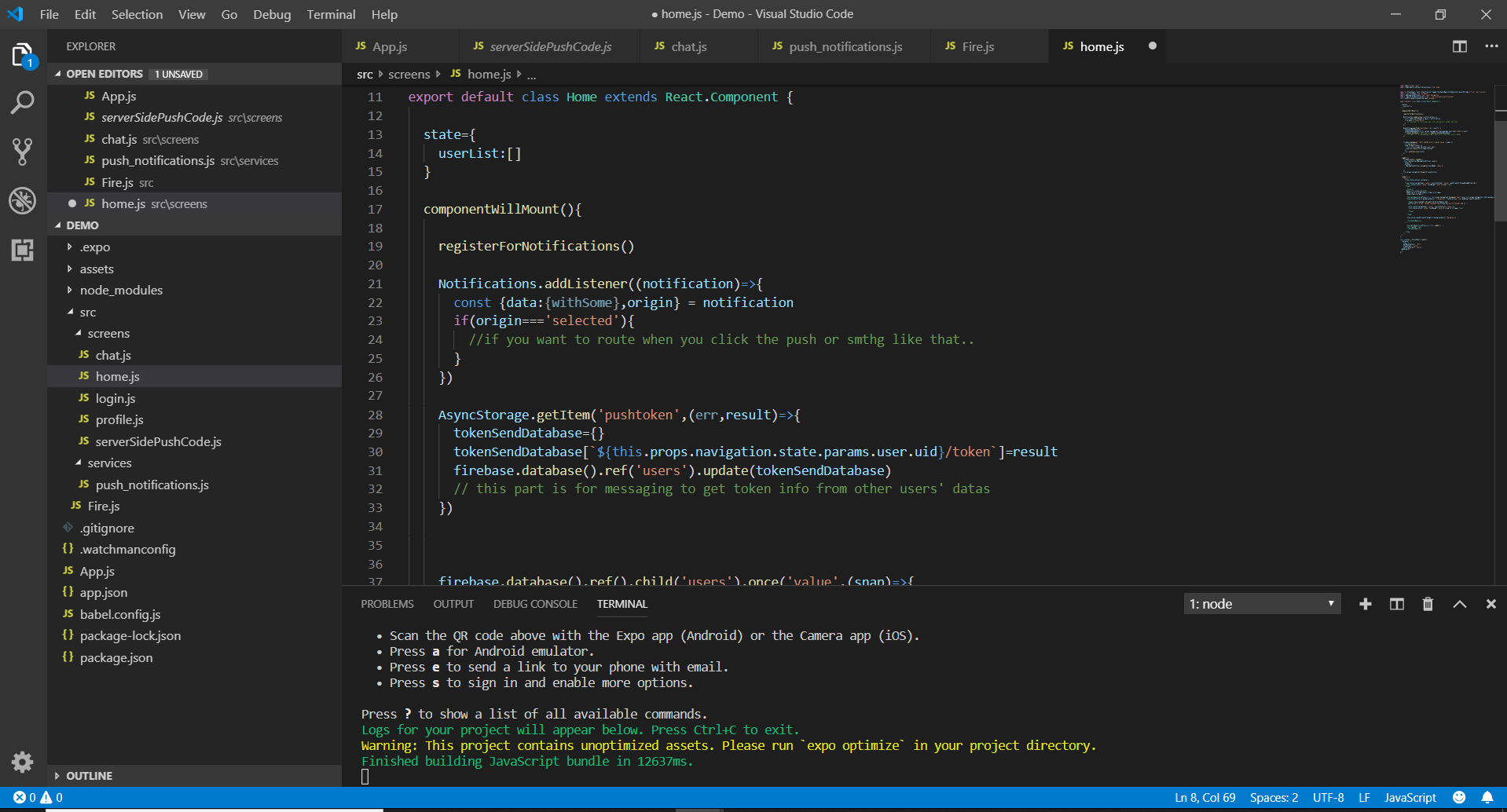
Hello Mr @Krizzu. i have same problem but i already code asyncstorage in my file and i use expo. Can u help me to fix it? i will appreciate it. I'm rookie
 HoangNamVN
on 24 Jun 2019
HoangNamVN
on 24 Jun 2019
Hi @HoangNamVN
Unfortunately, You cannot use this package with Expo due to its architecture. You can do so by ejecting or waiting for Expo team to upgrade to Community's Async Storage.
Krizzu
on 24 Jun 2019
In that case this should be stated in the README. https://facebook.github.io/react-native/docs/asyncstorage now points to this project.
EDIT: One can see that the project contains native code / doesn't work with expo as this project needs linking so tido64 makes a fair point.
 Tyratox
on 26 Jun 2019
Tyratox
on 26 Jun 2019
To be fair, it is clearly stated in Expo's documentation: https://docs.expo.io/versions/latest/expokit/eject/#should-i-eject-to-expokit. And here: https://docs.expo.io/versions/latest/introduction/faq/#how-do-i-add-custom-native-code. This applies to any package containing native code, not just AsyncStorage.
tido64
on 26 Jun 2019
Right, looks like the issue is gone. Closing this one.
Krizzu
on 4 Jul 2019
@Krizzu Sorry to revive this but I'm still having this issue RN 0.60.4 on Android. How can I fix this? Some people say to "manually install it", but how? Never had issues on iOS, and i'm not even using pod. But Android is making me struggle.
 msqar
on 30 Jul 2019
msqar
on 30 Jul 2019
@msqar We have instructions for manual linking. but the auto-linking feature should do it for you.
Auto linking should work out of the box if you're willing to dive why it's not happening, checkout diff comparison between RN 0.59 and 0.60 to see what changes are necessary to get it to work
Krizzu
on 30 Jul 2019
问题解决方案
1,react-native unlink @react-native-community/async-storage
2,cd ios && pod install
 nolan12345
on 24 Aug 2019
nolan12345
on 24 Aug 2019
@Krizzu Sorry to revive this but I'm still having this issue RN 0.60.4 on Android. How can I fix this? Some people say to "manually install it", but how? Never had issues on iOS, and i'm not even using pod. But Android is making me struggle.
Were you able to solve this issue? I'm suffering from the same using RN 0.60.4/5 just on Android.
@Krizzu Someone opened an issue 5 days ago, I followed your advice of cleaning the build and re-installing dependencies but sadly, no positive results just yet.
https://github.com/react-native-community/async-storage/issues/205
I'm getting the "AsyncStorage is null" error just on Android. Could you check on this, please? :)
 Arachnids
on 17 Sep 2019
Arachnids
on 17 Sep 2019
@Krizzu yes, as you said... after i properly migrated to 0.60.5 autolinking started to work and everything works as expected, i haven't had to manually install it :) no errors on both Android/iOS. Thanks man!
msqar
on 17 Sep 2019
Related issues
 rogueturnip
·
27Comments
rogueturnip
·
27Comments
 bachhuberdesign
·
18Comments
Krizzu
·
36Comments
bachhuberdesign
·
18Comments
Krizzu
·
36Comments
 Waqas-Jani
·
28Comments
Waqas-Jani
·
28Comments
 burhanahmed92
·
27Comments
burhanahmed92
·
27Comments
Most helpful comment
with me it does not work either.
I've tried everything.
react-native unlink @react-native-community/async-storage
react-native link @react-native-community/async-storage
pod 'RNCAsyncStorage', :path => '../node_modules/@react-native-community/async-storage'
pod install
but nothing works on ios
I dont know what to try anymore
[@RNC/AsyncStorage]: NativeModule: AsyncStorage is null.<unknown> AsyncStorage.js:22:8 loadModuleImplementation require.js:331:6 <unknown> index.js:5 loadModuleImplementation require.js:331:6 <unknown> index.js:1 loadModuleImplementation require.js:331:6 <unknown> routes.js:3 loadModuleImplementation require.js:331:6 <unknown> index.js:9 loadModuleImplementation require.js:331:6 <unknown> index.js:6 loadModuleImplementation require.js:331:6 guardedLoadModule require.js:197:45 global code <unknown file>:0