Async-storage: Read values from asyncStorage in native module
You want to:
Read (and possibly write) data from asyncStorage in native module (java/swift)
Details:
Hi there 👋
Is there a way to read (and possibly write) saved data by js code from native module?
I found some workarounds for java on Stackoverflow but posts there are from more than 3 years ago.
If currently there is no public api for it could you please point me into right direction of implementing something which might be at least a bit future proof (considering ASv2 work)?
 dominiczaq
All 22 comments
@dominiczaq We have implemented the delegate that can read/write to storage on iOS.
Currently there is no equivalent for Android, unfortunately.
I haven't give much thought about allowing access to saved data from native, although I think that's something we could discuss for the v2 in the future.
 Krizzu
on 6 Nov 2019
Krizzu
on 6 Nov 2019
thanks for the quick response!
looking at the android source code, getting value might be possible by
using
ReactDatabaseSupplier::getInstance
and
AsyncLocalStorageUtil::getItemImpl
I'll try to confirm that when I'm not on mobile 😅
On Wed, 6 Nov 2019, 15:22 Krzysztof Borowy, notifications@github.com
wrote:
@dominiczaq https://github.com/dominiczaq We have implemented the delegate
that can read/write to storage on iOS.
https://github.com/react-native-community/async-storage/blob/LEGACY/docs/advanced/BrownfieldIntegration.mdCurrently there is no equivalent for Android, unfortunately.
I haven't give much thought about allowing access to saved data from
native, although I think that's something we could discuss for the v2 in
the future.—
You are receiving this because you were mentioned.
Reply to this email directly, view it on GitHub
https://github.com/react-native-community/async-storage/issues/238?email_source=notifications&email_token=ABWFL7M7M4KIED3S74SV743QSLHK3A5CNFSM4JJULAYKYY3PNVWWK3TUL52HS4DFVREXG43VMVBW63LNMVXHJKTDN5WW2ZLOORPWSZGOEDGWEWQ#issuecomment-550330970,
or unsubscribe
https://github.com/notifications/unsubscribe-auth/ABWFL7I3S4RWJFJLBK4FMH3QSLHK3ANCNFSM4JJULAYA
.
dominiczaq
on 6 Nov 2019
In the same boat. Looking to save an item from native iOS in a notification service extension into AsyncStorage. In a sea of linking issues. Anyone successfully done this?
 gordoneliel
on 7 Nov 2019
gordoneliel
on 7 Nov 2019
@gordoneliel what kind of linking issues you see?
Krizzu
on 7 Nov 2019
I'll try to confirm that when I'm not on mobile 😅
I've used
AsyncLocalStorageUtil.getItemImpl(ReactDatabaseSupplier.getInstance(context).get(), "key"));
and it seems to be working.
Question is - is it safe? Is there a possibility of ie. memory leaks?
dominiczaq
on 7 Nov 2019
@dominiczaq Can't tell for sure, but it seems like it's fine (they way you used those classes are the same way of how the module is using them).
Krizzu
on 7 Nov 2019
@Krizzu Thanks for the response. I'm getting these linking issues.
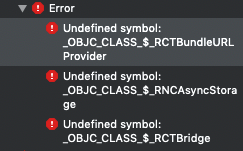
 .
.
I also also wondering what the best way to achieve saving state from an app extension to AsyncStorage is. What I'm trying to do now is create an instance of AsyncStorage with the current js bundle and save to AsyncStorage with the multiSet function. Do you know if this would work in the first place?
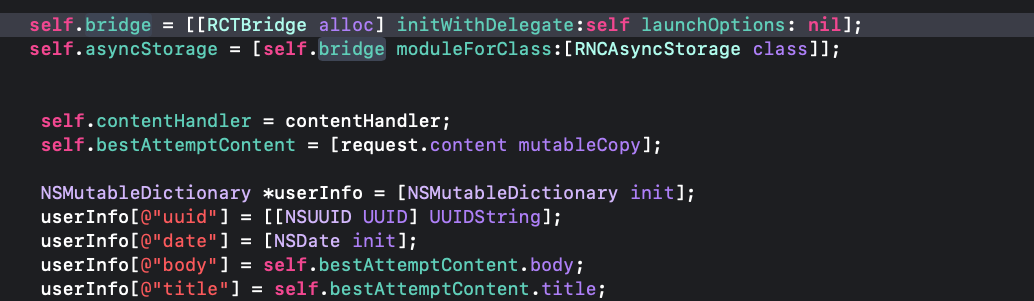
gordoneliel
on 7 Nov 2019
@gordoneliel Hard to tell just from ss what's wrong. Have you tried to clean and rebuild the project? Are you opening project through .xcworkspace ?
Regarding your question - I've never had a case that I had to access AsyncStorage from native side. Although, I think your approach is fine. I'd also add some helper to write/read from it, as using .multi* directly is not super elegant IMO.
Krizzu
on 8 Nov 2019
@Krizzu I am using the xcworkspace file. Below is my pods for the service extension
target 'notificationService' do
inherit! :search_paths
end
The project has no problem importing the header files for
import
import
However, when I try to create an instance of any react native library, I get a linker error. Is there a setup for a project with extensions?
gordoneliel
on 8 Nov 2019
@gordoneliel AFAIK, you don't need any extra setup. cc @tido64
Krizzu
on 13 Nov 2019
@gordoneliel It looks like you're not linking libReact.a and libRNCAsyncStorage.a. How are you consuming React Native? Does your Podfile include it? Are you using auto-linking?
 tido64
on 14 Nov 2019
tido64
on 14 Nov 2019
@tido64 I am using autolinking. This is my Podfile. I used inherit! :search_paths on my notificationService extension. It's able to import the header files, just not the actual implementations. Do I have to link them manually?
platform :ios, '9.0'
require_relative '../node_modules/@react-native-community/cli-platform-ios/native_modules'

target 'comingsoon' do
  # Pods for ComingSoon
  pod 'FBLazyVector', :path => "../node_modules/react-native/Libraries/FBLazyVector"
  pod 'FBReactNativeSpec', :path => "../node_modules/react-native/Libraries/FBReactNativeSpec"
  pod 'RCTRequired', :path => "../node_modules/react-native/Libraries/RCTRequired"
  pod 'RCTTypeSafety', :path => "../node_modules/react-native/Libraries/TypeSafety"
  pod 'React', :path => '../node_modules/react-native/'
  pod 'React-Core', :path => '../node_modules/react-native/'
  pod 'React-CoreModules', :path => '../node_modules/react-native/React/CoreModules'
  pod 'React-Core/DevSupport', :path => '../node_modules/react-native/'
  pod 'React-RCTActionSheet', :path => '../node_modules/react-native/Libraries/ActionSheetIOS'
  pod 'React-RCTAnimation', :path => '../node_modules/react-native/Libraries/NativeAnimation'
  pod 'React-RCTBlob', :path => '../node_modules/react-native/Libraries/Blob'
  pod 'React-RCTImage', :path => '../node_modules/react-native/Libraries/Image'
  pod 'React-RCTLinking', :path => '../node_modules/react-native/Libraries/LinkingIOS'
  pod 'React-RCTNetwork', :path => '../node_modules/react-native/Libraries/Network'
  pod 'React-RCTSettings', :path => '../node_modules/react-native/Libraries/Settings'
  pod 'React-RCTText', :path => '../node_modules/react-native/Libraries/Text'
  pod 'React-RCTVibration', :path => '../node_modules/react-native/Libraries/Vibration'
  pod 'React-Core/RCTWebSocket', :path => '../node_modules/react-native/'

  pod 'React-cxxreact', :path => '../node_modules/react-native/ReactCommon/cxxreact'
  pod 'React-jsi', :path => '../node_modules/react-native/ReactCommon/jsi'
  pod 'React-jsiexecutor', :path => '../node_modules/react-native/ReactCommon/jsiexecutor'
  pod 'React-jsinspector', :path => '../node_modules/react-native/ReactCommon/jsinspector'
  pod 'ReactCommon/jscallinvoker', :path => "../node_modules/react-native/ReactCommon"
  pod 'ReactCommon/turbomodule/core', :path => "../node_modules/react-native/ReactCommon"
  pod 'Yoga', :path => '../node_modules/react-native/ReactCommon/yoga'

  pod 'DoubleConversion', :podspec => '../node_modules/react-native/third-party-podspecs/DoubleConversion.podspec'
  pod 'glog', :podspec => '../node_modules/react-native/third-party-podspecs/glog.podspec'
  pod 'Folly', :podspec => '../node_modules/react-native/third-party-podspecs/Folly.podspec'

  pod 'react-native-intercom', :path => '../node_modules/react-native-intercom'

  # React Native Maps dependencies
  rn_maps_path = '../node_modules/react-native-maps'
  pod 'react-native-google-maps', :path => rn_maps_path
  pod 'GoogleMaps'
  pod 'Google-Maps-iOS-Utils'

  use_native_modules!

end

target 'comingsoonTests' do
  inherit! :search_paths
  # Pods for testing
end

target 'notificationService' do
  inherit! :search_paths

end
@gordoneliel: As far as I understand (I'm no CocoaPods expert), comingsoon is the only target that will link with React Native and any other native modules. notificationService will only inherit the search paths as you've declared, but will rely on the native modules being present in whatever target it will be linked into. If it is supposed to be standalone, you'll need to add your pod lines here as well. There might be a clever way to do this without having to copy but I don't know how that would look like off the top of my head.
tido64
on 18 Nov 2019
@tido64 I updated my Podfile with these dependencies. I am not including the Dev-Support pod but I have build issues with an API that is not available to share extensions so the build breaks.
  target 'notificationService' do
    inherit! :search_paths

    pod 'React', :path => '../node_modules/react-native/'
    pod 'React-Core', :path => '../node_modules/react-native/'
    pod 'React-CoreModules', :path => '../node_modules/react-native/React/CoreModules'

    pod 'RNCAsyncStorage', :path => '../node_modules/@react-native-community/async-storage'
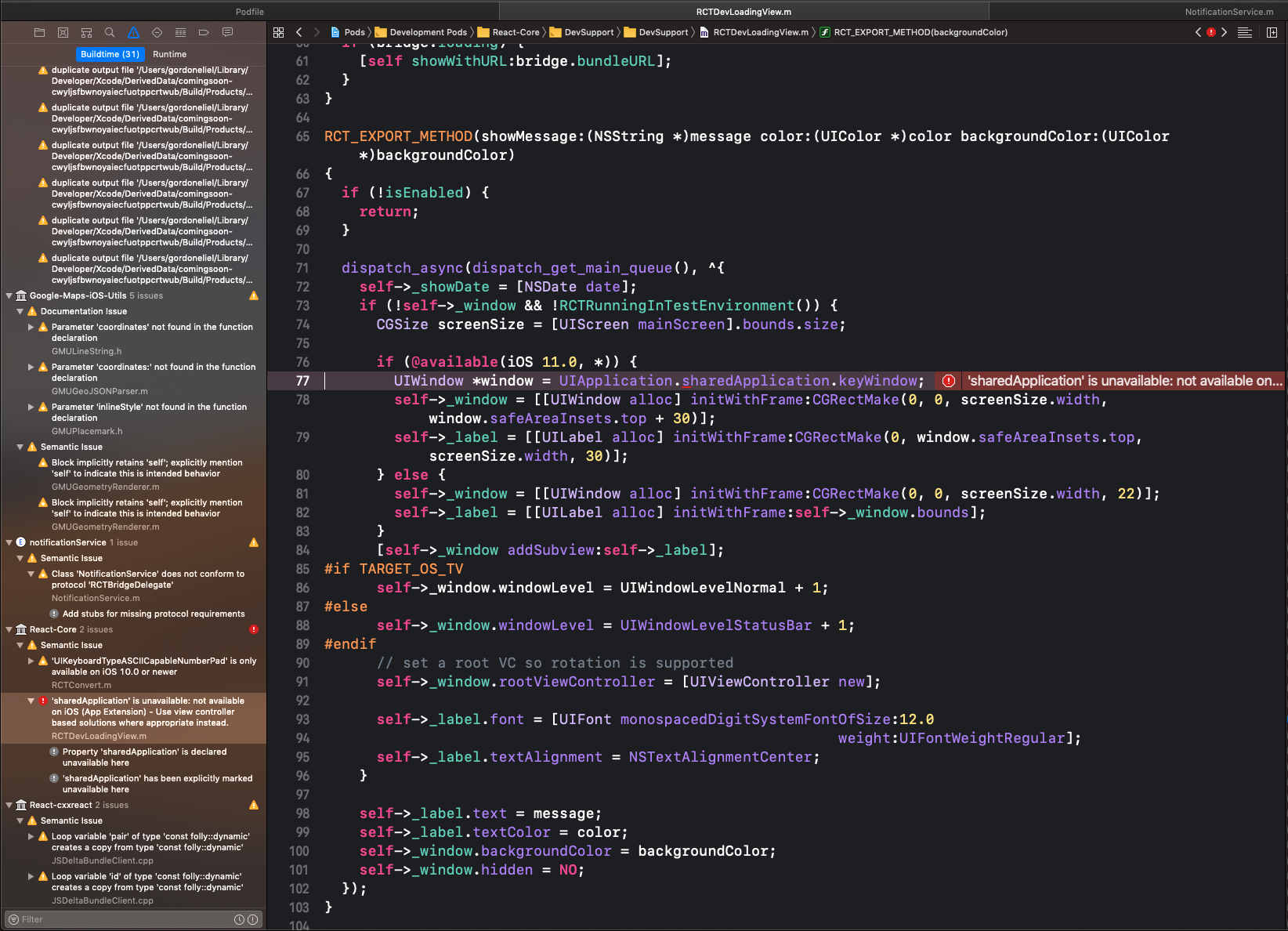
gordoneliel
on 18 Nov 2019
For anyone running into this issue, I was able to resolve it by marking "Require Only App-Extension-Safe API" to No, under Xcode's build settings. Looks like react-native is using some API unavailable to App extensions.
gordoneliel
on 18 Nov 2019
@Krizzu @tido64 Was able to resolve the linking issues. Thanks for the help! However, I'm still finding a hard time trying to save data into AsyncStorage from native iOS to JS. I implemented the delegates for storage but can't seem to use the default storage implementation to save to the same store that JS uses. Any ideas?
gordoneliel
on 18 Nov 2019
@dominiczaq We have implemented the delegate that can read/write to storage on iOS.
Currently there is no equivalent for Android, unfortunately.
I haven't give much thought about allowing access to saved data from native, although I think that's something we could discuss for the v2 in the future.
Sorry for digging out some antics but @Krizzu could you elaborate on the delegate? Do I understand that correctly that when using RNCAsyncStorageDelegate I'll have to implement all delegate's protocol methods by myself?
dominiczaq
on 8 Feb 2020
@dominiczaq, @gordoneliel: Once you've implemented RNCAsyncStorageDelegate, you're in charge of storing/retrieving data. JS will store/retrieve data the same way native does, and not vice versa, if that makes sense. E.g. if I had an RNCAsyncStorageDelegate implementation that stores everything in memory only, JS will do the exact same thing (after all, it's the exact same code being executed).
If you don't want to implement the storage yourself, you can also retrieve the RNCAsyncStorage instance and access the storage directly. I've outlined how it can be done in #80.
tido64
on 9 Feb 2020
@dominiczaq We have implemented the delegate that can read/write to storage on iOS.
Currently there is no equivalent for Android, unfortunately.
I haven't give much thought about allowing access to saved data from native, although I think that's something we could discuss for the v2 in the future.
@Krizzu I follow the link in your post but it's not available anymore. Can you give me the updated link? Thanks
 TBH-TPB
on 6 May 2020
TBH-TPB
on 6 May 2020
Yup, it's in our docs
Krizzu
on 6 May 2020
@Krizzu Isn't there a way to just get the value without having to implement all the delegate methods?
 focux
on 6 May 2020
focux
on 6 May 2020
see first comment here
https://github.com/react-native-community/async-storage/issues/80
On Wed, 6 May 2020, 22:20 Leonardo E. Dominguez, notifications@github.com
wrote:
@Krizzu https://github.com/Krizzu Isn't there a way to just get the
value without having to implement all the delegate methods?—
You are receiving this because you were mentioned.
Reply to this email directly, view it on GitHub
https://github.com/react-native-community/async-storage/issues/238#issuecomment-624868808,
or unsubscribe
https://github.com/notifications/unsubscribe-auth/ABWFL7OAJ4NB5LMKPSKROLDRQHBBTANCNFSM4JJULAYA
.
dominiczaq
on 6 May 2020
Related issues
 rogueturnip
·
27Comments
rogueturnip
·
27Comments
 StevenMasini
·
22Comments
StevenMasini
·
22Comments
 josmithua
·
20Comments
josmithua
·
20Comments
 hms111111
·
24Comments
hms111111
·
24Comments
 burhanahmed92
·
27Comments
burhanahmed92
·
27Comments