Async-storage: AsyncStorage.removeItem(key) not working as expected on iOS
Current behavior
When using AsyncStorage.removeItem(key) on iOS the key is not removed from the storage. At first I thought It was due to the simulator but I tried both the simulator and a real device and is not working.
Expected behavior
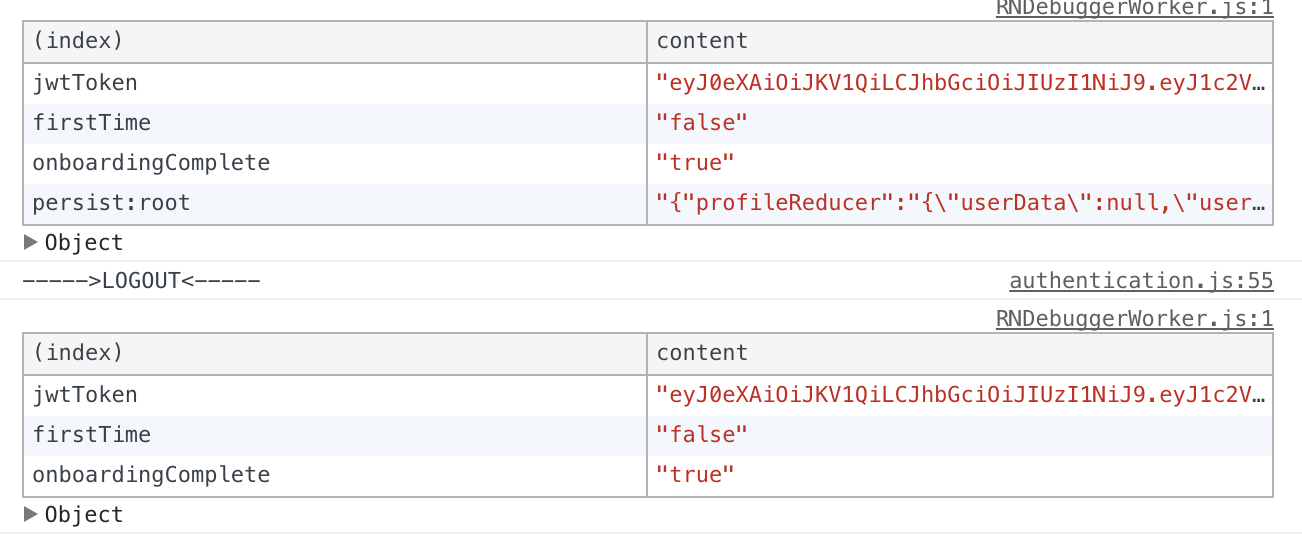
Key should be removed from AsyncStorage as in Android. On the screenshots below you can see that on Android the key is removed while on iOS you can still see it. Is not a debugger issue either because if I refresh/close the app the key is still there.
Android

iOS
Repro steps
Just try to await AsyncStorage.removeItem(key). I'm using redux-persist so I don't know if there's a conflict between libraries somehow but If that were the case Android should not work either.
Environment
- Async Storage version: 1.4.0
- React-Native version: 0.59.5
- Platform tested: iOS && Android
 facuacostag
All 12 comments
@facuacostag Hey, thanks for taking a time on it.
In your examples, android removes two values, while iOS only one (right?). I've noticed that few other devs using redux-persist came across similar problems.
I'll try to dig into it later today and come back with answer.
thanks.
 Krizzu
on 14 May 2019
Krizzu
on 14 May 2019
@Krizzu Yeah, Android and iOS remove the persisted reducer from redux-persist which is totally expected but iOS doesn't remove the jwtToken key which is the one I'm trying to remove with AsyncStorage.removeItem('jwtToken'). I should have pointed that out on the first message, sorry.
facuacostag
on 14 May 2019
i have same error. Please fix it
 nghiatv
on 15 May 2019
nghiatv
on 15 May 2019
@facuacostag @nghiatv Any repro steps (or repo) that I could look into? I'm testing this on fresh project and can't reproduce the issue.
Krizzu
on 15 May 2019
I have almost the same issue, not quite sure if its the same. I can remove the item, and check if its removed and it will show an empty array. But If I restart or relaunch the app, I can still grab the stored items that I have recently cleared. Android works fine
 vinnyhoward
on 17 May 2019
vinnyhoward
on 17 May 2019
@vinnyhoward Hey,
Mind sharing repo, so I could check it out?
Krizzu
on 17 May 2019
@Krizzu I can't share the repo since its my companies product but I can show the code that I have that's using it. I hope it can give you some clues.
On authentication:
 onSignin: ({form, setUser, navigation, setWallet, analyticsEvent}) => async values => {
      let data;
      Keyboard.dismiss();
      try {
        form === 'signUp' && !navigation?.state?.params?.form && (await auth0Signup(values));

        data = await auth0Login(values);
        data.profile.birthDate = data.profile[`${config.NAMESPACE}birthDate`];
        data.profile.fullName = data.profile[`${config.NAMESPACE}fullName`];
        delete data.profile[`${config.NAMESPACE}birthDate`];
        delete data.profile[`${config.NAMESPACE}fullName`];

        form === 'signUp' && !navigation?.state?.params?.form &&
          (await verifyAccount({
            email: data.profile.email,
          }));
        form === 'signUp' && !navigation?.state?.params?.form && (await setMixpanelAlias(data.profile.email));
        form === 'signUp' && !navigation?.state?.params?.form && (await mixpanelIdentify(data.profile));
        form === 'signUp' && !navigation?.state?.params?.form && analyticsEvent('Sign up', {email: data.profile.email});

        (form === 'signIn' || navigation?.state?.params?.form) && (await mixpanelIdentify(data.profile));
        (form === 'signIn' || navigation?.state?.params?.form) && analyticsEvent('Sign in', {email: data.profile.email});
        (form === 'signIn' || navigation?.state?.params?.form) && (await setPushNotificationsDeviceTokens());
      } catch (error) {
        return {[FORM_ERROR]: error};
      }

      let wallet;
      try {
        wallet = await fetchWallet(data ?.authData ?.accessToken);
      } catch (e) {
        throw new Error(e);
}

      setWallet(wallet);

      setUser(data);

      if (wallet) {
        await AsyncStorage.setItem('currentWallet', wallet?.walletAddress);

        navigation.navigate('ExplorePage');
      } else {
        navigation.navigate('CheckInbox');
      }
    },
  })),
On logout:
    onLogout: ({navigation, logout}) => async () => {
      try {
        await AsyncStorage.removeItem('currentWallet');
        const getItem = await AsyncStorage.getItem('currentWallet');
        //This works and it is cleared, but when the app is relaunched or refreshed the value comes back
        console.log('Should not be stored:', getItem);
      } catch (err) {
        throw new Error(err);
      }
      navigation.navigate('AuthPage');
      await logout();
    },
Package.json:
    "@react-native-community/async-storage": "^1.3.4",
    "redux-persist": "^5.10.0",
I hope these snippets help. I have been playing with it more, it seems like when I sign-in/sign-up set my wallet to local storage, constantly close the app and reopen the app before I even logout, the items persist and won't permanently delete even after I log out.
As opposed to if I stored the item, and clear it in the same app session, it will be permanently deleted after I logout, close the app, and then reopen. It. Maybe it has to do with redux persist? Not quite sure to be honest.
vinnyhoward
on 17 May 2019
@vinnyhoward I don't see any red lights here. It has to be something more than that.
I can suggest creating some kind of a proxy that will call get/set/remove on AsyncStorage, instead of calling it directly. You'll be able to track what operations are used, with what arguments and when. This could help to track down where this inconsistency comes from.
Krizzu
on 17 May 2019
I've had the same issue and it turned out it was caused by importing deprecated AsyncStorage from 'react-native' package in one place.
 norbertsongin
on 31 Jul 2019
norbertsongin
on 31 Jul 2019
I am experiencing this exact same problem, but on Android. I remove an item and it's gone until I restart the app.
 tomdaniel0x01
on 2 Dec 2019
tomdaniel0x01
on 2 Dec 2019
@tomdaniel0x01 Yeah if you're using redux-persist I actually was able to solve it with the AsyncStorage issue. You use the separate package of AsyncStorage as the storage.
import AsyncStorage from '@react-native-community/async-storage';

const persistConfig = {
  timeout: 0,
  key: 'root',
  storage: AsyncStorage,
  blacklist: []
};
@tomdaniel0x01 Yeah if you're using
redux-persistI actually was able to solve it with theAsyncStorageissue. You use the separate package ofAsyncStorageas the storage.import AsyncStorage from '@react-native-community/async-storage'; const persistConfig = { timeout: 0, key: 'root', storage: AsyncStorage, blacklist: [] };
@vinnyhoward I appreciate the info. I am actually using AsyncStorage standalone and am having this issue.
tomdaniel0x01
on 3 Dec 2019
Related issues
 hms111111
·
24Comments
hms111111
·
24Comments
 sumanthyedoti
·
25Comments
sumanthyedoti
·
25Comments
 burhanahmed92
·
27Comments
burhanahmed92
·
27Comments
 michaelsinatra
·
24Comments
michaelsinatra
·
24Comments
 alex-mironov
·
71Comments
alex-mironov
·
71Comments