Aspnetcore: Unexpected end of Stream, the content may have already been read by another component.
I have some weird problem which happens to only 1 user of let's say 50
When he uploads file there's Unexpected end of Stream, the content may have already been read by another component. at Microsoft.AspNetCore.WebUtilities.MultipartReaderStream.ReadAsync(Byte[] buffer, Int32 offset, Int32 count, CancellationToken cancellationToken) at Microsoft.AspNetCore.WebUtilities.StreamHelperExtensions.DrainAsync(Stream stream, ArrayPool1 bytePool, Nullable1 limit, CancellationToken cancellationToken) at Microsoft.AspNetCore.WebUtilities.MultipartReader.ReadNextSectionAsync(CancellationToken cancellationToken) at Microsoft.AspNetCore.Http.Features.FormFeature.InnerReadFormAsync(CancellationToken cancellationToken) at Microsoft.AspNetCore.Mvc.ModelBinding.FormValueProviderFactory.AddValueProviderAsync(ValueProviderFactoryContext context) at Microsoft.AspNetCore.Mvc.ModelBinding.CompositeValueProvider.CreateAsync(ActionContext actionContext, IList1 factories) at Microsoft.AspNetCore.Mvc.ModelBinding.CompositeValueProvider.CreateAsync(ControllerContext controllerContext) at Microsoft.AspNetCore.Mvc.Internal.ControllerBinderDelegateProvider.<>c__DisplayClass0_0.
` being thrown
Here's my endpoint:
[HttpPost]
public async Task<JsonResult> UploadFile(IFormFile file, int type, string otherParam)
The thing is that I have middleware which logs every request, so it is reading requests and setting body position to 0 in order to be able to use request data later
public async Task Invoke(HttpContext ctx)
{
    var request = await FormatRequest(ctx.Request, ctx);
    Log.Information(request);
    await next(ctx);
}

private async Task<string> FormatRequest(HttpRequest request, HttpContext ctx)
{
    //This line allows us to set the reader for the request back at the beginning of its stream.
    request.EnableRewind();

    //We now need to read the request stream.  First, we create a new byte[] with the same length as the request stream...
    var length = Convert.ToInt32(request.ContentLength);

    if (length > 30000)
        return $"file of length: {length}";

    var buffer = new byte[length];

    //...Then we copy the entire request stream into the new buffer.
    await request.Body.ReadAsync(buffer, 0, buffer.Length);

    //We convert the byte[] into a string using UTF8 encoding...
    var bodyAsText = Encoding.UTF8.GetString(buffer);

    //..and finally, assign the read body back to the request body, which is allowed because of // EnableRewind()
    request.Body.Position = 0;

    return $"User: '{ctx?.User?.Identity?.Name}' {Environment.NewLine} {request.Scheme} {request.Host}{request.Path} {Environment.NewLine} {request.QueryString} {Environment.NewLine} {bodyAsText}";
}
I thought that early return in
if (length > 30000)
    return $"file of length: {length}";
may cause problems, but when file's too large, then I'm receiving Request body too large.
I Increased
.UseKestrel(x =>
{
    x.Limits.MaxRequestBodySize = 100_000_000;
})
and now I'm able to upload "huge files" fine, so that
if (length > 30000)
    return $"file of length: {length}";
isn't causing this problem, but original problem Unexpected end of Stream, the content may have already been read by another component. still probably remains.
Anybody has an idea what may go wrong? or how to debug that?
I'm unable to reproduce it on any (dev/prod/beta) environment., but I see this exception in logs. It only occurs when that user uploads file. AFAIK he's using Chrome.
.NET Core 2.1
We're posting those files via JS.
I've seen that solution:
But if there was problem with lack of DisableFormValueModelBinding then wouldn't every upload request fail this way?
 tester346
All 50 comments
@Tratcher any guesses what could be causing this?
 pranavkm
on 2 Jan 2020
pranavkm
on 2 Jan 2020
And it always works fine if you skip FormatRequest?
It only occurs when that user uploads file. AFAIK he's using Chrome.
Can you get a Fiddler trace from the client when they repro this?
 Tratcher
on 2 Jan 2020
Tratcher
on 2 Jan 2020
@Tratcher
It works (for me) fine in both cases - when that attribute [DisableFormValueModelBinding] (from that SO link from above) which removes formatter IS used and also when it ISN'T, so basically always, huh.
I currently decided to push version with this attribute being enabled and I also decided to upgrade
Microsoft.AspNetCore.Appto 2.1.14 from 2.1.1
Meanwhile somebody on SO pointed that
Had an issue like that that sounds very similar, we updated Microsoft.AspNetCore.App packages and the problem went away.
So now I'm waiting to see what's going to happen.
tester346
on 7 Jan 2020
Seems like the problem's fixed.
So as I said previously I added that attribute:
[AttributeUsage(AttributeTargets.Class | AttributeTargets.Method)]
public class DisableFormValueModelBindingAttribute : Attribute, IResourceFilter
{
    public void OnResourceExecuting(ResourceExecutingContext context)
    {
        var factories = context.ValueProviderFactories;
        factories.RemoveType<FormValueProviderFactory>();
        factories.RemoveType<JQueryFormValueProviderFactory>();
    }

    public void OnResourceExecuted(ResourceExecutedContext context)
    {
    }
}
but I also upgraded
Microsoft.AspNetCore.App to 2.1.14 from 2.1.1
I believe that upgrade fixed this problem, but I'm not 100% sure
tester346
on 9 Jan 2020
@Tratcher
Update:
Problem still occurs. Even with this attribute (code above) and upgraded version of Microsoft.AspNetCore.App
Here's some log if it may be helpful
2020-01-22 17:44:49.190 +01:00 [INF] User: '********'
 http localhost:5004/File/AddAttachment/1/attachment
 ?_=1579711474176

2020-01-22 17:44:49.214 +01:00 [INF] Route matched with {action = "AddAttachment", controller = "File"}. Executing controller action with signature System.Threading.Tasks.Task`1[Microsoft.AspNetCore.Mvc.JsonResult] AddAttachment(Microsoft.AspNetCore.Http.IFormFile, Int32, System.String) on controller Controllers.FileController (APP).
2020-01-22 17:44:49.214 +01:00 [INF] Authorization was successful.
2020-01-22 17:44:51.189 +01:00 [ERR] 01/22/2020 17:44:49: nexpected end of Stream, the content may have already been read by another component. at Microsoft.AspNetCore.WebUtilities.MultipartReaderStream.ReadAsync(Byte[] buffer, Int32 offset, Int32 count, CancellationToken cancellationToken)
I'd also want to remind that it happens to only one particular user, but why? I tried uploading e.g 30 files at once, uploading huge file and disconnecting my network cable, disabling network card and I cannot reproduce this particular error
tester346
on 23 Jan 2020
Your middleware logs the whole request, what gets logged in the failure scenario? Does the request body appear to be truncated?
Tratcher
on 23 Jan 2020
@Tratcher
Working fine upload by other User:
2020-01-22 14:35:13.003 +01:00 [INF] User: 'A'
 http localhost:5004/File/AddAttachment/1/attachment
 ?_=1579699970169
 ------WebKitFormBoundarywlRNAu9AuOB6xBUD
Content-Disposition: form-data; name="file"; filename="some.docx"
Content-Type: application/vnd.openxmlformats-officedocument.wordprocessingml.document
Broken, sent by this (above mentioned) one particular User:
2020-01-24 16:29:24.677 +01:00 [INF] User: 'B'
 http localhost:5004/File/AddAttachment/1/attachment
 ?_=1579711474176
2020-01-24 16:29:24.677 +01:00 [INF] Route matched with {action = "AddAttachment", controller = "File"}. Executing controller action with signature System.Threading.Tasks.Task`1[Microsoft.AspNetCore.Mvc.JsonResult] AddAttachment(Microsoft.AspNetCore.Http.IFormFile, Int32, System.String) on controller Controllers.FileController (APP).
2020-01-24 16:29:24.677 +01:00 [INF] Authorization was successful.
2020-01-24 16:29:27.381 +01:00 [ERR] 01/24/2020 16:29:25: Exception! (...) Unexpected end of Stream, the content may have already been read by another component.
Your request logging middleware didn't run on the second one?
Tratcher
on 27 Jan 2020
@Tratcher
Yea, It apparently skips my middleware and doesn't log anything, but I'm unable to understand why
tester346
on 28 Jan 2020
Yea, It apparently skips my middleware and doesn't log anything, but I'm unable to understand why
You should focus on understanding that as it may help explain your other issues. Where did you insert your middleware in Startup.Configure?
Tratcher
on 29 Jan 2020
@Tratcher
app.UsePathBase(new PathString(Variables.GetPathBase()));

app.UseForwardedHeaders(new ForwardedHeadersOptions
{
    ForwardedHeaders = ForwardedHeaders.XForwardedFor | ForwardedHeaders.XForwardedProto
});

if (env.IsDevelopment())
{
    app.UseDeveloperExceptionPage();
    app.UseDatabaseErrorPage();
}
else
{
    app.UseHsts();
}

app.UseStaticFiles();
app.UseCookiePolicy();
app.UseAuthentication();

app.UseMiddleware(typeof(LoggerMiddleware));
app.UseMvc(routes =>
{
    routes.MapRoute(
        name: "default",
        template: "{controller=Home}/{action=Index}/{id?}");
});
Ok, Startup looks fine. Can you post the full code for your LoggerMiddleware? It seems like the issue is in there.
Tratcher
on 30 Jan 2020
using Microsoft.AspNetCore.Http;
using Microsoft.AspNetCore.Mvc;
using Microsoft.AspNetCore.Mvc.Controllers;
using Microsoft.AspNetCore.Mvc.Filters;
using Services;
using System;
using System.Linq;
using System.Text;
using System.Threading.Tasks;
using Microsoft.AspNetCore.Http.Internal;
using Serilog;
using Newtonsoft.Json;
using Common.Users;

public class LoggerMiddleware
{
    private readonly RequestDelegate next;

    public LoggerMiddleware(RequestDelegate next)
    {
        this.next = next;
    }

    public async Task Invoke(HttpContext ctx)
    {
        var request = await FormatRequest(ctx.Request, ctx);
        Log.Information(request);
        await next(ctx);
    }

    //hack
    private string[] endpoints_with_passwords = new string[] { "/Account/ChangePassword", "/Login" };

    private async Task<string> FormatRequest(HttpRequest request, HttpContext ctx)
    {
        Log.Information("Entering Logging Middleware");

        request.EnableRewind();
        var length = Convert.ToInt32(request.ContentLength);

        // in order to prevent having content of large files in logs...
        if (length > 30000)
            return $"file with length: {length} sent by User: '{ctx?.User?.Identity?.Name}'";

        var buffer = new byte[length];
        await request.Body.ReadAsync(buffer, 0, buffer.Length);
        var bodyAsText = Encoding.UTF8.GetString(buffer);

        // "hack" in order to do not log passwords
        if (endpoints_with_passwords.Contains(request.Path.Value))
        {
            Log.Information("endpoints with password");
            try
            {
                var data = JsonConvert.DeserializeObject<LoginModel>(bodyAsText);
                var ip = request.HttpContext.Connection.RemoteIpAddress;
                bodyAsText = $"IP: {ip} - UserName: {data?.UserName}";
            }
            catch (Exception ex)
            {
                EmailService.SendExceptionEmail(ex);
                Log.Error(ex.Message);
            }
        }

        Log.Information("Body Position = 0");
        request.Body.Position = 0;

        return $"User: '{ctx?.User?.Identity?.Name}' {Environment.NewLine} {request.Scheme} {request.Host}{request.Path} {Environment.NewLine} {request.QueryString} {Environment.NewLine} {bodyAsText}";
    }
}
var length = Convert.ToInt32(request.ContentLength);
ContentLength is optional, you can't rely on it being present.
  var buffer = new byte[length];
  await request.Body.ReadAsync(buffer, 0, buffer.Length);
  var bodyAsText = Encoding.UTF8.GetString(buffer);
You're not guaranteed to receive all the data in one call to ReadAsync, you need to call ReadAsync in a loop until you have all of the data (ReadAsync returns 0).
That said, neither of these issues should cause the error you gave.
Tratcher
on 9 Feb 2020
@Tratcher
Thanks!
but either way, is it possible to log or somehow determine what's going wrong or the only reasonable way is to upgrade to Core 3.1? or this lib didnt change between 2.1 & 3.1 and we should try to find what's going on here
may it be caused by HTTP Server (which reverse proxies to app) - Apache?
tester346
on 10 Feb 2020
If this is only happening with one user then you're going to have to coordinate with them until you can reliably reproduce it and debug it.
or the only reasonable way is to upgrade to Core 3.1
You can try, but without knowing the cause there's no reason to think it will be fixed by upgrading.
Tratcher
on 10 Feb 2020
I have the same issue with large file uploads, running 3.1 on docker linux. Added DisableFormValueModelBindingAttribute but I dont have any package reference to Microsoft.AspNetCore.App so havent updated that - it's an API only so I dont need it?
Also using kestrel with nothing in front of it.
It fails randomly on linux but I think it's ok on windows dev.
 Jonesie
on 14 Feb 2020
Jonesie
on 14 Feb 2020
@Jonesie
The environment where this fails for me is Linux too, debian.
tester346
on 14 Feb 2020
It fails randomly on linux but I think it's ok on windows dev.
Fails randomly how?
 davidfowl
on 11 Mar 2020
davidfowl
on 11 Mar 2020
I have the same issue with large file uploads, running 3.1 on docker linux. Added DisableFormValueModelBindingAttribute but I dont have any package reference to Microsoft.AspNetCore.App so havent updated that - it's an API only so I dont need it?
Also using kestrel with nothing in front of it.
It fails randomly on linux but I think it's ok on windows dev.
For me, it fails on Windows 10 Professional x64 too. So it is not platform dependent issue.
I use .NET Core 3.1.1 now on development PC.
 Arkasian
on 19 Apr 2020
Arkasian
on 19 Apr 2020
For me, it fails on Windows 10 Professional x64 too. So it is not platform dependent issue.
I use .NET Core 3.1.1 now on development PC.
Can you provide a repo?
davidfowl
on 19 Apr 2020
Interesting enough, we've started getting same errors as of today with exactly the same stack trace. And we have only 'GET' endpoints and errors very sporadic. We're using version 2.2.8 of AspNetCore and running the app in docker.
 zihotki
on 22 Apr 2020
zihotki
on 22 Apr 2020
@zihotki Can you share the stack trace? Seems unlikely that it's related if there are only GETs
davidfowl
on 22 Apr 2020
Here's the full stacktrace copied from Kibana. The only difference I see is that we're using https://github.com/khellang/Middleware/tree/master/src/ProblemDetails middleware.
An unhandled exception has occurred while executing the request.
System.IO.IOException: Unexpected end of Stream, the content may have already been read by another component.
   at Microsoft.AspNetCore.WebUtilities.MultipartReaderStream.ReadAsync(Byte[] buffer, Int32 offset, Int32 count, CancellationToken cancellationToken)
   at Microsoft.AspNetCore.WebUtilities.StreamHelperExtensions.DrainAsync(Stream stream, ArrayPool`1 bytePool, Nullable`1 limit, CancellationToken cancellationToken)
   at Microsoft.AspNetCore.WebUtilities.MultipartReader.ReadNextSectionAsync(CancellationToken cancellationToken)
   at Microsoft.AspNetCore.Http.Features.FormFeature.InnerReadFormAsync(CancellationToken cancellationToken)
   at Microsoft.AspNetCore.Mvc.ModelBinding.FormValueProviderFactory.AddValueProviderAsync(ValueProviderFactoryContext context)
   at Microsoft.AspNetCore.Mvc.ModelBinding.CompositeValueProvider.CreateAsync(ActionContext actionContext, IList`1 factories)
   at Microsoft.AspNetCore.Mvc.ModelBinding.CompositeValueProvider.CreateAsync(ControllerContext controllerContext)
   at Microsoft.AspNetCore.Mvc.Internal.ControllerBinderDelegateProvider.<>c__DisplayClass0_0.<<CreateBinderDelegate>g__Bind|0>d.MoveNext()
--- End of stack trace from previous location where exception was thrown ---
   at Microsoft.AspNetCore.Mvc.Internal.ControllerActionInvoker.InvokeInnerFilterAsync()
   at Microsoft.AspNetCore.Mvc.Internal.ResourceInvoker.InvokeNextResourceFilter()
   at Microsoft.AspNetCore.Mvc.Internal.ResourceInvoker.Rethrow(ResourceExecutedContext context)
   at Microsoft.AspNetCore.Mvc.Internal.ResourceInvoker.Next(State& next, Scope& scope, Object& state, Boolean& isCompleted)
   at Microsoft.AspNetCore.Mvc.Internal.ResourceInvoker.InvokeFilterPipelineAsync()
   at Microsoft.AspNetCore.Mvc.Internal.ResourceInvoker.InvokeAsync()
   at Microsoft.AspNetCore.Builder.RouterMiddleware.Invoke(HttpContext httpContext)
   at Microsoft.AspNetCore.Authentication.AuthenticationMiddleware.Invoke(HttpContext context)
   at Hellang.Middleware.ProblemDetails.ProblemDetailsMiddleware.Invoke(HttpContext context)
@zihotki do you have the request details for this in kibana as well (METHOD, path etc?)
davidfowl
on 22 Apr 2020
@davidfowl at this moment - unfortunately no, we didn't log all requests and apparently when logging unhandled exception all useful information was not logged. I'm currently working on fixing that and as soon as I get more info (likely - in a day) I'll post an update. Thanks for your effort
zihotki
on 22 Apr 2020
Seems like the problem's fixed.
So as I said previously I added that attribute:
[AttributeUsage(AttributeTargets.Class | AttributeTargets.Method)]
public class DisableFormValueModelBindingAttribute : Attribute, IResourceFilter
{
    public void OnResourceExecuting(ResourceExecutingContext context)
    {
        var factories = context.ValueProviderFactories;
        factories.RemoveType<FormValueProviderFactory>();
        factories.RemoveType<JQueryFormValueProviderFactory>();
    }

    public void OnResourceExecuted(ResourceExecutedContext context)
    {
    }
}
but I also upgraded
Microsoft.AspNetCore.App to 2.1.14 from 2.1.1
I believe that upgrade fixed this problem, but I'm not 100% sure
I just ran into this problem and the solution above did get most of the way there, however I had to add the following:
factories.RemoveType<FormFileValueProviderFactory>();
This has taken me a couple of hours to resolve and has been the only way to get the application working as expected.
Hope this helps anyone with the same issue.
 jonathanmadeley
on 29 Apr 2020
jonathanmadeley
on 29 Apr 2020
I can confirm the following:
Posting data with:
using (MultipartFormDataContent form = new MultipartFormDataContent())
{
    form.Add(new ByteArrayContent(buffer));
    var response = await httpClient.PostAsync(requestUri, form).ConfigureAwait(false);
}
And reading it in a controller with:
var reader = new MultipartReader(boundary, HttpContext.Request.Body);
var section = await reader.ReadNextSectionAsync();
Results in:
System.IO.IOException: Unexpected end of Stream, the content may have already been read by another component.
   at Microsoft.AspNetCore.WebUtilities.MultipartReaderStream.ReadAsync(Byte[] buffer, Int32 offset, Int32 count, CancellationToken cancellationToken)
And is "fixed" with:
[DisableFormValueModelBinding] and factories.RemoveType<FormFileValueProviderFactory>();
Assembly Microsoft.AspNetCore.WebUtilities, Version=3.1.0.0
Assembly Microsoft.AspNetCore.Mvc.Core, Version=3.1.0.0
 SharePointRadi
on 9 May 2020
SharePointRadi
on 9 May 2020
@SharePointRadi what does the controller action look like and what middleware do you have in your pipeline?
davidfowl
on 9 May 2020
The controller action:
        [HttpPost("[action]")] // POST /client/items/UploadFileStream?objectId=1234&itemId=5678&fileLength=1234
        [HttpHead("[action]")] // HEAD /client/items/UploadFileStream?objectId=1234&itemId=5678&fileLength=1234
        [DisableFormValueModelBinding]
        public async Task<IActionResult> UploadFileStream([FromQuery]string objectId, [FromQuery]string itemId, [FromQuery]long fileLength, CancellationToken cancellationToken)
        {
I have more in my pipeline, but I have streamed it down to this and I can reproduce the problem:
        public void Configure(IApplicationBuilder app, IWebHostEnvironment env)
        {
            if (env.IsDevelopment())
            {
                app.UseDeveloperExceptionPage();
            }
            else
            {
                app.UseHsts();
            }

            // Sets out CORS policy to run on all requests
            app.UseCors(CorsElectronClientPolicy);

            // The ASP.NET Core 3.0 way of doing mvc-style routing.
            app.UseRouting();
            app.UseEndpoints(endpoints =>
            {
                endpoints.MapControllers();

                // The logs interface is accessible through a Razor page.
                endpoints.MapRazorPages();
            });
        }
Hope this helps and thank you!
SharePointRadi
on 10 May 2020
Thanks I can reproduce the issue now!
davidfowl
on 11 May 2020
When I add the DisableFormValueModelBinding filter it works 😄. So maybe no repro?
davidfowl
on 11 May 2020
I'm getting this running the 3.x/SampleApp from the documentation.
The inital exception I got was caused by the ValidateAntiForgeryTokenAttribute on the StreamingController.UploadPhysical action :
System.IO.IOException: Unexpected end of Stream, the content may have already been read by another component.
   at Microsoft.AspNetCore.WebUtilities.MultipartReaderStream.ReadAsync(Byte[] buffer, Int32 offset, Int32 count, CancellationToken cancellationToken)
   at Microsoft.AspNetCore.WebUtilities.StreamHelperExtensions.DrainAsync(Stream stream, ArrayPool`1 bytePool, Nullable`1 limit, CancellationToken cancellationToken)
   at Microsoft.AspNetCore.WebUtilities.MultipartReader.ReadNextSectionAsync(CancellationToken cancellationToken)
   at Microsoft.AspNetCore.Http.Features.FormFeature.InnerReadFormAsync(CancellationToken cancellationToken)
   at Microsoft.AspNetCore.Antiforgery.DefaultAntiforgeryTokenStore.GetRequestTokensAsync(HttpContext httpContext)
   at Microsoft.AspNetCore.Antiforgery.DefaultAntiforgery.ValidateRequestAsync(HttpContext httpContext)
   at Microsoft.AspNetCore.Mvc.ViewFeatures.Filters.ValidateAntiforgeryTokenAuthorizationFilter.OnAuthorizationAsync(AuthorizationFilterContext context)
   at Microsoft.AspNetCore.Mvc.Infrastructure.ResourceInvoker.<InvokeFilterPipelineAsync>g__Awaited|19_0(ResourceInvoker invoker, Task lastTask, State next, Scope scope, Object state, Boolean isCompleted)
   at Microsoft.AspNetCore.Mvc.Infrastructure.ResourceInvoker.<InvokeAsync>g__Logged|17_1(ResourceInvoker invoker)
   at Microsoft.AspNetCore.Routing.EndpointMiddleware.<Invoke>g__AwaitRequestTask|6_0(Endpoint endpoint, Task requestTask, ILogger logger)
   at Microsoft.AspNetCore.Diagnostics.DeveloperExceptionPageMiddleware.Invoke(HttpContext context)
Once I removed the attribute I got the following:
System.IO.IOException: Unexpected end of Stream, the content may have already been read by another component.
   at Microsoft.AspNetCore.WebUtilities.MultipartReaderStream.ReadAsync(Byte[] buffer, Int32 offset, Int32 count, CancellationToken cancellationToken)
   at Microsoft.AspNetCore.WebUtilities.StreamHelperExtensions.DrainAsync(Stream stream, ArrayPool`1 bytePool, Nullable`1 limit, CancellationToken cancellationToken)
   at Microsoft.AspNetCore.WebUtilities.MultipartReader.ReadNextSectionAsync(CancellationToken cancellationToken)
   at SampleApp.Controllers.StreamingController.UploadPhysical() in C:\Users\Peter\Downloads\AspNetCore.Docs-master\AspNetCore.Docs-master\aspnetcore\mvc\models\file-uploads\samples\3.x\SampleApp\Controllers\StreamingController.cs:line 232
   at Microsoft.AspNetCore.Mvc.Infrastructure.ActionMethodExecutor.TaskOfIActionResultExecutor.Execute(IActionResultTypeMapper mapper, ObjectMethodExecutor executor, Object controller, Object[] arguments)
   at Microsoft.AspNetCore.Mvc.Infrastructure.ControllerActionInvoker.<InvokeActionMethodAsync>g__Awaited|12_0(ControllerActionInvoker invoker, ValueTask`1 actionResultValueTask)
   at Microsoft.AspNetCore.Mvc.Infrastructure.ControllerActionInvoker.<InvokeNextActionFilterAsync>g__Awaited|10_0(ControllerActionInvoker invoker, Task lastTask, State next, Scope scope, Object state, Boolean isCompleted)
   at Microsoft.AspNetCore.Mvc.Infrastructure.ControllerActionInvoker.Rethrow(ActionExecutedContextSealed context)
   at Microsoft.AspNetCore.Mvc.Infrastructure.ControllerActionInvoker.Next(State& next, Scope& scope, Object& state, Boolean& isCompleted)
   at Microsoft.AspNetCore.Mvc.Infrastructure.ControllerActionInvoker.InvokeInnerFilterAsync()
--- End of stack trace from previous location where exception was thrown ---
   at Microsoft.AspNetCore.Mvc.Infrastructure.ResourceInvoker.<InvokeNextResourceFilter>g__Awaited|24_0(ResourceInvoker invoker, Task lastTask, State next, Scope scope, Object state, Boolean isCompleted)
   at Microsoft.AspNetCore.Mvc.Infrastructure.ResourceInvoker.Rethrow(ResourceExecutedContextSealed context)
   at Microsoft.AspNetCore.Mvc.Infrastructure.ResourceInvoker.Next(State& next, Scope& scope, Object& state, Boolean& isCompleted)
   at Microsoft.AspNetCore.Mvc.Infrastructure.ResourceInvoker.InvokeFilterPipelineAsync()
--- End of stack trace from previous location where exception was thrown ---
   at Microsoft.AspNetCore.Mvc.Infrastructure.ResourceInvoker.<InvokeAsync>g__Logged|17_1(ResourceInvoker invoker)
   at Microsoft.AspNetCore.Routing.EndpointMiddleware.<Invoke>g__AwaitRequestTask|6_0(Endpoint endpoint, Task requestTask, ILogger logger)
   at Microsoft.AspNetCore.Diagnostics.DeveloperExceptionPageMiddleware.Invoke(HttpContext context)
Here is the the request I tested with:
POST http://localhost:5000/streaming/uploadphysical HTTP/1.1
User-Agent: Fiddler
Host: localhost:5000
Content-Type: multipart/form-data; boundary=--boundary
Content-Length: 133

--boundary
Content-Disposition: form-data; name="file"; filename="test.txt"
Content-Type: text/plain


hello world

--boundary--
 pariesz
on 11 May 2020
pariesz
on 11 May 2020
Hi! I'm having the same problem. In my situation it seems that despite the [DisableFormValueModelBinding] attribute, Form value still comes with the Request. In the example here: https://docs.microsoft.com/en-us/aspnet/core/mvc/models/file-uploads?view=aspnetcore-3.1#upload-large-files-with-streaming it is suggested to add the DisableFormValueModelBindingAttribute to the startup class for that page. With MVC I don't know how to do it, but in the example here https://github.com/aspnet/Entropy/blob/rel/2.0.0-preview2/samples/Mvc.FileUpload/Startup.cs it is not mentioned in the startup class and just applied as a filter attribute. That's also how I did it. Any idea how I can force the disabling of form value model binding?
 MrnB
on 12 May 2020
MrnB
on 12 May 2020
I just want to remind everyone again, in case you guys haven't updated it, that the [DisableFormValueModelBinding] is not an attribute that is built into AspNetCore and that depending on where (or perhaps more importantly, when) you got the code for it, it was missing something required for 3.0 or 3.1. I suspect this is the cause of most if not all people still experiencing this issue. I was having this issue and I was seeing the Form value still come through even though I already had [DisableFormValueModelBinding] until I updated the code to make sure that all of the correct binders were removed. Double-check your DisableFormValueModelBindingAttribute code to make sure that it's removing FormFileValueProviderFactory. You can even set a breakpoint in the OnResourceExecuting() method of that attribute and verify that the correct factories get removed.
On a side note, it may be worth updating the migration guide or breaking changes section for the correct aspnetcore version to call out this specific switch where the form file value provider got broken out into its own class.
 ttutko
on 12 May 2020
ttutko
on 12 May 2020
The 3.x/SampleApp that I tested with and I reproduced the problem removes the FormFileValueProviderFactory in the DisableFormValueModelBindingAttribute.
pariesz
on 13 May 2020
I just want to remind everyone again, in case you guys haven't updated it, that the
[DisableFormValueModelBinding]is not an attribute that is built into AspNetCore and that depending on where (or perhaps more importantly, when) you got the code for it, it was missing something required for 3.0 or 3.1. I suspect this is the cause of most if not all people still experiencing this issue. I was having this issue and I was seeing the Form value still come through even though I already had[DisableFormValueModelBinding]until I updated the code to make sure that all of the correct binders were removed. Double-check yourDisableFormValueModelBindingAttributecode to make sure that it's removingFormFileValueProviderFactory. You can even set a breakpoint in theOnResourceExecuting()method of that attribute and verify that the correct factories get removed.On a side note, it may be worth updating the migration guide or breaking changes section for the correct aspnetcore version to call out this specific switch where the form file value provider got broken out into its own class.
Thats what I did. However, when the [ValidateAntiForgeryToken] is not applied, there is no unhandled IO exception. When you do use it, it throws the exception. Is there something the ValidateAntiForgeryToken does which enabled the Form value again?
MrnB
on 13 May 2020
@MrnB yes, it reads the form and consumes the body.
davidfowl
on 13 May 2020
I ended up fixing this issue with a dirty fix. On my index page, in the AJAXSubmit method I added formData.delete('__RequestVerificationToken'); under const formData = new FormData(oFormElement);. There is still an AntiForgeryToken because this is generated by the form itself in MVC in ASP.NET Core. However, the AntiForgeryToken generated by the GenerateAntiforgeryTokenCookie was still put inside the formData instead of the header, despite the DisableFormValueModelBinding attribute.
MrnB
on 2 Jun 2020
It took me a while to get more data about the exception I mentioned earlier in this thread.
- Asp.Net Core 2.2
- We have only authentication and custom caching infront of our controllers. Caching uses
context.HttpContext.Request.GetEncodedPathAndQuery()and only writes to response or passes through and caches output. - The endpoint which failed has thrown the exception only once and successfully runs for other times
- Since our deployment yesterday where we've included more details it appeared only once
{
    "ActionId": "29c305c1-0cd1-4d02-bba8-b3771b4e7d39",
    "ActionName": "**",
    "RequestId": "0HM099RPARNKS:00002A0F",
    "RequestPath": "/bla/blah/16442",
    "CorrelationId": null,
    "ConnectionId": "0HM099RPARNKS",
    "HttpRequest": {
        "Host": "host:8443",
        "Path": {
            "Value": "/bla/blah/16442",
            "HasValue": true,
        },
        "Scheme": "https",
        "Method": "GET",
        "Protocol": "HTTP/1.1",
        "QueryString": {},
        "Headers": {
            "Connection": "Keep-Alive",
            "Accept": "application/json, application/*+json",
            "Accept-Encoding": "gzip",
            "Authorization": "Bearer ***",
            "Host": "host:8443",
            "User-Agent": "Apache-HttpClient/4.5.8 (Java/1.8.0_242)",
            "X-dynaTrace": "FW3;0;0;908821051;0;-1;-845120490;1",
            "X-Span-Name": "spanname",
            "x-forwarded-host": "host.domain",
            "x-forwarded-proto": "https",
            "X-B3-SpanId": "e4f7d25f810ec3a0",
            "x-forwarded-prefix": "/api/name",
            "X-B3-ParentSpanId": "5ae85d9e208fa137",
            "X-B3-Sampled": "0",
            "x-forwarded-port": "443",
            "X-B3-TraceId": "5ae85d9e208fa137",
            "x-forwarded-for": "ip4, ip4"},
        "Cookies": {},
        "Body": "",
    }
}
[13:51:14 ERR] <s:Hellang.Middleware.ProblemDetails.ProblemDetailsMiddleware> An unhandled exception has occurred while executing the request.
System.IO.IOException: Unexpected end of Stream, the content may have already been read by another component.
   at Microsoft.AspNetCore.WebUtilities.MultipartReaderStream.ReadAsync(Byte[] buffer, Int32 offset, Int32 count, CancellationToken cancellationToken)
   at Microsoft.AspNetCore.WebUtilities.StreamHelperExtensions.DrainAsync(Stream stream, ArrayPool`1 bytePool, Nullable`1 limit, CancellationToken cancellationToken)
   at Microsoft.AspNetCore.WebUtilities.MultipartReader.ReadNextSectionAsync(CancellationToken cancellationToken)
   at Microsoft.AspNetCore.Http.Features.FormFeature.InnerReadFormAsync(CancellationToken cancellationToken)
   at Microsoft.AspNetCore.Mvc.ModelBinding.FormValueProviderFactory.AddValueProviderAsync(ValueProviderFactoryContext context)
   at Microsoft.AspNetCore.Mvc.ModelBinding.CompositeValueProvider.CreateAsync(ActionContext actionContext, IList`1 factories)
   at Microsoft.AspNetCore.Mvc.ModelBinding.CompositeValueProvider.CreateAsync(ControllerContext controllerContext)
   at Microsoft.AspNetCore.Mvc.Internal.ControllerBinderDelegateProvider.<>c__DisplayClass0_0.<<CreateBinderDelegate>g__Bind|0>d.MoveNext()
--- End of stack trace from previous location where exception was thrown ---
   at Microsoft.AspNetCore.Mvc.Internal.ControllerActionInvoker.InvokeInnerFilterAsync()
   at Microsoft.AspNetCore.Mvc.Internal.ResourceInvoker.InvokeNextResourceFilter()
   at Microsoft.AspNetCore.Mvc.Internal.ResourceInvoker.Rethrow(ResourceExecutedContext context)
   at Microsoft.AspNetCore.Mvc.Internal.ResourceInvoker.Next(State& next, Scope& scope, Object& state, Boolean& isCompleted)
   at Microsoft.AspNetCore.Mvc.Internal.ResourceInvoker.InvokeFilterPipelineAsync()
   at Microsoft.AspNetCore.Mvc.Internal.ResourceInvoker.InvokeAsync()
   at Microsoft.AspNetCore.Builder.RouterMiddleware.Invoke(HttpContext httpContext)
   at Microsoft.AspNetCore.Authentication.AuthenticationMiddleware.Invoke(HttpContext context)
   at Hellang.Middleware.ProblemDetails.ProblemDetailsMiddleware.Invoke(HttpContext context)
@MrnB yes, it reads the form and consumes the body.
Is it possible to add a property on [ValidateAntiForgeryToken] and a parameter on IAntiforgery.ValidateRequestAsync & IAntiforgery.IsRequestValidAsync methods in the future, that indicates the validation merely retrieve request token from HTTP header rather than consuming data from the body?
 victarary
on 9 Jun 2020
victarary
on 9 Jun 2020
I had the same issue, just removing the FormFileValueProviderFactory when DisableFormValueModelBindingAttribute is applied worked for me.
 rfcdejong
on 7 Jul 2020
rfcdejong
on 7 Jul 2020
The problem from my May 11th comment was my bad. The Content-Type header was not correct:
Content-Type: multipart/form-data; boundary=--boundary
The boundary here should not have had the -- prefix.
pariesz
on 7 Jul 2020
I have the same error using Razor Pages when I do not disable Antiforgery. I'm posting/submitting a form with a file upload, and trying to use MultipartReader.ReadNextSectionAsync(). Disabling Antiforgery allows the section to be read successfully.
Attached is a small demo project that reproduces it. The razor page is FileUpload.cshtml. To make it work successfully, uncomment the
[IgnoreAntiforgeryToken(Order = 1001)]
on the FileUploadModel class.
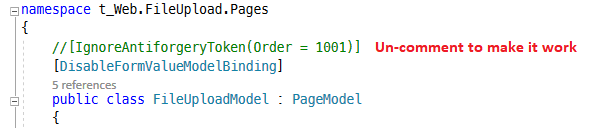
t_Web.FileUpload.zip
VS 2019 16.6.0, ASP.Net Core 3.1
We shouldn't have to disable Antiforgery, right?
 Dean-NC
on 25 Jul 2020
Dean-NC
on 25 Jul 2020
I ran into this as well, using the fetch() API on the browser.
First, I POST a form to the current page:
let response = await fetch(url, {
        method: 'post',
        body: data,
    });
The matching controller (this same endpoint is used without issues when posting forms normally via a submit button):
 public async Task<IActionResult> OnPost() {
            //functionality
            return RedirectToPage("");
        }
This results in a HTTP 302 response, as it should. However, fetch() will follow the redirect path but it still appends the Content-Type to the next GET headers:
Host: localhost:44337
User-Agent: Mozilla/5.0 (Windows NT 10.0; Win64; x64; rv:68.0) Gecko/20100101 Firefox/68.0
Accept: */*
Accept-Language: fi,en-US;q=0.7,en;q=0.3
Accept-Encoding: gzip, deflate, br
Content-Type: multipart/form-data; boundary=---------------------------18467633426500 **THIS CAUSES THE EXCEPTION**
Origin: https://localhost:44337
Referer: https://localhost:44337/Inspection/Transportation/11
Connection: keep-alive
Cookie: ...
TE: Trailers
If I resend the GET without the Content-Type, everything works as it should.
It seems that the Content-Type should be straight up ignored in GET requests, as it should be irrelevant? At least it should result in a 400 instead of 500. Although I think it's also a bug that fetch() sends that invalid header in the first place.
EDIT: I solved the issue by adding a custom header to the fetch call, and then returning 200 directly if the call came from fetch
 spaasis
on 26 Aug 2020
spaasis
on 26 Aug 2020
@pranavkm your new form exception handling fix should at least convert this to a 400, correct? What was that issue link?
Tratcher
on 26 Aug 2020
It would. I used https://github.com/dotnet/aspnetcore/issues/13333 as the issue to track the work. It isn't closed as yet since it's possible to return 500s when reading the body during input formatting while we'll tackle later on.
pranavkm
on 26 Aug 2020
Related spec change for fetch POST / 302 redirect behaviour; https://github.com/whatwg/fetch/issues/609
A Content-Type should only be present when there's a body to read, but some existing implementations will provide one when they shouldn't. That should probably be ignored, or at least rejected with a 400 error.
 lakeman
on 27 Aug 2020
lakeman
on 27 Aug 2020
@pranavkm will this be handled as part of #13333?
 javiercn
on 9 Oct 2020
javiercn
on 9 Oct 2020
@MrnB yes, it reads the form and consumes the body.
@davidfowl I didn't notice your comment when I posted my problem, but it explains my problem too...the AntiForgery token is reading the stream 1st (hence the "read by another component" error), and disabling it fixes the problem.
Hopefully they'll fix the bug so we can use AntiForgery.
Dean-NC
on 9 Oct 2020
Related issues
 rynowak
·
3Comments
rynowak
·
3Comments
 UweKeim
·
3Comments
UweKeim
·
3Comments
 fayezmm
·
3Comments
fayezmm
·
3Comments
 bgribaudo
·
3Comments
bgribaudo
·
3Comments
 markrendle
·
3Comments
markrendle
·
3Comments
Most helpful comment
Thanks I can reproduce the issue now!