Description
Target: Krom
When the project is compiled, the window is launched, but errors are displayed in the console:
- RenderPath - Desktop:
__________  [Armory] Compiling  __________
Exporting Scene
Scene exported in 0.007063150405883789
Finished in 8.375196933746338
deviceBufferSize = 4096
mSampleRate = 44100
mFormatFlags = 00000009
mBytesPerPacket = 8
mFramesPerPacket = 1
mChannelsPerFrame = 2
mBytesPerFrame = 8
mBitsPerChannel = 32

Uniform PPComp11 not found.
Uniform PPComp12 not found.
GL Error 1286 /Users/lubos/Downloads/armorcore/Kinc/Backends/Graphics4/OpenGL/Sources/Kore/OpenGL.cpp 341

#
# Fatal error in v8::Function::Call
# Function to be called is a null pointer
#
- RenderPath - Mobile:
__________  [Armory] Compiling  __________
Exporting Scene
Scene exported in 0.006122112274169922
Finished in 6.952546119689941
deviceBufferSize = 4096
mSampleRate = 44100
mFormatFlags = 00000009
mBytesPerPacket = 8
mFramesPerPacket = 1
mChannelsPerFrame = 2
mBytesPerFrame = 8
mBitsPerChannel = 32

GL Error 1286 /Users/lubos/Downloads/armorcore/Kinc/Backends/Graphics4/OpenGL/Sources/Kore/OpenGL.cpp 494
GL Error 1286 /Users/lubos/Downloads/armorcore/Kinc/Backends/Graphics4/OpenGL/Sources/Kore/OpenGL.cpp 341

#
# Fatal error in v8::Function::Call
# Function to be called is a null pointer
#
To Reproduce
- Create a project.
- Select _RenderPath_.
- Press _Play_.
System
Blender: 2.83.7
Armory: git (e7fd3ce)
Device: MacBook Air (11-inch, Mid 2012)
OS: MacOS Catalina (10.15.7 (19H2))
Graphics card: Intel HD Graphics 4000 1536 МБ
Test File
error.blend.zip
 e1e5en-gd
All 7 comments
When i try to export for Linux {Krom):
AttributeError: 'ArmoryAddonPreferences' object has no attribute 'open_build_directory'
 knowledgenude
on 4 Nov 2020
knowledgenude
on 4 Nov 2020
When i try to export for Linux {Krom):
AttributeError: 'ArmoryAddonPreferences' object has no attribute 'open_build_directory'
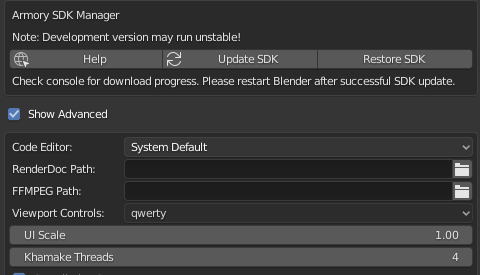
After updating the SDK, did you reinstall armory.py? Because this setting is specified there and now Render: Armory should look like this:

When updating, this script is not updated, since when installing as addons it is located in the corresponding folder of the Blender Foundation and you need to update it or reinstall the addon, thus updating this script.
e1e5en-gd
on 4 Nov 2020
When updating, this script is not updated, since when installing as addons it is located in the corresponding folder of the Blender Foundation and you need to update it or reinstall the addon, thus updating this script.
There is a nice way around that by using symlinks (like shortcuts). This way, the armory.py in the Blender addon directory will be kept up to date with the armoy.py in your SDK.
 MoritzBrueckner
on 4 Nov 2020
MoritzBrueckner
on 4 Nov 2020
Probably it is because i downloaded armory by Download button in the addon preferences after deleting its folder. I will download it again from the itch.io.
There is not an armory.py file, but Armory still working:
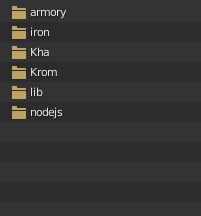
The tabs does not appear to me:
knowledgenude
on 4 Nov 2020
You can download https://github.com/armory3d/armsdk and it will be similar to the version with itch.io.
The addon is placed in the blender folder (more precisely armory.py), so it works for you. See catalog - https://docs.blender.org/manual/en/latest/advanced/blender_directory_layout.html
You can click the Remove button in the Preferences window, and then through Install... select armory.py (https://github.com/armory3d/armory/wiki/setup). As a result, the file will be overwritten in the _Blender_ folder.
e1e5en-gd
on 4 Nov 2020
The build for Krom does not have problems here (also made a Mac export, but i don't have one to test). No errors printed in the console, there is another issue for this one here: https://github.com/armory3d/armory/issues/839
knowledgenude
on 4 Nov 2020
Now that's the topic.
So I close the issue with a link to the result of the issue https://github.com/armory3d/armory/issues/839
e1e5en-gd
on 4 Nov 2020
Related issues
 Amir-Arsalan
·
4Comments
knowledgenude
·
3Comments
Amir-Arsalan
·
4Comments
knowledgenude
·
3Comments
 guzzard
·
4Comments
e1e5en-gd
·
3Comments
guzzard
·
4Comments
e1e5en-gd
·
3Comments
 AttSee
·
4Comments
AttSee
·
4Comments
Most helpful comment
There is a nice way around that by using symlinks (like shortcuts). This way, the armory.py in the Blender addon directory will be kept up to date with the armoy.py in your SDK.