Armory: Armory3d can't handle rotations - Impossible to make 3rd person games
Hey there!
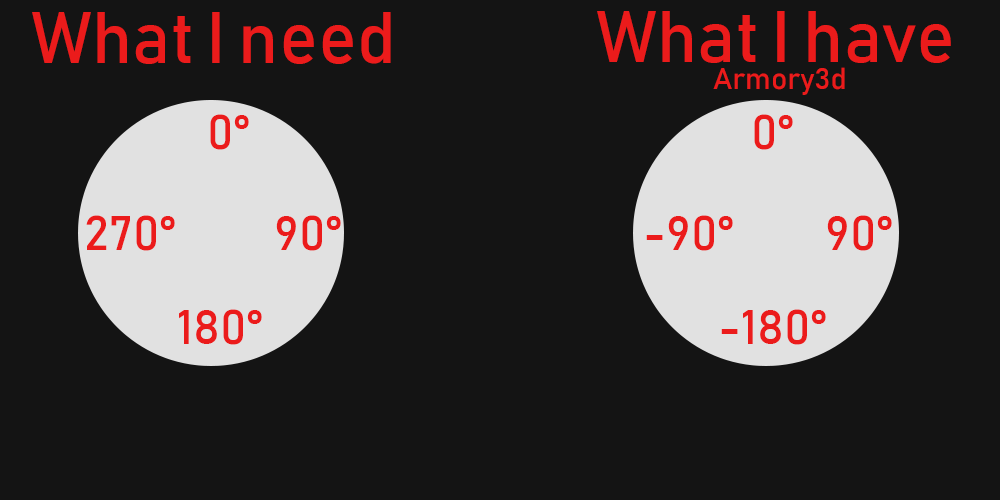
Whoever tried to make a third person controller like the one from unreal engine's starter example knows that it is nearly impossible! The reason for that are the rotations in armory3d. I would like to share my problems:
Problems
1: You can't get a 360° angle from the player. You will get a 180° angle and then it starts from -180° which is a huge problem for making a smooth turn.
2: If you rotate your player in the desired direction it gets messed up...somehow. If you would press the S key your player supposed to turn around. That works but if want to get the angle of the player while you pressing the S and D key you don't get 225°, instead you will get an angle of -135°. With this problem the player will flip on the head and also dont know where exactly to walk.
I really hope this problem will get fixed.
Please share your experience with 3rd person game in armory3d!!
 ArmoryBlender
All 10 comments
As a workaround you could try using angle % 360 (modulo). It's very likely related to Iron, so I'm not sure if fixing this would temporarily break Armorpaint. Maybe move this issue to the Iron repo so that there is a higher chance of lubos fixing that?
 MoritzBrueckner
on 21 Jun 2020
MoritzBrueckner
on 21 Jun 2020
About the rotation, i am very bad at math but in my mind:
You have -180-180
You want 0-360
If you add 180 to the rotation, the value will you not be 0-360? You say that you have -135 in the place of 225, in this case adding 180 don't works :/
 knowledgenude
on 22 Jun 2020
knowledgenude
on 22 Jun 2020
@knowledgenude I tried a similar thing but it still doesnt work because if you rotate the player from the euler angles the euler angles will rotate from 0 - 180° and then it gets flipped on the head. The problem is related to iron like @MoritzBrueckner said.
ArmoryBlender
on 22 Jun 2020
I made an example file for this issue. Isn't possible to get the object rotation with correct values, see the example:
Just use right and left to rotate the object and there is a display for its euler rotation
knowledgenude
on 22 Jun 2020
Link to #512
 Simonrazer
on 22 Jun 2020
Simonrazer
on 22 Jun 2020
@ArmoryBlender , hi again! I found a workaround for you...
Yes, is impossible to get the correct value of rotations in Armory for now, but you can create a fake rotation for the object in this way:
Create a float property "Rotation" for the object you want
Sync the value of the property to the object rotation (use Get Property, Vector and Set Rotation nodes for this).
Just don't use Get Rotation for now. After it be fixed, you can simple delete Get Property and put a Get Rotation instead :)
I really hope this works for you. I will send an example here when i can if it is need
I think with this you can do the "smooth turn"
knowledgenude
on 1 Aug 2020
Hey @knowledgenude !!
First of thank you for your help. Im not a fan of logic nodes....I just can't work with logic nodes. Could you send me please your blendfile. That would be awesome!!
ArmoryBlender
on 1 Aug 2020
I've done a simple example of how you can reach this, but i think that it can be a big work to do the full logic working, nothing impossible
The Axis (outside) object is where the "X, Y, Z" coordinates of the Direction (inside) object will be stored. Axis can be used for the horizontal camera axis.
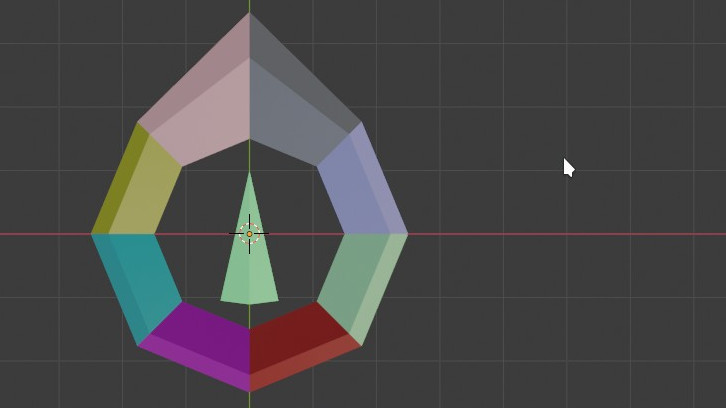
So in case of the player press S, the Direction will be for back from the Axis. If you rotate the Axis, the Direction will follow it, because it is updating every frame, but you can update it just when W, A, S, D keys are pressed. You can smooth this using Timer and some math with the stored values.
Maybe i can do a full third person logic here when i have more time and find out an easier way to do this, but not wait for nothing as i always end with confusing methods
knowledgenude
on 1 Aug 2020
Thanks for your little documentation @knowledgenude.
I dont think that I will use this method because it is very time consuming to set everything up. I also don't have that much time to set this up. Like I said Im working on other projects but I will save your documentation in case I will go back and try it with a new armory3d version. Anyways thank you so much for your time!!
ArmoryBlender
on 1 Aug 2020
I've done some progress here, but i am failing when i try to interpolate the rotation for the nearest angle to make the smooth turn.
I already tryed to use the values between 360/180 but the behavior is almost the same. If someone know a method to make the the rotation for the nearest angle, please let me know
I have a variable for Player Rotation and a variable for Rotation, just need to interpolate then:
After i find a way to do that, i think just adding the horizontal axis rotation to the player rotation should change the directions, like in the last example i send.
But due to the lack of vertex parenting, i will need to find an workaround for the axis not be fixed at the player.
knowledgenude
on 14 Aug 2020
Related issues
 luboslenco
·
3Comments
luboslenco
·
3Comments
 Nos-
·
4Comments
knowledgenude
·
3Comments
Nos-
·
4Comments
knowledgenude
·
3Comments
 donalffons
·
3Comments
donalffons
·
3Comments
 Sanva
·
3Comments
Sanva
·
3Comments
Most helpful comment
@ArmoryBlender , hi again! I found a workaround for you...
Yes, is impossible to get the correct value of rotations in Armory for now, but you can create a fake rotation for the object in this way:
Create a float property "Rotation" for the object you want
Sync the value of the property to the object rotation (use Get Property, Vector and Set Rotation nodes for this).
Just don't use Get Rotation for now. After it be fixed, you can simple delete Get Property and put a Get Rotation instead :)
I really hope this works for you. I will send an example here when i can if it is need
I think with this you can do the "smooth turn"