Description
After installing armory.py and pointing the SDK path to the extracted folder, I see no change in under any menu
System
Blender: 2.80
Armory: 2019.9
OS: Windows 10
Graphics card: NVIDIA GeForce GTX 1050 Ti
 sortai
All 9 comments
Can you toggle the system console by Window > Toggle System Console and check if there is any error message when you launch Blender?
 N8n5h
on 10 Sep 2019
N8n5h
on 10 Sep 2019
I had experienced the same issue but it was with 2019.8. The newest version resolves it for me
 VicentGJ
on 11 Sep 2019
VicentGJ
on 11 Sep 2019
Can you toggle the system console by Window > Toggle System Console and check if there is any error message when you launch Blender?
there are no errors on launch, but I tried re-installing the add-on with the system console visible and I saw a long chain of errors, ending with
ImportError:
Importing the multiarray numpy extension module failed.  Most
likely you are trying to import a failed build of numpy.
If you're working with a numpy git repo, try `git clean -xdf` (removes all
files not under version control).  Otherwise reinstall numpy.

Original error was: cannot import name 'multiarray' from 'numpy.core' (C:\Users\barti\AppData\Roaming\Python\Python37\site-packages\numpy\core\__init__.py)
Where did you get the armory.py and the armory SDK? and what is the version of the SDK you used?
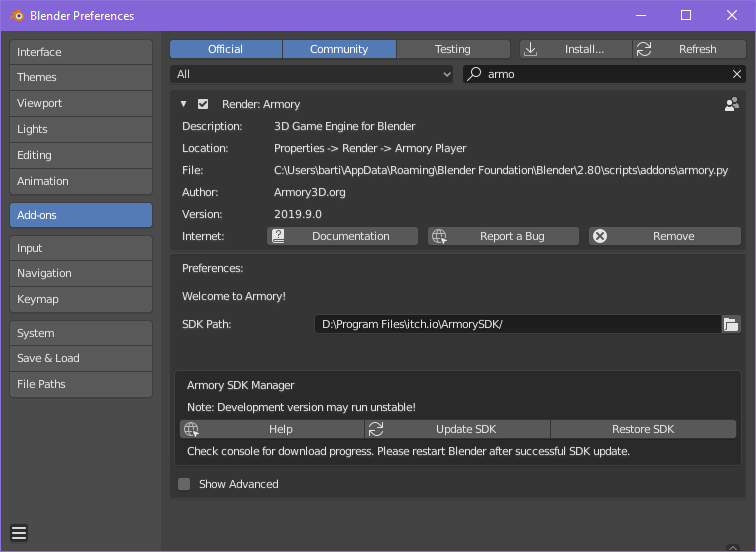
Also can you post a picture of the Armory add-on page inside Blender settings.
N8n5h
on 11 Sep 2019
I downloaded an archive from the itch.io page, specifically "ArmorySDK1909.zip"
Here's the image
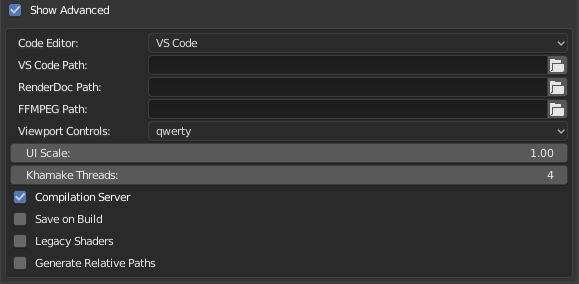
Advanced settings:
sortai
on 12 Sep 2019
Do you have git installed? Maybe an update on the SDK may fix some issue that doesn't work in the SDK version you downloaded.
if you do, try hitting Update SDK, check the system console for info about the update process. If you haven't git installed, don't forget to restart Blender when installing it.
N8n5h
on 12 Sep 2019
 kone9
on 13 Sep 2019
kone9
on 13 Sep 2019
if you do, try hitting Update SDK, check the system console for info about the update process. If you haven't git installed, don't forget to restart Blender when installing it.
I did, I didn't see anything weird during the installation and at the end it said
Armory SDK updated, please restart Blender
I restarted blender and didn't find any difference
I then removed the addon and tried installing 2019.8, with the same effect as before (same numpy error in the console)
sortai
on 13 Sep 2019
I fixed the problem; apparently it was the python installation that I use that was used instead of the one packaged with blender, after updating numpy everything started to work.
sortai
on 22 Sep 2019
Related issues
 e1e5en-gd
·
3Comments
e1e5en-gd
·
3Comments
e1e5en-gd
·
3Comments
e1e5en-gd
·
3Comments
 HeadClot
·
4Comments
HeadClot
·
4Comments
 DevMagicLord
·
3Comments
DevMagicLord
·
3Comments
 donalffons
·
3Comments
donalffons
·
3Comments