Firstly I guess in the last version of armory, the navmesh would show up as an actual object in the outliner with each poly in various colors, when you clicked the generate button. When you do it now, it appears as a trait under the plane i'm using for a ground (I assume it adds the navmesh to whatever object you have selected). You can't see it however as it's not an actual mesh object apparently.
In my blend file here, you'll also notice if you run it you can click anywhere on the plane, but the player box, only moves within a small area in the center, and then also goes through a couple of the obstacles there. Keep in mind that the "obstacles" were just extruded faces from the plane that was subdivided.
It's possible that I did something wrong because I'm still somewhat new to armory, however, someone suggested I submit this as a possible issue, just in case it's a bug.
My blend file is below.
AdventureGameTest_00001.zip
 Uhfgood
All 11 comments
@luboslenco What is the current plan to get navmesh generation back? I ask this because maybe I can help with this..
 N8n5h
on 9 Jul 2019
N8n5h
on 9 Jul 2019
@N8n5h here is an overview on current state:
- Object tagged with
NavMeshtrait gets exported as.objmesh at https://github.com/armory3d/armory/blob/master/blender/arm/exporter.py#L2601 - Navmesh is built from the exported
.objmesh at runtime at https://github.com/armory3d/armory/blob/master/Sources/armory/trait/NavMesh.hx#L35 - Visualization in viewport is broken since that functionality got removed in b28 https://github.com/armory3d/armory/blob/master/blender/arm/props_ui.py#L477
Quick way to fix navmesh visualization could be to write a small haxe/js script calling into Recast when Generate Navmesh button gets pressed. Then the generated navmesh can be loaded and displayed into Blender viewport. Navmesh functionality is overall very rough, lots of work hidden there.
 luboslenco
on 10 Jul 2019
luboslenco
on 10 Jul 2019
Hi @luboslenco, so Generate Mesh is only for visualization and NavMesh is built every single time at runtime? I was playing with some of this recently and got a full red screen on player after adding Navigation, I just need to clarify a little bit to myself how it works, thanks!
 zevarito
on 10 Jul 2019
zevarito
on 10 Jul 2019
Quick way to fix navmesh visualization could be to write a small haxe/js script calling into Recast when Generate Navmesh button gets pressed. Then the generated navmesh can be loaded and displayed into Blender viewport. Navmesh functionality is overall very rough, lots of work hidden there.
Yes, I was trying to find a way to communicate from python to cpp/haxe/js but couldn't find any example that doesn't require extra libraries, any example of that in Armory so I can look how this calling between languages works?
N8n5h
on 10 Jul 2019
@zevarito yeah, it's for visualization but it also adds a NavMesh trait to the object (although you can do that by hand as well). Yes, navmesh is generated at runtime - so this trait should be attached on a simplified mesh, until Armory supports pre-generating navmesh cache.
@N8n5h maybe this helps although it's not a direct call between languages - an example on how Armory executes js minifier using node: https://github.com/armory3d/armory/blob/master/blender/arm/make.py#L533.
So the exchange might look something like: python writes .obj file -> js takes .obj file and generates navmesh cache -> python loads cache and displays it in viewport.
luboslenco
on 10 Jul 2019
Hi @luboslenco I noticed that when the mesh is exported in https://github.com/armory3d/armory/blob/master/blender/arm/exporter.py#L2601
the mesh is flipped in the y axis, is that required by recast?
N8n5h
on 15 Jul 2019
Not sure if there is a way to configure that in recast, but I guess it assumes Y-up by default, hence the axis swap.
luboslenco
on 17 Jul 2019
@luboslenco
Ok I managed a solution a few days ago and got some results, the most blocking part was finding a way to recreate geometry only from an array of vertices:
I was investigating how to do that until I found that the author of the recastjs repo already had a solution in place using some functions of threejs, so I thought that porting that solution to node js was faster.
I used the three js files from that repo to keep compatibility with the solution.
I had to create a file that has all the content from all the scripts used because I couldn't find a way to simply "include" the content of those scripts in node js in a quick way that is not import nor require.
The version provided of three js min in the repo doesn't work in node, so I had to use a newer one and the functionality that the solution uses is not present in newer versions from what I read, so I had to comment some warnings that complains about using deprecated functions.
Maybe the solution could be updated to newer version of three js or ported to pure python to get rid of the threejs dependency but for now it works and results are quick enough in my tests so far.
https://github.com/N8n5h/armory_tools/tree/patch-1
https://github.com/N8n5h/haxerecast/tree/patch-1
https://github.com/N8n5h/armory/tree/patch-5
If the solution is okay I can create the PRs
N8n5h
on 18 Jul 2019
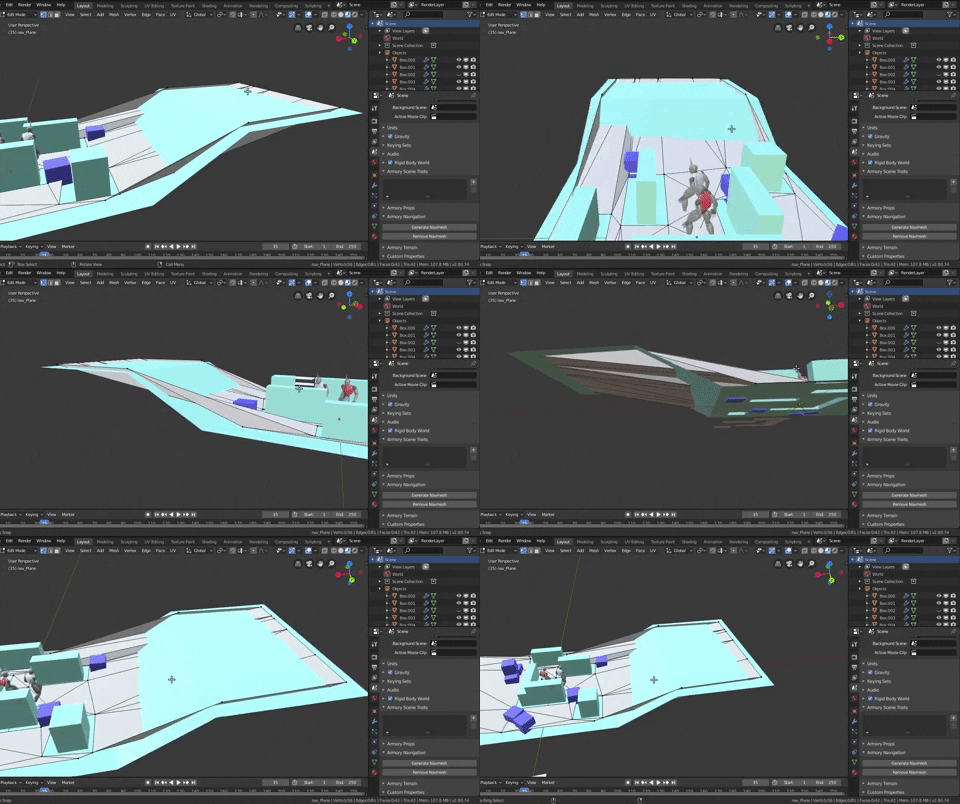
Update: doing more test I found that the solution works best when there is no elevation in the geometry:
compared to b2.79:
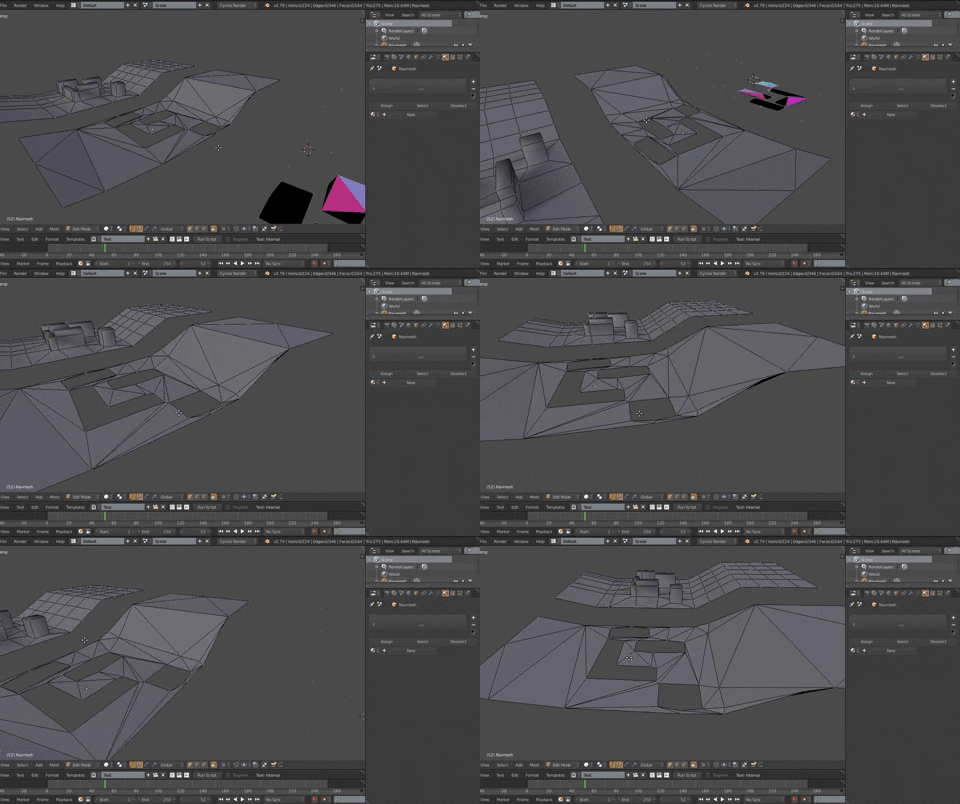
So I'm currently seeking for another solution to generate a mesh that works with elevations.
I was looking at the source of b2.79 to see how it was done, and it uses information like boundbox or cells that can't be obtained in javascript from what I understand. So I'm currently looking to maybe expand the bindings so that info can be obtained if possible to port the solution from b2.79.
If anyone knows another way please let me know.
N8n5h
on 23 Jul 2019
Ok I managed to port the original code for visualization generation in Blender from C++ to Javascript last week and got much better results than the ones of the previous implementation:

I still need to do some more test and clean ups to make sure everything is working fine.
I also wanted to play around with the settings for building navmeshes so I ended up exposing the values in the editor, so now it's possible to change settings for building navmesh directly in the editor.
I think the place where the Generate Navmesh button was didn't make much sense now that values are exposed, so I moved it to appear when you add a Bundled Trait "Navmesh" instead. Exposed values works when pressing that button and when hitting Play, tested in Krom.
I wanted to add a few more things for navigation but I'm completely out of time for the moment so when I can do more clean ups I will post my results so far for review in a PR.
N8n5h
on 6 Aug 2019
Merged now, thanks again!
luboslenco
on 14 Aug 2019
Related issues
 Bugsbane
·
3Comments
Bugsbane
·
3Comments
 knowledgenude
·
3Comments
knowledgenude
·
3Comments
 e1e5en-gd
·
3Comments
e1e5en-gd
·
3Comments
 Nos-
·
4Comments
knowledgenude
·
3Comments
Nos-
·
4Comments
knowledgenude
·
3Comments
Most helpful comment
Ok I managed to port the original code for visualization generation in Blender from C++ to Javascript last week and got much better results than the ones of the previous implementation:
I still need to do some more test and clean ups to make sure everything is working fine.
I also wanted to play around with the settings for building navmeshes so I ended up exposing the values in the editor, so now it's possible to change settings for building navmesh directly in the editor.
I think the place where the Generate Navmesh button was didn't make much sense now that values are exposed, so I moved it to appear when you add a Bundled Trait "Navmesh" instead. Exposed values works when pressing that button and when hitting Play, tested in Krom.
I wanted to add a few more things for navigation but I'm completely out of time for the moment so when I can do more clean ups I will post my results so far for review in a PR.