Argo-cd: Cannot create application withu CLI and GUI
If you are trying to resolve an environment-specific issue or have a one-off question about the edge case that does not require a feature then please consider asking a
question in argocd slack channel.
Checklist:
- [] I've searched in the docs and FAQ for my answer: http://bit.ly/argocd-faq.
- [*] I've included steps to reproduce the bug.
- [*] I've pasted the output of
argocd version.
Describe the bug
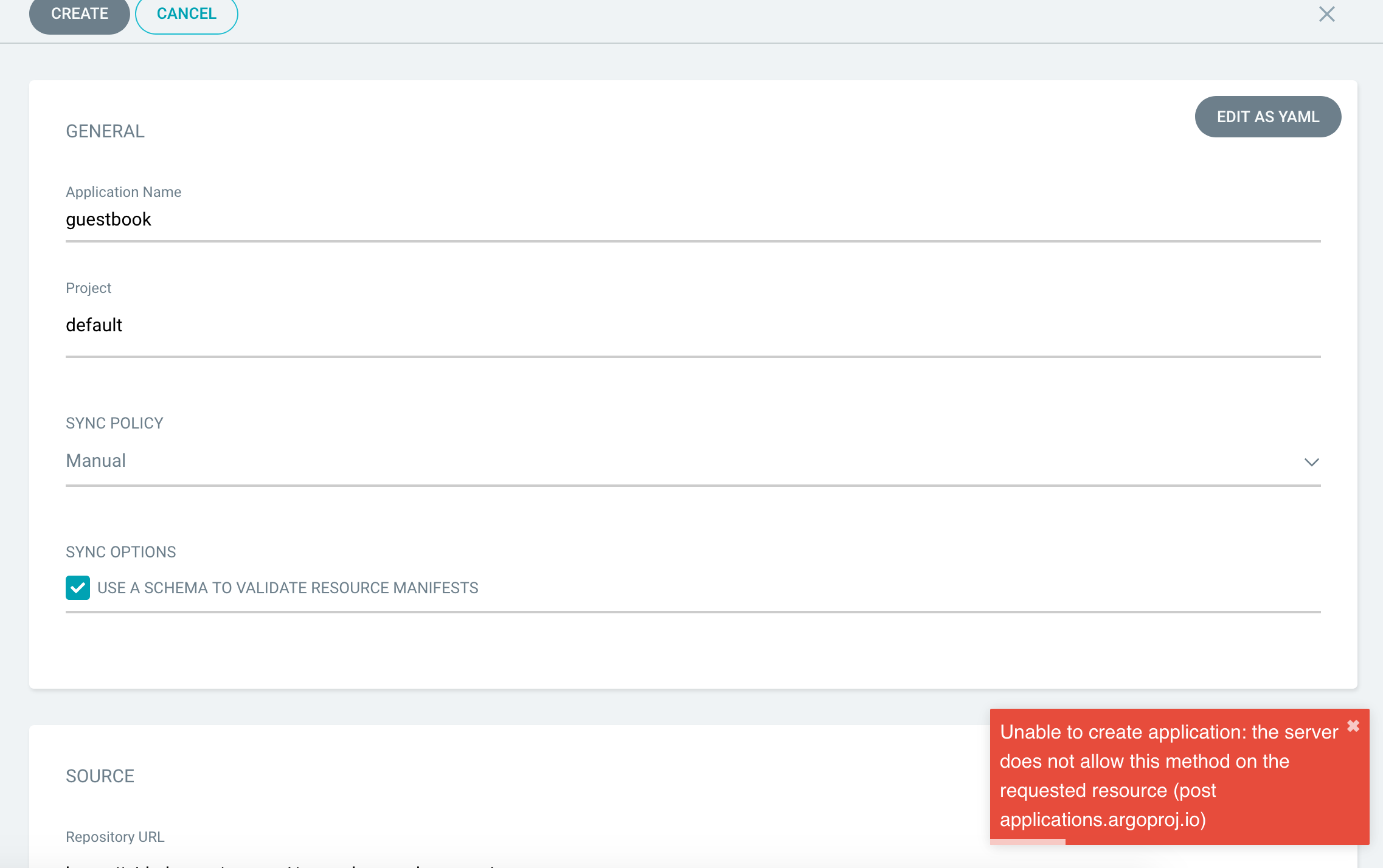
argocd app create guestbook --repo https://github.com/argoproj/argocd-example-apps.git --path guestbook --dest-server https://kubernetes.default.svc --dest-namespace demo
FATA[0014] rpc error: code = Unimplemented desc = the server does not allow this method on the requested resource (post applications.argoproj.io)
To Reproduce
kubectl create namespace argocd
kubectl apply -n argocd -f https://raw.githubusercontent.com/argoproj/argo-cd/stable/manifests/install.yaml
kubectl port-forward svc/argocd-server -n argocd 8080:443
kubectl get pods -n argocd -l app.kubernetes.io/name=argocd-server -o name | cut -d'/' -f 2
argocd login localhost:8080 --name local
argocd app create guestbook --repo  https://github.com/argoproj/argocd-example-apps.git --path guestbook --dest-server https://kubernetes.default.svc --dest-namespace demo
Expected behavior
A clear and concise description of what you expected to happen.
Screenshots
If applicable, add screenshots to help explain your problem.
Version
argocd version                                                                                                                        ─╯
argocd: v1.5.2+c2c19f4
  BuildDate: 2020-04-15T16:43:41Z
  GitCommit: c2c19f42ad78ed7a6fb70e86aed117be484feb50
  GitTreeState: clean
  GoVersion: go1.14
  Compiler: gc
  Platform: darwin/amd64
argocd-server: v1.5.0+bdda410
  BuildDate: 2020-04-02T16:38:24Z
  GitCommit: bdda41046378a855e289b5f1602d5c923a3f914a
  GitTreeState: clean
  GoVersion: go1.14
  Compiler: gc
  Platform: linux/amd64
  Ksonnet Version: v0.13.1
  Kustomize Version: Version: {Version:kustomize/v3.2.1 GitCommit:d89b448c745937f0cf1936162f26a5aac688f840 BuildDate:2019-09-27T00:10:52Z GoOs:linux GoArch:amd64}
  Helm Version: version.BuildInfo{Version:"v3.1.1", GitCommit:"afe70585407b420d0097d07b21c47dc511525ac8", GitTreeState:"clean", GoVersion:"go1.13.8"}
  Kubectl Version: v1.14.0
Logs
Paste any relevant application logs here.


 ddiawara
All 9 comments
helm install my-argocd -n argocd argo/argo-cd --wait
manifest_sorter.go:192: info: skipping unknown hook: "crd-install"
manifest_sorter.go:192: info: skipping unknown hook: "crd-install"
NAME: my-argocd
LAST DEPLOYED: Thu Apr 30 22:51:13 2020
NAMESPACE: argocd
STATUS: deployed
REVISION: 1
TEST SUITE: None
NOTES:
In order to access the server UI you have the following options:

1. kubectl port-forward service/my-argocd-server -n argocd 8080:443

    and then open the browser on http://localhost:8080 and accept the certificate

2. enable ingress in the values file `service.ingress.enabled` and either
      - Add the annotation for ssl passthrough: https://github.com/argoproj/argo-cd/blob/master/docs/operator-manual/ingress.md#option-1-ssl-passthrough
      - Add the `--insecure` flag to `server.extraArgs` in the values file and terminate SSL at your ingress: https://github.com/argoproj/argo-cd/blob/master/docs/operator-manual/ingress.md#option-2-multiple-ingress-objects-and-hosts


After reaching the UI the first time you can login with username: admin and the password will be the
name of the server pod. You can get the pod name by running:

kubectl get pods -n argocd -l app.kubernetes.io/name=argocd-server -o name | cut -d'/' -f 2
Hi @ddiawara, I'm a little confused - have you installed ArgoCD from the Helm chart or from the manifests?
 jannfis
on 1 May 2020
jannfis
on 1 May 2020
i try two method but still have the same issue
ddiawara
on 1 May 2020
Hm, I've seen this issue when the CRDs were not correctly installed into the cluster. Can you please check the following:
Are the CRDs actually installed in your cluster? Run
kubectl get crd applications.argoproj.io appprojects.argoproj.iofrom your workstationIs your ArgoCD API server allowed to create application resources in the target cluster? Run
kubectl auth can-i create applications.argoproj.iowithin yourargocd-serverpod, i.ekubectl exec -it <your argocd-server pod> kubectl auth can-i create applications.argoproj.io
jannfis
on 1 May 2020



ddiawara
on 1 May 2020
Something seems fishy there. Why are the creation timestamps for the two CRDs apart half a day?
I'd suggest to start over by removing the argocd namespace and the two CRDs applications.argoproj.io and appprojects.argoproj.io from your cluster, and install from the manifests (not the Helm chart) again.
jannfis
on 1 May 2020
ok i check it
ddiawara
on 1 May 2020
I had a similar issue. To make a long story short, I installed Argo CD, created some apps, and then messed up my Argo CD install by mistakenly installing the Argo CD manifests to kube-system. I then tried to delete Argo CD and reinstall to clean up. But had some apps hanging around. I had to edit the apps and manually remove the finalizer in the spec. Then I was able to delete the CRDs and Argo CD namespace. I was then able to reinstall and get back to a good state.
 tekenstam
on 2 May 2020
tekenstam
on 2 May 2020
exactly, i force delete CRDS and now its done, maybe need to update the docs because path : guestbook doesn't exist. i can help if its possible
ddiawara
on 2 May 2020
Related issues
 clintberry
·
3Comments
clintberry
·
3Comments
 everesio
·
3Comments
everesio
·
3Comments
 eroji
·
3Comments
eroji
·
3Comments
 jutley
·
3Comments
jutley
·
3Comments
 nouseforaname
·
3Comments
nouseforaname
·
3Comments
Most helpful comment
I had a similar issue. To make a long story short, I installed Argo CD, created some apps, and then messed up my Argo CD install by mistakenly installing the Argo CD manifests to
kube-system. I then tried to delete Argo CD and reinstall to clean up. But had some apps hanging around. I had to edit the apps and manually remove the finalizer in the spec. Then I was able to delete the CRDs and Argo CD namespace. I was then able to reinstall and get back to a good state.