Argo-cd: Cannot add https://source.cloud.google.com repo
Checklist:
- [x] I've searched in the docs and FAQ for my answer: http://bit.ly/argocd-faq.
- [x] I've included steps to reproduce the bug.
- Try to add a Cloud Source Repository https://source.cloud.google.com/
- It fails
- [x] I've pasted the output of
argocd version.
$ argocd version
argocd: v1.3.2+a5a65cd
  BuildDate: 2019-12-03T21:32:47Z
  GitCommit: a5a65cdfe7c43fd1e3beada202d80c19bc50bd40
  GitTreeState: clean
  GoVersion: go1.12.6
  Compiler: gc
  Platform: darwin/amd64
argocd-server: v1.3.2+a5a65cd
  BuildDate: 2019-12-03T21:32:18Z
  GitCommit: a5a65cdfe7c43fd1e3beada202d80c19bc50bd40
  GitTreeState: clean
  GoVersion: go1.12.6
  Compiler: gc
  Platform: linux/amd64
  Ksonnet Version: v0.13.1
  Kustomize Version: Version: {Version:kustomize/v3.2.1 GitCommit:d89b448c745937f0cf1936162f26a5aac688f840 BuildDate:2019-09-27T00:10:52Z GoOs:linux GoArch:amd64}
  Helm Version: v2.15.2
  Kubectl Version: v1.14.0
Describe the bug
argocd-server-744fb699f7-7qf8j argocd-server time="2019-12-05T14:03:29Z" level=error msg="finished unary call with code Unknown" error="ssh: handshake failed: knownhosts: key is unknown" grpc.code=Unknown grpc.method=ValidateAccess grpc.service=repository.RepositoryService grpc.start_time="2019-12-05T14:03:29Z" grpc.time_ms=241.072 span.kind=server system=grpc
To Reproduce
Expected behavior
- Default to including a key from Google Source Repositories
alt
- Make sure something like this works:
$ argocd repo add ssh://[email protected]@source.developers.google.com:2022/p/example/r/my-repo --ssh-private-key-path ./argo-cd.id25519
alt
- Make sure something like this works:
$ argocd repo add ssh://[email protected]@source.developers.google.com:2022/p/example/r/my-repo --ssh-private-key-path ./argo-cd.id25519 --insecure-ignore-host-key
Also, the command line says --insecure-ignore-host-key is deprecated and suggests --insecure-skip-server-validation but that flag doesn't exist.
alt
- Make sure something like this works
$ argocd repo add https://source.developers.google.com:2022/p/example-proj/r/my-repoafter adding the child certificate from$ openssl s_client -showcerts -servername source.developers.google.com -connect source.developers.google.com:443 </dev/nullin the UI
Also, the editor for known_host_keys is broken in that it doesn't accept the contents of the ~/.ssh/known_hosts_keys file.
Screenshots
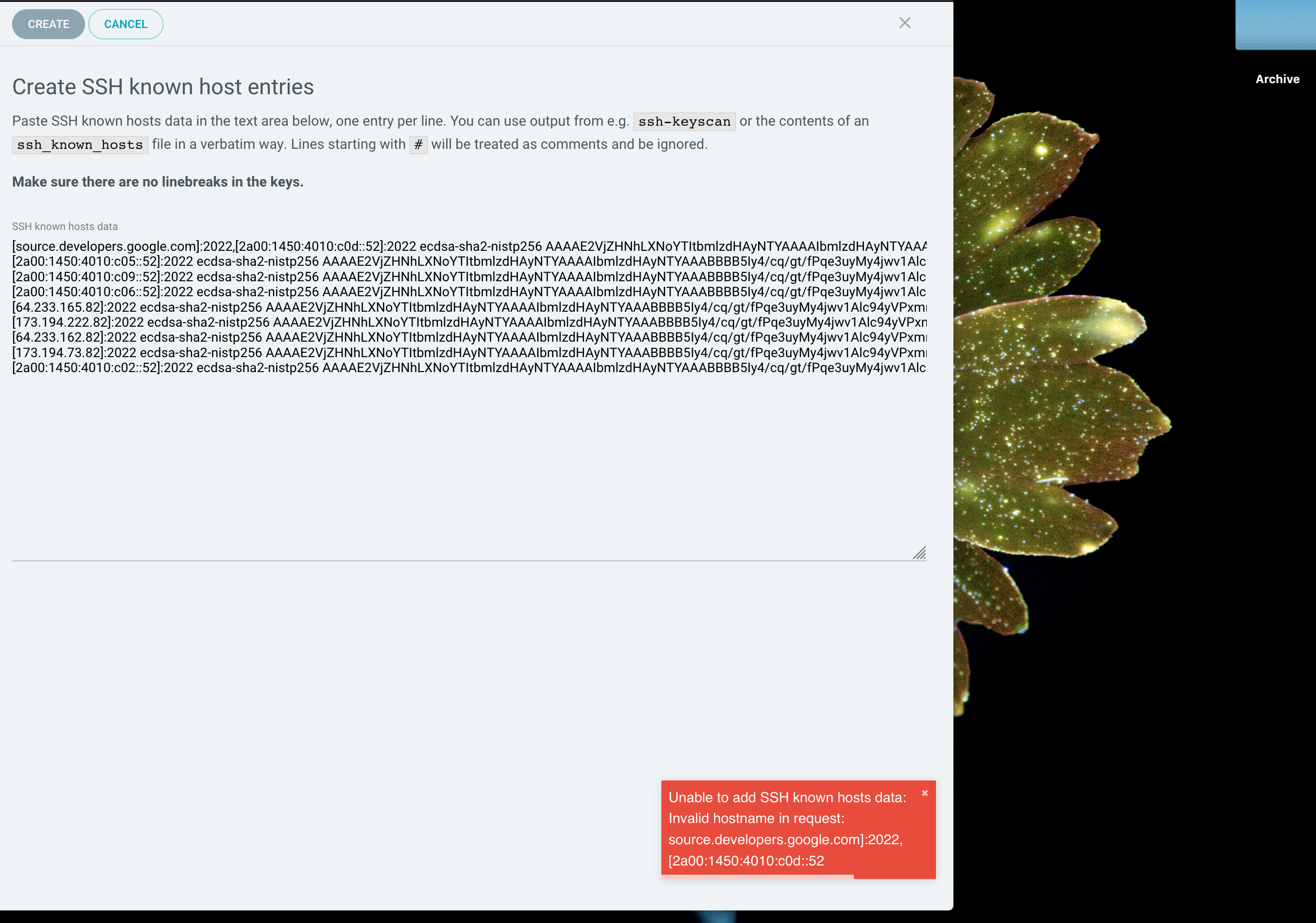
Logs
argocd-server-744fb699f7-7qf8j argocd-server time="2019-12-05T14:03:29Z" level=error msg="finished unary call with code Unknown" error="ssh: handshake failed: knownhosts: key is unknown" grpc.code=Unknown grpc.method=ValidateAccess grpc.service=repository.RepositoryService grpc.start_time="2019-12-05T14:03:29Z" grpc.time_ms=241.072 span.kind=server system=grpc

//

error="Invalid hostname in request: [email protected] ...

//

argocd-server-744fb699f7-7qf8j argocd-server time="2019-12-05T14:07:04Z" level=error msg="finished unary call with code Unknown" error="ssh: handshake failed: ssh: unable to authenticate, attempted methods [none publickey], no supported methods remain" grpc.code=Unknown grpc.method=ValidateAccess grpc.service=repository.RepositoryService grpc.start_time="2019-12-05T14:07:03Z" grpc.time_ms=499.563 span.kind=server system=grpc

//
 haf
haf
All 3 comments
Seeing the same on bitbucket - could it have a relation to a non-default port?
 davidkarlsen
on 14 Jan 2020
davidkarlsen
on 14 Jan 2020
Related issue https://github.com/argoproj/argo-cd/issues/2890
I've tried v1.3.6 and v1.4.0-rc1
davidkarlsen
on 14 Jan 2020
Sorry for the late reply, I was out on a well-earned vacation for a while :)
The known hosts management currently does not support all formats supported by SSH yet, most prominently it does not support multiple host specifications for the same key - as is the case with your known host data.
As a quick workaround, you should be able to remove the second hostname specification for the key in the first line of your known_hosts data, i.e. remove the ,[..ipv6addr]:2022 part after [source.developers.google.com]:2022 on line 1.
The fix to support multiple host names should not be hard to do, and I will send a PR shortly.
 jannfis
on 20 Jan 2020
jannfis
on 20 Jan 2020
Related issues
 nouseforaname
·
3Comments
nouseforaname
·
3Comments
 duboisf
·
3Comments
duboisf
·
3Comments
 gregsheremeta
·
3Comments
gregsheremeta
·
3Comments
 chiragthaker
·
3Comments
chiragthaker
·
3Comments
 jessesuen
·
3Comments
jessesuen
·
3Comments
Most helpful comment
Sorry for the late reply, I was out on a well-earned vacation for a while :)
The known hosts management currently does not support all formats supported by SSH yet, most prominently it does not support multiple host specifications for the same key - as is the case with your known host data.
As a quick workaround, you should be able to remove the second hostname specification for the key in the first line of your known_hosts data, i.e. remove the
,[..ipv6addr]:2022part after[source.developers.google.com]:2022on line 1.The fix to support multiple host names should not be hard to do, and I will send a PR shortly.