Arfoundation-samples: XR Plugin Management doesn't seem to work?
Bug Case 1264043
When I try to build my ARKit project on iOS I get this error in Xcode:
_"No active UnityEngine.XR.XRInputSubsystem is available. Please ensure that a valid loader configuration exists in the XR project settings."_
In #484 it says to check the XR Plugin Management Settings - I noticed that no options are checked. However, the checkbox doesn't seem to work? Clicking on "ARKit" under iOS does not check the box. I've tried restarting the editor and re-installing all packages, without success.
See gif here: https://forum.unity.com/attachments/arfoundationerrror-gif.663900/
Unity 2019.4.4f1
AR Foundation 2.1.8
AR Subsystems 2.1.2
ARKit XR PLugin 2.1.9
XR Interaction Subsystems 1.0.1
XR Plugin Mangement 3.2.13
 davidvjc
All 13 comments
I just tried those exact versions and could not reproduce the checkbox issue. Are there any warnings or errors in the Unity Editor console?
 tdmowrer
on 18 Jul 2020
tdmowrer
on 18 Jul 2020
Also (and I realize this is a bit confusing), ARFoundation 2.1.x was verified before XR Plug-in Management, well, managed plug-ins, and in order to avoid breaking changes, it is not actually necessary to check the "ARKit" box in 2.1 (otherwise older projects would not work until you went and checked a box that didn't used to be necessary). That is, ARKit will work as long as the package is present, regardless of the state of that checkbox.
I've just tested a simple project using those versions, with the box checked and unchecked to confirm this expected behavior. I don't know why the box does not stay checked for you, but I don't think that is the source of the problem either.
tdmowrer
on 18 Jul 2020
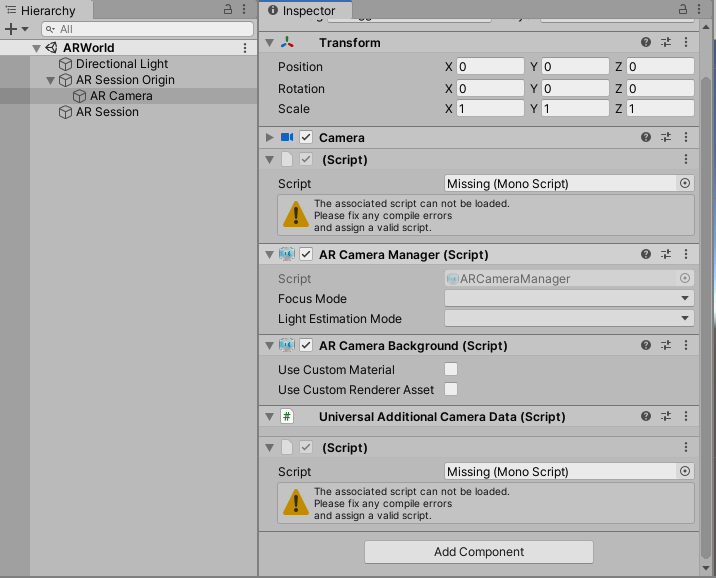
I ran the project you attached to the issue (thank you for doing that, btw), and while I didn't get the error that you reported (actually, it says it _did_ find an input subsystem provider), the screen is black and I see this in the Xcode console:
The referenced script on this Behaviour (Game Object 'AR Camera') is missing!
(Filename: ./Runtime/Mono/ManagedMonoBehaviourRef.cpp Line: 334)

The referenced script on this Behaviour (Game Object 'AR Camera') is missing!
(Filename: ./Runtime/Mono/ManagedMonoBehaviourRef.cpp Line: 334)

[Subsystems] Loading plugin UnityARKit for subsystem ARKit-Input...
[Subsystems] UnityARKit successfully registered Provider for ARKit-Input
Camera "AR Camera" does not use a Tracked Pose Driver, so its transform will not be updated by an XR device.
(Filename: ./Runtime/Export/Debug/Debug.bindings.h Line: 35)
So it sounds like the scene is missing some things. Indeed, this is from the ARWorld scene:
tdmowrer
on 18 Jul 2020
The missing scripts and components are available in my local project - not sure why they didn't upload with the bug report. The AR and pipeline elements in the project should be set up as required.
Since the checkbox wasn't the issue as I originally thoughts, I did some testing today.
The original project was created with Unity Hub and the Universal Render Pipeline preset. I started a new project using the standard "3D" preset in Unity Hub, then added URP to the existing project using package manager. Using the same AR package versions as above I did could not get it running - this time the the "AR Background Renderer" was missing from the Pipeline Asset (see attached), resulting in no camera feed.

After installing and uninstalling all versions of the AR packages, the only one that works is:
Unity 2019.4.4f1
AR Foundation 3.1.3
AR Subsystems 3.1.3
ARCore XR PLugin 3.1.4
ARKit XR Plugin 3.1.3
XR Plugin Management 3.2.13
With that combination of packages both URP and AR Foundation seem to work on iOS for me. All other combinations either gave me the original issue, a missing "render feature' or additional errors when building in Xcode.
davidvjc
on 21 Jul 2020
ARFoundation 4.0 fully supports the Universal Render Pipeline. However,
The original project was created with Unity Hub and the Universal Render Pipeline preset.
We've recently updated the URP setup instructions to account for this case (they are slightly different if you are starting with the URP template).
tdmowrer
on 21 Jul 2020
Useful link - thanks!
Does that mean you wouldn't recommend using AR Foundation 3.1.3 with URP?
When I use AR Foundation 4.0.2 I get this error in Xcode:
clang: error: no such file or directory: '..../build/Libraries/com.unity.xr.arkit/Runtime/iOS/Xcode1100/UnityARKit.a'
In the 4.0.2 documentation it says "This version of AR Foundation is compatible with the following versions of the Unity Editor 2019.2 and 2019.3" so I assumed it wasn't compatible with 2019.4.4f1
davidvjc
on 21 Jul 2020
Does that mean you wouldn't recommend using AR Foundation 3.1.3 with URP?
3.1.3 is fully compatible with URP, too. 4.0 is, of course, newer and therefore has more features. It is also 2019.4 compatible (the 4.0 and latest-preview branches of this repo were built with 2019.4).
clang: error: no such file or directory: '..../build/Libraries/com.unity.xr.arkit/Runtime/iOS/Xcode1100/UnityARKit.a'
That specific error sounds like you just need to rebuild your Xcode project from Unity. See this CHANGELOG entry:
The static library UnityARKit.a has been prefixed with lib to follow library naming conventions. Existing projects will need to either rebuild (Build and Run > Replace) the Unity generated Xcode project or manully remove UnityARKit.a from the UnityFramework "Frameworks and Libraries" section in Xcode.
tdmowrer
on 21 Jul 2020
Was my last comment helpful? Were you able to get 4.0 building?
tdmowrer
on 28 Jul 2020
Thanks for checking up - updating to AR Foundation 4.0 worked after deleting the build folder and seems to work fine now.
Thanks for you help, I appreciate it!
davidvjc
on 28 Jul 2020
I am also stuck with this. can you pls say which urp version+arfoundationversion+ ar kit plugin version to be used + unity version. Im stuck with past 10 days. im using unity 2019.4 and aslo tried with ar foundation 2.0 and 4.0..for urp . its not rendering only
 ShaziyaXR
on 20 Aug 2020
ShaziyaXR
on 20 Aug 2020
@ShaziyaXR please create a new issue for this.
tdmowrer
on 20 Aug 2020
I am also stuck with this. can you pls say which urp version+arfoundationversion+ ar kit plugin version to be used + unity version. Im stuck with past 10 days. im using unity 2019.4 and aslo tried with ar foundation 2.0 and 4.0..for urp . its not rendering only
This is what I ended up using:
Unity 2019.4.4f1
AR Foundation 3.1.3
AR Subsystems 3.1.3
ARCore XR PLugin 3.1.4
ARKit XR Plugin 3.1.3
XR Plugin Management 3.2.13
But I agree - it's a little confusing deciding which version to use with what given the amount of packages related to XR. A table in the documentation would be great (or something like that).
davidvjc
on 26 Aug 2020
But I agree - it's a little confusing deciding which version to use with what given the amount of packages related to XR. A table in the documentation would be great (or something like that).
We've started doing this in 4.0+, e.g. https://docs.unity3d.com/Packages/[email protected]/manual/index.html#platform-support
tdmowrer
on 26 Aug 2020
Related issues
 kennethlng
·
5Comments
kennethlng
·
5Comments
 atom182
·
8Comments
atom182
·
8Comments
 Berenice2018
·
3Comments
Berenice2018
·
3Comments
 srcnalt
·
7Comments
srcnalt
·
7Comments
 jackpr-unity
·
5Comments
jackpr-unity
·
5Comments