Arfoundation-samples: Errors with AR-Foundation samples
Hello,
I have seen this error before but I dont seem to be able to get rid of it.
I have tried several kind of package combinations.
This is what works better:
AR Foundation 2.1.4
AR Subsystems 3
ARCore XR Plugin 3.0.1
ARKit XR Plugin 3.0.1
5 errors
This is the average
AR Foundation 3.0.1
AR Subsystems 3
ARCore XR Plugin 3.0.1
ARKit XR Plugin 3.0.1
13 Errors
Some of the logs:
Failed to load 'C:/Users/Totoro-Ryzen/Documents/UnityProjects/Anansi Demo AR/Assets/arfoundation-samples/ProjectSettings/XRSettings.asset'. File may be corrupted or was serialized with a newer version of Unity.
UnityEditorInternal.InternalEditorUtility:ProjectWindowDrag(HierarchyProperty, Boolean)
UnityEngine.GUIUtility:ProcessEvent(Int32, IntPtr)
Library\PackageCache\com.unity.xr.[email protected]\Runtime\AR\ARReferencePointManager.cs(24,9): error CS0246: The type or namespace name 'XRReferencePointSubsystem' could not be found (are you missing a using directive or an assembly reference?)
Library\PackageCache\com.unity.xr.[email protected]\Runtime\AR\ARReferencePointManager.cs(25,9): error CS0246: The type or namespace name 'XRReferencePointSubsystemDescriptor' could not be found (are you missing a using directive or an assembly reference?)
Library\PackageCache\com.unity.xr.[email protected]\Runtime\AR\ARReferencePointManager.cs(26,9): error CS0246: The type or namespace name 'XRReferencePoint' could not be found (are you missing a using directive or an assembly reference?)
ETC.ETC.
Am I missing a library or something?
Thanks in advance for your help
 Yuri1976
All 23 comments
Please include what version of Unity you are using and what the errors are in the first package configuration.
For the logs, ARSubsystems 3+ renamed the concept of a ReferencePoint to an Anchor to be more inline with the provider APIs which is in the changelogs below. 2.1 does not have this change and therefore requires a different version of ARSubsystems to work with ARFoundation 2.1. You can see the dependencies in the package manager UI for each relevant package.
https://docs.unity3d.com/Packages/[email protected]/changelog/CHANGELOG.html
https://docs.unity3d.com/Packages/[email protected]/changelog/CHANGELOG.html
 DavidMohrhardt
on 14 Jan 2020
DavidMohrhardt
on 14 Jan 2020
Hello @DavidMohrhardt ,
This is using 2019.3.0f5 I have been using different versions and tried the configuration marked as 'verified' generate even more errors (19 errors)
Yuri1976
on 14 Jan 2020
Please post the errors if you have them readily available.
DavidMohrhardt
on 14 Jan 2020
Hello @DavidMohrhardt
Here are the errors using this configuration:
Unity 2019.3.0f5
AR Foundation 3.0.1
AR Subsystems 3
ARCore XR Plugin 3.0.1
ARKit XR Plugin 3.0.1
Assets\arfoundation-samples\Assets\Scripts\HumanBodyTracker.cs(20,12): error CS0246: The type or namespace name 'ARHumanBodyManager' could not be found (are you missing a using directive or an assembly reference?)
Assets\arfoundation-samples\Assets\Scripts\BoneController.cs(147,31): error CS0246: The type or namespace name 'ARHumanBody' could not be found (are you missing a using directive or an assembly reference?)
Assets\arfoundation-samples\Assets\Scripts\TestDepthImage.cs(40,12): error CS0246: The type or namespace name 'AROcclusionManager' could not be found (are you missing a using directive or an assembly reference?)
Assets\arfoundation-samples\Assets\Scripts\TestBodyAnchorScale.cs(15,12): error CS0246: The type or namespace name 'ARHumanBodyManager' could not be found (are you missing a using directive or an assembly reference?)
Assets\arfoundation-samples\Assets\Scripts\ScreenSpaceJointVisualizer.cs(54,12): error CS0246: The type or namespace name 'ARHumanBodyManager' could not be found (are you missing a using directive or an assembly reference?)
Assets\arfoundation-samples\Assets\Scripts\HumanBodyTracker.cs(49,31): error CS0246: The type or namespace name 'ARHumanBodiesChangedEventArgs' could not be found (are you missing a using directive or an assembly reference?)
Assets\arfoundation-samples\Assets\Scripts\TestBodyAnchorScale.cs(51,31): error CS0246: The type or namespace name 'ARHumanBodiesChangedEventArgs' could not be found (are you missing a using directive or an assembly reference?)
Assets\arfoundation-samples\Assets\Scripts\TestDepthImage.cs(35,5): error CS0246: The type or namespace name 'AROcclusionManager' could not be found (are you missing a using directive or an assembly reference?)
Assets\arfoundation-samples\Assets\Scripts\HumanBodyTracker.cs(15,5): error CS0246: The type or namespace name 'ARHumanBodyManager' could not be found (are you missing a using directive or an assembly reference?)
Assets\arfoundation-samples\Assets\Scripts\ScreenSpaceJointVisualizer.cs(81,37): error CS0246: The type or namespace name 'XRHumanBodyPose2DJoint' could not be found (are you missing a using directive or an assembly reference?)
Assets\arfoundation-samples\Assets\Scripts\TestBodyAnchorScale.cs(10,5): error CS0246: The type or namespace name 'ARHumanBodyManager' could not be found (are you missing a using directive or an assembly reference?)
Assets\arfoundation-samples\Assets\Scripts\ScreenSpaceJointVisualizer.cs(49,5): error CS0246: The type or namespace name 'ARHumanBodyManager' could not be found (are you missing a using directive or an assembly reference?)
It looks like I am missing some library...this is the average namespace in the cs files :
using System;
using System.Text;
using System.Collections.Generic;
using Unity.Collections;
using UnityEngine;
using UnityEngine.XR.ARFoundation;
using UnityEngine.XR.ARSubsystems;
Also, I have tried branch 2.1 and it works after you have updated the project settings provided into the project
Yuri1976
on 16 Jan 2020
Okay so the issue with with 3.0.1 is that the samples contain reference to the HumanBodySubsystem for ARKit. The feature was in our preview package but we felt that it wasn't production ready so we decided to remove it from the verified package. You can update to the following packages to fix the errors.
ARFoundation: 3.1.0-preview.3
ARSubsystems 3.1.0-preview.2
ARKit: 3.1.0-preview.2
Similarly you can remove the relevant scripts and scenes from your project should you not need Occlusion and HumanBody feature sets. ARCore and ARKit Face Tracking should be unaffected by this issue but you may update them if you would like.
DavidMohrhardt
on 16 Jan 2020
Hello @DavidMohrhardt ,
Thank you very much for your help. The update solved all the problems and now it works like a charm.
I knew I could have just deleted the specific examples, but I was more interesting in understanding what was wrong.
Once again, thanks for your help.
Cheers
Yuri
Yuri1976
on 17 Jan 2020
Hello @DavidMohrhardt
I have tried several kind of package combinations.
This is what works better:
AR Foundation 3.0.1
AR Subsystems 3.0.0
ARCore XR Plugin 3.0.1
ARKit XR Plugin 3.0.1
26 error
Library\PackageCache\com.unity.xr.[email protected]\Runtime\WindowsMRLoader.cs(101,16): error CS0246: The type or namespace name 'XRReferencePointSubsystem' could not be found (are you missing a using directive or an assembly reference?)
Library\PackageCache\com.unity.xr.[email protected]\Runtimemd5-e6ba733efcf025cc04c19aacbf640306\WindowsMRReferencePointSubsystem.cs(18,60): error CS0246: The type or namespace name 'XRReferencePointSubsystem' could not be found (are you missing a using directive or an assembly reference?)
Are there any solution for this?
thank you before
 setiahadi83
on 5 Mar 2020
setiahadi83
on 5 Mar 2020
i cant build into my android
setiahadi83
on 5 Mar 2020
Hey i am using unity 2019.3
AR Foundation 2.1.8
I can't seem to be able to update it to the above mentioned preview package.
Could you please guide me how to update to the latest preview package. I looked in package manager->show preview packages. But I don't see it.
Thanks.
 JERINPWILSON
on 20 Apr 2020
JERINPWILSON
on 20 Apr 2020
@JERINPWILSON drop down the AR Foundation in the package manager see all versions.
DavidMohrhardt
on 20 Apr 2020
@DavidMohrhardt sir I'm working on an AR project. I had no background in unity or augmented reality. So can i have your help.. I have done pretty something with it. It's a head mounted project but on smartphone.
JERINPWILSON
on 26 Apr 2020
The type or namespace name 'ARExtensions' does not exist in the namespace 'UnityEngine.XR'
 mavc18
on 5 May 2020
mavc18
on 5 May 2020
The type or namespace name 'ARExtensions' does not exist in the namespace 'UnityEngine.XR'
ARExtensions is a separate package that was necessary in very early versions of ARFoundation. It never came out of preview and was discontinued some time ago. @mavc18 what project or sample are you trying to open?
 tdmowrer
on 5 May 2020
tdmowrer
on 5 May 2020
Hello @DavidMohrhardt ,
I frequenlty get errors and warnings which now I think that they occur due to version compatibility issues, the errors and warnings get away when the versions are correct to each other.Could you please tell us if there is any website or forum where I could get the information that which version of say AR Foundation, ARCore, ARKit etc, is used by this version of unity, and so that I may install the right plugin for that version.
 shobhit-umrao
on 31 May 2020
shobhit-umrao
on 31 May 2020
@shobhit-umrao I suggest you use verified packages. Verified packages are the set of packages that have been verified to work together _for a specific Unity version_. So, for example, 2.1 is verified for Unity 2019.3. It also works with 2020.1, but it isn't verified there, and so may not be compatible with other 2020.1 verified packages.
tdmowrer
on 2 Jun 2020
Hello. I am having the same exact error as Yuri1976 shown also hereunder and I am on Macbook Pro 16 Catalina 10.15.4 beta and Unity 2020.2.a13. I originally used 3.13 for Kit/Core/Subsystems/Foundation but I got those errors. As you can see on the attached image there is no version 3.1.0 which you recommend to install for any of those modules. I am trying to access the new capabilities which body tracking is part of. Is that not available for the Mac?
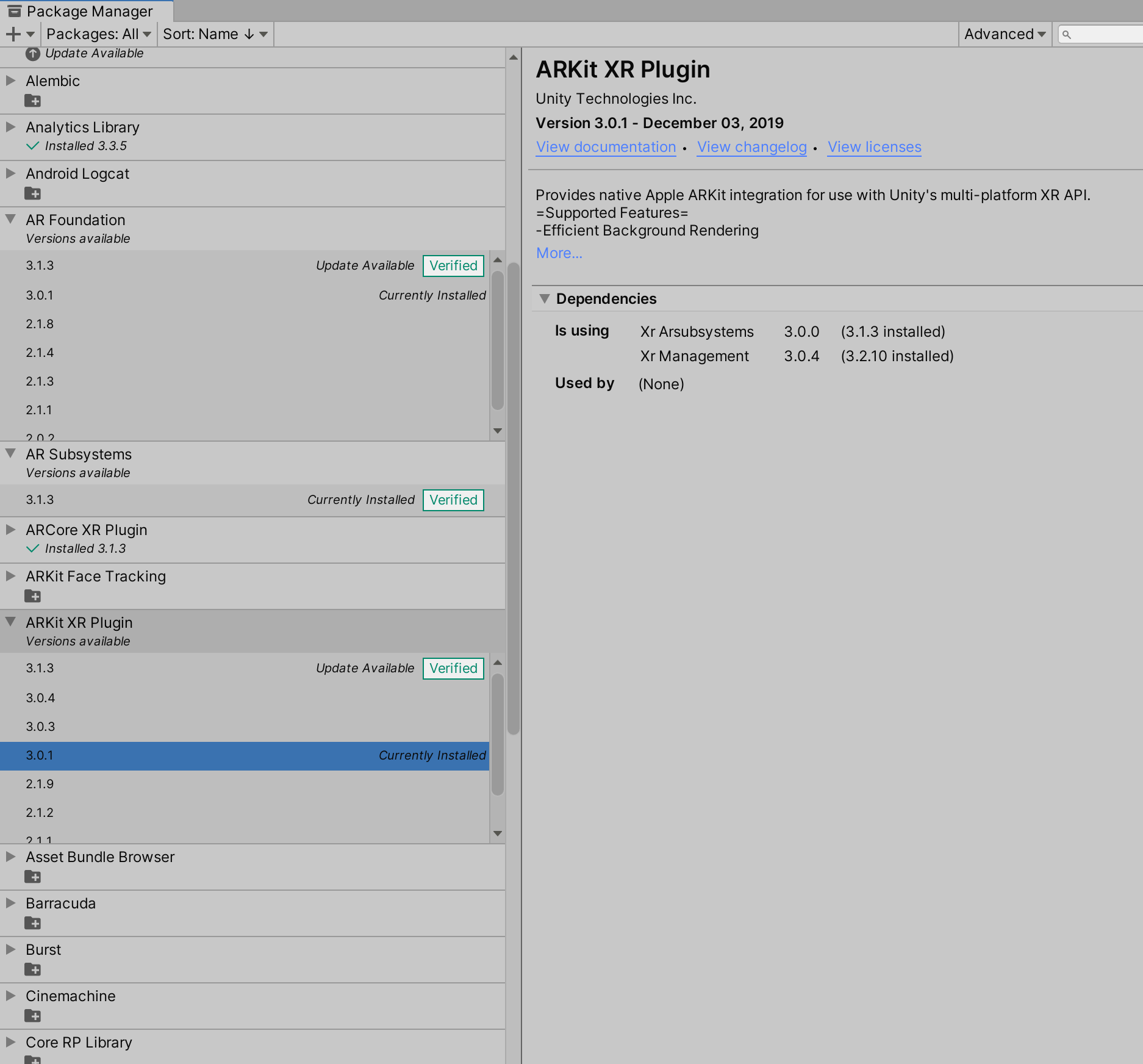

 YohanBaillot
on 16 Jun 2020
YohanBaillot
on 16 Jun 2020
Resolved..
"com.unity.xr.arcore": "3.1.0-preview.8",
"com.unity.xr.arfoundation": "3.1.0-preview.8",
"com.unity.xr.arkit": "3.1.0-preview.8",
 Somshekars
on 24 Jun 2020
Somshekars
on 24 Jun 2020
3.1 is 2020.2 compatible, but the AROcclusionManager is not available in the 3.1 verified packages as it relies on experimental APIs, so the project that you have loaded cannot use it.
4.0 is verified for 2020.2 and includes the AROcclusionManager.
tdmowrer
on 24 Jun 2020
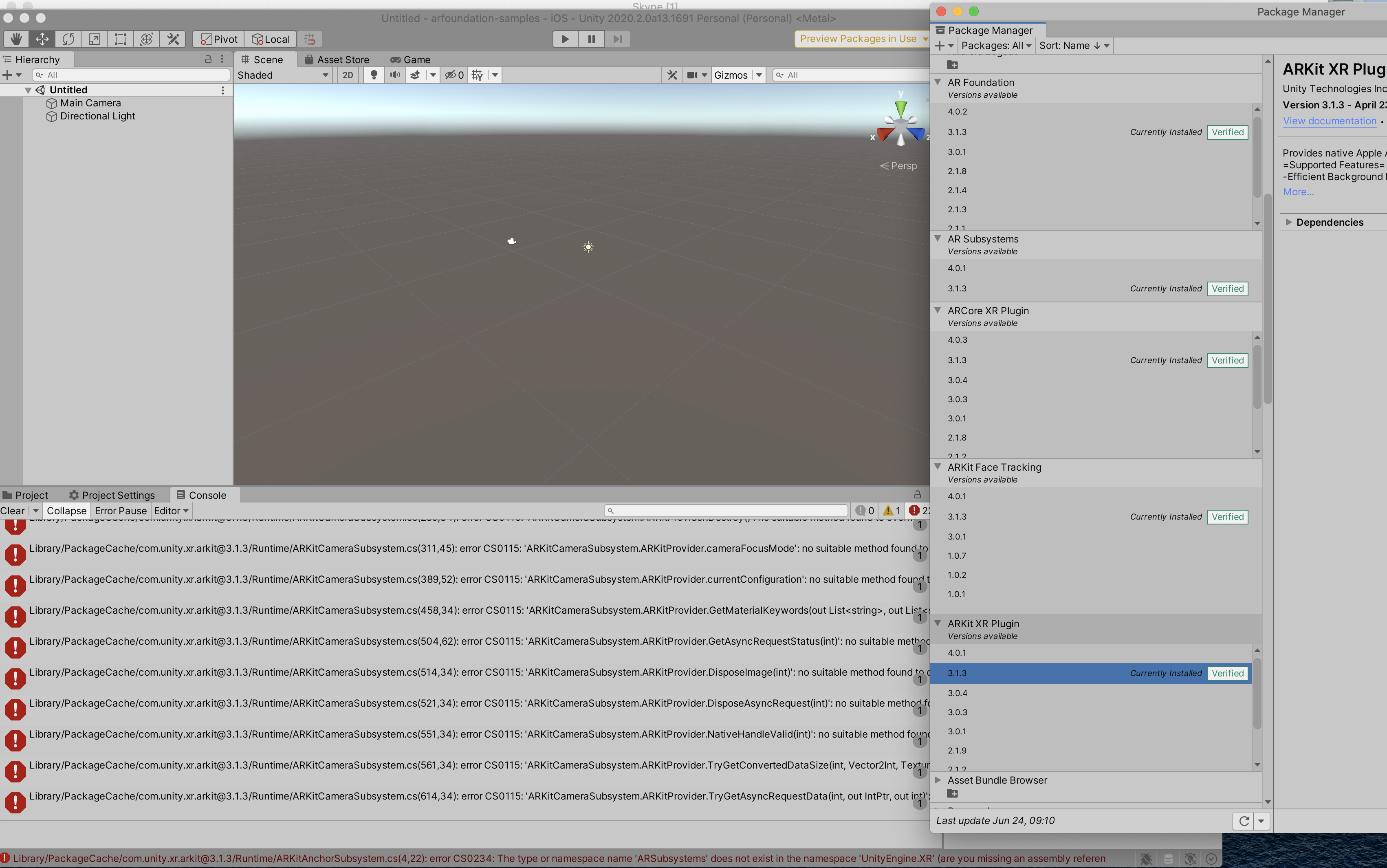
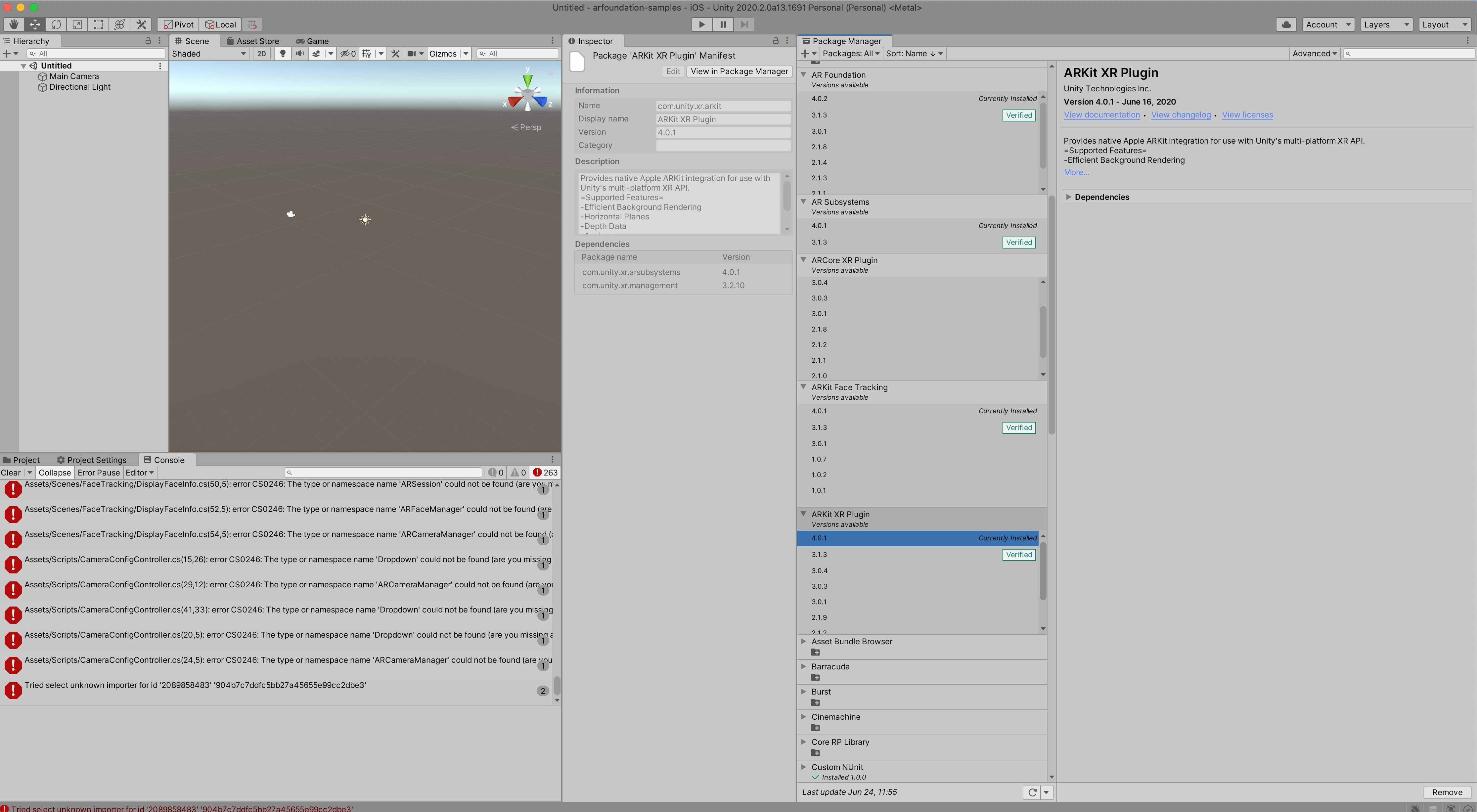
Hello Tim and Unity ARfoundation support. I am not sure where those packages you are mentioning are. 3.1.0 and 4.0 are just not there on Mac Package manager as you can see in the picture hereunder using Unity 2020, and you need to be on Mac to compile the ARkit only capability of being able to do face and world tracking simultaneously obviously
Can Unity please pay attention to this that has been going for more than 6 months on this thread and clarify once for all what should be used for the example WorldCameraWithUserFacingFaceTracking instead of just basically saying it should work? As you can see in the pictures the packages 4.0 and 3.1.0 do not exist!!!, and choosing all the latest packages OR making sure they are verified still shows 200+ errors. How do we go from there? If you are convinced that 3.1.0 and 4.0 should be there please let us know how to get them. Thank you
YohanBaillot
on 24 Jun 2020
As you can see in the pictures the packages 4.0 and 3.1.0 do not exist!!!
Are we looking at the same picture? :) I see a 4.0.* version of each package in your screenshots, and it shows 3.1.3 as the verified.
Were you perhaps looking for the _exact_ strings "4.0" and "3.1.0"? The last number in the version string is the patch version (i.e., bug fix). Patch versions don't change the API in any way, so that's why I've previously referred to versions 4.0 and 3.1 (I have not mentioned "3.1.0" specifically).
As to your compilation errors -- your screenshot does not provide enough information, but my guess is you cloned an earlier version of this samples repo and then tried to upgrade to a later package version without updating the samples. Changes to the major version number indicate breaking API changes, so the sample code for, say, 2.1 would not be compatible with 3.x or 4.x versions.
This repo has branches for each verified package version, and the latest-preview branch (the default) uses the latest preview packages.
tdmowrer
on 24 Jun 2020
Thanks for addressing this Tim, lots was left to the imagination and yes I was looking for the exact package number. Ill make sure to upgrade the samples and get the branch you mentioned. Thanks
YohanBaillot
on 25 Jun 2020
I can't find the custom Nunit 1.0.0 package anywhere also it keeps throwing this error:
Failed copying file C:/Users/admin/Downloads/arfoundation-samples-latest-preview11/arfoundation-samples-latest-preview/Assets/Scripts to Assets/Scripts.
UnityEngine.GUIUtility:ProcessEvent (int,intptr,bool&)
Please help.
 gogo-dread
on 2 Sep 2020
gogo-dread
on 2 Sep 2020
I can't find the custom Nunit 1.0.0 package anywhere also it keeps throwing this error:
Failed copying file C:/Users/admin/Downloads/arfoundation-samples-latest-preview11/arfoundation-samples-latest-preview/Assets/Scripts to Assets/Scripts.
UnityEngine.GUIUtility:ProcessEvent (int,intptr,bool&)
Please help.
This is a closed issue, and what you've described does not sound related. Please open a new issue.
tdmowrer
on 2 Sep 2020
Related issues
 Berenice2018
·
3Comments
Berenice2018
·
3Comments
 guidotalespin
·
5Comments
guidotalespin
·
5Comments
 srcnalt
·
7Comments
srcnalt
·
7Comments
 TimmyBest
·
6Comments
TimmyBest
·
6Comments
 jiungerich
·
6Comments
jiungerich
·
6Comments
Most helpful comment
@JERINPWILSON drop down the AR Foundation in the package manager see all versions.